Chapter 6: Prioritization That Survives Stakeholders
A simple, visible way to prioritize web requests that holds up when stakeholders push: an urgent-lane definition plus a five-criteria score.
 Rupak NepaliPublished Nov 26, 2026
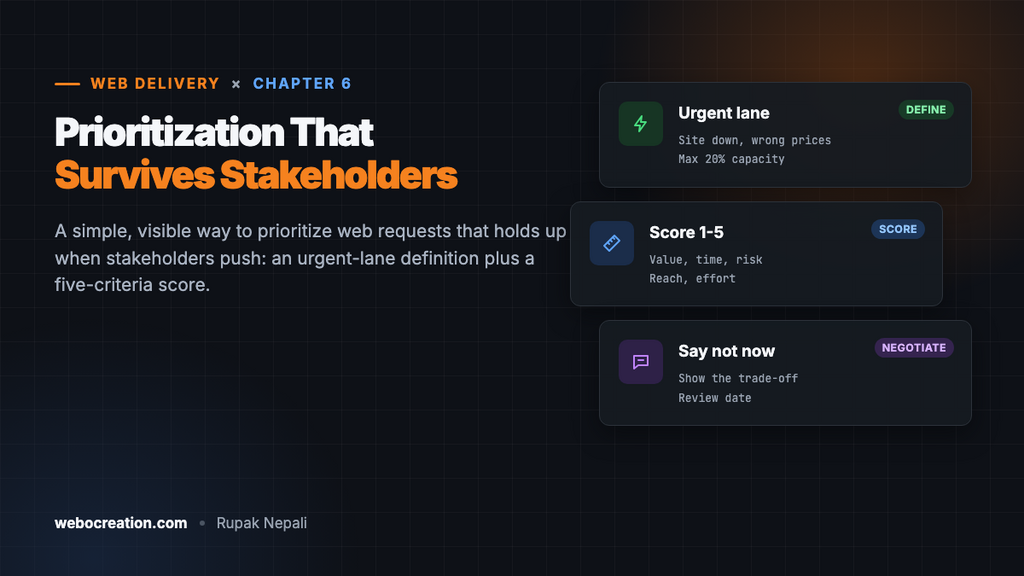
This is Chapter 6 of The Web Delivery Manager’s Playbook, a free series on running enterprise websites from request to release. A simple, visible way to prioritize web requests that holds up when stakeholders push: an urgent-lane definition plus a five-criteria score.
With the new intake process running, Maya had a new problem: everything was visible, and everything was urgent. In one week, the queue held a homepage redesign for the CMO, a new product microsite for a business unit, a security patch for the legacy WordPress sites, an accessibility fix flagged by legal, eleven campaign pages and a request from the CEO’s office to change a photo on the leadership page.
Every requester believed their item should be first. Each had a good reason. The web team could do perhaps a third of it in the next month.
Before the new intake process, this conflict had been hidden. Requests were done in the order people shouted loudest. Now it was out in the open, and Maya needed a way to decide that people would accept, even when they did not like the answer.
How to prioritize web requests
Why prioritization fails
Most teams already have a way to prioritize. It usually fails for one of four reasons:
- Everything is high priority. If requesters choose their own priority, they all pick “high.” The field becomes meaningless.
- The loudest voice wins. Without a shared method, rank follows seniority and persistence, not value.
- Hidden criteria. The team has a sense of what matters, but nobody has written it down, so every decision looks arbitrary to outsiders.
- No connection to capacity. A ranked list is useless if nobody knows how far down it the team can get.
A good prioritization method fixes all four: it uses criteria everyone can see, it scores requests consistently, it separates truly urgent work from important work, and it connects the ranked list to what the team can actually deliver.
Separate urgent from important
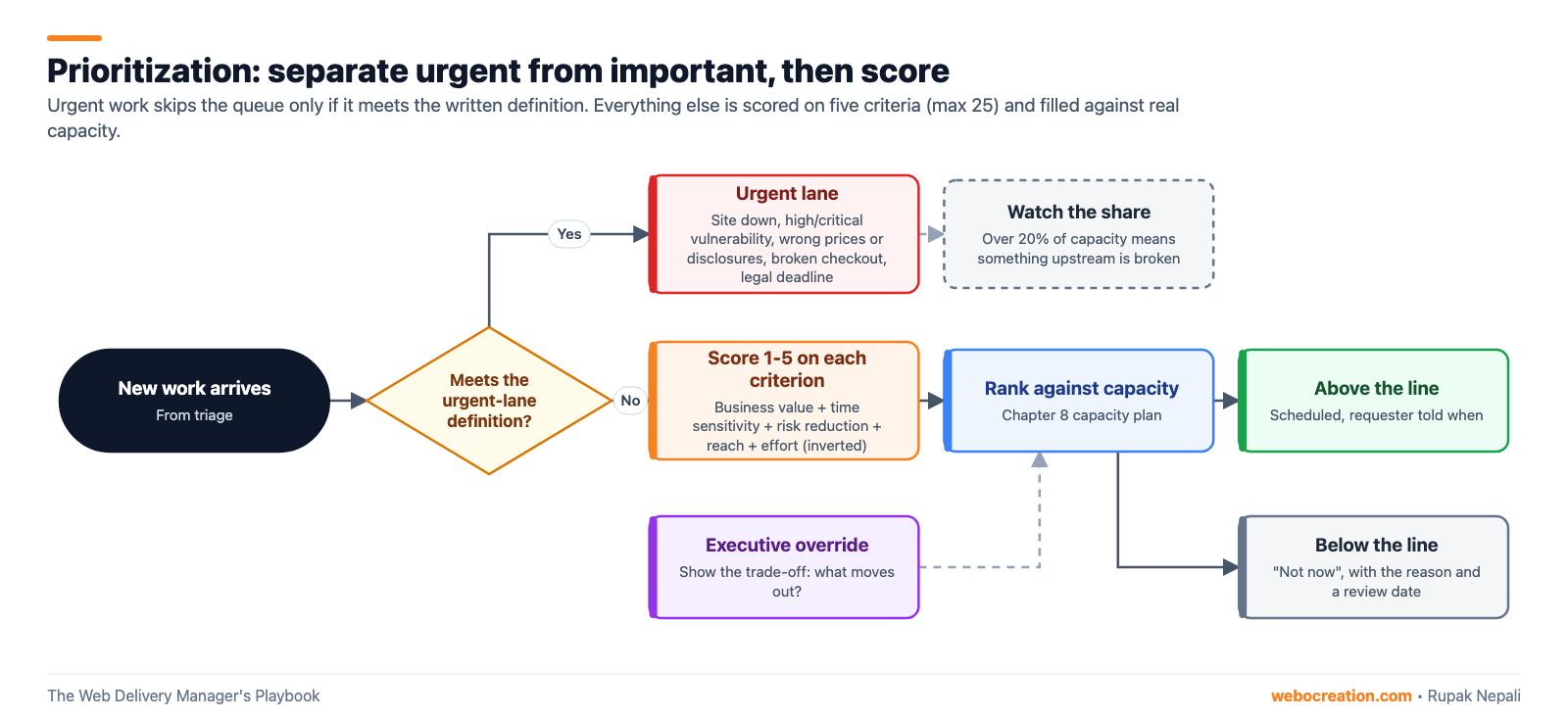
Before scoring anything, sort work into two lanes.
The urgent lane is for work that cannot wait for normal planning: incidents, security vulnerabilities, legal or regulatory errors on live pages, and anything blocking revenue right now. Urgent work skips the queue, but it must meet a strict definition. Write the definition down and hold to it.
The planned lane is for everything else: new pages, campaigns, improvements, redesigns, new sites. This is where scoring applies.
At Webocreation Group, the urgent lane is defined as any of the following:
- A live site or key page is down or seriously broken
- A security vulnerability rated high or critical
- Incorrect prices, rates, legal disclosures or regulated claims on a live page
- A broken form or checkout that is losing leads or sales
- A legal or compliance instruction with a deadline
The CEO’s office photo change is not on the list, however senior the requester. That does not mean it waits months. Small, low-effort requests move quickly through the planned lane. But it does not jump ahead of a security patch.
Keep an eye on how much work enters the urgent lane. If more than 20 percent of the team’s capacity regularly goes to urgent work, something upstream is broken: poor testing, an unstable platform, or a definition that has quietly widened.
A simple scoring model
For the planned lane, use a scoring model with a few clear criteria. The model does not make the decision for you. It makes the reasons visible, so that discussions are about the criteria rather than the people.
Maya uses five criteria, each scored from 1 to 5:
| Criterion | Question it answers | 1 means | 5 means |
|---|---|---|---|
| Business value | How much does this help revenue, leads, customers or brand? | Little measurable benefit | Directly drives a top company goal |
| Time sensitivity | Does the value drop if we do it later? | No deadline; just as useful in six months | Hard external deadline (launch, regulation, event) |
| Risk reduction | Does it reduce security, legal, accessibility or operational risk? | No risk reduction | Removes a serious, known risk |
| Reach | How many users or how much traffic does it affect? | One low-traffic page | Sitewide or a top-traffic page |
| Effort (inverted) | How much work is it? | Very large (multiple sprints) | Very small (hours) |
The score is the sum: business value plus time sensitivity plus risk reduction plus reach plus effort. The maximum is 25. Effort is inverted so that small tasks score higher, which naturally lets quick wins move up.
You can weight criteria if your company has clear priorities. A regulated financial services company might double the risk score. A company in a growth push might double business value. Keep weights simple and publish them.
Who scores
The delivery manager and the technical lead score effort and risk, because they have the expertise. Business value, time sensitivity and reach should be scored with input from the requester or business owner, then checked by the delivery manager for consistency. Over time, you will build a shared sense of what a 3 or a 5 looks like.
Do not spend long on scoring. If a request takes more than two minutes to score in triage, you probably do not understand it well enough yet. Send it back for clarification.
Scoring in practice
Here is how the requests in Maya’s busy week scored.
| Request | Value | Time | Risk | Reach | Effort | Total |
|---|---|---|---|---|---|---|
| Accessibility fix flagged by legal | 3 | 4 | 5 | 4 | 4 | 20 |
| Security patch for legacy WordPress sites | 2 | 4 | 5 | 2 | 4 | 17 |
| Campaign pages for spring launch (11 pages) | 4 | 5 | 1 | 3 | 3 | 16 |
| Homepage redesign | 4 | 2 | 1 | 5 | 1 | 13 |
| Leadership page photo change | 1 | 2 | 1 | 2 | 5 | 11 |
| New product microsite | 4 | 3 | 1 | 2 | 1 | 11 |
The security patch could arguably go in the urgent lane. The team decided to schedule it for the coming week instead, since the vulnerability was rated medium and the sites had little traffic. The scoring showed something people had not expected: the homepage redesign, the CMO’s top request, ranked below the spring campaign. Not because it mattered less, but because the campaign had a hard date and the redesign did not.
That became a conversation, not a fight. Maya showed the CMO the scores and asked whether the redesign had a date she did not know about. It did not. The CMO agreed the campaign should go first and asked for the redesign to be scheduled as a project in the next quarter’s roadmap (Chapter 8).
Saying no, or not now
A ranked list means some requests will not happen soon. How you communicate that determines whether people trust the process or work around it.
A few principles help:
- Say “not now” more often than “no.” Most requests are reasonable. They are just not the most important thing this month. Give a realistic timeframe.
- Show the list. When someone asks why their request is waiting, show them what is ahead of it and why. People accept a fair queue much more readily than a vague “we’re busy.”
- Offer options. Can a smaller version be done now? Can the requester’s team handle part of it with existing tools? Could budget for agency help move it forward?
- Let the business decide trade-offs. If two business owners both want to be first, do not choose between them yourself. Put both items, with their scores, in front of whoever owns the trade-off, often at the monthly stakeholder review.
- Close the loop. If a request will realistically never be done, say so and close it with an explanation. A request that sits open for a year is worse than an honest no.
Here is a message Maya uses, adapted for each case:
“Thanks for the request. We’ve reviewed it and it’s on our list for next month. Right now the team is working on the spring launch campaign and an accessibility fix required by legal, which both have fixed deadlines. If your date is fixed, let me know why and I’ll review the ranking. You can always see the status here: [link].”
Handling the executive override
Sometimes a senior executive will want something done now, regardless of the queue. This is normal. Executives often know things the team does not: a board meeting, a deal, a press story. The goal is not to block the override, but to make its cost visible.
When an override happens:
- Accept it gracefully. Do not argue in the moment. “Understood, we’ll make it happen.”
- Show what moves. Within a day, send a short note to the executive: “To deliver this by Thursday, we will move the product page update and the form fix to next week. Let me know if either of those is a problem.”
- Tell the affected requesters. Explain that a priority request from leadership moved their item, and give the new date.
- Track overrides. Keep a simple count. If overrides become frequent, raise it at the monthly stakeholder review as a pattern, not a complaint.
Most of the time, the executive will accept the trade-off. Occasionally, seeing what moves will lead them to reconsider. Either way, the decision is made with full information.
Connecting priority to capacity
A ranked list only becomes a plan when you know how far down it the team can get. Chapter 8 covers capacity planning in detail, but the basic idea is simple: estimate the team’s available time for the next period, subtract time reserved for urgent and maintenance work, and draw a line across the ranked list where the remaining capacity runs out.
Everything above the line is planned. Everything below it is not, and requesters should know that. Publishing the line is one of the most powerful things you can do. It turns “when will my request be done?” from a question you answer one at a time into something people can see for themselves.
Prioritization in ServiceNow
ServiceNow has built-in priority fields, but for requests they often default to a single priority value set by the requester or calculated from impact and urgency. That model works well for incidents (Chapter 14), but it is too blunt for ranking planned web work.
Practical options include:
- Add custom fields to your web catalog items or request tasks for each scoring criterion, plus a calculated total. Work with your ServiceNow administrator; this is a modest configuration change.
- Use a rank field on the team’s delivery board (in Jira or ServiceNow’s agile tools) and keep ServiceNow priority for urgency only.
- Score in a spreadsheet during triage and record the total in a work note on the request. This is the simplest option and fine for small teams.
Whichever option you choose, make the ranked list easy to find and share. A ServiceNow report or dashboard filtered to open web requests, sorted by score, can be linked from your one-page operating model.
Template: Prioritization scorecard
Use this scorecard in your weekly triage meeting. Add the weights that fit your company’s priorities, and publish the scoring guide so requesters understand how decisions are made.
| Field | Guidance |
|---|---|
| Request number and title | From ServiceNow |
| Urgent lane? (yes or no) | Yes only if it meets your written urgent-lane definition |
| Business value (1 to 5) | 5 = directly drives a top company goal; 1 = little measurable benefit |
| Time sensitivity (1 to 5) | 5 = hard external deadline; 1 = no deadline |
| Risk reduction (1 to 5) | 5 = removes a serious known risk; 1 = no risk reduction |
| Reach (1 to 5) | 5 = sitewide or top-traffic page; 1 = one low-traffic page |
| Effort, inverted (1 to 5) | 5 = hours; 4 = days; 3 = one to two weeks; 2 = several weeks; 1 = multiple sprints |
| Weights | Optional; for example, risk x 2 for regulated industries |
| Total score | Sum of weighted scores |
| Above or below capacity line | Based on current capacity (Chapter 8) |
| Decision and message to requester | What will happen, and when; date the message was sent |
Checklist
- Write a strict definition of the urgent lane and publish it.
- Agree five or fewer scoring criteria and a simple 1 to 5 scale with your key stakeholders.
- Score your current open requests and share the ranked list.
- Draw a capacity line and tell requesters below it what to expect.
- Use the “not now” message template for requests that will wait.
- Set up a simple log of executive overrides and what they displaced.
- Decide how scores will be recorded in ServiceNow and build a ranked-list report.
Common traps
- Letting requesters set their own priority. Everyone chooses high, and the field stops meaning anything.
- A loose urgent lane. If the urgent definition widens, planned work stops moving.
- Treating scores as the final answer. Scores structure the conversation; people still make the decision.
- Too many criteria. More than five makes scoring slow and the results harder to explain.
- Hiding the capacity line. Requesters below the line deserve to know their request is not planned yet.
- Fighting every override. Make the cost visible, then let leadership decide.
Related reading
- AI adoption: from pilots to scaled business value
- Chapter 5: Building a Request Intake Process
- Chapter 7: Estimating Web Work

Rupak Nepali is a web developer, manage Webocreation website and the author of six books:
Getting Started with OpenCart Module Development (Packt, 2013),
OpenCart Theme and Module Development (Packt, 2015),
OpenCart 4: Dev Guide for Themes & Extensions (2024),
OpenCart 4: User Manual (2025),
Cloudflare for the Enterprise Website (2026) and
The Technical Web Guide for Marketers (2026).
Rupak has built OpenCart stores and extensions since 2010, has published more than 600 tutorials on Webocreation, and shares free OpenCart extensions on GitHub.
Find Rupak on
GitHub | Amazon | LinkedIn | X | YouTube.