Chapter 4: Your First 90 Days
A three-phase plan for your first 90 days in a web delivery role: listen and map, stabilize and win, then propose and commit.
 Rupak NepaliPublished Nov 26, 2026
This is Chapter 4 of The Web Delivery Manager’s Playbook, a free series on running enterprise websites from request to release. A three-phase plan for your first 90 days in a web delivery role: listen and map, stabilize and win, then propose and commit.
When Maya accepted the job, her new manager gave her one instruction: “Make the website stop being a problem.” It was a fair request and an impossible brief. It did not say what “a problem” meant, which problems mattered most, or how anyone would know when they were solved.
The first 90 days in a delivery role decide how people will see you for years. Move too slowly and you are seen as another layer of process. Move too fast and you make changes based on wrong assumptions, then spend months undoing them. This chapter gives you a plan that balances the two: listen first, fix a few visible things, then propose a model that people have already helped shape.
Your first 90 days at a glance
The shape of the 90 days
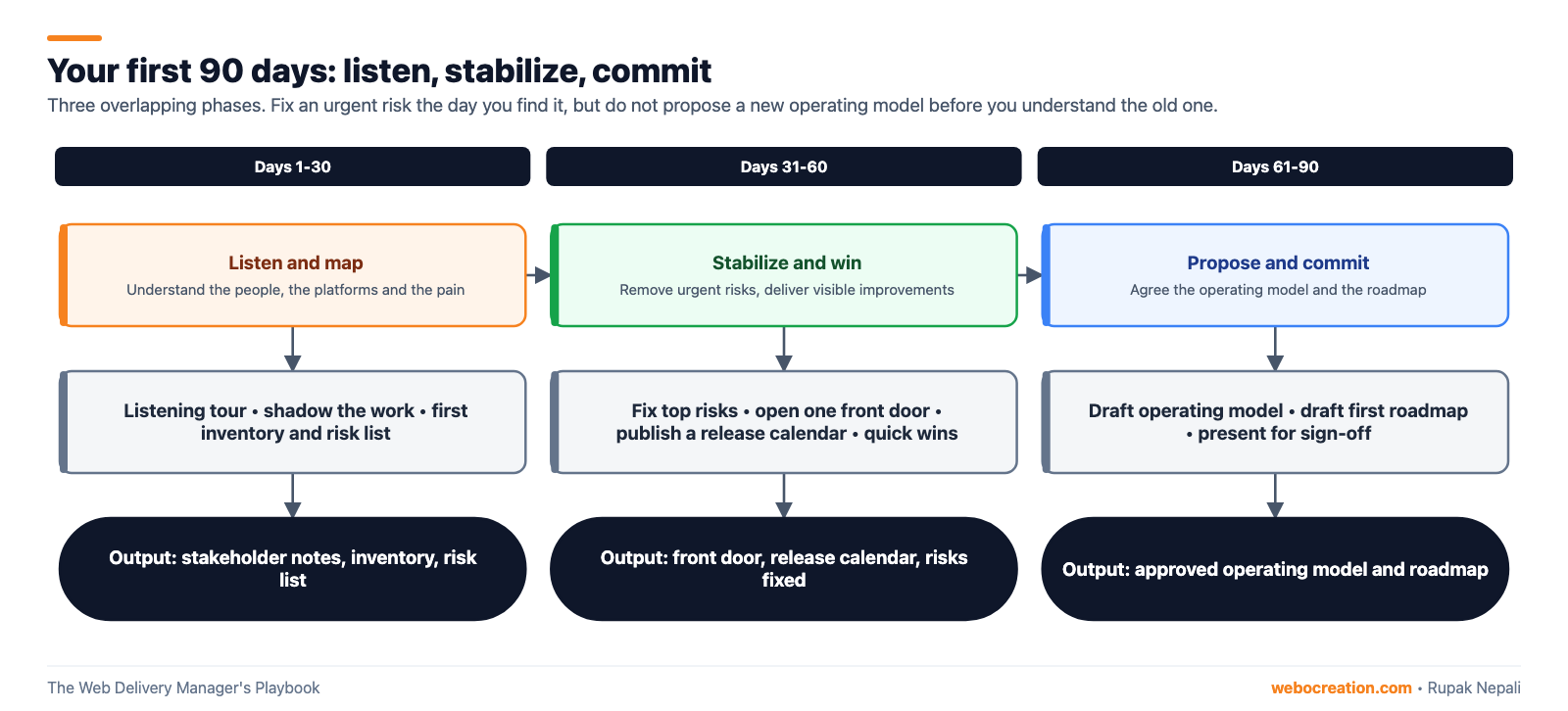
The plan has three phases of about 30 days each.
| Phase | Days | Goal | Main output |
|---|---|---|---|
| Listen and map | 1 to 30 | Understand the people, the platforms and the pain | Stakeholder notes, first inventory, risk list |
| Stabilize and win | 31 to 60 | Remove the most urgent risks and deliver visible improvements | A single front door, a release calendar, top risks fixed |
| Propose and commit | 61 to 90 | Agree the operating model and the roadmap | Approved one-page operating model and next-quarter roadmap |
The phases overlap in practice. You will fix an urgent risk on day 10 if you find it on day 10. But keeping the overall shape in mind stops you from proposing a new model before you understand the old one.
Days 1 to 30: listen and map
Your goal in the first month is to understand three things: who depends on the website, what they think is wrong, and what is actually wrong. Those last two are often different.
The listening tour
Book 30 to 45 minutes with each key person. Aim for 15 to 25 conversations across these groups:
- Your manager and their manager
- Heads of marketing, brand, communications and product marketing
- Business unit or regional leaders who own sites
- The web team: every developer, editor, designer and QA analyst
- IT infrastructure, security, the ServiceNow team and the CMDB owner
- Legal, privacy and compliance
- Your main agency and key vendors
Use the same core questions in every conversation, so you can compare answers:
- What does the website do for your team? What would happen if it stopped working for a day?
- When you need something changed on the website, what do you do today? How long does it usually take?
- What is the most frustrating thing about how web work gets done?
- Tell me about a time a web project went well. What made it work?
- What worries you about the website that nobody seems to be handling?
- What is coming in the next six months that will need web work?
- Who else should I talk to?
Take notes, and look for patterns. If eight people mention that nobody knows the status of their requests, that is a pattern. If one executive mentions a pet project, write it down, but do not build your plan around it.
Question five is the most valuable. People often know about risks they feel unable to raise. The developer who knows the legacy server has not been patched in two years, or the editor who knows a regulated disclosure is out of date, will often tell you if you ask directly.
Shadow the work
Spend at least two days watching work happen. Sit with a content editor while they publish changes. Join the developers’ standup. Watch a release from start to finish. Read the last 50 requests in ServiceNow, or the last 50 emails to the team mailbox if that is where requests go.
You will learn things nobody mentions in interviews: the approval step everyone skips, the manual step in the release that only one person knows, the request type that always comes back for clarification.
Build the first inventory and risk list
Run the inventory process from Chapter 3 in parallel. By day 30 you should have a first version, even if some rows are incomplete.
From the interviews, the shadowing and the inventory, build a risk list. For each risk, record what could happen, how likely it is, how bad it would be, and who owns fixing it. Keep it simple at this stage; Chapter 23 introduces a full risk register.
| Risk | Likelihood | Impact | Owner | Action |
|---|---|---|---|---|
| Public staging sites expose unreleased pricing | High | High | Web delivery | Lock down all staging sites with SSO or a password |
| Former contractors still have CMS admin access | High | High | Web platform | Remove access; start quarterly reviews |
| Six certificates renew manually | Medium | High | WEB-DNS | Switch to auto-renew or add to renewal calendar |
| Legacy WordPress sites unpatched for 18 months | Medium | High | Web development | Patch or retire; decide by day 60 |
| No front door; requests arrive by email and chat | High | Medium | Web delivery | Launch a ServiceNow catalog item for web requests |
Days 31 to 60: stabilize and win
The second month is about earning trust. People should start to notice that things are improving, and you should remove the risks that could cause a serious incident before your new model is even in place.
Fix the top risks
Take the three to five risks with the highest likelihood and impact and fix them. For most delivery managers, the list includes locking down non-production sites, removing stale access, and making sure nothing critical is about to expire. These fixes are usually quick, cheap and easy to explain. They also show IT and security that you take risk seriously, which earns you allies for later.
Open one front door
The single most visible improvement you can make is a single place to request web work. You do not need the full intake process from Chapter 5 yet. A simple ServiceNow catalog item, or even one shared form, with a few required fields is enough to start:
- What do you need?
- Which site and page?
- Why is it needed, and by when?
- Who approves the content?
Announce it clearly, explain the benefit to requesters (“you will always be able to see the status”), and then follow through. When someone emails a request, reply kindly, submit it through the front door on their behalf the first time, and send them the link. After a few weeks, most people switch on their own.
Publish a release calendar
The second most visible improvement is predictability. Publish a simple release calendar showing when changes go live, for example a regular weekly release window plus an agreed process for urgent fixes. Even if the delivery process behind it is not perfect yet, requesters can now plan.
Look for quick wins
Quick wins are small changes that remove a daily frustration. They should take days, not weeks, and the benefit should be obvious. Good candidates include:
- A status page or dashboard where requesters can see their requests
- A short guide for editors on the most common content tasks
- Cancelling an unused tool and announcing the savings
- Fixing a broken form or an annoying redirect that people have complained about for months
- Clearing the backlog of small content changes in a focused one-week push
Choose two or three, deliver them, and make sure people know about them. Delivering quick wins without telling anyone is a missed opportunity. A short monthly note to stakeholders listing what changed is enough.
Days 61 to 90: propose and commit
By the third month, you understand the landscape, you have fixed the worst risks, and people have seen improvements. Now you can propose the operating model with credibility.
Draft the operating model
Use Chapter 2 to draft the one-page operating model: the team model, ownership, RACI, front door and cadence. Build it from what you heard in the listening tour. When people see their own concerns reflected in the proposal, they support it.
Before you present it formally, share the draft one-on-one with the people whose support matters most. Ask, “Is there anything here that would not work for your team?” Fix what you can. A proposal that has been through ten small conversations rarely gets rejected in the big meeting.
Draft the first roadmap
Alongside the operating model, draft a roadmap for the next quarter. It should include business requests you already know about, the remaining items from your risk list, and the process improvements you plan to make. Chapter 8 covers roadmaps in detail; for now, a simple list grouped by month is enough.
Present and get sign-off
Present the operating model and roadmap to your manager and the key business owners. Keep the presentation short and structured:
- What I heard. Three to five themes from the listening tour, in people’s own words where possible.
- What I found. The inventory summary and the top risks, with what has already been fixed.
- What has already changed. The front door, the release calendar, the quick wins, with any early numbers.
- What I propose. The one-page operating model.
- What happens next. The next-quarter roadmap.
- What I need from you. Specific decisions or support, such as agreement on the RACI, legal’s review turnaround, or budget for a tool.
End with a clear request for a decision. “Do we agree to adopt this model from the start of next month?” is better than “Any feedback?”
Template: 30-60-90 Day plan
Copy this plan and adjust it to your situation. Share it with your manager in your first week, so they know what to expect and when.
| Phase | Goals | Key activities | Outputs | How I will know it worked |
|---|---|---|---|---|
| Days 1 to 30: Listen and map | Understand people, platforms and pain | 15 to 25 stakeholder interviews; shadow editors, developers and a release; read the last 50 requests; start the inventory | Interview notes and themes; first inventory; first risk list | I can name the top five pains and top five risks, and stakeholders feel heard |
| Days 31 to 60: Stabilize and win | Remove urgent risks; deliver visible improvements | Fix top three to five risks; launch the front door; publish a release calendar; deliver two or three quick wins | Front door live; release calendar published; risks closed; monthly update sent | Most new requests come through the front door; no surprise expirations |
| Days 61 to 90: Propose and commit | Agree the operating model and the roadmap | Draft operating model and RACI; one-on-one previews; draft next-quarter roadmap; present for sign-off | Approved one-page operating model; next-quarter roadmap | Leadership signs off; teams start using the RACI and cadence |
Webocreation Group: Day 90
On day 88, Maya presented to her manager, the CMO, the head of IT and the business unit leaders. The meeting took 40 minutes.
She opened with a slide of quotes from the listening tour. The one that got the biggest reaction was from a regional marketing manager: “I don’t mind waiting. I mind not knowing.” She then showed the inventory (37 sites, not 30), the risks already fixed (eleven staging sites locked down, fourteen stale accounts removed, two manual certificates moved to auto-renew), and the first numbers from the new front door: 86 percent of web requests in the past four weeks had come through it.
The operating model was approved with one change: the CMO asked for the monthly stakeholder review to include a short look at site performance, not just delivery. Maya agreed and added it to the agenda.
Afterwards, her manager said the meeting was the first time he had seen the whole web program on one page. That, more than any single fix, was what “make the website stop being a problem” had meant.
Checklist
- Share a 30-60-90 day plan with your manager in your first week.
- Book 15 to 25 listening-tour conversations and use the same core questions in each.
- Shadow at least one editor, one standup and one full release.
- Build a first inventory and a risk list by day 30.
- Fix the top three to five risks by day 60.
- Launch a single front door and a release calendar.
- Deliver and announce two or three quick wins.
- Preview your operating model one-on-one before presenting it.
- Present for sign-off by day 90 and ask for a clear decision.
Common traps
- Changing things before you understand them. The odd approval step may exist for a legal reason. Ask before you remove anything.
- Listening only to senior people. Editors and developers know where the real problems are. Interview them too.
- Invisible wins. If nobody hears about an improvement, it does not build trust. Tell people what changed.
- A big-bang rollout. Launching every new process at once overwhelms people. Introduce changes one at a time.
- Asking for feedback instead of a decision. End your day-90 presentation with a clear question that needs a yes or no.
The four chapters in Part 1 gave you the foundation: a clear role, an operating model, a full inventory and a plan for your first 90 days. Part 2 builds on that foundation, turning the front door you opened into a complete intake and planning process.
Related reading
- Free automated testing and monitoring of websites
- DNS records explained for marketers: what breaks when you change them
- Chapter 3: Know Your Stack: The Platform Inventory
- Chapter 5: Building a Request Intake Process

Rupak Nepali is a web developer, manage Webocreation website and the author of six books:
Getting Started with OpenCart Module Development (Packt, 2013),
OpenCart Theme and Module Development (Packt, 2015),
OpenCart 4: Dev Guide for Themes & Extensions (2024),
OpenCart 4: User Manual (2025),
Cloudflare for the Enterprise Website (2026) and
The Technical Web Guide for Marketers (2026).
Rupak has built OpenCart stores and extensions since 2010, has published more than 600 tutorials on Webocreation, and shares free OpenCart extensions on GitHub.
Find Rupak on
GitHub | Amazon | LinkedIn | X | YouTube.