Free Gift With Purchase for OpenCart 4: Add a Free Product Above a Cart Total (Free Extension)
Add a free gift to OpenCart 4 carts above a subtotal you choose. The gift is added at $0.00, removed when the cart drops below the minimum, and a message tells shoppers how much more to spend.
 Rupak NepaliPublished Nov 26, 2026
“Free tote bag with orders over $100” is one of the oldest ways to raise order value, and it works because shoppers can see exactly what they get. OpenCart 4 can’t do it on its own: coupons give discounts, not products, and adding a free product to the cart is left to the customer and a note at checkout.
This free extension adds a free gift with purchase to OpenCart 4. When the cart subtotal reaches the amount you set, the gift product is added automatically at a price of 0. If the cart drops below the amount, the gift goes again. The cart page shows “Spend $12 more and get a free tote bag” along the way. Tested on OpenCart 4.1.0.4.
Download: freegift.ocmod.zip (OpenCart 4.1.x, free, no core file changes)
What the free gift with purchase extension does
- Adds one gift product, quantity 1, price 0, when the cart subtotal reaches your minimum.
- Removes it when the cart drops below the minimum, and resets it to quantity 1 if the shopper changes it.
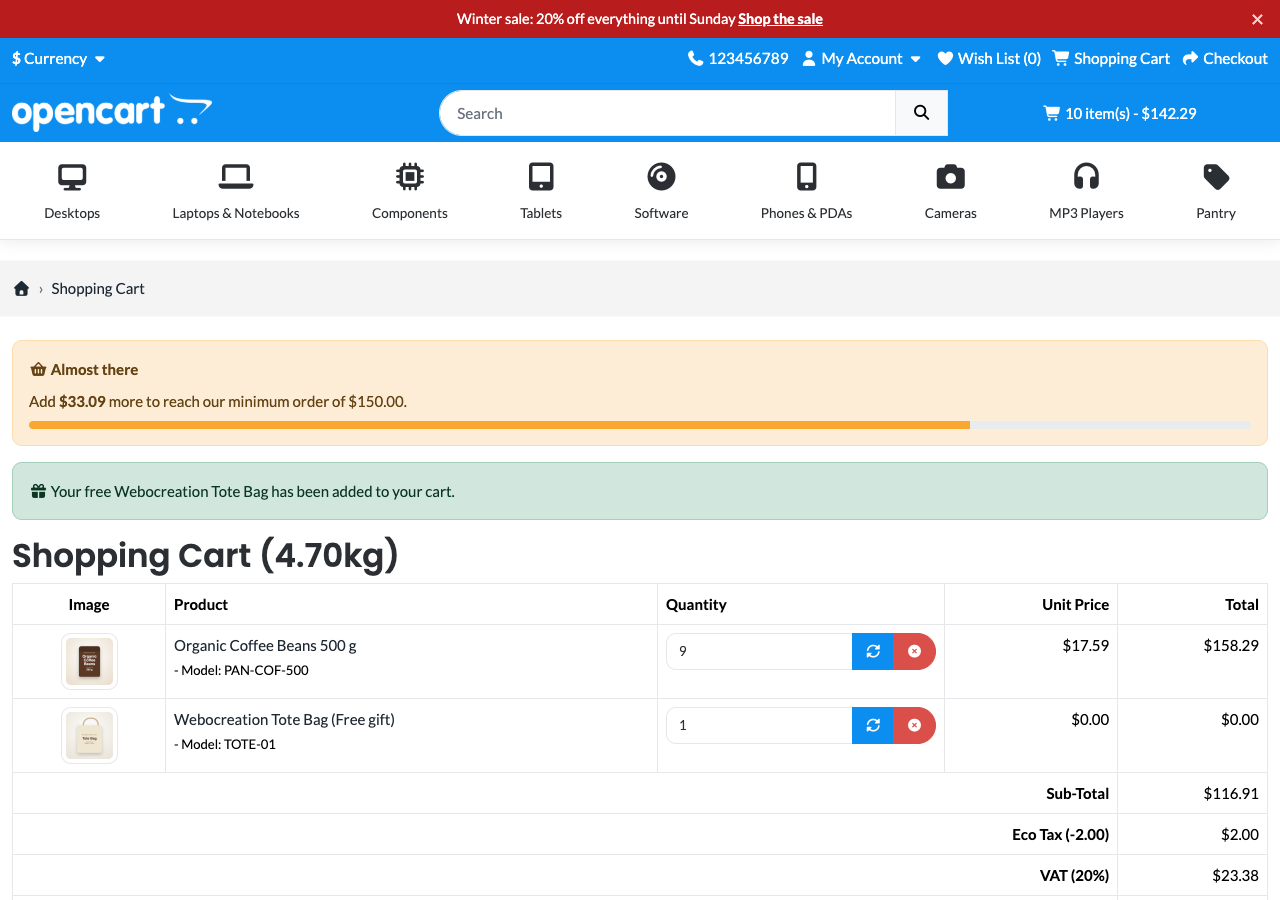
- Shows a progress message on the cart page (“Spend $87.01 more and get a free Webocreation Tote Bag.”) and a message when the gift is added.
- Labels the gift line “(Free gift)” in the cart. Because OpenCart builds order lines from the cart, the label and the 0 price carry into the order.
- Respects a shopper who removes the gift: it isn’t added back until the cart drops below the minimum and qualifies again.
- Optional customer groups and start and end dates, so a “Black Friday weekend” gift switches itself on and off.
- Skips the gift when the gift product is out of stock (unless your store allows checkout of out-of-stock products).
Install the extension
- Create the gift product in Catalog > Products (a normal product with stock).
- Download
freegift.ocmod.zip, then go to Extensions > Installer, click Upload and choose the zip. - Go to Extensions > Extensions, choose Modules, find Free Gift with Purchase and click Install.
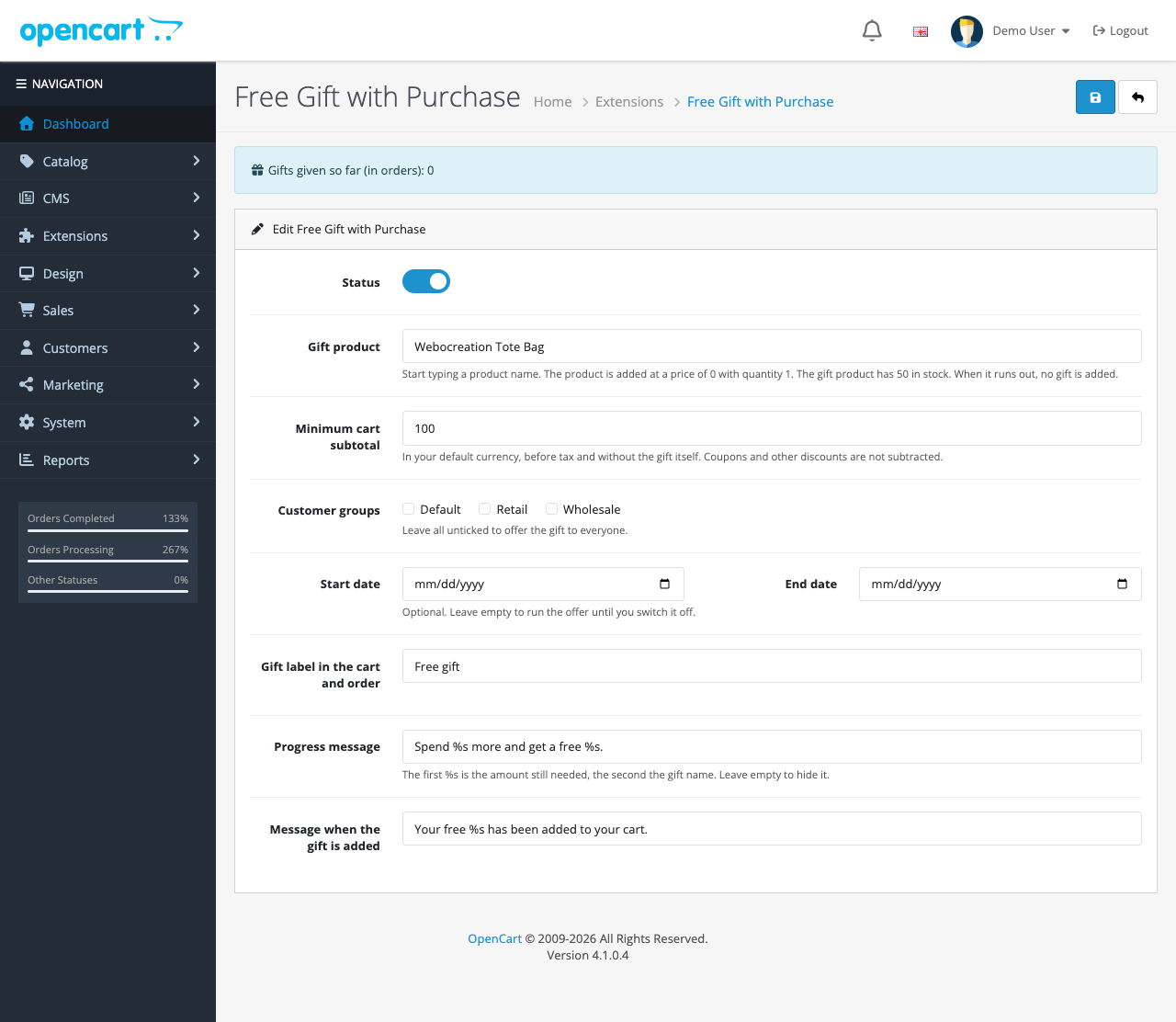
- Click Edit, choose the gift product, set the minimum subtotal, switch Status on and click Save.
Settings
- Gift product: type to search your catalog.
- Minimum cart subtotal: in your default currency, before tax, without the gift. Coupons aren’t subtracted, the same as OpenCart’s own Sub-Total line.
- Customer groups: leave all unticked to offer the gift to everyone, or limit it to, say, Wholesale.
- Start and end dates: optional.
- Texts: the gift label and the two cart messages.
How the gift line works
OpenCart 4’s cart table has an override column: any value stored there replaces the product’s data for that one cart line. The extension uses it to set the price, total, reward points and tax class of the gift line to zero and to add the label to the name. A startup action, which runs on every storefront request after the cart is loaded, keeps the gift in line with the cart:
if (!$keep && $in_stock) {
    $override = [
        'price'    => 0,
        'total'    => 0,
        'reward'   => 0,
        'points'   => 0,
        // No tax class: a free item must not pick up fixed per-item taxes (like an eco fee).
        'tax_class_id' => 0,
        'freegift' => 1,
        'name'     => html_entity_decode($offer['name'], ENT_QUOTES, 'UTF-8') . ' (' . $this->setting('label') . ')'
    ];

    $this->db->query("INSERT INTO `" . DB_PREFIX . "cart` SET `store_id` = '" . (int)$this->config->get('config_store_id') . "', `customer_id` = '" . (int)$this->customer->getId() . "', `session_id` = '" . $this->db->escape($this->session->getId()) . "', `product_id` = '" . (int)$offer['product_id'] . "', `subscription_plan_id` = '0', `option` = '" . $this->db->escape(self::MARK) . "', `quantity` = '1', `override` = '" . $this->db->escape(json_encode($override)) . "', `date_added` = NOW()");

    // update() also clears the Cart library's cached rows, so the gift shows on this same request.
    $this->cart->update($this->db->getLastId(), 1);

    $this->session->data['freegift_added'] = 1;
    $this->session->data['freegift_notice'] = 1;
}
Two details took testing to get right:
- The marker option. The core
cart->add()merges a new item into an existing line when the product, options and subscription plan match. If the gift line looked like a normal tote bag line, a shopper who also bought a tote bag would get it merged into the free line, and pay nothing for it. The gift line therefore carries an option value{"freegift":"1"}that OpenCart ignores when it shows options but that keeps the two lines apart. - Quantity. The cart page lets shoppers change any quantity, so every request resets the gift line to 1.
What we found when testing
We used a $15 “Webocreation Tote Bag” as the gift with a $100 minimum, and coffee at $12.99 a bag:
| Step | Result |
|---|---|
| 1 bag ($12.99) | “Spend $87.01 more and get a free Webocreation Tote Bag.” |
| 9 bags ($116.91) | Gift added, “Your free Webocreation Tote Bag has been added to your cart.” |
| Gift quantity changed to 3 | Back to 1 on the next page load |
| Coffee reduced to 2 bags | Gift removed, “Spend $74.02 more…” |
| 9 bags again plus a paid tote bag | Two lines: the free gift and the paid tote at $20.00 |
| Shopper removes the gift | Not added back |
One bug we fixed: the “free” gift first showed $2.00. The demo store’s “Taxable Goods” class includes a fixed $2.00 eco tax per item, which OpenCart added even at a price of 0. The gift line now has no tax class, so it shows $0.00. If your store uses fixed per-item fees, that’s the behavior you want.
We tested the cart, mini-cart and totals; we didn’t place a test order with the gift. Order lines come from the same cart data, so the order gets the gift at 0 with its label.
Limitations
- One gift offer at a time.
- The gift product’s options aren’t chosen; use a product without required options (or one variant product per size or color).
- Uninstalling removes gift lines still sitting in carts, so nobody checks out a free product afterwards.
Related posts
- Free shipping progress bar for OpenCart 4
- Product bundles for OpenCart 4
- Minimum order amount for OpenCart 4
- Gift wrap for OpenCart 4

Rupak Nepali is a web developer, manage Webocreation website and the author of six books:
Getting Started with OpenCart Module Development (Packt, 2013),
OpenCart Theme and Module Development (Packt, 2015),
OpenCart 4: Dev Guide for Themes & Extensions (2024),
OpenCart 4: User Manual (2025),
Cloudflare for the Enterprise Website (2026) and
The Technical Web Guide for Marketers (2026).
Rupak has built OpenCart stores and extensions since 2010, has published more than 600 tutorials on Webocreation, and shares free OpenCart extensions on GitHub.
Find Rupak on
GitHub | Amazon | LinkedIn | X | YouTube.