Chapter 17: Vendor and License Management
Vendor and license management for web teams: track every vendor, treat each renewal as a decision, use SSO and choose platforms with a scored process.
 Rupak NepaliPublished Nov 26, 2026
This is Chapter 17 of The Web Delivery Manager’s Playbook, a free series on running enterprise websites from request to release. Vendor and license management for web teams: track every vendor, treat each renewal as a decision, use SSO and choose platforms with a scored process.
In Maya’s first year, Webocreation Group’s web program paid 23 different vendors: hosting providers, a CDN, a DAM, a CMS platform, form tools, a site search service, an accessibility scanner, a translation service, analytics and tag management tools, a stock image library, font licenses, domain registrars, and several smaller SaaS tools. Some were paid by IT, some by marketing, and some on individual credit cards.
Three renewals caught her by surprise that year. One auto-renewed for three years at a 15 percent price increase because nobody cancelled it within the notice period. One expired, taking a regional site’s search feature down for two days. One renewed for 40 seats when only 12 people were still using it.
Vendor management is not glamorous. But for most web programs, licenses and services are a large share of the budget, and a source of real risk.
Vendor and license management: the renewal clock
Why vendors belong to the delivery manager
In many companies, vendor contracts are owned by procurement, paid by finance and used by whoever needs them. Nobody looks at the web program’s vendors as a whole. The delivery manager is often the only person who sees the full picture: which tools are used, by whom, for which sites, and how they fit together.
That makes you the natural owner of the web vendor portfolio, even if you do not sign the contracts. Your job is to know what you have, make sure it is used and secure, and make good decisions at renewal time.
The vendor and renewal tracker
Start with the inventory from Chapter 3. Extend it into a vendor and renewal tracker that records, for each vendor:
- What the product does and which sites use it
- The business and technical owner
- Contract start, end and renewal dates
- Notice period for cancellation or changes
- Auto-renewal terms
- Annual cost, payment method and budget owner
- Number of licensed seats and number actually used
- Whether it is connected to SSO
- Security review status and date
- Data it stores or processes, especially personal data
- Alternatives, if you were to replace it
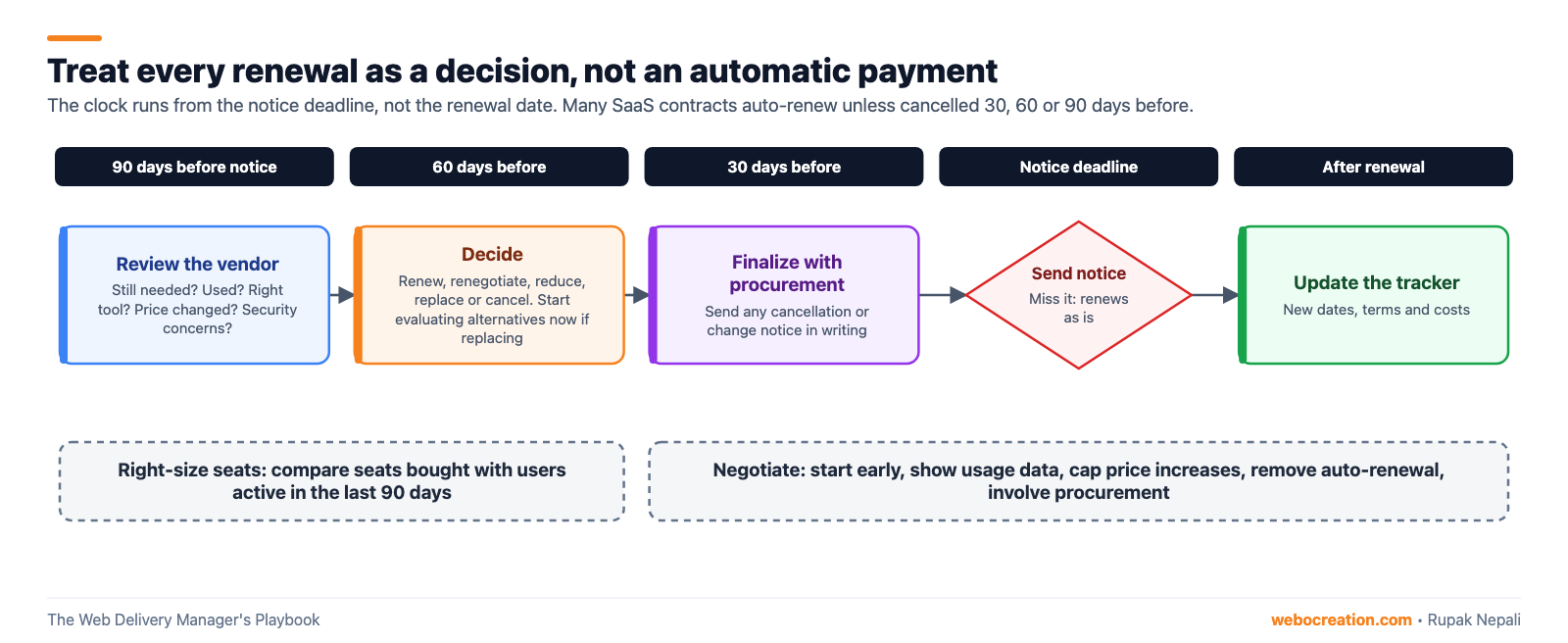
The notice period is the field most often missed. Many SaaS contracts renew automatically unless cancelled 30, 60 or 90 days before the renewal date. If you only look at a contract on its renewal date, you have already missed your chance to negotiate or cancel.
Tracking vendors in ServiceNow
If your company uses ServiceNow modules for vendor management, contracts or software asset management (SAM), work with their owners to record web vendors there. Benefits include:
- Contract records with renewal dates and automatic reminders.
- Software asset management that compares licenses purchased with actual usage, sometimes automatically through SSO or discovery data.
- Vendor risk management that tracks security reviews and assessments.
- Links to the CMDB, so you can see which sites depend on each vendor.
If these modules are not available, a well-maintained spreadsheet with calendar reminders, owned by the web team and shared with procurement, is perfectly adequate. The tool matters less than the habit of keeping it current.
Managing renewals
Treat every renewal as a decision, not an automatic payment. Use a simple process.
90 days before the notice deadline: the tracker reminds the owner. Review the vendor: Is it still needed? Is it used? Is it the right tool? Has the price changed? Are there security or performance concerns?
60 days before: decide whether to renew as is, renegotiate, reduce, replace or cancel. If replacing, start evaluating alternatives now. Switching tools almost always takes longer than expected.
30 days before: finalize the decision with procurement and send any cancellation or change notice in writing.
After renewal: update the tracker with the new dates, terms and costs.
Right-sizing seats
Seat counts creep up. People join a team and get a license; they leave and the license stays. Before each renewal, compare seats purchased with active users in the last 90 days. Most vendors let you reduce seats at renewal, even if they do not allow it during the term. At Webocreation Group, right-sizing seats across the DAM, analytics and design tools saved more than $14,000 in the first year.
Negotiating
You do not need to be a professional negotiator to get better terms. A few approaches work consistently:
- Start early. Vendors negotiate more when there is time for you to walk away.
- Know your usage. Show actual usage data when asking for fewer seats or a lower tier.
- Ask for multi-year discounts only if you are sure. Locking in for three years saves money but reduces flexibility.
- Cap price increases. Ask for a maximum annual increase written into the contract.
- Remove auto-renewal or shorten notice periods where possible.
- Involve procurement. They negotiate for a living and often know what discounts other customers receive.
Single sign-on and access
Every web tool that supports single sign-on should be connected to your company’s identity provider. SSO gives you three important benefits: people use their normal company login, access is removed automatically when someone leaves, and you can see who uses each tool.
Many SaaS vendors only offer SSO on higher-priced plans. When this is the case, factor the cost into your decision. The security benefit is often worth it for tools that hold sensitive content or have publishing rights on your sites, such as the CMS, DAM, CDN, DNS and tag manager.
For tools without SSO, add them to your quarterly access review (Chapter 3), and make sure there is an offboarding step to remove access when people leave. ServiceNow offboarding workflows can include tasks to remove access from web tools; ask your ServiceNow team to add them.
Vendor security and privacy
Every vendor that touches your sites is part of your security and privacy posture. A compromised third-party script can steal form data from your visitors. A vendor with weak security can expose your content or credentials.
Work with your security and privacy teams to make sure:
- New vendors pass a security review before contracts are signed.
- Vendors that process personal data have appropriate data protection agreements.
- Third-party scripts on your sites are approved and inventoried (Chapter 20).
- Existing vendors are re-reviewed periodically, especially critical ones.
In regulated industries such as financial services, vendor reviews may be mandatory and detailed. Allow time for them in any plan to adopt a new tool.
Choosing new platforms: Running an RFP
From time to time, you will need to choose a new major platform: a CMS, a DAM, a CDN, a search tool. For significant purchases, a structured selection process protects you from choosing based on the best sales demonstration.
A simple selection process
- Define the problem. What do you need the platform to do, and why is the current situation not good enough?
- Gather requirements. Talk to editors, developers, marketers, security, legal and IT. Separate must-haves from nice-to-haves.
- Create a long list of candidate vendors from analyst reports, peer recommendations and research.
- Send a request for information (RFI) or do desk research to narrow to a shortlist of three or four.
- Issue a request for proposal (RFP) with your requirements, scenarios and pricing questions.
- Run scripted demonstrations. Give each vendor the same real scenarios to demonstrate, such as “An editor creates a new campaign landing page with a form and publishes it after legal approval.” Do not let vendors run their standard demo.
- Do a proof of concept with your top one or two choices, using your content and your team.
- Check references with customers similar to you, and ask about problems, not just successes.
- Score and decide using a weighted scorecard agreed before demos started.
Scoring criteria
Agree the criteria and weights before seeing any vendor. A typical scorecard covers:
| Criterion | Example weight |
|---|---|
| Fit with must-have requirements | 30% |
| Editor and developer experience | 20% |
| Security, compliance and SSO | 15% |
| Total cost of ownership over 3 to 5 years | 15% |
| Integration with existing systems | 10% |
| Vendor stability, support and roadmap | 10% |
Total cost of ownership should include licenses, implementation, hosting, training, internal effort, support, and the cost of switching away later. The cheapest license often turns out not to be the cheapest platform.
Webocreation Group: The renewal calendar pays off
After the three surprise renewals, Maya built the vendor tracker and set reminders 90 days before every notice deadline. In the following year, the web program made 19 renewal decisions. Four tools were cancelled, three were consolidated into one, seat counts were reduced on six, and two contracts were renegotiated with price caps. Total annual vendor spending fell by 22 percent, and there were no surprise renewals or expirations.
The savings funded the SSO upgrade for the DAM and tag manager, which had been on the risk list for a year.
Template: Vendor and renewal tracker
| Field | Example |
|---|---|
| Vendor and product | Example Forms Inc., online form builder |
| Purpose and sites | Lead forms on 6 microsites |
| Business owner / technical owner | Product marketing / WEB-Development |
| Contract start and end | January 1 to December 31 |
| Notice period and auto-renewal | 60 days; auto-renews annually |
| Notice deadline | November 1 |
| Annual cost and budget owner | $8,400; marketing |
| Seats purchased / active in last 90 days | 20 / 9 |
| SSO connected | No (requires enterprise plan) |
| Security review | Passed, reviewed last year |
| Personal data processed | Yes: names, emails, phone numbers |
| Alternatives | Built-in CMS forms; CRM forms |
| Decision and date | Replace with CRM forms; cancel by notice deadline |
Checklist
- Build a vendor and renewal tracker covering every web tool and service.
- Record notice periods and set reminders 90 days before each notice deadline.
- Compare seats purchased with active users before every renewal.
- Connect every critical web tool to SSO, or add it to the quarterly access review.
- Confirm every vendor has passed a security review and has a data agreement if needed.
- Use scripted demos and an agreed scorecard for any major platform selection.
- Share the tracker with procurement and finance.
Common traps
- Missing the notice period. By the renewal date, it is too late to cancel or negotiate.
- Seat creep. Licenses stay when people leave. Check usage before every renewal.
- Tools on personal credit cards. They escape review, security checks and SSO.
- Choosing by demo. Use your own scenarios and a scorecard agreed in advance.
- Ignoring total cost. The cheapest license is rarely the cheapest platform.
Related reading
- Passwords, MFA and passkeys: authentication done right
- 7 real-world breaches and the security lessons they teach
- Chapter 16: Working with Agencies and Contractors
- Chapter 18: Building and Growing the Web Team

Rupak Nepali is a web developer, manage Webocreation website and the author of six books:
Getting Started with OpenCart Module Development (Packt, 2013),
OpenCart Theme and Module Development (Packt, 2015),
OpenCart 4: Dev Guide for Themes & Extensions (2024),
OpenCart 4: User Manual (2025),
Cloudflare for the Enterprise Website (2026) and
The Technical Web Guide for Marketers (2026).
Rupak has built OpenCart stores and extensions since 2010, has published more than 600 tutorials on Webocreation, and shares free OpenCart extensions on GitHub.
Find Rupak on
GitHub | Amazon | LinkedIn | X | YouTube.