Chapter 25: AI in Web Delivery
AI in web delivery: where it helps web teams today, the guardrails that keep it safe, and how to prove it pays off with a small pilot.
 Rupak NepaliPublished Nov 26, 2026
This is Chapter 25 of The Web Delivery Manager’s Playbook, a free series on running enterprise websites from request to release. AI in web delivery: where it helps web teams today, the guardrails that keep it safe, and how to prove it pays off with a small pilot.
In Maya’s second year, AI features appeared in almost every tool the web team used. ServiceNow offered to summarize tickets and draft responses. Jira suggested user stories. The CMS could write page drafts and alt text. The DAM tagged images automatically. Developers used AI coding assistants daily, and marketing was generating campaign copy with AI tools.
Some of this saved real time. Some of it created new risks: a page draft that included an invented statistic, an AI-written alt text that described an image incorrectly, a developer pasting a confidential configuration file into a public AI tool. The CMO asked Maya a direct question: “How should the web team be using AI, and how do we stop it from causing problems?”
This chapter is her answer. Because AI tools change quickly, it focuses on principles and practices that will outlast any specific product.
AI in web delivery with guardrails
Where AI helps today
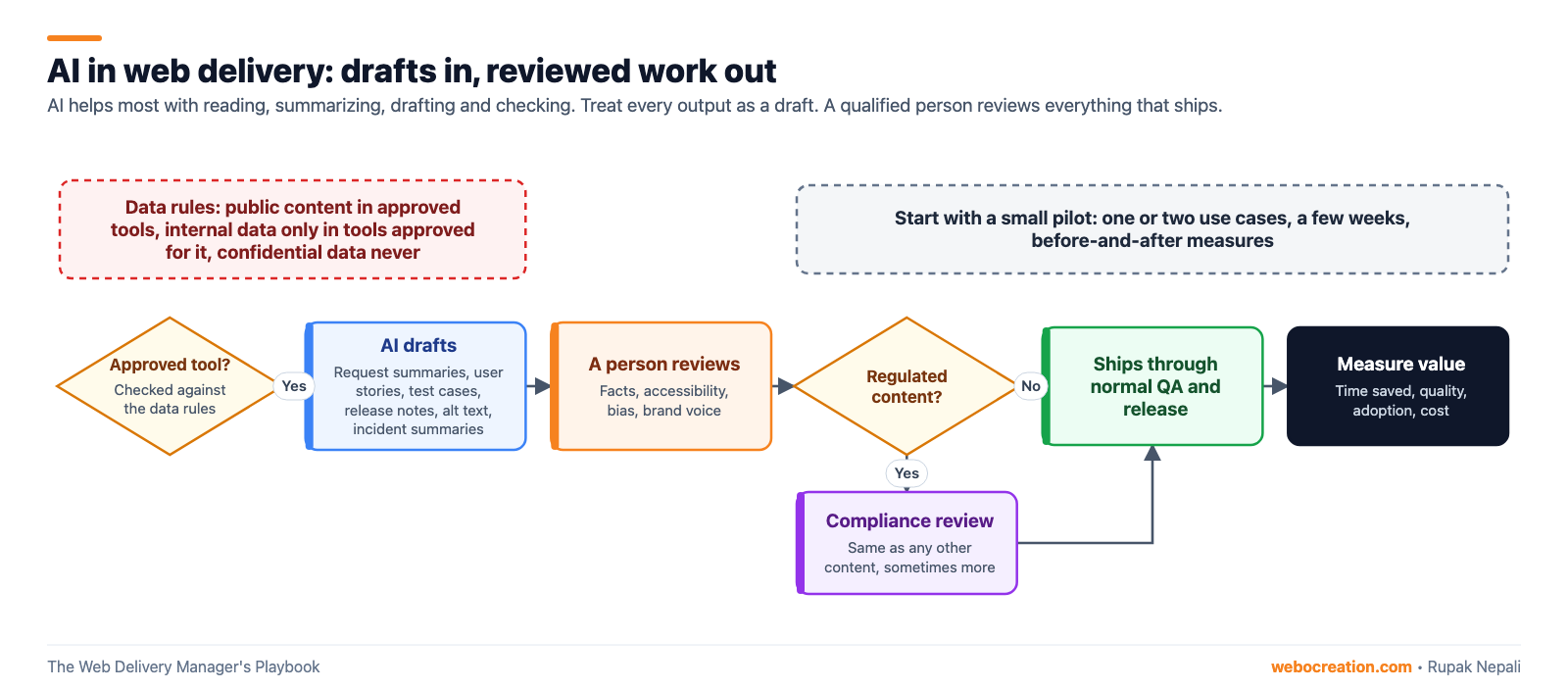
AI is most useful in web delivery for tasks that involve reading, summarizing, drafting and checking, where a person reviews the result. The following uses are practical for most teams today.
Intake and triage
- Summarizing requests: turning a long, rambling request email into a clear summary with the key details.
- Spotting missing information: checking a request against the catalog item’s requirements and drafting a question to the requester.
- Suggesting the request type and routing: recommending whether something is a request or an incident, and which group should handle it.
- Finding duplicates: identifying requests that repeat earlier ones.
Planning and delivery
- Drafting user stories and acceptance criteria from a request, for the team to refine.
- Generating test cases from acceptance criteria, including edge cases people often miss.
- Drafting release notes in plain language from the list of completed items.
- Supporting developers with code suggestions, explanations of unfamiliar code and documentation drafts.
Content and quality
- First drafts of page copy, meta descriptions and summaries, for editors to rewrite and approve.
- Alt text suggestions for images, reviewed by an editor for accuracy and context.
- Plain-language checks: simplifying complex text and flagging jargon.
- Consistency checks against the style guide: tone, terminology, formatting.
- Accessibility support: identifying likely issues such as unclear link text or missing headings, alongside proper testing (Chapter 12).
Operations and reporting
- Incident summaries: turning a long incident timeline into a clear summary for stakeholders.
- Post-mortem drafts from incident records, for the team to review and complete.
- Monthly report drafts from metrics and delivered items.
- Knowledge articles: drafting runbooks and guides from resolved tickets and notes.
AI built into your tools
Many of the most useful AI features are now built into tools you already use, which often makes them safer than separate public tools, because they work under your company’s existing contracts and data protections.
| Tool type | Typical AI features | What to watch |
|---|---|---|
| ITSM platform (such as ServiceNow) | Ticket summaries, suggested responses, routing suggestions, knowledge article drafts, virtual agents for common requests | Accuracy of routing; tone of drafted replies; cost of AI add-on licenses |
| Delivery board (such as Jira) | Story drafting, summarizing issues, searching across projects | Stories that sound complete but miss real requirements |
| CMS | Copy drafts, summaries, translations, alt text, SEO suggestions | Invented facts; brand voice; regulated content |
| DAM | Automatic tagging, search by description, image variations | Tag accuracy; rights and licensing of generated images |
| Developer tools | Code completion, code review suggestions, test generation | Security of generated code; licensing; leaking confidential code |
| Analytics and testing | Automatic insights, anomaly detection, summaries | Correlation presented as cause; over-trusting automatic conclusions |
Before switching on any AI feature, ask your security, privacy and legal teams whether it is approved, what data it sends where, and whether that data is used to train the vendor’s models. Many vendors offer settings to keep your data out of training. Make sure they are configured.
Guardrails
AI tools make mistakes that look confident and correct. They can invent facts, misread context, and produce content that sounds right but is wrong. Good guardrails let your team gain the benefits while managing these risks.
Use approved tools only
Agree with security and privacy which AI tools are approved for which kinds of data. A simple classification helps:
- Public information (published web content): may be used with approved tools.
- Internal information (unpublished plans, internal tickets): only with tools approved for internal data under company contracts.
- Confidential or regulated information (credentials, personal data, unreleased financial information, security configurations): never pasted into AI tools unless specifically approved for that data.
Make the rules simple enough to remember, and give people approved tools that are good enough that they do not look for unapproved ones.
A person reviews everything that ships
No AI-generated content, code or configuration goes to production without review by a qualified person. Treat AI output as a draft from a fast, well-read but unreliable junior colleague. Add this to your Definition of Done (Chapter 10): “AI-assisted work has been reviewed by a person who checked it for accuracy.”
Extra care with regulated content
In regulated industries, AI-generated content needs the same compliance review as any other content, and sometimes more. AI tools may invent rates, terms, statistics or claims that sound plausible. Some companies prohibit AI drafting for specific regulated content types entirely. Agree the rules with your compliance team and build them into your intake forms and approval workflows.
Watch for accessibility and bias
AI-generated alt text may describe an image literally while missing what matters in context. AI-written copy may use language that excludes some audiences. Review for both.
Be transparent
Agree when and how AI use should be disclosed, both internally (for example, noting AI assistance in a ticket) and externally, if your company has a policy on disclosing AI-generated content to site visitors.
Measuring the value
AI tools often have licensing costs, and leaders will want to know whether they pay off. Measure their impact the same way you measure process changes (Chapter 22):
- Time saved: compare cycle times for tasks before and after, such as drafting release notes, triaging requests or writing test cases.
- Quality: watch release health, defect counts and content errors. Faster work that creates more errors is not a gain.
- Adoption: how many people actually use the tools, and for what.
- Cost: license and usage costs compared with the time saved.
Start with a small pilot: one or two use cases, a few weeks, clear before-and-after measures. Expand only what works.
What AI does not change
It is easy to get caught up in new tools. But the core of web delivery management does not change. Someone still needs to own the flow of work from request to release. Requests still need clear owners, sensible priorities and honest estimates. Releases still need testing, approval and a way back. Stakeholders still need to be informed. Sites still need owners, standards and retirement dates.
AI can make each of these steps faster. It cannot decide what matters, take accountability for a launch, or build trust with a frustrated business owner. Those remain the delivery manager’s job.
Webocreation Group: The AI pilot
Maya ran a six-week pilot with three use cases: AI summaries for incoming requests in ServiceNow, AI-drafted release notes, and AI-suggested test cases for standard-tier work. The security team approved the tools after confirming the data stayed within existing company contracts.
The results were mixed in useful ways. Request summaries saved the triage lead about two hours a week and caught missing details more consistently. Release note drafts saved time but needed heavy editing for tone at first; after the team added examples to the prompt library, the edits became small. AI-suggested test cases found edge cases the team had missed on about one release in four, which the QA analyst called “the best second opinion I’ve had.”
One problem surfaced: an editor used a public AI tool to rewrite a product page and pasted in unreleased pricing. Nothing leaked, but it led directly to the AI use policy below and a short training session for every editor.
Template: AI use policy and prompt library for web teams
Policy outline:
| Section | Contents |
|---|---|
| Purpose | How the web team uses AI to work faster while protecting quality, security and compliance |
| Approved tools | List of approved AI tools and features, and the data each may handle |
| Data rules | Public, internal and confidential data: what may be used where; never paste credentials, personal data or unreleased financial information |
| Review requirement | A qualified person reviews all AI-assisted work before it ships |
| Regulated content | Rules agreed with compliance; any prohibited uses |
| Accessibility and bias | Review AI-generated alt text and copy for accuracy and inclusive language |
| Disclosure | When to note AI assistance in tickets or published content |
| Measurement | How pilots are run and evaluated |
| Training | Required training before using AI tools |
| Review | Policy reviewed every six months |
Starter prompt library:
| Task | Example prompt |
|---|---|
| Request summary | “Summarize this web request in three bullet points: what is needed, which page, and the deadline with its reason. List any information that is missing for a content update request.” |
| Acceptance criteria | “Write acceptance criteria for this request as a short checklist. Include accessibility, mobile and analytics checks where relevant.” |
| Test cases | “Suggest test cases for this change, including edge cases for forms, browsers, mobile devices and keyboard-only users.” |
| Release notes | “Write plain-language release notes for business stakeholders from this list of completed items. One sentence per item. No technical jargon.” |
| Incident update | “Write a short stakeholder update from these incident notes: what is affected, what we are doing, and when the next update will be. No speculation about the cause.” |
| Alt text | “Suggest alt text for this image as used on a product page about [topic]. Describe what matters in this context in under 125 characters.” |
Checklist
- Agree approved AI tools and data rules with security, privacy and legal.
- Check data training settings for every AI feature in your existing tools.
- Add a human review requirement for AI-assisted work to your Definition of Done.
- Agree rules for AI and regulated content with compliance.
- Run a small pilot with clear before-and-after measures.
- Publish an AI use policy and a starter prompt library.
- Train everyone on the team before they use AI tools.
Common traps
- Trusting confident output. AI can invent facts. A person must check everything that ships.
- Pasting confidential data into public tools. Set clear data rules and provide approved alternatives.
- Adopting everything at once. Pilot a few use cases and measure them.
- Measuring speed but not quality. Faster work with more errors is not a gain.
- Thinking AI replaces the role. It speeds up tasks; it does not take accountability.
Related reading
- AI governance, risk and measuring business impact
- Prompt injection explained: how attackers hijack LLM apps
- How to secure AI agents: design for a compromised model
- Do AI content detectors work?
- Chapter 24: Migrations, Replatforming and Sunsetting

Rupak Nepali is a web developer, manage Webocreation website and the author of six books:
Getting Started with OpenCart Module Development (Packt, 2013),
OpenCart Theme and Module Development (Packt, 2015),
OpenCart 4: Dev Guide for Themes & Extensions (2024),
OpenCart 4: User Manual (2025),
Cloudflare for the Enterprise Website (2026) and
The Technical Web Guide for Marketers (2026).
Rupak has built OpenCart stores and extensions since 2010, has published more than 600 tutorials on Webocreation, and shares free OpenCart extensions on GitHub.
Find Rupak on
GitHub | Amazon | LinkedIn | X | YouTube.