Chapter 19: Managing a Portfolio of Sites
Website portfolio management: tier sites by importance, match service levels to tiers and review the health of the whole portfolio regularly.
 Rupak NepaliPublished Nov 26, 2026
This is Chapter 19 of The Web Delivery Manager’s Playbook, a free series on running enterprise websites from request to release. Website portfolio management: tier sites by importance, match service levels to tiers and review the health of the whole portfolio regularly.
When Maya presented her first inventory, the CIO asked a simple question: “Of these 37 sites, which ones matter most?” Maya realized she could not answer with confidence. The team treated every site the same way: the same release process, the same response times, the same level of testing. In practice, that meant the corporate site, which handled most of the company’s leads, got roughly the same attention as a campaign site from three years ago that received 40 visits a month.
Treating every site equally sounds fair. It is actually a poor use of a small team’s time. A portfolio needs tiers.
Website portfolio management by tier
Thinking in portfolios
A single site is a project or a product. Thirty sites are a portfolio. Managing a portfolio means asking different questions:
- Which sites create the most value, and which carry the most risk?
- Where should limited time and money go?
- Which sites share platforms, components and processes, and which are one-offs?
- Which sites should grow, which should be maintained, and which should be retired?
These questions cannot be answered site by site. They need a view across everything.
Tiering your sites
Tiering means grouping sites by how important they are to the business, then setting service levels for each group. Three tiers work for most portfolios.
| Tier | Description | Typical examples |
|---|---|---|
| Tier 1: Critical | Sites whose failure would cause serious business, legal or reputational harm. High traffic or revenue; regulated content; core brand | Corporate site; main product sites; customer login portals; sites with regulated rates or disclosures |
| Tier 2: Important | Sites that support business goals but where a short outage is manageable | Product microsites; careers site; regional sites; investor relations |
| Tier 3: Long tail | Low-traffic, low-risk sites | Older campaign sites; event sites; small informational sites |
Deciding the tier
Score each site against a few criteria, such as traffic, revenue or leads, regulatory or legal exposure, brand visibility, and data sensitivity (for example, whether it collects personal data). Discuss borderline cases with business owners. A low-traffic site that displays regulated financial rates may still be Tier 1, because an error there could cause legal harm.
Record the tier in the inventory and in the CMDB, where it maps to the business criticality field (Chapter 3). ServiceNow can then use it to set incident priority and routing automatically.
Service levels by tier
Once sites are tiered, set different expectations for each tier. This lets you focus effort where it matters most and be honest about what lower tiers will receive.
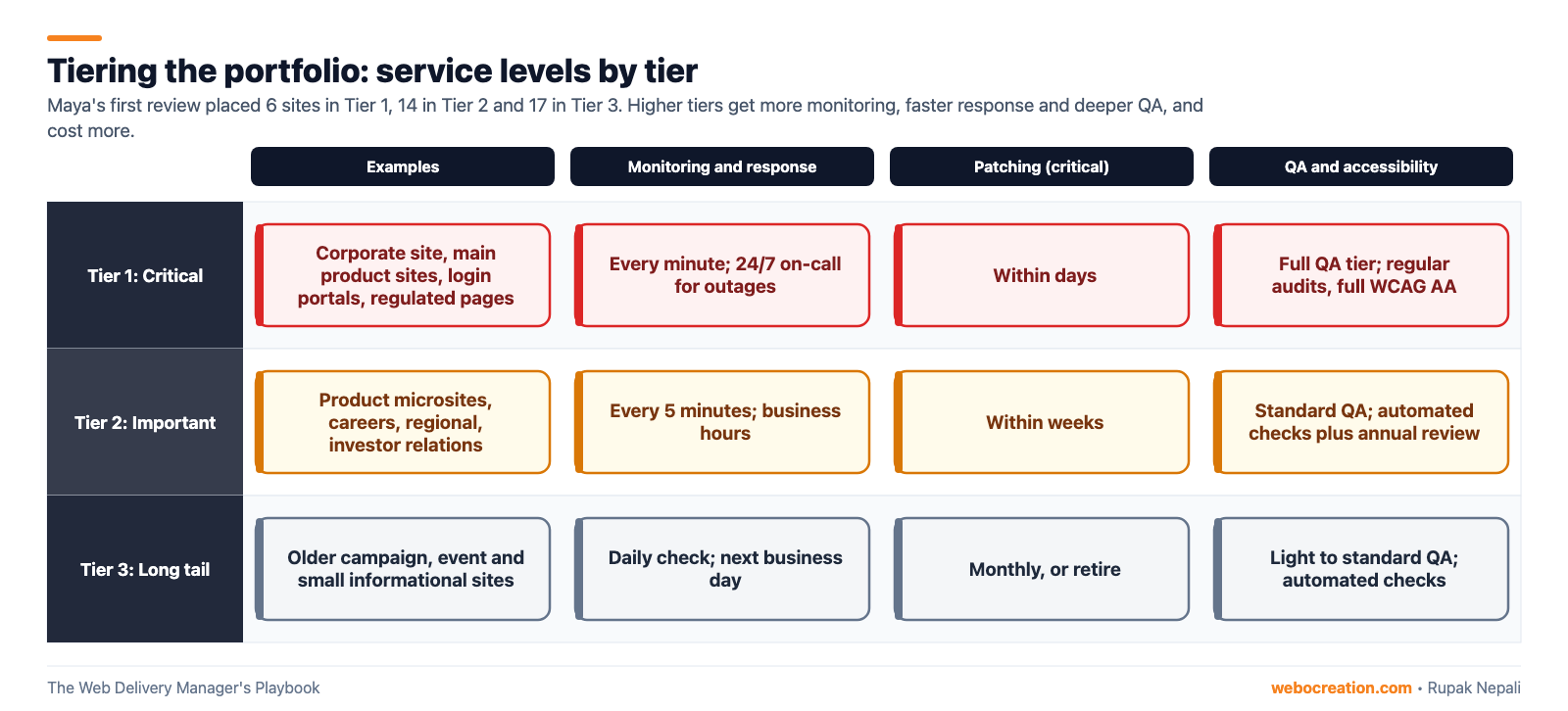
| Area | Tier 1 | Tier 2 | Tier 3 |
|---|---|---|---|
| Monitoring | Every minute; alerts to on-call | Every 5 minutes; alerts in business hours | Daily check |
| Incident response | 24/7 for outages | Business hours | Next business day |
| QA depth | Full tier for significant changes | Standard tier | Light to standard tier |
| Release process | Normal or standard change; release windows | Standard change; release windows | Standard change |
| Patching | Within days for critical vulnerabilities | Within weeks | Monthly or retire |
| Accessibility | Regular audits; full WCAG AA | Automated checks plus annual review | Automated checks |
| Content review | Quarterly for regulated pages | Annually | Annually or at retirement review |
| Backups and recovery | Tested quarterly | Tested annually | Platform default |
Share the tiers and service levels with business owners. Some will ask for their site to move up a tier. That is a reasonable conversation, and it often comes with a budget question: higher service levels cost more.
Shared platforms versus one-off builds
Over time, portfolios accumulate platforms. At Webocreation Group, 37 sites ran on five different content management systems, three hosting providers, and several custom-built static sites. Each platform needed its own skills, patching, licenses and security reviews.
Every new platform adds lasting cost. A useful principle is to consolidate onto a small number of standard platforms, each suited to a type of site:
- An enterprise CMS for large, complex, regulated sites with many editors and integrations.
- A visual site builder or lightweight CMS for marketing microsites and campaigns that need speed and design flexibility.
- A static site approach for very simple sites that rarely change.
New sites should use a standard platform unless there is a strong reason not to. Make exceptions a decision, recorded with a reason, not a default.
Multisite and design systems
Two approaches can multiply the value of a shared platform.
Multisite means running several sites from one installation or codebase, sharing modules, templates and updates. Regional sites and product sites are often good candidates. One upgrade or security patch then covers many sites at once. The trade-off is that a problem can also affect many sites at once, so testing and release discipline matter more.
A design system is a shared library of components, styles and patterns used across sites. It keeps sites consistent, speeds up new builds, and lets you fix accessibility or brand issues once, in the component, rather than on every site. Chapter 20 covers how design systems fit into governance.
Portfolio health reviews
Twice a year, review the whole portfolio. For each site, look at:
- Value: traffic, conversions, business importance. Has its tier changed?
- Health: platform version, open security issues, accessibility status, performance, content freshness.
- Cost: hosting, licenses and the team time it consumes.
- Ownership: does it still have an active business owner?
- Future: should it grow, be maintained as is, be merged into another site, be migrated to a standard platform, or be retired?
A simple scorecard makes these reviews fast and comparable. The output is a short list of decisions: sites to invest in, sites to migrate, and sites to retire. Feed them into the next quarterly roadmap (Chapter 8).
Webocreation Group: The first portfolio review
Maya’s first portfolio review placed 6 sites in Tier 1, 14 in Tier 2 and 17 in Tier 3. The review produced several decisions:
- Nine Tier 3 sites were marked for retirement, including the four ownerless sites found in the inventory.
- Five regional sites would move to a multisite setup on the corporate CMS over the next year.
- Three legacy WordPress sites would be migrated to the standard microsite platform.
- One Tier 2 site, the investor relations site, was moved to Tier 1 because it published regulated financial information.
The tiering also changed the on-call rota. Instead of responding to every site at any hour, the on-call developer now handled only Tier 1 outages outside business hours. On-call pages fell by two-thirds.
Template: Site portfolio scorecard
Use one row per site. Score health items as green, amber or red.
| Site | Tier | Owner | Visits per month | Platform | Health (security / accessibility / content) | Annual cost | Recommendation |
|---|---|---|---|---|---|---|---|
| Corporate site | 1 | Corporate communications | 450,000 | Enterprise CMS, current | Green / Amber / Green | $84,000 | Invest: redesign |
| Product A microsite | 2 | Product marketing | 22,000 | Site builder | Green / Green / Amber | $600 | Maintain |
| Regional site (Spain) | 2 | Regional marketing | 9,000 | Old CMS, support ending | Red / Amber / Red | $3,200 | Migrate to multisite |
| 2022 event site | 3 | None | 40 | Static, cloud storage | Amber / Red / Red | $300 | Retire |
Checklist
- Agree tiering criteria with business owners and assign every site a tier.
- Record tiers in the inventory and the CMDB business criticality field.
- Define and publish service levels for each tier.
- List the platforms in your portfolio and choose a small set of standard platforms.
- Evaluate multisite and a shared design system for groups of similar sites.
- Run a portfolio health review twice a year and feed decisions into the roadmap.
Common traps
- Treating every site the same. Small teams cannot give every site Tier 1 attention.
- Tiering by traffic alone. A low-traffic page with regulated content can be critical.
- Platform sprawl. Every new platform adds lasting cost in skills, patching and licenses.
- Multisite without discipline. Shared code means shared risk. Test and release carefully.
- Reviews without decisions. A portfolio review should end with a list of actions.
Related reading
- Cloudflare Rules for Drupal: security, redirect and cache rules
- Loading third-party scripts in Webflow without wrecking Core Web Vitals
- Automated offsite backups with restic, cron and a restore drill
- Chapter 18: Building and Growing the Web Team
- Chapter 20: Web Governance

Rupak Nepali is a web developer, manage Webocreation website and the author of six books:
Getting Started with OpenCart Module Development (Packt, 2013),
OpenCart Theme and Module Development (Packt, 2015),
OpenCart 4: Dev Guide for Themes & Extensions (2024),
OpenCart 4: User Manual (2025),
Cloudflare for the Enterprise Website (2026) and
The Technical Web Guide for Marketers (2026).
Rupak has built OpenCart stores and extensions since 2010, has published more than 600 tutorials on Webocreation, and shares free OpenCart extensions on GitHub.
Find Rupak on
GitHub | Amazon | LinkedIn | X | YouTube.