Chapter 10: Choosing a Delivery Rhythm
Choose a web team delivery rhythm that fits projects and a stream of small requests: a two-lane system where neither starves the other.
 Rupak NepaliPublished Nov 26, 2026
This is Chapter 10 of The Web Delivery Manager’s Playbook, a free series on running enterprise websites from request to release. Choose a web team delivery rhythm that fits projects and a stream of small requests: a two-lane system where neither starves the other.
The Webocreation Group web team had tried Scrum once. A consultant had set up two-week sprints, story points, planning sessions, reviews and retrospectives. It lasted five sprints. Every sprint was disrupted by urgent content changes, campaign tweaks and incidents. The developers felt they were always breaking the sprint. The business felt the team had become slower, because a request made on day three of a sprint waited until the next one. Eventually, the sprints quietly stopped, and the team went back to working on whatever seemed most urgent.
Maya did not think Scrum was wrong. She thought it had been applied to the wrong kind of work. Web teams do two very different kinds of work at once, and they need a rhythm that fits both.
A two-lane web team delivery rhythm
Two kinds of flow
Look at a month of work for most web teams and you will see two distinct streams.
Project work has a clear goal and takes weeks or months: a new microsite, a redesign, a CMS upgrade, a major campaign build. It benefits from planning, a defined scope and regular reviews with stakeholders.
Flow work is a steady stream of small, independent items: content updates, small page changes, bug fixes, tracking requests, DNS changes. Each item is small. They arrive constantly and often need to be done within days.
Scrum handles project work well. It struggles with flow work, because small requests cannot wait for the next sprint. Kanban handles flow work well. It can struggle with large projects, because without a planning rhythm, big work drifts.
Most web teams need both.
Scrum, Kanban and the hybrid
Here is a short comparison of the main options.
| Approach | How it works | Strengths for web teams | Weaknesses for web teams |
|---|---|---|---|
| Scrum | Fixed-length sprints (usually two weeks); the team commits to a set of work at the start; reviews and retrospectives at the end | Predictable cadence; good for projects; regular stakeholder demos | Urgent work disrupts sprints; small requests wait too long |
| Kanban | Continuous flow; work is pulled from a ranked queue as capacity frees up; limits on work in progress | Handles a steady stream of small requests; responds quickly | Large projects can drift without milestones; less natural planning rhythm |
| Hybrid (“Scrumban” or two lanes) | Project work runs in sprints or milestones; flow work runs on a Kanban board alongside, with reserved capacity | Fits the real mix of web work; protects projects and keeps small requests moving | Needs clear rules about capacity and who works on what |
Maya chose the hybrid. In practice, most successful corporate web teams end up there, whether or not they call it by name.
Designing a two-lane system
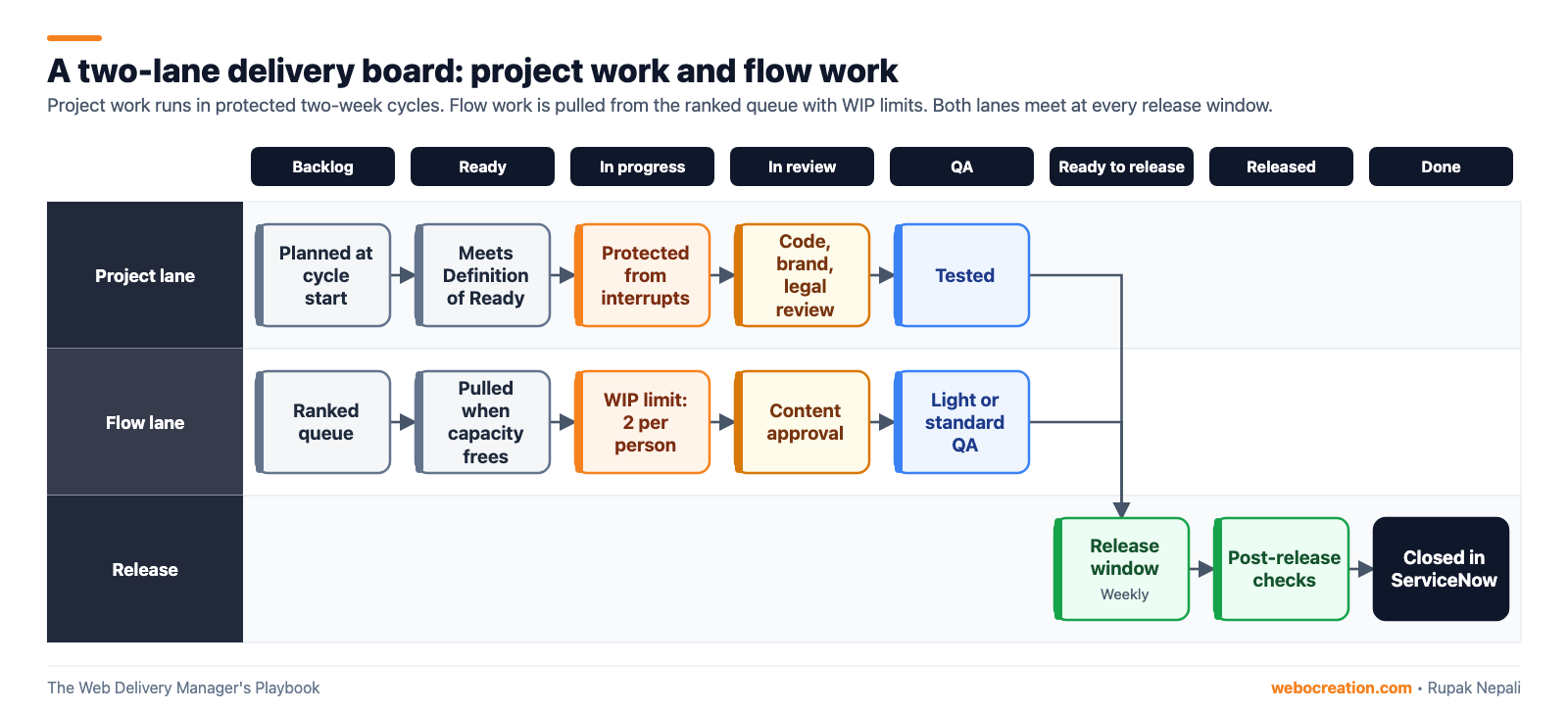
The core idea is simple: split the team’s capacity between a project lane and a flow lane, and run each with the rhythm that suits it.
The project lane
- Runs in two-week cycles, aligned with the release calendar.
- At the start of each cycle, the team plans which project work it will complete.
- At the end, it shows the finished work to stakeholders and holds a short retrospective.
- Work in the project lane is protected. Urgent requests do not interrupt it unless they meet the urgent-lane definition from Chapter 6.
The flow lane
- Runs as a Kanban board with columns such as Ready, In progress, In review, Ready to release and Done.
- Work is pulled from the top of the ranked queue whenever someone has capacity in the flow lane.
- Work-in-progress limits stop too many items from being started and left half-done. A good starting point is no more than two items in progress per person in the flow lane.
- Releases happen at every release window, not at the end of a cycle.
Sharing capacity
The split between lanes should match the capacity plan from Chapter 8. If 20 percent of capacity is reserved for unplanned and support work, that 20 percent is the flow lane, plus some planned small items.
There are two common ways to staff the lanes:
- Rotation. One or two team members are on flow duty each cycle, handling small requests and incidents, while the rest focus on projects. Rotate every cycle so nobody is stuck on flow work forever, and everyone stays familiar with every site.
- Percentage. Everyone spends a set share of their time on flow work, for example every morning or one day a week.
Rotation usually works better. Switching between project and flow work several times a day is exhausting and slows both down. A person on flow duty can respond quickly, and the rest of the team can focus.
A fast lane for urgent content
Even with two lanes, some content changes need to happen within hours, not days: a correction to a press release, a price change that takes effect today, an outage notice. For these, set up a fast lane with clear rules:
- Only for content changes, not code, and only for items meeting the urgent-lane definition.
- Handled by the person on flow duty, or by a trained content editor.
- Published outside the normal release window if necessary, using a standard change (Chapter 11).
- Reviewed afterwards at the weekly triage meeting, so the fast lane does not become a habit.
The fast lane exists so that true emergencies do not wreck the plan. Track how often it is used. If it is used more than once or twice a week, find out why.
The meetings that matter
A delivery rhythm needs a small set of recurring meetings. Each should be short, have a clear purpose and produce decisions.
| Meeting | When | Length | Purpose |
|---|---|---|---|
| Daily standup | Every day | 15 minutes | Walk the board from right to left: what is close to done, what is blocked, what is next |
| Cycle planning | Start of each two-week cycle | 45 minutes | Agree project-lane commitments; confirm who is on flow duty |
| Review or demo | End of each cycle | 30 minutes | Show finished work to stakeholders; gather feedback |
| Retrospective | End of each cycle | 30 minutes | What helped, what hurt, one or two changes to try next |
| Weekly triage | Weekly | 30 minutes | Rank and size new requests (Chapter 5) |
Notice the standup format. Walking the board from right to left, starting with the items closest to done, keeps the focus on finishing work rather than starting new work. “What did you do yesterday” standups tend to become status reports for the manager. Board-based standups help the team move work forward.
The board
Your board, whether in Jira, ServiceNow’s agile module or another tool, should show every piece of work in progress, in both lanes. A simple set of columns works for most web teams:
- Backlog: ranked work not yet ready to start.
- Ready: work that meets the Definition of Ready (below).
- In progress: being built or written.
- In review: content approval, code review, legal or brand review.
- QA: being tested.
- Ready to release: approved, tested and waiting for the next release window.
- Released: live, waiting for post-release verification.
- Done: verified and closed in ServiceNow.
Use swimlanes to separate the project and flow lanes. Use a visible marker, such as a color or a flag, for blocked items, and talk about every blocked item at standup.
The columns “In review” and “Ready to release” are where most web work waits. If cards pile up there, the problem is not development speed. It is approvals or release frequency. The board makes that visible.
Definition of ready and definition of done
Two short agreements make a huge difference to how smoothly work moves.
Definition of Ready says what must be true before work starts. It stops the team from beginning work that will stall halfway. For a web team, it might include:
- The request has a clear description and acceptance criteria.
- Final content is available, or there is an agreed date for it.
- Designs are approved, if needed.
- Required approvals (legal, privacy, budget) are done or scheduled.
- The work is sized and ranked.
Definition of Done says what must be true before work counts as finished. It stops the team from calling work done when it is only built. For a web team, it might include:
- Built and code reviewed, or content published to staging.
- Tested against the QA checklist (Chapter 12), including mobile and accessibility checks.
- Approved by the content approver on staging.
- Redirects, tracking and SEO basics in place.
- Released to production and verified.
- ServiceNow record updated and closed; inventory or CMDB updated if needed.
Write both definitions on one page and post them where the team works. Review them in retrospectives and adjust when something keeps slipping through.
Measuring flow
Two simple measures tell you whether your delivery rhythm is working.
Cycle time is the time from when work starts to when it is done. Track it separately for the flow lane and the project lane. In the flow lane, you want it short and predictable.
Throughput is the number of items completed in a period, such as a week or a cycle. It shows whether the team is keeping up with incoming demand.
If throughput is steady but the queue keeps growing, demand is higher than capacity. That is a conversation for the monthly stakeholder review and the roadmap, not something to solve by working harder. If cycle time is long but effort is small, work is waiting somewhere. Look at which board column it waits in.
Webocreation Group: Two lanes in practice
Maya introduced the two-lane system at the start of a new quarter. Each cycle, one developer and one content editor took flow duty. The other two developers, the designer and the agency partner worked in the project lane on the microsite and the CMS upgrade.
The first two cycles were bumpy. The flow-duty developer was overwhelmed by a backlog of small requests, and two project-lane developers kept getting pulled in to help. In the third cycle’s retrospective, the team agreed to clear the backlog with a one-week focused push, then hold the line.
By the end of the quarter, small requests had a median cycle time of two days, the microsite launched on its planned date, and the CMS upgrade was on track. The developers said it was the first time in years they had been able to focus on a project for more than a few hours without interruption.
Template: Delivery rhythm one-pager
Fill this in and share it with your team and stakeholders.
| Element | Our choice |
|---|---|
| Approach | For example: hybrid, with a project lane in two-week cycles and a flow lane on Kanban |
| Cycle length | For example: two weeks, starting on Mondays |
| Release windows | For example: Tuesdays and Thursdays, 7 to 9 a.m. |
| Capacity split | For example: project lane 70 percent, flow lane 30 percent |
| Flow duty | For example: one developer and one editor, rotating each cycle |
| Work-in-progress limits | For example: two items per person in the flow lane |
| Fast lane rules | Content only; urgent-lane definition; reviewed weekly |
| Meetings | Standup, cycle planning, review, retrospective, weekly triage (days and times) |
| Definition of Ready | Link |
| Definition of Done | Link |
| Measures | Cycle time by lane; throughput per cycle |
Checklist
- Look at the last two months of work and estimate the split between project and flow work.
- Choose an approach (Scrum, Kanban or hybrid) based on that mix.
- Set up a board with swimlanes for project and flow work.
- Decide how flow duty will be staffed, and rotate it.
- Write a Definition of Ready and a Definition of Done.
- Define the fast lane and track how often it is used.
- Start measuring cycle time and throughput by lane.
Common traps
- Pure Scrum for flow work. Small requests cannot wait two weeks for the next sprint.
- Pure Kanban for big projects. Without milestones and reviews, large work drifts.
- Everyone splitting every day. Constant switching between projects and small requests slows both.
- Status-report standups. Walk the board and focus on finishing, not reporting.
- Ignoring the “In review” column. If work piles up waiting for approvals, faster developers will not help.
- A fast lane that becomes the normal lane. Track it, review it, and keep it rare.
Related reading
- Git, CI/CD and staging: a deployment workflow that does not break the live site
- Chapter 9: Running Web Work Through ServiceNow
- Chapter 11: Environments, Branching and Release Management

Rupak Nepali is a web developer, manage Webocreation website and the author of six books:
Getting Started with OpenCart Module Development (Packt, 2013),
OpenCart Theme and Module Development (Packt, 2015),
OpenCart 4: Dev Guide for Themes & Extensions (2024),
OpenCart 4: User Manual (2025),
Cloudflare for the Enterprise Website (2026) and
The Technical Web Guide for Marketers (2026).
Rupak has built OpenCart stores and extensions since 2010, has published more than 600 tutorials on Webocreation, and shares free OpenCart extensions on GitHub.
Find Rupak on
GitHub | Amazon | LinkedIn | X | YouTube.