Store all your data in a Unicode format (UTF-8) – database
 Rupak NepaliPublished Nov 26, 2012
Getting error below while installing the moodle, How we can solve them?
must be installed and enabled
It is required that you store all your data in a Unicode format (UTF-8). New installations must be performed into databases that have their default character set as Unicode. If you are upgrading, you should perform the UTF-8 migration process (see the Admin page).
Solution:
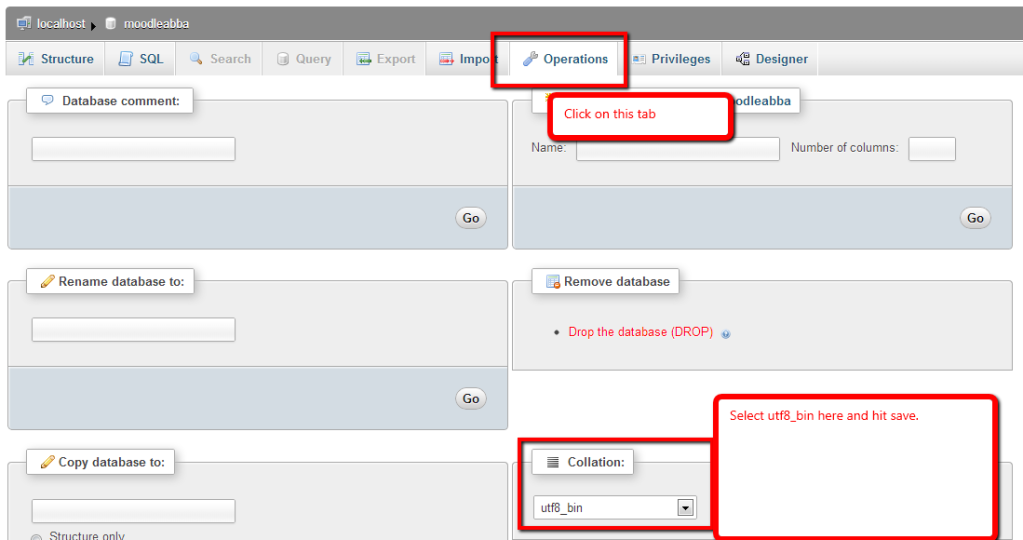
While creating the database please take following things into consideration and you will be able to remove the error.
Set the above setting and click save and go to the moodle site and click reload and the error is removed and you will be able to see the continue button.
Searched Keywords:
Moodle workers Nepal, Moodle workers India, Cheap moodle worker, cheap moodle programmer, moodle programmer

Rupak Nepali is a web developer, manage Webocreation website and the author of six books:
Getting Started with OpenCart Module Development (Packt, 2013),
OpenCart Theme and Module Development (Packt, 2015),
OpenCart 4: Dev Guide for Themes & Extensions (2024),
OpenCart 4: User Manual (2025),
Cloudflare for the Enterprise Website (2026) and
The Technical Web Guide for Marketers (2026).
Rupak has built OpenCart stores and extensions since 2010, has published more than 600 tutorials on Webocreation, and shares free OpenCart extensions on GitHub.
Find Rupak on
GitHub | Amazon | LinkedIn | X | YouTube.