Managing Webflow Custom Code Programmatically with the Data API v2
Register hosted and inline scripts, apply them site-wide or per page, and version them with Webflow's Data API v2 instead of copy-pasting code.
 Rupak NepaliPublished Nov 13, 2026
If you manage custom code across many Webflow sites, such as client sites or a multi-brand setup, copying <script> tags into Site settings doesn’t scale. Webflow’s Data API v2 has Custom Code endpoints for registering scripts and applying them to sites and pages from code.
This post walks through the flow. Endpoint shapes change, so check the details against Webflow’s current API reference before you build on them.
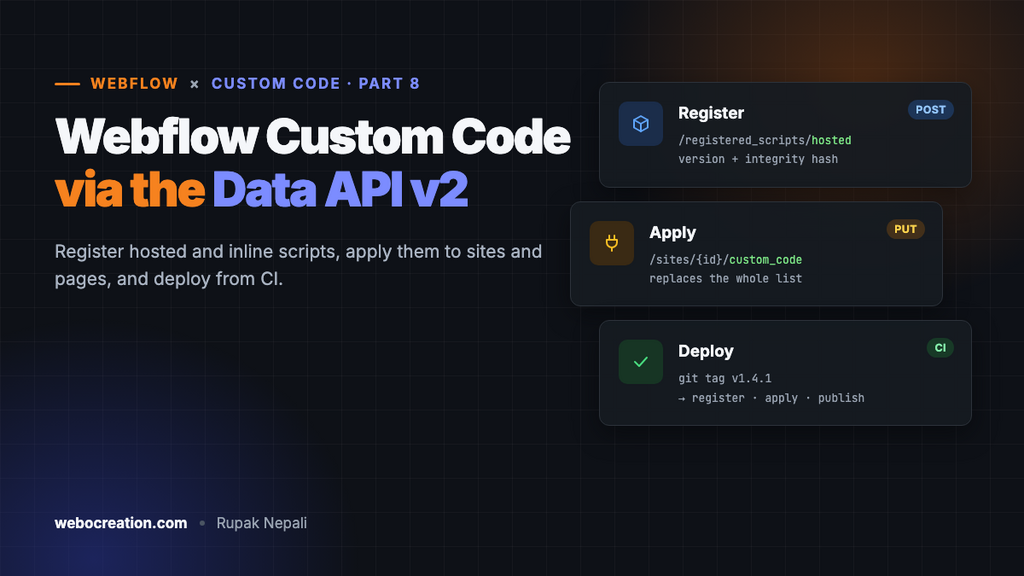
The model: register, then apply
Scripts go through two steps:
- Register a script with a site. It becomes a named, versioned entry in that site’s script registry. There are two kinds:
– Hosted: you provide a URL (your CDN) and an SRI integrity hash.
– Inline: you provide the source code directly. Inline scripts are size-limited (around 2,000 characters), so they suit small loaders and config. - Apply registered scripts to the site (every page) or to a specific page, choosing
headerorfooterplacement and optional attributes.
Scripts applied this way are managed separately from the code typed into the Site settings custom code box, so designers can’t break your code by editing that box.
Authentication
The Custom Code endpoints need the custom_code:read and custom_code:write scopes. Webflow has historically limited these endpoints to apps authorised via OAuth (a Data Client app created in your Workspace’s Apps & Integrations settings) rather than plain site API tokens. If a site token returns a 403 on these endpoints, that’s why. Register an app, install it on the site, and use its access token.
export WEBFLOW_TOKEN="your-oauth-access-token"
export SITE_ID="your-site-id"
Get the site ID from GET https://api.webflow.com/v2/sites.
Registering a hosted script
First build your bundle and compute its integrity hash:
npm run build
HASH="sha384-$(openssl dgst -sha384 -binary dist/main.js | openssl base64 -A)"
echo $HASH
Then register it:
curl -X POST "https://api.webflow.com/v2/sites/$SITE_ID/registered_scripts/hosted" \
  -H "Authorization: Bearer $WEBFLOW_TOKEN" \
  -H "Content-Type: application/json" \
  -d '{
    "displayName": "SiteBundle",
    "version": "1.4.0",
    "hostedLocation": "https://cdn.jsdelivr.net/gh/your-user/webflow-scripts@1.4.0/dist/main.js",
    "integrityHash": "'"$HASH"'",
    "canCopy": false
  }'
The response includes an id for the registered script. Use that exact value when you apply it. Don’t build IDs yourself.
Notes:
- The
hostedLocationmust serve the exact bytes you hashed. With an SRI hash, the browser refuses the script if even one byte differs. Use pinned, immutable URLs (e.g. jsDelivr@1.4.0), never branch URLs. - SRI needs CORS. The host must send
Access-Control-Allow-Origin. jsDelivr, Cloudflare Pages and most CDNs do. - Versions must be valid semver and unique per display name. Shipping
1.4.1means registering a new entry.
Registering an inline script
Good for a small config object or a loader:
curl -X POST "https://api.webflow.com/v2/sites/$SITE_ID/registered_scripts/inline" \
  -H "Authorization: Bearer $WEBFLOW_TOKEN" \
  -H "Content-Type: application/json" \
  -d '{
    "displayName": "SiteConfig",
    "version": "1.0.0",
    "sourceCode": "window.SITE_CONFIG={apiBase:\"https://api.example.com\",env:\"production\"};"
  }'
Send just the JavaScript, without <script> tags. Webflow wraps it.
Applying scripts to the whole site
curl -X PUT "https://api.webflow.com/v2/sites/$SITE_ID/custom_code" \
  -H "Authorization: Bearer $WEBFLOW_TOKEN" \
  -H "Content-Type: application/json" \
  -d '{
    "scripts": [
      { "id": "<SiteConfig id>", "version": "1.0.0", "location": "header" },
      { "id": "<SiteBundle id>", "version": "1.4.0", "location": "footer",
        "attributes": { "defer": "true" } }
    ]
  }'
PUT replaces the whole list. Anything you leave out is removed from the site. Read the current state first (GET .../custom_code), change it, and send the full list back.
Applying to a single page
Same shape, page endpoint:
curl -X PUT "https://api.webflow.com/v2/pages/$PAGE_ID/custom_code" \
  -H "Authorization: Bearer $WEBFLOW_TOKEN" \
  -H "Content-Type: application/json" \
  -d '{ "scripts": [ { "id": "<PricingCalc id>", "version": "2.0.0", "location": "footer" } ] }'
List pages with GET /v2/sites/{site_id}/pages to find page IDs by slug.
Then publish
Applying code changes the site’s configuration, but visitors only see it after a publish:
curl -X POST "https://api.webflow.com/v2/sites/$SITE_ID/publish" \
  -H "Authorization: Bearer $WEBFLOW_TOKEN" \
  -H "Content-Type: application/json" \
  -d '{ "publishToWebflowSubdomain": true }'
Publishing goes live with whatever else is unpublished in the Designer. On a site where designers are mid-edit, publish to the .webflow.io subdomain only, or coordinate with them first.
Putting it in CI (GitHub Actions sketch)
name: Deploy Webflow scripts
on:
  push:
    tags: ['v*']

jobs:
  deploy:
    runs-on: ubuntu-latest
    steps:
      - uses: actions/checkout@v4
      - uses: actions/setup-node@v4
        with: { node-version: 22 }
      - run: npm ci && npm run build
      - name: Register and apply
        env:
          WEBFLOW_TOKEN: ${{ secrets.WEBFLOW_TOKEN }}
          SITE_ID: ${{ secrets.WEBFLOW_SITE_ID }}
          VERSION: ${{ github.ref_name }}
        run: node scripts/deploy-webflow.mjs
scripts/deploy-webflow.mjs would:
- wait for jsDelivr to serve the new tag (poll the URL until it returns 200),
- compute the SHA-384 of
dist/main.js, - register the hosted script with
version = VERSIONminus thev, GETthe current site custom code, swap the oldSiteBundleentry for the new one,PUTit back,- optionally publish to staging.
Pushing a git tag then updates the script on the site. Rolling back means re-applying the previous version, which is still in the registry.
When it’s worth it
| Situation | Use the API? |
|---|---|
| One site, one developer | Probably not. A loader script (Local dev workflow) is simpler. |
| Agency with many client sites sharing a library | Yes |
| Marketplace app that injects scripts into users’ sites | Yes, this is what it’s for |
| Strict change control / audit requirements | Yes, deployments live in CI logs |
For most single sites, a loader pointing at a pinned CDN URL is enough. Once you’re managing code across many sites, the Custom Code API is how you avoid copy-pasting into each one.
Webflow custom code series: 1. Host JavaScript on Webflow’s CDN · 2. MIME types and the asset CDN · 3. Where custom code runs · 4. CMS data in JavaScript · 5. JSON-LD on CMS pages · 6. Local dev workflow · 7. Forms to your own API · 8. Custom code via the Data API · 9. Third-party scripts and Core Web Vitals. Preparing for the exam too? See the Webflow Visual Developer Certification guide.

Author of four Opencart book.
The recent are Opencart 4 developer book and Opencart 4 user manual