OpenCart vs Shopify vs WooCommerce in 2026: A Sober Look from a Developer’s Perspective

Stop asking “which is best?” — ask how much control you really want

In 2026, you don’t need another surface‑level pros/cons list of OpenCart, Shopify, and WooCommerce. You need clarity on architecture, cost, and control.

All three can power serious stores; the real question is: who owns the stack, who eats the complexity, and what will it cost you over the next 3–5 years, not just at launch.

The three axes that matter: architecture, cost, control

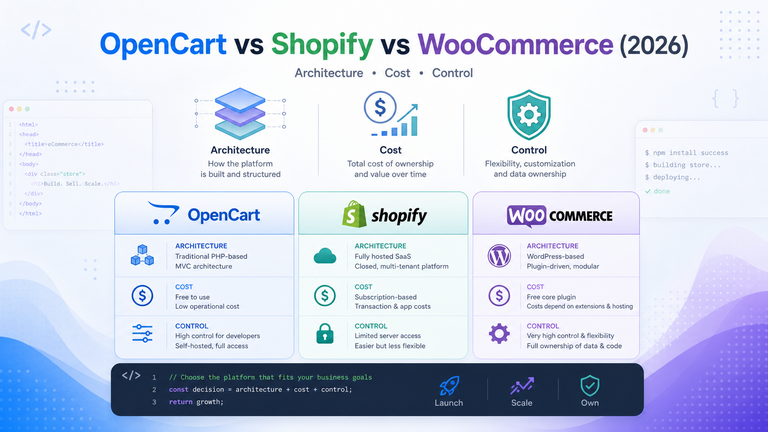
From a developer’s perspective, the platforms line up along three practical axes:

  • Architecture – How opinionated is the stack? Can you treat it as a component in a bigger system, or does it want to be the system?
  • Cost – Not just “free vs subscription,” but hosting, apps/extensions, payment fees, and developer time.
  • Control – Who owns the code, the infra, the data, and the roadmap? How hard is it to move away later?

Let’s look at each platform through those lenses.

Architecture: what are you actually deploying?

Shopify: hosted monolith with clean edges

Shopify is a fully hosted SaaS: you deploy configurations, Liquid templates, and apps, not servers.

  • Core stack, scaling, database, and security are all handled by Shopify.
  • You extend via themes, the app store, and API/webhook integrations, not by modifying core.
  • Their Online Store, Checkout, and Payments are deeply integrated; you integrate your logic around them, not inside them.

This is fantastic if you want a stable, opinionated commerce core and you’re happy to live inside its boundaries.

WooCommerce: WordPress plugin with a big ecosystem

WooCommerce is an open‑source ecommerce plugin that turns a WordPress site into a store.

  • Runs entirely on your WordPress stack: PHP, MySQL/MariaDB, your chosen hosting.
  • High‑Performance Order Storage (HPOS) is now the default, moving orders out of the WordPress posts table into dedicated tables for better scalability.
  • You inherit the entire WordPress ecosystem: themes, plugins, and dev patterns—good and bad.

Architecture‑wise, WooCommerce is flexible but tightly coupled to WordPress. If WordPress is already your CMS, this can be a big win.

OpenCart: standalone, focused ecommerce app

OpenCart is a standalone open‑source ecommerce platform written in PHP, with its own admin and storefront, independent of WordPress.

  • You run it like a traditional PHP application: web server, PHP, database, your hosting.
  • The core offers solid catalog, order management, and multi‑store support out of the box.
  • Extensions exist, but the ecosystem is smaller than WordPress/WooCommerce.

Architecturally, OpenCart is simpler than “WordPress + WooCommerce + everything else” and less opinionated than Shopify, but you’re closer to the metal for scaling and hardening.

Cost: where the money actually goes

Ignore sticker price for a moment. Look at TCO: subscription + hosting + payments + apps/extensions + developer time.

Shopify: predictable subscription, variable fees

Shopify’s pricing is subscription‑based plus transaction fees.

  • As of 2026, the Basic plan is roughly 29–39 USD/month depending on billing cycle, with higher tiers (Grow, Advanced, Plus) scaling up for volume, reporting, and advanced features.
  • Card processing via Shopify Payments is typically around 2.9% + fixed fee on Basic, with rates improving on higher plans.
  • “Hidden” cost is the app store: many serious stores run multiple paid apps (reviews, upsells, subscriptions, etc.) adding 5–50 USD per app per month.

Upside: very low infra and maintenance cost; you’re buying predictability and time. Downside: you pay a premium for that and share margin on every transaction.

WooCommerce: free core, you own the hosting bill

WooCommerce core is free under GPL, but you pay for everything around it.

  • You’re responsible for hosting, domain, backups, caching, security, and scaling.
  • Many essential extensions (subscriptions, bookings, advanced shipping, some payment gateways) are commercial.
  • Payment fees are between you and your gateway/PSP; Woo doesn’t take a cut, but you don’t get bundled negotiation either.

If you already have strong WordPress operations and a good host, WooCommerce can be economical at scale; if you don’t, you’ll pay in ops and developer time.

OpenCart: low software cost, higher ops attention

OpenCart core is also free and open source.

  • You pay for hosting, maintenance, and any commercial extensions you adopt.
  • Out‑of‑the‑box functionality is often enough for simple stores, which can reduce extension sprawl.
  • At the same time, fewer high‑quality, maintained extensions mean more custom dev for advanced needs.

OpenCart can be extremely cost‑effective for lean stores with straightforward requirements and access to PHP talent; it becomes less attractive when you want Woo‑level marketing integrations or Shopify‑level polish without paying for development.

Control: who really owns the store?

This is where opinions get strong.

Shopify: you rent the rails

With Shopify, you do not own the platform, but you own your data within it and can export products, orders, and customers.

  • You can’t fork Shopify or run it on your own infra.
  • Checkout, core performance, and many platform behaviors are controlled by Shopify.
  • If Shopify changes pricing, policies, or APIs, you adapt or leave.

For many businesses, that’s an acceptable trade: you trade infra control for stability and focus.

WooCommerce: full code and data ownership (within WordPress)

WooCommerce is open source. You can inspect, extend, and fork the code and you fully own your store data and hosting environment.

  • You choose hosting, PHP version, database, and the surrounding stack.
  • You can build custom plugins, override templates, and integrate deeply with other internal systems.
  • Migrating away is non‑trivial but fully possible; you’re not locked into a vendor data silo.

If “I want to own the whole stack and integrate ecommerce into a broader custom architecture” is the requirement, WooCommerce fits that mindset well.

OpenCart: similar ownership, narrower ecosystem

OpenCart also gives you full ownership of code and data on your own hosting.

  • You can modify core (not recommended), build extensions, and integrate however you like.
  • Multi‑store support from a single admin gives you interesting control patterns you don’t get out‑of‑the‑box with WooCommerce.
  • However, you’re more on your own in terms of best‑practice patterns, documentation, and high‑quality extensions.

OpenCart is appealing when you want open‑source control but don’t want WordPress in the mix at all.

Ecosystem and trajectory in 2026

Market momentum matters, especially for plugin quality, talent availability, and long‑term bets.

  • WooCommerce powers the majority of WordPress stores and a huge share of online shops overall; estimates put it at around two‑thirds of open‑source ecommerce installs.
  • Shopify dominates the hosted SMB and mid‑market segment and continues to invest heavily in apps, themes, and partner tooling.
  • OpenCart remains a niche but active project with a smaller user and developer base compared to Woo.

In practice, that means:

  • Easier hiring and more ready‑made solutions in the Shopify and Woo ecosystems.
  • More greenfield space but fewer polished off‑the‑shelf modules in OpenCart land.

Developer‑centric comparison table

A quick, opinionated snapshot from a dev/ops viewpoint:

DimensionShopifyWooCommerceOpenCart
ArchitectureHosted SaaS, opinionated core, API/app‑drivenWordPress plugin, runs on your LAMP stackStandalone PHP app on your LAMP stack
Core costMonthly subscription + card feesFree core; pay for hosting + premium extensionsFree core; pay for hosting + some extensions
Infra & scalingShopify’s problemYour problem (choose host, manage caching/CDN)Your problem (choose host, manage caching/CDN)
ExtensibilityApps, themes, APIs, limited low‑level controlThemes, plugins, full code access, very extensibleExtensions, code access, smaller ecosystem
Data ownershipPlatform‑hosted; exportable but not self‑hostedFull ownership of store and databaseFull ownership of store and database
Ecosystem sizeHuge, commercial‑driven app ecosystemMassive WordPress + Woo ecosystemNiche but focused community
Best fit mindset“I want commerce as a service”“I want full control, integrated into WordPress/content”“I want open‑source ecommerce without WordPress”

So, what should you actually choose?

From a sober developer’s perspective:

  • Pick Shopify if you want to minimize infrastructure and maintenance, move fast, and you’re okay trading deep control and some margin for speed and stability. Ideal for teams without strong dev/ops resources or those who want to keep ecommerce as a bounded product, not a platform engineering project.
  • Pick WooCommerce if you’re already invested in WordPress, care about owning the entire stack, and are comfortable managing hosting, updates, and scaling yourself (or via an agency). It’s the most flexible for content‑heavy sites and custom integrations, with the strongest open‑source ecosystem behind it.
  • Pick OpenCart if you want a focused, standalone open‑source ecommerce app, don’t want WordPress, and are happy to write or commission more of your own functionality instead of relying on a gigantic plugin marketplace. It’s a good fit for lean, technically supported stores that value simplicity over ecosystem size.

The “right” answer isn’t which platform wins a feature checklist. It’s which stack you’re willing to own for the next several years—and how much you’re prepared to pay, in both cash and engineering time, for the control you think you need.

PCI‑Conscious Architecture: Where Payment Data Should (and Shouldn’t) Flow in OpenCart

If you run an OpenCart store, you are in the payments business whether you like it or not.
That means the decisions you make about where card data flows in your architecture directly impact your PCI scope, your risk, and ultimately your chances of getting breached.

In this post, we’ll look at PCI‑conscious architecture for OpenCart: what “cardholder data” actually is, which integration patterns keep that data away from your infrastructure, and which common configurations quietly drag you into full PCI DSS scope.
We’ll stay practical and opinionated, with specific examples from OpenCart’s ecosystem and payment extensions.

Quick PCI DSS reality check for OpenCart merchants

The Payment Card Industry Data Security Standard (PCI DSS) is a set of security requirements for any entity that stores, processes, or transmits cardholder data such as the primary account number and related authentication data.
Compliance is mandatory for e‑commerce merchants that accept card payments, and failure to comply can result in fines, higher fees, or even loss of the ability to take cards.

PCI DSS defines different self‑assessment questionnaires (SAQs) depending on how your site handles payments.
For e‑commerce, the low‑scope options (like SAQ A) are only available when all payment pages are fully outsourced to a PCI‑validated provider via redirect or iFrame such that no payment page elements originate from your server.

If any part of the card entry page comes from your environment, you move into higher‑scope categories (such as SAQ A‑EP or full DSS) because your site can now be used to skim card data.
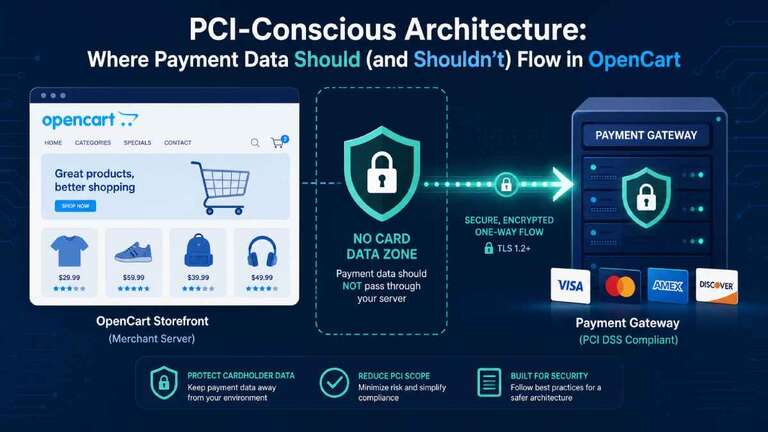
That’s the core idea of PCI‑conscious architecture: design things so sensitive data never has a reason to cross your infrastructure boundary in the first place.

What counts as “cardholder data” and “scope”?

PCI calls card numbers and related data “cardholder data” and treats certain fields as especially sensitive, such as the full PAN and CVV.
If these values flow through your servers, logs, databases, backups, or email, those systems are in PCI scope and must meet the relevant security requirements.

The PCI Council’s e‑commerce guidance is clear: even if you think you “outsource payments,” your own web server is still in scope if it can affect the page where card data is collected, for example via scripts, forms, or DOM manipulation.
This is because criminals routinely compromise merchant sites to inject JavaScript that silently copies card data as customers type, even when the actual processing is done by a gateway.

Conversely, if the entire payment page is hosted by a PCI‑validated provider and all form fields and scripts come from that provider, your server never sees cardholder data and has a much smaller compliance footprint.
That is exactly the architecture you want to aim for with OpenCart wherever possible.

Common OpenCart payment patterns and their PCI impact

Let’s walk through the main payment integration patterns you see in OpenCart and how they affect where card data flows.

1. Hosted payment page (full redirect)

In a typical hosted payment gateway, your OpenCart checkout redirects the customer to a page on the payment provider’s domain to enter card details, then returns them to your site after authorization.
The PCI SSC explicitly says that when the entirety of all payment pages is delivered directly from a PCI‑validated third party via redirect, the merchant may be eligible for the lowest‑scope SAQ A.

OpenCart payment plugins that implement a pure hosted page model keep card data on the provider’s infrastructure rather than your own.
Your responsibilities then focus on securing your own site so attackers cannot tamper with the redirect or trick users into a fake payment page.

From a PCI‑conscious architecture perspective, this is usually the safest pattern for small and mid‑sized OpenCart merchants.

2. Hosted iFrame / lightbox on your checkout

Some gateways provide a lightbox or iFrame embedded in your OpenCart checkout page that is still hosted and controlled by the payment provider.
Mastercard’s OpenCart integration, for example, offers a hosted checkout via lightbox or redirect where every sensitive field is collected in a secure hosted component that never stores card details in your database.

PCI treats an iFrame that is fully loaded from a PCI‑validated provider similarly to a redirect, as long as the entirety of the payment frame comes from that provider.
Even with this model, your checkout page becomes a “web redirection” surface that must be monitored for tampering because any script you add could try to skim data from or around the frame.

Done well, the hosted iFrame pattern keeps card data out of your environment while maintaining a seamless on‑site checkout experience.

3. Direct post / API forms on your domain

In a direct post or “API integration,” your OpenCart site renders the card form on your domain and posts the data directly from the browser to the processor’s API, often via JavaScript.
Merchants like this because they get full control over the payment page’s look and flow without a visible redirect.

However, PCI specifically calls out this pattern as higher risk because attackers can inject JavaScript on your page to grab a copy of card data before it is sent to the processor.
For this reason, these implementations usually fall into SAQ A‑EP or full PCI scope, meaning your web server and application must meet more comprehensive requirements.

In other words, even if card data does not transit your server directly, the fact that your code builds the form and can influence the payment flow drags your platform into the PCI blast radius.
This pattern should be approached only if you are prepared to invest heavily in secure coding, change‑control, and monitoring.

4. “Offline credit card” modules and local storage

A fourth pattern still seen in some OpenCart extensions is the “offline credit card” method where checkout simply collects the card number and CVV and stores or emails them for manual processing on a separate terminal.
One such extension advertises that it saves card data to the order record and can even send it in email, with the author explicitly warning that dealing with this data is “very sensitive and risky” and may be illegal in some jurisdictions.

OpenCart community discussions make it clear that if you accept credit card data onto your site at all, even if you don’t store it long‑term, you are in full PCI scope and must meet all relevant standards.
Auditors will look at your hosting environment, who has access, how you encrypt and protect data, and how you manage intrusion risk, which is expensive and complex for most merchants.

From a PCI‑conscious architecture standpoint, these “offline card” approaches are essentially anti‑patterns that you should avoid in modern OpenCart stores.

Where payment data should flow in an OpenCart architecture

The goal is simple: keep raw cardholder data on systems explicitly designed and certified to handle it, and nowhere else.
For most OpenCart merchants, that means:

  • Use a reputable hosted payment gateway with full redirect or fully hosted iFrame so all card entry fields come from the provider.
  • Ensure that no card number or CVV fields are present in any OpenCart templates, custom modules, or themes on your server.
  • Favor gateways and extensions that explicitly state that no sensitive card information is stored in your database and that tokenization is used instead.

For example, the Mastercard Payment Gateway Services integration for OpenCart emphasizes that no sensitive credit card data is stored in your database and that all data is collected and encrypted by Mastercard, with your store only retaining a token.
That is exactly the kind of data flow you want: cardholder data from browser to gateway, tokens back to your store for subsequent charges, and nothing else.

With modern open banking and account‑to‑account payment plugins, sensitive card data may not be involved at all, but the same principle applies: your store should hand users to a secure environment for payment entry and receive only non‑sensitive references or confirmation.
Architecturally, your OpenCart application should treat payment details as something it never needs to see.

Where payment data must not flow

PCI‑conscious design is as much about the “no‑go zones” as the happy path.
For an OpenCart store, you should ensure that the following never contain full card numbers or CVV:

  • OpenCart database tables, including orders, customers, and custom fields.
  • Application logs, error logs, web server logs, and debugging output.
  • Emails sent to customers or administrators, including order confirmations and failure notices.
  • Analytics events, tags, or third‑party scripts that might accidentally capture form field values.
  • Backups and exports of your database or file system, which could silently propagate sensitive data to multiple locations.

The OpenCart community repeatedly warns that storing or emailing card details, even in encrypted form, creates significant PCI obligations and legal risk for the merchant.
Any extension that offers to “store full card data for manual processing” or “email card details” should be treated as a red flag in 2026.

A sample PCI‑conscious OpenCart architecture

Here is what a sane, PCI‑aware architecture looks like for a typical OpenCart store:

  1. Customer browsing and cartThe customer browses your OpenCart site served from your web host or cloud platform, ideally fronted by a CDN or WAF.
    No payment fields exist anywhere on product, cart, or account pages, and your application uses HTTPS everywhere.
  2. Checkout page on your domainAt checkout, your OpenCart page displays order summary, shipping, billing address, and other non‑sensitive details.
    When the customer chooses “Pay now,” your site either redirects them to a hosted payment page or loads a hosted iFrame from the gateway for card entry.
  3. Payment page hosted by providerThe payment provider’s infrastructure serves the actual form that collects card details and handles all validation, authorization, and fraud checks.
    Your domain does not host the card form, does not serve the JavaScript that builds it, and does not receive card data in any HTTP requests.
  4. Token and result sent backAfter a successful authorization, the provider redirects back to your OpenCart return URL or communicates via server‑to‑server callback with a transaction reference or token.
    Your store stores only that token and minimal non‑sensitive metadata (such as last four digits and card brand as allowed) for display and possible future charges.
  5. Monitoring and hardening your partYou protect your own environment with TLS, patch management, web application firewall, and regular external vulnerability scans as required by PCI.
    You also monitor your checkout and redirect pages for unauthorized script changes because even in SAQ A, those pages must be protected from tampering.

In this design, the card data “lives” only in the customer’s browser and the payment provider’s PCI‑certified environment, not in your OpenCart stack.

Practical checklist for OpenCart merchants

If you want a fast way to make your architecture more PCI‑conscious, work through this checklist:

  • Inventory your payment extensions: List every active payment method and note whether it uses hosted redirect, iFrame, direct post API, or local storage.
  • Eliminate local card collection: Remove any “offline credit card” or custom modules that collect card numbers directly on your site or store them in your database or emails.
  • Prefer hosted or iFrame gateways: Where possible, switch to gateways that provide fully hosted pages or iFrames and explicitly state that no sensitive card data is stored in OpenCart.
  • Review templates and themes: Search your theme and extension code for any <input> fields that resemble card number, expiry, or CVV and remove them unless they are part of a provider‑hosted component.
  • Secure your redirect and checkout pages: Apply strong authentication and access control to your admin, keep OpenCart and extensions up to date, and monitor for unauthorized code changes on pages that initiate payments.
  • Understand your SAQ: Talk to your acquirer or payment provider to confirm which SAQ you should be completing based on your integration model and adjust your architecture if you want to reduce scope.

OpenCart’s own PCI compliance guidance emphasizes that while the platform can be used in a compliant way, it is the merchant’s responsibility to choose secure payment methods and maintain the environment.
The more you can keep raw card data out of your architecture, the simpler that responsibility becomes.

Closing thoughts

PCI‑conscious architecture is not about chasing the cheapest scanning vendor or ticking boxes on a questionnaire.
It’s about being intentional about where payment data is allowed to flow in your OpenCart stack and designing the system so that your application never needs to touch it.

By leaning hard on hosted payment pages or iFrames, avoiding legacy “offline card” patterns, and tightening the few pages that can influence the payment experience, you give attackers less surface area and auditors less to worry about.
That’s good for your customers, your brand, and your sleep.

Enhancing Your OpenCart 4 Store with The Advanced Image Content Module for free

In the competitive world of e-commerce, creating engaging and visually appealing product pages and landing pages is crucial for converting visitors into customers. The Image Content Module for OpenCart 4 takes this to the next level by providing a flexible, multilingual, and highly customizable way to display images alongside rich content and call-to-action buttons.

Whether you’re showcasing products, creating promotional banners, or building landing pages, this module offers the tools you need to create compelling visual experiences that drive conversions.

Installation and Setup

Getting started is straightforward:

  • Download the zip file by clicking the button above. You will get “image_content.ocmod.zip”
  • Install via the admin panel under Extensions >> Installer >> Upload the zip file. >> Then, click the install green button
    Installed extensions Opencart 4

Configuration of the Image Content module

After installation is complete, go to Extensions >> Extensions >> Choose the extension type “Modules” >> Find Image Content and install it >> Then click “Add New” >> You will get a list, then click “Add module.”

Opencart 4 image content module

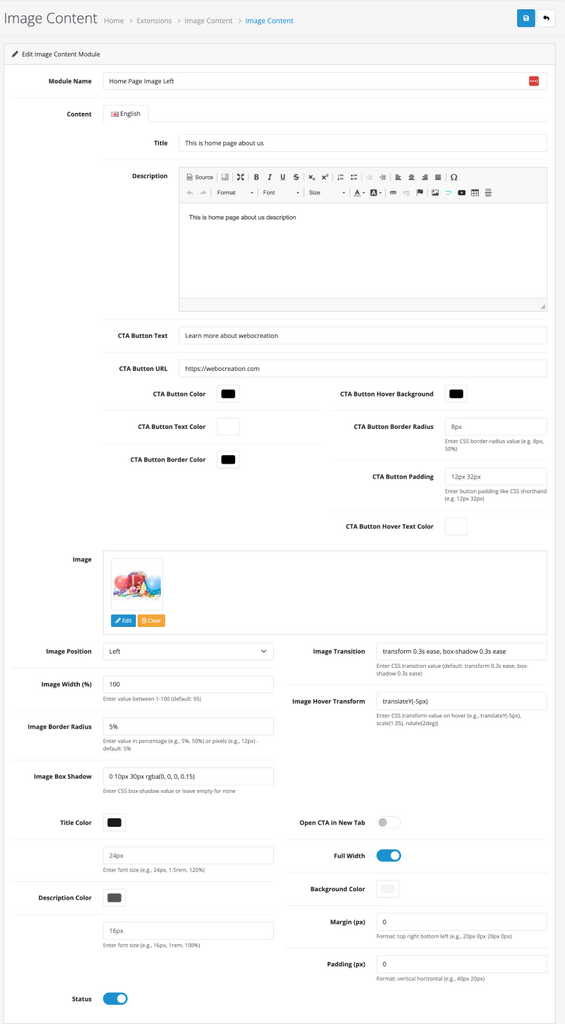
You will get a form with the following fields:

  • Module Name
  • Title
  • Description
  • CTA text, URL, and its styles fields
  • Image
  • Image Position (Left or Right)
  • Image Styles
  • Font sizes of Title and Description
  • Title and description text color
  • Background Color
  • Full width selection
  • Margin
  • Padding
  • Status

Add those settings as needed. The module integrates seamlessly with OpenCart 4’s existing systems and requires no complex setup.

Opencart 4 Image Content settings

With the above settings, you can see the output in the frontend like below:

Image Content frontend

What Makes the Image Content Module Special?

Multilingual Support from the Ground Up

One of the standout features of this module is its comprehensive multilingual support. Every aspect of the content can be customized for different languages:

  • Titles and descriptions in multiple languages
  • CTA button text and URLs that adapt to your audience’s language
  • Language-specific styling for complete customization per language

This ensures that your international customers receive a truly localized experience, from content to visual presentation.

Advanced Styling Options

The module doesn’t just display content—it allows you to create stunning visual experiences with extensive styling controls:

Image Customization

  • Adjustable width percentages for perfect layout control
  • Border radius and box shadow effects for modern aesthetics
  • Smooth transition and hover transform effects
  • Professional image presentation with customizable positioning

Typography Control

  • Custom font sizes for titles and descriptions
  • Color customization for optimal readability and branding
  • Responsive text sizing for mobile devices

Call-to-Action Enhancement

The CTA button system is particularly impressive, with fully language-specific styling:

  • Background, text, and border colors
  • Border radius and padding controls
  • Hover effects for interactive engagement
  • Option to open links in new tabs

Responsive Design Excellence

Built with Bootstrap and modern web standards, the module ensures your content looks perfect on all devices:

  • Mobile-optimized layouts that stack content vertically
  • Adaptive text sizes and spacing
  • Touch-friendly interactive elements
  • Cross-browser compatibility

Recent Major Updates (Version 1.1.0)

The latest version brings significant improvements to the admin experience and functionality:

Redesigned Admin Interface

The admin panel has been completely reorganized with a two-column layout that makes configuration intuitive and efficient:

  • Logical grouping of related settings
  • Full-width image settings with internal column organization
  • Streamlined workflow for faster setup
  • Visual clarity with better spacing and organization

Enhanced Typography Controls

Font size customization has been added for both titles and descriptions, giving you complete control over your content’s visual hierarchy.

Fully Multilingual CTA Styling

What was once a limitation is now a strength—all CTA button styling options are now language-specific, allowing you to:

  • Use different color schemes per language
  • Adjust button sizes and spacing for different character sets
  • Create culturally appropriate hover effects
  • Maintain brand consistency across languages

Real-World Applications

Product Showcases

Create compelling product presentations with images, detailed descriptions, and prominent call-to-action buttons that drive purchases.

Landing Pages

Build conversion-optimized landing pages with hero sections that combine striking visuals with persuasive copy and clear next steps.

Promotional Campaigns

Design seasonal promotions or special offers with eye-catching imagery and language-specific messaging that resonates with your audience.

Category Pages

Enhance category pages with featured content sections that highlight key products or collections.

Technical Benefits

Performance Optimized

  • Inline CSS for minimal HTTP requests
  • Per-instance styling to avoid conflicts
  • Efficient image handling with automatic resizing

Developer Friendly

  • Clean, maintainable code following OpenCart standards
  • Extensive customization hooks for further development
  • Comprehensive documentation and support

SEO Ready

  • Semantic HTML structure
  • Alt text support for images
  • Clean URLs and proper heading hierarchy

Conclusion

The Image Content Module represents the evolution of OpenCart module design—combining powerful functionality with an exceptional user experience. Whether you’re a store owner looking to enhance your visual presentation or a developer seeking a flexible content solution, this module delivers professional results with minimal effort.

OpenCart Redirects Manager Module for free 4.1.0.3

The Redirect Manager is a powerful OpenCart module extension designed to help store owners manage URL redirects and efficiently handle “404 Not Found” errors. This module offers a user-friendly interface within the OpenCart admin panel, allowing you to create, edit, and delete redirects, thereby preventing traffic loss from broken or outdated links.

🧩 What Is the Redirection Module?

The Redirection Module for OpenCart allows you to set up and manage 301 (permanent) and 302 (temporary) redirects directly from your admin panel — no need to edit .htaccess manually.

It’s perfect for:

  • Redirecting old product URLs to new ones
  • Merging categories or changing slugs
  • SEO optimization after site migration
  • Catching and fixing broken links (404s)

Key Features

  • Full Redirect Management: Create, edit, and delete URL redirects with ease.
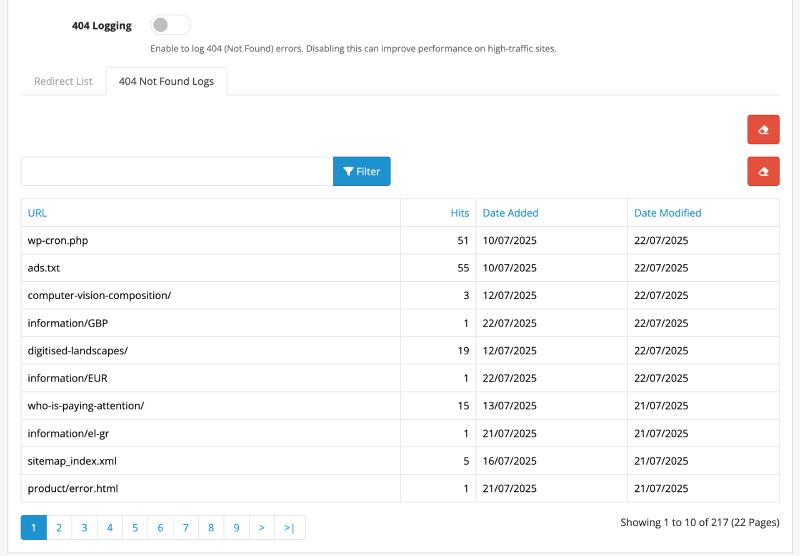
  • 404 Error Logging: Automatically logs all “404 Not Found” errors, giving you insight into broken links that visitors are trying to access.
  • Bulk Actions: Delete multiple redirects at once using the checkbox selection.
  • Multiple Response Codes: Choose the appropriate HTTP status code for your redirects (301 Permanent, 302 Found, 307 Temporary).
  • One-Click Redirect Creation: Convert a logged 404 error into a redirect with a single click.
  • Import & Export: Easily import and export your redirect list in CSV format, perfect for migrating or bulk-managing URLs.
  • Permissions Control: The module integrates with OpenCart’s user permission system, ensuring only authorized administrators can manage redirects.
  • AJAX-Powered Deletion: Delete individual redirects directly from the list without a full page reload, providing a seamless and fast user experience.

Example

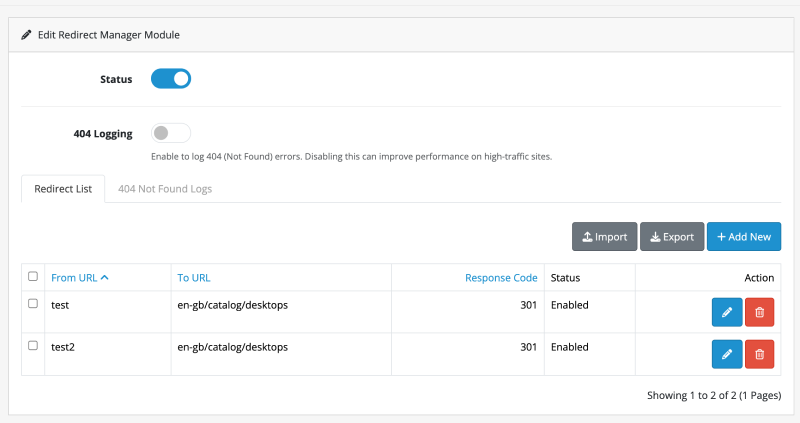
If you visit https://demo.webocreation.com/test it will redirect to https://demo.webocreation.com/en-gb/catalog/desktops

How to Use

  1. Installation: Install the extension through the OpenCart admin panel under Extensions > Installer.
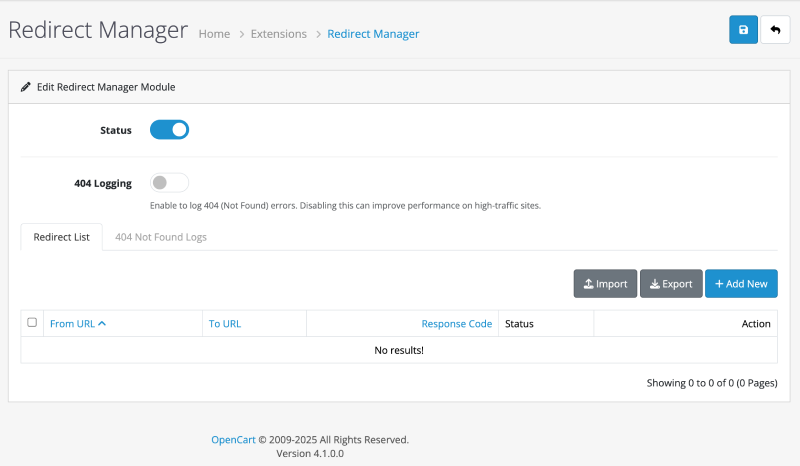
  2. Access: Navigate to Extensions > Extensions, select Modules from the filter, and find the Redirect Manager. Install and edit it to access the main settings page.
    Redirect manager Opencart
  3. Managing Redirects:
    • Add: Click the blue + button to add a new redirect.
    • Edit: Click the blue pencil button next to any entry to edit it.
    • Delete: Click the red trash can button to delete a single redirect. You will be asked for confirmation.
      CRUD redirect opencart
  4. Using the 404 Log: Click on the 404 Log Tab to view a list of URLs that resulted in a “Not Found” error. You can add these URLs as new redirects directly from this list.
404 logging to analyze and add the redirect in Opencart

🗺️ How to Use the Redirection Module

  1. Navigate to Admin > Tools > Redirection Manager
  2. Click Add New Redirect
    • From URL: (e.g., /old-product-url)
    • To URL: (e.g., /new-product-url)
    • Type: 301 (Permanent) or 302 (Temporary)
  3. Save your changes — and it’s live!

✅ You can also bulk import redirects by uploading a CSV file:

from_url,to_url,type
/old-url-1,/new-url-1,301
/old-url-2,/new-url-2,302

💡 Use Case Scenarios

ScenarioWhat to Do
Product removedRedirect to a replacement product or category
Changed URL slugsAdd a 301 from old slug to new one
Rebranded categoriesRedirect old category URLs to the new one
Site restructureUse bulk upload to quickly set up new paths

📈 SEO Benefits

  • Prevents 404 errors that harm SEO
  • Helps preserve link equity from old URLs
  • Provides better crawlability and user experience
  • Avoids penalties for duplicate content

Technical Implementation Highlights

This module is built following OpenCart 4.x best practices, utilizing the MVC-L (Model-View-Controller-Language) pattern and event system.

Admin Controller (admin/controller/module/redirect_manager.php)

The controller handles all the business logic for the module. Key methods include:

  • index(): Loads the main module page and settings.
  • getList(): Fetches and prepares the list of redirects for display.
  • delete(): Handles the deletion of single or multiple redirects. It performs a permission check and returns a JSON response to the client.
  • validateDelete(): A protected method that ensures the user has the ‘modify’ permission before allowing a delete operation.

Admin View (admin/view/template/module/redirect_list.twig)

The view template for the redirect list contains the HTML structure and the client-side JavaScript needed for the dynamic delete functionality. A key feature is the AJAX call that handles the delete request:

$('#form-redirect').on('click', '.btn-danger', function(e) {
    e.preventDefault();

    if (confirm('{{ text_confirm }}')) {
        $.ajax({
            url: $(this).attr('href'),
            dataType: 'json',
            success: function(json) {
                // ... handle success and error messages

                // Reload the redirect list container
                $('#redirects').load('index.php?route=extension/redirect_manager/module/redirect_manager.list&user_token={{ user_token }}');
            }
        });
    }
});

This script listens for clicks on delete buttons, shows a confirmation dialog, and sends an AJAX request to the delete() method in the controller. On success, it reloads the #redirects container with the updated list, avoiding a full page refresh.

Final Thoughts

Improve SEO and user experience with this Redirection Module for OpenCart. Easily manage 301/302 redirects, monitor 404s, and prevent broken links. It’s quick to install, easy to configure, and highly useful for modern e-commerce sites. We hope you liked this OpenCart module. Please subscribe to our YouTube Channel for OpenCart video tutorials. You can also find us on Twitter and Facebook. Do you have questions or need a custom feature added? Feel free to contact us at WeboCreation.

How to build a free eCommerce website using Opencart 4 user manual in 2026

This Opencart user manual is for getting started with the Opencart online eCommerce website for 2024 for beginners, we are listing the best videos, blog posts, examples guides, tips, and tricks to run your Opencart shop successfully. We are showing both the frontend and backend management of Opencart.

Introduction

In this opencart 4 user manual, we are showing how we can set up an online eCommerce store with Opencart 4 for 2024. This is a list of topics covering the Opencart user manual

Get a domain name and hosting – We use onlydomains.com as we can get a domain name at $8 which is the cheapest that we found and for hosting you can use Google Cloud which gives $300 for free or use another hosting as per your choice.

Install Opencart

In the above tutorial, we will show how to install Opencart and set up the custom URL with the virtual host.

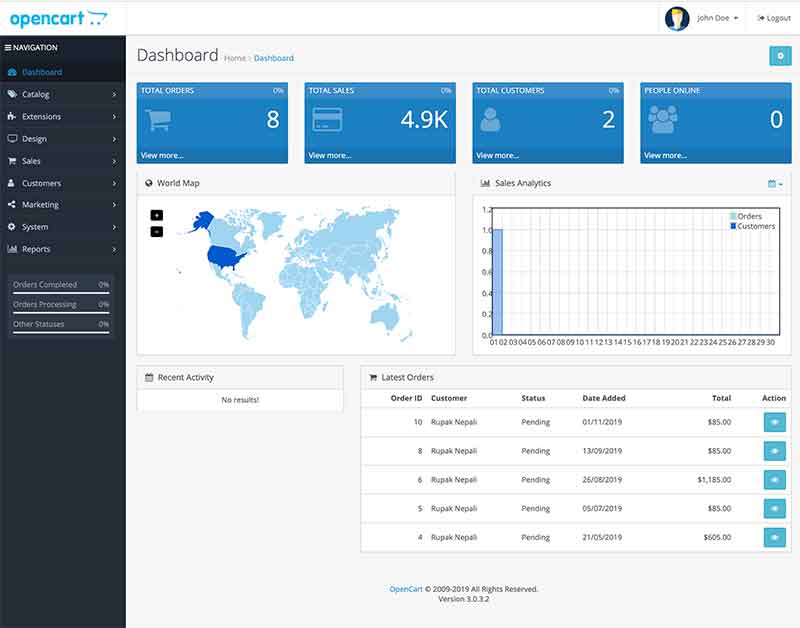
Login into Opencart Administration

Go to http://YOURURL/admin, enter your username and password and you will be in the Administration section.

Opencart Administration

Admin user profile change in Opencart

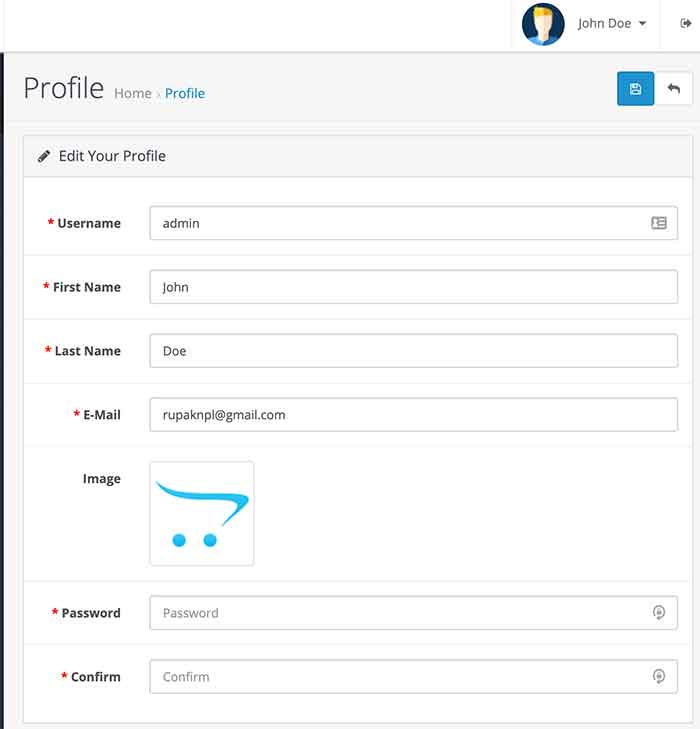
In the default Opencart installation the default user’s First Name and Last Name is John Doe so to change it just click in the John Doe on the top right corner and click “Your Profile” Then you can change the User details, and we will show you how to change by going on System Users later.

user profile change in Opencart

Change as per your username. first name, last name, email, image, and password.

System

In the System section, we manage and enable global or system settings of the Opencart eCommerce store like users, localization, languages, statuses, length, weight classes, and many more.

Settings

All settings details of the Opencart are in the link below, which shows local settings, options, mail settings, and server settings.

https://webocreation.com/settings-configuration-in-opencart-3-local-option-image-mail-and-server/

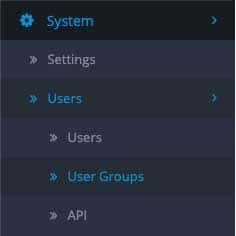
Users

To manage the users, user groups, access permission, modify permission, and API users in the Opencart check the following blog post:

User menu

https://webocreation.com/opencart-user-permissions-group-management-and-api-users/

Localization

In localization, we manage the local values of the stores like store locations, languages, currencies, stock statuses, order statuses, returns, countries, zones, geo sones, taxes, length classes, and weight classes.

Store location:

We can show multiple locations for each store so this is the section where we enter the store locations. Visit the blog below which shows how to add multiple stores and show it on the Contact us page.

https://webocreation.com/how-to-show-multiple-store-locations-in-contact-us-page-of-opencart/

Languages

Opencart supports multi-language, so the languages section manages the languages for the store, by default it has the English language. We can upload a new language, add a new language, set a different default language than English, and create a new custom language pack for Opencart. Check the following two links for languages:

https://webocreation.com/add-a-new-language-in-opencart-3-and-ways-to-set-a-default-language/

https://webocreation.com/how-to-make-the-custom-language-pack-in-opencart-3/

Currencies

Go to admin >> System >> Localization >> Currencies where you will see the currencies available for use in the storefront. In the store by default is the US dollar. There are Euro, Pound, and US dollars. Go to the following post to learn all about the currencies in Opencart.

https://webocreation.com/currencies-management-in-the-opencart-3/

Stock Statuses

In Opencart 3 we can manage the stock statuses. For that go to admin >> System >> Localization >> Stock Statuses then you can enter the Stock Status Name. For details go to the following post for stock statuses:

https://webocreation.com/stock-statuses-management-in-opencart-3/

Order Statuses

In Opencart 3 we can manage the order statuses. For that go to admin >> System >> Localization >> Order Statuses then click “Add New” and you can enter the Order Status Name. For detail go to the blog post:

https://webocreation.com/order-statuses-management-in-opencart-3/

Returns (Return Statuses, Return Actions, and Return Reasons)

Opencart 3 has return functionalities by default. In this Opencart user manual, we are showing you how returns are managed and handled in Opencart 3 by the site administrator and customer. Read the following post for details:

https://webocreation.com/how-product-returns-are-handled-in-opencart-3-opencart-user-manual/

Countries and Zones:

You can manage countries and zones in Opencart.
Go to the blog post and learn more:

https://webocreation.com/countries-and-zones-states-regions-management-opencart-user-manual/

Geo Zones set up in Opencart

Zone Shipping is simply shipping that is based on the different destinations, or geo zones, based on the weight of the total order.

https://webocreation.com/what-is-zone-shipping-and-how-do-i-set-it-up/

Taxes management in Opencart

We can manage and set up taxes with geocodes in OpenCart for each product.

https://webocreation.com/opencart-setup-taxes-geocodes-us-taxes-california-residents-8-75/

Length Classes and Weight Classes management in Opencart

Opencart user manual where we are showing how we can manage length classes and weight classes. These lengths and weights are used by Shipping extensions like FedEx, UPS, etc, and will be used by Shipping API to calculate the shipping cost.

https://webocreation.com/length-classes-and-weight-classes-management-opencart-user-manual/

Maintenance (Backup/Restore, Uploads and Error Logs)

In this Opencart user manual, we are giving you details of the Maintenance links: Backup/Restore, Uploads, and Error logs.

https://webocreation.com/maintenance-backup-restore-uploads-and-error-logs-opencart-user-manual/

Add categories and sub-categories in Opencart

The video shows steps to add categories and sub-categories in OpenCart.

https://www.youtube.com/watch?v=LHbq5jxmol0

Add product options and attributes in Opencart 4

This video shows how to add products, their options, and attributes in Opencart, it shows physical product additions.

https://www.youtube.com/watch?v=Qw8cFNrRJRA

Add Manufacturers or Brands

We can add manufacturers and brands in Opencart and assign them to products and brands to have their own pages. The video shows how to create the brands or manufacturers in Opencart:

https://www.youtube.com/watch?v=d_ob7GK09Zk

Reviews management

Visitors or customers can give reviews of the product, the video below shows how we can manage the reviews in Opencart.

https://youtu.be/9MI8YRdbnOQ

Add and change the Information page, edit the About Us page, and Add a new Information page

We can add an information page, change it, and edit the About Us page, the video shows how we can do it.

https://www.youtube.com/watch?v=SQb6qQ9HL8Q

Edit the Contact Us page and add a Google map to the Contact Us page

All the Contact Us page contents are handled from the settings, so if you have read the above settings posts then you can see how to change the contact addresses, phone numbers, and other stores. In the video below we show we can add Google Maps to the Contact Us page.

https://www.youtube.com/watch?v=BlUs0TobctA
https://webocreation.com/how-to-add-google-map-contact-page-opencart/

Add and manage Recurring profiles

If you are selling products where you can distribute the prices in installments then the recurring profiles are ways to set up, likewise we products with a subscription. See the video below, where it is described how to set up the recurring profiles.

https://www.youtube.com/watch?v=v4l7ONFqMtU

Add filters

If your eCommerce site needs filters then watch the video on how to set them up in OpenCart

https://www.youtube.com/watch?v=-A17pVsMh6U

Manage extensions

https://www.youtube.com/watch?v=mXhRSXw_ycE
https://webocreation.com/uploading-installing-configuring-uninstalling-deleting-removing-opencart-module/

Setup Marketplace

https://webocreation.com/signature-hash-not-match-opencart-solution/

https://webocreation.com/how-to-install-extensions-in-opencart-3-0-2-0/

Manage Advertising

https://youtu.be/AvkBLWAUojI

Manage Analytics

In this Opencart tutorial, you will learn how to add HTML in Opencart, similarly how to add Google Analytics, Google Tag Manager, Adroll, Facebook pixels, MailChimp conversion code, Google Ads conversion in success page only, and other third-party JavaScript code in the Opencart, likewise our best way to manage the JavaScript code through google tag manager and test and preview in the google tag manager.

https://www.youtube.com/watch?v=CnJjzUYfXbU

Manage Captchas in Opencart

https://webocreation.com/set-google-recaptcha-basic-captcha-opencart-2-3-0-1/

Manage Dashboard

https://webocreation.com/manage-admin-dashboard-in-opencart-3-add-and-remove-widgets/

Manage Feeds

https://youtu.be/tHz2VSv6n5E

Manage Anti-Fraud

https://www.youtube.com/watch?v=baSR5_gjKUk

Manage Modules

https://youtu.be/mXhRSXw_ycE

Manage Payments

http://docs.opencart.com/en-gb/extension/payment/
https://youtu.be/4sSSKwA3KrM

Manage Shipping

http://docs.opencart.com/en-gb/extension/shipping/

Manage themes

https://youtu.be/v580dOJ94Oo

Manage Order Totals

See how Opencart Store credits work

https://isenselabs.com/posts/opencart-order-totals

Manage Modifications

https://www.youtube.com/watch?v=NCtiqTyEoUA

Manage Events

https://www.youtube.com/watch?v=_aH2hiUK-jo

Manage Layouts and Positions

https://webocreation.com/customize-layouts-positions-show-different-modules-opencart/

https://webocreation.com/how-to-customize-the-opencart-homepage-version-3/

Theme Editor

https://webocreation.com/administrator-theme-editor-in-opencart-3-0-2-0-default-theme/

Language Editor

https://www.youtube.com/watch?v=Q5TuFBOpzP8

Manage Banners

https://www.youtube.com/watch?v=-O2Ih2GSnvM

Manage SEO URL

https://webocreation.com/25-seo-best-practices-for-opencart-3-seo-module/

https://webocreation.com/remove-route-in-opencart-for-contact-home-and-other/

https://www.youtube.com/watch?v=5Y7DFjAKf-I

Sales and Manage Orders

https://youtu.be/1YtsodkHp74

Manage Returns

https://www.youtube.com/watch?v=ck1t8eubmwM

Manage Gift Vouchers

https://webocreation.com/manage-send-apply-and-design-custom-gift-vouchers-in-opencart-3/

Customers, manage customers, customer groups and customer approvals

It is the same for Opencart 3 and Opencart 2.3

https://www.youtube.com/watch?v=yCH2YIgfeho

Affiliates management in Opencart

https://webocreation.com/how-does-affiliate-work-in-opencart-3/

Manage Custom Fields

https://webocreation.com/managing-custom-fields-in-opencart-3-account-address-and-affiliate/

Marketing and Manage Marketing

https://www.youtube.com/watch?v=EKpcATEANXM

Manage Coupons

https://www.youtube.com/watch?v=jkklaSm9LaQ

Manage Mail

https://www.youtube.com/watch?v=ZNuauBwLSOE

Reports, Who’s Online, and Statistics

https://webocreation.com/reports-whos-online-and-statistics-reports-in-opencart-3/

We hope these lists of videos and blog posts will help you to start the Opencart shop and go deeper into it. Please don’t forget to post your questions comments or errors so that we can help you. You can follow us on our Twitter account @rupaknpl. Subscribe to our YouTube channel for Opencart tutorials, and click to see all Opencart user manuals.

AI Security Risks in 2026 You Can’t Afford to Ignore 

You must have landed on this page to know the disadvantages of AI. But you know, AI is something that you can’t ignore. You will find AI in at least one business function. But what you need is to take every step carefully.

In this article, we will explain AI risks and challenges in 2026, the top AI threats businesses should know, and how to overcome them. Let’s delve!

Why AI Security Matters More in 2026

AI is no longer a tool; it works more like a support system. Healthcare, education, and the retail industry use AI to automate complex processes, provide personalized experiences, and enable data-driven decision-making. But do you know 92% security professionals are concerned about the security implications of autonomous AI agents interacting with company data? 

Here’s a list of why security matters in 2026;

  • Vast industries use AI across financial transactions, healthcare diagnostics, transportation, and infrastructure. When these systems compromise, the consequences go beyond data breaches; they can even disrupt entire services.
  • Modern AI systems aren’t standalone; they rely heavily on APIs, cloud platforms, and third-party datasets. These new entrances may effectively bring attackers. 
  • Many AI systems make decisions automatically 
  • Deepfakes and fake content are increasing 
  • Poor security can lead to legal trouble and fines

Top AI Security Risks You Can’t Ignore 

Have you ever wondered why your business sites sometimes show new or unknown plugins appearing in the admin panel? That’s where AI security threats come from. Here’s a list that you shouldn’t ignore for the long run.

Deep Poisoning Attacks 

Sometimes hackers secretly add bad or fake data while an AI is learning. This confuses the system and causes it to give incorrect or unsafe answers later. 

How to overcome:

  • Use trusted and verified data sources 
  • Regularly check and clean your training data
  • Test your AI model before using it in real-world situations 

Model Theft & Reverse Engineering 

This is when someone copies your AI model or figures out how it works. It is like someone stealing your secret recipe after you worked hard on it.

How to overcome:

  • Limit access to your AI models
  • Use a strong security and authentication system
  • Monitor for unusual activity or repeated access attempts 

Prompt Injection & Jailbreaking

Hackers give clever inputs to trick AI into breaking its rules. This can cause the AI to reveal private information or behave in ways it shouldn’t.

How to overcome:

  • Add strong input filtering and validation
  • Set strict rules on what the AI can and cannot do
  • Continuously test your AI with tricky inputs

Deepfakes & Synthetic Media Threats 

AI can create real-looking photos, videos and images. These can be used to spread lies, scam people or damage someone’s reputation.

How to overcome:

  • Use tools to detect fake media 
  • Educate users to verify content before trusting it 
  • Add digital signatures or verifications for real content 

Supply Chain Vulnerabilities 

AI systems often use multiple data sources from other companies. If those sources are not safe, they can introduce hidden risks into your system.

How to overcome:

  • Only use trusted vendors and tools
  • Regularly audit third-party components 
  • Keep all systems and dependencies updated

Privacy Leakage & Data Exposure 

Sometimes AI accidentally reveals private or sensitive data it has learned. This can put personal or company information at risk.

How to overcome:

  • Avoid using sensitive data unless necessary
  • Use data masking and encryption techniques
  • Regularly monitor AI outputs for any leaks

How to Mitigate AI Security Risks 

To be less painless with AI Security, follow the points to be more careful;

  • Be careful what you share with AI. Do not paste passwords, financial data, or confidential business info. Because anything you type into an AI tool could be stored or learned from.
  • Most AI security problems occur because someone failed to recognize the risk. Teach teams how AI scams and deepfakes work, show examples of fake emails or voice cloning 
  • Not everyone has full access to everything. Instead, use role-based access control, enable multi-factor authentication, and restrict AI tools from accessing sensitive systems.
  • Monitor AI systems regularly. Review outputs for errors or leaks, track unusual behavior or activity, and run regular security audits. 
  • AI can actually improve cybersecurity. Detect unusual patterns or threats faster, automate threat response, and identify phishing attempts in real time. 
  • AI regulations are growing fast. Analyze what laws apply to your industry, be transparent about how you use AI, and keep records of AI decisions when needed.

The Future of AI Security 

AI is moving fast, and so are the risks around it. The future of AI security is not just about stopping hackers anymore. It is about managing a whole new layer of digital risk that did not exist a few years ago. Let’s look for trends in AI security that will rule in the upcoming years.

  • Security operations will shift toward AI that acts without human intervention to neutralize threats in real-time, moving beyond simple detection 
  • AI will analyze massive datasets to identify anomalies and behavioural deviations, reducing human error and the noise of false positives.
  • Rather than replacing human professionals, AI will shift roles from repetitive tasks to high-level strategy, requiring cybersecurity professionals to develop AI-centric skills.

Conclusion

In 2026, the conversation is no longer “is AI a cybersecurity threat?” It’s how prepared you are to handle it. The rise of AI security risks in 2026, from advanced AI hacking risks and prevention challenges to growing AI data privacy risks in 2026, shows that businesses and individuals can’t afford to stay unaware. As emerging AI threats in cybersecurity continue to evolve, so do the AI risks and challenges 2026 brings, especially amid increasing AI vulnerabilities in businesses and the risks posed by generative AI security issues.

The good news is that these risks are manageable. By understanding real-world AI security risks, focusing on AI cybersecurity best practices for 2026, and staying compliant with evolving regulations, organizations can reduce exposure to AI compliance and security risks. The key lies in knowing the top AI threats businesses should know and taking action early.

As future AI cybersecurity risks become more complex, the focus should shift toward awareness, smarter defenses, and clear strategies on how to prevent AI security risks in 2026. Because in the end, the biggest risk isn’t AI itself, it’s ignoring it.

Top OpenCart Development Trends to Watch in 2026

Do you want to know the top OpenCart development trends of 2026? If yes, then you are exactly where you need to be. Here, we have prepared a detailed blog that provides you with a list of top trends. Apart from that, the blog also explains OpenCart, its features, and its pros and cons. Let’s explore. 

What is OpenCart? 

Since OpenCart is an open-source eCommerce platform, it is free to download and upgrade. It uses a variety of HTML elements and operates on a MySQL or PostgreSQL database. 

It is built on PHP and MVC architecture. OpenCart does not ask for any type of monthly fees. 

You may take advantage of its built-in SEO, manage customers, products, coupons, tax regulations, orders, and more thanks to its strong shop management features.

Additionally, OpenCart lets you choose outstanding themes and modules to increase the functionality of your online business. 

OpenCart users also receive free or paid community help.

OpenCart now offers two platforms: CloudStore, which is a paid platform, and Free.

CloudStore is a cloud-based version that costs about $33 a month for businesses. However, there is a support cap, so if you need more alternatives, you will have to spend $199 a month.

Top OpenCart Trends in 2026

As we already know, OpenCart is an ecommerce platform, which means any trend of it also becomes a part of the entire ecommerce landscape. Here we have listed all the important trends of 2026. Let’s check them out. 

AI-Powered Personalization

By 2026, personalization for ecommerce will evolve from being considered a “good to have” element to being the main driver of customer engagement and revenue generation. Customers will be looking for online vendors to understand their preferences, intentions, and behaviors instantly. 

Personalization technology through artificial intelligence enables companies to give their customers personalized services instead of generic ones. Rather than showing the same products to everyone, AI tailors content and promotions based on individual customer behavior.

Customization using personalization tools includes:

  • Unique homepage for different customers.
  • Product recommendations based on behavior.
  • Email, SMS, and push notifications personalized using AI
  • Price and promotion personalization

Increased Efficiency with AI 

There’s little doubt that artificial intelligence (AI) is transforming the ecommerce landscape. For years, commerce teams have used the technology to automate and personalize product recommendations, chatbot activity, and other processes. 

However, generative and predictive AI trained on large language models (LLMs) now provide even more prospects for increased efficiency and scaled personalization. AI is more than just an ecommerce fad; it can increase team productivity and consumer satisfaction.

Focus on Data Management and Harmonization

Data is the most valuable corporate asset. It is how you evaluate your clients, make informed decisions, and assess success. As a result, ensuring that your data is correct is vital. Businesses gather a lot of data, but they don’t necessarily know how to manage it. 

This is where data management and harmonization come in. They combine data from several sources, including customer relationship management (CRM) and order management systems, to create a comprehensive picture of all of your business activities. 

With harmonized data, you can discover insights and act on them faster, increasing customer happiness and revenues. Harmonized data also allows you to use AI (including generative AI), automation, and machine learning to improve marketing, service, and sales efficiency. 

Voice Search Optimization

The global speech recognition market is predicted to grow to approximately $50 billion by 2029. Websites must now be optimized for voice search in order to be accessible and provide the best user experience possible.

With smart speakers, smartphone assistants, and in-car voice commands becoming the standard, optimizing for voice search in 2026 requires context rather than keywords. 

This includes arranging material in plain language, directly answering popular queries, and employing schema markup such as FAQ and HowTo. Voice queries are typically longer and more conversational; thus, optimizing for intent and giving brief, spoken-friendly responses is critical. 

Google’s algorithm emphasizes highlighted snippets and zero-click results. Both of them are powered by voice-optimized material. Voice UX design is also evolving, prompting developers to reconsider how users browse and interact without touching a screen.

Serverless Architecture 

Serverless architecture is another significant trend of OpenCart. It simplifies the development and management of web applications by decreasing system overload, data loss, and server costs.

Using technologies such as AWS Lambda, Vercel, Netlify, and Azure Functions, developers may run backend code without having to set up or manage infrastructure. It’s pay-as-you-go, infinitely scalable, and perfect for event-driven apps and microservices. Serverless is particularly useful for real-time services like chat, streaming, and notifications. 

And it’s not just about performance! It’s about allowing developers to focus on code rather than capacity planning. 

As a bonus, you can deploy new features faster and with fewer DevOps issues. As edge computing expands, anticipate serverless and CDN-based operations to collaborate for ultra-low latency experiences.

Blockchain Technology 

With its decentralized and secure structure, this breakthrough technology is changing the face of web development. Expect blockchain to have an innovative impact on industries such as commerce and data storage.

This year, blockchain is going beyond the crypto frenzy and into actual web applications. Decentralized identity (DID) systems provide individuals more control over their personal data, and smart contracts enable secure transactions on the web. 

Blockchain improves e-commerce by making payments, product sourcing, and supply chains more transparent. Web3 is also gaining traction: decentralized apps (dApps) developed on platforms such as Ethereum and Solana are changing the way we think about ownership, authentication, and content monetization. 

Personalized Loyalty Programs

Attracting new consumers is crucial, but so is retaining old ones. That implies you must find strategies to boost loyalty and foster brand love. Customers are increasingly interested in brand loyalty programs, but they want real rewards and experiences. 

So, what is the key to running a good loyalty program? In one word: personalization. Customers do not want to give up their data for a clunky, impersonal experience that requires them to jump through hoops to redeem points. They prefer direct, exclusive offers. 

Experiments that have been carefully selected. Relevant incentives. Six out of ten consumers prefer to receive discounts in exchange for joining a loyalty program, and roughly one-third value exclusive or early access to products.

Key Features of OpenCart

Here we have listed some of the key features of OpenCart. Let’s explore. 

Easy to Use and Intuitive 

The OpenCart admin interface makes it simple to handle items, user accounts, and multi-store configurations. The drag-and-drop functionality of the platform makes it simple to create and arrange new categories and goods.

Mobile-First Strategy

OpenCart guarantees the best possible mobile responsiveness. It comes with pre-made layouts that can easily adapt to various screen sizes, making your store usable and accessible on all gadgets, including tablets and smartphones.

Dynamic Pricing Plans 

Develop adaptable pricing plans by utilizing OpenCart’s extensive capabilities. The platform facilitates the use of coupons, discounts, and special offers, which makes it simpler to attract and keep clients.

Digital Products, Simplified

OpenCart offers simplified procedures for handling downloadable products for retailers who sell digital goods. It improves user experience and operational effectiveness by supporting many configurations to accommodate different kinds of digital offerings.

Multi-Store

With OpenCart, you get a single admin interface that allows you to manage different stores easily. It also makes listing products on different stores much simpler. Additionally, you also get to localize settings, choose unique themes for every store, and set the per-store product prices. 

Pros and Cons of OpenCart

After top trends and key features, it is also necessary that we take a look at the pros and cons of OpenCart. 

Pros

  • Comes pre-equipped with numerous features
  • Free to download 
  • Wide range of options for extensions 
  • Easy to set up and manage 
  • Large and active community 

Cons

  • Lacks advanced features 
  • Requires constant maintenance and updates for security 
  • Absence of direct customer support 
  • Need for technical knowledge 
  • Restricts stability 

Final Thoughts

Now, as the blog comes to an end, you know about some of the top OpenCart trends that help you take your business to the next level. With a wide range of extensions, you unlock limitless functionality. However, to perfectly leverage extensions, you need to hire ecommerce developers who understand how OpenCart works. They also help you avoid the disadvantages of this platform.

Top Legacy System Modernization Trends in 2026

Technology never waits. Although a few companies have been riding the digital transformation wave over the years, many organizations continue to run on outdated infrastructure, silently bleeding productivity, increasing security risks, and limiting innovation. Professional Legacy System Modernization services have become a strategic consideration for businesses that wish to remain competitive in 2026. Never has there been a greater urgency to modernize– nor have strategies to do it been wiser.

You may be a CTO who needs to assess your next IT roadmap, or you may be a business leader just trying to keep up with the times; knowing the direction modernization is taking can guide your decisions. And now, let’s dissect the trends that are defining the industry.

1. Cloud-Native Migration Is Not an Option.

Several years ago, relocating to the cloud was a strategic benefit. Nowadays, it is a minimum requirement. As of 2026, companies will go beyond mere lift-and-shift migrations. They are re-architecturing applications to be cloud-native – built to the ground, optimizing to exploit scalability, elasticity, and microservices architecture.

Companies that have not migrated sooner are paying higher costs to support moaning in-house systems than the migration costs. The economics have reversed, and firms that adopt cloud-native models are experiencing an accelerated deployment process, less downtime, and better cost control.

2. It is being accelerated by AI-Powered Modernization.

Among the most thrilling changes that are currently underway is the introduction of artificial intelligence to accelerate the process of modernization itself. The AI tools can now analyze old codebases, detect dependencies, highlight vulnerabilities, and even automatically produce documentation, tasks that previously required months of manual effort.

This is especially useful with systems developed in COBOL, RPG, or other older programming languages, where expert programmers are becoming a rarity. AI does not replace the human know-how required to make critical decisions, but it drastically reduces the time and cost of assessment and migration planning.

3. API-First Strategies Are Making the Gap between old and new.

A complete system overhaul cannot be done in all organizations overnight. This is the reason why API-first modernization has been one of the most viable methods in 2026. Rather than tearing out legacy systems wholesale, businesses are encasing them in new APIs that enable new applications and digital frontends to interact with older backends.

This “strangler figure” strategy allows the companies to modernize in a gradual way – introducing new capabilities without interfering with the existing operations. It is a risk-controlled process of evolving, and it is working in businesses such as banking, healthcare, logistics, and more.

4. Security-Based Modernization Is Starting to Take Priority.

The issue of cybersecurity is driving modernization up the boardroom agenda. The legacy systems tend to be based on old protocols, incompatible software versions, and architectures not originally designed to address the current threat environment. Over the next several years, more organizations are starting to take security vulnerabilities in aging infrastructure as a direct business risk, rather than an IT issue.

There is also pressure of regulation. Data privacy and protection compliance frameworks are increasingly becoming tougher worldwide, and legacy systems are often not able to meet current demands. Efficiency is not the only reason why modernization is accelerating; there is also a need to remain legally and operationally safe.

5. Expanding Access is through Low-Code and No-Code Platforms.

The modernization space has conventionally needed extensive technical competence, which is costly and lengthy. However, with the emergence of low-code and no-code platforms, the role of people who can join in the modernization process is shifting. Now, business analysts, operations workers, and domain specialists can create workflows and interfaces without a line of code.

This democratization of development implies that modernization projects are undertaken at a quicker pace, and with more involvement of the people who use the systems on a daily basis. It also lessens dependency on the limited talent of developers; this is one of the biggest bottlenecks in large-scale IT transformation projects.

6. Modernization of Data Is Growing inseparable from System Modernization.

You cannot discuss updating systems without discussing the data present within systems. Organizations are realizing in 2026 that it is not possible to modernize the application layer without modernizing the data layer, which introduces new issues. Any modern front-end that is built upon siloed data or won’t work with other data formats or other proprietary databases limits the usefulness of the data.

Modernization of data. Data modernization (such as migration to cloud data warehouses, adopting data lakehouse architectures, and real-time data pipelines) is now being planned alongside system upgrades, as opposed to an afterthought.

Keeping on top of a fast-changing environment.

The most progressive organizations are not merely responding to these trends of modernization of their legacy systems; they are constructing internal organizational cultures and forms of governance that view modernization as an ongoing activity, not as a project. Technology Debt is a silent killer, and the longer it is left unchecked, the more costly it becomes to deal with.

The companies that will be leaders of their industries in the years to come are those that are investing in the present in infrastructure that is flexible, secure, and designed to meet the speed of change that is characterized in modern markets. It is time to evaluate your system’s position – and plot a practical course.

Generative AI in 2026: Trends, Opportunities, and Business Impact

Generative AI is no longer a novelty; it is becoming as essential as cloud computing or the internet itself. In 2026, businesses are not asking “Should we use AI?” But instead, how deeply can we integrate it? From content creation to product design, generative AI is reshaping workflows, decision-making, and customer experiences at scale. 

What Is Generative AI?

Generative AI is a type of artificial intelligence capable of generating new content, such as text, images, audio, video, and data, instead of just analyzing or classifying existing information. Generative AI often relies on large language models. These models are trained on massive datasets to understand the underlying structure and patterns of information.

ChatGPT, Claude, Midjourney, DALL-E, and GitHub Copilot are examples of generative AI.

Key Trends Defining Generative AI in 2026

Do you know 71% of companies have already integrated generative AI into at least one of their business functions? Generative AI trends in 2026 will be sharper, more aware of its context, more independent, and more accountable. It is set to reshape how businesses get things done, make decisions, and serve their customers.

Multimodel AI

Imagine you need to run a campaign but do not have the skills to design posts, images, or audio. This is where multimodal AI comes into play. It helps to design all in a single workflow.

Results:

  • The marketing team generates full campaigns in minutes, like videos, visuals, or voiceovers
  • Product teams prototype experiences using AI-generated simulations.

AI Agents 

Imagine you are planning a trip; you need a comprehensive trip chart that includes the budget, accommodations, places to visit, and eateries. As a human, you need to go through analyzing vast datasets. But to eliminate this span of time, you jump to Autonomous AI agents that can plan, execute, and refine tasks with minimal human input.

Examples:

  • AI handling customer support end-to-end 
  • AI is managing supply chain adjustments in real-time.

Hyper-Personalization at Scale

When you visit a website, there’s a pop-up chatbox, just like an assistant, that assists with your queries 24/7/365. It helps with navigation, provides a brief overview of the services they actually provide, and helps solve queries. This is where AI helps in individual personalization.

Application

  • Personalized education content
  • Dynamic e-commerce storefronts
  • Tailored healthcare insights

Enterprise Grade AI Adoption 

Enterprise-grade AI adoption is the strategic, secure, and large-scale integration of AI technologies across an organization’s operations, moving beyond isolated pilots to production environments.

Why it matters:

  • Better accuracy 
  • Stronger data security 
  • Competitive differentiation

Regulation and Responsible AI

Governments and organizations are implementing stricter AI governance frameworks.

Focus areas:

  • Transparency
  • Bias reduction 
  • Data privacy 

Opportunities Across Industries 

Generative AI is no longer optional. Instead, it plays a crucial role in industries by helping staff to reduce workloads and providing instant support to users. Here’s a list of industries that have already integrated AI into their systems and workflows.

Healthcare 

AI in healthcare is reshaping workflow operations, enabling doctors to generate diagnostic and treatment plans. It also helps to speed drug discovery through simulation.

Retail & E-Commerce

With an AI function system, users can try clothes virtually, such as with Lenskart, which lets them try lenses before purchasing suitable specs. 

Education

Students or learners can use platforms with AI integration to study complex issues more easily. 

Media & Entertainment 

AI helps with scriptwriting, video production, and AI-powered game design. Interactive storytelling experiences.

How Generative AI Impacts Business

Here’s a list of the impact of generative AI on businesses. 

Productivity Explosion

Teams are achieving 5–10x output with the same resources.

Result: Smaller teams, bigger impact

Redefinition of Rules

Routine tasks are automated, while human roles shift toward:

  • Strategy
  • Creativity
  • Oversight

Faster Innovation of Cycles

Ideas move from concept to execution in days instead of months.

Cost Efficiency Meets Creativity

AI reduces operational costs while unlocking new creative possibilities.

Challenges To Watch

So, what challenges might businesses face when integrating AI systems into their workflows? Let’s grab it!

  • Data security risks
  • Model hallucinations
  • Ethical concerns
  • Skill Gaps in the Workforce 

Businesses that ignore these risks may face reputational and operational setbacks.

How Businesses Can Prepare

Businesses can start by investing in AI literacy, start small and scale fast, build responsible AI frameworks, and integrate, rather than isolate.

Final Thoughts

Generative AI in 2026 is becoming essential for modern businesses. Key generative AI trends 2026 show rapid growth in automation, personalization, and innovation. The future of generative AI in business lies in transforming workflows and decision-making, with strong generative AI use cases in 2026 across industries.

As AI content generation trends 2026 evolve, companies are creating faster, smarter content. Overall, the ways generative AI is changing industries highlight major efficiency gains, new opportunities for startups, and significant benefits for enterprises.

How AI Is Changing Legacy Application Modernization Forever

Think of a question that the vast majority of technology vendors will never ask you. Imagine that it was not about your budget, your team, or your desire to change, that your last modernization effort failed, or that you have never attempted to modernize the company at all? What about the fact that the process itself was ultimately flawed, and no money or planning could have helped to correct it by the old rules?

That is not a supposition. The legacy modernization of decades worked on a flawed model that had a structural weakness in the middle of it. It required flawless knowledge of imperfectly understood systems, by their nature. Undocumented code. Forgotten integrations. Rules in business that were only in the minds of the employees who had long since passed. Each project began with an information gap that became more costly to fill the further the teams went.

AI failed to enhance that model. It replaced it. And the business owners and decision-makers’ implications in 2026 are so great that they should be the reason to rethink the scope of what legacy system modernization services may potentially provide.

Compounding Cost of Delay.

The modernization market of the world had reached 29 billion in 2026. Analysts estimate that it will surpass 66 billion by 2031. The figures are indicative of organizations in all fields coming to the same conclusion that the annual cost of supporting legacy systems has forever exceeded the cost of substitution.

The definite pressures are properly documented. Sixty to 80 percent of IT budgets are consumed by maintenance. Eighty-seven percent of organizations have software with exploitable vulnerabilities. An ageing workforce of legacy-skilled developers who are retiring at a rate of 10 percent a year. The regulatory frameworks GDPR, HIPAA, the EU AI Act, and others, which place requirements that aging architectures lack the capacity to handle.

The least written about is the compounding nature of these costs. Each quarter of deferred modernization does not simply add to the total. It compounds it – the more technical debt a company has, the greater its vulnerability to security, and the more costly the remaining talent pool can be.

What AI Replaced – and Why It Matters.

Legacy modernisation refers to the process of upgrading old software to modern performance, security, scalability, and integration requirements. The strategies offered, such as cloud migration, refactoring, rebuilding, and API enablement, are established.

The approach has changed in the methodology of AI. There are three changes that are imminent.

Exposure was all-inclusive and quick. Smart-based tools of analysis can now generate entire inventories of systems, all applications, dependencies, data flows, and uncharted relationships, within weeks. A commercial laundry services company that operates in twelve locations was tested by artificial intelligence discovery and discovered that their route optimization system was taking scheduling information supplied by an abandoned HR platform via an integration that was turned off two years prior. The association was causing imaginary scheduling conflicts that had been attributed to operator error for a year and a half.

Translation was made computerized and testable. Production-scale Generative AI translates legacy code into modern programming languages and has been shown to reduce the timeline by 40 to 50 percent. More to the point, the output can be tested as soon as it is produced, removing the long periods of manual review that traditionally took months before.

Validation became exhaustive. AI testing tools are able to generate thousands of test scenarios automatically – with edge cases that human teams can hardly envision. In testing with AI, a regional credit union found out that their loan processing system had been charging an expired interest rate to loans opened prior to a change in their policies in 2018. This misalignment impacted about 340 accounts and was not detected in three years of manual audits.

A Six-Step Framework of Trustworthy Implementation.

Step 1 — Comprehensive discovery

Identify your entire technology environment with AI analysis tools. Add departmentalized discussions. During the discovery, an independent pharmacy chain realized that its prescription management system was exchanging patient information with an inventory system via a file-transfer operation that a former pharmacy technician had set up five years prior. The relationship breached their data handling procedures. By discovering it prior to migration, they were able to remedy a compliance exposure of which they were unaware.

Step 2 — Quantification of total costs.

Assemble a total financial image that encompasses emergency assistance, expert work, workaround, lost earning prospects, and capacity lapses. This exercise was completed by a family-owned moving and storage company that found that their legacy environment was costing them $9,100 per month to support it – almost the same amount they would have spent on monthly modernization. Their general manager summed up the discovery in a simple statement: “We are spending the same amount of money. One choice would leave things broken. The other choice would fix stuff.

Step 3 — Strategic triage

Classify all applications based on business impact, risk profile, and existing functionality. Contemporaryize what is actively hurting operations. Maintain constant systems. Retire dormant software. A chain of independent bookstores abandoned one of their legacy event management tools and an unused customer loyalty platform, and reclaimed $22,000/year in licensing fees, which were redirected immediately to updating their point-of-sale system.

Step 4 — First execution.

Start with the system that yields the most easily noticeable improvement when fixed. One of the specialty chemical distributors chose their order fulfillment platform – the root of their recurring shipping delays that had already led to official complaints by three of their top ten accounts. Eight-week AI-guided migration provided an automated warehouse allocation cloud-based replacement. The accuracy of shipping increased by 79 percent to 97 percent. Two out of the three complaining accounts had augmented their quarterly order volumes in sixty days.

Step 5 – Parallel operation and validation.

Concurrently run legacy and modernized systems until full AI testing is done to ensure behavioral equivalence in all scenarios. During the process of migrating to a new platform, a medium-sized event management company managed three weeks of parallel registration. More than 1,400 event registrations were made on both systems, with not a single discrepancy of data. The information about the transition was communicated to staff via an internal newsletter -the workflow was not interrupted.

Step 6 — Operational continuity

Implement monitoring, quarter reviews, and documentation maintenance as standard operating procedures. The difference between the organizations that maintain the benefits of modernization over the long-term and those that reestablish the previous legacy conditions over time is not technological. It is disciplinary. Regular practice yields regular results. The second crisis of modernization is caused by neglect.

Tangible Outcomes

Organizations completing AI-powered modernization report recurring system failures eliminated, processing capacity scaled to two to three times previous levels, customer-facing performance improved by 60 to 80 percent, infrastructure costs reduced by 35 to 45 percent, and development timelines compressed from quarterly cycles to weekly releases.

Addressing Practical Concerns

Cost. Phased modernization connects each investment to demonstrated returns. Positive ROI arrives within twelve to eighteen months for most organizations — roughly half the timeline of traditional full-scale rewrites.

Downtime. Parallel operation guarantees continuous business function. No system transition occurs without independent validation. Rollback is available at every stage.

Risk. AI-powered discovery and testing reduce unknowns systematically. In 2026, the measurable risk of modernization is substantially lower than the compounding risk of operating on aging, unpatched, and increasingly unsupportable systems.

How Sparkout Tech Enables This Transformation

Sparkout Tech executes legacy modernization using the framework outlined above — AI-powered discovery, business-driven prioritization, phased parallel execution, and ongoing operational stewardship.

Their legacy application modernization services are designed to deliver verified results on an initial system before any broader commitment. For organizations approaching modernization with justified caution, this model provides a structured, evidence-based entry point that minimizes exposure while maximizing early returns.

Begin With Clarity

Sparkout Tech offers a complimentary system assessment — a professional evaluation of your technology environment, risk profile, and modernization opportunities. No obligations. No lengthy proposals. A clear foundation for informed decision-making.

AI permanently changed what legacy modernization can deliver. The timelines contracted. The costs decreased. The risks became manageable. What did not change is the cost of inaction — and in 2026, that cost is accelerating faster than at any point in the last decade.

Organizations that act now build foundations for the future. Organizations that wait inherit the consequences. The distinction between the two begins with a single decision.