Rescuing Your UTMs: A Cookie-Based Approach to Reliable Attribution for multi pages and sub domains
 Rupak NepaliPublished Jun 9, 2026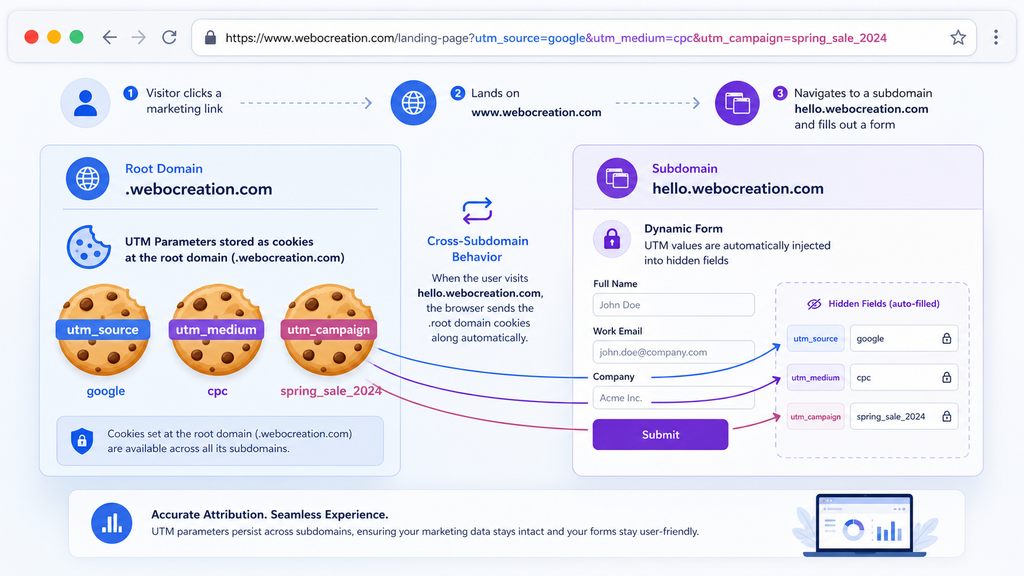
Why Your UTMs Keep Disappearing
If you care about marketing attribution, UTM parameters are the lifeblood of your reporting. But they are also incredibly fragile. They live in the URL, vanish on navigation, and are often lost when users move across subdomains or interact with dynamically rendered forms or other third-party embeds.
The result is broken attribution: campaigns that look underperforming, sources that show up as “direct,” and a CRM full of leads with no clear origin.
To fix that, we use a UTM cookie script that captures UTM values once, persists them at the root Webocreation domain, and injects them into any compatible form—no matter when the form appears in the DOM.
What the UTM Cookie Script Does
At a high level, the script does three things:
- Reads UTM query parameters from the page URL.
- Stores them as cookies shared across the Webocreation domain.
- Populates matching form fields (
utm_campaign,utm_content,utm_medium,utm_source,utm_term) even if the form is initialized asynchronously.
This pattern lets you preserve UTMs across subdomains, such as www.webocreation.com and hello.webocreation.com, ensuring the original campaign data survives the user’s entire session, not just the first pageview.
Where It Runs Today
The script is designed to be reusable and is currently embedded in multiple Webocreation pages, including:
Both copies share the same underlying logic so that UTM values are captured consistently and can be applied to any forms present on those pages.
How the Script Behaves on Page Load
On every page load, the script follows a clear decision tree:
- If the URL contains UTM query parameters:
- Each UTM value is sanitized.
- The sanitized value is saved in a cookie on
.webocreation.com. - Form fields with the corresponding names are populated immediately.
- If the URL does not contain UTM parameters:
- The script looks for existing UTM cookies.
- It applies those stored values to any matching form fields on the page.
To support dynamic or delayed form rendering (for embedded forms), the script also retries field population for a short period after load, so late-arriving fields still receive the correct UTM values.
Cookie Strategy and Lifetime
The cookie model is simple but intentional:
- Cookie names:
utm_campaign,utm_content,utm_medium,utm_source,utm_term - Domain: computed from the current hostname (e.g.,
www.webocreation.combecomes.webocreation.com) - Path:
/ - Lifetime: 7 days
- SameSite:
Lax
By deriving the cookie domain at runtime, the script can run on any Webocreation subdomain without hardcoding domain values, which makes it easier to reuse in different environments and deployment targets.
How the Cookie Domain Is Computed
Getting the cookie domain right is what enables cross-subdomain attribution without dirty hacks. The function getCookieDomain() computes the domain dynamically based on window.location.hostname:
- For single-label hostnames (e.g.,
localhost), it returns the hostname itself. - For simple, two-part domains like
webocreation.com, it returns.webocreation.com. - For common three-part hostnames like
www.webocreation.com, it returns.webocreation.com(second-level plus top-level domain). - For two-letter TLDs with likely three-part public suffixes (e.g.,
www.example.co.uk), it returns.example.co.uk.
This logic lets the script behave correctly across local development, production domains, and more complex country-code TLDs without manual tuning.
Security-First: Sanitizing UTM Values
UTM parameters come from the URL, which means they are fully user-controlled input. Treating them as trusted strings is a recipe for XSS or polluted data. The sanitizeValue(value) function cleans every UTM value before it’s stored or applied by:
- Decoding URL-encoded strings.
- Stripping HTML tags.
- Removing script-like tokens and patterns.
- Dropping quotes and semicolons.
- Trimming any leading or trailing whitespace.
This protects downstream systems from injection and keeps your analytics data usable and clean.
Core Functions and Their Responsibilities
The script is structured around a set of focused helper functions:
sanitizeValue(value)
Cleans raw UTM values to remove HTML, scripts, quotes, and other unsafe characters before storage or form population.getQueryParams()
Parseswindow.location.searchand returns a normalized object that includes only the allowed UTM parameters, ignoring anything else in the query string.setCookie(name, value, days)
Writes a cookie using the domain computed fromwindow.location.hostname, with the appropriate path and expiration.getCookieDomain()
Derives the correct cookie domain based on the current hostname, handling simple domains, subdomains, and multi-part public suffixes.getCookie(name)
Reads and returns a cookie value fromdocument.cookieso stored UTMs can be reused on subsequent pages.setFieldValue(name, value)
Finds all form fields with a givennameattribute and setsfield.valuewhen the element is aninput,textarea, orselect.
Applying and Reapplying UTM Values
The script includes several orchestration functions that ensure UTM values are applied reliably:
applyStoredUtmValues()
Reads each UTM cookie and applies its value to any form fields with matching names.applyUtmValues()
If the current URL has UTM parameters, it sanitizes, stores, and applies them immediately; otherwise, it falls back to applying existing cookie values.areUtmFieldsPopulated()
Checks whether all target UTM fields currently contain a value, which helps avoid unnecessary reapplication.reapplyUtmValuesUntilReady()
Re-applies stored cookie values every 300ms for up to 10 seconds so that fields created or modified after initial page load still receive UTM values.observeFormFields()
Uses aMutationObserverto watch for DOM changes and reapply UTM values when new form fields are injected by third-party scripts or SPA frameworks.initUtmFields()
Kicks off the entire UTM population flow once the DOM is ready or theDOMContentLoadedevent fires.
Code to capture UTM values and set cookies, and persists to different pages
<script>
    (function () {
      var utmFields = ['utm_campaign', 'utm_content', 'utm_medium', 'utm_source', 'utm_term'];
      var cookieDomain = getCookieDomain();

      function getCookieDomain() {
        var hostname = window.location.hostname;
        var parts = hostname.split('.');
        if (parts.length < 2) {
          return hostname;
        }
        if (parts.length === 2) {
          return '.' + hostname;
        }
        var tld = parts[parts.length - 1];
        var sld = parts[parts.length - 2];
        if (tld.length === 2 && sld.length <= 3 && parts.length > 2) {
          return '.' + parts.slice(parts.length - 3).join('.');
        }
        return '.' + parts.slice(parts.length - 2).join('.');
      }

      function sanitizeValue(value) {
        if (value == null) {
          return '';
        }
        var decoded = String(value);
        try {
          decoded = decodeURIComponent(decoded.replace(/\+/g, ' '));
        } catch (err) {
          decoded = decoded;
        }
        decoded = decoded.replace(/<[^>]*>/g, '');
        decoded = decoded.replace(/javascript:/gi, '');
        decoded = decoded.replace(/\b(onerror|onload|onclick|onmouseover|onmouseleave|onmouseenter|onfocus|onblur|style)\b/gi, '');
        decoded = decoded.replace(/["'`;]/g, '');
        return decoded.trim();
      }

      function getQueryParams() {
        var params = {};
        var query = window.location.search;
        if (!query) {
          return params;
        }
        var pairs = query.substring(1).split('&');
        for (var i = 0; i < pairs.length; i++) {
          var part = pairs[i];
          if (!part) {
            continue;
          }
          var pair = part.split('=');
          var name = pair[0] ? pair[0].toLowerCase() : '';
          if (utmFields.indexOf(name) === -1) {
            continue;
          }
          var value = pair.slice(1).join('=');
          params[name] = sanitizeValue(value);
        }
        return params;
      }

      function setCookie(name, value, days) {
        if (!name || value == null || value === '') {
          return;
        }
        var maxAge = (days || 7) * 24 * 60 * 60;
        document.cookie = name + '=' + encodeURIComponent(value) + ';max-age=' + maxAge + ';path=/;domain=' + cookieDomain + ';SameSite=Lax';
      }

      function getCookie(name) {
        if (!name) {
          return '';
        }
        var cookies = document.cookie ? document.cookie.split(';') : [];
        var prefix = name + '=';
        for (var i = 0; i < cookies.length; i++) {
          var cookie = cookies[i].trim();
          if (cookie.indexOf(prefix) === 0) {
            return decodeURIComponent(cookie.substring(prefix.length));
          }
        }
        return '';
      }

      function setFieldValue(name, value) {
        if (!name || value == null || value === '') {
          return false;
        }
        var fields = document.getElementsByName(name);
        var set = false;
        for (var i = 0; i < fields.length; i++) {
          var field = fields[i];
          if (!field || !field.tagName) {
            continue;
          }
          var tag = field.tagName.toLowerCase();
          if (tag === 'input' || tag === 'textarea' || tag === 'select') {
            field.value = value;
            set = true;
          }
        }
        return set;
      }

      function applyStoredUtmValues() {
        var applied = false;
        for (var j = 0; j < utmFields.length; j++) {
          var cookieName = utmFields[j];
          var storedValue = sanitizeValue(getCookie(cookieName));
          if (storedValue) {
            applied = setFieldValue(cookieName, storedValue) || applied;
          }
        }
        return applied;
      }

      function applyUtmValues() {
        var queryParams = getQueryParams();
        var hasQuery = Object.keys(queryParams).length > 0;
        if (hasQuery) {
          for (var i = 0; i < utmFields.length; i++) {
            var key = utmFields[i];
            var value = queryParams[key];
            if (value) {
              setCookie(key, value, 7);
              setFieldValue(key, value);
            }
          }
          return;
        }

        applyStoredUtmValues();
      }

      function areUtmFieldsPopulated() {
        var selectors = utmFields.map(function(name) {
          return 'input[name="' + name + '"],textarea[name="' + name + '"],select[name="' + name + '"]';
        }).join(',');
        var fields = document.querySelectorAll(selectors);
        if (!fields.length) {
          return false;
        }
        for (var i = 0; i < fields.length; i++) {
          if (!fields[i].value) {
            return false;
          }
        }
        return true;
      }

      function reapplyUtmValuesUntilReady() {
        var deadline = Date.now() + 10000;
        var intervalId = setInterval(function() {
          applyStoredUtmValues();
          if (areUtmFieldsPopulated() || Date.now() > deadline) {
            clearInterval(intervalId);
          }
        }, 300);
      }

      function observeFormFields() {
        if (!window.MutationObserver) {
          return;
        }
        var deadline = Date.now() + 5000;
        var observer = new MutationObserver(function() {
          if (applyStoredUtmValues() || Date.now() > deadline) {
            observer.disconnect();
          }
        });
        observer.observe(document.documentElement || document.body, {
          childList: true,
          subtree: true
        });
      }

      function initUtmFields() {
        applyUtmValues();
        observeFormFields();
        reapplyUtmValuesUntilReady();
      }

      if (document.readyState === 'complete' || document.readyState === 'interactive') {
        initUtmFields();
      } else {
        document.addEventListener('DOMContentLoaded', initUtmFields, false);
      }
    })();
  </script>
Why It Works Well with Dynamic and Embedded Forms
Many real-world forms are not present at initial page load. They may be:
- Embedded via a third-party marketing platform.
- Injected by a tag manager.
- Rendered by a single-page application framework.
The combination of a short-interval retry loop and a MutationObserver means this script doesn’t rely on timing luck. If a form appears in the DOM any time within the initial 10-second window—or triggers attribute changes that remove values—the script can re-apply the UTM data and keep the fields in sync.
Practical Notes and Gotchas
If a page is setting UTM cookies but a specific form is not receiving values, check the following:
- Confirm that the UTM cookies exist for
.webocreation.comusing your browser’s developer tools. - Ensure the form contains hidden inputs (or visible fields) with names that exactly match the UTM keys:
utm_campaign,utm_source,utm_medium,utm_content,utm_term. - Verify that the UTM cookie script is included before or alongside the form initialization logic, so it can observe DOM changes and start retries in time.
- If a third-party embed overwrites the UTM fields after they are set, remember that the retry loop will continue reapplying values for up to 10 seconds—but beyond that, the external script may “win” the race.
These checks typically resolve most “UTM not showing up” issues without needing to modify the script itself.
When to Use This Pattern
A cookie-based UTM persistence script is particularly useful when:
- You operate multiple subdomains within the same brand or product experience.
- You rely on embedded or dynamically rendered forms for lead capture.
- You want a front-end solution that doesn’t require backend or CRM integration work.
- You need a reusable pattern that can travel with your site templates and marketing pages.
By capturing UTMs once and making them reliably available to every compatible form, you significantly improve campaign attribution accuracy with relatively little implementation effort.

Author of four Opencart book.
The recent are Opencart 4 developer book and Opencart 4 user manual