




LATEST ARTICLES

Accessibility (ADA/WCAG) for Ecommerce Stores: Why Itโ€™s Not Optional

For ecommerce stores, accessibility is now a nonโ€‘optional requirement driven by accelerating ADA litigation and the reality that inaccessible UX directly erodes conversions and revenue. If you run an online store, โ€œweโ€™ll get to accessibility laterโ€ has quietly become one of the most expensive assumptions you can make.

The lawsuit wave you canโ€™t ignore

ADA website accessibility lawsuits have grown every year since 2017 and crossed more than 5,000 digital cases in 2025 when federal and state courts are combined. Seyfarth Shawโ€™s ADA Title III tracker reports 3,117 federal website/app accessibility suits in 2025 aloneโ€”a 27% increase over 2024โ€”and projections for 2026 are approaching roughly 6,176 digital accessibility lawsuits.

Zooming out, total ADA Title III federal lawsuits (covering both physical and digital access) hit 8,667 in 2025, roughly triple the 2013 baseline, with website cases now representing about 36% of all filings. Multiple trackers agree that since 2021, more than 4,000 digital accessibility lawsuits have been filed every year, confirming that this is a structural trend rather than a shortโ€‘term spike.

Why ecommerce is the epicenter

Ecommerce is now the single largest target category for ADA web lawsuits, accounting for roughly 69โ€“79% of all filings depending on the dataset and year. UsableNetโ€™s 2025 yearโ€‘end report found that nearly 70% of ADA web lawsuits targeted ecommerce, and among the top 500 ecommerce retailers, 35.8% had already received at least one accessibility lawsuit.

Critically, this is not just a โ€œbig box retailerโ€ problem: various reports show that 67โ€“68% of defendants have less than 25โ€“50 million dollars in annual revenue, meaning small and midโ€‘market merchants are now the primary targets. Shopify merchants and other hosted platforms feature prominently in lawsuit data, largely because their ecosystems are dense with thirdโ€‘party apps and custom scripts that introduce accessibility issues in carts, product filters, and checkout flows.

ADA, WCAG, and what โ€œcomplianceโ€ really means

In the U.S., ecommerce accessibility obligations primarily stem from ADA Title III, which requires โ€œplaces of public accommodationโ€ to be accessibleโ€”an interpretation courts have increasingly applied to websites and mobile apps that accept orders or bookings. While the ADA statute itself is technologyโ€‘neutral, WCAG 2.1 Level AA (and emerging 2.2) has become the de facto benchmark used by regulators, plaintiffs, and auditors to assess whether a site is accessible.

Internationally, similar obligations are emerging through frameworks like the European Accessibility Act (EAA) and Canadaโ€™s AODA, which also treat WCAG AA as the reference standardโ€”so global ecommerce brands cannot assume this is only a U.S. concern. Functionally, โ€œcomplianceโ€ means building and maintaining your storefront so that people using screen readers, keyboard navigation, magnifiers, or alternate input methods can browse products, add to cart, and complete checkout without artificial barriers.

Quantifying the legal risk and cost

Industry analyses of ADA web accessibility cases show that typical singleโ€‘plaintiff ecommerce settlements fall somewhere in the 5,000โ€“30,000 dollar range for demand letters and lowโ€‘complexity lawsuits, but full litigation exposureโ€”including defense, remediation, and monitoringโ€”often lands between 55,000 and 270,000 dollars per case. Breakdown data suggests that core settlement payments tend to be in the 30,000โ€“75,000 dollar range for many ecommerce retailers, with additional legal fees often adding 10,000โ€“50,000 dollars even when cases are resolved relatively quickly.

Aggregated numbers highlight how frequency amplifies impact: with around 5,000 digital accessibility suits in 2025 and an average settlement in the 25,000โ€“30,000 dollar band, the industry is absorbing well over 100 million dollars annually in payouts before remediation and reputational costs are even counted. Many reports also stress that 40โ€“46% of defendants are repeat targets, which means prior settlement does not automatically shield you from future claims if you continue to ship inaccessible experiences.

Widgets and quick fixes donโ€™t protect you

One of the most sobering data points for ecommerce owners is how often sites are sued despite having accessibility widgets or overlays installed. EcomBackโ€™s Q1 2026 report found that roughly 25โ€“26% of ADA website lawsuits involved sites using accessibility widgets, and midโ€‘year and annual datasets for 2025 show similar percentages of overlay customers among defendants.

Several trackers note that courts and enforcement agencies increasingly view overlays as insufficient because they attempt to mask structural issues instead of fixing them in the underlying code, and lawsuit data shows that 20โ€“38% of sued businesses had installed such tools at the time of litigation. The takeaway is clear: you cannot buy a oneโ€‘line script, toggle an icon, and assume you are insulated from ADA claimsโ€”genuine remediation at the template and component level is what matters.

Accessibility as core UX, not just compliance

Accessibility is often framed narrowly as a legal checkbox, but practically it is a UX discipline focused on making your store usable for more people, across more devices and contexts. Ecommerce benchmarks repeatedly find that over 90% of leading sites still have critical accessibility issues affecting navigation, images, forms, and keyboard support, and those same issues are friction points for every shopper, not just people with disabilities.

When you improve accessibilityโ€”clear labels, consistent headings, predictable navigation, adequate color contrast, and robust form validationโ€”you also improve product discovery, checkout completion rates, and overall customer satisfaction across your entire audience. Studies and practitioner guides emphasize that accessible layouts and flows reduce abandonment by removing unexpected hurdles, whether someone is using a screen reader or simply shopping oneโ€‘handed on a phone in bright sunlight.

The patterns plaintiffs keep finding

Looking at lawsuit complaints and accessibility scans, the same WCAG failures appear over and over again across ecommerce sites. WebAIMโ€™s โ€œMillionโ€ report and litigation analyses identify lowโ€‘contrast text, missing or incorrect alt text, unlabeled form fields, empty links and buttons, missing document language, broken keyboard navigation, and inaccessible modal dialogs as the most common violations.

In ecommerce specifically, accessibility studies and legal analyses highlight chronic problems in product galleries, filters, and checkout flows: carousels without keyboard support, filters that donโ€™t announce state changes to assistive tech, multiโ€‘step checkouts with unlabeled inputs, and error messages that arenโ€™t programmatically associated with the fields they reference. Because these components sit at the heart of the shopping journey, any break in accessibility directly translates to abandoned carts and lost revenueโ€”long before a demand letter arrives.

The AI factor: why risk is accelerating

New reports and practitioner writeโ€‘ups point to a rise in pro se filingsโ€”lawsuits filed by plaintiffs without attorneysโ€”which jumped to roughly 40% of federal web cases in 2025 according to some ADA Title III analyses. This trend is directly tied to the availability of AIโ€‘assisted tools that can scan sites for WCAG violations and generate complaint drafts in minutes, dramatically lowering the barrier to filing.

At the same time, law firms specializing in accessibility litigation are using automated scanning pipelines to identify highโ€‘value targets at scale, which helps explain why a relatively small number of firms are responsible for a large share of filings each year. For ecommerce operators, this combination of automation and established case law means that visible violationsโ€”missing alt text on product images, broken keyboard focus in checkout, lowโ€‘contrast pricing and CTA buttonsโ€”are now machineโ€‘discoverable risk surface.

A practical roadmap for ecommerce stores

Given the data, โ€œdoing nothingโ€ is an increasingly expensive default, but the path to meaningful accessibility is entirely manageable when treated as an ongoing product discipline rather than a oneโ€‘off project. Researchโ€‘backed guidance from accessibility firms and lawsuit trackers converge on a few pragmatic steps for ecommerce teams: run automated scans to identify machineโ€‘detectable WCAG 2.1 AA issues, fix them in your templates and components instead of relying on widgets, monitor changes continuously, and document your remediation efforts.

Specifically for online stores, this means prioritizing core flowsโ€”home, category, product detail, cart, and checkoutโ€”ensuring they are fully operable by keyboard, screen readerโ€‘friendly, and free from contrast and labeling issues, then extending that discipline to promotional modules, account areas, and any embedded thirdโ€‘party apps. Many lawsuits arise from simple oversights like unlabelled โ€œAdd to Cartโ€ buttons or inaccessible promo popups, so consistently baking WCAG requirements into design reviews, QA, and content governance creates both UX wins and a demonstrable compliance narrative.

CLAUDE.md for the Opencart developer

As AI coding assistants become part of everyday development, one challenge quickly becomes obvious: they only know what you tell them. Without project-specific guidance, even the best AI models may generate code that doesn’t match your framework conventions, architecture, or coding standards.

For OpenCart developers, this is where a CLAUDE.md file becomes incredibly valuable.

What Is CLAUDE.md?

CLAUDE.md is a project-level instruction file used by Claude Code to understand how it should work within your repository. Think of it as onboarding documentation for your AI pair programmer.

Instead of explaining your project’s conventions every time you ask for help, you define them once in CLAUDE.md. Claude then uses those instructions to generate code that aligns with your existing codebase.

The result is more consistent code, fewer corrections, and a development workflow that feels much more like collaborating with an experienced teammate.

Why OpenCart Projects Benefit

OpenCart has its own architecture, conventions, and extension mechanisms that differ significantly from generic PHP applications. A general-purpose AI assistant may not automatically know that:

  • Business logic belongs in models.
  • Controllers should remain lightweight.
  • User-facing text belongs in language files.
  • Twig templates should contain presentation logic only.
  • Database queries should use the OpenCart database abstraction layer.
  • DB_PREFIX should always be respected.
  • Events or OCMOD are preferred over modifying core files.
  • Admin URLs require security tokens.
  • Permissions must be validated before performing administrative actions.

Encoding these expectations in CLAUDE.md helps ensure the AI follows established OpenCart practices from the beginning.

What Should Be Included?

A well-written CLAUDE.md should describe how the project is organized and how new code should be written.

Typical sections include:

  • Project overview
  • Supported OpenCart versions
  • Directory structure
  • Coding standards
  • MVC guidelines
  • Database conventions
  • Language file usage
  • Security practices
  • Extension development
  • OCMOD and Event preferences
  • Testing checklist
  • Deployment expectations

Rather than documenting every implementation detail, focus on the rules that guide consistent development decisions.

Example Instructions

For an OpenCart project, your CLAUDE.md might include instructions such as:

  • Load models using OpenCart’s loader.
  • Never hardcode database table prefixes.
  • Store UI text in language files.
  • Use Twig for presentation only.
  • Validate permissions in every admin controller.
  • Prefer Events or OCMOD over core modifications.
  • Cast numeric IDs before using them in SQL queries.
  • Reuse existing models whenever possible.

These simple guidelines dramatically improve the quality of AI-generated code.

Keeping Your Architecture Consistent

One of the biggest advantages of CLAUDE.md is architectural consistency.

Without project guidance, an AI assistant might:

  • Place business logic inside controllers.
  • Duplicate existing models.
  • Hardcode configuration values.
  • Introduce a new JavaScript framework into a jQuery-based application.
  • Edit OpenCart core files unnecessarily.

A good CLAUDE.md establishes clear boundaries and encourages solutions that fit naturally within your application.

# CLAUDE.md

## Project Overview

This is an OpenCart eCommerce application.

Primary objectives:
- Maintain compatibility with the existing OpenCart version.
- Follow OpenCart MVC architecture.
- Prefer OCMOD/Event system over core modifications.
- Keep backward compatibility whenever possible.
- Minimize breaking database changes.

---

# Tech Stack

- PHP 8.x (follow project requirement)
- OpenCart
- MySQL / MariaDB
- Twig Templates
- JavaScript (Vanilla + existing libraries)
- Bootstrap (existing version)
- jQuery (existing version)

---

# Directory Structure

Typical directories:

```
admin/
catalog/
system/
extension/
image/
storage/
```

Important MVC locations:

```
admin/controller/
admin/model/
admin/view/

catalog/controller/
catalog/model/
catalog/view/
```

Language files:

```
admin/language/
catalog/language/
```

Twig templates:

```
*.twig
```

---

# Coding Standards

## PHP

- Follow PSR-12 where practical.
- Use strict comparisons.
- Use descriptive variable names.
- Keep controller actions small.
- Business logic belongs in models.
- Avoid duplicated SQL.
- Prefer OpenCart database abstraction.

Example:

```php
$query = $this->db->query(
    "SELECT * FROM `" . DB_PREFIX . "product` WHERE product_id = '" . (int)$product_id . "'"
);
```

Always cast IDs to integers.

Never concatenate raw user input into SQL.

---

## Controllers

Controllers should:

- Validate permissions
- Validate input
- Call models
- Prepare `$data`
- Load language
- Render view

Avoid business logic inside controllers.

---

## Models

Models should:

- Handle SQL
- Handle reusable business logic
- Return structured arrays
- Never echo output

---

## Views

Views should:

- Contain presentation only
- Avoid business logic
- Use Twig syntax
- Escape output when appropriate

---

# OpenCart Conventions

Always load dependencies using OpenCart loaders.

Example:

```php
$this->load->language('extension/module/example');

$this->load->model('catalog/product');

$this->load->model('setting/setting');
```

Avoid direct includes.

---

# Language Files

Never hardcode UI strings.

Always use:

```php
$_['text_success']
$_['entry_name']
$_['error_permission']
```

Controller:

```php
$data['heading_title'] = $this->language->get('heading_title');
```

---

# Configuration

Use configuration values:

```php
$this->config->get('config_name');
```

Avoid hardcoded configuration.

---

# URL Generation

Generate admin URLs using:

```php
$this->url->link(...)
```

Always include:

- user_token (OpenCart 3)
- route

Do not hardcode admin URLs.

---

# Security

Always:

- Validate permissions

```php
$this->user->hasPermission(...)
```

- Validate CSRF tokens where applicable.
- Escape output.
- Sanitize filenames.
- Cast numeric IDs.
- Validate uploaded files.
- Prevent directory traversal.
- Prevent SQL injection.
- Prevent XSS.

Never trust:

- GET
- POST
- COOKIE
- FILES

---

# Database

Prefer existing tables.

Before creating a new table, verify one does not already exist.

Use:

```php
DB_PREFIX
```

Never hardcode prefixes.

Example:

```php
"SELECT * FROM `" . DB_PREFIX . "customer`"
```

---

# Events

Prefer Events over core edits.

If extending functionality:

1. Events
2. OCMOD
3. Core modification (last resort)

---

# OCMOD

If modifying OpenCart behavior:

Prefer generating an OCMOD XML instead of editing core files.

Only edit core when explicitly requested.

---

# Extension Development

Structure:

```
extension/example/

admin/
catalog/
system/
```

Include:

- controller
- model
- language
- view

Keep admin and catalog separated.

---

# Settings

Persist module settings using:

```php
model_setting_setting
```

Do not write configuration directly to the database.

---

# Error Handling

Return meaningful errors.

Avoid:

```php
die();
exit();
print_r();
var_dump();
```

Use:

- logs
- exceptions
- OpenCart error handling

---

# Logging

Use:

```php
$this->log->write(...)
```

Do not leave debug statements in production.

---

# JavaScript

Prefer existing OpenCart patterns.

Avoid introducing new frameworks.

Use vanilla JS where possible.

If existing code uses jQuery, remain consistent.

---

# CSS

Reuse existing Bootstrap classes.

Avoid large custom CSS unless necessary.

---

# Performance

Prefer:

- single SQL query
- indexed lookups
- pagination
- lazy loading where applicable

Avoid:

- N+1 queries
- unnecessary loops
- repeated model loading

---

# Cache

Respect OpenCart cache.

Use:

```php
$this->cache
```

when appropriate.

Clear caches only when necessary.

---

# File Uploads

Validate:

- extension
- MIME type
- file size

Never trust filenames.

Generate safe filenames.

---

# API

When adding API endpoints:

- validate authentication
- validate permissions
- return JSON
- use proper HTTP status codes where supported

---

# Admin UI

Follow existing OpenCart UI.

Use:

- breadcrumbs
- success messages
- warning messages
- pagination
- tokenized URLs

Maintain consistency with the admin theme.

---

# Forms

Always validate:

- required fields
- permissions
- data types

Populate validation errors via:

```php
$error['field']
```

---

# Installation

Installation scripts should:

- create tables only if absent
- add indexes if missing
- avoid destructive changes
- support repeated execution safely

Uninstall should clean up only extension-owned data.

---

# Backward Compatibility

Do not remove:

- existing events
- hooks
- language keys
- config values
- database columns

without explicit approval.

---

# Version Compatibility

Before using new APIs, verify compatibility with the target OpenCart version.

Avoid features unavailable in supported versions.

---

# Testing Checklist

Before submitting changes:

- PHP syntax passes
- Admin pages load
- Catalog pages load
- No warnings/notices
- No fatal errors
- Language strings resolve
- URLs generate correctly
- Permissions verified
- SQL queries work
- Module installs
- Module uninstalls
- Cache cleared if needed

---

# When Making Changes

Claude should:

1. Search for existing implementations before creating new ones.
2. Preserve OpenCart coding style.
3. Minimize file modifications.
4. Explain architectural changes.
5. Avoid unnecessary refactoring.
6. Keep patches focused.
7. Maintain backward compatibility.
8. Update language files when UI changes.
9. Update both admin and catalog sides when required.
10. Prefer Events/OCMOD over core edits.

---

# Avoid

- Editing OpenCart core without request
- Hardcoded SQL prefixes
- Hardcoded URLs
- Inline HTML in controllers
- Business logic in Twig
- Business logic in controllers
- Duplicate code
- Unvalidated input
- Direct SQL with raw input
- Debug output in production

---

# Preferred Workflow

When implementing a feature:

1. Understand the OpenCart version.
2. Identify existing patterns.
3. Reuse existing models where possible.
4. Create language entries.
5. Implement model.
6. Implement controller.
7. Implement Twig template.
8. Validate permissions.
9. Test admin.
10. Test storefront.
11. Check logs for warnings/errors.

Always aim for maintainable, OpenCart-native solutions that integrate cleanly with the existing architecture.

Better Code Reviews

When everyone on a team uses the same project instructions, AI-generated code becomes much more predictable.

Reviewers spend less time pointing out style violations or architectural inconsistencies and more time evaluating business logic and functionality.

This leads to:

  • Smaller pull requests
  • Faster reviews
  • Fewer revisions
  • More maintainable code

Faster Onboarding

New developers often need time to learn an existing OpenCart project’s conventions. A comprehensive CLAUDE.md serves as both AI guidance and lightweight documentation for human contributors.

Instead of relying solely on tribal knowledge, the project’s expectations are documented in one place.

This benefits both developers and AI assistants.

Easier Extension Development

OpenCart extension developers often need to maintain compatibility across multiple stores and versions.

A CLAUDE.md can specify important rules such as:

  • Preserve backward compatibility.
  • Avoid destructive database migrations.
  • Separate admin and catalog functionality.
  • Register events instead of editing core files.
  • Store settings using OpenCart’s configuration models.
  • Clean up only extension-owned data during uninstall.

These practices help produce extensions that are easier to maintain and more compatible with future OpenCart releases.

Living Documentation

Your project evolves over time, and your AI instructions should evolve with it.

Whenever you adopt a new coding standard, architectural pattern, or deployment workflow, update your CLAUDE.md. The AI immediately benefits from the new guidance without requiring repeated explanations.

Treat it as living documentation that grows alongside your application.

Final Thoughts

AI coding assistants are most effective when they understand the context of the project they’re working on. For OpenCart developers, a thoughtfully crafted CLAUDE.md provides that context by documenting architecture, coding standards, and development expectations.

Whether you’re building custom modules, maintaining client stores, or developing marketplace extensions, investing a little time in a comprehensive CLAUDE.md can lead to more consistent code, fewer mistakes, and a smoother development experience.

As AI becomes a standard part of modern software development, project-specific guidance is no longer a nice-to-haveโ€”it’s an important part of maintaining quality and consistency across your codebase.

OpenCart MCP Server: Bring AI-Powered Store Management to OpenCart

Artificial Intelligence is rapidly changing how developers build software and how merchants manage online stores. Instead of switching between multiple dashboards, writing SQL queries, or manually updating products, AI assistants are becoming capable of interacting directly with business systems.

One of the technologies making this possible is the Model Context Protocol (MCP).

Imagine asking an AI assistant:

  • “Create a new product for the latest iPhone.”
  • “Show me all products that are out of stock.”
  • “Generate SEO descriptions for every product missing metadata.”
  • “Summarize today’s sales.”
  • “Find customers who spent more than $1,000 this year.”

Instead of simply answering questions, the AI performs these actions safely inside your OpenCart store.

In this article, we’ll explore what an OpenCart MCP Server is, why it matters, and how it can transform store management.

What is MCP?

Model Context Protocol (MCP) is an open standard that enables AI assistants to securely connect with external applications, databases, APIs, and business systems.

Rather than training an AI on your store’s data, MCP gives the AI controlled access to perform specific actions through approved tools.

This means AI can:

  • Read your catalog
  • Update products
  • Process orders
  • Generate reports
  • Create coupons
  • Optimize SEO
  • Manage inventory

โ€”all while respecting permissions and authentication rules.

Why OpenCart Needs an MCP Server

OpenCart powers thousands of online stores worldwide. While it offers excellent flexibility, many day-to-day management tasks are repetitive and time-consuming.

Store owners frequently need to:

  • Update hundreds of product prices
  • Generate product descriptions
  • Optimize SEO metadata
  • Find low-stock products
  • Process orders
  • Analyze sales reports
  • Export customer information
  • Refresh caches
  • Install extensions

An MCP server allows these tasks to be completed through natural language conversations.

Instead of navigating multiple admin pages, you simply ask your AI assistant.

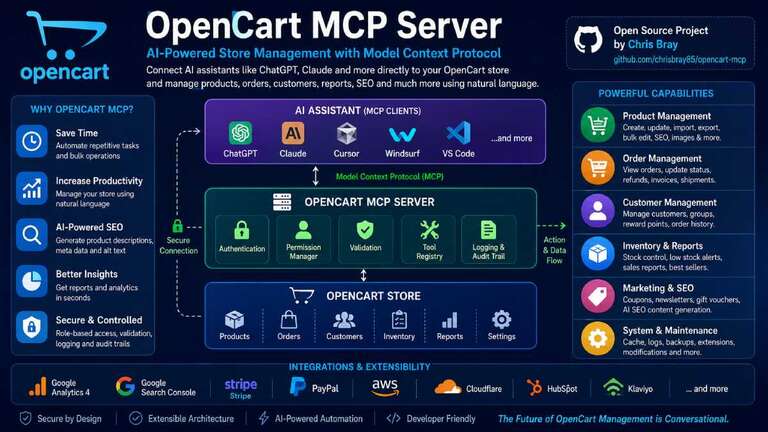
How an OpenCart MCP Server Works

AI Assistant
(ChatGPT, Claude, Cursor)

        โ”‚
        โ–ผ

OpenCart MCP Server

        โ”‚
 โ”œโ”€โ”€ Authentication
 โ”œโ”€โ”€ Permission Manager
 โ”œโ”€โ”€ Validation
 โ”œโ”€โ”€ Tool Registry
 โ””โ”€โ”€ Logging

        โ”‚
        โ–ผ

OpenCart Database & APIs

The MCP server acts as a secure bridge between your AI assistant and your OpenCart store.

Every request is authenticated, validated, logged, and executed only if the user has the required permissions.

Existing OpenCart MCP Projects

The OpenCart MCP ecosystem is still in its early stages, but there are already promising community projects that developers can build upon.

One example is the open-source OpenCart MCP project by Chris Bray:

GitHub Repository

OpenCart MCP by Chris Bray

This project demonstrates how an MCP server can expose OpenCart functionality to AI assistants, making it possible to interact with an OpenCart store using natural language. It provides a solid foundation for developers interested in experimenting with AI-powered store management and can serve as a starting point for building custom integrations.

While this project is an excellent proof of concept, there are many opportunities to extend it with enterprise-ready capabilities, such as:

  • Complete product, category, order, and customer management
  • AI-powered SEO generation
  • Inventory automation
  • Sales and analytics dashboards
  • Bulk product operations
  • Extension and theme management
  • Multi-store support
  • Role-based access control (RBAC)
  • Audit logging
  • Cloudflare, AWS, Stripe, and Google Analytics integrations

These enhancements could evolve an OpenCart MCP server from a developer utility into a comprehensive AI management platform for OpenCart stores.

Core Features

Product Management

Instead of editing products one by one, you can simply ask: Create a new gaming keyboard product.

The MCP server can:

  • Create products
  • Update prices
  • Update inventory
  • Upload images
  • Generate SEO metadata
  • Create product options
  • Assign categories
  • Duplicate products
  • Bulk update products

Example:

You:
Increase all Samsung product prices by 5%.

AI:
Updated 84 products successfully.

Order Management

Managing orders becomes conversational.

Examples:

Show today's pending orders.

Refund Order #10245.

Generate today's invoices.

Find orders awaiting shipment.

The server can:

  • View orders
  • Update order status
  • Process refunds
  • Generate invoices
  • Add tracking numbers
  • Search customer orders

Inventory Management

Inventory tasks become much easier.

Ask:

Which products will run out within seven days?

Show products with inventory below five.

Restock all gaming laptops.

The MCP server can generate inventory reports instantly.

Customer Management

Examples:

Show my top customers.

Find customers who haven't purchased in six months.

Create a wholesale customer.

Disable fraudulent accounts.

Marketing Automation

Marketing teams can work faster.

Examples:

Create a Black Friday coupon.

Generate newsletter content.

Show coupon usage.

Create gift vouchers.

AI-Powered SEO

One of the most exciting features is automatic SEO optimization.

Instead of manually writing descriptions, the AI can generate:

  • Meta titles
  • Meta descriptions
  • Product descriptions
  • ALT text
  • Product tags
  • Search keywords

Example: Generate SEO metadata for Product #238.

Result:

Meta Title

Apple AirPods Pro (2nd Generation) Wireless Earbuds

Meta Description

Buy Apple AirPods Pro (2nd Generation) with Active Noise Cancellation, USB-C charging, fast shipping, and manufacturer warranty.

This can save countless hours when managing large catalogs.

Sales Reports in Seconds

Instead of opening multiple reports, simply ask:

Summarize today's store activity.

Example response:

  • Revenue: $8,420
  • Orders: 96
  • New Customers: 17
  • Refunds: 2
  • Best Seller: Gaming Mouse Pro
  • Low Stock Products: 14

Business insights become immediately accessible.

Bulk Operations

Bulk updates are one of the biggest productivity gains.

Examples:

Increase prices by 3%.

Move all Dell laptops into the Business category.

Disable discontinued products.

Generate descriptions for every product missing content.

Instead of multiple admin pages, a single AI command completes the work.

System Administration

Developers can also automate maintenance tasks.

Examples include:

  • Refresh modifications
  • Clear image cache
  • Clear theme cache
  • Backup database
  • View PHP configuration
  • Review system logs
  • Enable maintenance mode

This makes OpenCart administration faster and less error-prone.

Security Comes First

An MCP server should never expose unrestricted access to your store.

A production-ready implementation should include:

  • API authentication
  • Role-based permissions
  • Audit logging
  • Rate limiting
  • Input validation
  • Tool-level authorization
  • Read-only mode
  • Confirmation for destructive operations

Every action should be recorded for auditing purposes.

Future Integrations

An OpenCart MCP Server can extend beyond the store itself.

Potential integrations include:

  • Google Analytics 4
  • Google Search Console
  • Stripe
  • PayPal
  • AWS
  • Cloudflare
  • HubSpot
  • Klaviyo
  • Mailchimp
  • ShipStation
  • Amazon Marketplace
  • eBay
  • Etsy

The AI becomes a central assistant capable of managing your entire eCommerce ecosystem.

Benefits for Store Owners

Implementing an OpenCart MCP Server can provide significant advantages:

  • Reduce repetitive administrative work
  • Improve catalog quality with AI-generated SEO
  • Speed up inventory management
  • Simplify reporting
  • Enable natural language interaction with store data
  • Automate marketing tasks
  • Improve operational efficiency
  • Create a foundation for AI-powered workflows

Whether you’re managing hundreds or tens of thousands of products, conversational automation can dramatically reduce the time spent on routine tasks.

Looking Ahead

The OpenCart MCP ecosystem is already beginning to grow, with community projects like Chris Bray’s OpenCart MCP server demonstrating what’s possible. As adoption of the Model Context Protocol accelerates, there’s an exciting opportunity for the OpenCart community to collaborate on a feature-rich, open-source MCP platform that supports merchants, developers, and agencies alike. At Webocreation, we’re excited to contribute ideas, enhancements, and integrations that help make AI-powered OpenCart management a reality.

AI assistants are evolving from tools that answer questions into systems that can safely perform real work. Model Context Protocol provides a standardized way to connect those assistants with business applications, and OpenCart is an excellent candidate for this approach.

As AI adoption continues to grow, an OpenCart MCP Server could become an essential part of every modern store, enabling merchants and developers to manage products, process orders, optimize SEO, monitor sales, and maintain their stores using simple, natural language.

The future of eCommerce management isn’t clicking through dozens of admin pagesโ€”it’s having a trusted AI assistant that understands your store and helps you run it more efficiently.

At Webocreation, we’re exploring what an open-source, extensible OpenCart MCP Server could look like for the community. By combining OpenCart’s flexibility with MCP’s standardized AI connectivity, we can unlock new possibilities for developers, agencies, and merchants alike.

If you’re interested in contributing ideas or following the project’s progress, stay tuned for future updates as we work toward bringing AI-native store management to the OpenCart ecosystem.

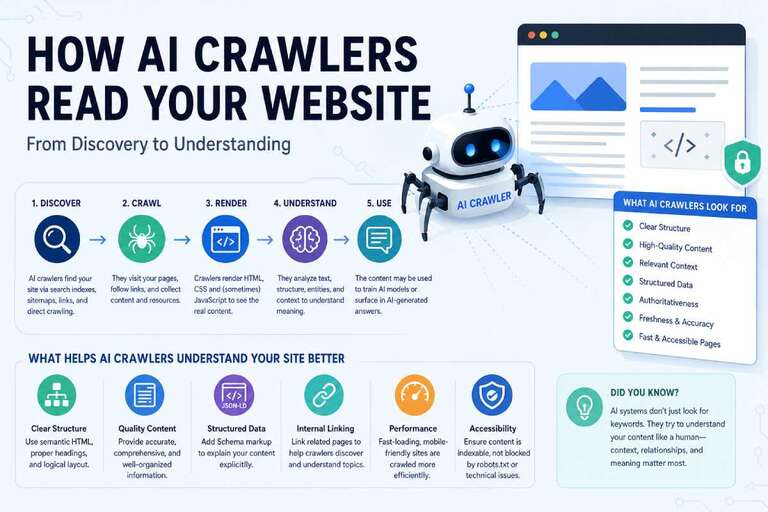
How AI Crawlers Read Your Website

Search is changing.

Instead of typing a query into Google and clicking through a list of links, millions of users now ask ChatGPT, Claude, Gemini, Perplexity, and other AI assistants directly. These AI systems often summarize information, recommend products, compare services, and cite websites as sources.

For website owners, developers, and marketers, understanding how AI crawlers read your website has become just as important as understanding how Googlebot works.

In this guide, we’ll explain how AI crawlers work, what content they prefer, and how to make your website easier for large language models (LLMs) to understand.

What Are AI Crawlers?

AI crawlers (sometimes called AI bots or LLM crawlers) are automated programs that collect publicly available web content for:

  • Training language models
  • Keeping AI knowledge fresh
  • Retrieving information for AI-generated answers
  • Powering AI search engines

Unlike traditional search engines, AI systems don’t simply index pages for keyword matchingโ€”they aim to understand the meaning, context, relationships, and structure of your content.

Traditional Search Crawlers vs AI Crawlers

Traditional SearchAI Crawlers
Index pagesUnderstand content
Match keywordsUnderstand meaning
Rank linksGenerate answers
Focus on backlinksFocus on authority and clarity
Return search resultsProduce conversational responses

Traditional SEO is still important, but AI introduces a new layer of optimization centered on content quality and machine readability.

Popular AI Crawlers

Several organizations operate crawlers that may access your site.

  • OpenAI
  • Anthropic
  • Google AI
  • Microsoft AI
  • Perplexity AI
  • Apple Intelligence
  • Meta AI

Each platform has its own crawling, licensing, and retrieval policies, but they all rely on high-quality, structured, and accessible content.

How AI Crawlers Discover Your Website

Most AI systems discover websites through one or more of these methods:

Search Engine Indexes

Many AI assistants rely on search indexes from providers such as Google or Bing to locate relevant pages.

Direct Crawling

Some organizations maintain dedicated crawlers that fetch publicly accessible pages directly.

XML Sitemaps

A sitemap helps crawlers discover:

  • new pages
  • updated articles
  • product pages
  • documentation
  • category pages

Always keep your sitemap current.

Internal Links

AI crawlers follow links similarly to traditional crawlers.

Good internal linking helps them understand:

  • topic relationships
  • page hierarchy
  • important resources

External Links

Mentions from reputable websites reinforce topical authority and increase the likelihood that your content is discovered and trusted.

How AI Crawlers Read a Webpage

Once a crawler reaches your page, it evaluates much more than keywords.

1. HTML Structure

Semantic HTML helps machines understand the role of each element.

Prefer:

  • <article>
  • <section>
  • <header>
  • <main>
  • <nav>
  • <aside>

instead of generic nested <div> elements whenever appropriate.

2. Headings

A clear heading hierarchy provides context.

Example:

H1
 โ”œโ”€โ”€ H2
 โ”‚     โ”œโ”€โ”€ H3
 โ”‚     โ”œโ”€โ”€ H3
 โ”œโ”€โ”€ H2
 โ””โ”€โ”€ H2

Avoid skipping heading levels or using headings purely for styling.

3. Content Hierarchy

Well-organized pages are easier to interpret.

Use:

  • introductions
  • descriptive headings
  • bullet lists
  • comparison tables
  • FAQs
  • summaries

rather than long, unbroken paragraphs.

4. Context

AI models analyze how concepts relate to one another.

For example, a page about HubSpot Email Marketing should naturally reference related concepts such as:

  • CRM
  • workflows
  • contacts
  • automation
  • personalization
  • analytics

These relationships help AI build a richer understanding of the topic.

5. Entities

Modern AI identifies entities rather than just keywords.

Examples include:

  • companies
  • products
  • people
  • locations
  • technologies

Instead of repeating a keyword unnaturally, clearly explain what the entity is and how it relates to other entities.

Structured Data Helps AI

Structured data provides explicit context.

Useful schema types include:

  • Article
  • BlogPosting
  • Product
  • Organization
  • FAQ
  • BreadcrumbList
  • Person
  • Review
  • SoftwareApplication

Although schema doesn’t guarantee inclusion in AI answers, it makes content easier to interpret.

AI Loves Clear Writing

Large language models perform best with content that is:

  • factual
  • well organized
  • complete
  • easy to scan
  • technically accurate

Avoid writing solely to satisfy search algorithms.

AI Prefers Complete Answers

Instead of writing: AI crawler

Write: An AI crawler is software that automatically visits websites to collect publicly available information for training language models or retrieving information used to answer user questions.

The second example provides context that machines can readily interpret.

Internal Linking Matters

AI systems often analyze relationships between pages.

A strong content cluster might look like:

AI SEO Guide
     โ”‚
     โ”œโ”€โ”€ llms.txt
     โ”œโ”€โ”€ AI Crawlers
     โ”œโ”€โ”€ AI Search
     โ”œโ”€โ”€ Structured Data
     โ”œโ”€โ”€ Robots.txt
     โ””โ”€โ”€ AI Analytics

This topical organization strengthens subject authority.

Technical Factors AI Crawlers Appreciate

Fast Websites

Slow pages reduce crawl efficiency.

Optimize:

  • image sizes
  • caching
  • CDN usage
  • JavaScript
  • CSS delivery

Mobile-Friendly Design

Responsive layouts improve accessibility for both users and automated systems.

Clean HTML

Avoid unnecessary markup and ensure important content appears in the initial HTML whenever practical.

Stable URLs

Changing URLs frequently makes long-term discovery and referencing more difficult.

Can AI Read JavaScript?

Modern AI crawlers vary in their JavaScript rendering capabilities.

Server-rendered or statically generated content is generally easier to crawl than content that appears only after complex client-side rendering.

If critical content requires JavaScript, ensure it remains accessible and test how it appears to automated crawlers.

Can AI Read Images?

Yesโ€”but AI still benefits from textual context.

Provide:

  • descriptive alt text
  • informative captions
  • nearby explanatory content
  • meaningful filenames where appropriate

Can AI Read PDFs?

Yes.

Many AI systems can process PDF documents, especially technical manuals, white papers, and documentation. Ensure PDFs contain selectable text rather than scanned images whenever possible.

Can AI Read Videos?

Indirectly.

AI systems rely on supporting information such as:

  • transcripts
  • captions
  • titles
  • descriptions
  • chapter markers

Publishing transcripts improves accessibility and machine understanding.

Should You Block AI Crawlers?

Some publishers choose to block AI crawlers due to licensing or content concerns.

Others allow crawling to increase the likelihood that their content appears in AI-generated answers.

The right decision depends on your business goals, intellectual property strategy, and traffic model.

Best Practices for AI-Friendly Websites

Use this checklist to improve your site’s readability for AI systems:

  • Write comprehensive, accurate content.
  • Use semantic HTML.
  • Keep heading structures logical.
  • Publish descriptive titles.
  • Add structured data.
  • Maintain XML sitemaps.
  • Strengthen internal linking.
  • Improve page speed.
  • Make content accessible.
  • Update older articles regularly.
  • Include clear author information.
  • Demonstrate expertise with real examples and practical guidance.

Common Mistakes

Avoid these issues:

  • Thin content
  • Keyword stuffing
  • AI-generated text without review
  • Hidden text
  • Broken internal links
  • Poor HTML structure
  • Missing metadata
  • Duplicate content
  • Outdated information

The Future of AI Crawling

AI systems are evolving beyond simply indexing web pages.

Increasingly, they evaluate:

  • expertise
  • originality
  • freshness
  • structured knowledge
  • topical authority
  • trustworthiness

Rather than optimizing for individual keywords, successful websites will organize information into connected knowledge hubs that answer real user questions comprehensively.

Final Thoughts

Traditional SEO isn’t disappearingโ€”it is expanding.

The websites that perform best in AI-driven search are those that combine technical excellence with genuinely useful content. Focus on semantic structure, clear explanations, logical organization, and strong topical coverage.

If your content helps both humans and machines understand a topic, you’ll be well positioned for the next generation of search.

Frequently Asked Questions

What is an AI crawler?

An AI crawler is an automated program that collects publicly available web content to help train language models or retrieve information for AI-powered search and conversational systems.

Does ChatGPT crawl websites?

ChatGPT itself does not continuously crawl the web. Depending on the feature being used, OpenAI may use dedicated crawlers and retrieval systems to access publicly available content, while some responses rely on previously trained knowledge.

Do AI crawlers use robots.txt?

Many AI crawlers respect robots.txt directives, although support and policies vary by provider. Always review the documentation for the specific crawler if you intend to allow or restrict access.

Is structured data important for AI?

Yes. Structured data provides explicit information about your content, making it easier for AI systems to identify entities, relationships, and page purpose.

How can I optimize my website for AI search?

Publish high-quality content, use semantic HTML, implement structured data, maintain strong internal linking, improve page speed, and organize related content into topical clusters that demonstrate expertise.

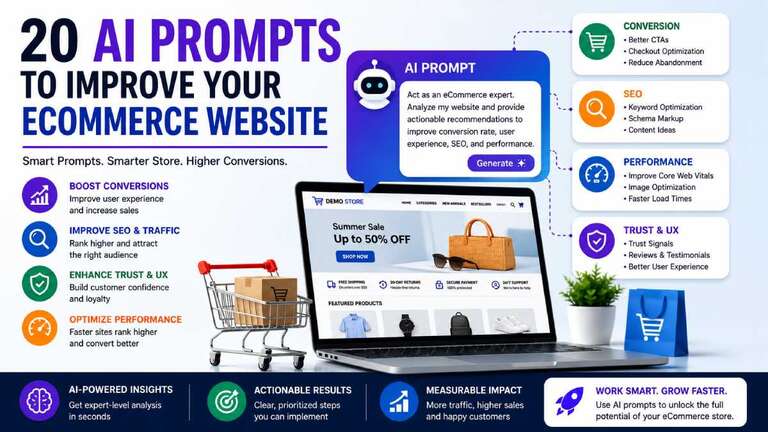
20 AI Prompts to Improve Your eCommerce Website in 2026

Artificial intelligence is quickly becoming one of the most valuable tools available to eCommerce store owners. Whether you run an online store on OpenCart, WordPress WooCommerce, Shopify, or another platform, AI can help you uncover usability problems, increase conversions, improve SEO, and optimize the customer journey.

The challenge isn’t whether AI can help your store โ€” it’s knowing what questions to ask.

Below are 20 powerful prompts you can use with AI assistants such as ChatGPT, Claude, or Google Gemini to identify opportunities and improve your eCommerce website.

1. Homepage Conversion Audit

Prompt:

Analyze the homepage of my eCommerce store and provide 20 recommendations to improve conversion rate, trust signals, and user engagement.

Your homepage often determines whether visitors continue browsing or leave within seconds. AI can identify issues with messaging, layout, calls to action, and product presentation.


2. First-Time Visitor Experience Review

Prompt:

Pretend you are a first-time visitor arriving from Google search. What would confuse you, what would build trust, and what would prevent you from making a purchase?

Store owners know their websites too well. Viewing your site through the eyes of a new customer can reveal hidden friction points.


3. Call-to-Action Optimization

Prompt:

Review all CTA buttons on my website and suggest improvements to increase clicks and conversions.

Small changes such as button placement, wording, and color contrast can have a significant impact on sales.

4. Checkout Flow Analysis

Prompt:

Analyze my checkout flow and identify friction points that could cause cart abandonment.

Complicated checkouts remain one of the biggest causes of lost revenue for online stores.

5. Trust Signal Audit

Prompt:

What trust badges, guarantees, reviews, and policies should I add to increase customer confidence?

Trust signals reduce purchase hesitation and improve conversion rates.

6. UX Expert Review

Prompt:

Act as a senior UX designer and identify usability issues on my store. Prioritize fixes based on impact.

AI can often spot navigation issues and design inconsistencies that internal teams overlook.

7. Mobile Shopping Experience Audit

Prompt:

Review the mobile version of my website and list improvements for navigation, speed, and usability.

With mobile traffic accounting for the majority of eCommerce visits, mobile optimization is no longer optional.

8. Navigation and Category Optimization

Prompt:

Analyze my menu structure and recommend a better category hierarchy for easier product discovery.

Customers should be able to find products in just a few clicks.

9. Accessibility Review

Prompt:

Review my site for accessibility issues and provide fixes to improve WCAG compliance.

Accessibility improvements benefit all users and often improve SEO as well.

10. Visual Hierarchy Analysis

Prompt:

Evaluate whether users can easily identify important actions, products, and information on each page.

Good design guides visitors naturally toward conversion actions.

11. Technical SEO Audit

Prompt:

Perform a complete SEO audit of my website and identify technical, on-page, and content opportunities.

AI can quickly identify missing metadata, duplicate content, and technical issues.

12. Category Page Optimization

Prompt:

Suggest improvements for category pages to increase organic traffic and conversions.

Category pages are often some of the highest-value pages on an eCommerce website.

13. Product Page SEO Review

Prompt:

Review a product page and suggest improvements for titles, descriptions, schema, FAQs, and internal linking.

Well-optimized product pages improve both rankings and conversion rates.

14. Content Marketing Opportunities

Prompt:

Identify 50 blog topics that could attract customers interested in my products.

Content marketing remains one of the most cost-effective customer acquisition channels.

15. AI Search Optimization

Prompt:

How can I optimize my website for AI search assistants and conversational commerce experiences?

The future of product discovery is shifting from traditional search results toward AI-powered recommendations and conversational interfaces.

16. Performance and Speed Audit

Prompt:

Analyze my website performance and provide recommendations to improve Core Web Vitals.

Faster websites convert better and rank higher in search engines.

17. Security Review

Prompt:

Review my eCommerce store for common security issues and recommend improvements.

Security issues can impact customer trust, SEO, and payment processing compliance.

18. Image Optimization Analysis

Prompt:

Suggest improvements for image formats, lazy loading, responsive images, and CDN usage.

Large images continue to be one of the biggest causes of slow page loads.

19. Structured Data Audit

Prompt:

Identify all schema types that should be implemented to improve search visibility and rich results.

Proper schema implementation can improve click-through rates and visibility in search results.

20. Competitive Benchmarking

Prompt:

Compare my website with the top three competitors in my industry and identify areas where my store falls behind.

Understanding how competitors outperform your store provides a roadmap for improvement.

The Ultimate AI eCommerce Audit Prompt

If you only use one prompt from this list, make it this one:

Act as a team consisting of a conversion optimization expert, UX designer, SEO specialist, eCommerce manager, and performance engineer. Analyze my website and provide:
Top 10 issues hurting sales
Top 10 quick wins that can be implemented within one week
Top 10 long-term improvements
Estimated impact of each recommendation on revenue, SEO, and customer satisfaction

This approach gives you insights from multiple perspectives in a single analysis.

Final Thoughts

AI is not replacing eCommerce experts, designers, marketers, or developers. Instead, it acts as an always-available consultant capable of reviewing your store from different viewpoints and identifying opportunities for improvement.

The businesses that learn how to ask better questions will often receive better answers and make better decisions. Start with these prompts, apply the recommendations, measure the results, and continue refining your store experience. The next conversion increase may be just one prompt away.

40 cool final year college projects for students in 2026

The final year project plays a vital role in deciding your career as a Computer Science student. The era of technology is constantly evolving, and so is the need for great projects in the field. There are multi-billion dollar industries that demand great projects in the respective field – in order to be considered for recruitment. This raised the billion-dollar question: What final-year project should I choose as a Computer Science Student in 2026?ย 

Well, we have got some answers and ideas that you can choose from. In this blog, we have gathered some of the most reliable final-year projects for students of Computer Science for 2025. By the end of this blog, you will be able to:

  • Analyze different cool final-year projects for Computer Science. 
  • Get a hands-on idea of final project ideas. 
  • Decide the cool final-year project that will help you flourish in your career. 

Read More: Internship SWOT analysis final year report

Cool Final Year College Projects That You Can Do As A Computer Science Student in 2025

The field of Computer Science is one of the vast domains to study. It has an unwavering demand in the marketplace. Enterprises and high-paying companies yearn for efficient talents in the Computer Science field. Likewise, the final year college project is also equally important. This project opens the arenas of opportunities to be considered in these marketplaces. Here are some cool final year projects for Computer Science in 2025 that you can work on. We have made collections of around 40 projects, and we keep on writing for each project in our upcoming posts, so don’t forget to subscribe to our email list:

Artificial Intelligence-related projects:

  • Location Detection
    Face detection is normal nowadays; how about location detection? Let’s say big construction sites where each location’s work is detected and updated in the Apps, so they can know what timing and things are needed to move forward?ย 
  • Spam & Fake Detector AI Apps
    Everyone wants to get rid of spam and remove it, so a spam and Fake Detector App can be a good project. You can create a fake spam detector by analyzing the patterns for the Products, etc.

Other Artificial Intelligence-related projects include:

  • Artificial Intelligence-Based Staffing Solution. 
  • Android Assistant like Appleโ€™s Siri. 
  • Workflow Automator Software. 
  • Auto-monitoring Software for Workspace. 
  • Communication Tracker & Scheduler App and Extension. 
  • Chatbot – App, Software, and Extension
  • Virtual Assistant (VA) for Windows and Desktops. 
  • Online Task Assignment and Management Tools like HubSpot and Trello.ย 
  • Shipment Tracker for Logistics. 
  • Artificial Data Validation Software like Plagiarism Checker

With the rise of AI in recent years, here are some ideas for AI agent projects suitable for a final-year project. These ideas span different domains like natural language processing, computer vision, reinforcement learning, and robotics. You can select one based on your interest and the tools you’re comfortable working with:

1. AI Personal Assistant for Productivity

  • Objective: Create an AI-powered personal assistant that manages schedules, sets reminders, and prioritizes tasks intelligently.
  • Key Features:
    • Natural Language Understanding (NLU) for conversational interactions.
    • Integration with calendars (Google Calendar, Outlook).
    • Proactive suggestions for task prioritization.
  • Tools: Python, Dialogflow, GPT-based APIs, Calendar APIs.

2. AI Agent for Autonomous Drone Navigation

  • Objective: Develop an AI agent that enables drones to navigate autonomously in complex environments.
  • Key Features:
    • Real-time object detection to avoid obstacles.
    • GPS integration for waypoint navigation.
    • Reinforcement learning for optimizing routes.
  • Tools: Python, OpenCV, ROS (Robot Operating System), TensorFlow, DJI SDK.

3. AI Customer Support Agent for E-commerce

  • Objective: Build an AI agent that answers customer queries, tracks orders, and suggests products.
  • Key Features:
    • NLP to understand customer questions.
    • Integration with an e-commerce database to fetch product details.
    • Sentiment analysis to detect unhappy customers.
  • Tools: Python, Hugging Face Transformers, Flask/Django, Twilio.

4. AI Cybersecurity Agent

  • Objective: Create an AI system that monitors network traffic and detects potential threats in real-time.
  • Key Features:
    • Anomaly detection in network activity.
    • Automated incident response.
    • Threat intelligence integration for proactive measures.
  • Tools: Python, Scikit-learn, Wireshark, ELK Stack (Elasticsearch, Logstash, Kibana).

5. AI Fitness Coach

  • Objective: Develop an AI agent that tracks user fitness activities and provides recommendations to improve health.
  • Key Features:
    • Motion tracking using computer vision for exercise validation.
    • Diet planning based on user goals.
    • Integration with wearables like Fitbit or Apple Watch.
  • Tools: Python, OpenCV, TensorFlow, Flask.

6. AI Agent for Stock Market Prediction

  • Objective: Build an AI-powered agent that analyzes stock market data and provides investment advice.
  • Key Features:
    • Predict stock prices using historical data.
    • Portfolio management recommendations.
    • Sentiment analysis of financial news to predict trends.
  • Tools: Python, Scikit-learn, Flask/Django, Alpha Vantage API.

7. AI Agent for Smart Home Automation

  • Objective: Design an AI system that automates home devices based on user behavior and preferences.
  • Key Features:
    • Voice-based control of IoT devices.
    • Energy optimization based on usage patterns.
    • Security monitoring using facial recognition.
  • Tools: Python, Raspberry Pi, OpenCV, Google Assistant API.

8. AI Legal Research Assistant

  • Objective: Develop an AI agent that helps lawyers research case laws and legal documents.
  • Key Features:
    • Search through large legal databases using keywords.
    • Summarize legal documents for quick review.
    • NLP for question-answering on legal topics.
  • Tools: Python, ElasticSearch, Hugging Face, LexisNexis API.

9. AI Agent for Personalized Learning

  • Objective: Create an AI system that customizes learning paths for students based on their performance.
  • Key Features:
    • Adaptive quizzes and assessments.
    • Recommendations for learning resources.
    • Gamification to keep students motivated.
  • Tools: Python, TensorFlow, Flask, OpenAI APIs.

10. AI Writing Assistant

  • Objective: Build an AI-powered writing assistant for content creators.
  • Key Features:
    • Grammar and spell-checking.
    • Sentence rephrasing and tone adjustment.
    • Plagiarism detection and suggestions for improvement.
  • Tools: Python, GPT-3/4 API, Grammarly API.

11. AI Recruitment Agent

  • Objective: Design an AI agent that helps HR teams shortlist candidates based on resumes and job descriptions.
  • Tools: Python, SpaCy, Scikit-learn, Flask.

12. AI Agent for Mental Health Support

  • Objective: Develop an AI system that provides mental health support and tracks emotional well-being.
  • Tools: Python, Dialogflow, Hugging Face, Flask.

13. AI Agent for Traffic Management

  • Objective: Create an AI system to optimize traffic flow in urban areas.
  • Tools: Python, OpenCV, TensorFlow, SUMO (Simulation of Urban Mobility).

14. AI Agent for Personalized Shopping

  • Objective: Build an AI shopping assistant for e-commerce platforms.
  • Key Features:
    • Product recommendations based on browsing history.
    • Virtual try-on for fashion and accessories.
    • Predictive analytics for customer behavior.
  • Tools: Python, TensorFlow, Flask/Django, Shopify API.

15. AI Agent for Healthcare Diagnosis

Objective: Design an AI system that assists doctors in diagnosing diseases.
Tools: Python, OpenCV, TensorFlow, Hugging Face.

16. AI Agent for Real-Time Translation

  • Objective: Build an AI-powered translator for real-time speech or text translation.
  • Tools: Python, Google Cloud Translation API, PyTorch.

17. AI Travel Planner

Objective: Create an AI agent that designs personalized travel itineraries.
Tools: Python, Flask, Travel APIs (e.g., Skyscanner, Amadeus).

18. AI Fraud Detection Agent

Objective: Develop an AI-powered system for detecting fraudulent transactions in real-time.
Tools: Python, Scikit-learn, Flask/Django.

Decentralization project ideas like:

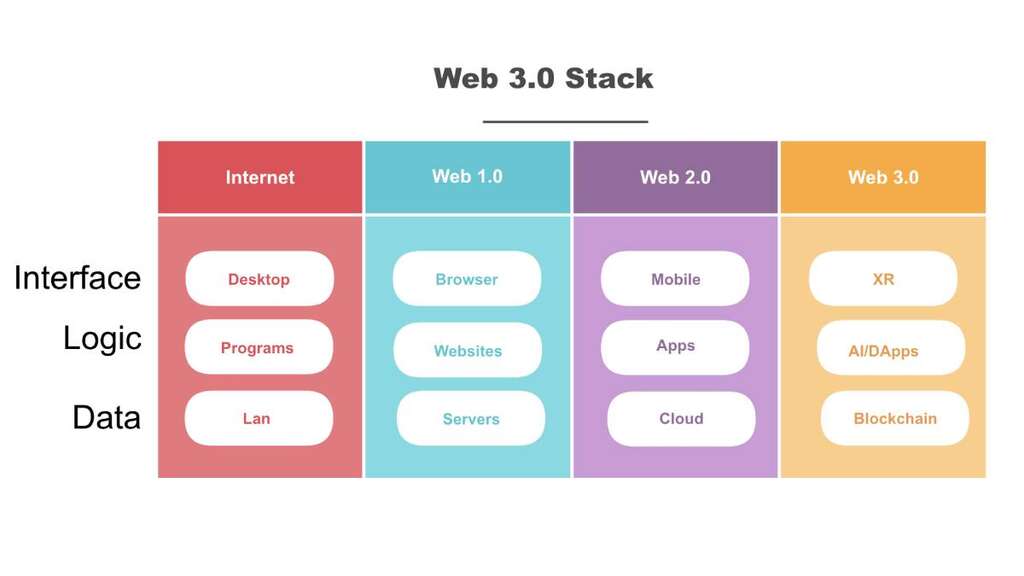
Web 3.0 Stacks
  • eCommerce with Web 3.0 implementation
    The technologies you can use are below and can make eCommerce implementation with Web 3.0 and a decentralization environment:
    Frontend development with HTML, CSS, JS, React.
    Node Provider: Infura, Quicknode, Alchemy, etc
    Smart Contracts: Solidity, Vyper, Rust, etc
    Blockchain: Ethereum, Polygon, Solana, etc
  • Decentralised Finance (DeFi)

If it were Web 2.0, then the Currency Converter project would have been a good idea, but with decentralization, it is better to work with DeFi projects.

  • Non-fungible token (NFT)

Non-fungible token (NFT) generally refers to a cryptographic resource on the blockchain that addresses a theoretical and interesting advanced thing like a piece of craftsmanship, a photograph, an in-game collectible, or a tweet that different resources can’t supplant on the grounds that it has a bunch of outstanding properties.

  • Decentralized Identification

Create a decentralized identification system so users donโ€™t need to keep on sharing their information again and again on different platforms. Simplify access to DApps with single sign-on (SSO).

  • Marketplace for Cryptocurrencies
  • Decentralised Applications (DApps)
  • Create new Cryptocurrencies
  • Peer to Peer (P2P) sharing

The popularity of Uber, Lyft, Didi, etc, nowadays ridesharing, delivery sharing, etc are becoming popular so these project ideas can also be one.

Read More: Final year E-commerce project eShopping Process model and functional diagram

API related projects

Opencart API
  • Integrated API endpoints
    Build a single and integrated platform for all APIs, and your one Endpoint will call all the APIs needed.
  • NASA free APIs
  • RapidAPI free APIs
  • Google free APIs like Google Maps projects

Read More: API call in eCommerce

Marketing/Media

  • Copyright system and implementation with NFTs and cryptocurrencies
  • Manage multiple ads in one system and implement Prebid, so marketers can use Google ads, media ads, and other ads from one place
  • Search Engine Marketing (SEM) Monitoring Tool
  • Search Engine Optimization (SEO) Monitoring Software
  • Product Auto-analyzer to See How the Product is Performing in the Market
  • Google DoubleClick Evaluation Tool
  • Micro & Macro Content Performance Evaluator 
  • Auto Lead Generation App

Read More: 13 proven tips and tricks to boost conversions for eCommerce

Future Predictor Applications

  • Stock Price Predictor application
    Fluctuations in Stock price is one of the growing concerns of modern marketplaces. The stock price sees countless ebbs and flows every day. Once you reckon this as a problem, you can come up with a solution to it. The best solution would be to come up with software that detects real-time stock prices.ย 
    Essentially, you will assemble a stock valuation indicator that can foresee the future costs of stock. The best thing about working with financial exchange information is that it by and large has short input cycles.ย 
    This makes it simple for financial analysts to utilize new market information to approve stock value forecasts. This financial exchange information will in general be exceptionally granular, diverse, and unpredictable.
    You can use it to find and gather comparable stocks dependent on their price movements and identify periods when there are significant changes in their prices.
  • Product stock prediction and data prediction as per the shipping timing, seasonal requirement, and emotional adjustment. Order the product as per the Stock needed.
  • We see lots of Weather predictors; how about an agriculture product predictor as per the weather so we can control what is needed?ย 
  • Music Recommendation App
  • Predictive Analyzer of Products before launching them
  • Luck Predictor App Based on Age and Interest

Health-related project ideas:

  • Blood Gift and Blood Donation Center Locator
    This online blood gift device is intended to help individuals find blood benefactors in case of a crisis. Clients can join to give blood to a blood donation center or present a solicitation for blood. Clients can check out the donors’ profiles and request help from them.
    Crises ought to forever be tended to first. Therefore, this final year project makes Computer Science understudies foster this in 2022. This framework will address the requirement for blood gifts when required by a patient. Patients can check their blood classification match and ask for help from the prospects.
  • Coronavirus-infected person locator
  • Disease Detector Apps, like Cancer, Allergy, etc
  • Tools for the Management of Medications:
    Automated Software to Monitor Medicines and Healthcare Products and Record Tracker App of Medicines and Drugs

Read More: Project Objectives for Health Nutrition Program and Targets of Nutrition

Programming and Developer support systems

  • Continuous integration and continuous delivery, which supports the developers
  • 24/7 Website Monitoring Software
  • Designing a multi-page functional website where you will auto-generate HTML & CSS as you drag and drop modules

Read more: Best extensions of Visual Studio Code for PHP developer

Robotics Projects

  • Functional Robot for Multitasking
  • Goods Transporters Robot to Handle Logistics 
  • Bluetooth-controlled Robot for Cell Phones 
  • Remote Controlled Robot as a Virtual Assistant 
  • Intermediate and Higher Level Arino Robot

Fitness Project Ideas 

  • Exercise Tracker App
  • Recess Movement Analyzer
  • Auto Yoga Trainer Software 
  • Exercise Training Virtual Assistant Tool 
  • Goal Setter for Daily & Weekly Routine

Economics

  • Currency Converter – With Real-Time Conversion Rate
    Designing a Currency Converter – both an app and extension – is one of the exciting projects for the final year project. As a Computer Science student, it is a noteworthy idea to come up with a solution to modern-day challenges.ย 
    This undertaking includes incorporating a money converter that can convert one currency unit into another currency unit. For example, you can change the Indian rupee into dollars or pounds – as well as the other way around.ย 
    The test that lies here is that the worth of currencies changes day by day. Nonetheless, you can address this issue by bringing in a dominant accounting page containing the refreshed cash esteems. To complete this task, you should have the fundamental information on Python programming and the Pygame library.
  • Banking System Reformation
  • Real-time Price Determinator
  • Export and Import Management on National and International Level
  • Micro and Macro Economics & Their Impacts on Currency Values 
  • Real-Time Cost Opportunity Detectorย 
  • Fundamental Economics & Current State Budget

We hope these titles and some details help you to select your final year project easily, and wish you the best of luck for your final year project. Let us know which project you are working on; maybe we can work on providing you with details to complete the project successfully. Please let us know if you have any questions or suggestions. Please click to seeย other internship projects. You can also find us onย Twitterย andย Facebook.

How AI Agents Are Changing Product Discovery: From Search Results to Chat-Based Shopping Research

For more than two decades, ecommerce discovery followed a predictable pattern:

  1. A customer searched for a product.
  2. A search engine returned a list of links.
  3. The customer opened multiple tabs.
  4. They compared products, prices, reviews, and features.
  5. Eventually, they made a purchase decision.

That model is changing rapidly.

AI agents and conversational assistants are transforming how consumers research products, compare options, and decide what to buy. Instead of browsing dozens of search results pages, shoppers increasingly ask an AI assistant a question and receive personalized recommendations in seconds.

The shift from traditional search engine results pages (SERPs) to chat-based product discovery may become one of the biggest changes in ecommerce since mobile shopping.

From SERP to Conversation: The Old vs New Discovery Flow

Traditional SERPโ€‘Based Discovery

In the model most of us grew up with:

  1. You type a query into a search engine.
  2. You see a list of links (brands, retailers, marketplaces, blogs).
  3. You click, compare, read reviews, and decide.

For ecommerce, the battle for discovery was mostly about:

  • Winning keywords in SERPs (SEO).
  • Winning paid ads on those same keywords.
  • Optimizing product pages to convert once you click through.

Search engines and marketplaces controlled the โ€œsurfaceโ€ (the SERP), and you optimized your listings to fit that surface.

AI Agents Are Becoming Research Assistants

Modern AI assistants are beginning to perform the research process on behalf of customers.

Instead of searching: “best laptop for graphic design under $1,500”

Consumers may ask:

“I am a freelance designer who travels frequently and needs a lightweight laptop with excellent battery life and strong performance for Adobe applications. What are my best options under $1,500?”

An AI agent can analyze:

  • Product specifications
  • Reviews
  • Pricing
  • Customer sentiment
  • Performance benchmarks
  • User preferences

The result is not ten blue links. The result is an answer.

From Search Engines to Answer Engines

Traditional search engines optimized for relevance and authority. AI-driven discovery platforms optimize for usefulness and context. Instead of asking:

  • Which page ranks highest?
  • Which website has the strongest backlinks?

AI systems increasingly ask:

  • Which answer solves the user’s problem?
  • Which recommendation fits the customer’s situation?
  • Which product best matches stated preferences?

This transition is often described as moving from SEO to AEO (Answer Engine Optimization). Businesses that create clear, structured, and trustworthy content are more likely to appear in AI-generated recommendations.

Personalization Happens Earlier in the Journey

Traditional search treated many users similarly. AI agents introduce deep personalization from the very beginning. A customer may ask: “Recommend running shoes for a beginner training for a marathon who has flat feet and prefers extra cushioning.” The recommendations can incorporate:

  • Experience level
  • Budget
  • Location
  • Preferences
  • Purchase history
  • Intended use case

This creates a discovery experience that feels closer to speaking with an expert salesperson than using a search engine.

Product Pages Must Become AI-Friendly

Many ecommerce product pages were designed primarily for human visitors.

AI systems require content that is:

  • Structured
  • Clear
  • Factually accurate
  • Easy to interpret
  • Rich in product attributes

Important product information includes:

  • Dimensions
  • Materials
  • Technical specifications
  • Compatibility
  • Shipping details
  • Return policies
  • Customer reviews
  • Availability

Structured product data is becoming increasingly important because AI agents rely on high-quality information to generate recommendations.

The Rise of Conversational Commerce

Consumers increasingly expect to ask questions naturally.

Examples include:

  • Which laptop is best for engineering students?
  • What camera works best for wildlife photography?
  • Which stroller fits in a compact car trunk?
  • What CRM software is best for a small business with fewer than ten employees?

Instead of navigating category filters and comparison tables, users expect conversational guidance.

This trend is accelerating the growth of conversational commerce experiences.

Comparison Content Is Becoming More Valuable

AI agents thrive on comparison data.

Content formats likely to perform well include:

  • Product comparisons
  • Best-of lists
  • Buying guides
  • Pros and cons analysis
  • Use-case recommendations
  • Industry benchmarks

Examples:

  • Best ecommerce platforms for startups
  • OpenCart versus WooCommerce for B2B stores
  • Best AI tools for ecommerce customer service

Content that helps customers make decisions becomes highly valuable in AI-driven discovery environments.

Reviews and Trust Signals Matter More Than Ever

AI agents increasingly analyze customer feedback to understand product quality and customer satisfaction.

Signals that influence recommendations include:

  • Customer reviews
  • Verified purchase feedback
  • Return rates
  • Product ratings
  • Brand reputation
  • Expert opinions

As a result, businesses must actively manage customer experience and reputation.

Poor reviews may impact not only conversions but also future AI recommendations.

Brand Authority Becomes a Competitive Advantage

AI systems favor sources that demonstrate expertise and trustworthiness.

Businesses can strengthen authority by publishing:

  • Original research
  • Industry data
  • Technical documentation
  • Case studies
  • Tutorials
  • Expert insights

Topical authority is becoming one of the strongest long-term advantages in AI discovery ecosystems.

What Ecommerce Businesses Should Do Today

1. Improve Product Data Quality

Ensure products contain:

  • Complete specifications
  • Detailed descriptions
  • Accurate attributes
  • Frequently asked questions

2. Implement Structured Data

Schema markup helps machines understand:

  • Prices
  • Availability
  • Reviews
  • Product details

3. Publish Comparison Content

Create resources that answer purchasing questions before customers ask them.

4. Invest in Expert Content

Experience-driven content is more likely to be trusted by both users and AI systems.

5. Optimize for Questions, Not Just Keywords

Customers increasingly search using natural language questions.

Examples:

  • Which ecommerce platform is easiest to manage?
  • What AI tools help increase ecommerce conversions?
  • How can small businesses automate customer support?

Question-based content aligns closely with conversational discovery patterns.

What This Means for SEO Professionals

SEO is not disappearing. Instead, it is evolving. Traditional ranking factors remain important because AI systems still rely heavily on authoritative web content. However, optimization strategies are expanding beyond:

  • Keywords
  • Backlinks
  • Rankings

Future success will depend on:

  • Topical authority
  • Structured content
  • Expertise
  • Data quality
  • User trust
  • Answer completeness

The Future of Ecommerce Discovery

The future customer journey may look very different:

  1. A customer explains their needs to an AI assistant.
  2. The AI researches available options.
  3. The AI narrows the choices.
  4. The customer reviews a small number of personalized recommendations.
  5. The purchase is completed with minimal friction.

The era of opening twenty browser tabs to compare products may gradually disappear. Businesses that prepare for conversational discovery today will be better positioned for tomorrow’s buying behaviors.

Final Thoughts

AI agents are changing product discovery from a search-first experience into a conversation-first experience. The winners in this new environment will not necessarily be the businesses with the most keywords or the largest advertising budgets. Instead, the winners will be the companies that provide:

  • High-quality product data
  • Expert guidance
  • Clear answers
  • Trustworthy information
  • Exceptional customer experiences

The shift from SERPs to chat-based research is already underway. The question is no longer whether AI agents will influence ecommerce discovery. The question is whether your business is preparing for it.

How to Secure an OpenCart Store with Content Security Policy (CSP)

Modern OpenCart stores run a mix of core code, themes, extensions, analytics, ads, and thirdโ€‘party scripts. That complexity creates opportunities for crossโ€‘site scripting (XSS), clickjacking, and dataโ€‘injection attacksโ€”especially on checkout and account pages where sensitive data lives. Read about Opencart security tips.

Content Security Policy (CSP) is one of the strongest browserโ€‘level defenses you can add: it lets you explicitly control which scripts, styles, images, and frames the browser is allowed to load. In this guide, weโ€™ll walk through:

  • What CSP is and how it mitigates XSS.
  • A secureย .htaccessย example for OpenCart (with CSP + other headers). And a PHP code that you can add at the top of index.php
  • How to test and debug CSP safely.
  • How to combine CSP with Subresource Integrity (SRI) for thirdโ€‘party scripts.

What CSP is and why it matters for OpenCart

Content Security Policy is an HTTP response header that tells the browser which sources are allowed for scripts, styles, images, fonts, frames, and more. Instead of the browser executing any script it finds in the HTML, CSP acts like a whitelist:

  • If a script or stylesheet comes from an allowed origin, it runs.
  • If itโ€™s injected from somewhere else, the browser blocks it.

For ecommerce and payment pages, CSP is increasingly treated as a requirement, not a niceโ€‘toโ€‘have, because it helps enforce โ€œonly trusted scripts on checkoutโ€ and aligns with PCIโ€‘style guidance around script authorization and integrity.

On an OpenCart store, CSP can significantly reduce the impact of:

  • Stored and reflected XSS via product reviews, contact forms, or vulnerable extensions.
  • Malicious thirdโ€‘party script injection (compromised CDNs, ad scripts, or tag managers).
  • Clickjacking and dataโ€‘exfiltration from injected iframes or forms.

How CSP mitigates XSS in practice

XSS works when an attacker can cause the browser to execute arbitrary JavaScript in the context of your domain. CSP reduces that risk by:

  • Restricting script-src to trusted origins (your domain, specific CDNs).
  • Blocking inline scripts and javascript: URLs unless explicitly allowed.
  • Preventing dynamic script injection via functions  eval() in strict configurations.

MDNโ€™s CSP docs emphasize that properly configured script-src and default-src Directives can โ€œreduce or eliminateโ€ many XSS injection paths by only allowing scripts from trusted domains and disallowing inline/eventโ€‘handler JavaScript.

CSP does not fix the underlying bug, but it turns many XSS exploits into harmless, blocked requests instead of executed code.

Step 1: Start with CSP in reportโ€‘only mode

Never deploy a strict CSP in one shot on a production OpenCart storeโ€”you will break checkout and extensions. The safer pattern (also used in Adobe Commerce/Magento and other platforms) is:

  1. Start with Content-Security-Policy-Report-Only the browser logs violations without enforcing them.
  2. Collect and review violations.
  3. Adjust your policy until the noise drops and only the necessary sources are allowed.
  4. Switch to enforcing Content-Security-Policy once the policy is stable.

This phased approach is widely recommended to avoid blank pages and broken functionality while tuning your directives.

Step 2: A secure .htaccess baseline for OpenCart

Assuming youโ€™re running OpenCart on Apache, you can add CSP and other security headers via .htaccess in your web root.

Example .htaccess snippet with reportโ€‘only CSP

<IfModule mod_headers.c>
# Strict transport security (only if you are fully on HTTPS)
Header always set Strict-Transport-Security "max-age=31536000; includeSubDomains; preload"

# Clickjacking protection
Header always set X-Frame-Options "SAMEORIGIN"

# XSS filter (legacy, still harmless)
Header always set X-XSS-Protection "1; mode=block"

# MIME sniffing protection
Header always set X-Content-Type-Options "nosniff"

# Referrer policy
Header always set Referrer-Policy "strict-origin-when-cross-origin"

# Basic CSP in REPORT-ONLY mode
Header set Content-Security-Policy-Report-Only "
default-src 'self';
script-src 'self' 'unsafe-inline' 'unsafe-eval' https://www.google-analytics.com https://www.googletagmanager.com;
style-src 'self' 'unsafe-inline' https://fonts.googleapis.com;
img-src 'self' data: https://www.google-analytics.com;
font-src 'self' https://fonts.gstatic.com;
connect-src 'self' https://www.google-analytics.com https://www.googletagmanager.com;
frame-ancestors 'self';
object-src 'none';
"
</IfModule>

Notes:

  • This is intentionally permissive ('unsafe-inline''unsafe-eval') because many OpenCart themes and extensions still rely on inline JS and dynamic code.
  • The goal here is to observe violations, not enforce yet.
  • Add or remove domains for your own analytics, payment providers, CDNs, and chat tools as needed.

Later, once youโ€™re ready, you replace the Report-Only header with an enforcing Content-Security-Policy header and start tightening the policy.

PHP Code for index.php

Here is one PHP example you can add directly after <?php in index.php.

header(
    "Content-Security-Policy-Report-Only: " .
    // Core restrictions
    "default-src 'self'; " .
    "base-uri 'self'; " .
    "object-src 'none'; " .
    "frame-ancestors 'self'; " .
    "form-action 'self' https://remediadigital.us16.list-manage.com; " .
    "upgrade-insecure-requests; " .

    // Scripts: OpenCart + jQuery + GTM/GA + FB Pixel + Mailchimp
    "script-src 'self' 'unsafe-inline' 'unsafe-eval' " .
        "https://cdnjs.cloudflare.com https://cdn.jsdelivr.net " .
        "https://www.googletagmanager.com " .
        "https://connect.facebook.net " .
        "https://chimpstatic.com " .
        "https://www.google-analytics.com ".
        "https://form-assets.mailchimp.com " .
        "https://static.cloudflareinsights.com " .
        "https://s3.amazonaws.com " .

    // Styles: theme CSS + Google Fonts + cdnjs
    "style-src 'self' 'unsafe-inline' " .
        "https://fonts.googleapis.com " .
        "https://cdn-images.mailchimp.com https://cdn.jsdelivr.net ".
        "https://cdnjs.cloudflare.com; " .

    // Fonts: local + Google Fonts
    "font-src 'self'  https://cdnjs.cloudflare.com https://fonts.gstatic.com data:; " .

    // Images: products, logos, social pixels, Mailchimp, etc.
    "img-src 'self' data: " .
        "https://www.facebook.com https://connect.facebook.net https://form-assets.mailchimp.com " .
        "https://www.googletagmanager.com https://www.google-analytics.com " .
        "https://merging.rempub.com " .
        "https://remediadigital.us16.list-manage.com; " .

    // Frames/embeds: YouTube, Facebook widgets if used
    "frame-src https://www.youtube.com https://www.facebook.com; " .

    // XHR / fetch: GTM/GA, FB, Mailchimp, etc.
    "connect-src 'self' " .
        "https://www.googletagmanager.com https://www.google-analytics.com https://form-assets.mailchimp.com https://cdn.jsdelivr.net " .
        "https://connect.facebook.net " .
        "https://chimpstatic.com https://eventcollector.mcf-prod.a.intuit.com " .
        "https://cdnjs.cloudflare.com; "
);

Step 3: Tightening CSP for real protection

Once youโ€™ve watched reportโ€‘only violations and cleaned up obvious issues, you can move toward a stricter-enforced policy.

A more secure, enforced CSP might look like this:

<IfModule mod_headers.c>
Header set Content-Security-Policy "
default-src 'self';
script-src 'self' https://www.google-analytics.com https://www.googletagmanager.com;
style-src 'self' https://fonts.googleapis.com;
img-src 'self' data: https://www.google-analytics.com;
font-src 'self' https://fonts.gstatic.com;
connect-src 'self' https://www.google-analytics.com https://www.googletagmanager.com;
frame-ancestors 'self';
object-src 'none';
base-uri 'self';
form-action 'self';
"
</IfModule>

Key improvements:

  • Removed 'unsafe-inline' and 'unsafe-eval' from script-src to stop inline scripts and eval from running.
  • object-src 'none' blocks legacy plugins.
  • frame-ancestors 'self' replaces X-Frame-Options in modern CSP, preventing clickjacking.
  • form-action 'self' ensures that forms (including checkout) can only post back to your domain.

Youโ€™ll only be able to enforce something this strict after youโ€™ve:

  • Moved inline scripts into external .js files.
  • Updated extensions that inject inline code or rely on eval.
  • Whitelisted the exact thirdโ€‘party domains you really need.

SecurityScorecard and other security checks explicitly warn against โ€œbroadโ€ CSP directives; they recommend specific domain whitelists instead of wildcards or overly permissive settings.

Step 4: Testing and debugging your CSP

1. Use browser DevTools

All modern browsers log CSP violations to the console. In DevTools, youโ€™ll see messages like โ€œRefused to load script from โ€ฆ because it violates the Content Security Policy.โ€

Use those messages to:

  • List all scripts, styles, images, or fonts being blocked.
  • Decide whether to whitelist the source, refactor your code, or drop the dependency.

2. Reportโ€‘only and reporting endpoints

You can enhance debugging by adding a report endpoint, for example:

Header set Content-Security-Policy-Report-Only "
default-src 'self';
script-src 'self' https://www.google-analytics.com;
report-uri /csp-report-endpoint;
"

The browser will POST JSON violations to /csp-report-endpoint, which you can log.

Many organizations also use external CSP reporting services or log pipelines so they can analyze violations over time.

3. Use external scanners

Tools like Mozilla Observatory and CSPโ€‘testing tools can scan your site and offer recommendations around missing or weak directives. Theyโ€™re especially useful for:

  • Catching mixed content (HTTP vs HTTPS).
  • Spotting overly broad patterns like * or entire TLDs in script-src.

Step 5: Reducing inline JS and OpenCartโ€‘specific challenges

Realistically, most OpenCart themes and modules still add inline scriptsโ€”for example, small snippets in header.twig or templates that use inline event handlers. CSPโ€™s biggest win comes from blocking all inline JS, but that means youโ€™ll need to refactor:

  • Move inline <script> tags into separate .js files served from your domain (allowed by script-src 'self').
  • Replace onclick="..." and other inline handlers with event listeners bound in external scripts.
  • Avoid eval() and similar dynamic evaluation.

If you absolutely must keep some inline scripts, you can use nonces or hashes in CSP ('nonce-...' or 'sha256-...') to authorize specific blocks, but that adds complexity and often requires application changes to output unique nonces per request. Itโ€™s usually better to clean the theme.

Step 6: Add Subresource Integrity (SRI) for thirdโ€‘party scripts

CSP limits where scripts can load from; Subresource Integrity (SRI) verifies what you got from those sources.

SRI lets the browser check that a script or stylesheet from a CDN matches a known cryptographic hash. If the file is tampered with, the browser refuses to load it.

MDN explains SRI as a mechanism where you add an integrity attribute with a sha256/sha384/sha512 hash value to your <script> or <link> element.

Example with a CDN script:

<script
src="https://cdn.example.com/js/library.min.js"
integrity="sha384-BASE64_ENCODED_HASH_HERE"
crossorigin="anonymous">
</script>

If the file at cdn.example.com changes in a way that doesnโ€™t match the hash, the browser blocks it.

You can generate SRI hashes using:

  • Online SRI hash generators.
  • OpenSSL or shasum on the command line, as MDN demonstrates.

Best practice for OpenCart:

  • Use SRI on all thirdโ€‘party CDN scripts and styles that are critical to your store (e.g., a main UI library or payment widget scripts that you donโ€™t selfโ€‘host).
  • Combine SRI with a tight script-src CSP that only whitelists those CDNs and your own domain.

This way, even if a whitelisted CDN is compromised, your store refuses to run the modified script.

Bringing it all together: CSP + SRI as a baseline

For an OpenCart store, a solid security baseline on the frontend looks like this:

  • CSP in enforce mode with:
    • default-src 'self' plus minimal thirdโ€‘party domains.
    • Strict script-srcstyle-srcimg-srcfont-srcform-actionframe-ancestors, and object-src 'none'.
  • No inline JS or CSS in new development; refactor legacy inline code over time.
  • SRI on critical thirdโ€‘party scripts and styles from CDNs.
  • Hardened .htaccess , including HSTS, X-Frame-Options (or frame-ancestors), X-Content-Type-Options, and a sensible Referrer-Policy.
  • Reportโ€‘only and logging during rollout to avoid breaking checkout and to monitor violations.

CSP and SRI wonโ€™t replace secure coding, patch management, or strong access controlโ€”but they significantly shrink the attack surface for XSS and thirdโ€‘party script compromise. For any serious OpenCart operation, thatโ€™s now table stakes.

Firstโ€‘Touch vs Lastโ€‘Touch UTMs with Cookies: Track with two fields for Better Attribution

In our previous article, we showed how to capture UTMs, store them in cookies, and keep attribution working across multiple pages and subโ€‘domains. That gave us solid lastโ€‘touch data: we knew which campaign was active at the moment of conversionโ€”but we still didnโ€™t know which campaign first brought the user into our world.

In this post, weโ€™ll extend that approach so we can track:

  • Firstโ€‘touch UTMs (the very first campaign that brought a visitor in).
  • Lastโ€‘touch UTMs (the campaign active when they finally converted).

Weโ€™ll do this by storing UTMs twice in cookies and sending them into paired fields, like:

  • utm_term โ†’ lastโ€‘touch term.
  • utm_term_first โ†’ firstโ€‘touch term.

You can replicate this pattern for utm_source, utm_medium, utm_campaign, and utm_content so your CRM or order table gets clean firstโ€‘ vs lastโ€‘touch attribution per order or lead.

Why Firstโ€‘Touch and Lastโ€‘Touch UTMs Matter

Most basic UTM setups only care about the current URL, which effectively gives you lastโ€‘touch attribution only: the last campaign that had UTMs in the URL gets all the credit. That hides a lot of reality in ecommerce:

  • A user first discovers you via a generic search ad.
  • They come back later through retargeting or email.
  • They finally convert from a coupon site or branded search.

Analytics platforms like Mixpanel, Mailchimp, and others explicitly talk about firstโ€‘touch vs lastโ€‘touch models because each answers a different question:

  • Firstโ€‘touch: Which channels are best at initial acquisition?
  • Lastโ€‘touch: Which channels are best at closing the deal?

By storing both versions of the UTMs in your own cookies and form fields, you get that same clarity without needing a heavyweight attribution tool.

Customer Journey Funnel

Data Model: Doubling Each UTM Field

UTM parameters are just tags on URLs like utm_source, utm_medium, utm_campaign, utm_content, and utm_term. To support firstโ€‘touch and lastโ€‘touch, we keep the original field names and add a โ€œ_firstโ€ variant for each.

Recommended naming convention:

  • utm_source and utm_source_first
  • utm_medium and utm_medium_first
  • utm_campaign and utm_campaign_first
  • utm_content and utm_content_first
  • utm_term and utm_term_first

At conversion time (checkout, signup, quote request, etc.) youโ€™ll:

  • Map lastโ€‘touch UTMs into the standard fields (utm_source, utm_term, etc.).
  • Map firstโ€‘touch UTMs into the *_first fields (utm_source_first, utm_term_first, etc.).

This gives your backend and BI tools clean, queryable columns for both attribution models on every contact or order.

Cookie Strategy: Two Cookies, Shared Across Subโ€‘Domains

Weโ€™ll reuse the core idea from the original article: capture UTMs when users land, then store them in firstโ€‘party cookies so they survive page changes and subโ€‘domains.

Weโ€™ll use two cookies:

  • wc_utm_first โ†’ firstโ€‘touch UTMs (written once per attribution window).
  • wc_utm_last โ†’ lastโ€‘touch UTMs (updated whenever new UTMs appear).

Each cookie will contain a JSON object with all UTM parameters present on that visit:

json{
  "utm_source": "facebook",
  "utm_medium": "paid-social",
  "utm_campaign": "summer_sale_2026",
  "utm_content": "carousel_ad_1",
  "utm_term": "summer dresses"
}

For multiโ€‘subโ€‘domain setups (www.example.com, shop.example.com, checkout.example.com), use the root domain (e.g. .example.com) in the cookieโ€™s domain attribute so every subโ€‘domain sees the same attribution data.

JavaScript: Capturing UTMs and Writing First/Lastโ€‘Touch Cookies

Load the following script on all pages, ideally via your template, a small OpenCart module, or a custom HTML tag in Google Tag Manager. It:

  1. Reads UTM parameters from the URL.
  2. Writes them to wc_utm_first only if that cookie doesnโ€™t exist.
  3. Writes them to wc_utm_last every time new UTMs appear.
  4. Uses cookie expiry for the attribution window.
<script>
(function () {
var utmKeys = [
"utm_source",
"utm_medium",
"utm_campaign",
"utm_content",
"utm_term"
];

function getQueryParam(name) {
var params = new URLSearchParams(window.location.search);
return params.get(name) || "";
}

function getUtmObject() {
var data = {};
utmKeys.forEach(function (key) {
var val = getQueryParam(key);
if (val) {
data[key] = val;
}
});
return data;
}

function readCookie(name) {
var match = document.cookie.match(new RegExp("(^|; )" + name + "=([^;]+)"));
return match ? decodeURIComponent(match[2]) : null;
}

function writeCookie(name, value, days) {
var expires = "";
if (days) {
var date = new Date();
date.setTime(date.getTime() + days * 24 * 60 * 60 * 1000);
expires = "; expires=" + date.toUTCString();
}

// IMPORTANT: change ".example.com" to your root domain
var domain = "; domain=.example.com";

document.cookie =
name +
"=" +
encodeURIComponent(value) +
expires +
domain +
"; path=/; SameSite=Lax";
}

var utm = getUtmObject();

// If there are UTMs in the URLโ€ฆ
if (Object.keys(utm).length > 0) {
var firstCookie = readCookie("wc_utm_first");

// First-touch: set once per attribution window
if (!firstCookie) {
writeCookie("wc_utm_first", JSON.stringify(utm), 90); // 90 days
}

// Last-touch: always update when we see new UTMs
writeCookie("wc_utm_last", JSON.stringify(utm), 30); // 30 days
}
})();
</script>

This is very close to patterns recommended in GTM and analytics communities for โ€œpersist campaign data in a cookie and reuse it later.โ€

Populating Form Fields (utm_term vs utm_term_first)

Next, we need to get cookie values into our forms: checkout, lead forms, signup, etc. The idea is:

  • Read wc_utm_first โ†’ fill *_first fields.
  • Read wc_utm_last โ†’ fill standard UTM fields.

Hidden Inputs in Your Form

Add hidden inputs for both firstโ€‘touch and lastโ€‘touch UTMs:

<!-- Last-touch UTMs -->
<input type="hidden" name="utm_source" id="utm_source">
<input type="hidden" name="utm_medium" id="utm_medium">
<input type="hidden" name="utm_campaign" id="utm_campaign">
<input type="hidden" name="utm_content" id="utm_content">
<input type="hidden" name="utm_term" id="utm_term">

<!-- First-touch UTMs -->
<input type="hidden" name="utm_source_first" id="utm_source_first">
<input type="hidden" name="utm_medium_first" id="utm_medium_first">
<input type="hidden" name="utm_campaign_first" id="utm_campaign_first">
<input type="hidden" name="utm_content_first" id="utm_content_first">
<input type="hidden" name="utm_term_first" id="utm_term_first">

You can add these directly in your checkout template, contact form, or via GTM if the form is rendered clientโ€‘side.

Script to Map Cookies to Inputs

Now, add a small script on your conversion page(s) to read the cookies and populate the fields:

<script>
(function () {
function readCookie(name) {
var match = document.cookie.match(new RegExp("(^|; )" + name + "=([^;]+)"));
return match ? decodeURIComponent(match[2]) : null;
}

function setFields(prefix, data) {
if (!data) return;

Object.keys(data).forEach(function (key) {
var fieldId = prefix === "first" ? key + "_first" : key; // utm_term vs utm_term_first
var el = document.getElementById(fieldId);
if (el) {
el.value = data[key];
}
});
}

var firstRaw = readCookie("wc_utm_first");
var lastRaw = readCookie("wc_utm_last");

var first = null;
var last = null;

try {
first = firstRaw ? JSON.parse(firstRaw) : null;
last = lastRaw ? JSON.parse(lastRaw) : null;
} catch (e) {
// swallow parse errors
}

// Map first-touch UTMs to *_first fields
setFields("first", first);

// Map last-touch UTMs to standard UTM fields
setFields("last", last);
})();
</script>

With this:

  • utm_term_first will store the very first search term or ad keyword that brought the user in.
  • utm_term will store the search term or keyword for the last campaign before conversion.

This mirrors how attribution templates push cookie data into hidden form fields so the backend can store it reliably.

Attribution Windows and Reset Logic

If you never reset wc_utm_first, someone who bought from you two years ago could still show attribution to an old campaign. Most attribution tools use attribution windows or reset logic to keep data meaningful.

Practical rules for ecommerce:

  • Firstโ€‘touch window: 60โ€“90 days is common, aligning with typical research/buy cycles.
  • Lastโ€‘touch window: much shorter (30 minutes to a few days) so microโ€‘navigation on your own site doesnโ€™t create โ€œnew campaigns.โ€

You can implement resets by:

  • Relying on cookie expiry (as in the script above).
  • Optionally clearing wc_utm_first when big events happen, like โ€œOrder completedโ€ or โ€œLead qualified,โ€ so new journeys start fresh.

Screenshot Cookie settings diagram showing expiry windows for firstโ€‘touch vs lastโ€‘touch cookies.

Crossโ€‘Subโ€‘Domain and Crossโ€‘Domain Considerations

If your stack uses multiple subโ€‘domains:

  • Use .example.com as cookie domain so www, shop, and checkout share the same UTMs.
  • Keep paths as / so cookies are visible everywhere.

For truly separate domains (e.g., external payment gateways or microsites):

  • You can forward UTMs via URL parameters when redirecting back to the main site, then let the script capture them again into cookies.
  • Serverโ€‘side tagging or serverโ€‘set firstโ€‘party cookies can make this more robust and privacyโ€‘friendly for complex environments.

Reporting Ideas: Making First vs Lastโ€‘Touch Actionable

Once youโ€™re collecting both fields (e.g., utm_term and utm_term_first) on every order or lead, you can start answering questions that GA alone struggles with:

  • Which channels rarely close deals but excel at first touch?
  • How often does a brand search close vs a generic search open the journey?
  • Do coupon sites mostly appear as lastโ€‘touch, while social and content carry firstโ€‘touch credit?

Example reports in your BI tool or database:

  • Group by utm_source_first vs utm_source and compare revenue.
  • Compare conversion rates for journeys that start via paid search but end via email.
  • Segment repeat purchasers by their firstโ€‘touch channel to see which campaigns bring in highโ€‘LTV customers.

Privacy and Compliance Note

Because weโ€™re using firstโ€‘party cookies and storing marketing metadata (not PII) weโ€™re in a relatively safe zone, but modern privacy laws still expect you to:

  • Document your cookie usage.
  • Ask for consent where required (especially for marketing analytics).
  • Keep cookie data as minimal and shortโ€‘lived as practical.

Avoid sticking user IDs or personal data into these UTM cookies; keep them focused on campaign tags only.

Wrapโ€‘Up

With just a few extra lines of JavaScript and some hidden fields, we can upgrade a standard cookieโ€‘based UTM implementation into a firstโ€‘touch + lastโ€‘touch attribution layer that works across pages and subโ€‘domains.

The key pattern is simple:

  • Capture UTMs once for first touch and keep them stable.
  • Update UTMs for last touch whenever a new campaign link is clicked.
  • Map each set into paired fields like utm_term and utm_term_first on every conversion.

From there, your ecommerce backend, CRM, or data warehouse can run whatever attribution analyses you wantโ€”without waiting for a thirdโ€‘party tool to catch up

Ecommerce Product Page Optimization: The Complete Guide to Increasing Conversions

Your product page is where buying decisions happen.

You can spend thousands of dollars on SEO, Google Ads, email marketing, and social media campaigns, but if your product pages fail to convince visitors to purchase, your marketing budget is being wasted.

According to multiple ecommerce studies, product pages with clear messaging, strong visuals, trust signals, and optimized user experiences consistently outperform poorly designed pages. Even small improvements can significantly increase conversion rates and revenue.

In this guide, you’ll learn proven ecommerce product page optimization strategies that help turn more visitors into customers.

What Is Ecommerce Product Page Optimization?

Ecommerce product page optimization is the process of improving product pages to increase conversions, sales, and customer satisfaction.

The goal is to remove friction from the buying process while providing shoppers with the information and confidence they need to complete a purchase.

An optimized product page should:

  • Clearly communicate product benefits
  • Answer customer questions
  • Build trust and credibility
  • Reduce purchase anxiety
  • Make checkout decisions easier
  • Encourage immediate action

Why Product Page Optimization Matters

Many ecommerce stores focus heavily on driving traffic but overlook conversion optimization.

Consider this example:

  • Monthly visitors: 50,000
  • Current conversion rate: 2%
  • Average order value: $75

Monthly revenue:

50,000 ร— 2% ร— $75 = $75,000

If you improve the conversion rate from 2% to 3%, revenue increases to:

50,000 ร— 3% ร— $75 = $112,500

That’s a 50% increase in revenue without spending more on traffic acquisition.

Essential Elements of a High-Converting Product Page

1. Create Clear and Compelling Product Titles

Your product title should instantly communicate what the product is and who it’s for.

Good product titles include:

  • Product name
  • Key feature
  • Model or variation
  • Important identifiers

Example:

Instead of:

“Wireless Headphones”

Use:

“Noise-Canceling Wireless Bluetooth Headphones with 40-Hour Battery Life”

This helps shoppers understand the value immediately.

Start with search intent and data

Before tweaking layouts, validate that your product pages actually match how people search and shop for the product. Modern product page SEO frameworks start with keyword research and intent mapping, then layer on onโ€‘page optimization, image SEO, and schema markup. Use tools like Google Search Console and analytics to see which queries already drive impressions, then align titles, descriptions, and content with those queries rather than guessing.

2. Use High-Quality Product Images

Images are often the most influential element on a product page.

Best practices include:

  • Multiple product images
  • High-resolution photography
  • Zoom functionality
  • Lifestyle photos
  • Different viewing angles
  • Mobile-friendly image galleries

Consider including:

  • Front view
  • Side view
  • Close-up details
  • Product in use
  • Packaging images

Customers want to visualize ownership before purchasing.

Elevate imagery and rich media

Highโ€‘quality visuals are one of the strongest levers on product page conversion. Studies and bestโ€‘practice guides recommend large, clear, zoomable product images placed above the fold, complemented by lifestyle imagery, 360โ€‘degree views, interactive graphics, and videos where appropriate. From an SEO and performance perspective, you should use descriptive file names, alt text with relevant keywords, responsive image sizes, and compressed formats like JPG or WebP to balance quality and speed.

3. Add Product Videos

Videos help customers understand products more effectively than text alone.

Effective video content includes:

  • Product demonstrations
  • Unboxing videos
  • How-to tutorials
  • Feature walkthroughs
  • Customer testimonials

Product videos can reduce uncertainty and improve purchase confidence.

4. Write Benefit-Focused Product Descriptions

Many ecommerce stores simply list features.

Successful stores explain benefits.

Feature:

“Made from stainless steel.”

Benefit:

“Durable stainless steel construction resists rust and lasts for years.”

Feature:

“Memory foam cushioning.”

Benefit:

“Provides all-day comfort and reduces foot fatigue.”

Focus on how the product improves the customer’s life.

Write unique, benefitโ€‘driven product descriptions

Many ecommerce stores still copy manufacturer descriptions, which dilutes SEO and fails to sell the product. Guides from Ahrefs, Chargebee, and Salsify all emphasize writing unique, detailed descriptions that go beyond features to highlight concrete benefits, materials, dimensions, use cases, and who the product is for. Use bullets for key specs and benefits, keep copy readable, and avoid keyword stuffingโ€”readability and persuasion should come first, with keywords woven in naturally.

5. Highlight Key Features Above the Fold

Most visitors scan before reading.

Display critical information immediately:

  • Price
  • Product images
  • Product title
  • Reviews
  • Key benefits
  • Availability
  • Add-to-cart button

Customers should understand the product’s value within seconds.

6. Optimize Your Call-to-Action (CTA)

Your Add-to-Cart button should stand out visually.

Best practices:

  • Use contrasting colors
  • Make buttons large and clickable
  • Use clear text
  • Place near product information
  • Keep visible on mobile devices

Examples:

  • Add to Cart
  • Buy Now
  • Get Yours Today
  • Order Now

Avoid vague button labels. Your primary callโ€‘toโ€‘action (typically โ€œAdd to cartโ€ or โ€œBuy nowโ€) should be visually prominent, emotionally compelling, and frictionโ€‘free. Conversion optimization guides advise using strong action verbs, urgency when appropriate, a contrasting button color, and placement near key information like price, shipping, and stock status. Avoid cluttering the page with competing CTAs and popโ€‘ups; stick to a focused path that makes the next step obvious.

7. Display Customer Reviews and Ratings

Social proof significantly impacts purchasing decisions.

Include:

  • Star ratings
  • Written reviews
  • User-generated photos
  • Verified buyer badges
  • Review summaries

Customer reviews provide reassurance and answer common buyer concerns.

8. Build Trust with Security and Credibility Signals

Trust is critical in ecommerce.

Display:

  • SSL security indicators
  • Secure payment icons
  • Money-back guarantees
  • Return policies
  • Shipping information
  • Customer service contact details

Visitors are more likely to purchase when they feel protected. Social proof is consistently cited as a major driver of product page conversions. Multiple sources recommend prominently displaying ratings, reviews, testimonials, and userโ€‘generated content on product pages, not hiding them behind tabs. Trust can be reinforced with security badges, guarantees, transparent return and shipping policies, and even subtle urgency elements like โ€œX people are viewing this nowโ€ or โ€œ500+ purchases this monthโ€ when used responsibly

9. Show Inventory and Availability

Creating urgency can motivate action.

Examples:

  • Only 3 left in stock
  • Limited availability
  • Ships today
  • Order within 2 hours for same-day shipping

Use urgency honestly and avoid misleading scarcity tactics.

10. Simplify Product Variations

Complex product options can create confusion.

For products with:

  • Sizes
  • Colors
  • Materials
  • Bundles

Ensure options are:

  • Easy to understand
  • Clearly labeled
  • Mobile-friendly
  • Visually appealing

Show updated images when customers select different variants.

11. Improve Mobile Experience

Mobile traffic often exceeds desktop traffic.

Optimize for mobile by:

  • Using responsive layouts
  • Compressing images
  • Making buttons thumb-friendly
  • Reducing page load times
  • Simplifying navigation

A poor mobile experience can dramatically reduce conversions.

12. Speed Up Page Load Times

Every second matters.

Slow pages lead to:

  • Higher bounce rates
  • Lower conversions
  • Poor user experience
  • Reduced search rankings

Ways to improve speed:

  • Compress images
  • Use WebP formats
  • Enable browser caching
  • Minify CSS and JavaScript
  • Use a content delivery network (CDN)

Fast pages create smoother shopping experiences.

13. Include Frequently Asked Questions (FAQs)

FAQs address objections before they become barriers.

Common questions:

  • How long is shipping?
  • What is the return policy?
  • Is assembly required?
  • What materials are used?
  • Is there a warranty?

Well-written FAQs reduce customer support requests and improve conversions.

14. Use Cross-Sells and Upsells

Increase average order value by recommending related products.

Examples:

  • Frequently bought together
  • Complete the look
  • Customers also purchased
  • Recommended accessories

Keep recommendations relevant and useful.

15. Leverage User-Generated Content

Customers trust other customers.

Include:

  • Customer photos
  • Customer videos
  • Social media mentions
  • Product usage examples

Authentic content helps build credibility.

Product Page SEO Best Practices

Product pages should also be optimized for search engines.

Optimize Product URLs

Good URL:

/wireless-noise-canceling-headphones

Poor URL:

/product?id=12345

Optimize Meta Titles

Example:

Wireless Noise-Canceling Headphones | Free Shipping

Optimize Meta Descriptions

Include:

  • Primary keyword
  • Product benefits
  • Call-to-action

Use Structured Data

Product schema can help search engines display:

  • Ratings
  • Prices
  • Availability
  • Reviews

This improves visibility in search results.

Common Product Page Optimization Mistakes

Avoid these common issues:

Weak Product Descriptions

Generic descriptions fail to persuade buyers.

Poor Product Photography

Low-quality images damage credibility.

Hidden Shipping Costs

Unexpected costs often lead to cart abandonment.

Lack of Reviews

Products without social proof often convert poorly.

Slow Loading Pages

Performance issues frustrate visitors.

Complicated Checkout Paths

Reduce unnecessary steps between product pages and checkout.

Key Metrics to Track

Monitor these metrics regularly:

  • Product page conversion rate
  • Add-to-cart rate
  • Cart abandonment rate
  • Revenue per visitor
  • Average order value
  • Bounce rate
  • Time on page
  • Mobile conversion rate

Data-driven optimization consistently delivers better results.

Final Thoughts

Product page optimization is one of the highest-impact activities for ecommerce growth.

Rather than focusing solely on acquiring more traffic, improving your existing product pages can generate significant revenue gains from visitors you already have.

Start by evaluating your product images, descriptions, reviews, trust signals, mobile experience, and call-to-action buttons. Then continuously test and refine based on user behavior and conversion data.

The most successful ecommerce brands treat product page optimization as an ongoing processโ€”not a one-time project.

Every improvement that reduces friction and increases customer confidence can lead to more sales, higher revenue, and stronger long-term business growth.