OpenCart Mobile App: a Native iOS and Android App for OpenCart 4.1.0.4
A native iOS and Android shopping app for OpenCart 4.1.0.4 stores, built with Expo and React Native, with its own Mobile App API extension. Code on GitHub.
 Rupak NepaliPublished Nov 12, 2026
A native iOS and Android shopping app for OpenCart 4.1.0.4 stores, built with Expo, React Native and TypeScript. All of its data comes from your store through the Mobile App API extension included in the GitHub repository.
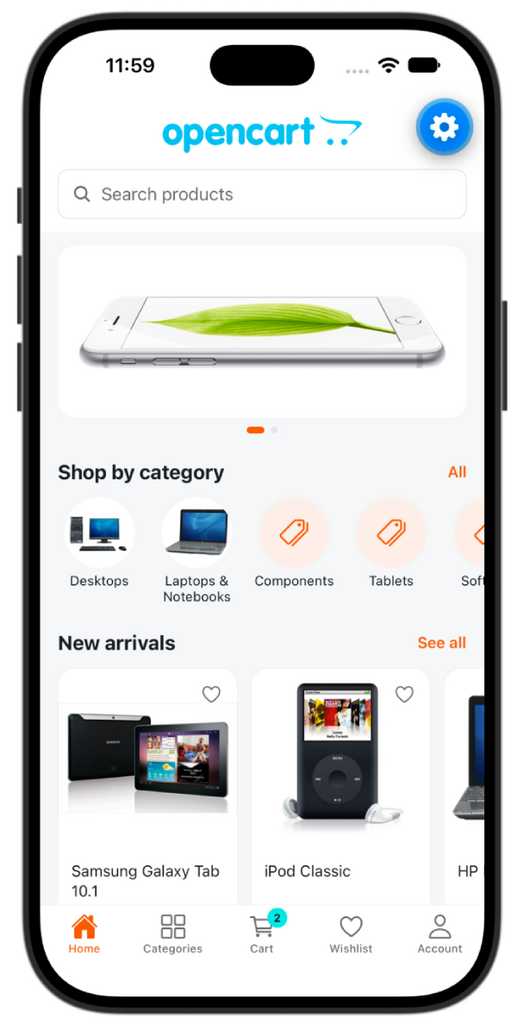
- Shopping: catalog, search, products with every option type, cart, wishlist and checkout, with the same prices, taxes, stock rules and coupons as your website.
- Payments: every installed OpenCart payment and shipping extension works. Cash on Delivery, Bank Transfer, Cheque and Free Checkout complete inside the app; online gateways run in a secure in-app web view.
- Accounts: customer accounts, address book and order history, shared with the website.
- Branding: the app’s colours are set from the OpenCart admin.
Contents
- Features
- How it works
- Requirements
- Getting started
- Configuration
- Project structure
- Development
- Releasing
- API reference
- Security
- Known limitations
- Documentation
Features
| Area | What the app does |
|---|---|
| Home | Banner carousel (taps open the linked product or category), categories, and featured, special, new and bestselling products |
| Catalog | Category tree, product lists with infinite scroll, sorting and category filters, search, specials |
| Product | Image gallery, price, special and tax, quantity discounts, stock, every option type (select, radio, checkbox, image swatches, text, textarea, date and time), subscription plans, specifications, related products, sharing |
| Reviews | Read reviews and write one, following the store’s review rules |
| Cart | The same cart as the website for logged-in customers; quantities, coupons, totals, stock and minimum-quantity warnings |
| Wishlist | Works for guests and moves into the account at login |
| Checkout | Guest or logged in, saved or new addresses, payment address if the store requires one, live shipping quotes, payment methods, comments, terms |
| Payments | Cash on Delivery, Bank Transfer, Cheque and Free Checkout in the app; any other gateway (PayPal, Stripe, …) in the store’s own payment form inside a web view |
| Account | Register, log in, forgotten password, edit details, change password, newsletter, address book, order history with status and “buy again” |
| Store | Currency switcher, information pages, call or email the store |
| Branding | Primary, secondary, header, font and button colours set in the OpenCart admin, with automatic text contrast |
How it works
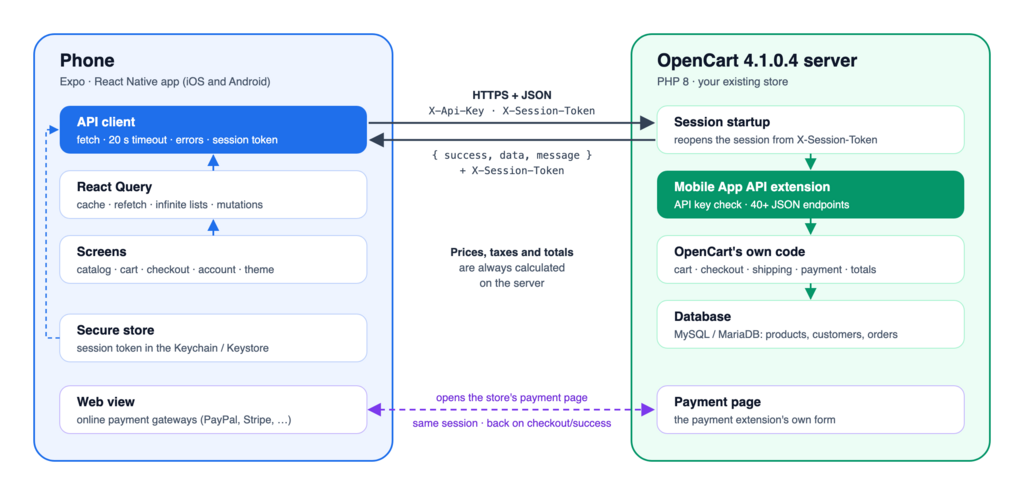
The server holds the cart, the checkout progress and the login, in the normal OpenCart session. The app sends that session’s ID in a header instead of a cookie.
Why an extension? OpenCart’s built-in API was designed for the admin panel’s order editor, not for shoppers:
- Only
api/orderandapi/subscriptioncan be called. Every otherapi/*route returns 403. - Each request needs an HMAC-SHA1 signature with a secret key and must come from a whitelisted IP address. A public app can’t keep that secret, and phone IP addresses can’t be whitelisted.
- It has no endpoints for products, categories, customer login, wishlist or order history.
- It trusts posted values such as the shipping cost, which is safe for an admin but not for the public.
The Mobile App API extension adds the customer-facing endpoints. It uses OpenCart’s own models and controllers, so the app and the website always agree on prices, taxes, specials, discounts, stock and coupons. Where the core API is safe, the extension reuses it: adding to the cart goes through api/cart.addProduct, and totals come from api/cart.getTotals. The client never sends prices.
Requirements
| For | You need |
|---|---|
| The extension | OpenCart 4.1.0.4, PHP 8.0 or newer |
| The app | Node.js 20.19 or newer; Expo Go on a phone, or the iOS Simulator / an Android emulator |
| The local dev store | Docker Desktop (or Docker Engine with Compose v2) |
| Store releases | An Expo account (EAS Build), Apple Developer and Google Play accounts, and an HTTPS store |
Getting started
1. Local dev store (optional)
Skip this step if you already have an OpenCart 4.1.0.4 store to test against.
cp .env.example .env     # set every password in it first
make store               # downloads OpenCart 4.1.0.4 into ./store, installs it with demo data
That gives you a storefront at http://localhost:8090/ and an admin at http://localhost:8090/admin/, with the credentials from .env. Afterwards, make up and make down start and stop it; the database is kept in a Docker volume.
To test on a real phone over Wi-Fi, set STORE_BIND_ADDRESS=0.0.0.0 in .env and run make up again. Anyone on the same network can then reach the store and its admin, so only do this on a network you trust.
2. Install the Mobile App API extension
- Build the package:
make extension(orsh opencart-extension/build.sh). CI also attaches it to every run. - In the admin, go to Extensions → Installer, upload
opencart-extension/mobile_api.ocmod.zipand click Install. - Go to Extensions → Extensions → Modules → Mobile App API, click Install (+), then Edit.
- Turn on Status, copy the API Key, and save. The other settings are described under Configuration.
3. Run the app
cd mobile
npm ci
cp .env.example .env     # then set the store URL and API key (below)
npx expo start -c
In mobile/.env:
EXPO_PUBLIC_STORE_URL=http://192.168.0.10:8090/    # your store; see the table below
EXPO_PUBLIC_API_KEY=paste-the-key-from-the-module-settings| Running the app on | Store URL for the local dev store |
|---|---|
| A real phone (Expo Go) | http://<your computer's LAN IP>:8090/ (macOS: ipconfig getifaddr en0) |
| iOS Simulator | http://localhost:8090/ |
| Android emulator | http://10.0.2.2:8090/ |
Then scan the QR code with the iPhone Camera or the Expo Go app, or press i / a for a simulator. If the store URL or API key is missing or wrong, the app says so on its start screen. Restart with npx expo start -c after changing .env.
Configuration
App: mobile/.env
| Variable | Required | Notes |
|---|---|---|
EXPO_PUBLIC_STORE_URL | yes | The storefront URL, not the API URL. Release builds require https://. |
EXPO_PUBLIC_API_KEY | yes | From the module settings page |
EXPO_PUBLIC_LANGUAGE | no | An installed store language code; default en-gb |
These values are compiled into the app, so they are not secret; that includes the API key. See Security.
Extension settings (Extensions → Modules → Mobile App API)
| Setting | Effect |
|---|---|
| Status | Turns the API on or off. While off, every endpoint returns 503. |
| API Key | Must match EXPO_PUBLIC_API_KEY. Use a different key for production. |
| CORS Origin | Only for testing in a web browser (npx expo start --web). Leave empty otherwise. |
| Home Banner | Banner group shown on the home screen |
| Featured Product IDs | Comma-separated, e.g. 40,42,30 |
| Products per Home Section, Product Image Size | Home screen and list layout |
| App Colours | See below. The app applies them the next time it is opened. |
| Colour | Used for |
|---|---|
| Primary | Buttons, links, the active tab and selected options (darker and lighter shades are derived from it) |
| Secondary | Sale badges, special prices, wishlist hearts, cart and wishlist count badges |
| Tertiary | Header and tab bar background |
| Font | Main text, and header titles on a light header. Use a dark colour; the app background is light. |
| Button / Button Text | Main buttons. Leave empty to follow Primary with automatic text contrast. |
Text on every colour switches between white and dark automatically. Error messages always stay red.
OpenCart settings the app depends on
| Setting | Where | Why |
|---|---|---|
| Two-factor authentication off | System → Settings → Option | The 2FA page only works in a browser, so app logins are refused while it’s on |
| Session lifetime | System → Settings → Server | How long a customer stays logged in on the app without activity |
| Guest checkout, terms pages, password rules, price display, stock checkout, reviews | System → Settings → Option | Read by the app and enforced by the API |
| Shipping, payment and order total extensions | Extensions | All installed ones are supported |
Project structure
opencart-mobile-app/
├── mobile/                       Expo app (TypeScript)
│   ├── App.tsx                   Entry point: providers, error boundary, start screen
│   ├── app.config.ts             App name, IDs, icon, splash, per-build settings
│   ├── eas.json                  EAS Build profiles: development, preview, production
│   ├── assets/                   Icon, adaptive icon, splash image
│   └── src/                      Screens, components, API client, hooks, theme, tests
├── opencart-extension/
│   ├── mobile_api/               Mobile App API extension source (PHP)
│   └── build.sh                  Builds mobile_api.ocmod.zip
├── docs/                         Developer guide (Markdown, HTML, WordPress import)
├── docker/                       Dev store image and setup script
├── docker-compose.yml            Local OpenCart dev store
├── Makefile                      Common tasks (make help)
├── .github/workflows/ci.yml      Continuous integration
├── CHANGELOG.md
└── SECURITY.mdstore/, .env and mobile/.env are created locally and are not committed.
Development
| Command | What it does |
|---|---|
make help | Lists all tasks |
make store | First-time setup of the local dev store |
make up / make down / make logs | Start, stop and follow the dev store |
make mobile-install / make mobile-start | Install the app’s dependencies / start Expo with a clean cache |
make extension | Lint the PHP and build mobile_api.ocmod.zip |
make check | Everything CI runs: PHP lint plus the app checks |
make docs | Rebuild the HTML and WordPress versions of the developer guide |
In mobile/, npm run check runs the type check, ESLint, the Prettier check and the unit tests. The individual steps are npm run typecheck, npm run lint, npm run format and npm test. npm run doctor checks dependency versions, and npm run icons regenerates the icon and splash.
CI (.github/workflows/ci.yml) runs on every push and pull request:
- the app checks and
expo-doctor - production bundles for iOS and Android
- a PHP syntax check on PHP 8.0 and 8.3
- the extension zip, attached as a downloadable artifact
Editing the extension: the source is opencart-extension/mobile_api/. The dev store runs its installed copy in store/extension/mobile_api/. Copy changed files across, or rebuild and reinstall the zip; reinstalling resets the module settings, including the API key.
The developer guides explain the architecture and how to add screens, endpoints and settings.
Releasing
Extension
- Bump
versioninopencart-extension/mobile_api/install.jsonand add an entry toCHANGELOG.md. - Run
make extensionand install the zip on the store.
Upgrading an installed copy means uninstalling and reinstalling it, which resets its settings. Note the API key and colours first, or upload just the changed PHP files.
App (App Store and Google Play)
The app is built with EAS Build. mobile/eas.json has three profiles:
| Profile | Use | App ID and name |
|---|---|---|
development | Development client on your own devices | <APP_BUNDLE_ID>.dev, “… (Dev)” |
preview | Internal test builds | <APP_BUNDLE_ID>.preview, “… (Preview)” |
production | Store release; build numbers increase automatically | <APP_BUNDLE_ID> |
Before the first production build:
- Use an HTTPS store. Production builds refuse an
http://store URL. Plain HTTP to the local network is only allowed in development and preview builds. - Choose your app ID. Set
APP_BUNDLE_ID(e.g.com.yourcompany.store) and optionallyAPP_NAME. The production build stops while the ID is stillcom.example.*, because it can’t be changed after publishing. - Use a new API key for production. Generate it in the module settings.
- Add your branding to
mobile/assets/, or editmobile/scripts/build-icons.cjsand runnpm run icons. - Set the build variables
APP_BUNDLE_ID,APP_NAME,EXPO_PUBLIC_STORE_URL,EXPO_PUBLIC_API_KEYandEXPO_PUBLIC_LANGUAGE. Put them in theenvblock of the production profile ineas.json, or set them as EAS environment variables.
npm install -g eas-cli
cd mobile
eas init                                       # links the project; set EAS_PROJECT_ID to the ID it prints
eas build --platform all --profile production
eas submit --platform ios                      # and --platform android
The server-side checklist is in SECURITY.md.
API reference
Every endpoint is GET|POST {store}/index.php?route=extension/mobile_api/api/{endpoint}.
| Header | |
|---|---|
X-Api-Key | Required on every request |
X-Session-Token | The session ID. The server returns it in this response header and in common.init. |
Content-Type: application/json | For POST bodies (form posts also work) |
Optional query parameters: language=en-gb, currency=USD.
Responses use one envelope, with HTTP status 400, 401, 403, 404, 409, 422, 429 or 503 on failure:
{ "success": true,  "data": { ... }, "message": "optional" }
{ "success": false, "error": "Message", "errors": { "field": "Message" } }| Endpoint | Method | Body / query |
|---|---|---|
common.init | GET | Store info, theme colours, settings, currencies, customer, session_token |
catalog.home | GET | Banners, categories, featured, latest, specials, bestsellers |
catalog.categories | GET | parent_id |
catalog.category | GET | category_id → category, children, filter groups |
catalog.manufacturers | GET | |
catalog.informations / catalog.information | GET | information_id |
product.index | GET | category_id, sub_category, manufacturer_id, search, tag, description, filter, special, sort (default/newest/price_asc/price_desc/rating/name_asc/name_desc/model), page, limit |
product.info | GET | product_id |
product.reviews | GET | product_id, page |
product.review | POST | ?product_id + {author, text, rating} |
cart.index | GET | |
cart.add | POST | {product_id, quantity, option: {product_option_id: value or [values]}, subscription_plan_id} |
cart.edit / cart.remove / cart.clear | POST | {key, quantity} / {key} / – |
cart.coupon | POST | {coupon} (empty removes it) |
account.login / account.logout | POST | {email, password} |
account.register | POST | {firstname, lastname, email, telephone, password, newsletter, agree} |
account.forgotten | POST | {email} |
account.profile | GET | |
account.edit | POST | {firstname, lastname, email, telephone} |
account.password | POST | {current, password, confirm} |
account.newsletter | POST | {newsletter: 0 or 1} |
address.index / address.save / address.delete | GET/POST | {address_id?, firstname, lastname, company, address_1, address_2, city, postcode, country_id, zone_id, default} |
wishlist.index / wishlist.add / wishlist.remove | GET/POST | {product_id} |
order.index / order.info / order.reorder | GET/POST | page / order_id / {order_id, order_product_id} |
localisation.countries / localisation.zones | GET | country_id |
checkout.index | GET | Current checkout state |
checkout.guest | POST | {firstname, lastname, email, telephone} |
checkout.shippingAddress / checkout.paymentAddress | POST | {address_id} or address fields (+ save: true to add it to the address book) |
checkout.shippingMethods / checkout.shippingMethod | GET/POST | {code: "flat.flat"} |
checkout.paymentMethods / checkout.paymentMethod | GET/POST | {code: "cod.cod"} |
checkout.confirm | POST | {comment, agree} → status: complete, or payment_required with a payment_url |
checkout.pay | GET (HTML) | Payment page for the web view |
checkout.complete | POST | Finishes the order after the web view reaches checkout/success |
Shipping and payment choices are checked against the quotes the server calculated and stored in the session, so a client can’t set its own prices.
Security
- Every endpoint checks the API key (constant-time comparison). Account, address and order endpoints also require a logged-in customer and only return that customer’s data.
- Prices, totals, shipping and payment are always calculated on the server.
- The session token is kept in the iOS Keychain or Android Keystore. Release builds only talk to an HTTPS store.
- Login uses OpenCart’s login-attempt limit. Forgotten-password requests give the same answer whether or not the email exists.
- The API key ships inside the app, so treat it as an app identifier, not a secret.
Report vulnerabilities and find the production checklist in SECURITY.md. The full analysis is in §14 of the developer guides.
Known limitations
- File-upload product options can’t be filled in from the app. The product page asks the customer to order that product on the website.
- No captcha on registration and reviews, because captchas are browser widgets. The API key and the login-attempt limit are the protection.
- Two-factor authentication must be off for app logins.
- One store and one language per build: the default store (
store_id0) and the language inEXPO_PUBLIC_LANGUAGE. - Colour changes in the admin show up the next time the app is opened.
Testing status:
- Checks that pass:
make check: PHP 8.0 and 8.3 syntax, TypeScript, ESLint, Prettier and the unit tests.expo-doctor(20/20).- The production bundle builds.
- End-to-end run against the local 4.1.0.4 store passed: browsing, cart, coupons, wishlist, guest and logged-in checkout with Cash on Delivery, accounts, orders, currency switching and API key rejection.
- Not tested yet: online payment gateways in the web view, and a production HTTPS store. Try both on a staging copy before going live.
Documentation
Developer guide series
The full developer guide is also published here as a five-part series:
- Part 1: Overview, Architecture, Repository Layout and Languages
- Part 2: Tools and Libraries, Why Expo, and the Development Environment
- Part 3: The OpenCart Extension and the Mobile App
- Part 4: Design Patterns, Hooks and End-to-End Flows
- Part 5: Configuration, Security, Extending, Testing, Releasing and Troubleshooting
Source code, issues and releases: github.com/rupaknepali/opencart-mobile.

Author of four Opencart book.
The recent are Opencart 4 developer book and Opencart 4 user manual