Frequently Bought Together for OpenCart 4: Suggest Products From Your Real Orders (Free Extension)
A free OpenCart 4 extension that shows the products customers most often buy with the one they're viewing, from your own orders, with checkboxes, a live total and one "Add selected to cart" button.
 Rupak NepaliPublished Nov 14, 2026
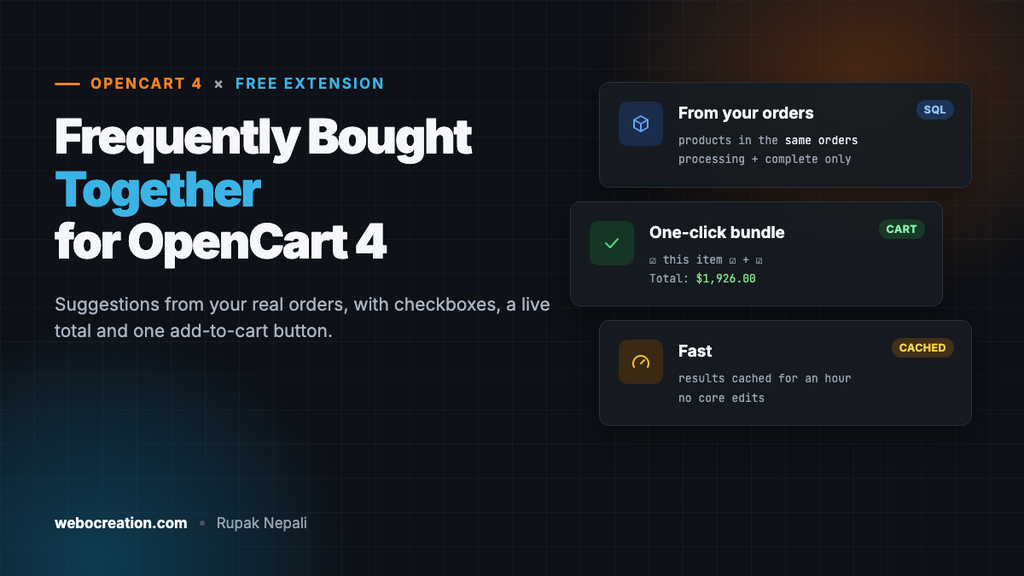
“Frequently bought together” is one of the oldest tricks in e-commerce, and still one of the best. When a shopper looks at a laptop, showing the bag and mouse that other buyers added, with one button to add all three, raises the average order without a discount. OpenCart 4 doesn’t have it built in. Its Related Products block shows only what you’ve linked by hand.
This free extension adds it. It looks at your own orders, finds the products that most often appear in the same orders as the one being viewed, and shows them as a bundle with checkboxes, a live total and an Add selected to cart button. No AI service, no monthly fee, no data leaving your store.
Download Frequently Bought Together for OpenCart 4 (free, tested on OpenCart 4.1.0.4)
What it does
- Suggestions from your real orders. For the product being viewed, it counts how many orders also contained each other product, and shows the most frequent ones.
- Only real orders count. It uses the statuses your store treats as processing or complete (System → Settings → Option), so cancelled and failed orders are ignored. It also leaves out the status new orders start with (usually Pending), because those are often unpaid; OpenCart’s default “processing” list includes it, which would otherwise let abandoned bank-transfer orders shape your suggestions.
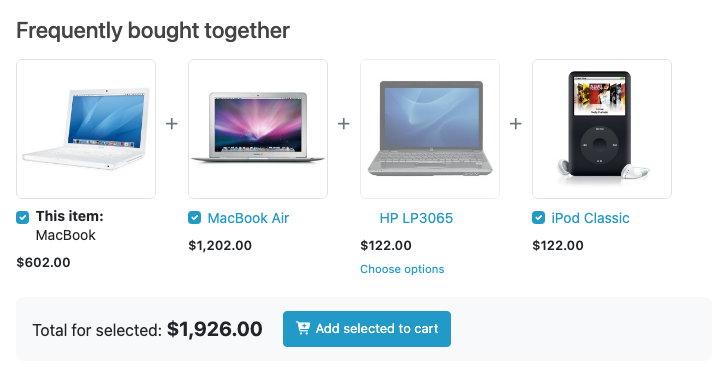
- One-click bundle. The current product plus up to six suggestions, each with a checkbox. The total updates as shoppers tick and untick, and one button adds everything selected.
- Handles products that need choices. Products with required options (a size, a colour) or subscription plans can’t be added without a choice, so they get a “Choose options” link instead of a checkbox.
- Respects your store’s rules. Disabled products, products from other stores and products not yet available never appear. If you hide prices from guests, the prices and total are hidden too.
- Fast. Results are cached for an hour, so a busy product page doesn’t run the order query on every view.
How the suggestions are calculated
The heart of the extension is one query. It joins the order products table to itself: every order that contains the viewed product, and every other product in those orders.
SELECT `op2`.`product_id`, COUNT(DISTINCT `op2`.`order_id`) AS `orders`
FROM `oc_order_product` `op1`
INNER JOIN `oc_order_product` `op2` ON (`op2`.`order_id` = `op1`.`order_id` AND `op2`.`product_id` != `op1`.`product_id`)
INNER JOIN `oc_order` `o` ON (`o`.`order_id` = `op1`.`order_id`)
WHERE `op1`.`product_id` = 43
AND `o`.`store_id` = 0
AND `o`.`order_status_id` IN (5, 2, 12, 3)        -- processing and complete statuses, minus Pending (1)
AND `o`.`date_added` >= DATE_SUB(NOW(), INTERVAL 365 DAY)
GROUP BY `op2`.`product_id`
HAVING `orders` >= 2
ORDER BY `orders` DESC
LIMIT 9
Three settings shape the result:
| Setting | Default | What it does |
|---|---|---|
| Products to suggest | 3 | How many products to show next to the current one (1 to 6) |
| Minimum shared orders | 2 | A product is suggested only if it was in at least this many of the same orders. It stops one unusual order from creating a suggestion. |
| Look back (days) | 365 | Only orders from this period count, so suggestions follow what sells now, not what sold three years ago. |
For a new store with few orders, set the minimum to 1. For a busy store, raise it to 3 or more, so only real patterns show. The query runs on indexed order columns and is cached, so it stays quick even with many thousands of orders.
Install it
- Download
boughttogether.ocmod.zip. - Go to Extensions → Installer, upload the zip, and click the green + next to it.
- Go to Extensions → Extensions, choose Modules, and install Frequently Bought Together.
- Click Edit, check the settings, turn Status on, and save.
- Go to Design → Layouts, edit the Product layout, add Frequently Bought Together to Content Bottom, and save.
Open a product that has been ordered with others. If nothing shows, that product doesn’t have enough shared orders yet; try a lower minimum.
How it’s built
The extension is a standard OpenCart 4 module: a settings page in the admin, and a storefront controller, model and template. It doesn’t change any core files, so it survives OpenCart updates and works with any theme that shows layout modules.
Deciding which products get a checkbox
OpenCart’s add-to-cart endpoint refuses a product with a required option that wasn’t chosen, or a subscription product without a plan. The controller checks for both before offering a checkbox:
// Products with required options or subscription plans can't be added from here:
// the customer has to choose on the product page.
$needs_choice = (bool)$this->model_catalog_product->getSubscriptions((int)$info['product_id']);

foreach ($this->model_catalog_product->getOptions((int)$info['product_id']) as $option) {
	if ($option['required']) {
		$needs_choice = true;
		break;
	}
}
If the product being viewed itself needs a choice, the block says “Choose options above” and leaves it out of the bundle, since the shopper picks those options in the main product form.
Adding several products at once
The button posts each ticked product to OpenCart’s own checkout/cart.add endpoint, one after the other. Sending them in sequence rather than all at once matters: parallel requests can write the cart session at the same moment and lose an item. When they’re done, it reloads the header cart the same way OpenCart’s product page does:
// One request per product, in order, so the cart session isn't written to in parallel.
items.reduce(function (chain, input) {
  return chain.then(function () {
    return $.ajax({
      url: url,
      type: 'post',
      data: {product_id: input.value, quantity: input.dataset.quantity},
      dataType: 'json'
    });
  });
}, $.Deferred().resolve().promise()).always(function () {
  $('#cart').load(cartInfoUrl);   // refresh the header cart
});
Products with a minimum quantity are added at that minimum, and the total includes it.
A caching trap worth knowing
OpenCart 4’s file cache returns an empty array when a key isn’t cached, not false or null. Code that checks “if the cache gave me an array, use it” therefore treats every cache miss as a cached empty result, and never runs the query. Our first version did exactly that, and the block never appeared. The fix is to store the result in a wrapper, so the two cases can be told apart:
$cached = $this->cache->get($key);

if (is_array($cached) && array_key_exists('rows', $cached)) {
	$rows = $cached['rows'];
} else {
	$rows = $this->db->query($sql)->rows;
	$this->cache->set($key, ['rows' => $rows]);
}
If you write your own OpenCart 4 extensions, use the same pattern anywhere an empty result is a valid answer.
On phones
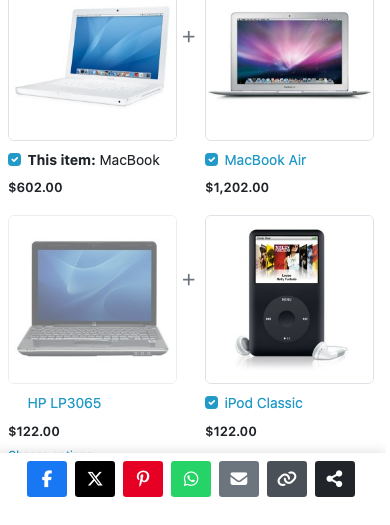
Frequently bought together or related products?
Both help shoppers find more to buy, but they answer different questions:
| Frequently bought together | Related products | |
|---|---|---|
| Question it answers | “What else do buyers of this get?” | “What’s similar to this?” |
| Source | Your order history | Links you set, or the same category |
| Typical result | Accessories and complements | Alternatives and similar items |
| Best place | Product page, near the price | Further down the product page |
They work well together. Our free automatic related products extension fills the Related Products block from the same category, so every product page has both: complements from your orders, and alternatives from the catalog.
Troubleshooting
| Problem | Cause and fix |
|---|---|
| The block doesn’t appear | Check that Status is on and the module is in the Product layout. Then check the product has orders shared with other products in your processing or complete statuses. Lower “Minimum shared orders” for a new store. |
| New orders don’t change the suggestions | Results are cached for an hour. Saving the module’s settings clears the cache at once. |
| A product shows “Choose options” instead of a checkbox | It has a required option or a subscription plan, so the shopper must choose on its page. This is intended. |
| Prices and total are missing | Your store hides prices from guests (System → Settings → Option → “Login Display Prices”). They appear after login. |
More free OpenCart 4 extensions in this series: automatic related products, the “Only 3 left” low-stock message and social share buttons.

Rupak Nepali is a web developer, manage Webocreation website and the author of six books:
Getting Started with OpenCart Module Development (Packt, 2013),
OpenCart Theme and Module Development (Packt, 2015),
OpenCart 4: Dev Guide for Themes & Extensions (2024),
OpenCart 4: User Manual (2025),
Cloudflare for the Enterprise Website (2026) and
The Technical Web Guide for Marketers (2026).
Rupak has built OpenCart stores and extensions since 2010, has published more than 600 tutorials on Webocreation, and shares free OpenCart extensions on GitHub.
Find Rupak on
GitHub | Amazon | LinkedIn | X | YouTube.