Import Product Reviews in Bulk with CSV – OpenCart Extension Spotlight
 Rupak NepaliPublished Jun 2, 2025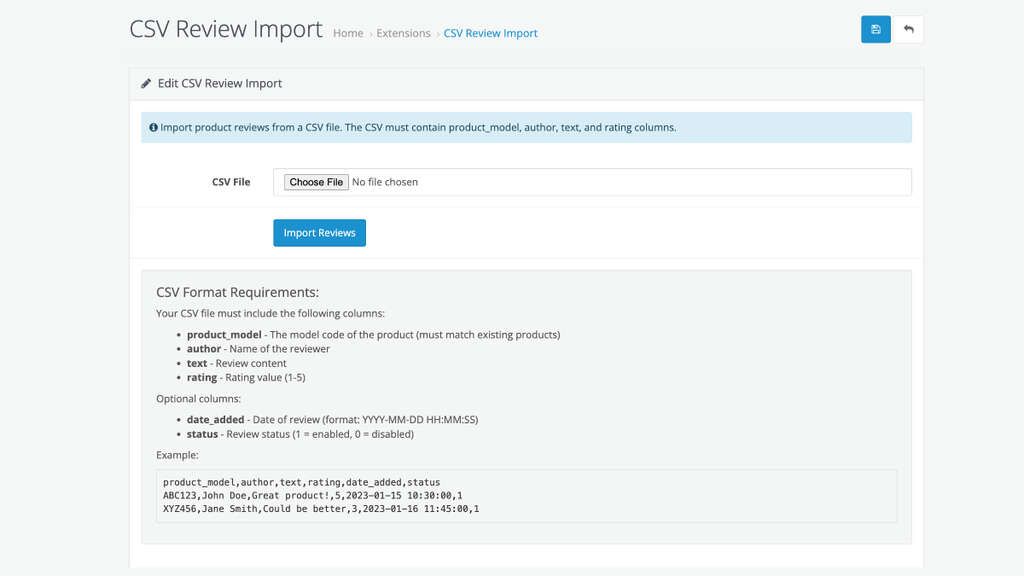
Managing product reviews in your OpenCart store just got easier. Whether you’re launching a new site, migrating from another platform, or handling large product catalogs, manual entry of product reviews can be time-consuming and error-prone. That’s where our new OpenCart extension — “CSV Review as per Product Model Import” — comes in.
This extension allows store owners to upload multiple product reviews via a single CSV file, mapped directly to products using their model codes. It’s fast, scalable, and perfect for streamlining your review management process.
🔧 Installation Steps
- Download the extension ZIP file.
- Log in to your OpenCart Admin Panel.
- Navigate to
Extensions→Installer. - Upload the ZIP file of the extension.
- Once uploaded, go to
Extensions→Modules. - Look for “CSV Review Import” and click Install.
- After installation, click Edit to access the module.
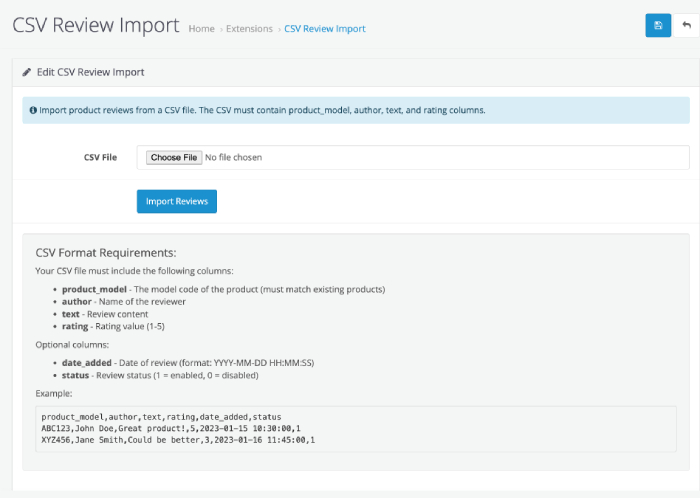
📥 How to Import CSV Reviews
- Prepare your CSV file as per the format above.
- Go to
Extensions→Modules→ CSV Review Import. - Click “Browse” or “Choose File” and select your CSV.
- Click “Import”.
- You’ll see a success message once the reviews are added.
✅ Pro tip: Make sure product models in your CSV exactly match those in your OpenCart catalog. Otherwise, reviews won’t be linked.
🔍 What is the “CSV Review as per Product Model Import” Extension?
This extension provides a user-friendly interface to import customer reviews for your OpenCart products in bulk. Instead of manually adding each review one at a time, you simply prepare a CSV file, upload it, and let the extension handle the rest.
It matches reviews to products based on the product’s model code, ensuring accurate data mapping even across large inventories.
🧾 CSV Format Requirements
To ensure compatibility, your CSV file must include the following required columns:
| Column | Description |
|---|---|
product_model | The model code of the product (must match an existing product) |
author | The name of the reviewer |
text | The review content |
date_added | Date the review was created (Format: YYYY-MM-DD HH:MM:SS) |
rating | A numerical rating (1 to 5) |
status | Review status (1 = enabled, 0 = disabled) |
✅ Example:
product_model,author,text,rating,date_added,status
ABC123,John Doe,Great product!,5,2023-01-15 10:30:00,1
XYZ456,Jane Smith,Could be better,3,2023-01-16 11:45:00,1
⚙️ Key Features
- Bulk review import via CSV
- Matches products using model codes
- Supports custom review dates and status flags
- Compatible with OpenCart 3.x and 4.x
- Easy-to-use interface for uploading and mapping CSV files
💡 Use Cases
- 🛠️ Migrate from another eCommerce platform and bring customer reviews with you.
- 🚀 Populate reviews in new stores quickly during development or testing.
- 📈 Import curated or syndicated reviews from trusted sources or marketing tools.
- 🕒 Save time for store admins managing high-volume product catalogs.
🛒 Who Should Use This?
This extension is perfect for:
- E-commerce developers building or migrating OpenCart stores
- Store owners managing hundreds of products
- Agencies maintaining multiple OpenCart installations
- Merchants working with dropshipping or affiliate products
🎯 Final Thoughts
Product reviews play a vital role in influencing purchase decisions. Adding them quickly and accurately shouldn’t be a bottleneck. With the CSV Review as per the Product Model Import extension for OpenCart, you get a reliable, scalable solution to manage customer feedback with ease.

Author of four Opencart book.
The recent are Opencart 4 developer book and Opencart 4 user manual