OpenCart 4: How to Set a Default Shipping Method (So Customers Don’t Have to Choose)
 Rupak NepaliPublished Mar 30, 2026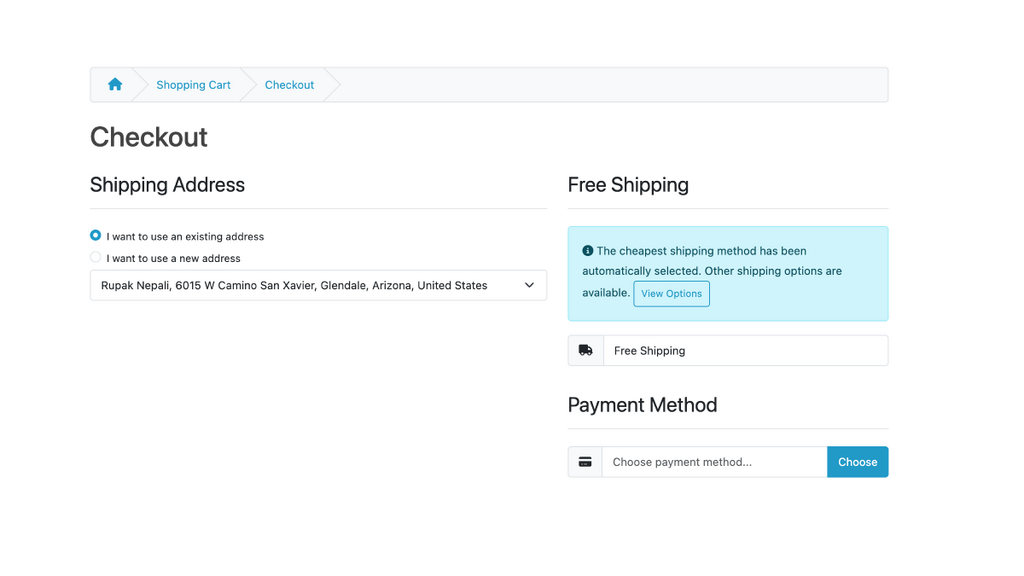
If your OpenCart store offers only one shipping method, forcing customers to select it manually during checkout creates unnecessary friction. Every extra click increases the chance of cart abandonment. In this guide, you’ll learn how to automatically set the default shipping method in OpenCart 4 so your customers can move through checkout faster and more smoothly.
Why Set a Default Shipping Method?
When there’s only one shipping option available (for example, Flat Rate or Free Shipping), asking users to choose it is redundant. By setting it as the default, you:
- Improve checkout speed
- Reduce user confusion
- Increase conversion rates
- Create a cleaner checkout experience
How OpenCart 4 Handles Shipping Selection
By default, OpenCart requires customers to:
- Enter a shipping address
- Click “Get Quotes”
- Select a shipping method
Even if there’s only one option, OpenCart still requires manual selection. To change this behavior, we’ll auto-select the available shipping method using a small code override.
OpenCart 4 shipping method functionality to select the cheapest shipping method automatically and inform users about other available options. Here’s what I implemented:
Changes Made:
1. Updated Shipping Method Selection Logic
Locate file catalog/controller/checkout/shipping_method.php, then find the code below:
lass ShippingMethod extends \Opencart\System\Engine\Controller {
	/**
	 * Index
	 *
	 * @return string
	 */
	public function index(): string {
		$this->load->language('checkout/shipping_method');
Below the line above, paste the code below:
// Auto-set default shipping method if none exists and shipping address is available
if (!isset($this->session->data['shipping_method']) && isset($this->session->data['shipping_address'])) {
	// Validate cart has products and has stock.
	if ($this->cart->hasProducts() && ($this->cart->hasStock() || !$this->config->get('config_stock_checkout')) && $this->cart->hasMinimum()) {
		// Validate if customer data is set
		if (isset($this->session->data['customer'])) {
			// Validate if shipping not required. If not the customer should not have reached this page.
			if (!$this->cart->hasShipping() || isset($this->session->data['shipping_address']['address_id'])) {
				// Get shipping methods
				$this->load->model('checkout/shipping_method');
				$shipping_methods = $this->model_checkout_shipping_method->getMethods($this->session->data['shipping_address']);

				if ($shipping_methods) {
					$this->session->data['shipping_methods'] = $shipping_methods;

					// Auto-select cheapest available shipping method
					$cheapest_method = null;
					$cheapest_cost = null;
					$total_methods = 0;

					foreach ($shipping_methods as $shipping_method) {
						if (isset($shipping_method['quote']) && !empty($shipping_method['quote'])) {
							foreach ($shipping_method['quote'] as $quote) {
								$total_methods++;
								$cost = isset($quote['cost']) ? (float)$quote['cost'] : 0;

								if ($cheapest_cost === null || $cost < $cheapest_cost) {
									$cheapest_cost = $cost;
									$cheapest_method = $quote;
								}
							}
						}
					}

					if ($cheapest_method) {
						$this->session->data['shipping_method'] = $cheapest_method;
						// Store info about multiple methods for display
						$this->session->data['has_multiple_shipping_methods'] = ($total_methods > 1);
					}
				}
			}
		}
	}
}
In the same file, in the quote method public function quote(): void { find the code below:
if ($shipping_methods) {
				$json['shipping_methods'] = $this->session->data['shipping_methods'] = $shipping_methods;
Just below that line, paste these codes:
// Auto-select cheapest available shipping method if none is set
if (!isset($this->session->data['shipping_method'])) {
	$cheapest_method = null;
	$cheapest_cost = null;
	$total_methods = 0;

	foreach ($shipping_methods as $shipping_method) {
		if (isset($shipping_method['quote']) && !empty($shipping_method['quote'])) {
			foreach ($shipping_method['quote'] as $quote) {
				$total_methods++;
				$cost = isset($quote['cost']) ? (float)$quote['cost'] : 0;

				if ($cheapest_cost === null || $cost < $cheapest_cost) {
					$cheapest_cost = $cost;
					$cheapest_method = $quote;
				}
			}
		}
	}

	if ($cheapest_method) {
		$this->session->data['shipping_method'] = $cheapest_method;

		// Store info about multiple methods for display
		$this->session->data['has_multiple_shipping_methods'] = ($total_methods > 1);
	}
}
The code above has the following functionalities:
- Cheapest Method Selection: Modified both index() and quote() methods to analyze all available shipping methods and select the one with the lowest cost instead of the first one
- Cost Comparison: The code now compares the
costfield of each shipping quote to find the cheapest option - Multiple Methods Tracking: Added tracking to count the total available shipping methods
2. Enhanced User Interface
Locate file catalog/view/template/checkout/shipping_method.twig and find the code below:
<legend>{{ heading_title }}</legend>Just below that line, paste the code below:
{% if has_multiple_shipping_methods %}
  <div class="alert alert-info">
    <i class="fa fa-info-circle"></i> {{ text_cheapest_selected }} <button type="button" id="button-shipping-methods" class="btn btn-sm btn-outline-primary">{{ button_view_options }}</button>
  </div>
  {% endif %}
In the same file, find the following code
<script type="text/javascript"><!--Paste the code below:
// Auto-load shipping methods on page load if none is selected
$(document).ready(function() {
    if (!$('#input-shipping-code').val()) {
        $('#button-shipping-methods').trigger('click');
    }
});- Information Message: Added an informative alert that appears when multiple shipping methods are available
- Smart Button Display: The “Choose” button is hidden when there are multiple options (replaced with “View Options” in the info message)
- Clean Layout: The interface now clearly communicates that the cheapest option was selected while providing easy access to alternatives
3. Added Language Support
- New Text Strings: Added
text_cheapest_selectedto inform users about automatic selection - Button Text: Added
button_view_optionsfor the alternative shipping options button - User-Friendly Messaging: Clear communication about what was automatically selected and why
Locate file upload/catalog/language/en-gb/checkout/shipping_method.php and at the end of the file add the following code:
$_['text_cheapest_selected'] = 'The cheapest shipping method has been automatically selected. Other shipping options are available.';
$_['button_choose']           = 'Choose';
$_['button_view_options']     = 'View Options';
How It Works:
- Automatic Selection: When the checkout page loads, the system now:
- Retrieves all available shipping methods
- Compares costs to find the cheapest option
- Automatically selects the cheapest method
- Tracks if multiple methods are available
- User Communication:
- If only one shipping method exists, it is auto-selected by default.
- If multiple methods exist, Shows an info message explaining that the cheapest was selected with the “View Options” button
- Flexibility: Users can still change the shipping method by clicking “View Options” to see all available methods
Benefits:
- Cost Savings: Customers automatically get the cheapest shipping option
- Transparency: Users are informed about other available options
- Better UX: Reduces friction while maintaining choice
- Smart Defaults: Makes intelligent decisions on behalf of the user
The implementation ensures customers get the best value while maintaining full control over their shipping preferences.
Important Notes
- This approach works best when only one shipping method is active
- If multiple methods exist, customers may be forced into the wrong choice
- Always test checkout with different addresses and cart scenarios
Testing Checklist
Before going live:
- ✅ Add product to cart
- ✅ Go to checkout
- ✅ Confirm shipping is auto-selected
- ✅ Verify order completes without manual selection
- ✅ Test logged-in and guest checkout
Final Thoughts
Removing unnecessary steps in checkout is one of the simplest ways to improve conversion rates. If your OpenCart store only uses one shipping method, auto-selecting it is a small change with a big impact. By implementing the solution above, you streamline the checkout process and create a better user experience without complex customization. If you want to go further, you can also auto-select payment methods or skip entire checkout steps — turning OpenCart into a near one-click checkout system.

Author of four Opencart book.
The recent are Opencart 4 developer book and Opencart 4 user manual