One-Click Unsubscribe (RFC 8058): The List-Unsubscribe-Post Header Gmail and Yahoo Require, With Working Code
What Gmail and Yahoo's one-click unsubscribe rule actually requires, the List-Unsubscribe and List-Unsubscribe-Post headers, a tested PHP endpoint that handles the POST safely, and what to check in your email platform (and in OpenCart's newsletter mailer).
 Rupak NepaliPublished Nov 15, 2026
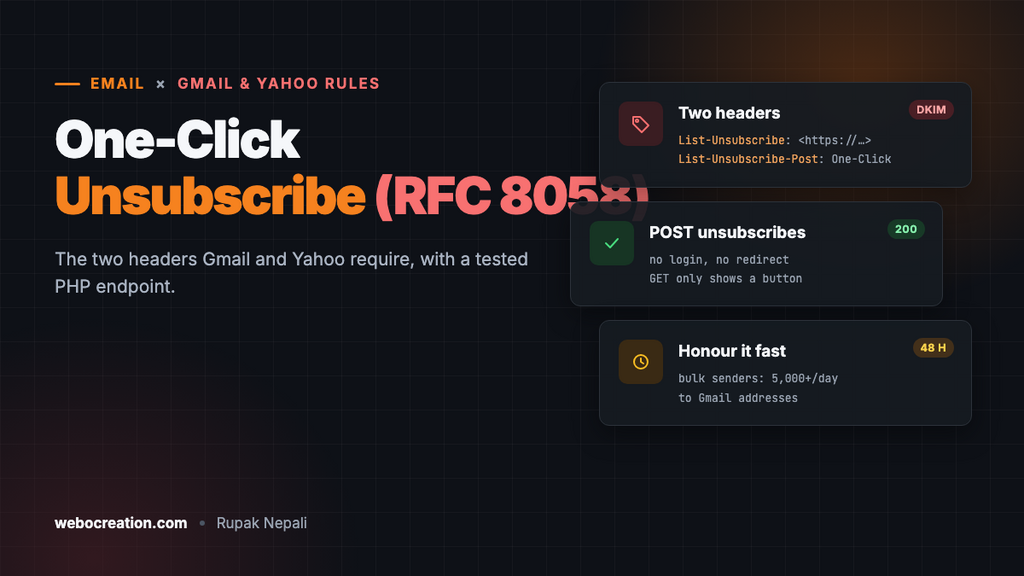
Since February 2024, Gmail and Yahoo have required bulk senders to support one-click unsubscribe: an Unsubscribe button in the mail app that works instantly, without opening a web page or logging in. Behind that button are two email headers and a URL that accepts a POST request. Get them wrong and the button doesn’t appear, users press “Report spam” instead, and your spam rate climbs.
This guide explains exactly what’s required, shows the headers, and gives a small PHP endpoint we tested against the requests mailbox providers send. It ends with a check for OpenCart stores, because OpenCart’s built-in newsletter mailer doesn’t do any of this.
Who has to comply
Google’s sender guidelines apply the requirement to bulk senders, meaning those sending close to 5,000 or more messages a day to Gmail addresses, and to marketing and subscribed messages. Their wording: marketing messages “must support one-click unsubscribe and include a clearly visible unsubscribe link in the body.” Order confirmations, shipping updates and password resets aren’t marketing and don’t need it.
Google’s Postmaster Tools help adds the deadline: unsubscribe requests should be honored within 48 hours. Yahoo’s rules say the same: one-click unsubscribe for bulk mail, honored within two days.
Even below 5,000 a day, add it. The button is how people leave without reporting you as spam, and spam reports are what hurt delivery.
The two headers
List-Unsubscribe: <https://shop.example.com/unsubscribe.php?e=jane%40example.com&t=8f2c...>, <mailto:unsubscribe@example.com?subject=unsubscribe>
List-Unsubscribe-Post: List-Unsubscribe=One-Click| Header | Purpose |
|---|---|
List-Unsubscribe | Where to unsubscribe: an HTTPS URL (required for one-click) and optionally a mailto address. Angle brackets around each, comma between |
List-Unsubscribe-Post | Always exactly List-Unsubscribe=One-Click. It tells the mailbox provider it may POST to the HTTPS URL to unsubscribe |
When the user clicks Unsubscribe in Gmail, Google’s servers send this request, with no cookies and no user present:
POST /unsubscribe.php?e=jane%40example.com&t=8f2c... HTTP/1.1
Host: shop.example.com
Content-Type: application/x-www-form-urlencoded

List-Unsubscribe=One-Click
The rules from RFC 8058
- The URL must identify the recipient by itself. No login, no cookies: put the subscriber (or a subscription ID) and a signature in the URL.
- Unsubscribe on POST, not GET. Security scanners and link previews fetch URLs in emails automatically. If a GET unsubscribes, people get unsubscribed by their antivirus.
- Don’t redirect the POST and don’t ask for confirmation. Return a 200 and do it.
- Both headers must be covered by your DKIM signature, so they can’t be added or changed in transit. Email platforms do this for you; if you build your own sending, add both headers to the DKIM
h=list.
A working endpoint
This PHP file handles both cases: the POST from the mail app (one click, done) and a person clicking the link in the email body (a page with a button). The link carries the email address and an HMAC signature, so nobody can unsubscribe someone else by editing the URL:
<?php
// One-click unsubscribe endpoint (RFC 8058). Example only: replace the file storage with your database.
const SECRET = 'change-me-to-a-long-random-string';

$email = (string)($_GET['e'] ?? '');
$token = (string)($_GET['t'] ?? '');

// The link carries the address and an HMAC, so nobody can unsubscribe someone else by guessing.
$valid = $email !== '' && hash_equals(hash_hmac('sha256', strtolower($email), SECRET), $token);

if ($_SERVER['REQUEST_METHOD'] === 'POST') {
	// Mailbox providers POST "List-Unsubscribe=One-Click". No login, no confirmation page, no redirect.
	if ($valid && ($_POST['List-Unsubscribe'] ?? '') === 'One-Click') {
		file_put_contents(__DIR__ . '/unsubscribed.txt', strtolower($email) . "\n", FILE_APPEND | LOCK_EX);
		http_response_code(200);
		exit('Unsubscribed');
	}

	http_response_code($valid ? 400 : 403);
	exit($valid ? 'Bad request' : 'Invalid link');
}

// A person clicking the link in the email body gets a page with a button (GET must never unsubscribe:
// link scanners and previews fetch URLs automatically).
header('Content-Type: text/html; charset=utf-8');
echo $valid
	? '<form method="post"><input type="hidden" name="List-Unsubscribe" value="One-Click"><button>Unsubscribe ' . htmlspecialchars($email) . '</button></form>'
	: 'Invalid link';
When sending, build each recipient’s URL with the same secret:
$token = hash_hmac('sha256', strtolower($email), SECRET);
$url = 'https://shop.example.com/unsubscribe.php?e=' . rawurlencode($email) . '&t=' . $token;

$headers[] = 'List-Unsubscribe: <' . $url . '>, <mailto:unsubscribe@example.com?subject=unsubscribe>';
$headers[] = 'List-Unsubscribe-Post: List-Unsubscribe=One-Click';
Testing it
We ran the endpoint in PHP 8.3 and sent it the same requests a mailbox provider and a link scanner would:
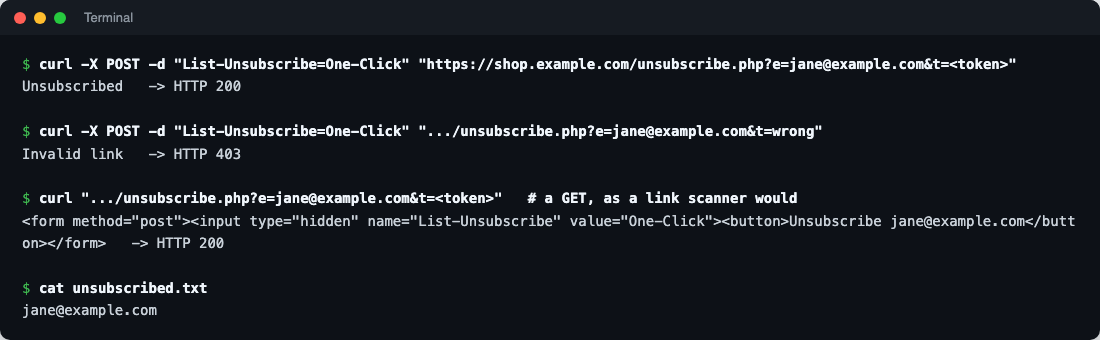
| Request | Result |
|---|---|
POST List-Unsubscribe=One-Click with a valid token | 200 “Unsubscribed”, address recorded |
| Same POST with a wrong token | 403 “Invalid link”, nothing recorded |
| GET with a valid token (a link scanner) | 200, a page with an Unsubscribe button; nothing recorded |
Test yours the same way:
curl -i -X POST -d "List-Unsubscribe=One-Click" "https://shop.example.com/unsubscribe.php?e=jane%40example.com&t=YOUR_TOKEN"Then check a real email: in Gmail, open the message, choose Show original, and confirm both headers are present and that DKIM passes with your domain.
If you use an email platform
Mailchimp, Klaviyo, Brevo, HubSpot, Marketo and Pardot add both headers to marketing emails for you, and handle the POST. What’s left for you:
- Authenticate your sending domain in the platform (DKIM with your domain), so the headers are signed by you. See SPF, DKIM and DMARC setup.
- Keep a visible unsubscribe link in the body, as Google requires both. Every platform’s templates include one; don’t remove it from custom templates (our HubSpot, Marketo and Pardot templates keep it).
- Sync unsubscribes back to your store or CRM, so a customer who left the newsletter isn’t added again by the next import.
OpenCart’s newsletter mailer
OpenCart 4 can email newsletter subscribers from Marketing → Mail. We checked the 4.1.0.4 source: it adds no List-Unsubscribe header, offers no way to add one, and inserts no unsubscribe link into the message. Customers can only leave through their account’s Newsletter page.
That’s fine for a note to a few dozen customers. For real newsletters, send through an email platform instead, and connect your store to it, as in our OpenCart and Klaviyo guide. Order emails sent by OpenCart itself don’t need one-click unsubscribe, but they do need proper authentication: send them through an SMTP service (see our transactional email comparison for OpenCart).
Common mistakes
| Mistake | Effect |
|---|---|
| Only a mailto in List-Unsubscribe | No one-click: Gmail requires the HTTPS URL plus the Post header |
| The URL unsubscribes on GET | Subscribers removed by link scanners and previews |
| The URL requires login or shows “Are you sure?” | The provider’s POST fails; the user’s click does nothing |
| Headers added after DKIM signing (by a relay or plugin) | Not covered by DKIM; providers may ignore them |
| Unsubscribes processed weekly | Breaks the 48-hour rule; people report spam instead |
Next in the series: check your compliance in Google Postmaster Tools. Also see Gmail, Yahoo and Microsoft bulk sender requirements, BIMI and MTA-STS.

Rupak Nepali is a web developer, manage Webocreation website and the author of six books:
Getting Started with OpenCart Module Development (Packt, 2013),
OpenCart Theme and Module Development (Packt, 2015),
OpenCart 4: Dev Guide for Themes & Extensions (2024),
OpenCart 4: User Manual (2025),
Cloudflare for the Enterprise Website (2026) and
The Technical Web Guide for Marketers (2026).
Rupak has built OpenCart stores and extensions since 2010, has published more than 600 tutorials on Webocreation, and shares free OpenCart extensions on GitHub.
Find Rupak on
GitHub | Amazon | LinkedIn | X | YouTube.