Cloudflare Rules for Moodle: Block Version Probes, Rate-Limit Logins, Challenge the Admin and Cache Theme Files
Tested on a fresh Moodle 5.3.1: what a new Moodle exposes, why account lockout is off by default, and the Cloudflare security, rate limiting and cache rules that protect logins and the admin area and cache theme CSS and JavaScript at the edge.
 Rupak NepaliPublished Nov 18, 2026
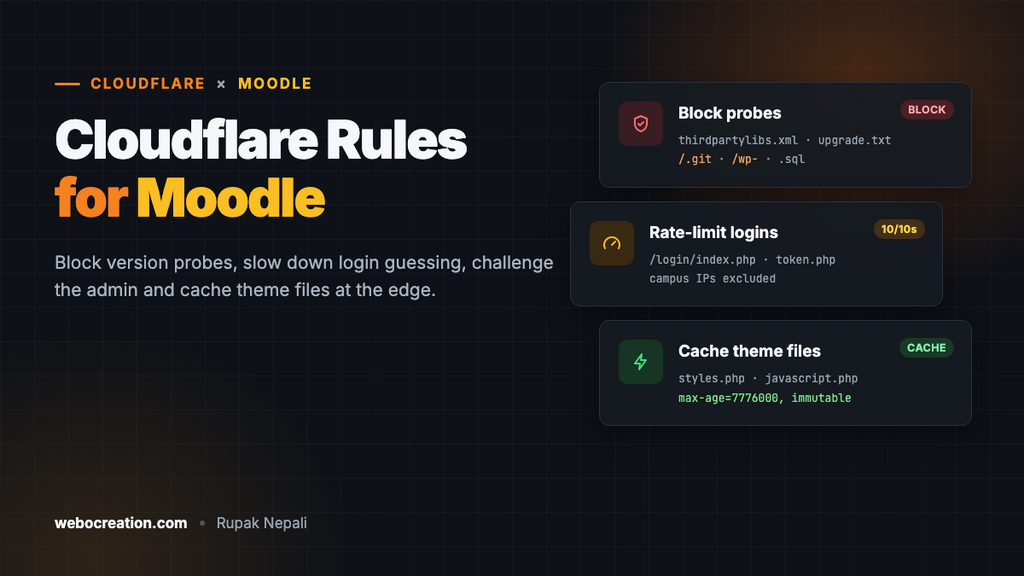
Moodle sites are busy, predictable targets. Every Moodle login form is at /login/index.php, every admin area is at /admin/, and scanners know both. On a fresh install, Moodle also doesn’t limit password guessing. Cloudflare’s free plan can cover those gaps and take the theme CSS and JavaScript, which Moodle serves through PHP, off your server.
We tested every path and behaviour in this guide on a fresh Moodle 5.3.1 (Build 20261117) with PHP 8.4 and MariaDB, before putting anything in front of it. The rules work for Moodle 4.x too; where older versions differ, we say so.
What a fresh Moodle exposes
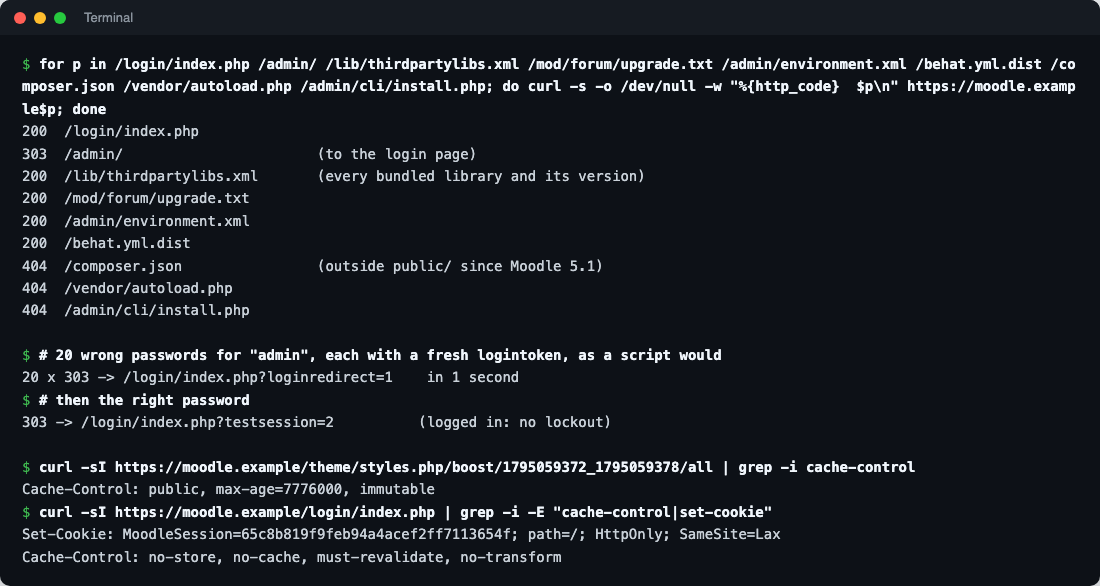
| Path | Response | Notes |
|---|---|---|
/login/index.php | 200 | The only login form, for students, teachers and admins alike |
/admin/ | 303 to the login page | Site administration |
/login/forgot_password.php | 200 | Password reset requests, which send email |
/login/signup.php | 404 | Self-registration is off by default. If you turn on email-based self-registration, this becomes a spam target |
/lib/thirdpartylibs.xml, /mod/forum/upgrade.txt, /admin/environment.xml, /lib/db/install.xml, /behat.yml.dist, UPGRADING.md and readme_moodle.txt files | 200 | Not secrets, but they tell a scanner exactly which libraries and versions you run |
/composer.json, /vendor/, /admin/cli/, config-dist.php | 404 | Outside the web root since Moodle 5.1 (see below) |
/webservice/rest/server.php, /login/token.php | 403 / “Web services must be enabled” | Off until you enable web services or the Moodle app |
Moodle 5.1 moved the code out of the web root
Since Moodle 5.1, the files a browser may load are in a public/ folder, and the web server’s document root must point there. config.php, vendor/, composer.json and the command-line scripts in admin/cli/ sit one level up, where no URL reaches them. Opening the old root index.php throws a “rootdirpublic” error. If you upgraded from 4.x and still point the server at the top folder, fix that first.
On 4.5 LTS and earlier, the whole code tree is the web root, so many more of those files are reachable. Rule 1 below blocks the common ones on any version.
No limit on password guessing
We sent 20 wrong passwords for the admin account, each with a fresh login token as a script would. All 20 were accepted for checking in about one second, and the correct password still logged straight in afterwards. Moodle has an account lockout, but its threshold is 0 (off) on a new site.
Turn it on: in Site administration, search for “lockout” and set Account lockout threshold to something like 10. We set it to 5 and repeated the test: after five wrong passwords, even the right one was refused until the lockout expired. The locked user gets an email with an unlock link. Lockout works per account, so anyone who knows a username can lock that person out on purpose; the rate limit below makes that slow, and Rule 2 keeps bots off the admin area.
Make Moodle work behind Cloudflare
1. HTTPS: use Full (strict)
Set $CFG->wwwroot to your https:// address and Cloudflare’s SSL/TLS mode to Full (strict), with a certificate on the origin (a free Cloudflare Origin Certificate is fine). Avoid Flexible: Cloudflare then talks to your server over plain HTTP, Moodle sees requests that don’t match its https wwwroot and redirects them to https, and you get a redirect loop.
If HTTPS ends before Moodle, for example at a load balancer that forwards plain HTTP to the web server, add this to config.php so Moodle knows the visitor’s connection is secure:
$CFG->sslproxy = true;Don’t set it when Moodle itself serves HTTPS.
2. Real visitor IPs
Moodle uses the visitor’s IP in its logs, in “Logged in from” emails, for quiz network restrictions and for IP blocking. Behind Cloudflare, every request comes from a Cloudflare address unless you fix it.
On our fresh install, Logged IP address source (getremoteaddrconf) was set to use only REMOTE_ADDR, the address of whatever connected to the web server. Leave it that way, and let the web server replace REMOTE_ADDR with the real visitor IP, trusting only Cloudflare’s ranges. On Apache:
# a2enmod remoteip
# Full list: https://www.cloudflare.com/ips-v4 and /ips-v6
RemoteIPHeader CF-Connecting-IP
RemoteIPTrustedProxy 173.245.48.0/20
RemoteIPTrustedProxy 103.21.244.0/22
# ...one line per range...
On Nginx, use set_real_ip_from for each range and real_ip_header CF-Connecting-IP;. Don’t switch Moodle to read HTTP_X_FORWARDED_FOR unless your server only accepts connections from Cloudflare; anyone reaching it directly could put any IP in that header.
3. Keep the Moodle app and web services working
If you use the Moodle app or web services, never put a challenge or “I’m under attack” mode in front of these paths. Apps can’t solve challenges, and every request would fail:
/login/token.php(app login)/webservice/(REST and other protocols)/lib/ajax/service.phpand/lib/ajax/service-nologin.php(used by every Moodle page, not just the app)/admin/tool/mobile/(app sign-in through the browser)/pluginfile.phpand/tokenpluginfile.php(files in courses)
Security rules
In the Cloudflare dashboard, go to Security → Security rules and create custom rules. The free plan includes five.
Rule 1: Block probes and version files
Action: Block.
(http.request.uri.path contains "/.git")
or (http.request.uri.path contains "/.env")
or (starts_with(http.request.uri.path, "/wp-"))
or (ends_with(http.request.uri.path, ".sql"))
or (ends_with(http.request.uri.path, "/upgrade.txt"))
or (ends_with(http.request.uri.path, "/UPGRADING.md"))
or (ends_with(http.request.uri.path, "/readme_moodle.txt"))
or (ends_with(http.request.uri.path, "/thirdpartylibs.xml"))
or (ends_with(http.request.uri.path, "/environment.xml"))
or (ends_with(http.request.uri.path, "/db/install.xml"))
or (ends_with(http.request.uri.path, ".dist"))
or (starts_with(http.request.uri.path, "/vendor/"))
or (ends_with(http.request.uri.path, "/composer.json"))
or (ends_with(http.request.uri.path, "/composer.lock"))
None of these is a page anyone needs. Hiding version files doesn’t make an outdated Moodle safe, so keep updating, but it takes your site off the lists scanners build when a new Moodle flaw is published. The /wp- line catches WordPress scanners, which make up much of the junk traffic on any site. The last three lines matter for Moodle 4.5 and older.
Rule 2: Challenge the admin area
Action: Managed Challenge.
(starts_with(http.request.uri.path, "/admin/"))
and not (starts_with(http.request.uri.path, "/admin/tool/"))
and not ip.src in {203.0.113.10 198.51.100.0/24}
Replace the IPs with your office or campus addresses, or leave that line out. The /admin/tool/ exception matters: several tools there are used by ordinary users, including the Moodle app’s sign-in (tool/mobile), site policies students must accept (tool/policy) and data privacy requests (tool/dataprivacy).
Moodle admins log in on the same page as students, so this rule doesn’t stop password guessing; the lockout and the rate limit do that. What it adds is a check in front of site administration that bots can’t pass. For a small admin team, Cloudflare Zero Trust Access (free for up to 50 users) in front of /admin/ is stronger: nobody reaches those pages without signing in to your identity provider first.
Rate limiting: logins
In Security → Security rules → Rate limiting rules:
- If incoming requests match: URI Path is in
/login/index.php,/login/token.phpand/login/forgot_password.php - And: not
ip.src in {your campus ranges} - Characteristics: IP
- Requests: 10 per 10 seconds
- Action: Block for 10 seconds
The campus exception is the Moodle-specific part. A school often sends a whole classroom through one public IP, and 30 students logging in at the start of a lesson is 60 requests in a few seconds (the login page, then the form post). Without the exception, the rule would block a real class. If you can’t list your school’s ranges, raise the limit instead, and rely on Moodle’s lockout to protect individual accounts.
The free plan gives one rate-limiting rule with a 10-second window. That turns our 20-passwords-a-second script into one guess a second at most. On paid plans, add http.request.method eq "POST" so only form posts count, and use longer windows.
Cache rules
Cloudflare doesn’t cache .php URLs by default, but Moodle serves its theme CSS, JavaScript, icons and fonts through PHP scripts. Every page loads several of them. Moodle already marks them as safe to cache: the URL contains a revision number that changes whenever you purge caches or change the theme, and the response says so:
/theme/styles.php/boost/1795059372_1795059378/all
Cache-Control: public, max-age=7776000, immutable
That’s 90 days, and the YUI combo files get a year. We checked the login page too: Cache-Control: no-store and a MoodleSession cookie, so Cloudflare already leaves it alone.
Cache rule 1: Theme and JavaScript files
In Caching → Cache Rules:
(starts_with(http.request.uri.path, "/theme/styles.php/")
 or starts_with(http.request.uri.path, "/theme/image.php/")
 or starts_with(http.request.uri.path, "/theme/font.php/")
 or starts_with(http.request.uri.path, "/theme/yui_combo.php")
 or starts_with(http.request.uri.path, "/lib/javascript.php/")
 or starts_with(http.request.uri.path, "/lib/requirejs.php/"))
and not (http.request.uri.path contains "/-1")- Cache eligibility: Eligible for cache
- Edge TTL: Use cache-control header if present, bypass cache if not
- Browser TTL: Respect origin
Keeping Moodle’s own headers is the safe choice: if Moodle ever sends a short lifetime for one of these, Cloudflare follows it. The /-1 line skips the revision Moodle uses when Theme designer mode is on; we saw those responses without a Cache-Control header, because they’re meant to change on every reload. The YUI combo URL keeps its file list in the query string, and Cloudflare’s default cache key includes the query string, so different combinations are cached separately.
After you change the theme, Purge all caches in Moodle as usual. The revision number in the URLs changes, so visitors get the new files immediately without a Cloudflare purge.
Don’t cache course files or pages
Leave everything else to Moodle, and don’t add a “cache everything” rule. Moodle checks permissions on every course file request: /pluginfile.php/... serves assignment submissions, quiz images and private files only to people allowed to see them. A cached copy at the edge would go to anyone with the link. Pages are personal too, from the dashboard to grades. Moodle marks them no-store, and that’s correct.
Test everything
After the rules are live, check from outside your network (replace the domain):
# Rule 1: should be 403 from Cloudflare
curl -s -o /dev/null -w "%{http_code}\n" https://moodle.example/lib/thirdpartylibs.xml

# Cache rule: the second request should say cf-cache-status: HIT
curl -sI "https://moodle.example/theme/styles.php/boost/REV/all" | grep -i cf-cache-status

# The login page must never be cached: expect DYNAMIC or BYPASS
curl -sI https://moodle.example/login/index.php | grep -i cf-cache-status
Copy the real styles.php URL from your page source. Then log in as a student and as a teacher, open a course, an assignment file and a quiz, and if you use it, sign in to the Moodle app. Check Security → Events in Cloudflare for anything a real user triggered.
Summary
| Where | What |
|---|---|
| Moodle | Account lockout threshold on (it’s 0 on a new site); web root pointed at public/ on 5.1+ |
| Server | Real visitor IPs from CF-Connecting-IP, trusting only Cloudflare’s ranges |
| Cloudflare SSL | Full (strict); $CFG->sslproxy only if HTTPS ends before Moodle |
| Rule 1 | Block probes and version files |
| Rule 2 | Managed Challenge on /admin/, except /admin/tool/ |
| Rate limit | Logins, token and password reset: 10 per 10 seconds per IP, campus IPs excluded |
| Cache | Theme and JavaScript PHP files, respecting Moodle’s headers; never course files or pages |
| Never challenge | /login/token.php, /webservice/, /lib/ajax/, /admin/tool/mobile/, /pluginfile.php |
The same approach for other platforms: Drupal, WordPress, Joomla, Laravel and Ghost.

Rupak Nepali is a web developer, manage Webocreation website and the author of six books:
Getting Started with OpenCart Module Development (Packt, 2013),
OpenCart Theme and Module Development (Packt, 2015),
OpenCart 4: Dev Guide for Themes & Extensions (2024),
OpenCart 4: User Manual (2025),
Cloudflare for the Enterprise Website (2026) and
The Technical Web Guide for Marketers (2026).
Rupak has built OpenCart stores and extensions since 2010, has published more than 600 tutorials on Webocreation, and shares free OpenCart extensions on GitHub.
Find Rupak on
GitHub | Amazon | LinkedIn | X | YouTube.