Who Owns Your Domain? A Domain Ownership and Security Checklist for Marketers
Your domain carries your website, email and every campaign link. Check who owns it, who can change it and when it renews, with this plain-language checklist for marketers.
 Rupak NepaliPublished Oct 23, 2026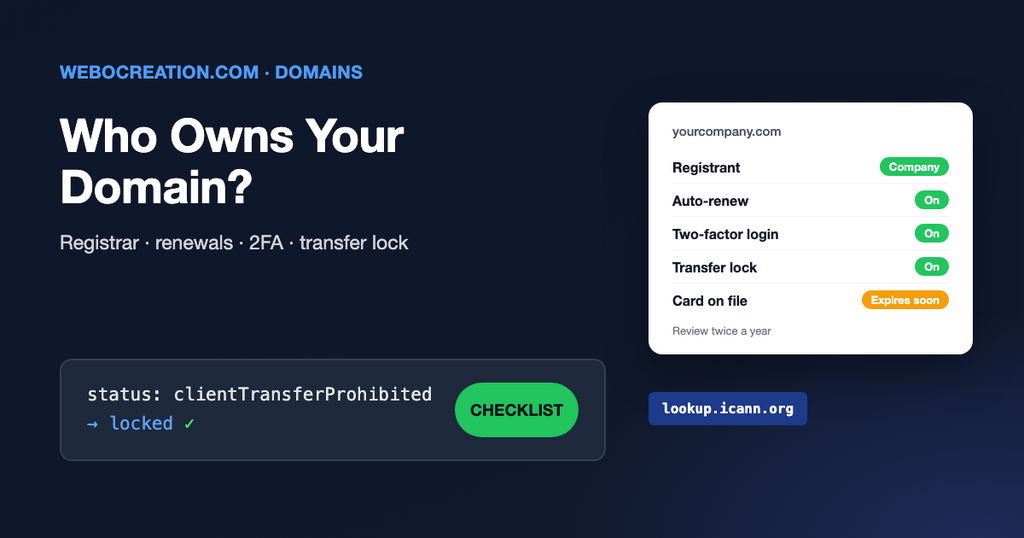
Your domain name is the most important marketing asset most teams never look at. Your website, your email, every link in every ad, every QR code on every printed brochure depends on it. If it expires or someone changes its settings, all of them stop working at once.
It happens more often than you would think. A domain is registered by a freelancer, a former employee or an agency, on their own account and their own credit card. Years later the card expires, the renewal emails go to an inbox nobody reads, and the website and email go dark on a Monday morning.
This checklist takes about 30 minutes and you don’t need a developer for it.
Three words to know first
| Term | What it means | Examples |
|---|---|---|
| Registrar | The company you pay for the domain. It records who the owner is. | GoDaddy, Namecheap, Cloudflare, Google Workspace partners, Squarespace Domains |
| DNS host | The company that answers “where is this website, where does this email go?” Often the registrar, but not always. | Cloudflare, your web host, AWS Route 53 |
| Web host | The server where the website files live. | SiteGround, WP Engine, Webflow, Shopify |
These can be three different companies with three different logins. Write down all three for every domain you use. Many teams have more domains than they think: the main site, old brand names, campaign microsites, country domains and typo domains.
The checklist
1. Find where the domain is registered
Search your domain on ICANN Lookup. It shows the registrar, the creation and expiry dates and the name servers. Personal contact details are usually hidden for privacy, but the registrar and dates are public.
2. Make sure the company owns it, not a person
Log in to the registrar account. The registrant (the legal owner) should be your company’s name, and the account should belong to the company, with a shared login stored in your password manager. If the domain sits in an agency’s or a freelancer’s account, ask them to transfer it to an account you control. A good agency will not object.
3. Use a contact email that will exist in five years
Renewal notices, transfer approvals and security alerts go to the account email. Use a shared address such as domains@yourcompany.com that more than one person reads. Don’t use an address on the same domain alone: if the domain stops working, so does that inbox. Add a backup address on a different domain.
4. Turn on auto-renew and check the payment card
Turn on auto-renew, check the card on file is a company card that won’t expire soon, and consider renewing for several years at once. Put the expiry date in a shared calendar with a reminder 60 days before.
5. Turn on two-factor authentication
Anyone who can log in to the registrar can point your website and email anywhere. Turn on two-factor authentication with an authenticator app or security key, not SMS if you can avoid it. Do the same on the DNS host if it’s a different company.
6. Check the transfer lock is on
In the registrar, the domain should show as locked (in ICANN Lookup it appears as clientTransferProhibited). This stops someone moving the domain to another registrar without your approval. Only unlock it when you are deliberately transferring.
7. Know who can change DNS
List everyone with access to the DNS settings: in-house staff, agencies, the web developer. Remove people who have left. A single wrong change in DNS can stop your email or take your website offline. Our guide to DNS records for marketers explains which records matter.
8. Keep old domains, and redirect them
Don’t let old brand or campaign domains lapse. Someone can register an expired domain and get the traffic from every old link, ad and backlink pointing to it, or send email that looks like it’s from you. If a domain is still linked anywhere, keep renewing it and redirect it to the right page on your main site.
What happens if a domain expires
For most common domain endings (.com, .net, .org) there is a safety net, but it’s expensive and stressful:
- Expiry day: the registrar usually parks the domain. Website and email may stop working straight away.
- Grace period (often around 30 days, depending on the registrar): you can still renew at the normal price.
- Redemption period (30 days): you can get it back, but with a recovery fee that is often many times the normal price.
- Released: anyone can register it, including domain investors who watch for expiring domains.
Country domains such as .co.uk, .de or .com.np have their own rules, and some give you much less time. Check the policy for every domain ending you use.
A simple domain register
Keep one shared spreadsheet with a row for every domain and these columns: domain, purpose, registrar, DNS host, web host, registrant, account email, expiry date, auto-renew (yes/no), two-factor (yes/no), lock (yes/no), last checked. Review it twice a year. It’s the cheapest insurance your marketing team will ever buy.
Learn the rest of the technical side
Domains are the first chapter of the technical foundation every marketer stands on. My book, The Technical Web Guide for Marketers, covers domains, email, tracking, search and AI in the same plain language, so you can spot problems early and work with developers without guessing. (I’m the author; the Amazon link is an affiliate link.)

Author of four Opencart book.
The recent are Opencart 4 developer book and Opencart 4 user manual