Cloudflare Rules for Strapi: Lock Down the Admin, Close Open Registration, and Cache the Content API
Copy-ready Cloudflare rules for Strapi 5, checked against a fresh Strapi 5.62 install, where public user registration was open by default: protecting the admin panel, closing registration, making Strapi's rate limits see real IPs, and caching the public Content API.
 Rupak NepaliPublished Nov 16, 2026
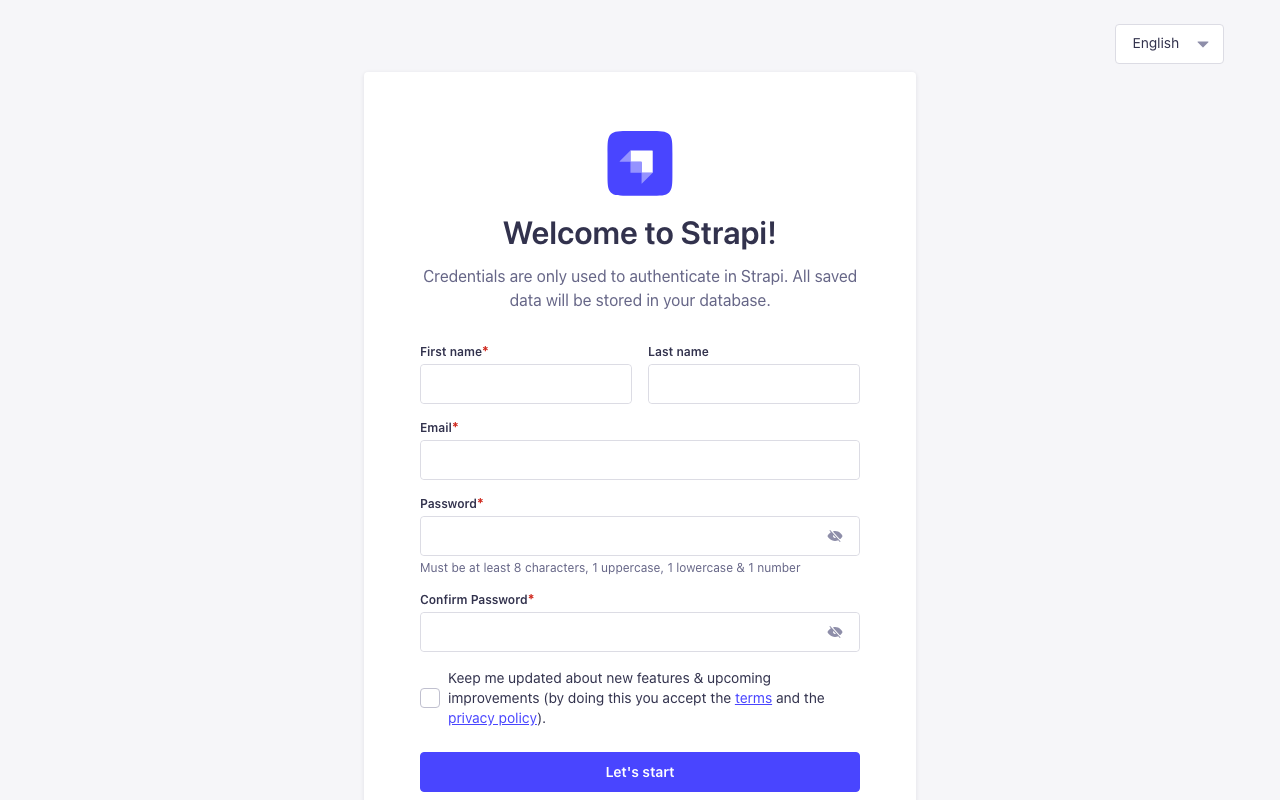
Strapi is a headless CMS: it has no public website of its own, just an admin panel and an API that your front end (Next.js, Nuxt, a mobile app) reads. That makes its attack surface small but sharp. Whoever reaches the admin of a fresh install can create the super admin, and the end-user registration endpoint is open by default.
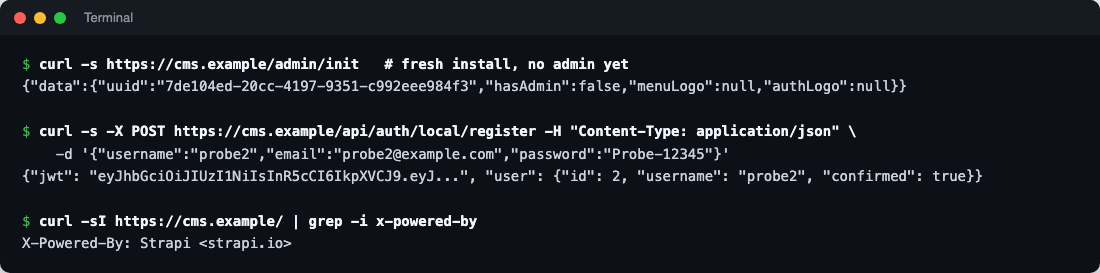
We installed Strapi 5.62 fresh and tested every path in this guide against it. The findings shaped the rules below.
What a fresh Strapi exposes
| Path | Response | Why it matters |
|---|---|---|
/admin/init | "hasAdmin":false until the first admin exists | The first visitor to /admin registers the super admin |
POST /api/auth/local/register | 200, a JWT and a confirmed user | Public sign-up is on by default, without email confirmation |
/api/users, /api/upload/files | 403 | Strapi denies content to the Public role until you allow it |
/_health | 204 | Health check for load balancers |
| Every response | X-Powered-By: Strapi <strapi.io> | Announces the platform |
Open registration matters more than it looks. A registered user gets the Authenticated role. On a fresh install that role can do very little, but as soon as a developer allows “Authenticated” to create or read something, for example comments or private content, every bot that signs up gets that access too.
Fix these in Strapi first
1. Turn off public registration if you don’t need it
In the admin: Settings → Users & Permissions plugin → Advanced settings, switch off Enable sign-ups. If your app does need sign-ups, switch on Enable email confirmation so accounts stay unconfirmed until the address is verified. In the installed plugin’s bootstrap code, the default is allow_register: true, which is what our test hit.
2. Let Strapi see real visitor IPs
Strapi has built-in rate limits: the admin login allows 5 attempts per 5 minutes for each email, path and IP; the Users & Permissions auth routes allow 10 requests per minute per IP. Behind Cloudflare, every request arrives from Cloudflare’s addresses, so those limits either do nothing or lock out everyone at once. Strapi 5 can read the real IP from Cloudflare’s header:
// config/server.js
module.exports = ({ env }) => ({
  host: env('HOST', '0.0.0.0'),
  port: env.int('PORT', 1337),
  app: { keys: env.array('APP_KEYS') },
  proxy: {
    koa: true,                     // trust proxy headers
    ipHeader: 'CF-Connecting-IP'   // Cloudflare's real visitor IP
  },
  url: env('PUBLIC_URL', 'https://cms.example.com')
});
Only enable this when the server is reachable through Cloudflare alone (firewall the origin to Cloudflare’s IP ranges, or use Cloudflare Tunnel); otherwise anyone can send the header with a fake IP.
3. Remove X-Powered-By
In config/middlewares.js, configure strapi::poweredBy with your own value, or remove the header with a Cloudflare Transform Rule (Rules → Transform Rules → Modify Response Header → remove X-Powered-By). It’s cosmetic, but it stops scanners picking you out as a Strapi target.
Security rules
Rule 1: Lock the admin panel to your team
Action: Block (or Managed Challenge if your team’s IPs change).
(starts_with(http.request.uri.path, "/admin"))
and not ip.src in {203.0.113.10 198.51.100.0/24}
Unlike a website, a headless CMS’s admin is used by a handful of editors, so an IP allowlist is practical. For a remote team, put /admin behind Cloudflare Zero Trust Access instead (free for up to 50 users), which asks for a login before Strapi is even reached. Either way, the “first visitor creates the super admin” problem can’t happen.
What it might break: nothing public. The admin panel and its API (/admin/...) are only used by editors; your front end uses /api/....
Rule 2: Block registration (if sign-ups are off)
Action: Block.
(http.request.uri.path in {"/api/auth/local/register" "/api/auth/forgot-password" "/api/auth/reset-password" "/api/auth/send-email-confirmation"})
or (starts_with(http.request.uri.path, "/api/connect/"))
Belt and braces with the Strapi setting: even if someone switches sign-ups back on, or a future bug ignores the setting, these routes can’t be reached. Leave out the lines you use: an app with end-user accounts needs forgot-password and reset-password; /api/connect/ is for social logins.
Rule 3: Only allow the methods your front end uses
Action: Block.
(starts_with(http.request.uri.path, "/api/"))
and not http.request.method in {"GET" "HEAD" "OPTIONS"}
and not http.request.uri.path in {"/api/auth/local" "/api/auth/refresh" "/api/auth/logout"}
and not ip.src in {203.0.113.10}
Many Strapi projects are read-only from the public’s point of view: the front end only fetches content. If yours is, this blocks every write to the Content API from the internet, whatever the role permissions say. Keep /api/auth/local, /api/auth/refresh and /api/auth/logout if users log in (Strapi 5’s newer session handling refreshes tokens with a POST), and add your build server’s or back end’s IP if it writes content. Skip this rule if your app lets users create content.
Rule 4: Block probes
(ends_with(http.request.uri.path, ".php"))
or (http.request.uri.path contains "/.env")
or (http.request.uri.path contains "/.git")
or (http.request.uri.path in {"/wp-login.php" "/xmlrpc.php"})
Action: Block. Strapi never serves PHP files, so these are always scans.
Rate limiting: login
- If incoming requests match: URI Path equals
/api/auth/local - Characteristics: IP
- Requests: 5 per 10 seconds
- Action: Block for 10 seconds
That’s the end-user login. If you have no end users, use the one Free-plan rule on /admin/login instead, though Rule 1 already keeps strangers away from it.
Cache rules: the public Content API
When your front end fetches published content with the Public role (no token), the responses are the same for everyone and cache well at the edge, which also shields Strapi from traffic spikes.
Cache rule 1: Cache public GET requests
(starts_with(http.request.uri.path, "/api/"))
and http.request.method eq "GET"
and not any(http.request.headers["authorization"][*] ne "")
and not starts_with(http.request.uri.path, "/api/users")
and not starts_with(http.request.uri.path, "/api/auth")
Eligible for cache, Edge TTL: 5 minutes (ignore origin), Browser TTL: bypass. Requests with an Authorization header (API tokens, user JWTs) are never cached, so private or draft content can’t leak into the cache. Cloudflare includes the query string in the cache key by default, so ?populate=*, filters and pagination are cached separately.
Five minutes means a published change can take up to five minutes to appear. To make it instant, add a Strapi webhook (Settings → Webhooks, events “entry.publish” and “entry.update”) that calls Cloudflare’s purge API.
Cache rule 2: Uploads
(starts_with(http.request.uri.path, "/uploads/"))Eligible for cache, Edge TTL: 1 month, Browser TTL: 1 week. Strapi’s local upload provider gives every file a unique name with a hash, so a replaced image gets a new URL. (If you store media on S3 or Cloudinary, they’re served from there, not through Strapi.)
Test everything
curl -s -o /dev/null -w "%{http_code}\n" https://cms.example.com/admin                       # 403 from outside your IPs
curl -s -o /dev/null -w "%{http_code}\n" -X POST https://cms.example.com/api/auth/local/register   # 403
curl -s -o /dev/null -w "%{http_code}\n" -X DELETE https://cms.example.com/api/articles/1      # 403
curl -sI https://cms.example.com/api/articles | grep -i cf-cache-status                       # HIT after a reload
curl -sI -H "Authorization: Bearer x" https://cms.example.com/api/articles | grep -i cf-cache-status   # DYNAMIC or BYPASS
Summary
| Rule | Action | Stops |
|---|---|---|
| Admin allowlist | Block | Admin takeover and password guessing |
| Registration routes | Block | Bot sign-ups getting the Authenticated role |
| Read-only Content API | Block writes | Writes through misconfigured permissions |
| Probes | Block | PHP and secret-file scans |
| Login rate limit | Block 10 s | Credential stuffing |
| Public API cache | Cache 5 min | Origin load and traffic spikes |
| Uploads cache | Cache 1 month | Media bandwidth |
More in this series: Cloudflare rules for Next.js (a common Strapi front end), Ghost, Laravel and WordPress.

Rupak Nepali is a web developer, manage Webocreation website and the author of six books:
Getting Started with OpenCart Module Development (Packt, 2013),
OpenCart Theme and Module Development (Packt, 2015),
OpenCart 4: Dev Guide for Themes & Extensions (2024),
OpenCart 4: User Manual (2025),
Cloudflare for the Enterprise Website (2026) and
The Technical Web Guide for Marketers (2026).
Rupak has built OpenCart stores and extensions since 2010, has published more than 600 tutorials on Webocreation, and shares free OpenCart extensions on GitHub.
Find Rupak on
GitHub | Amazon | LinkedIn | X | YouTube.