Search Everywhere: A Full SEO, AEO and GEO Audit and 90-Day Plan (Case Study)
A complete SEO, AEO and GEO audit of webocreation.com/, with findings by area and a 90-day plan you can adapt to your own site.
 Rupak NepaliPublished Nov 14, 2026
This post is Chapter 25 of Search Everywhere: The Practical Guide to SEO, AEO and GEO, the free online edition. Chapter and appendix references link to the matching post.
This chapter brings every thread of the book together into one audit of the case study site, followed by a prioritised 90-day plan. It is written in the format you would deliver to a client, so you can use it as a template for your own audits.
Scope and method
Site: https://webocreation.com/ Date of review: 14–15 November 2026 Platform: WordPress with Yoast SEO, custom “webocreation” theme, Google Tag Manager.
Method: A live review of public pages: homepage, blog listing, About page, author archive, SEO and marketing service page, two recent posts, robots.txt, llms.txt and all five XML sitemaps. Pages were retrieved with a text-mode fetcher, which shows rendered page text and metadata but strips script tags.
Limitations: The review did not have access to Search Console, GA4, Semrush, Bing Webmaster Tools or server logs. Direct HTTP header checks, PageSpeed Insights and the Rich Results Test could not be run from the review environment. Findings that depend on those sources are marked “to verify”, and the data needed is listed at the end of the chapter.
Executive summary
webocreation.com/ has the most important ingredient for success in SEO, AEO and GEO: genuine, demonstrable expertise in a clear niche. Its founder has written four books on OpenCart, the site has hundreds of detailed tutorials and more than 80 free extensions, and recent articles are well structured, specific and include downloadable code. It already has an llms.txt file and allows AI crawlers.
What holds it back is dilution and missing proof:
- Off-topic and thin content (Nepali-language serial posts, health-sector study notes, internship report fragments, NFT and metaverse guest posts) and 62 guest author archives blur the site’s topical identity and suggest a link-selling history.
- Inconsistent brand and trust signals: the Open Graph site name is “Opencart tutorials”, the homepage title has a typo, the About page says “founded 2020” next to “10+ years of experience”, the author has no real photo, the business uses a Gmail address, and service pages have no case studies.
- Untapped AEO structure: tutorials lack summary boxes, question headings, comparison tables and FAQs that answer engines extract.
- Unverified technical layers: structured data, Core Web Vitals and crawl behaviour need checking with tools that could not be run here.
Fixing these is mostly editorial and configuration work rather than development. The plan below sequences it over 90 days.
Findings by area
Each finding has a priority: P1 (do first, high impact or low effort), P2 (important), P3 (nice to have).
A. Crawling and indexing
| # | Finding | Evidence | Priority | Recommendation |
|---|---|---|---|---|
| A1 | ClaudeBot and Twitterbot groups in robots.txt override all default rules for those bots, so they may crawl /wp-admin/, login and search URLs |
robots.txt | P1 | Repeat the disallow rules inside each bot-specific group (Chapter 4 has a corrected file) |
| A2 | No documented policy for AI crawlers | robots.txt | P2 | Decide training / search / user-fetch policy and document it in robots.txt (Chapter 23) |
| A3 | Duplicate Allow: /wp-admin/admin-ajax.php line |
robots.txt | P3 | Remove duplicate |
| A4 | Footer links to wp-sitemap.xml, robots.txt to sitemap_index.xml |
Footer, robots.txt | P3 | Point footer to sitemap_index.xml |
| A5 | Tag archives indexable and in sitemap | Sitemap index | P1 | Noindex tags in Yoast, which removes them from the sitemap |
| A6 | 63 author archives, 62 for guest contributors | author-sitemap.xml | P1 | Noindex guest author archives, remove author sitemap or limit to staff |
| A7 | Off-topic legacy posts in post sitemap | post-sitemap.xml | P1 | Prune with the decision framework (section C) |
| A8 | Index coverage unknown | – | P1 (verify) | Export Search Console Page indexing report, filtered to submitted sitemaps |
| A9 | FAQ answers on SEO service page not present in fetched text | /seo-and-marketing/ | P1 (verify) | Check raw HTML; ensure answers are server-rendered |
| A10 | WordPress version exposed in generator tag | Homepage meta | P3 | Remove generator tag |
B. Site architecture and internal linking
| # | Finding | Priority | Recommendation |
|---|---|---|---|
| B1 | Topic hubs exist in navigation (OpenCart 4, extensions, themes, user guide) but rely on archives | P2 | Build curated hub pages with an intro, “start here” path and key links |
| B2 | HubSpot posts filed under “Salesforce” | P2 | Create a “Marketing automation” category with HubSpot, Marketo, Pardot children; recategorise |
| B3 | Blog has 52 archive pages; older posts likely deep | P2 (verify) | Crawl to measure click depth; link evergreen posts from hubs |
| B4 | Good contextual linking on recent posts (about 9 body links) | – | Keep; add links to relevant service pages and hubs |
| B5 | Internship and project reports split into several thin parts | P2 | Merge into single comprehensive guides and redirect parts |
C. Content pruning plan
| Group | Example URLs (from sitemap) | Recommended action | Data to confirm |
|---|---|---|---|
| Nepali serial “Bokagiri” | /bokagiri-part-4-.../, /bokagiri-6-my-book-name-.../ |
Move to a personal site or noindex | GSC clicks |
| Health-sector notes | /control-of-diarrhoeal-disease/, /prevention-of-malnutrition/, /national-policies-and-plans-in-health-sector/ |
Move to a separate site or noindex | GSC clicks, backlinks |
| Internship report fragments | /title-page-of-internship-report-.../, /college-internship-report-...-part-iii/ |
Merge into one guide, 301 the parts | GSC clicks |
| NFT, metaverse, Web3 guest posts | /how-to-make-money-with-nfts-.../, /why-you-should-hire-a-metaverse-.../ |
Remove (410) or noindex; nofollow outbound links meanwhile | Backlinks |
| Generic eCommerce guest posts | /best-practices-to-prevent-e-commerce-fraud/ |
Rewrite in-house with OpenCart specifics, or remove | GSC clicks |
| Database theory posts | /referential-integrity/, /domain-constraints/ |
Keep if traffic; else consolidate | GSC clicks |
| OpenCart 2.x tutorials | /show-attributes-of-products-in-category-tpl-page-opencart-2-0/ |
Add version notice and link to the OpenCart 4 equivalent; update the most-visited | GSC clicks |
D. Page experience
| # | Finding | Priority | Recommendation |
|---|---|---|---|
| D1 | Core Web Vitals not measured in this review | P1 (verify) | Run PageSpeed Insights on homepage, a post, a service page; check Search Console CWV report |
| D2 | Calendly booking and YouTube embeds can hurt INP and LCP | P2 | Use click-to-load facades |
| D3 | GTM container may hold unused tags | P2 | Audit tags; delay non-essential ones |
E. Structured data
| # | Finding | Priority | Recommendation |
|---|---|---|---|
| E1 | JSON-LD output could not be verified | P1 (verify) | Rich Results Test and Schema Validator on homepage, a post, the author page |
| E2 | Site name inconsistency (“Opencart tutorials” vs “Webocreation”) likely flows into WebSite schema | P1 | Set site name to “Webocreation” in Yoast; set alternate name |
| E3 | No Book schema for the founder’s books | P2 | Create a books page with Book schema, linked from author page and About |
| E4 | No SoftwareApplication markup for free extensions | P3 | Add to extension download pages |
| E5 | Organisation sameAs relies on founder’s personal profiles |
P2 | Create a LinkedIn company page and other official profiles; add to schema |
F. On-page and content
| # | Finding | Priority | Recommendation |
|---|---|---|---|
| F1 | Homepage title 150+ characters with typo “turorials” | P1 | “OpenCart & WordPress Development and Tutorials | Webocreation” |
| F2 | Homepage H1 “Stores that sell on autopilot.” has no topic words | P2 | Descriptive H1, keep slogan as styled text |
| F3 | Logo alt text “ebocreation” | P1 | Fix to “Webocreation” |
| F4 | Many tutorial titles exceed 70–130 characters | P3 | Keep long H1s; shorten title tags to about 60 characters |
| F5 | Some posts missing og:image | P2 | Set default social image in Yoast |
| F6 | Tutorials lack summary box, question headings, comparison tables and FAQs | P1 | Apply the AEO template (Chapter 21) to the 20 most important tutorials |
| F7 | 15 latest posts share the same date | P3 (verify) | Make sure dates reflect real publication or update |
| F8 | Homepage shows mock dashboards (revenue, orders, speed scores) | P2 | Label as illustrative examples |
G. E-E-A-T and brand
| # | Finding | Priority | Recommendation |
|---|---|---|---|
| G1 | Author avatar is a generated placeholder | P1 | Upload a real headshot to the author profile and Gravatar |
| G2 | Books mentioned but not showcased with details | P1 | List each book with cover, publisher, year, ISBN and links |
| G3 | About page: “founded 2020” vs “10+ years experience” | P1 | Clarify: company founded 2020, founder working since 2010 |
| G4 | Unsourced statistics on About page | P2 | Replace with case studies, named clients, reviews |
| G5 | Team shown as initials, no photos | P2 | Add photos and bios, or simplify |
| G6 | Four About page images without alt text | P3 | Add alt text |
| G7 | Gmail business email; Iowa area code with Arizona address | P2 | Domain email; consistent phone across all listings |
| G8 | Service pages lack case studies and results | P1 | Publish two or three case studies with numbers |
| G9 | No GitHub or Amazon author links on author page | P2 | Add, and add to Person schema |
| G10 | Guest posting programme looks like link selling | P1 | Tighten “Write For Us” policy, nofollow/sponsored outbound links |
H. AEO and GEO
| # | Finding | Priority | Recommendation |
|---|---|---|---|
| H1 | llms.txt exists and is well formed | – | Keep; align with pruning; lead with canonical description; validate links |
| H2 | No AI visibility baseline | P1 | Build a 40-prompt tracking set; run monthly (Chapter 24) |
| H3 | No AI Assistants channel in GA4 (to verify) | P1 | Create custom channel group |
| H4 | Service page uses “AIO/GEO”, never “AEO” | P3 | Mention AEO explicitly, since it is a common search term |
| H5 | Fan-out coverage for core topics incomplete (hosting, payment gateways, migrations, errors) | P2 | Build out from Keyword Gap (Chapter 18) and fan-out maps (Chapter 22) |
| H6 | Off-site presence (Reddit, YouTube, GitHub READMEs) not leveraged for GEO | P2 | Weekly community participation; link READMEs to tutorials |
| H7 | Bing Webmaster Tools status unknown | P1 (verify) | Verify site, submit sitemap, enable IndexNow |
I. Local
| # | Finding | Priority | Recommendation |
|---|---|---|---|
| I1 | Google Business Profile status unknown | P2 (verify) | Claim or optimise as a service-area business |
| I2 | NAP consistency across directories unknown | P2 | Audit Google, Bing, Apple, Yelp, Clutch, LinkedIn |
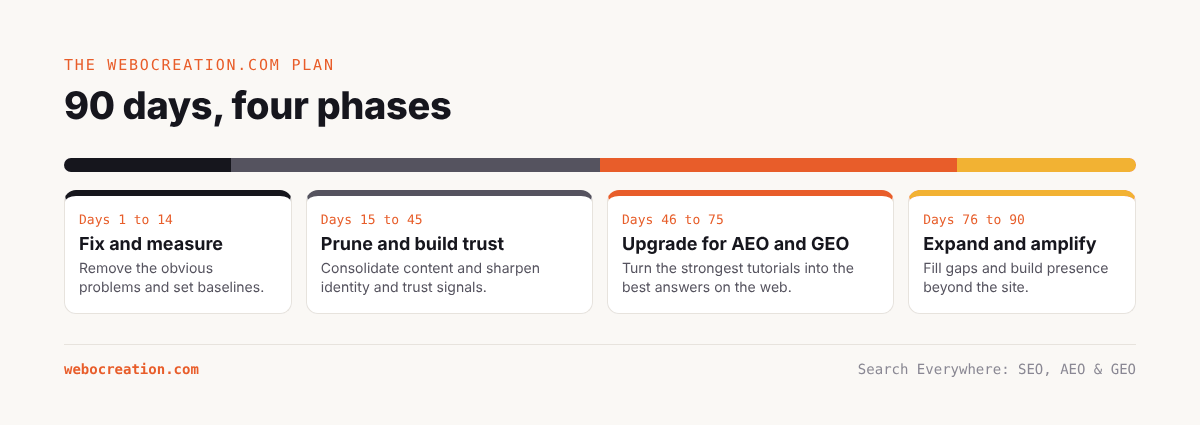
The 90-day plan
Days 1–14: Fix and measure
Goal: remove the obvious problems and establish baselines.
- Fix robots.txt (A1–A3), footer sitemap link (A4), generator tag (A10).
- Yoast settings: site name “Webocreation” (E2), noindex tags (A5), noindex or disable guest author archives (A6), default social image (F5).
- Fix homepage title (F1), logo alt text (F3).
- Upload a real author photo (G1); fix About page founding statement (G3) and alt text (G6).
- Verify: Rich Results Test (E1), PageSpeed Insights (D1), raw HTML of FAQ answers (A9).
- Set up or verify: Search Console Domain property and bulk export, Bing Webmaster Tools with IndexNow (H7), GA4 AI Assistants channel (H3), key events for leads, bookings and downloads.
- Run the first 40-prompt AI visibility baseline (H2).
- Export baselines: Search Console performance and indexing, GA4 channels, Semrush Domain Overview and Position Tracking with AI Overview tracking.
- Download 30 days of server or Cloudflare logs and run the Chapter 20 analysis.
Days 15–45: Prune, consolidate and strengthen trust
Goal: sharpen the site’s identity and trust signals.
- Run the pruning plan (section C) in batches, starting with the clearest off-topic groups. Merge internship and project fragments (B5). Redirect or remove as decided.
- Nofollow or mark sponsored all commercial outbound links in remaining guest posts; update the Write For Us policy (G10).
- Recategorise HubSpot, Marketo and Pardot content (B2).
- Build the books page with Book schema (E3, G2); add GitHub and Amazon links to the author page (G9).
- Create a LinkedIn company page and other official profiles; add to Organization schema (E5).
- Switch to a domain email; make NAP consistent; claim or optimise Google Business Profile (G7, I1, I2).
- Label homepage mock-ups as illustrative (F8).
Days 46–75: Upgrade the best content for AEO and GEO
Goal: turn the strongest tutorials into the best answers on the web.
- Apply the AEO template to the 20 tutorials with the most impressions (F6): summary box, question headings, direct answers, comparison tables, numbered steps, question-style troubleshooting, FAQ, heading IDs.
- Build three curated hub pages: OpenCart 4, Free OpenCart extensions, OpenCart security and performance (B1).
- Write two or three case studies with quantified results; add them to service pages and the About page (G4, G8).
- Update the llms.txt to reflect pruning and hubs (H1).
- Add tutorial links to every extension’s GitHub README (H6).
- Implement click-to-load facades for Calendly and YouTube; audit GTM (D2, D3).
Days 76–90: Expand and amplify
Goal: start filling gaps and building presence beyond the site.
- Publish the first three fan-out gap articles from the Keyword Gap analysis (H5), for example OpenCart hosting requirements, OpenCart Stripe setup, migrating from OpenCart to WooCommerce.
- Plan one original-data piece (for example a survey of OpenCart store owners about spam and captchas) for the next quarter.
- Begin weekly community participation on the OpenCart forum, Reddit and Stack Overflow (H6).
- Run the second AI visibility tracking cycle and compare with the baseline.
- Produce the first monthly report combining Search Console, GA4, Semrush, logs and prompt tracking.
Expected outcomes
Results from pruning and trust work typically appear over two to four months as Google recrawls and reassesses the site. AEO improvements on existing pages can show changes in snippets and AI Overview citations within weeks of recrawling. GEO visibility in live-retrieval assistants can move within a month; changes in model knowledge take longer.
Indicative targets at 90 days (to be set against real baselines):
- Indexed share of submitted URLs: up, as thin URLs leave the sitemap.
- Crawled – currently not indexed: down.
- Non-branded clicks to core OpenCart content: up 10–20%.
- Featured snippets and AI Overview citations on tracked keywords: up.
- AI prompt citation rate on core OpenCart prompts: up 5–10 percentage points.
- AI Assistants sessions: up.
- Leads from organic and AI channels: tracked and rising.
Data needed to complete the audit
To replace the illustrative examples in this book with real figures and finish the “to verify” items, the following exports are needed:
| Source | Export | Used in |
|---|---|---|
| Google Search Console | Performance (queries, pages, 16 months); Page indexing (all statuses, filtered by sitemap); Crawl stats; Core Web Vitals; Links | Chapters 4, 5, 15, 25 |
| GA4 | Traffic acquisition by channel and source (12 months); landing pages for Organic and AI sources; key events | Chapters 16, 24 |
| Semrush | Domain Overview; Organic Research positions and pages; Keyword Gap vs 3–5 competitors; Backlink Analytics and Backlink Gap; Site Audit; Position Tracking with AI Overviews; AI visibility report | Chapters 12, 18, 21, 24 |
| Server or Cloudflare logs | 30–90 days of access logs, or Cloudflare AI Crawl Control and Security Analytics exports | Chapter 20 |
| PageSpeed Insights | Mobile and desktop for homepage, a post, a service page | Chapter 6 |
| Rich Results Test | Homepage, a post, author page | Chapter 7 |
| Bing Webmaster Tools | Search performance, Site Scan | Chapter 15 |
| AI prompt tracking | 40 prompts × 5 assistants × 2 runs | Chapter 24 |
Key takeaways
- The site’s expertise is real; the work is to remove dilution, make trust signals consistent and present the expertise in answer-ready form.
- The first two weeks fix configuration and set baselines; the next month prunes and strengthens trust; then content is upgraded for AEO and GEO and amplified off-site.
- Every recommendation is tied to evidence, a priority and the data needed to confirm it.
Previous: Measuring AEO and GEO: How to Track AI Visibility
Next: How to Diagnose a Traffic Drop and Survive Algorithm Updates
All chapters: Search Everywhere: The Practical Guide to SEO, AEO and GEO

Rupak Nepali is a web developer, manage Webocreation website and the author of six books:
Getting Started with OpenCart Module Development (Packt, 2013),
OpenCart Theme and Module Development (Packt, 2015),
OpenCart 4: Dev Guide for Themes & Extensions (2024),
OpenCart 4: User Manual (2025),
Cloudflare for the Enterprise Website (2026) and
The Technical Web Guide for Marketers (2026).
Rupak has built OpenCart stores and extensions since 2010, has published more than 600 tutorials on Webocreation, and shares free OpenCart extensions on GitHub.
Find Rupak on
GitHub | Amazon | LinkedIn | X | YouTube.