Search Everywhere: Measuring AEO and GEO: How to Track AI Visibility
A five-part framework for measuring AI visibility: prompt tracking, AI referral traffic, crawler logs, AI Overview tracking and honest reporting.
 Rupak NepaliPublished Nov 14, 2026
This post is Chapter 24 of Search Everywhere: The Practical Guide to SEO, AEO and GEO, the free online edition. Chapter and appendix references link to the matching post.
You cannot improve what you cannot measure, and AI visibility is harder to measure than classic SEO. There is no “AI Search Console” that reports every time an assistant cites you. Answers vary between users, sessions and days. Different assistants give different answers to the same prompt.
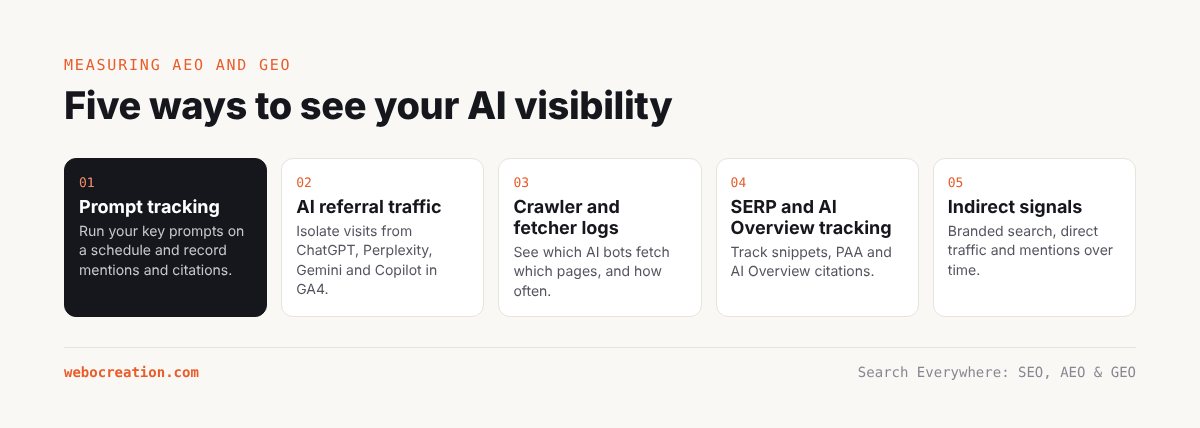
Despite this, a practical measurement system is possible. It combines four data sources: prompt tracking, AI referral traffic, AI crawler logs and SERP feature tracking, plus a few indirect signals. This chapter builds that system.
The measurement framework
| What you want to know | Data source | Tool |
|---|---|---|
| Do AI assistants mention or cite us for our key topics? | Prompt tracking | Spreadsheet, or an AI visibility tool |
| How do we compare with competitors? | Prompt tracking (share of voice) | Same |
| Do AI citations send visitors, and do they convert? | AI referral traffic | GA4 AI Assistants channel |
| Which pages do AI systems read? | AI crawler and fetcher logs | Server or CDN logs |
| Are we cited in Google’s AI Overviews? | SERP feature tracking | Semrush Position Tracking or similar |
| Is brand awareness growing? | Branded search and mentions | Search Console, Google Trends, brand monitoring |
1. Prompt tracking
Prompt tracking means running a fixed set of prompts through AI assistants on a regular schedule and recording what they say.
Build the prompt set
Start with the prompt list from Chapter 3. A good set:
- Has 30 to 100 prompts for a small business, more for larger ones.
- Covers each core topic and each persona.
- Includes informational (“How do I…”), comparison (“X or Y?”), recommendation (“Who/what should I…”) and brand (“What is Webocreation?”) prompts.
- Uses natural, realistic phrasing.
- Stays fixed over time, so changes in results reflect changes in visibility, not changes in the test. Add new prompts as a separate cohort if needed.
Choose the assistants
At minimum: ChatGPT (with search), Google AI Mode (and note whether AI Overviews appear for the equivalent query), Perplexity, Gemini and Microsoft Copilot. Add Claude and others if your audience uses them.
Run the prompts consistently
- Use a clean session (logged out, or a fresh account without memory and personalisation).
- Use the same location and language each time.
- Run each prompt at least twice per cycle, because answers vary. If budget allows, three to five times.
- Run monthly at minimum; weekly for priority prompts.
Record the results
For each prompt, assistant and run, record:
| Field | Values |
|---|---|
| Date | 2026-11-15 |
| Assistant | ChatGPT, AI Mode, Perplexity, Gemini, Copilot, Claude |
| Prompt ID | P01–P50 |
| Brand mentioned? | Yes / No |
| Brand position | 1st, 2nd, … mention in the answer |
| Domain cited? | Yes / No |
| Cited URL(s) | The specific pages |
| Sentiment | Positive / Neutral / Negative |
| Accuracy | Correct / Partly wrong / Wrong |
| Competitors mentioned | List |
| Other cited domains | List |
Calculate the metrics
- Mention rate = runs where the brand is mentioned ÷ total runs.
- Citation rate = runs where the domain is cited ÷ total runs.
- Share of voice = your mentions ÷ total mentions of you and tracked competitors.
- Average position of the brand among recommendations.
- Accuracy rate = runs with correct information about you ÷ runs where you are mentioned.
- Source map: which other domains are cited most, which tells you where to build presence.
Illustrative example: monthly prompt tracking summary for webocreation.com/. 40 prompts × 5 assistants × 2 runs = 400 runs. All figures illustrative.
Assistant Mention rate Citation rate Share of voice Accuracy ChatGPT (search) 18% 14% 11% 94% Google AI Mode 15% 15% 9% 100% Perplexity 24% 22% 15% 96% Gemini 9% 6% 6% 89% Copilot 12% 11% 8% 92% All 16% 14% 10% 95%
Topic cluster Citation rate Most-cited page OpenCart captcha and spam 48% Turnstile tutorial OpenCart upgrades 21% Upgrade guide OpenCart books 35% Books page (via Amazon) Cloudflare for stores 17% OWASP ruleset guide HubSpot templates 6% Email template tutorial Agency recommendations 2% –
Most-cited other domains (all prompts) Share of citations opencart.com (docs and forum) 14% reddit.com 11% youtube.com 8% github.com 7% Competitor agency blog 5% Readings: visibility is concentrated where the site has unique assets (the Turnstile extension, the books). Agency recommendation prompts almost never mention the business, which points to the missing case studies, reviews and directory profiles. Reddit and YouTube are major cited sources, so presence there is a lever.
Automating prompt tracking
Manual tracking works for 30 to 50 prompts. Beyond that, either:
- Use an AI visibility tool (Chapter 19), which runs prompts on a schedule and produces these metrics.
- Use APIs with web search enabled, where available, to run prompts programmatically. Be aware that API results with search can differ from the consumer apps people actually use, and that terms of service apply. Record which method you use and keep it consistent.
2. AI referral traffic
Set up the GA4 AI Assistants channel (Chapter 16). Track monthly:
- Sessions by assistant (source).
- Engagement rate and key event rate compared with organic search.
- Landing pages receiving AI traffic.
- Trend over time.
Two caveats:
- Undercounting: some AI traffic arrives with no referrer and is counted as Direct. A rise in Direct traffic to deep tutorial pages (which people rarely type in) can be a hint of hidden AI referrals.
- Google AI features are invisible here: clicks from AI Overviews and AI Mode are counted as Google organic.
3. AI crawler and fetcher logs
From Chapter 20, track monthly:
- Requests by AI crawler.
- Top pages requested by user-initiated fetchers (ChatGPT-User, Claude-User, Perplexity-User). These pages are being read to answer live questions, whether or not the user clicks through.
- Ratio of fetches to referral sessions per assistant. If ChatGPT-User fetches a page 300 times a month and GA4 records 30 sessions from chatgpt.com to it, roughly one in ten of those answers led to a click.
4. SERP feature and AI Overview tracking
Use Semrush Position Tracking (or a similar tool) with AI Overview tracking enabled for your keyword set. Track:
- The share of tracked keywords that trigger an AI Overview.
- The share of those AI Overviews that cite your domain.
- Featured snippets owned.
- Changes after you optimise a page (Chapter 21).
5. Indirect signals
- Branded search in Search Console and Google Trends. When AI assistants mention a brand, some users search for it afterwards. A rising trend in branded queries, especially without other marketing changes, can indicate growing AI visibility.
- Long conversational queries in Search Console (the regex from Chapter 15). Growth suggests your pages are matching AI-style queries.
- Impressions up, CTR down for informational queries can indicate AI Overviews answering the question on the results page. Not necessarily bad, but important to recognise.
- Brand mentions across the web (Semrush Brand Monitoring, Google Alerts, Ahrefs Brand Radar).
Building the AI visibility dashboard
Combine everything in one Looker Studio report (or a spreadsheet for smaller sites):
Page 1: Summary – Citation rate and share of voice, by month, all assistants. – AI Assistants sessions and key events, by month. – AI Overview citation rate for tracked keywords. – Branded search clicks.
Page 2: By assistant – Mention and citation rates per assistant. – Sessions per assistant. – Crawler and fetcher requests per assistant’s bots.
Page 3: By topic – Citation rate per topic cluster. – Most-cited pages. – AI landing pages.
Page 4: Competitors and sources – Share of voice versus competitors. – Most-cited other domains for your prompts.
Page 5: Accuracy log – Prompts where assistants gave wrong information about you, with the wrong claim and the likely source. Use this list to correct the source (your own outdated pages, an old directory listing, a misattributed article).
Reporting AI visibility honestly
AI visibility data is noisy. When reporting:
- Show sample sizes: “Citation rate 14% (56 of 400 runs)”.
- Use trends over several months, not single snapshots.
- Separate what you control from what you do not: an assistant changing its citation format can move numbers overnight.
- Connect to business outcomes: AI referral leads, branded search growth, and pipeline influenced, not just mention counts.
Setting targets
Reasonable targets for the first year for a specialist site like webocreation.com/:
| Metric | Baseline (illustrative) | 12-month target |
|---|---|---|
| Citation rate, core OpenCart prompts | 25% | 40% |
| Citation rate, agency recommendation prompts | 2% | 15% |
| Share of voice vs 4 competitors | 10% | 20% |
| AI Assistants sessions per month | 600 | 1,500 |
| AI Overview citation rate on tracked keywords | 12% | 25% |
| Accuracy of brand information | 95% | 100% |
Key takeaways
- Measure AI visibility with four sources: prompt tracking, AI referral traffic, crawler logs and AI Overview tracking.
- Keep the prompt set fixed, run prompts repeatedly in clean sessions, and record mentions, citations, position, sentiment and accuracy.
- Calculate mention rate, citation rate and share of voice, and map which other sources are cited.
- Remember that Google AI feature clicks appear as organic, and some AI referrals appear as Direct.
- Report with sample sizes and trends, and connect AI visibility to business outcomes.
Previous: Controlling AI Access: AI Crawlers, robots.txt, llms.txt and the Edge
Next: A Full SEO, AEO and GEO Audit and 90-Day Plan (Case Study)
All chapters: Search Everywhere: The Practical Guide to SEO, AEO and GEO

Rupak Nepali is a web developer, manage Webocreation website and the author of six books:
Getting Started with OpenCart Module Development (Packt, 2013),
OpenCart Theme and Module Development (Packt, 2015),
OpenCart 4: Dev Guide for Themes & Extensions (2024),
OpenCart 4: User Manual (2025),
Cloudflare for the Enterprise Website (2026) and
The Technical Web Guide for Marketers (2026).
Rupak has built OpenCart stores and extensions since 2010, has published more than 600 tutorials on Webocreation, and shares free OpenCart extensions on GitHub.
Find Rupak on
GitHub | Amazon | LinkedIn | X | YouTube.