Search Everywhere: Controlling AI Access: AI Crawlers, robots.txt, llms.txt and the Edge
Decide which AI bots can train on, index or fetch your content, with robots.txt patterns, Cloudflare edge rules, meta tags and a practical llms.txt.
 Rupak NepaliPublished Nov 14, 2026
This post is Chapter 23 of Search Everywhere: The Practical Guide to SEO, AEO and GEO, the free online edition. Chapter and appendix references link to the matching post.
Every site owner now faces a policy decision that did not exist a few years ago: which AI systems may use my content, and for what? The answer affects AI visibility (GEO), server load, and, for some publishers, licensing revenue. This chapter lays out the options and the controls.
The three kinds of AI access
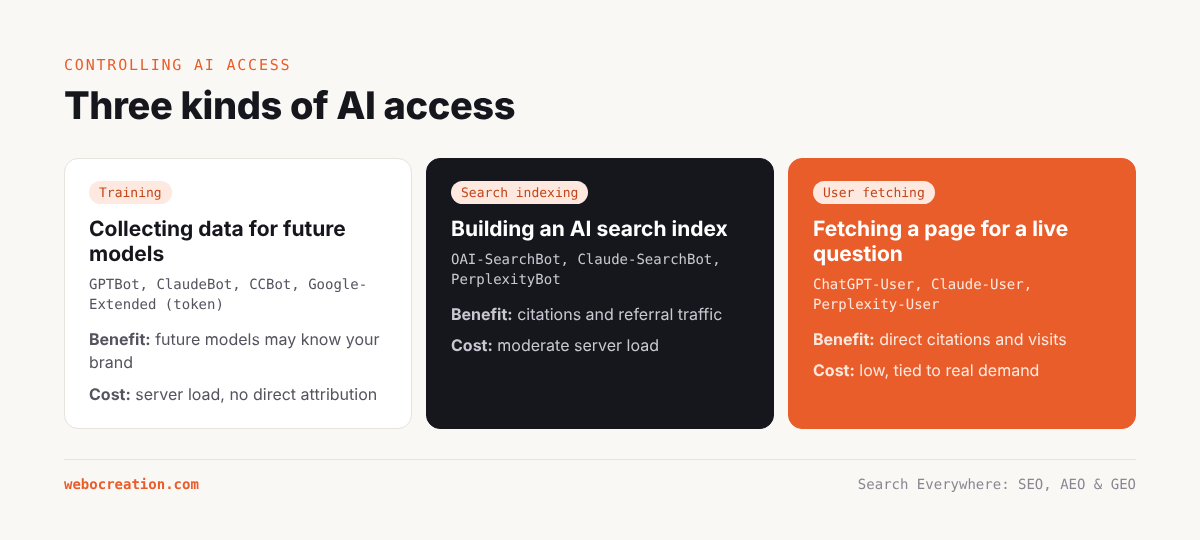
It helps to separate AI access into three purposes, because each has different costs and benefits.
| Purpose | Examples | Benefit to you | Cost to you |
|---|---|---|---|
| Training: collecting content to train future models | GPTBot, ClaudeBot, CCBot, Bytespider, Google-Extended (token), Applebot-Extended (token), meta-externalagent | Indirect: future models may know your brand and expertise | Server load; your content used without direct attribution or payment |
| Search indexing: building an index for AI search products | OAI-SearchBot, Claude-SearchBot, PerplexityBot | Citations and referral traffic from AI search | Moderate server load |
| User-initiated fetching: retrieving a page because a user’s request needs it | ChatGPT-User, Claude-User, Perplexity-User, MistralAI-User | Direct citations and traffic for a live question | Low load; tied to real user demand |
For most businesses that want to be found, the logical policy is to allow search indexing and user-initiated fetching, because those produce citations and traffic. The training question is more nuanced.
Should you allow training crawlers?
Arguments for allowing:
- Models trained on your content are more likely to know your brand, your products and your expertise, and to mention you even without searching.
- For a business whose goal is reach and reputation (like a tutorial site that promotes its founder’s books and services), being part of the model’s knowledge is valuable.
Arguments for blocking:
- Your content may be used to answer questions without any attribution or visit.
- Some training crawlers are aggressive and consume significant bandwidth.
- Publishers with valuable proprietary content may prefer to license it.
For webocreation.com/, whose business model depends on visibility and expertise, allowing training (perhaps with rate limiting for aggressive bots) is consistent with its goals. A subscription publisher or a company with proprietary research might decide differently.
Google-Extended and Applebot-Extended
These are robots.txt tokens, not separate crawlers. Google crawls with Googlebot; disallowing Google-Extended tells Google not to use your content to train Gemini models or to ground Gemini app answers. It does not affect Google Search, AI Overviews or AI Mode, which are part of Search and governed by normal Googlebot rules and snippet controls. Similarly, Applebot-Extended controls whether Apple uses content crawled by Applebot for training its models, without affecting Apple’s search features.
This is a frequent source of confusion: blocking Google-Extended does not remove you from AI Overviews. The only ways to limit your content’s use in AI Overviews and AI Mode are snippet controls (nosnippet, max-snippet, data-nosnippet), which also limit normal snippets, or blocking Googlebot, which removes you from Search entirely.
robots.txt patterns for AI
Remember the rule from Chapter 4: a crawler follows only the most specific group that matches it, so any group you create for a bot must contain all the rules you want that bot to follow.
Policy A: Allow everything (maximum visibility)
No AI-specific groups needed; the * group applies. Optionally add explicit groups to document the decision.
Policy B: Allow search and user fetches, block training
User-agent: GPTBot
User-agent: ClaudeBot
User-agent: CCBot
User-agent: Bytespider
User-agent: meta-externalagent
User-agent: Google-Extended
User-agent: Applebot-Extended
Disallow: /

User-agent: *
Disallow: /wp-admin/
Allow: /wp-admin/admin-ajax.php
Disallow: /?s=
Disallow: /search/
OAI-SearchBot, ChatGPT-User, Claude-SearchBot, Claude-User, PerplexityBot and Perplexity-User fall under * and are allowed.
Policy C: Allow AI but protect sections
For example, allow everything except premium content or a members’ area:
User-agent: GPTBot
User-agent: ClaudeBot
User-agent: CCBot
Disallow: /members/
Disallow: /premium/
Disallow: /wp-admin/
Disallow: /?s=
Policy D: Block all AI, keep search engines
User-agent: GPTBot
User-agent: OAI-SearchBot
User-agent: ChatGPT-User
User-agent: ClaudeBot
User-agent: Claude-SearchBot
User-agent: Claude-User
User-agent: PerplexityBot
User-agent: Perplexity-User
User-agent: CCBot
User-agent: Bytespider
User-agent: meta-externalagent
User-agent: Amazonbot
User-agent: Google-Extended
User-agent: Applebot-Extended
Disallow: /
This removes you from most AI search products, but not from Google’s AI Overviews or AI Mode (which use Googlebot) or Copilot (which uses Bing’s index). It is the right choice only if you have decided AI visibility is not worth the cost.
Notes on compliance
- User-initiated fetchers are treated differently by some companies. Several AI companies have stated that because these fetches are made on behalf of a user, they may not apply robots.txt rules in the same way as automated crawling. Check each provider’s current documentation.
- Not every bot respects robots.txt. For bots that ignore it, use edge controls.
- Crawl-delay is respected by some AI crawlers (Anthropic documents support for it) but not by Google.
Edge controls: Cloudflare and other CDNs
robots.txt is a request. To enforce a policy, use your CDN or firewall. Cloudflare, which many WordPress and OpenCart sites use, offers several AI-related controls:
- AI Crawl Control (formerly AI Audit): a dashboard listing AI crawlers visiting your site, how many requests each makes, whether they follow robots.txt, and one-click allow or block per crawler.
- Block AI bots: a setting that blocks known AI crawlers. Cloudflare has changed defaults over time, including blocking AI crawlers by default for new domains in some configurations, so check this setting if you want AI visibility.
- Managed robots.txt: Cloudflare can prepend AI-related directives to your robots.txt, including content signals that state whether content may be used for search, AI input or AI training.
- Pay per crawl (in beta for some customers): lets publishers charge AI crawlers for access, returning HTTP 402 to crawlers that have not agreed to pay.
- WAF custom rules and rate limiting: target specific user agents or verified bot categories. For example, rate-limit Bytespider to a few requests per minute instead of blocking it.
- Verified bots: Cloudflare identifies verified crawlers by IP and signature, which helps distinguish real AI crawlers from impostors.
Case study. webocreation.com/ publishes detailed guides on Cloudflare rules and the OWASP core ruleset, so the site’s audience is exactly the kind of technical owner who can benefit from an “AI crawler policy for online stores” article, written from the site’s own configuration and log data. If the site itself sits behind Cloudflare, check AI Crawl Control to confirm that the AI search crawlers are allowed, and consider rate limiting Bytespider and other aggressive training crawlers.
A sample Cloudflare WAF rule expression to rate-limit a specific crawler:
(http.user_agent contains "Bytespider")Pair it with a rate-limiting rule (for example, 10 requests per minute per IP) rather than a block, if you want to keep some presence in that ecosystem.
Meta tags and headers for AI
Beyond robots.txt, page-level controls exist:
noindexremoves a page from search indexes, and therefore from AI products built on those indexes.nosnippetandmax-snippetlimit how much text Google can show, which also limits use in AI Overviews and AI Mode.data-nosnippeton an HTML element excludes that element from snippets and AI Overviews.noaiandnoimageaimeta values were proposed by some platforms but are not standards and are not honoured by major AI companies. Do not rely on them.- Content signals: Cloudflare’s proposed Content Signals Policy adds lines to robots.txt such as
Content-Signal: search=yes, ai-input=yes, ai-train=no, expressing preferences for different uses. Adoption by AI companies is still emerging.
llms.txt in detail
The llms.txt proposal, published in 2024, suggests a Markdown file at the root of a site that gives language models a concise overview and a curated list of links. Its structure:
# Webocreation

> Webocreation is a web development studio in Glendale, Arizona, founded by
> Rupak Nepali, author of four books on OpenCart. It publishes free OpenCart
> tutorials and extensions and builds OpenCart, WordPress and Webflow sites.

Key facts:
- 770+ tutorials, 80+ free OpenCart extensions, 12 free themes
- Founder blogging about web development since 2010
- Books: OpenCart 4 Dev Guide for Themes & Extensions (2024); OpenCart 4 User Manual (2025)

## OpenCart 4 guides
- [Upgrade OpenCart 3 to 4](https://webocreation.com/...: step-by-step upgrade with backups
- [Cloudflare Turnstile for OpenCart 4](https://webocreation.com/opencart-4-cloudflare-turnstile-captcha/: free captcha extension
- [OpenCart 4 extension development](https://webocreation.com/...: events, controllers, Twig

## Free extensions
- [All free OpenCart extensions](https://webocreation.com/...: list with compatibility

## Services
- [OpenCart development](https://webocreation.com/opencart-development/
- [SEO and marketing](https://webocreation.com/seo-and-marketing/

## Optional
- [Webflow certification study guide](https://webocreation.com/...
- [Final year project ideas](https://webocreation.com/...
Conventions:
- An H1 with the site or project name (required).
- A blockquote summary.
- Optional free-form details.
- H2 sections containing lists of links, each with a short description.
- An “Optional” section for secondary content that can be skipped when context is limited.
- Optionally, Markdown versions of key pages at the same URL with
.mdappended, and anllms-full.txtwith the full text of the most important content.
What llms.txt is good for today:
- Developer tools, coding assistants and AI agents that look for it (it is widely used for software documentation).
- A curated, human-reviewed summary that you control, which can be useful to anyone, human or machine, trying to understand the site quickly.
- A forcing function to decide which pages are actually your most important ones.
What it is not:
- An access control. It does not block or allow anything.
- A confirmed ranking or citation factor for ChatGPT, Gemini, AI Overviews, Perplexity or Claude’s search features at the time of writing.
Case study. webocreation.com/’s existing llms.txt follows the format well. Recommended changes: lead with the canonical brand description; list hubs before individual posts; move student and off-core content into the Optional section (or remove it if pruned); validate all links monthly; and generate the article counts automatically so they never drift from reality (the file says about 776 articles, which matches the blog filter, while the author page says 619 by the founder, a difference explained by guest posts).
Licensing and partnerships
Large publishers have signed content licensing deals with AI companies, and marketplaces for licensing content to AI are emerging. For most small and mid-sized sites these are not yet relevant, but two developments are worth watching:
- Pay-per-crawl systems at the CDN level (such as Cloudflare’s) may let any site charge for training access.
- Attribution standards: efforts to standardise how AI systems attribute and link to sources.
Making the decision: a checklist
- What is the site’s business model? Visibility and leads (allow), subscriptions or proprietary data (restrict), mixed (allow search, decide on training).
- What does the log analysis show? Which AI crawlers visit, how much bandwidth they use, and whether any cause performance problems.
- Which AI products send traffic? GA4’s AI Assistants channel shows which assistants are worth keeping access for.
- Decide per category: training, search indexing, user fetching.
- Implement in robots.txt, with complete rule groups for each bot listed.
- Enforce at the edge for bots that ignore robots.txt or overload the server.
- Document the policy in a comment at the top of robots.txt and in internal documentation.
- Review quarterly, because new crawlers appear and companies change user agents.
Key takeaways
- Separate AI access into training, search indexing and user-initiated fetching; each has different value.
- For visibility-driven businesses, allow AI search and user fetchers; decide on training based on goals and load.
- Google-Extended controls Gemini training and grounding, not AI Overviews or AI Mode.
- A crawler-specific robots.txt group replaces the
*group for that crawler; include all needed rules. - Use CDN controls such as Cloudflare AI Crawl Control and rate limiting to enforce policies and handle aggressive bots.
- llms.txt is a useful curated summary, not an access control or a confirmed ranking factor. Keep it accurate.
Previous: Generative Engine Optimization (GEO): Get Cited by ChatGPT, Perplexity and Gemini
Next: Measuring AEO and GEO: How to Track AI Visibility
All chapters: Search Everywhere: The Practical Guide to SEO, AEO and GEO

Rupak Nepali is a web developer, manage Webocreation website and the author of six books:
Getting Started with OpenCart Module Development (Packt, 2013),
OpenCart Theme and Module Development (Packt, 2015),
OpenCart 4: Dev Guide for Themes & Extensions (2024),
OpenCart 4: User Manual (2025),
Cloudflare for the Enterprise Website (2026) and
The Technical Web Guide for Marketers (2026).
Rupak has built OpenCart stores and extensions since 2010, has published more than 600 tutorials on Webocreation, and shares free OpenCart extensions on GitHub.
Find Rupak on
GitHub | Amazon | LinkedIn | X | YouTube.