Search Everywhere: Site Architecture, Internal Linking and Topical Authority
Build topical authority with hub-and-spoke architecture, smart internal links, content pruning, clean categories and breadcrumbs that search engines follow.
 Rupak NepaliPublished Nov 14, 2026
This post is Chapter 5 of Search Everywhere: The Practical Guide to SEO, AEO and GEO, the free online edition. Chapter and appendix references link to the matching post.
Search engines and AI systems both try to answer a simple question about any site: what is this site an authority on? The answer comes partly from external signals such as links and mentions, but a surprising amount comes from the site itself: how its pages are organised, how they link to each other, and how consistently they stay on topic.
This chapter covers three connected ideas: site architecture, internal linking, and content pruning. Together they build topical authority.
What topical authority means
Topical authority is the degree to which a site is seen as a comprehensive, trustworthy source on a subject. It is not a single metric that Google publishes, but the concept fits well with how modern ranking systems work:
- Google’s systems evaluate quality at the site level as well as the page level. A site with a large proportion of unhelpful content can see good pages held back.
- Search engines build entity associations. If hundreds of pages on a site cover OpenCart thoroughly, link to each other, and are linked to by other OpenCart resources, the site becomes strongly associated with the OpenCart entity.
- AI retrieval systems often favour sources that appear repeatedly for related sub-queries. A site that covers every aspect of a topic has more chances to be retrieved in a query fan-out.
The practical recipe is simple to state and hard to execute: cover your core topics completely, connect the coverage with links, and remove or isolate what does not belong.
Architecture: hubs and spokes
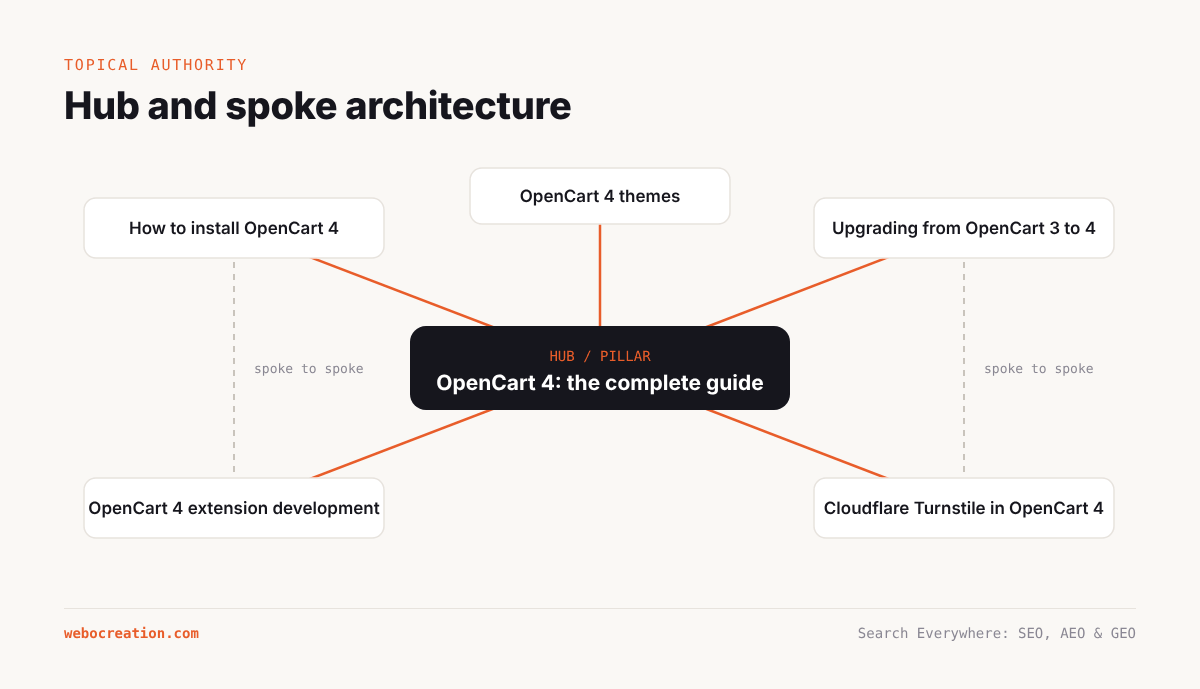
A good architecture makes every important page reachable in a few clicks from the homepage and groups related content together. The most widely used pattern is hub and spoke, also called pillar and cluster.
- A hub (or pillar) page covers a broad topic at a high level and links to every detailed article in the cluster. For example, “OpenCart 4: the complete guide”.
- Spoke (or cluster) pages each cover one subtopic in depth: “How to install OpenCart 4”, “Upgrading from OpenCart 3 to 4”, “OpenCart 4 extension development”, and so on. Each spoke links back to the hub and to closely related spokes.
On WordPress, hubs are often category pages. That works only if the category page has real content: an introduction, a curated list of the most important articles in a logical order, and links to subcategories. A bare list of recent posts with pagination is a weak hub.
Case study. webocreation.com/’s navigation already hints at hubs: “OpenCart 4”, “OpenCart 3”, “Extensions and modules”, “Themes and templates”, “OpenCart user guide”, “Developer tutorials”, “Tips and tricks”. The opportunity is to turn each into a curated hub page with an introduction, a “start here” sequence, the ten most important tutorials, and links to every related article, rather than relying on date-ordered archives.
Flat versus deep
Click depth is the number of clicks from the homepage to a page. Pages at depth 1 to 3 are crawled more often and generally seen as more important. Old blog posts on a large WordPress site can drift to depth 10 or more as they move down paginated archives. Fix this by:
- Linking to important evergreen articles from hubs, the homepage and the main navigation.
- Using related-post modules that link by topic rather than only by date.
- Adding contextual links from newer articles to older relevant ones.
Screaming Frog and Semrush Site Audit both report crawl depth. Any important page deeper than 4 clicks deserves attention.
URL structure
URLs should be readable, stable and consistent. WordPress’s post-name structure (/post-name/) used by webocreation.com/ is fine. Category-based URLs (/opencart/post-name/) add context but make it harder to recategorise later. Whichever you choose, do not change it without a full redirect plan.
Internal linking
Internal links do three jobs at once:
- They help crawlers discover pages.
- They pass ranking signals (often called link equity) from strong pages to weaker ones.
- They tell search engines what the linked page is about, through anchor text and surrounding context.
Principles
- Link contextually. A link inside a relevant paragraph carries more meaning than a link in a footer or sidebar.
- Use descriptive anchor text. “Read our guide to OpenCart 4 extension development” is better than “click here”. Vary anchors naturally; do not use the same exact-match phrase on every link.
- Link from strong pages to pages you want to rank. Your strongest pages are usually the homepage, popular evergreen tutorials and pages with external backlinks. Semrush Backlink Analytics or Ahrefs show which pages have the most links.
- Link up and across, not just down. Spokes should link to their hub and to sibling spokes.
- Fix orphan pages. Every indexable page should have at least one internal link from another indexable page.
- Keep sitewide links purposeful. Header and footer links appear on every page and dilute each other. Keep navigation focused.
Finding internal link opportunities
A simple and effective method uses Google itself:
site:webocreation.com "turnstile"This returns pages on the site that mention Turnstile. Any of them that do not already link to the Turnstile tutorial are candidates for a new contextual link.
For a more systematic approach, export all pages and their body text from a crawler, then search for target phrases in pages that do not already link to the target URL. Screaming Frog’s custom search and Semrush Site Audit’s internal linking report make this easier.
Case study. The webocreation.com/ post on Search Console page indexing reasons had around nine contextual links in its body plus about eighteen links in “Related reading” and “Keep reading” lists. That is a healthy pattern. The improvement is to make sure the contextual links point to hub pages and to the most important commercial page for the topic (here, the OpenCart SEO or development service), not only to other blog posts.
Internal links and AI retrieval
Internal links matter for AI systems too, in a quieter way. They help search engines understand which page is your canonical answer for a topic, which influences what gets retrieved. They also help AI agents that browse your site follow a path from a summary to the detail. A clear “start here” structure benefits human readers, crawlers and agents alike.
Content pruning: the most underused technique
Most long-running sites accumulate content that no longer serves them: outdated tutorials, thin posts, duplicate coverage, guest posts accepted for links, and content from previous directions the business took. This material:
- Consumes crawl resources.
- Lowers the average quality of the site.
- Dilutes the site’s topical identity.
- Can cannibalise better pages.
Pruning means reviewing this content systematically and deciding what to do with each piece.
The decision framework
For each URL, collect:
- Topic fit: does it belong to a core or secondary topic?
- Traffic: organic clicks in the last 12 months (Search Console).
- Links: external backlinks pointing to it (Semrush, Ahrefs).
- Conversions or engagement: GA4.
- Quality: is it accurate, current and substantial?
Then apply this decision tree:
| Situation | Action |
|---|---|
| On-topic, good quality, gets traffic | Keep. Refresh periodically. |
| On-topic, outdated or thin, has potential | Improve. Update, expand, merge in related thin posts. |
| On-topic, duplicates a better page | Merge and 301 redirect to the better page. |
| Off-topic, has valuable backlinks | Redirect to the closest relevant page if one exists; otherwise keep but noindex. |
| Off-topic, has traffic but no business value | Move to a separate site or subdomain, or noindex. |
| Off-topic, no traffic, no links | Remove (410) or noindex. |
| Thin archive pages (tags, authors, attachments) | Noindex and remove from sitemaps. |
Pruning is not about deleting as much as possible. A good outcome is a smaller set of stronger pages that all reinforce the same identity.
Case study: a pruning plan for webocreation.com/. Based on the public sitemaps, the following groups are candidates. Traffic and backlink data from Search Console and Semrush would confirm each decision.
Group Examples Likely action Nepali-language serial (“Bokagiri”) Parts 4, 6, 8, plan post Move to a personal blog, or noindex Health-sector study notes Malnutrition, diarrhoeal disease, national health plans, NHSP Move to a separate site, or noindex. They may get student traffic, so check first. Internship report fragments Title page, acknowledgement, parts II to IV Merge into one “internship report example” guide, redirect the parts Final-year project posts Project report parts, project lists Keep the strong list posts (they fit the student audience) and merge fragments NFT, metaverse and Web3 guest posts NFT profit methods, metaverse developer, Web3 eCommerce Remove or noindex unless they have strong links Generic eCommerce guest posts Fraud prevention, customer safety Improve and rewrite in the site’s voice with OpenCart specifics, or remove Database theory posts Integrity constraints, domain constraints, referential integrity Keep if they get traffic from students; otherwise consolidate Old OpenCart 2.x tutorials Attributes in category tpl for OpenCart 2.0 Update for OpenCart 4 or add a clear version note and link to the current guide Guest author archives 62 non-founder author pages Noindex and remove from sitemap; keep the posts if they are good Tag archives All tags Noindex unless curated
How to prune safely
- Back up the site and export the list of URLs you plan to change.
- Check for backlinks before removing anything. A post with links from reputable sites should be redirected, not deleted.
- Make changes in batches, starting with the clearest cases.
- Update internal links so they no longer point to removed or redirected URLs.
- Update sitemaps (Yoast does this automatically when posts are trashed or noindexed).
- Monitor Search Console’s Page indexing and Performance reports for the following 8 to 12 weeks.
Results from pruning are usually gradual. Google needs to recrawl the site and reassess it. Expect to see changes over two to four months.
Category and taxonomy hygiene
Categories should reflect your topic map. Common problems:
- Mismatched categories. On webocreation.com/, HubSpot tutorials appear under a “Salesforce” category. HubSpot is not a Salesforce product, so this confuses both readers and search engines. Create a “Marketing automation” parent with HubSpot, Marketo and Pardot (the latter two are Adobe and Salesforce products respectively) as children.
- Too many categories with few posts. Merge them.
- Posts in many categories. Pick one primary category per post. Yoast lets you set a primary category, which is used in breadcrumbs and URLs.
- Overlapping categories and tags. Use categories for structure and tags sparingly, or not at all.
Breadcrumbs
Breadcrumbs show where a page sits in the hierarchy (Home › Blog › OpenCart Guide › Post) and provide internal links up the tree. With BreadcrumbList structured data, Google may show the breadcrumb path in results instead of the raw URL. The sample post on webocreation.com/ shows a visible breadcrumb trail. Yoast can output BreadcrumbList schema automatically when its breadcrumbs are enabled; verify it with the Rich Results Test (Chapter 17).
Key takeaways
- Topical authority comes from complete coverage, strong internal links and a consistent focus.
- Build hubs with real content and curated links, not bare date-ordered archives.
- Keep important pages within three or four clicks of the homepage.
- Prune off-topic, thin and duplicate content with a clear decision framework, checking traffic and backlinks first.
- Fix taxonomy problems such as mismatched categories, and noindex thin tag and author archives.
Previous: Crawlability and Indexability: robots.txt, Sitemaps, Canonicals and Redirects
Next: Page Experience and Speed: Fixing Core Web Vitals
All chapters: Search Everywhere: The Practical Guide to SEO, AEO and GEO

Rupak Nepali is a web developer, manage Webocreation website and the author of six books:
Getting Started with OpenCart Module Development (Packt, 2013),
OpenCart Theme and Module Development (Packt, 2015),
OpenCart 4: Dev Guide for Themes & Extensions (2024),
OpenCart 4: User Manual (2025),
Cloudflare for the Enterprise Website (2026) and
The Technical Web Guide for Marketers (2026).
Rupak has built OpenCart stores and extensions since 2010, has published more than 600 tutorials on Webocreation, and shares free OpenCart extensions on GitHub.
Find Rupak on
GitHub | Amazon | LinkedIn | X | YouTube.