Cloudflare Rules for Ruby on Rails: Real IPs, the rate_limit Bypass at the Origin, HTTPS With assume_ssl, and Asset Caching
Run Rails behind Cloudflare safely: lock the origin, trust Cloudflare as a proxy, enforce HTTPS at the edge, rate-limit logins and cache digested assets. Tested on Rails 8.1.4.1.
 Rupak NepaliPublished Nov 21, 2026
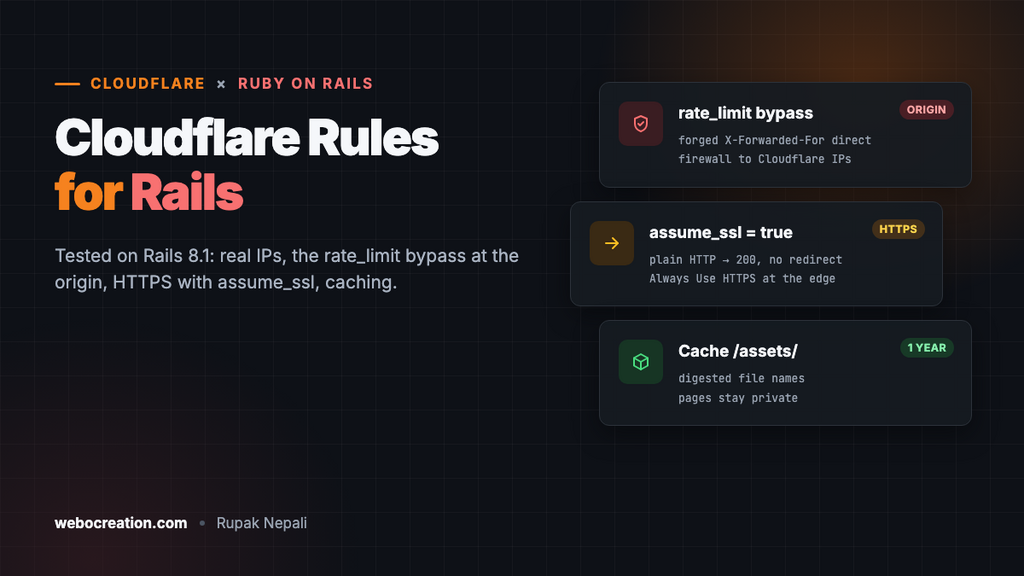
Rails 8 ships with more security built in than ever: forced HTTPS, a login rate limit in the authentication generator, host authorization, and a health check endpoint. Behind Cloudflare, each of these behaves a little differently than you might expect. We expected the login rate limit to break behind a proxy. It doesn’t, but it can be bypassed in a way most guides don’t mention, and HTTPS isn’t enforced where you’d think.
We tested every behaviour in this guide on a fresh Rails 8.1.4.1 app (Ruby 3.3, Puma 8.1, SQLite, rails new --minimal plus bin/rails generate authentication) running in the production environment, before writing any rules. The advice applies to Rails 7.1 and later, with two version notes: rate_limit arrived in Rails 7.2 and the authentication generator in Rails 8.0.
What a fresh Rails app does
HTTPS isn’t enforced at your server
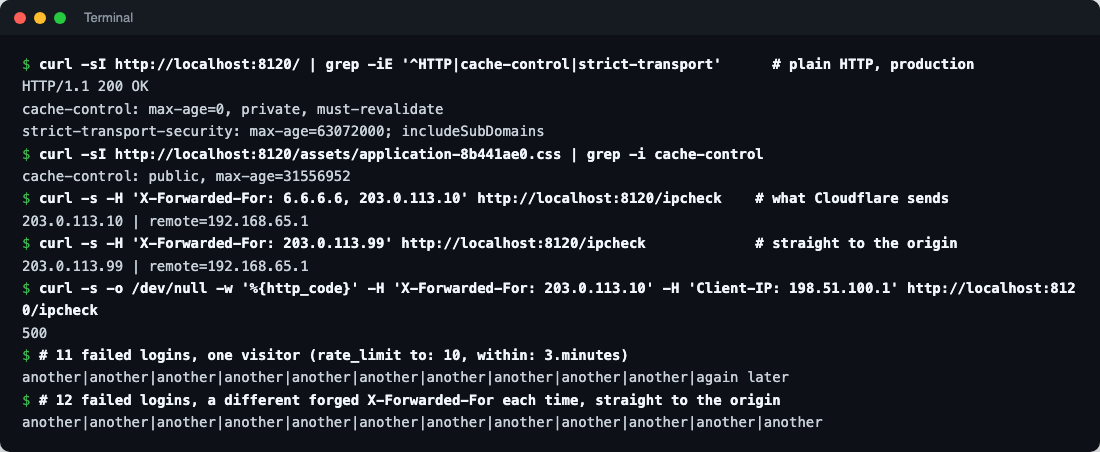
New apps have config.force_ssl = true and config.assume_ssl = true in production.rb. assume_ssl tells Rails that every request already arrived over HTTPS, which is right behind a proxy that terminates TLS. The side effect: a plain HTTP request to our server got 200 OK, not a redirect, with the HSTS header attached. force_ssl still marks cookies secure and sends HSTS, but the redirect to HTTPS has to happen at Cloudflare.
Rails finds the real visitor IP, and believes anyone
Cloudflare sends the visitor’s IP at the end of X-Forwarded-For. Rails’ request.remote_ip takes the right-most address in that header that isn’t a trusted proxy, so when we sent X-Forwarded-For: 6.6.6.6, 203.0.113.10, the way a forged header looks after Cloudflare appends the real IP, Rails correctly picked 203.0.113.10. You don’t need a gem or extra config for that.
The catch is in the same code. Rails reads X-Forwarded-For whoever sends it; the address of the machine actually connecting is only used when every forwarded address is trusted. A request sent straight to the origin with X-Forwarded-For: 203.0.113.99 came out as 203.0.113.99.
The login rate limit can be bypassed at the origin
The authentication generator adds rate_limit to: 10, within: 3.minutes, only: :create to SessionsController, keyed by request.remote_ip. From one visitor, our 11th failed login got “Try again later.” Then we sent 12 logins straight to the server with a different forged X-Forwarded-For each time: none were limited. Anyone who can reach your server directly can guess passwords without limit.
Two headers make Rails return 500
Rails checks that Client-IP and X-Forwarded-For agree, and raises IpSpoofAttackError when they don’t. Sending both with different addresses got a 500. That’s harmless to your data, but anyone can fill your error tracker and logs with 500s, and a proxy doesn’t stop a visitor from sending the header.
Caching is safe by default
- Pages:
Cache-Control: max-age=0, private, must-revalidateand a session cookie. Cloudflare won’t store them. - Assets under
/assets/:Cache-Control: public, max-age=31556952(a year), with a digest in the file name (application-8b441ae0.css). /up, the health check, answered200.
Make Rails work behind Cloudflare
1. Lock the origin to Cloudflare
This is the fix for the rate-limit bypass and the most important step. Allow ports 80 and 443 only from Cloudflare’s IP ranges in your firewall or your cloud provider’s security group, or use a Cloudflare Tunnel so the server has no open web ports at all. Then every request carries the X-Forwarded-For Cloudflare built, and Rails’ IP logic is sound.
2. Trust Cloudflare as a proxy
Add Cloudflare’s ranges to Rails’ trusted proxies, in config/environments/production.rb:
CLOUDFLARE_IPS = %w[
  173.245.48.0/20 103.21.244.0/22 103.22.200.0/22 103.31.4.0/22 141.101.64.0/18
  108.162.192.0/18 190.93.240.0/20 188.114.96.0/20 197.234.240.0/22 198.41.128.0/17
  162.158.0.0/15 104.16.0.0/13 104.24.0.0/14 172.64.0.0/13 131.0.72.0/22
  2400:cb00::/32 2606:4700::/32 2803:f800::/32 2405:b500::/32 2405:8100::/32
  2a06:98c0::/29 2c0f:f248::/32
].map { |range| IPAddr.new(range) }   # current list: https://www.cloudflare.com/ips/

config.action_dispatch.trusted_proxies = ActionDispatch::RemoteIp::TRUSTED_PROXIES + CLOUDFLARE_IPS
Keep ActionDispatch::RemoteIp::TRUSTED_PROXIES in the list: it holds the private ranges, so a load balancer or Kamal’s proxy in front of Puma stays trusted too. Don’t set an empty list hoping to trust nobody: a blank list means “use the defaults”. With Cloudflare’s addresses trusted, a request that passes through two Cloudflare hops (for example a Worker in front of your app) still resolves to the visitor, not to Cloudflare.
3. HTTPS at the edge
- SSL/TLS mode: Full (strict), with a certificate on the server (a free Cloudflare Origin Certificate works with Thruster, nginx or Kamal’s proxy).
- Turn on Always Use HTTPS under SSL/TLS → Edge Certificates. With
assume_ssl, Rails won’t redirect plain HTTP itself.
4. Host authorization
The generated production.rb has a commented-out config.hosts block. Fill it in so requests with another Host header are refused, and keep the health check open:
config.hosts = ["shop.example", /.*\.shop\.example/]
config.host_authorization = { exclude: ->(request) { request.path == "/up" } }
5. Strip the Client-IP header
In Rules → Transform Rules → Modify Request Header, create a rule for all incoming requests that removes the Client-IP header. Your visitors’ browsers don’t send it, so nothing legitimate is lost, and the 500 errors stop.
Security rules
In Security → Security rules create custom rules. The free plan includes five.
Rule 1: Block probes
Action: Block.
(ends_with(http.request.uri.path, ".php"))
or (http.request.uri.path contains "/.env")
or (http.request.uri.path contains "/.git")
or (starts_with(http.request.uri.path, "/wp-"))
or (starts_with(http.request.uri.path, "/config/"))
A Rails app has no PHP, so these are all scanners. They never reach your app, but blocking them at the edge keeps them out of your logs and off your Puma threads.
Rule 2: Challenge the admin area
If you use an admin engine such as ActiveAdmin, Avo, Administrate or Mission Control (Solid Queue’s dashboard), challenge its path. Action: Managed Challenge.
(starts_with(http.request.uri.path, "/admin")
 or starts_with(http.request.uri.path, "/jobs"))
and not ip.src in {203.0.113.10 198.51.100.0/24}
Adjust the paths to where your engines are mounted, and replace the IPs with your office addresses or remove that line. For a small team, Cloudflare Zero Trust Access in front of these paths is stronger.
Don’t challenge /up (load balancers and uptime monitors can’t solve challenges) or /cable (Action Cable’s WebSocket connection can’t show a challenge page). Cloudflare proxies WebSockets on every plan, so /cable works as long as no rule challenges it. Our minimal test app had no Action Cable, so we didn’t test that part.
Rate limiting: logins and password resets
In Security → Security rules → Rate limiting rules:
- If incoming requests match: URI Path is in
/sessionand/passwords, and the method is POST - Characteristics: IP
- Requests: 10 per 10 seconds
- Action: Block for 10 seconds
These are the paths the Rails 8 authentication generator creates: POST /session logs in, POST /passwords sends a reset email. With Devise, use /users/sign_in and /users/password. Keep the generator’s own rate_limit: Cloudflare stops bursts at the edge, and Rails’ limit, now keyed on real IPs, catches slow guessing over minutes.
Cache rules
Rails’ digested assets are the ideal thing to cache: the digest changes whenever the file does. Cloudflare already caches CSS, JavaScript, images and fonts by extension and follows the one-year Cache-Control. To make sure everything under /assets/ is cached, including file types Cloudflare doesn’t cache by default (such as .map or .json), add a rule in Caching → Cache Rules:
(starts_with(http.request.uri.path, "/assets/"))- Cache eligibility: Eligible for cache
- Edge TTL: Use cache-control header if present
- Browser TTL: Respect origin
Don’t cache pages
Rails marks pages private and sets a session cookie, and every form embeds a CSRF token tied to that session. Cloudflare respects private, so don’t override it with a Cache Everything rule. If some pages really are public (a marketing site inside the app), mark them cacheable in the controller with expires_in 1.hour, public: true and make sure they render no CSRF token or user data. Turbo’s own page cache works in the browser and is unaffected.
Test everything
# HTTPS redirect now happens at Cloudflare
curl -sI http://shop.example/ | grep -i "^location"

# Rule 1: 403 from Cloudflare
curl -s -o /dev/null -w "%{http_code}\n" https://shop.example/wp-login.php

# Health check still open
curl -s -o /dev/null -w "%{http_code}\n" https://shop.example/up

# Assets from the edge: run twice, the second should say HIT
curl -sI https://shop.example/assets/application-8b441ae0.css | grep -i cf-cache-status

# The origin refuses direct connections (run from a machine outside Cloudflare)
curl -s --max-time 5 -o /dev/null -w "%{http_code}\n" --resolve shop.example:443:YOUR.SERVER.IP https://shop.example/
The last command should time out or be refused. If it answers, step 1 isn’t done, and the rate limit can still be bypassed.
Summary
- Rails picks the visitor’s IP from Cloudflare’s
X-Forwarded-Forcorrectly, but believes anyone who sends the header. Firewall the origin to Cloudflare. - Add Cloudflare’s ranges to
trusted_proxiesalongside the defaults. - With
assume_ssl, enforce HTTPS at Cloudflare (Always Use HTTPS, Full strict). - Set
config.hosts, stripClient-IP, block probes, challenge admin engines but never/upor/cable. - Rate-limit
/sessionand/passwordsat the edge and keep Rails’ ownrate_limit. - Cache
/assets/, never pages.
More in this series: Django, Laravel, Next.js and Odoo.

Rupak Nepali is a web developer, manage Webocreation website and the author of six books:
Getting Started with OpenCart Module Development (Packt, 2013),
OpenCart Theme and Module Development (Packt, 2015),
OpenCart 4: Dev Guide for Themes & Extensions (2024),
OpenCart 4: User Manual (2025),
Cloudflare for the Enterprise Website (2026) and
The Technical Web Guide for Marketers (2026).
Rupak has built OpenCart stores and extensions since 2010, has published more than 600 tutorials on Webocreation, and shares free OpenCart extensions on GitHub.
Find Rupak on
GitHub | Amazon | LinkedIn | X | YouTube.