Search Everywhere: How to Diagnose a Traffic Drop and Survive Algorithm Updates
A six-step method to diagnose an organic traffic drop, match it to Google algorithm updates, find the cause and recover, including AI-era traffic loss.
 Rupak NepaliPublished Nov 14, 2026
This post is Chapter 26 of Search Everywhere: The Practical Guide to SEO, AEO and GEO, the free online edition. Chapter and appendix references link to the matching post.
Sooner or later every site sees a sudden fall in organic traffic. The worst response is panic: rewriting everything, disavowing links at random, or changing the site structure while the cause is still unknown. The best response is a calm, systematic diagnosis. This chapter gives you a process that works for classic SEO drops and for the newer pattern of traffic lost to AI answers.
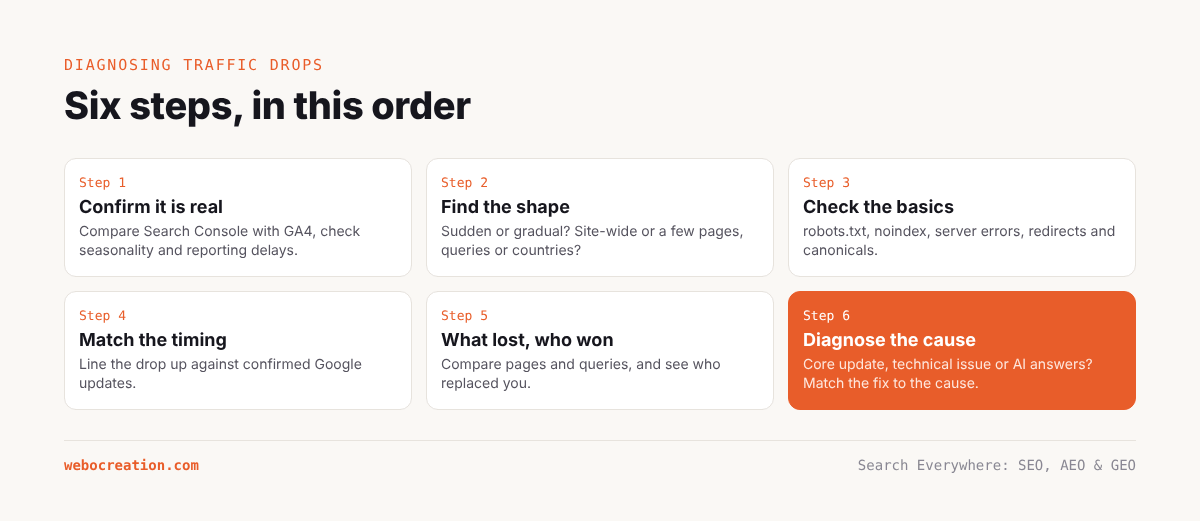
Step 1: Confirm the drop is real
Before investigating causes, rule out measurement problems.
- Compare Search Console and GA4. If GA4 sessions fell but Search Console clicks did not, the problem is tracking, not rankings. Common causes: a broken GTM container, a consent banner change, a theme update that removed the tag, or a new subdomain that breaks sessions.
- Check the date range and comparison. Compare with the same period last year to remove seasonality. Student-focused content drops sharply in holidays; eCommerce content peaks before holiday sales.
- Check for reporting delays. Search Console data is about two days behind.
- Check the Search Status Dashboard for known Google data issues.
Step 2: Find the shape of the drop
The pattern tells you a lot.
| Pattern | Likely causes |
|---|---|
| Sudden, site-wide drop on one day | Technical problem (noindex, robots.txt, server errors, DNS), manual action, or a large deployment |
| Drop over several days coinciding with a confirmed Google update | Algorithmic reassessment (core update, spam update, helpful-content related changes now in core) |
| Gradual decline over months | Content decay, competitors improving, SERP features or AI Overviews absorbing clicks, loss of links |
| Drop on specific pages or sections only | Page-level issue: cannibalisation, content changes, lost links, a competitor overtaking |
| Impressions stable, clicks down | CTR loss: SERP features, AI Overviews, title rewrites, or a competitor’s more attractive snippet |
| Impressions and clicks both down | Ranking or indexing loss |
| Drop in one country or device | Localised issue: hreflang, mobile rendering, regional competitor |
Step 3: Check the technical basics
For any sudden drop, check these first because they are fast to confirm and fix:
- robots.txt: has anything been disallowed? (Search Console Settings › robots.txt.)
- Noindex: did a plugin, theme update or staging setting add
noindex? Check a few key URLs with URL Inspection, and WordPress Settings › Reading. - Server errors: Search Console Crawl stats › By response, and server logs for 5xx responses.
- Redirects and canonicals: did a change send canonicals to the wrong URLs or create redirect loops?
- Rendering: did a JavaScript change hide content? URL Inspection › View crawled page.
- Security: Search Console Security issues; check for injected spam pages (
site:yourdomain.complus spammy terms like “casino” or “pharmacy”). - Manual actions: Search Console Security & Manual Actions.
- DNS, SSL and CDN: certificate expiry, CDN misconfiguration, bot protection challenging Googlebot.
Step 4: Match the timing to updates
Google announces core updates, spam updates and other notable ranking changes on the Search Status Dashboard and the Search Central blog. If your drop started during a confirmed update, the cause is probably algorithmic. Core updates reassess overall quality and relevance; they do not target specific technical errors.
Keep a change log of your own site changes (deployments, plugin updates, content changes, pruning) alongside the update timeline. Many “algorithm” drops turn out to coincide with a site change, and vice versa.
Step 5: Find what lost and who won
In Search Console:
- Compare the 4 weeks after the drop with the 4 weeks before (or year over year).
- Pages tab: sort by click difference. Which pages lost most?
- Queries tab: which queries lost most?
- For the top losing queries, search them and see who ranks now.
In Semrush:
- Organic Research › Position Changes: declined and lost keywords, by page.
- Compare competitors’ visibility over the same period: did a specific competitor gain?
Group the losing pages. Are they a content type (old tutorials, guest posts, thin pages), a topic, a template? Patterns point to causes.
Step 6: Diagnose by cause
Core update losses
Core updates reward content that Google’s systems judge more helpful, reliable and relevant. If you lost:
- Compare your losing pages with the winners. Do the winners have more first-hand experience, more depth, more recent information, clearer answers, stronger authors?
- Assess site-wide quality. A large amount of unhelpful content can affect the whole site. This is where pruning (Chapter 5) helps.
- Strengthen E-E-A-T (Chapter 11).
- Be patient. Recovery usually comes with later core updates after improvements are made, not immediately.
Avoid quick fixes like changing publication dates, adding word count, or rewriting with AI. They rarely help and can make things worse.
Spam updates and manual actions
If you have a manual action, the report tells you the type. Fix it thoroughly (remove unnatural links or ask for removal, then disavow what remains; remove spammy or scaled content; fix structured data abuse) and file a reconsideration request explaining what you did.
Algorithmic spam demotions have no notification. If you suspect one, look at practices that could be seen as spam: paid links, scaled low-value content, doorway pages, site reputation abuse via third-party content, expired domain abuse, hidden text.
Case study relevance. For webocreation.com/, the main spam-adjacent risk is the guest post history: off-topic guest posts with commercial links can look like link selling or site reputation abuse. Cleaning these up proactively (Chapters 5 and 12) reduces risk in future spam and core updates.
Content decay
Gradual declines on individual pages usually mean competitors updated and you did not, or the topic changed (a new software version, new regulations). Refresh the page (Chapter 10).
Cannibalisation
If two of your pages swap rankings for the same query, both may underperform. Consolidate into one page and redirect.
Lost links
Check Semrush Backlink Analytics or Ahrefs for lost referring domains to the affected pages. Reclaim important ones (often a site redesign broke a link to you; ask for an update).
CTR loss to SERP features and AI answers
If impressions held but clicks fell, look at the results page:
- Did an AI Overview start appearing for your main queries?
- Did a featured snippet go to a competitor?
- Did Google rewrite your title?
- Did video or forum results push organic results down?
Responses:
- Win the feature: optimise for the snippet or for AI Overview citation (Chapter 21).
- Accept and adapt: for simple definitional queries that AI Overviews fully answer, clicks may not come back. Focus on queries where users need depth, tools, downloads or services, and measure visibility (impressions, citations) as well as clicks.
- Improve your snippet: a more specific title and description can recover CTR.
The AI-era traffic question
Many publishers have seen informational traffic decline as AI Overviews and assistants answer questions directly. How do you tell if this is happening to you, and what do you do?
Signs:
- Impressions stable or rising, CTR falling, positions stable, on informational queries.
- Semrush or similar tools show AI Overviews appearing on more of your tracked keywords.
- Branded search and AI Assistants referral traffic rising while non-branded informational clicks fall.
Responses:
- Shift the mix toward content AI cannot replace: tools, downloads, code, original data, detailed troubleshooting, case studies, opinionated comparisons, and services.
- Aim to be the cited source in AI answers, since citations build brand and drive high-intent clicks.
- Capture the visitors you get: AI-referred visitors often engage and convert well. Make sure every tutorial has a relevant next step (download, newsletter, book, service).
- Report differently: include impressions, AI citations and branded search, not only clicks.
A traffic drop worksheet
Use this as a checklist the next time traffic falls.
| Step | Question | Answer |
|---|---|---|
| 1 | Is the drop in Search Console clicks as well as GA4? | |
| 2 | Is it seasonal (compare year over year)? | |
| 3 | Date the drop started | |
| 4 | Confirmed Google updates around that date | |
| 5 | Site changes around that date | |
| 6 | robots.txt, noindex, 5xx, redirects, rendering: any problem? | |
| 7 | Manual actions or security issues? | |
| 8 | Impressions down, or only CTR? | |
| 9 | Which pages lost most (top 20)? | |
| 10 | Pattern among losing pages (type, topic, template, author)? | |
| 11 | Which competitors gained? | |
| 12 | SERP changes on top losing queries (AI Overview, snippets, video)? | |
| 13 | Lost backlinks to losing pages? | |
| 14 | Hypothesis | |
| 15 | Actions and dates |
Key takeaways
- Confirm the drop is real and not seasonal or a tracking error.
- The shape of the drop (sudden or gradual, site-wide or sectional, impressions or CTR) points to the cause.
- Check technical basics and manual actions first; they are fast to confirm.
- Match timing against Google updates and your own change log.
- Diagnose by cause: core update, spam, decay, cannibalisation, lost links, or CTR loss to SERP features and AI answers.
- In the AI era, shift toward content AI cannot replace, aim for citations, and report visibility alongside clicks.
Previous: A Full SEO, AEO and GEO Audit and 90-Day Plan (Case Study)
Next: 101 SEO, AEO and GEO Tips, Tricks and Mistakes to Avoid
All chapters: Search Everywhere: The Practical Guide to SEO, AEO and GEO

Rupak Nepali is a web developer, manage Webocreation website and the author of six books:
Getting Started with OpenCart Module Development (Packt, 2013),
OpenCart Theme and Module Development (Packt, 2015),
OpenCart 4: Dev Guide for Themes & Extensions (2024),
OpenCart 4: User Manual (2025),
Cloudflare for the Enterprise Website (2026) and
The Technical Web Guide for Marketers (2026).
Rupak has built OpenCart stores and extensions since 2010, has published more than 600 tutorials on Webocreation, and shares free OpenCart extensions on GitHub.
Find Rupak on
GitHub | Amazon | LinkedIn | X | YouTube.