Search Everywhere: How Search Engines and AI Answer Engines Work
Follow a query through Google's crawl-to-rank pipeline and an AI answer engine's retrieve-and-cite pipeline, and learn where your content can win.
 Rupak NepaliPublished Nov 14, 2026
This post is Chapter 2 of Search Everywhere: The Practical Guide to SEO, AEO and GEO, the free online edition. Chapter and appendix references link to the matching post.
You can practise SEO for years by following checklists without knowing what happens inside a search engine. But the moment something odd happens, such as a page that refuses to index, a ranking that collapses overnight, or an AI assistant that cites a competitor’s outdated page instead of yours, the checklist runs out. Then you need a mental model of the machine.
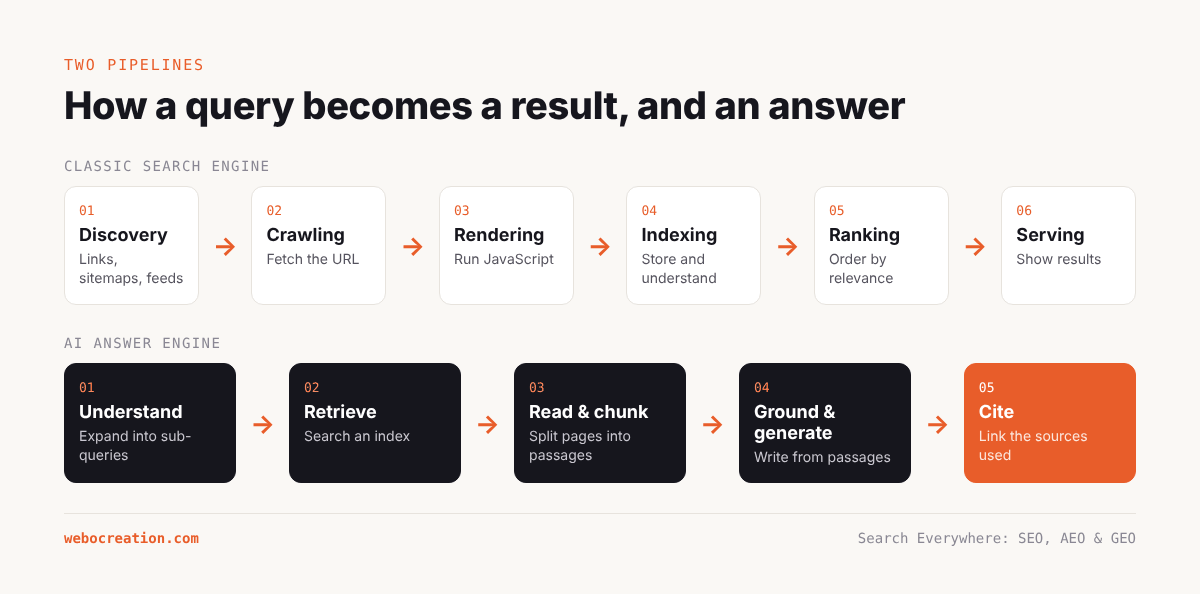
This chapter gives you that model. It covers the classic pipeline (crawl, render, index, rank, serve), and then the newer pipeline that AI answer engines add on top (retrieve, ground, generate, cite).
The classic pipeline
1. Discovery
A search engine first has to learn that a URL exists. It discovers URLs in four main ways:
- Links from pages it already knows, both on your site and on other sites.
- XML sitemaps you submit in Search Console or list in robots.txt.
- Direct submission, such as the URL Inspection tool’s “Request indexing” button in Search Console, or IndexNow for Bing, Yandex and other participating engines.
- Feeds and other signals, such as RSS feeds and Merchant Center product feeds.
Discovery is cheap. Google knows about trillions of URLs it will never crawl. The important point is that discovery is not a promise of anything else.
2. Crawling
Crawling means fetching the URL. Googlebot requests the page, follows redirects, and stores the response. Before it fetches, it checks robots.txt to see whether the path is allowed.
How often Google crawls a site depends on two things that Google describes together as crawl budget:
- Crawl capacity: how fast Google can crawl without overloading your server. Fast, reliable servers get crawled more. Slow servers or frequent 5xx errors make Googlebot back off.
- Crawl demand: how much Google wants to crawl your URLs. Popular pages, frequently updated pages and newly discovered pages have higher demand. Low-value URLs have lower demand.
For a site with a few thousand pages, crawl budget is rarely the limiting factor. It becomes important on large eCommerce sites with faceted navigation, where filter and sort parameters can generate millions of URL variations, and on sites with lots of thin or duplicate pages, where Googlebot wastes time on URLs that will never be indexed. Server log analysis (Chapter 20) is the only way to see exactly how your crawl budget is being spent.
3. Rendering
Modern pages are often built with JavaScript. Google renders pages using an evergreen version of Chromium, executing JavaScript to see the final content, much as a browser would. Rendering happens after the initial crawl and can be delayed, although for most sites the delay is now short.
Two practical consequences matter:
- If important content or links only appear after JavaScript runs, Google can usually see them, but many other crawlers cannot. Most AI crawlers, including those for ChatGPT, Claude and Perplexity, are reported to fetch the HTML and do little or no JavaScript execution. Content that only exists after client-side rendering is at risk of being invisible to them.
- Anything that requires a user action (clicking a tab, scrolling, closing a modal) may not be rendered. Content hidden in accordions is generally fine if it is in the HTML; content loaded only when a user clicks is not.
Case study. When we fetched webocreation.com/’s SEO and marketing page with a text-only fetcher, the FAQ questions appeared but the answers to four of them did not. That can mean the answers are loaded by JavaScript or are simply missing. Either way, a crawler that does not run JavaScript would see questions without answers. Chapter 25 includes checking this as an action item.
4. Indexing
After crawling and rendering, the engine decides whether to add the page to its index, and in what form. During indexing it:
- Parses the content, headings, links, images, structured data and metadata.
- Detects the language and the main content versus boilerplate (navigation, footers, sidebars).
- Groups duplicates and near-duplicates into clusters and picks a canonical URL for each cluster. Your
rel=canonicaltag is a strong hint, not a command. - Extracts entities (people, organisations, products, places, concepts) and connects them to its knowledge graph.
- Evaluates quality signals and decides whether the page is worth keeping at all.
That last step is why Search Console shows statuses like “Crawled – currently not indexed” and “Discovered – currently not indexed”. Google crawled (or at least found) the page and chose not to index it, usually because it judged the page to be low value, duplicate, or not worth the resources yet. On a site with a lot of thin or off-topic content, these numbers grow, and that can drag down how Google perceives the site as a whole.
5. Ranking
When someone searches, the engine finds candidate documents in the index and orders them. Hundreds of signals feed into this. You do not need to know them all; you do need to understand the families:
- Relevance: does the document match the query’s words, meaning and intent? Modern systems use language models to understand meaning, so exact keyword matching matters less than covering the topic the searcher actually cares about.
- Quality and helpfulness: is the content original, substantial, accurate and created for people rather than for search engines? Google’s helpful content system, now folded into its core ranking systems, works at the site level as well as the page level, which is why a large amount of low-value content can hold back good pages on the same site.
- Authority and trust: links from other sites, mentions, reputation, and the expertise of the author and publisher.
- Freshness: for queries where recency matters (news, software versions, “2026”), newer or recently updated content gets a boost.
- Page experience: Core Web Vitals, mobile-friendliness, HTTPS, absence of intrusive interstitials. These act more as tie-breakers than as major factors.
- Context: the searcher’s location, language, device and, to some extent, search history.
6. Serving
Finally the engine builds the results page. This is where SERP features appear: featured snippets, People Also Ask, image packs, video carousels, local packs, shopping results, knowledge panels, and AI Overviews. Each feature has its own selection logic, and Chapter 21 looks at how to win the ones that matter for AEO.
The answer engine pipeline
AI answer engines add steps on top of search. The details differ between products and change frequently, but the general architecture, usually called retrieval-augmented generation (RAG), is shared.
Step 1: Understanding and expanding the question
The system reads the user’s prompt and decides whether it needs to search at all. Simple factual or creative requests may be answered from the model’s own knowledge. Anything involving current events, specific products, prices, local information or detailed instructions usually triggers a search.
If it searches, it often rewrites the prompt into one or more search queries. Google has described AI Mode using a “query fan-out” technique: one question is split into many sub-queries covering different aspects, each run separately. A question like “Which captcha should I use on OpenCart 4?” might fan out into “OpenCart 4 captcha extensions”, “reCAPTCHA vs Turnstile”, “Turnstile OpenCart install”, “captcha impact on conversion”, and so on.
The implication for content creators is important: you are not competing for one query, but for a cluster of related sub-queries. A page that covers the topic thoroughly, including comparisons, steps, trade-offs and edge cases, has more chances to be retrieved for one of the fan-out queries.
Step 2: Retrieval
The system runs the queries against a search index and collects candidate documents. Which index depends on the product:
- Google AI Overviews and AI Mode use Google’s own index.
- ChatGPT search uses a mix of third-party search providers (notably Bing) and OpenAI’s own crawler, OAI-SearchBot.
- Microsoft Copilot uses Bing.
- Perplexity runs its own crawler, PerplexityBot, and index, and also uses other sources.
- Claude with web search uses a search provider plus Anthropic’s own fetchers.
- Gemini uses Google Search.
Two practical lessons follow. First, Bing matters again: if you only optimise for Google and never check Bing Webmaster Tools, you may be invisible to ChatGPT and Copilot. Second, AI crawler access matters: if your robots.txt or CDN blocks OAI-SearchBot or PerplexityBot, those products may not be able to fetch your pages live.
Step 3: Reading and chunking
Retrieved pages are fetched (or pulled from a cache) and broken into chunks, typically passages of a few hundred words. The system scores each chunk for how well it answers the question. This is the step where page structure matters most:
- A passage that starts with a clear, direct answer scores better than one that buries the answer in the fourth paragraph.
- Headings phrased as questions or clear topics help the system understand what each chunk covers.
- Lists, tables and short definitions are easy to extract.
- Content that relies on images, video or JavaScript to carry its meaning may be ignored.
Step 4: Grounding and generation
The model writes the answer using the top-scoring chunks as evidence. Good systems are designed to stay close to the evidence (“grounding”) and to avoid claims the sources do not support. The model combines passages from several sources, paraphrases them, and resolves contradictions, usually by preferring the sources it judges more authoritative or more recent.
Step 5: Citation
Finally the system attaches citations: links to the sources it used. How many, where they appear and how prominent they are varies by product. Perplexity shows numbered citations prominently. AI Overviews show source cards beside the text. ChatGPT shows inline citations and a sources panel. Being cited is not the same as being clicked, but it builds brand recognition and it does drive some traffic, often high-intent traffic.
Training data versus live retrieval
There is a second, slower route by which AI systems learn about you: training data. Large language models are trained on huge snapshots of the web, books and other sources. If your brand, your products and your expertise appear consistently across many high-quality sources, the model is more likely to “know” about you even when it does not search. Ask a model “Who wrote books about OpenCart?” and whether it mentions the right author depends largely on training data.
You influence training data mostly through the same activities that build authority in classic SEO: being mentioned on reputable sites, being cited in discussions, having consistent information on Wikipedia, Wikidata, LinkedIn, Amazon author pages, GitHub and industry directories. Robots.txt rules for training crawlers (such as GPTBot, Google-Extended, CCBot and ClaudeBot) also affect whether future models learn from your pages directly. Chapter 23 discusses the trade-offs.
How the pipelines connect
Put the two pipelines side by side and the dependencies become clear:
| Stage | Classic search | AI answer engine | What you control |
|---|---|---|---|
| Access | Googlebot, Bingbot crawl | AI crawlers fetch, or reuse search index | robots.txt, CDN rules, server health |
| Understanding | Indexing, entity extraction | Chunking, embedding | HTML structure, headings, schema, clear language |
| Selection | Ranking | Retrieval plus passage scoring | Relevance, depth, authority, freshness |
| Presentation | Blue links, snippets | Generated answer with citations | Quotable passages, facts, entity consistency |
| Feedback | Clicks, engagement | Citations, follow-up queries, clicks | Usefulness of the page once someone lands |
The left-hand column is SEO. The right-hand column is AEO and GEO. The middle rows are shared, which is why the same technical and content fundamentals pay off everywhere.
Five myths this model clears up
Myth 1: “AI search doesn’t use links, so authority doesn’t matter.” Retrieval systems rank sources before the model ever sees them, and authority is part of that ranking. Models are also instructed to prefer reliable sources.
Myth 2: “Schema markup makes AI cite you.” Structured data helps search engines understand entities and makes you eligible for rich results. There is little public evidence that LLMs read JSON-LD directly when writing answers. Schema is worth doing, but for its search benefits and for entity clarity, not as a magic AI switch.
Myth 3: “llms.txt is the robots.txt of AI.” It is a proposed convention for giving language models a curated map of a site. As of late 2026, no major AI search product has confirmed that it uses llms.txt for retrieval or ranking. It is cheap to create and may help some tools and agents, but it does not control access. Robots.txt does that.
Myth 4: “If I block AI crawlers, my content won’t appear in AI answers.” Blocking training crawlers does not necessarily block search-time retrieval, and blocking some bots does not affect products that use a search engine’s index. You need to block the right user agents for the outcome you want. Chapter 23 maps them out.
Myth 5: “Google has a separate AI ranking algorithm, so I need a separate strategy.” Google has said that the same core systems and the same best practices apply to AI Overviews and AI Mode. The fan-out approach widens the range of queries your page can match, but it rewards the same qualities.
Key takeaways
- Classic search works in stages: discover, crawl, render, index, rank, serve. Problems at any stage stop everything after it.
- AI answer engines add query expansion, retrieval, chunking, grounded generation and citation on top of a search index.
- Many AI crawlers do not run JavaScript. Keep important content in the HTML.
- Query fan-out means a page competes for many related sub-queries. Thorough coverage wins more of them.
- Bing’s index feeds several AI products. Do not ignore Bing Webmaster Tools.
- Training data is the slow route to AI visibility, built through consistent mentions across the web.
Previous: SEO, AEO and GEO Explained: How Search Works in 2026
Next: Keyword, Question and Prompt Research for SEO, AEO and GEO
All chapters: Search Everywhere: The Practical Guide to SEO, AEO and GEO

Rupak Nepali is a web developer, manage Webocreation website and the author of six books:
Getting Started with OpenCart Module Development (Packt, 2013),
OpenCart Theme and Module Development (Packt, 2015),
OpenCart 4: Dev Guide for Themes & Extensions (2024),
OpenCart 4: User Manual (2025),
Cloudflare for the Enterprise Website (2026) and
The Technical Web Guide for Marketers (2026).
Rupak has built OpenCart stores and extensions since 2010, has published more than 600 tutorials on Webocreation, and shares free OpenCart extensions on GitHub.
Find Rupak on
GitHub | Amazon | LinkedIn | X | YouTube.