Estimated Delivery Date for OpenCart 4: “Order Within 3 Hours, Get It by Thursday” on Product Pages (Free Extension)
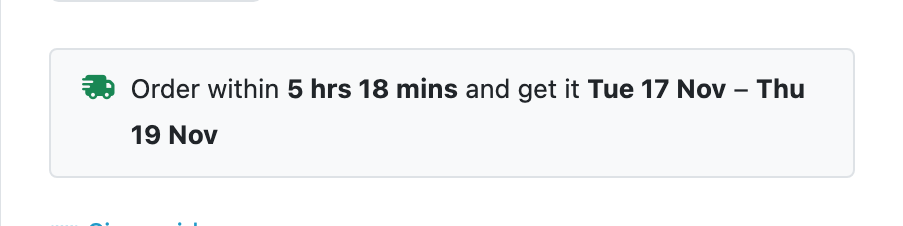
A free OpenCart 4 extension that shows "Order within 5 hrs 18 mins and get it Tue 17 Nov – Thu 19 Nov" on product pages, calculated from your cut-off time, handling time, working days and holidays, with a live countdown.
 Rupak NepaliPublished Nov 15, 2026

“When will it arrive?” is one of the questions that decides an online sale, and most stores make shoppers dig through a delivery page to find out. Showing a date right under the price, with a countdown to today’s dispatch cut-off, answers it at the moment of decision, and gives a gentle reason to order now rather than later.
This free extension adds that to OpenCart 4. It calculates the date from your own dispatch rules: cut-off time, handling time, working days, holidays and delivery time. No carrier account or API needed.
Download Estimated Delivery Date for OpenCart 4 (free, tested on OpenCart 4.1.0.4)
What it shows
| When | Message |
|---|---|
| A working day, before the cut-off | Order within 5 hrs 18 mins and get it Tue 17 Nov – Thu 19 Nov |
| After the cut-off, or on a day off | Order now and get it Wed 18 Nov – Fri 20 Nov |
| Same shortest and longest delivery time | A single date instead of a range |
| Product doesn’t need shipping, or is out of stock | Nothing (out-of-stock behaviour is a setting) |
The countdown updates every 30 seconds, and when the cut-off passes while the page is open, the message switches to the next day’s dates by itself.

Install and set up
- Download
estdelivery.ocmod.zip. - Go to Extensions → Installer, upload it, and click the green +.
- Go to Extensions → Extensions → Modules and install Estimated Delivery Date.
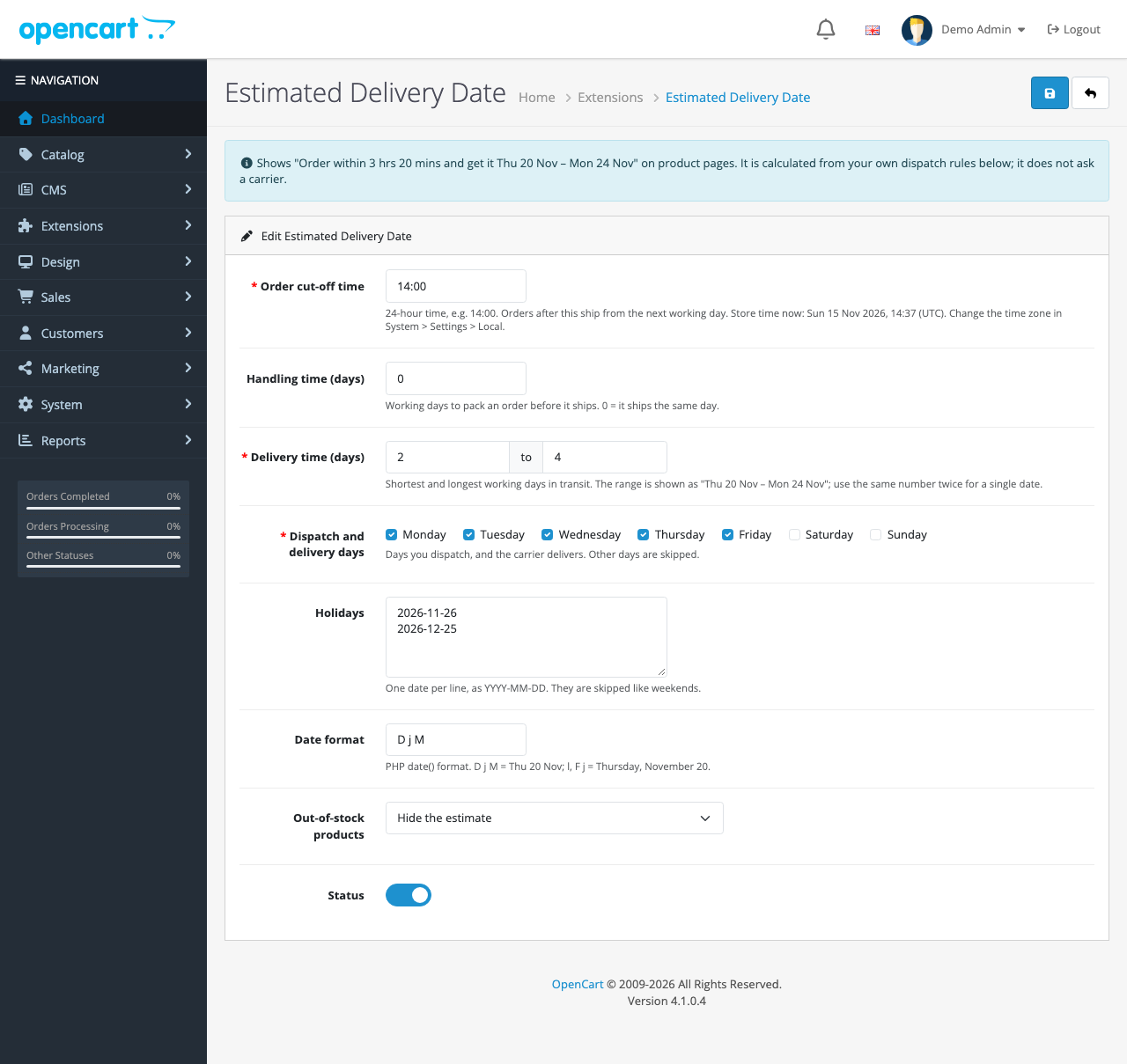
- Click Edit, fill in your dispatch rules, turn Status on and save.
| Setting | Meaning | Example |
|---|---|---|
| Order cut-off time | Orders after this ship from the next working day | 14:00 |
| Handling time | Working days to pack before dispatch | 0 = same day |
| Delivery time | Shortest and longest working days in transit | 2 to 4 |
| Dispatch and delivery days | Days you send and the carrier delivers | Monday to Friday |
| Holidays | Dates skipped like weekends, one per line | 2026-12-25 |
| Date format | PHP date() format | D j M = Thu 20 Nov |
| Out-of-stock products | Hide the estimate, or show it anyway | Hide |
The time zone comes from System → Settings → Local → Time Zone, not the server or the shopper. A store in London with its time zone left on UTC would be an hour out in summer, so check the clock line on the settings page first.
How the date is calculated
Starting from now, in the store’s time zone:
- Dispatch day. If today is a working day and it’s before the cut-off, the order goes today. Otherwise, the next working day.
- Handling time. Add that many working days.
- Delivery window. From the dispatch day, add the shortest and longest delivery times in working days.
Working days skip both unticked weekdays and holidays. In code, the whole thing rests on one helper:
private function isWorkingDay(\DateTimeImmutable $day): bool {
	return in_array((int)$day->format('N'), $this->days) && !in_array($day->format('Y-m-d'), $this->holidays);
}

private function nextWorkingDay(\DateTimeImmutable $day): \DateTimeImmutable {
	// A year of days off would mean a misconfiguration, not a real schedule; stop there.
	for ($i = 0; $i < 366; $i++) {
		$day = $day->modify('+1 day');

		if ($this->isWorkingDay($day)) {
			break;
		}
	}

	return $day;
}
We checked the arithmetic on the test store on the morning of Sunday 15 November 2026, with a 14:00 cut-off and 2 to 4 days’ delivery, Monday to Friday:
- Default settings: Sunday isn’t a working day, so dispatch is Monday 16; plus 2 working days is Wed 18, plus 4 is Fri 20.
- With Sunday ticked as a working day: dispatch is today, with 5 hrs 18 mins to the cut-off; delivery Tue 17 – Thu 19. The after-cut-off text, prepared alongside, said Wed 18 – Fri 20.
Thursday 26 November is in the holiday list in our settings, so with one day’s delivery, an order dispatched on Wednesday 25 is estimated for Friday 27, not Thursday.
A countdown that stays right
The server works out both messages, before and after the cut-off, and sends both. The page shows the first and keeps the second in a <template> tag. A small script counts down using the server’s clock, corrected for any difference in the visitor’s own clock, and swaps the message at the deadline:
// Count down on the server's clock: offset corrects for a visitor whose clock is wrong.
var deadline = parseInt(box.getAttribute('data-deadline'), 10) * 1000;
var offset = parseInt(box.getAttribute('data-now'), 10) * 1000 - Date.now();

function tick() {
  var left = deadline - (Date.now() + offset);
  var text = box.querySelector('.oc-estdelivery-text');

  if (left <= 0) {
    // Past the cut-off: switch to the next working day's dates.
    text.innerHTML = box.querySelector('.oc-estdelivery-after').innerHTML;
    return;
  }

  // ...update "5 hrs 18 mins", then check again in 30 seconds
  setTimeout(tick, 30000);
}
A shopper whose laptop clock is ten minutes fast still sees the store’s real cut-off, and a page left open over the cut-off never shows a countdown to a time that has passed.
Where it appears
An after event on the product page view inserts the message just above the options and Add to Cart form, under the price:
// Above the Add to Cart form, under the price.
$position = strpos($output, '<div id="product">');

if ($position !== false) {
	$output = substr_replace($output, $html, $position, 0);
}
Themes that keep OpenCart’s id="product" wrapper get it in the same place. If your theme renamed it, change that string to an element your theme does have.
Keep the promise honest
A delivery estimate that’s often wrong does more harm than none. A few rules:
- Set the longest delivery time from experience, not the carrier’s best case. If 1 in 10 parcels takes five days, say five.
- Add holidays a year ahead, including the carrier’s (some don’t deliver on days you work).
- Raise handling time in busy seasons rather than letting dispatch slip.
- It’s one estimate for everyone. The extension doesn’t know the shopper’s address. If you ship abroad, consider wording such as “UK delivery” in the language file (
catalog/language/en-gb/module/estdelivery.phpinside the extension).
Troubleshooting
| Problem | Cause and fix |
|---|---|
| No message on a product | The product has Requires Shipping set to No, or it’s out of stock with “Hide” chosen. Also check Status and the estdelivery_product event |
| Dates are a day out | The store’s time zone is wrong. Compare the clock on the settings page with your local time |
| Dates in English on a French store | PHP’s date() names are English. Use a numeric format such as d/m |
| Countdown shown on a cached page | A full-page cache serves an old message. Exclude product pages from it, or accept that the countdown corrects itself at the cut-off |
It works well alongside the free low-stock message: “Only 3 left” plus “get it by Thursday” is a strong pair. More free extensions: size chart popup, product Q&A and frequently bought together.

Rupak Nepali is a web developer, manage Webocreation website and the author of six books:
Getting Started with OpenCart Module Development (Packt, 2013),
OpenCart Theme and Module Development (Packt, 2015),
OpenCart 4: Dev Guide for Themes & Extensions (2024),
OpenCart 4: User Manual (2025),
Cloudflare for the Enterprise Website (2026) and
The Technical Web Guide for Marketers (2026).
Rupak has built OpenCart stores and extensions since 2010, has published more than 600 tutorials on Webocreation, and shares free OpenCart extensions on GitHub.
Find Rupak on
GitHub | Amazon | LinkedIn | X | YouTube.