Search Everywhere: Server Log Analysis for Search and AI Crawlers
Read server logs to see how Googlebot and AI crawlers like GPTBot really crawl your site, with command-line one-liners, Python scripts and dashboards.
 Rupak NepaliPublished Nov 14, 2026
This post is Chapter 20 of Search Everywhere: The Practical Guide to SEO, AEO and GEO, the free online edition. Chapter and appendix references link to the matching post.
Every tool covered so far gives you an indirect view of how crawlers behave. Search Console’s Crawl stats is a summary. Crawlers like Screaming Frog simulate a bot. Only your server logs record what actually happened: every request from Googlebot, Bingbot, GPTBot, ClaudeBot, PerplexityBot and every other visitor, with the exact URL, time, status code and response size.
Log analysis used to be an enterprise speciality. Today it matters for every site, for a simple reason: AI crawlers. They are invisible in GA4 (they do not run JavaScript analytics tags), they are not reported in Search Console, and their volume has grown dramatically. Logs are the only place you can see them.
What a log line contains
Most web servers (Apache, Nginx, LiteSpeed) write access logs in the combined log format:
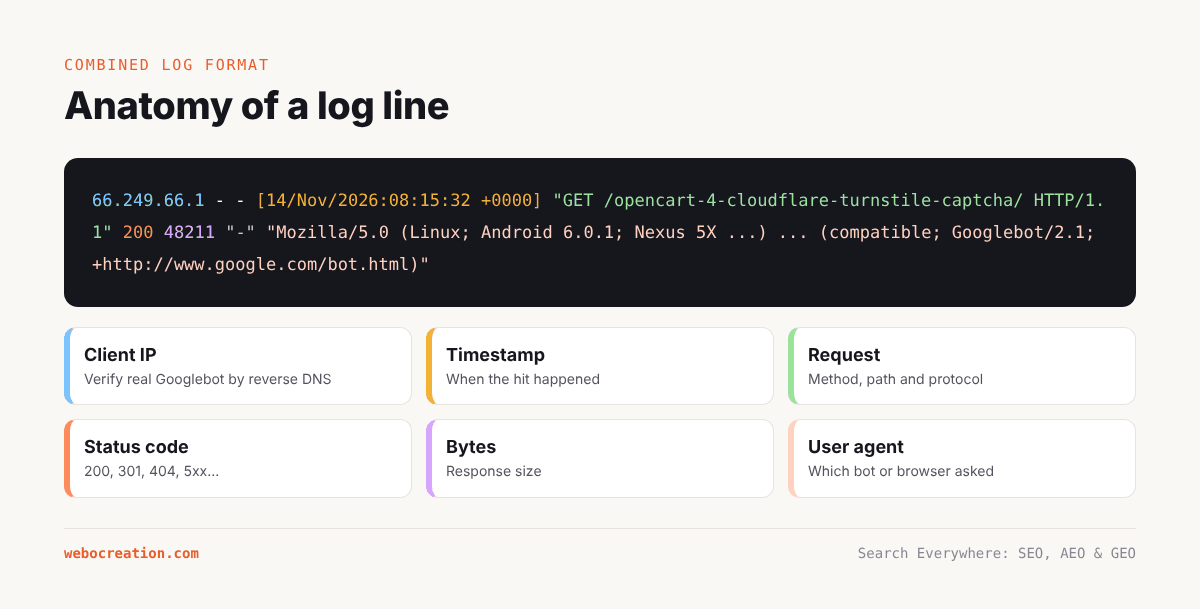
66.249.66.1 - - [14/Nov/2026:08:15:32 +0000] "GET /opencart-4-cloudflare-turnstile-captcha/ HTTP/1.1" 200 48211 "-" "Mozilla/5.0 (Linux; Android 6.0.1; Nexus 5X Build/MMB29P) AppleWebKit/537.36 (KHTML, like Gecko) Chrome/131.0.0.0 Mobile Safari/537.36 (compatible; Googlebot/2.1; +http://www.google.com/bot.html)"Fields, in order:
- Client IP (
66.249.66.1) - Identity and user (usually
-) - Timestamp (
14/Nov/2026:08:15:32 +0000) - Request: method, path and protocol (
GET /opencart-4-.../ HTTP/1.1) - Status code (
200) - Response size in bytes (
48211) - Referrer (
-) - User agent (Googlebot Smartphone in this example)
Many setups add the response time, host name, or a cache status. If your site is behind Cloudflare or another CDN, the client IP in your origin logs may be the CDN’s IP, unless the server is configured to log the real visitor IP from the CF-Connecting-IP or X-Forwarded-For header. Also, requests served from the CDN’s cache never reach your origin at all, so origin logs undercount. For a complete picture behind a CDN, use the CDN’s own logs (Cloudflare Logpush on paid plans, or its analytics dashboards).
Getting the logs
| Hosting | Where to find logs |
|---|---|
| cPanel shared hosting | cPanel › Metrics › Raw Access (download .gz files); enable archiving so they are kept |
| Managed WordPress hosts | Often in the host dashboard; some keep only a few days, so download regularly |
| VPS with Nginx | /var/log/nginx/access.log (and rotated .1, .2.gz files) |
| VPS with Apache | /var/log/apache2/access.log or /var/log/httpd/access_log |
| Cloudflare | Logpush to storage (Enterprise and some paid plans); Security › Analytics and AI Crawl Control dashboards for bot summaries on all plans |
| AWS CloudFront / ALB | Access logs to S3 |
Collect at least 30 days for a first analysis, ideally 90. Logs contain IP addresses, which are personal data under GDPR and similar laws; store them securely, limit retention, and anonymise IPs of human visitors if you share the files.
Case study note. Server logs for webocreation.com/ were not available for this book. The examples below use illustrative log data shaped like a WordPress site of this size behind Cloudflare. To run the analysis for real, export 30 to 90 days of access logs from the host (or Cloudflare) and follow the same steps.
Know your crawlers
Before analysing, you need to recognise who is who. The table below lists the main search and AI crawlers as of late 2026. User-agent strings and purposes change; check each company’s documentation.
Search engine crawlers
| Crawler | User-agent token | Purpose |
|---|---|---|
| Googlebot (smartphone and desktop) | Googlebot |
Google Search indexing |
| Googlebot-Image, -Video, -News | Googlebot-Image etc. |
Specialised indexing |
| Google-InspectionTool | Google-InspectionTool |
Search Console URL Inspection and Rich Results Test |
| GoogleOther | GoogleOther |
Google’s non-Search crawling (research, product teams) |
| Google-Extended | (robots.txt token only, no separate crawler) | Controls use of content for Gemini training and grounding; crawling is done by Googlebot |
| Bingbot | bingbot |
Bing Search, which also feeds Copilot and others |
| Applebot | Applebot |
Siri, Spotlight and Apple search features |
| Applebot-Extended | (robots.txt token only) | Controls use of content for Apple’s AI training |
| YandexBot, Baiduspider, DuckDuckBot | – | Other search engines |
AI crawlers and fetchers
| Company | User-agent token | Purpose |
|---|---|---|
| OpenAI | GPTBot |
Crawling for model training |
| OpenAI | OAI-SearchBot |
Indexing for ChatGPT search results |
| OpenAI | ChatGPT-User |
Fetching a page when a ChatGPT user’s request needs it (user-initiated) |
| Anthropic | ClaudeBot |
Crawling for model training |
| Anthropic | Claude-SearchBot |
Indexing for Claude’s search results |
| Anthropic | Claude-User |
Fetching pages for a Claude user’s request |
| Perplexity | PerplexityBot |
Indexing for Perplexity search |
| Perplexity | Perplexity-User |
Fetching pages for a user’s request |
| Common Crawl | CCBot |
Open web crawl widely used for AI training datasets |
| ByteDance | Bytespider |
Crawling associated with ByteDance AI products |
| Meta | meta-externalagent |
Crawling for Meta AI |
| Amazon | Amazonbot |
Alexa and Amazon AI features |
| DuckDuckGo | DuckAssistBot |
Fetching for DuckDuckGo’s AI answers |
| Mistral | MistralAI-User |
User-initiated fetching |
The distinction between training crawlers, search indexers and user-initiated fetchers matters for both analysis and policy. A spike in ChatGPT-User requests means real people are asking ChatGPT questions that lead it to your pages in real time. A spike in GPTBot means OpenAI is collecting training data. Chapter 23 discusses how to treat each.
Verifying that a bot is real
Anyone can put “Googlebot” in a user-agent string. Scrapers do it all the time to get past bot protection. Verify important crawlers in one of two ways:
Reverse DNS then forward DNS (Google, Bing, Apple and others support this):
$ host 66.249.66.1
1.66.249.66.in-addr.arpa domain name pointer crawl-66-249-66-1.googlebot.com.
$ host crawl-66-249-66-1.googlebot.com
crawl-66-249-66-1.googlebot.com has address 66.249.66.1
The hostname must end in googlebot.com, google.com or googleusercontent.com for Google, search.msn.com for Bing, and the forward lookup must return the original IP.
Published IP ranges: Google publishes JSON files of crawler IP ranges (for Googlebot, special crawlers and user-triggered fetchers). OpenAI, Anthropic and Perplexity also publish IP ranges for their crawlers. Match request IPs against these lists. Cloudflare does this automatically and labels verified bots in its dashboards.
Quick analysis with the command line
For a first look, standard Unix tools are fast and need nothing installed. The examples assume combined log format in access.log.
Requests per crawler (top 20 user agents):
awk -F'"' '{print $6}' access.log | sort | uniq -c | sort -rn | head -20Count requests from specific bots:
for bot in Googlebot bingbot GPTBot OAI-SearchBot ChatGPT-User ClaudeBot \
           Claude-SearchBot Claude-User PerplexityBot Perplexity-User CCBot \
           Bytespider Amazonbot meta-externalagent Applebot; do
  printf "%-20s %s\n" "$bot" "$(grep -c "$bot" access.log)"
done
Status codes returned to Googlebot:
grep Googlebot access.log | awk '{print $9}' | sort | uniq -c | sort -rnGooglebot’s most-crawled URLs:
grep Googlebot access.log | awk '{print $7}' | sort | uniq -c | sort -rn | head -30404s requested by any bot:
grep -Ei 'bot|crawler|spider' access.log | awk '$9==404 {print $7}' | sort | uniq -c | sort -rn | head -30Daily Googlebot requests (to spot trends):
grep Googlebot access.log | awk -F'[' '{print substr($2,1,11)}' | sort | uniq -cWhich pages do AI user-initiated fetchers request? (a proxy for what people ask AI about):
grep -E 'ChatGPT-User|Claude-User|Perplexity-User' access.log | awk '{print $7}' | sort | uniq -c | sort -rn | head -30For gzip-compressed rotated logs, replace grep with zgrep and cat with zcat.
Deeper analysis with Python
For anything beyond a quick look, load the logs into pandas.
# pip install pandas
import re, gzip, glob
import pandas as pd

LINE = re.compile(
    r'(?P<ip>\S+) \S+ \S+ \[(?P<time>[^\]]+)\] "(?P<method>\S+) (?P<path>\S+) \S+" '
    r'(?P<status>\d{3}) (?P<size>\S+) "(?P<referrer>[^"]*)" "(?P<ua>[^"]*)"')

BOTS = {
    "Googlebot": r"Googlebot(?!-Image|-Video|-News)", "Googlebot-Image": r"Googlebot-Image",
    "Bingbot": r"bingbot", "Applebot": r"Applebot",
    "GPTBot": r"GPTBot", "OAI-SearchBot": r"OAI-SearchBot", "ChatGPT-User": r"ChatGPT-User",
    "ClaudeBot": r"ClaudeBot", "Claude-SearchBot": r"Claude-SearchBot", "Claude-User": r"Claude-User",
    "PerplexityBot": r"PerplexityBot", "Perplexity-User": r"Perplexity-User",
    "CCBot": r"CCBot", "Bytespider": r"Bytespider", "Amazonbot": r"Amazonbot",
    "Meta": r"meta-externalagent",
}

def classify(ua):
    for name, pat in BOTS.items():
        if re.search(pat, ua):
            return name
    return "Other bot" if re.search(r"bot|crawl|spider", ua, re.I) else "Human/unknown"

def read_logs(pattern):
    for path in glob.glob(pattern):
        opener = gzip.open if path.endswith(".gz") else open
        with opener(path, "rt", errors="replace") as f:
            for line in f:
                m = LINE.match(line)
                if m:
                    yield m.groupdict()

df = pd.DataFrame(read_logs("logs/access.log*"))
df["time"] = pd.to_datetime(df["time"], format="%d/%b/%Y:%H:%M:%S %z")
df["status"] = df["status"].astype(int)
df["size"] = pd.to_numeric(df["size"], errors="coerce").fillna(0)
df["bot"] = df["ua"].map(classify)
df["section"] = df["path"].str.extract(r"^/([^/?]+)")[0].fillna("(home)")
df["is_param"] = df["path"].str.contains(r"\?")

summary = (df.groupby("bot")
             .agg(requests=("path", "size"), unique_urls=("path", "nunique"),
                  pct_200=("status", lambda s: (s == 200).mean() * 100),
                  mb=("size", lambda s: s.sum() / 1e6))
             .sort_values("requests", ascending=False))
print(summary.round(1))
From this DataFrame you can answer the questions in the next section.
The questions logs answer
1. How is crawl budget being spent?
Group Googlebot requests by URL type: posts, pages, categories, tags, author archives, paginated archives, parameter URLs, feeds, assets, and so on.
gb = df[df.bot == "Googlebot"].copy()
def url_type(p):
    if p.startswith("/wp-content/") or p.startswith("/wp-includes/"): return "asset"
    if "/feed" in p: return "feed"
    if p.startswith("/tag/"): return "tag archive"
    if p.startswith("/author/"): return "author archive"
    if p.startswith("/category/"): return "category"
    if "/page/" in p: return "paginated archive"
    if "?" in p: return "parameter URL"
    if p.startswith("/wp-json/"): return "REST API"
    return "post/page"
gb["type"] = gb["path"].map(url_type)
print(gb["type"].value_counts(normalize=True).mul(100).round(1))
Illustrative example: Googlebot crawl distribution over 30 days
URL type Share of Googlebot requests Posts and pages 46% Assets (CSS, JS, images) 19% Tag archives 9% Paginated archives 8% Feeds 6% Author archives 4% Parameter URLs ( ?replytocom=,?amp, tracking)4% REST API ( /wp-json/)3% Category archives 1% Interpretation: nearly a quarter of Googlebot’s HTML requests go to tag archives, author archives, feeds and parameter URLs, all of which have little or no search value. Noindexing tag and guest author archives (Chapter 4) and removing feed links for comments would redirect that crawl activity towards real content.
2. Which important pages are rarely or never crawled?
Join the list of URLs from your sitemap with Googlebot’s crawled URLs. Pages in the sitemap with no Googlebot hits in 30 days are either low priority in Google’s eyes or poorly linked.
sitemap = pd.read_csv("sitemap_urls.csv")["path"]   # paths from Chapter 19's sitemap script
crawled = set(gb["path"].str.split("?").str[0])
never = sitemap[~sitemap.isin(crawled)]
print(len(never), "sitemap URLs not crawled by Googlebot in the period")
3. Are bots hitting errors and redirects?
errs = df[df.bot.isin(["Googlebot", "Bingbot", "GPTBot", "OAI-SearchBot", "ClaudeBot", "PerplexityBot"])]
print(errs.groupby(["bot", "status"]).size().unstack(fill_value=0))
High numbers of 404s point to broken internal links or old URLs that should be redirected. High numbers of 301s mean internal links point to redirected URLs and should be updated. Any 5xx responses to crawlers are urgent.
4. How fast is the server for bots?
If your log format includes response time (Nginx $request_time, Apache %D), compare average and 95th-percentile response times for Googlebot by URL type. Slow templates reduce crawl rate.
5. How quickly is new content discovered?
For a new post, find the first request from each bot after publication:
url = "/opencart-4-cloudflare-turnstile-captcha/"
first = df[df.path.str.startswith(url)].groupby("bot")["time"].min().sort_values()
print(first)
Illustrative example: first crawl after publishing
Bot First request after publish Googlebot 2 h 10 min Bingbot 5 h (after IndexNow ping) OAI-SearchBot 1 day 4 h PerplexityBot 1 day 9 h ChatGPT-User 3 days (first user-initiated fetch) GPTBot 6 days ClaudeBot 9 days
6. What are AI crawlers doing?
This is the newest and often most surprising analysis. Measure, for each AI crawler:
- Volume over time (requests per day).
- Which sections and pages they request.
- Bandwidth consumed.
- Status codes they receive (are you accidentally blocking them via a firewall?).
- Ratio of crawling to referrals: compare a crawler’s requests with sessions from the corresponding assistant in GA4.
ai = df[df.bot.isin(["GPTBot", "OAI-SearchBot", "ChatGPT-User", "ClaudeBot", "Claude-SearchBot",
                     "Claude-User", "PerplexityBot", "Perplexity-User", "CCBot", "Bytespider",
                     "Amazonbot", "Meta"])]
daily = ai.groupby([ai.time.dt.date, "bot"]).size().unstack(fill_value=0)
top_pages = ai.groupby(["bot", "path"]).size().sort_values(ascending=False).groupby(level=0).head(10)
print(daily.tail(14)); print(top_pages)
Illustrative example: AI crawler activity over 30 days
Bot Requests Unique URLs MB transferred % 200 Top section GPTBot 21,400 3,900 1,020 97% OpenCart tutorials ClaudeBot 6,100 2,300 290 96% OpenCart tutorials Bytespider 9,800 4,700 470 94% Everything, including tag archives Meta 4,200 1,900 200 98% Blog PerplexityBot 2,900 1,100 140 99% Cloudflare and OpenCart guides OAI-SearchBot 2,300 950 110 99% Recent posts ChatGPT-User 1,150 410 55 99% Turnstile, ShoppingGPT, upgrade guide Claude-User 240 120 11 100% Cloudflare guides Perplexity-User 380 190 18 100% OpenCart troubleshooting Readings from this illustrative data:
- Training crawlers (GPTBot, Bytespider) generate most of the AI load.
- User-initiated fetchers (ChatGPT-User, Claude-User, Perplexity-User) are a small share of requests but the most valuable signal: each represents a real person whose question led an AI to your page. Their top URLs are your most AI-relevant content.
- Bytespider crawls tag archives and other thin URLs heavily. If bandwidth or server load is a concern, it is a candidate for blocking or rate limiting.
- With ClaudeBot set to a crawl delay of 10 seconds in robots.txt, its volume is naturally capped at about 8,640 requests per day.
7. Are fake bots scraping you?
Filter requests that claim to be Googlebot and verify their IPs. A high share of unverified “Googlebots” indicates scrapers. Block them at the CDN or firewall, never by blocking the Googlebot user agent itself.
Log analysis tools
If you prefer not to code:
- Screaming Frog Log File Analyser: import logs, verify bots automatically, see crawl frequency by URL, status codes and response times, and import a crawl or sitemap to find orphan and uncrawled pages. It now recognises major AI bots too.
- Semrush Log File Analyzer: upload logs inside Site Audit to see Googlebot activity by page and status.
- GoAccess: a fast, open-source log analyser with a terminal and HTML dashboard.
- Cloudflare dashboards: Security Analytics and AI Crawl Control (formerly AI Audit) show AI crawler requests, which crawlers respect robots.txt, and let you block or allow each crawler with a click. For sites behind Cloudflare, this is the easiest way to see AI crawler activity without downloading logs.
- Enterprise platforms (Botify, Lumar, JetOctopus, Oncrawl): continuous log ingestion joined with crawl and analytics data.
Building a recurring log dashboard
A practical setup for a small site:
- Schedule a daily job (cron) on the server or a small cloud function to copy yesterday’s log file to storage.
- Run the Python parser and append a daily summary (requests by bot, status code mix, top URLs per AI fetcher) to a Google Sheet or BigQuery table.
- Build a Looker Studio page with:
- Googlebot requests per day and status code mix.
- AI crawler requests per day, stacked by bot.
- Top 20 URLs requested by user-initiated AI fetchers this week.
- 404s and 5xx served to bots.
- Review it weekly alongside Search Console and GA4.
Key takeaways
- Logs are the only complete record of what search engines and AI crawlers actually request.
- Behind a CDN, origin logs undercount; use CDN logs or dashboards too.
- Distinguish search crawlers, AI training crawlers, AI search indexers and AI user-initiated fetchers; each means something different.
- Verify bots with reverse and forward DNS or published IP ranges.
- Use logs to find wasted crawl budget, uncrawled important pages, errors served to bots, discovery speed and AI crawler behaviour.
- User-initiated AI fetches (ChatGPT-User, Claude-User, Perplexity-User) show which pages real people’s AI questions lead to.
Previous: The SEO Tool Stack: Crawlers, AI Trackers and Python Scripts
Next: Answer Engine Optimization (AEO): Win Snippets, PAA and AI Overviews
All chapters: Search Everywhere: The Practical Guide to SEO, AEO and GEO

Rupak Nepali is a web developer, manage Webocreation website and the author of six books:
Getting Started with OpenCart Module Development (Packt, 2013),
OpenCart Theme and Module Development (Packt, 2015),
OpenCart 4: Dev Guide for Themes & Extensions (2024),
OpenCart 4: User Manual (2025),
Cloudflare for the Enterprise Website (2026) and
The Technical Web Guide for Marketers (2026).
Rupak has built OpenCart stores and extensions since 2010, has published more than 600 tutorials on Webocreation, and shares free OpenCart extensions on GitHub.
Find Rupak on
GitHub | Amazon | LinkedIn | X | YouTube.