Burp Suite vs OWASP ZAP: Which Web Testing Proxy Should You Use?
An intercepting proxy is the center of every web security test. Here is how Burp Suite and OWASP ZAP compare, which features matter most, and why many professionals end up using both.
 Rupak NepaliPublished Nov 19, 2026
If you test web applications, an intercepting proxy is where you will spend most of your time. It sits between your browser and the target, recording every request and response and letting you pause, edit, replay, and automate them. Everything else, from scanners to custom scripts, orbits around it.
The two dominant options are Burp Suite from PortSwigger and OWASP ZAP. Here is how they compare and how to choose.
What a proxy workflow looks like
Whichever tool you pick, professional testing follows the same rhythm:
- Explore the application through the proxy like a normal user.
- Map what you found: endpoints, parameters, roles, and features.
- Hypothesize what could go wrong in each feature.
- Test those hypotheses by modifying and replaying requests.
- Automate repetitive checks.
- Document findings with evidence.
The tool supports this process. It does not replace it.
Burp Suite: the manual tester’s workbench
Burp comes in a free Community Edition and a paid Professional edition. Its strengths:
- Scope control and HTTP history that make it easy to focus on in-scope traffic.
- Repeater for editing and resending individual requests, the tool you will use most.
- Intruder for automated payload attacks and fuzzing (heavily throttled in Community).
- Scanner (Professional) for strong active and passive vulnerability detection.
- Collaborator (Professional) for detecting out-of-band interactions, essential for blind SSRF, blind XXE, and similar bugs.
- DOM Invader for tracing client-side sources and sinks in the browser.
- A rich extension ecosystem, including:
- Autorize for finding access control bugs by replaying requests with another user’s session
- Param Miner for discovering hidden parameters and headers
- JWT Editor for inspecting and tampering with tokens
OWASP ZAP: free, scriptable, and automation-friendly
ZAP is free and open source, and it covers the core of manual testing well: proxy, history, a request editor, a fuzzer, spidering, and active and passive scanning. Where it really shines is automation:
- Contexts define scope, authentication, and users, making authenticated scanning practical.
- The Automation Framework describes a whole scan in a YAML plan that you can version-control.
- Packaged scans (baseline, full, and API scans) run from a single Docker command.
- Scripting lets you add custom logic for authentication, rules, and payloads.
That makes ZAP a natural fit for running in CI/CD pipelines on every build.
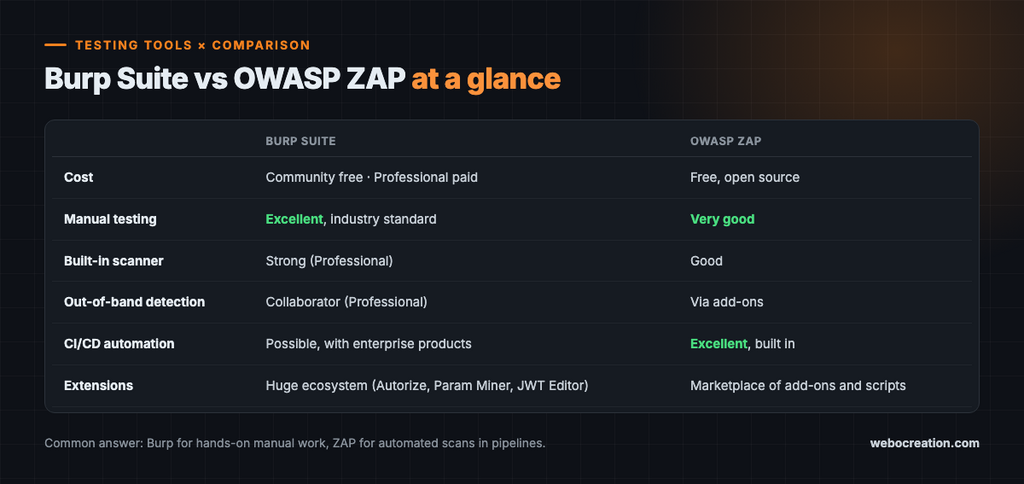
Side-by-side
| Burp Suite | OWASP ZAP | |
|---|---|---|
| Cost | Community free; Professional paid | Free, open source |
| Manual testing | Excellent, industry standard | Very good |
| Built-in scanner | Strong (Professional) | Good |
| Out-of-band detection | Collaborator (Professional) | Via add-ons |
| CI/CD automation | Possible, with enterprise products | Excellent, built in |
| Extensions | Huge ecosystem | Marketplace of add-ons and scripts |
The common answer: use both
Many professionals use Burp for hands-on manual work and ZAP for automation in pipelines. If you are just starting, install both free versions, proxy the same practice app through each, and see which one fits how you think.
Habits matter more than features
The biggest difference between a beginner and an experienced tester is not which tool they use. It is how they use it:
- Configure scope first so you never accidentally send traffic to systems outside your authorization.
- Organize as you go with highlights, comments, and notes on interesting requests.
- Use multiple sessions (two browsers or containers with different accounts) to test access control.
- Throttle automated tools so you do not degrade the target. Production systems belong to real users.
- Verify every finding manually. Scanners produce false positives, and reporting one damages your credibility.
Getting set up safely
Install the proxy’s CA certificate only in a dedicated testing browser profile, never your everyday browser, since it lets the proxy read all your HTTPS traffic. Practice against local, intentionally vulnerable apps such as OWASP Juice Shop, DVWA, or crAPI bound to 127.0.0.1, or use PortSwigger’s free Web Security Academy labs.
Only point these tools at applications you own or are explicitly authorized to test.
Key takeaways
- An intercepting proxy is the core of web security testing.
- Burp Suite excels at manual testing, with Repeater, Collaborator, and a powerful extension ecosystem.
- ZAP is free and excels at automation, with contexts, the Automation Framework, and packaged scans.
- Many professionals use Burp for manual work and ZAP in CI pipelines.
- Good habits such as scope control, throttling, and manual verification matter more than features.
Go deeper with the book
This article is adapted from Web Security in the Age of AI: Attacks, Defenses, Tools, and Bug Hunting for Modern Web Applications and LLM Systems by Rupak (see Chapter 18, “Mastering Burp Suite and OWASP ZAP”).
The book pairs every attack with its fix across 27 chapters, from core vulnerabilities and professional tools to bug bounty hunting, attacking and defending LLM applications, and lessons from real breaches. It includes hands-on labs, review questions, a full testing checklist, a security headers reference, and an LLM red teaming playbook.
Related reading
- Bug Bounty Methodology: How to Find Bugs That Get Paid
- Broken Access Control and IDOR: The #1 Web Security Risk

Rupak Nepali is a web developer, manage Webocreation website and the author of six books:
Getting Started with OpenCart Module Development (Packt, 2013),
OpenCart Theme and Module Development (Packt, 2015),
OpenCart 4: Dev Guide for Themes & Extensions (2024),
OpenCart 4: User Manual (2025),
Cloudflare for the Enterprise Website (2026) and
The Technical Web Guide for Marketers (2026).
Rupak has built OpenCart stores and extensions since 2010, has published more than 600 tutorials on Webocreation, and shares free OpenCart extensions on GitHub.
Find Rupak on
GitHub | Amazon | LinkedIn | X | YouTube.