How to Build an Ecommerce Observability Stack: Logs, Metrics, and Alerts for Store Owners
 Rupak NepaliPublished Jun 14, 2026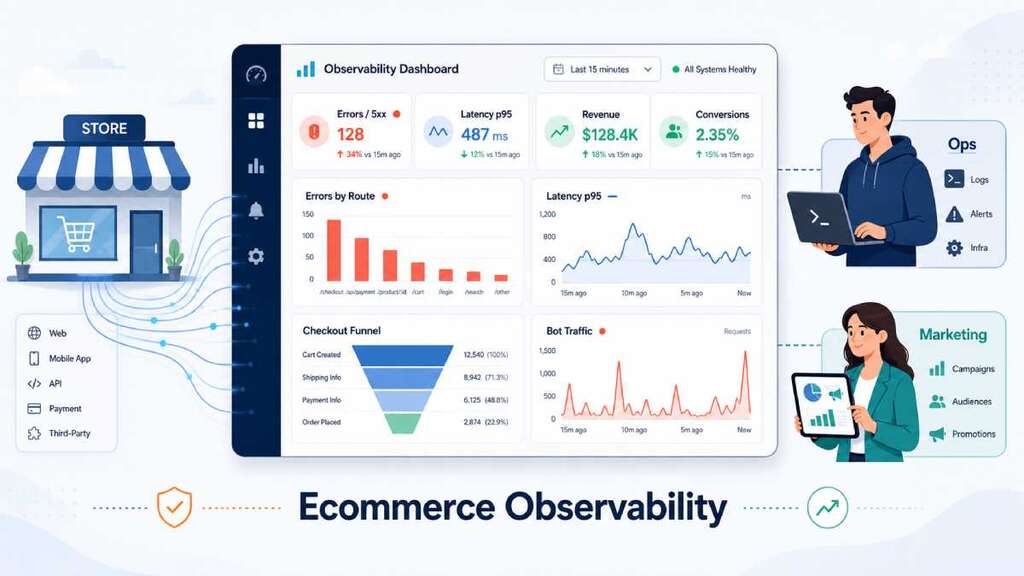
An ecommerce observability stack is what tells you, in near real time, whether your site is fast, error‑free, and actually converting—not just “up.” It connects ops metrics (latency, 4xx/5xx, bot spikes) to marketing and revenue metrics (funnel drop‑offs, lost orders).
Here’s how to build one that store owners and marketers can both use.
What “observability” should mean for an ecommerce store
Classic monitoring answers “Is my site up?” Observability answers better questions:
- Which URLs are slow right now, and is that hurting conversions?
- Are errors clustered on a specific step—like shipping selection or payment?
- Did a bot spike or broken campaign just distort our analytics?
- When performance regresses, what does it cost in revenue terms?
AWS and other observability guides usually frame the basics as availability, latency, and error rate, often derived from 4xx/5xx counts and request volumes. For ecommerce, you add funnel and traffic quality on top.
You want both:
- A technical view (what’s broken, where, and how badly).
- A business view (what that means for add‑to‑cart, checkout, and revenue).
Core signals your stack must track
1. Errors by route (4xx/5xx) and availability
Error rate is simply the percentage of failed requests, usually based on HTTP status codes:
- 4xx = client or user errors (bad input, validation, blocked)
- 5xx = server errors (code bugs, timeouts, infra problems)
A common availability formula is:

For an ecommerce store, track:
- 4xx/5xx per critical route: product pages, cart, checkout, login, payment endpoints.
- 4xx patterns that signal UX issues (e.g., validation failures on checkout).
- 5xx patterns that signal outages or capacity problems.
If 5xx on /checkout jumps above even 0.5–1% over a 5‑minute window, that’s already costing you real orders.
2. Latency by page type and route (p50/p95/p99)
It’s not enough to know your “average” speed. You need percentiles (p50/p95/p99) and by route:
- Product listing pages (PLP) and product detail pages (PDP) for discovery and consideration.
- Cart and checkout pages for payment.
Real‑user monitoring studies show that when pages cross certain thresholds (especially on mobile), conversion starts dropping even if the site is technically “up.”
A useful pattern is:
- p50 latency – typical user experience.
- p95 latency – worst 5% of sessions; often where rage‑clicks and drop‑offs come from.
- Track separately for: PDP → Cart → Checkout. A good PDP average can hide a catastrophically slow checkout.
3. Checkout funnel drop‑offs
Industry data pegs average cart abandonment around 70%, with a significant slice directly tied to checkout issues and friction.
Your observability stack should map technical health to funnel steps:
- Sessions that view a PDP.
- Sessions that add to cart.
- Sessions that reach checkout.
- Sessions that complete payment/see order confirmation.
For each step, track:
- Conversion rate to the next step (PDP→Cart, Cart→Checkout, Checkout→Order).
- 4xx/5xx rate on the pages powering that step.
- Latency (p95) on those URLs.
When you see a sudden drop in Cart→Checkout while PDP→Cart stays normal, and at the same time 5xx on /checkout spiked, you can tie a technical issue directly to lost revenue instead of guessing.
4. Bot spikes and traffic quality
Bots can distort your data and load your stack without generating revenue. Common signs include:
- Sudden spikes in sessions from unusual geos or data‑center IP ranges.
- Huge traffic to search or product listing pages with no add‑to‑cart or checkout progression.
- Lots of abandoned checkouts from obviously synthetic customer profiles.
From an observability perspective, you want:
- Traffic volume by route segmented into “likely human” vs “likely bot” (Cloudflare bot scores, WAF logs, or behavior analysis).
- Separate dashboards and segments for analytics that exclude bot and ghost sessions, otherwise funnel conversion and latency analysis becomes meaningless.
The building blocks of an ecommerce observability stack
You don’t need every tool under the sun, but you do need three layers working together.
1. Logs: your ground truth
Every request and every key event should produce a log line with at least:
- Timestamp
- Route / URL pattern
- HTTP method and status code
- Latency (ms)
- User/session identifier (hashed)
- Device/geo or user agent
- Tags like step=pdp/cart/checkout, source=ads/email where possible
Server logs and application logs let you:
- Aggregate errors by route.
- Compute latency distributions.
- Correlate specific error spikes with deployment times or third‑party failures.
Good practice is to centralize logs into something queryable (ELK/Opensearch, CloudWatch Logs, etc.) so you can slice them by route, geo, device, or funnel step.
2. Metrics: the summarized signals you alert on
Metrics compress log and trace data into time‑series you can graph and alert on:
Essential ecommerce metrics include:
- Request count per route.
- 4xx and 5xx counts per route.
- Latency (p50/p95/p99) per route.
- Conversion rates per funnel stage (from analytics or event stream).
- Bot vs non‑bot traffic volume on key endpoints.
These feed dashboards and alerts. Many teams use Prometheus‑style histograms for HTTP request duration, labeled by handler/method/status, which is ideal for “errors by route” and “latency by route” panels.
3. Frontend UX and funnel analytics
Technical health alone isn’t enough—you need real‑user performance and funnel analytics:
- Core Web Vitals (LCP, INP, CLS) by page type (PDP, cart, checkout).
- Step‑level events in GA4 or similar (view_checkout, add_to_cart, begin_checkout, purchase).
- Segments that exclude obvious bots and spam traffic so conversion numbers are trustworthy.
Also read about the key performance of ecommerce
Best‑practice guides emphasize combining real-user performance data with funnel outcomes to prioritize fixes that move revenue, not just synthetic scores.
Example dashboards that tie ops and marketing together
Dashboard 1: “Store health” overview
Panels:
- Total requests & sessions (by device, geo).
- Error rate (4xx/5xx) overall and for key routes (home, PDP, cart, checkout).
- p50/p95 latency per key route.
- Uptime / availability (based on 4xx/5xx/2xx mix).
Audience:
- Ops sees where to triage when error or latency goes up.
- Marketing sees whether a campaign is sending traffic to a healthy experience.
Dashboard 2: Checkout & cart health
Panels:
- PDP → Cart → Checkout → Purchase funnel, with conversion rates by device.
- 4xx/5xx on PDP, cart, and checkout routes.
- p95 latency for cart and checkout specifically.
- # of payment failures vs successes.
This surfaces subtle problems like:
- Cart loads fine, but checkout intermittently 500s for mobile Safari.
- A new payment gateway is timing out and increasing “payment failed” event counts.
- New tracking script slowed checkout on mobile and reduced completion rate.
Dashboard 3: Bot & traffic quality
Panels:
- Sessions and requests by country/ASN, with a “suspected bot” overlay.
- Requests per minute on search and product listing routes, split by human vs bot.
- Funnel conversion for human segment vs “all traffic” to demonstrate how bots are skewing analytics.
Ops can then tune WAF/bot rules or rate limits; marketing can filter campaigns and funnels to focus on real users.
Alerts that actually matter for store owners
You want alerts that answer “Is my store making money normally?” rather than just “Is CPU high?”
Good patterns:
- Checkout 5xx rate spike
- Condition: 5xx on /checkout or payment endpoints > 1–2% for 5–10 minutes.
- Impact: direct loss of orders; highest priority.
- Checkout p95 latency regression
- Condition: p95 duration on checkout step > defined threshold (e.g., 2–3 seconds) compared to last 24h.
- Impact: more drop‑offs and failed payments, especially on mobile.
- Funnel conversion anomaly
- Condition: Cart→Checkout or Checkout→Purchase conversion drops X% vs rolling baseline (excluding bots).
- Impact: something in UX, payments, or analytics broke.
- Bot traffic spike
- Condition: Requests per minute from suspicious geos/ASNs or marked as “likely bot” spike above baseline.
- Impact: skewed analytics, possible checkout/card testing abuse, extra infrastructure load.
- SLO burn for overall availability
- Condition: Availability (based on 4xx/5xx) burns through your error budget too quickly (SLO burn rate).
- Impact: repeated minor errors are adding up, risk to brand and revenue.
These alerts live at the boundary between ops (pages actually failing) and marketing (conversions and revenue dropping).
Making it usable for both ops and marketing
To keep this from becoming “just another ops dashboard” no one outside engineering looks at, you need:
- Shared metrics: error rates and p95 latency next to funnel conversion and revenue for the same routes and time windows.
- Shared vocabulary: marketing reports “checkout drop‑off up 5% on mobile,” ops can answer with “yes, p95 latency + 5xx increased on /checkout at the same time.”
- A small, agreed‑upon set of SLOs around checkout, cart, and PDP that everyone cares about.
When you frame observability around “money is working / money is broken”—using logs, metrics, and alerts tailored to ecommerce paths—store owners, ops, and marketers all get what they need:
- Ops knows what to fix first.
- Marketing knows when not to launch heavy campaigns.
- Owners see issues in minutes instead of days, with a clear sense of revenue impact.

Author of four Opencart book.
The recent are Opencart 4 developer book and Opencart 4 user manual