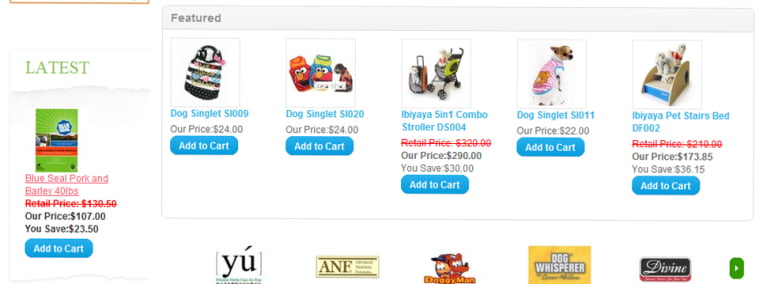
Today we read the above post and was thinking of something new like showing the products at WordPress of opencart. http://forum.opencart.com/viewtopic.php?f=128&t=36145
We are thinking to make that it works in the same URL as most of my clients thinking to use WordPress as the blog because of different beneficiaries and Opencart as the main site.
Mostly what we have seen is Opencart installed as the main site and there is a link somewhere in Opencart as Blog and when clicked on it, it redirected to the WordPress.
opencart products to WordPress
The WordPress design is made the same as opencart and menus are managed likewise so people think that they are navigated to the blog but not to the different platforms.
With the above post now we can show the featured or latest or best sellers and so no, on the WordPress that will help to make the concurrency in site
Hope we start this soon and make it available to you all
Although we are also quite unsure whether to retrieve to the opencart from WordPress or to show the products to WordPress.
While testing Paypal with Opencart, Paypal sandbox always sends the pending status although completed. We were working with the Paypal sandbox business account and Opencart opensource and getting this problem.
We were working for the missneopoints.com to make the instant delivery system. We got stuck for around 1 day as the PayPal complete status is also sending pending status. We checked it many times and installed many new installations but the result is the same. Always we get the pending status.
The instant delivery system in opencart
So, we have to test it live with real payment. We were successful to accomplish the given project.
Now, what was the real problem we found was, we were using the live Paypal email address instead of the business account or in-store email account created at the sandbox. 🙂
So, we create a business account and insert it into the Paypal payment address and it started to track the correct status.
We created the store on Opencart and just changed the Paypal email at Modules>> Payments >> Paypal Standard. We inserted the business PayPal email and it starts working.
Paypal checkout email address we are using
deepak_1341249680_per@gmail.com
Personal
Verified
In-Store Checkout Enabled
Country: United States Business Name: None Credit Card: Visa 4502177194947462 Exp Date: 7/2017 Bank Account: Checking (Confirmed) Routing Number: 325272063 Bank Account Number: 254497029715223 Balance: 5000.00 USD Email: Confirmed Phone Number: 4089836609 First Name: Rupak Last Name: Nepali Notes: Date Created: Jul 2, 2012, 10:21:36 PDT
Likewise, we use the following business account
deepak_1342357563_biz@gmail.com
Business
Verified
Country: United States Business Name: Deepak Nepali’s Test Store Credit Card: Visa 4215085155458882 Exp Date: 7/2017 Bank Account: Checking (Confirmed) Routing Number: 325272063 Bank Account Number: 297595978189791 Balance: 3811.94 USD Email: Confirmed Notes: Date Created: Jul 15, 2012 06:06:27 PDT
Opencart PayPal sending only pending status at the sandbox, opencart sandbox PayPal
Let us know if you are getting any payment issues so that we can help you to solve it.
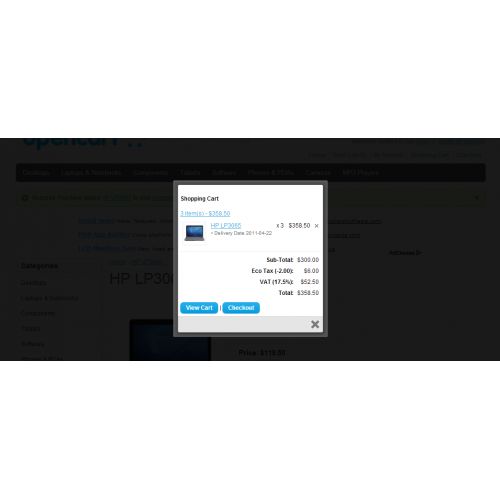
We are modifying the opencart eCommerce platform, the module popup the color box on clicking the add to cart button. It shows the mini shopping cart as shown in the mouse hover. This helps with confirmation of adding and easy navigation to the checkout or shopping cart and some visual effect to the site.
You can easily download the file from below and it is free. The Version I have tested for this module is 1.5.4.1
Right now two files are overridden common.js and the product.tpl. If you have customized these files then you have to add one line to each file manually. Find the following line and insert it
At common.js Find the function addToCart(product_id, quantity) { and below the following line insert the above line:
if (json['success']) {
$('#notification').html('< div style="display: none;">' + json['success'] + '>img src="catalog/view/theme/default/image/close.png" alt="" /> </div>');
Likewise at product.tpl Find the line $(#button-cart).bind(click, function() { and just after this line finds the line below and insert the code just below this.
if (json['success']) {
$('#notification').html('< div style="display: none;">' + json['success'] + '>img src="catalog/view/theme/default/image/close.png" alt="" /> </div>');
Enjoy the module and let me know if there is something that I need to do to improve it.
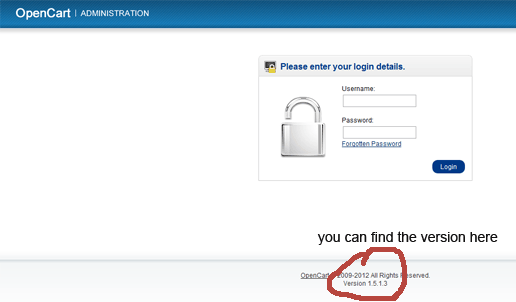
The easiest way to find the Opencart version that you are running is to see at the admin footer. Go to your site http://YOUR_URL/admin then see at the footer and you will be able to know which version of opencart it is because most of the programmer did not remove it, so it will be easy to find it out.
If you were not able to find it there then another option is to open the index.php of the root folder and look for
// Version
define('VERSION', '3.0.3.2');
The VERSION is the named constant for the Opencart version, here in the above example it is 3.0.3.2
Similarly, there are other places where we can find the Opencart version. We can also find it out by seeing the coding style also. One of the most changed styles is as below,
Open ../catalog/controller/module/latest.php, look at line 3
If it says: protected function index($module) { then you have 1.5.0.x
If it says: protected function index($setting) { then you have 1.5.1.x
Similarly, you can find out the opencart version, let us know if you are having any issues and we will help you on those.
I love the opencart but I am worried using the fancy box for image enlargement in the product details page, so I think to change the way to show the image enlargement with the use of the color box.
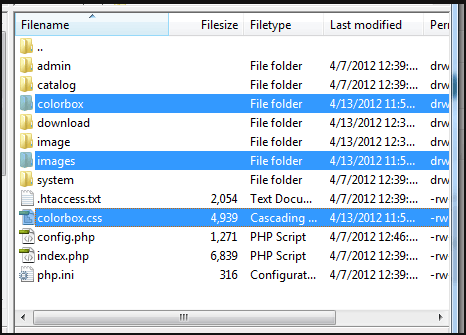
Download the following zip files, upload those files and folders in the root folder like in the image below:
colorbox-in-opencart
Go to the catalog/view/theme/default/template/product.tpl and place the code below, below the <?php echo $header; ?>
<link rel="stylesheet" href="colorbox.css" /> <script src="colorbox/jquery.colorbox.js"></script> <script> $(document).ready(function(){ $(".group1").colorbox({rel:'group1'}); $("#click").click(function(){ $('#click').css({"background-color":"#f00", "color":"#fff", "cursor":"inherit"}).text("Open this window again and this message will still be here."); return false; }); }); </script>
module for free in opencart, image magnification
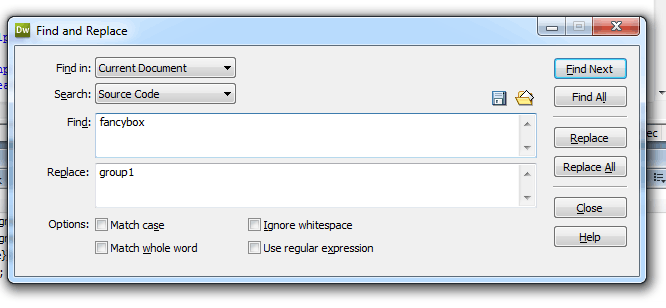
Now find “facybox” and replace with the “group1” and save, then bingo, things works.
fancy color box for opencart
Features of ColorBox
Supports photos, grouping, slideshow, ajax, inline, and framed content.
Lightweight: 10KB of JavaScript (less than 5KBs gzipped).
Appearance is controlled through CSS so it can be restyled.
Can be extended with callbacks & event-hooks without altering the source files.
Completely unobtrusive, options are set in the JS and require no changes to existing HTML.
Preloads upcoming images in a photo group.
Find out the example how the colorbox works out as the fancy box with some extra things.
Opencart tips and tricks post which shows you how we can show or insert the “you save” price. For the demo, you can check the site http://www.starpetshub.com/
We have managed to show the You Save in modules as well but we have hard-code it so we have to change in the controller of each module and in the product controller and the category controller. To make it work we have to Edit or insert product >> Click on Special tab >> Add your special price amount >> then Save it. Go to your site and click on the product. You will see a regular and discounted value with the discounted amount and You save as shown in the above image.
First, we are going to show how to insert the “You Save” on the category page.
Find the following line of codes in the catalog/controller/product/category.php
and paste the following code after if (($this->config->get(‘config_customer_price’) && $this->customer->isLogged()) || !$this->config->get(‘config_customer_price’)) {
Now go to the catalog/view/theme/default/template/product/category.tpl and replace the price section and paste the following and things work out in the category page.
insert the ‘save’ => $save, as in the above in the product array.
Now go to the catalog/view/theme/default/template/module/featured.tpl and replace the price section and paste the following and things work out in the category page.
Likewise, you can make the changes in the latest module, category module, special module, make some changes as in the featured module and things will work like in the demo site.
We have not made the language and other settings, for now, we will make the free module for you all till then take care of the above coding style.
the amount that customer saves, right under the price, when there is a special price for the product, shows the amount in an amount that customer saves, customer save modules, You save this module for all modules, discount % or amount of $ right under the picture on front page modules
I used Filezilla 3.5.3 to upload images and files. When i upload the other files it work but when i upload the images then no images are shown in the server but it is working fine in the localhost. After uploading the updates I noticed that images were corrupt. I verified that images worked on my system, uploaded them and tried to view, but nothing.
Then I downloaded the image and tried to view it on my laptop, but the downloaded image was corrupt as well. I finally used the built in Windows Explorer to upload the PNG files and that worked, so I know the issue is in Filezilla.
I have not had this issue in the past with Filezilla.
I finally find out that the file transfer server software, Filezilla have the setting from where there is
I mistakenly set the file transfer type to ASCII by which the images are not uploaded but other files are uploaded. Again setting to the Auto I am now able to transfer the images as well.
This is opencart 2 guides to send an email when reviews are given to the product. Changes to be done in the module’s product.php is shown in the following images
Likewise, we have to change the product.tpl, type the code for the form as per your need
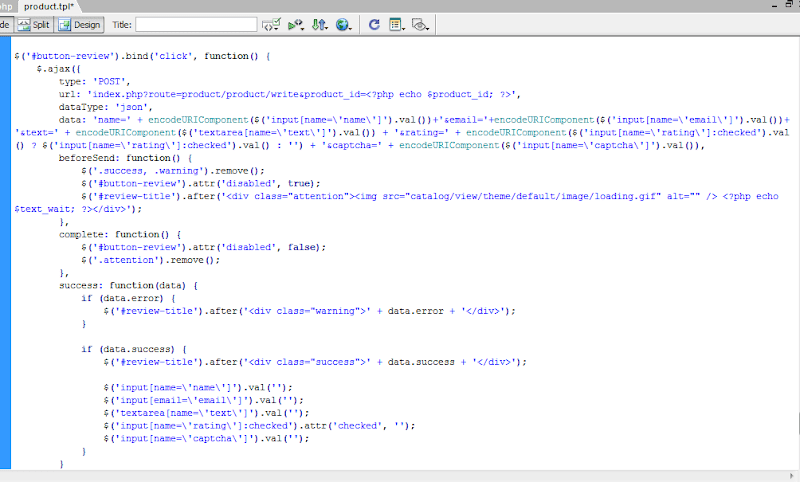
Now to the javascript part of the product.tpl which pass the data to the model and return whether the review is successfully added or not.
We hope you will get it because writing a post and long stories I feel bored just post things that we have done and shown you the logic we used in opencart to send mail to the specified mail.
We have not focused on the languages so sorry for that as well will update this post when we will get the time cheers.