SEO, and customer process to buy the product E-shopping Part VII

0

In this final year’s eCommerce project eShopping we are showing how we set up SEO and customer processes to buy the product on the eCommerce website.

Search Engine Optimization

Search engine optimization, or simply SEO, refers to the practices employed to increase the number of visitors a web site receives from organic (unpaid) search engine result pages. Today, the search engine is the most important tool people use to find information and products on the Internet. Needless to say, having your e-commerce web site rank well for the relevant keywords will help drive visitors to your site and increase the chances that visitors will buy from you and not the competition!

RupJayGri shop is so small and young and some of the points that we consider to make the site more searchable are by following:

  • Implement keyword-rich URLs
  • Redirect requests to index.php
  • Dynamically generate the page titles to reflect the contents of their pages
  • Errors and problems are properly handled and redirect to pages on the site.
  • We correctly used page headings and other markups, so that search engines will be able to identify the page’s important to copy.
  • We don’t have duplicate content. The catalog doesn’t contain identical pages, or page fragments, which can incur search engine penalties.
  • The product, department, and category pages are easily reachable

Customer Sign Up:

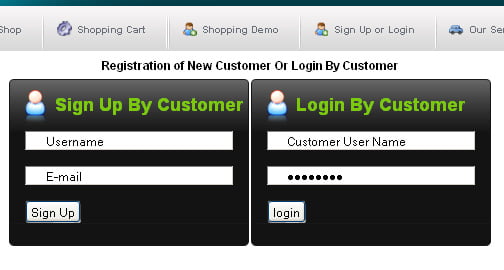
In our shop customers are able to buy or place the product in the cart only when they are registered.

signup process at the eshopping project
the signup process at the shopping project

The customer has filled the signup form and clicks the signup button and the password is sent to the email given.

Customer Login:

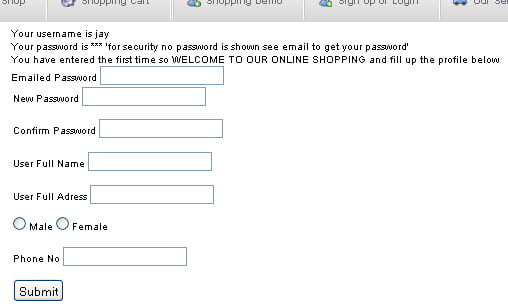
The customer can log in with the username and the password provided in the mail. For the first time login the customer will see the form below:

Form filled by cusustomer

With the filling of the form, the customer will be able to buy a product and add it to the carts. For the other time, the customer will be able to directly login to the dashboard.

Shopping Cart

When customer clicks Add to Cart for any product, it is added to the shopping cart.

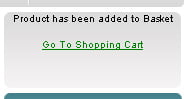
Adding a product into the shopping cart does not decrease the number of products in the database. It is decreased only after an order is placed for the product. In our RupJayGri shop the shopping cart whether the product is added to the database or in the cart or not and on clicking the Go To Shopping Cart, the detail of the cart is shown.

empty shopping cart at eshopping final year project
empty shopping cart at shopping final year project

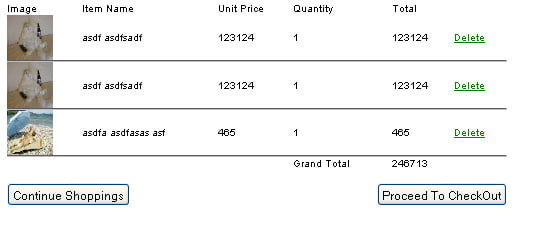
The detail of the cart looks like the figure below:

details of shopping cart at eshopping project
details of the shopping cart at the shopping project

Placed Order and Proceed to CheckOut

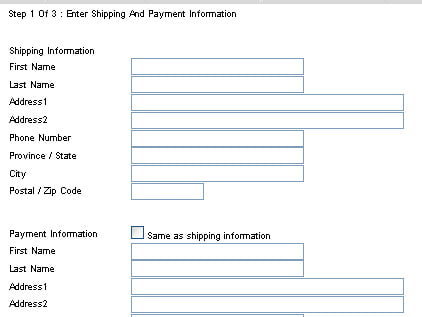
When Proceed To Checkout button is clicked which is located on the bottom of the shopping cart, the web page will direct to the form where the customer has to input the shipping information and the payment information

final checkout process at eshopping project
the final checkout process at shopping project

Confirming the information:

After filling the form in shipping and payment information the final confirmation page is shown which is from the PayPal API and consists of the credit card information to be filled up. After clicking the submit button the PayPal process the credit card information and send whether the payment is successful or not.

How to shop in the RupJayGri Shop?

For the easiness of the customer there consists of video and ways to do shopping in RupJayGri Shop on the page why_us and the link is at the menu’s Shopping Demo.

3 simple steps
Step 1: Search
There are 2 ways by which you can locate products on our site.
1. Keyword Search

There is a Search Box in the header (right-hand top corner)

* Enter the product/item that you want to locate for in the Search Box (Eg: If you want to buy flowers, you can type Flowers in the Search Box). You can also search for products within a category.
* Then click on the Go Button. The next page will display the Search Results with suitable products for you to choose from.

2. Category/Sub-Category Search

Products at RupJayGri.com are divided into Categories and Sub-Categories with further sub-division, displayed in the category list at the top. You can browse through each of these categories until you find your desired product type.
Step 2: Register

Registration on RupJayGri Shop

Visitors must be registered users of RupJayGri Shop to be able to BUY online. RupJayGri Shop Registration process is fast, easy and totally FREE!
Click on the Sign-in link on the top right corner in the header part of every Page.

Please follow the steps to register with rupjaygri.com

  • Enter your Email address which will also function as your User Name for rupjaygri.com.
  • Finally, click on the Sign-Up button.
  • Now login with the username and password in the email that we have sent to the customer.

Step 3: Buying on RupJayGri

  • Login
  • View the product or list the product
  • Click the details of the product and click the Add To Cart button if u like to purchase then go to the details of the shopping cart and click Proceed to checkout and follow the steps.

The others post about the internship is in the internship category.

Web Page Flow in E-shopping Cart Part VI

2

In this final year’s eCommerce project eShopping we are showing web page flow in the shopping cart website.
Chapter 2 part 3 continued…..

Web Page Flow in RupJayGri Shop

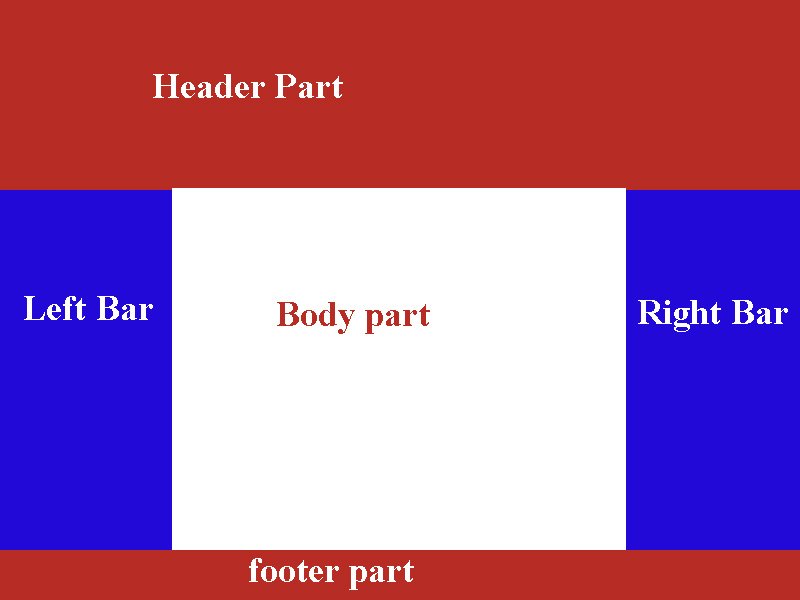
The web page is divided into five parts as in the figure below:

eShopping main design part

1. Header part:

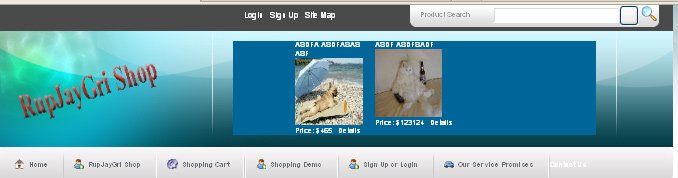
In our RupjayGri shop, the header part consists of the search box which is useful for searching the product directly likewise, the shortcut to login and sign up. As well it also consists of the name of the Shop and the header also contains the advertised products in the scrolling images.

header part of the eShopping cart
header part of the shopping cart

The header part also consists of the menu. The menu contains the link to the pages so that the visitors can easily render the pages.

2. Left Bar:

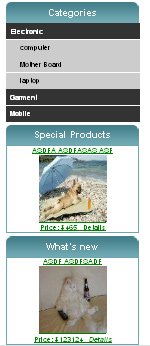
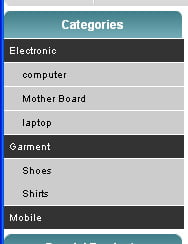
The left bar contains the categories and other boxes which is changeable as per the pages. The categories box shows the list of category and on the click of the list, the products of the same category are shown.

leftbar part of our e-commerce site
the left bar part of our e-commerce site

3. Body Part:

The body part consists of the content of the website

4. Right Bar:

The right bar is also changeable as per the page requirement.

5. Footer Part:

The footer part contains the footer of the pages which can contain the reserved information and copyright as well as links to the pages.

Showing our Visitors What We’ve Got

One of the essential features required in any e-store is to allow the visitor to easily browse through the products. Whether our visitors are looking for something specific or just browsing, it’s important to make sure their experiences with our site are pleasant ones. After all, we want our visitors to find what they are looking for as easily and painlessly as possible. This is why we’ll want to add search functionality to the site and also find a clever way of structuring products into categories so they can be quickly and intuitively accessed.

Depending on the size of the store, it might be enough to group products under a number of categories, but if there are a lot of products, you’ll need to find even more ways to categorize and structure the product catalog.

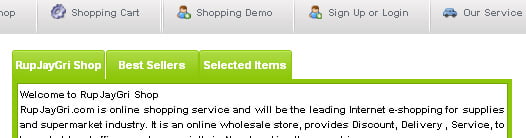
In our RupJayGri Shop products are categorized into different categories and the visitors can easily get the product as per the category. Likewise, there are many sections which show the different product like the tab section which shows the best seller products and selected items by the RupJayGri Shop.

tab for the homepage at eshopping
tab for the homepage at shopping

Products are also shown in a different category as per the click in the menu

category show at eshopping cart
category show at the shopping cart

Products are categorized as per the manufacturers also so the visitors can also view the products as per the manufacturer.

Detail view of the product:

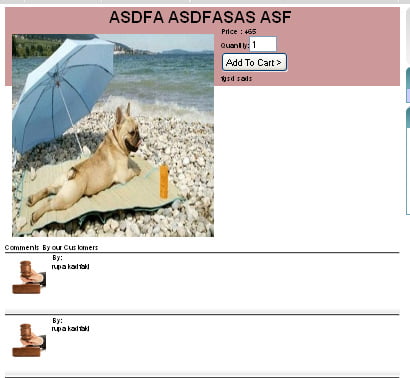
After getting the list of the product we can view the details of the product by clicking in the pictures of the product or just clicking the details button.

detail view of the eshopping
detail view of the shopping

The detail view of the product is seen below:

detail view of product at the eshopping final year project
detail view of product at the shopping final year project

Searching the Products

Products can be searched based on the product identification number, name of the product. For searching the product just type the name of the product in the box

search of product at the eshopping project
a search of product at the shopping project

Figure: For Searching the Product type the name of the product

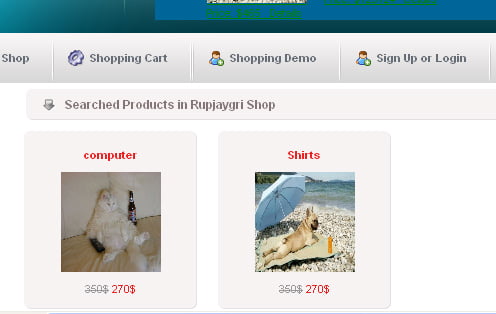
After pressing the ENTER key we will get the list of searched products.

Displaying the Search Results

listing of search at the eshopping final year project
listing of search at the shopping final year project

Figure: List of Searched Products

The others post about the internship is in the internship category.

Final year E-commerce project eShopping Process model, functional diagram Part V

4

In this final year’s eCommerce project eShopping process model, we are showing you the Process Model, Functional Decomposition Diagram, Data flow Diagram, User Interface diagram, and three-tier architecture. Chapter Two Part-2 continued…

3.2. Process Model

A Process Model tells us about how the data is processed and how the data flows from one table to another to gather the required information. This model consists of the Functional Decomposition Diagram and Data Flow Diagram.

3.2.1. Functional Decomposition Diagram

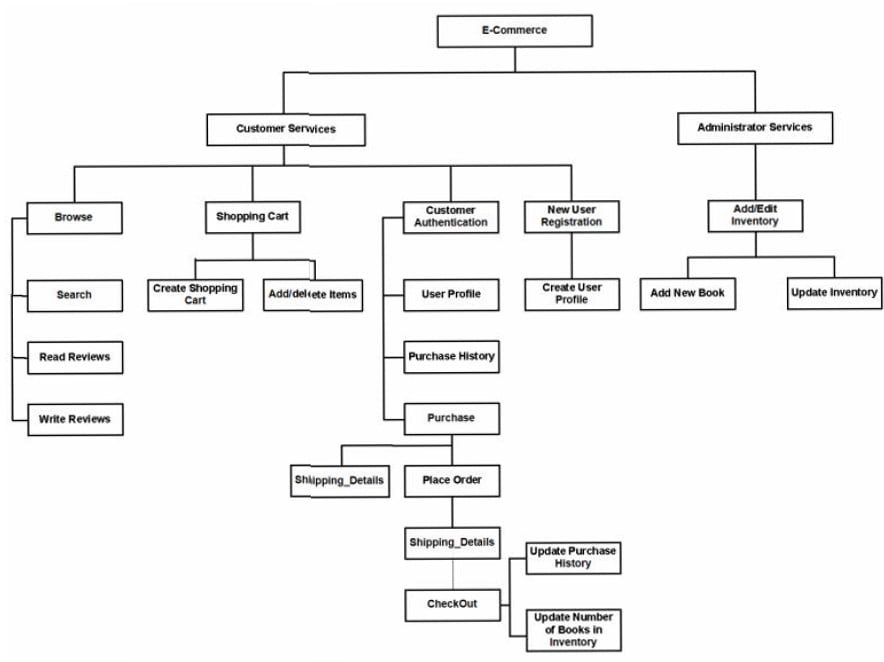
A decomposition diagram shows a top-down functional decomposition of a system and exposes the system’s structure. The objective of the Functional Decomposition is to break down a system step by step, beginning with the main function of a system and continuing with the interim levels down to the level of elementary functions. The diagram is the starting point for more detailed process diagrams, such as data flow diagrams (DFD). Figure 2 shows the Functional Decomposition Diagram for this project.

functional decomposition diagram of eshopping project
functional decomposition diagram of a shopping project

Figure 2 Functional Decomposition Diagram

3.2.2 Data Flow Diagram (DFD)

Data Flow Diagrams show the flow of data from external entities into the system, and from one process to another within the system. There are four symbols for drawing a

DFD:

  1. Rectangles representing external entities, which are sources or destinations of data.
  2. Ellipses representing processes, which take data as input, validate and process it and output it.
  3. Arrows representing the data flow, which can either, be electronic data or physical items.
  4. Open-ended rectangles or a Disk symbol representing data stores, including electronic stores such as databases or XML files and physical stores such as filing cabinets or stacks of paper.

The Detailed DFD provides a more detailed and comprehensive view of the interaction among the sub-processes within the system.

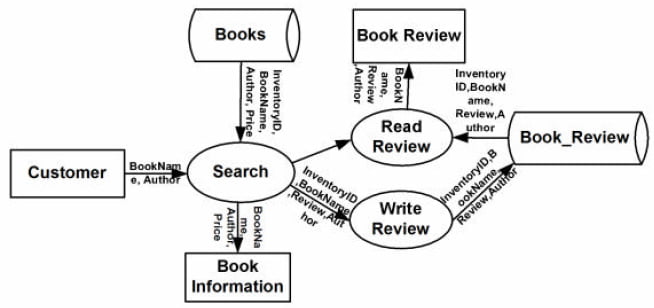
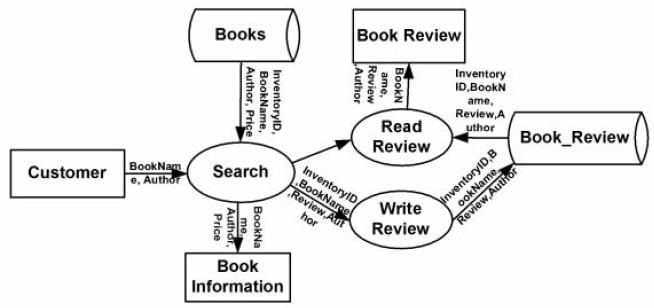
Customer-Browse Context DFD:

Customer Browse Detail DFD
Customer—Browse-Detail DFD

Figure 3: Customer-Browse Context DFD

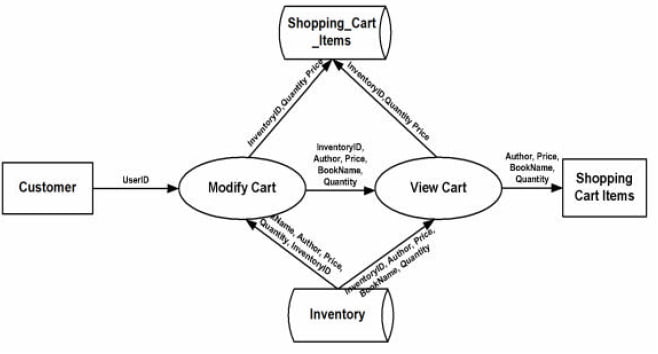
Customer – ShoppingCart Context DFD:

Shopping cart details DFD

Figure 4: Customer – ShoppingCart Context DFD

Customer – ShoppingCart Detailed DFD:

Customer Browse Detail DFD
Customer—Browse-Detail DFD

Figure 5: Customer Shopping Cart Detailed DFD

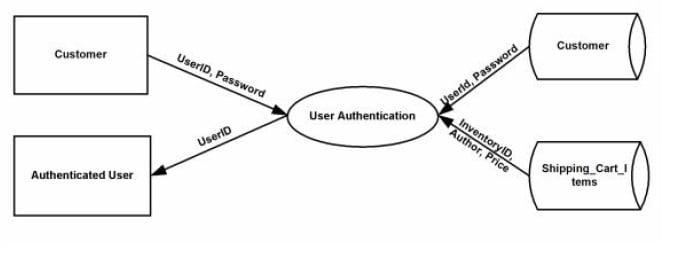
Customer-Authentication Context DFD:

Authentication Customer DFD

Figure 6: Customer-Authentication Context DFD

3.3 User Interface Design

Before implementing the actual design of the project, a few user interface designs were constructed to visualize the user interaction with the system as they browse for books, create a shopping cart and purchase books. The user interface design will closely follow our Functional Decomposition Diagram. Figures 7 – 20 show the initial designs of the web pages.

Front Page of e-shopping

Figure 7: Front Page of RupJayGri Shop with menu


The Magic of the Three-Tier Architecture

Generally, the architecture refers to the way we split the code that implements a feature of the application into separate components based on what they do and grouping each kind of component into a single logical tier.

In particular, the three-tier architecture refers to an architecture that is based on these tiers:

-The presentation tier

-The business tier

-The data tier

Figure: Example of information exchange among application tiers

The presentation tier contains the user interface elements of the site and includes all the logic that manages the interaction between the visitor and the client’s business. This tier makes the whole site feel alive, and the way you design it has crucial importance for the site’s success. Because your application is a web site, its presentation tier is composed of dynamic web pages.

The business tier (also called the middle tier) receives requests from the presentation tier and returns a result to the presentation tier depending on the business logic it contains. Almost any event that happens in the presentation tier usually results in the business tier being called (utilized), except events that can be handled locally by the presentation tier, such as simple input data validation, and so on. For example, if the visitor is doing a product search, the presentation tier calls the business tier and says, Please send me back the products that match this search criterion. Most of the time, the business tier needs to call the data tier for information to be able to respond to the presentation tier’s request.

The data tier (sometimes referred to as the database tier) is responsible for managing the application’s data and sending it to the business tier when requested. For the RupJayGri e-commerce site, you’ll need to store data about products (including their categories and their departments), users, shopping carts, and so on. Almost every client request finally results in the data tier being interrogated for information (except when previously retrieved data has been cached at the business tier or presentation tier levels), so it’s important to have a fast database system.

Choosing Technologies and Tools

No matter which architecture is chosen, a major question that arises in every development project is which technologies, programming languages, and tools are going to be used, bearing in mind that external requirements can seriously limit your options. We’re creating a web site using PHP 5, MySQL 5, and related technologies.

We really like these technologies, but it doesn’t necessarily mean they’re the best choice for any kind of project, in any circumstances. Additionally, there are many situations in which you must use specific technologies because of client requirements. The Requirements Analysis stage that is present in the most software development process will determine which technologies you must use for creating the application.

Although the book assumes some previous experience with PHP and MySQL, we’ll take a quick look at them and see how they fit into our project and into the three-tier architecture.

Using PHP to Generate Dynamic Web Content

PHP is an open-source technology for building dynamic, interactive web content. Its short description (on the official PHP web site, http://www.php.net) is PHP is a widely-used general-purpose scripting language that is especially suited for web development and can be embedded into HTML.

PHP stands for PHP: Hypertext Preprocessor (yes, it’s a recursive acronym) and is available for free download at its official web site. The story of PHP, having its roots somewhere in 1994, is a successful one. Among the factors that led to its success are the following:

  • PHP is free; especially when combined with Linux server software, PHP can prove to be a very cost-efficient technology to build dynamic web content.
  • PHP has a shorter learning curve than other scripting languages.
  • The PHP community is agile. Many useful helper libraries or new versions of the existing libraries are being developed (such as those you can find in the PEAR repository or at http://www.phpclasses.org), and new features are added frequently.
  • PHP works very well on a variety of web servers and operating systems (Unix-like platforms, Windows, and Mac OS).

Apache Web Server:

Apache offers various advantages to users, developers and Web administrators:

  • Features. Apache has various useful features, including the implementation of the latest protocols.
  • Customizable. Apache’s modular architecture allows you to build a server that is “made to measure.”
  • Administration. Apache configuration files are in ASCII, have a simple format, and can be edited using any text editor. They are transferable, so one can effectively clone a server. One can control the server from the command line, which makes remote administration very convenient.
  • Extensible. Apache server and API source code are open to the public. If there is any feature that you want but does not exist in Apache, you can write your own server module to implement it.
  • Efficient. A lot of effort has been put into optimizing the Apache’s C code for performance. As a result, it runs faster and consumes fewer systems resources than many other servers.
  • Portability. Apache runs on a wide variety of operating systems, including all variants of UNIX, Windows 9x/NT, MacOS (on PowerPC), and various others.
  • Stability/Reliability. Apache’s source code is open to the public. When any bugs are found, they are often quickly communicated, and rapidly fixed. Updates are made and announced thereafter. This has resulted in Apache becoming more and more stable, and hence reliable, server over time.
  • Support. Apache is supported by the Apache Group, a large number of dedicated users (many of whom can often be found in the Usenet newsgroup comp.infosystems.www.servers.unix or
    comp.infosystems.www.servers.ms-windows), and by companies who market commercial versions of Apache.

MySQL Database:

In this project, MySQL is used as the back-end database. MySQL is an opensource database management system. The features of MySQL are given below:

-MySQL is a relational database management system. A relational database stores information in different tables, rather than in one giant table. These tables can be referenced to each other, to access and maintain data easily.

– MySQL is an open-source database system. The database software can be used and modify by anyone according to their needs.

-It is fast, reliable and easy to use. To improve performance, MySQL is a multi-threaded database engine. A multi-threaded application performs many tasks at the same time as if multiple instances of that application were running simultaneously.

Being multi-threaded MySQL has many advantages. A separate thread handles each incoming connection with an extra thread that is always running to manage the connections. Multiple clients can perform read operations simultaneously, but while writing, only hold up another client that needs access to the data being updated. Even though the threads share the same process space, they execute individually and because of this separation, multiprocessor machines can spread the thread across many CPUs as long as the host operating system supports multiple CPUs. Multi-threading is the key feature to support MySQL performance design goals. It is the core feature around which MySQL is built.

MySQL database is connected to ASP.NET using an ODBC driver. Open Database Connectivity (ODBC) is a widely accepted application programming interface (API) for database access. The ODBC driver is a library that implements the functions supported by ODBC API. It processes ODBC function calls, submits SQL requests to MySQL server, and returns results back to the application. If necessary, the driver modifies an application’s request so that the request conforms to syntax supported by MySQL.

Macromedia DreamWeaver:

For writing codes and making design, we use Macromedia DreamWeaver

Screenhunter:

For making the screenshot

TeamViewer:

For communicating between our team and showing our development.

Choosing Naming and Coding Standards

Although coding and naming standards might not seem that important at first, they definitely shouldn’t be overlooked. Not following a set of rules for your code will almost always result in code that’s hard to read, understand, and maintain. On the other hand, when you follow a consistent way of coding, you can almost say your code is already half documented, which is an important contribution toward the project’s maintainability, especially when multiple people are working on the same project at the same time.

Naming conventions refer to many elements within a project, simply because almost all of a project’s elements have names: the project itself, files, classes, variables, methods, and method parameters, database tables, database columns, and so on. Without some discipline when naming all those elements, after a week of coding, you won’t understand a single line of what you’ve written.

When developing RupJayGri Shop, we followed a set of naming conventions that are popular among PHP developers. Some of the most important rules are summarized here and in the piece of code that follows:

  • Class names and method names should be written using Pascal casing (uppercase letters for the first letter in every word), such as WarZone.
  • Public class attribute names follow the same rules as class names but should be prepended with the character. So, valid public attribute names look like this: $mSomeSoldier.
  • Private class attribute names follow the same rules as public class attribute names, except they’re also prepended with an underscore, such as in $_mSomeOtherSoldier.
  • Method argument names should use camel casing (uppercase letters for the first letter in every word except the first one), such as $someEnemy, $someOtherEnemy.
  • Variable names should be written in lowercase, with an underscore as the word separator, such as $master_of_war.
  • Database objects use the same conventions as variable names (the department_id column).
  • Try to indent your code using a fixed number of spaces (say, four) for each level. (The code in this book uses two spaces because of physical space limitations)

Final year project E-shopping, project design, data model and database design Part IV

1

CHAPTER TWO

Report Body

2.2 Project Design

In order to design a website, the relational database must be designed first. Conceptual design can be divided into two parts: The data model and the process model. The data model focuses on what data should be stored in the database while the process model deals with how the data is processed. To put this in the context of the relational database, the data model is used to design the relational tables. The process model is used to design the queries that will access and perform operations on those tables.

2.2.1 Data Model

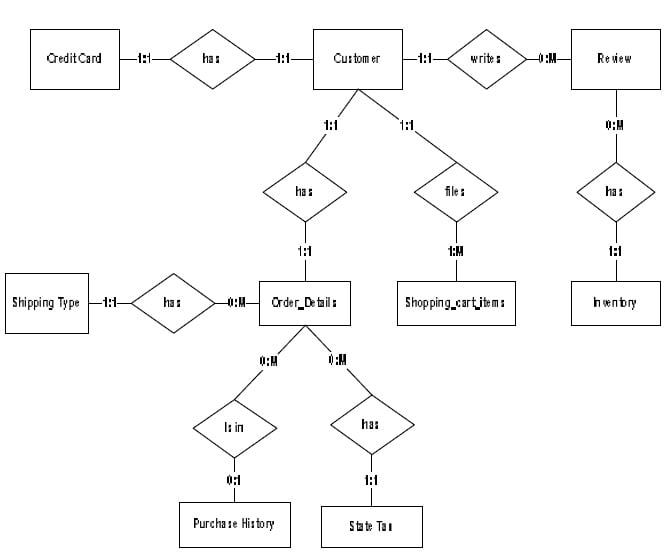
A data model is a conceptual representation of the data structures that are required by a database. The first step in designing a database is to develop an Entity-Relation Diagram (ERD). The ERD serves as a blueprint from which a relational database may be deduced. Figure 1 shows the ERD for the project and later we will show the transformation from ERD to the Relational model.

E-shopping final year project Data modeling

Fig 1: Data Modeling of the whole project

Entity A matches exactly one record in entity B and every record in B matches exactly one record in A. One to many means that every record in A matches zero or more records in B and every record in B matches exactly one record in A. If there is a one to many relationships between two entities, then these entities are represented as Associative Entities. In the Relational Database model, each of the entities will be transformed into a table. The tables are shown below along with the attributes.

2.2.1.1 Database Design

In this section, the basic structure of the tables composing the database for the project are shown along with information about primary and foreign keys.

Background of E-shopping final year College Project- E-commerce Part III

0

CHAPTER ONE

Introduction

1.1 Background of the Project

Nepal is a developing country and Information Communication and technology are playing their important roles in the development of the country. By eCommerce, we mean buying and selling of products or services over electronic systems such as the Internet and other computer networks. In truth in Nepal, we have very fewer ways to pay our bills online or trade online. But that does not mean we cannot. There are new players on Nepali ground like Paybill and Esewa who want to revolutionize the way the Nepali eCommerce field is taken. With the launch of these services, many new startups can easily sell their products and services online. These services have lots of potentials and we hope it will succeed and bring a change in the Nepali eCommerce field. There is a big and old player like muncha.com in Nepal which is already popular for its money transfer and online shops.

E-commerce is fast gaining ground as an accepted and used business paradigm. More and more business houses are implementing web sites providing functionality for performing commercial transactions over the web. It is reasonable to say that the process of shopping on the web is becoming commonplace.

The objective of this project is to develop a general-purpose e-commerce store where any product (such as books, CDs, computers, mobile phones, electronic items, and home appliances) can be bought from the comfort of home through the Internet. However, for implementation purposes, this paper will deal with an online book store.

An online store is a virtual store on the Internet where customers can browse the catalog and select products of interest. The selected items may be collected in a shopping cart. At checkout time, the items in the shopping cart will be presented as an order. At that time, more information will be needed to complete the transaction.

Usually, the customer will be asked to fill or select a billing address, a shipping address, a shipping option, and payment information such as a credit card number. An email notification is sent to the customer as soon as the order is placed.

1.2 Objective of Project

The objectives of this project are:

  1. Create a set of requirements for a Website CMS for small businesses based on research
  2. Build and test a prototype of a Website CMS for small businesses based on the requirements found
  3. Knowing when an item was saved or not saved in the shopping cart.
  4. Returning to different parts of the site after adding an item to the shopping cart.
  5. Easy scanning and selecting items in a list.
  6. Effective categorical organization of products.
  7. Simple navigation from home page to information and order links for specific products.
  8. Obvious shopping links or buttons.
  9. Minimal and effective security notifications or messages.
    1. The consistent layout of product information.

1.3 Limitations of the Project:

There are some limitations for the current system to which solutions can be provided as a future development:

  1. The system is not configured for multi-users at this time. The concept of the transaction can be used to achieve this.
  2. The Website is not accessible to everyone. It can be deployed on a web server so that everybody who is connected to the Internet can use it.
  3. Credit Card validation is not done. Third-party proprietary software can be used for validation checks.

As for other future developments, the following can be done:

  1. The Administrator of the web site can be given more functionality, like looking at a specific customer’s profile, the books that have to be reordered, etc.
  2. Multiple Shopping carts can be allowed.

1.4 Selection Method of Data Collection

There are two major approaches to gathering information in our final year project about the situation, person, problems or phenomenon and software about e-shopping.

  • Internal information
  • External Information

This information was collected with the help of both primary and secondary resources.

a) Primary Data: They are collected by us on the concerned topic, which is original. While studying we have come across with the sources such as

b) Secondary Data: They are collected by us on the basis of the study of internet websites, interviews with friends, etc.

E-shopping final year college project report acknowledgement, executive summary, TOC Part II

0

ACKNOWLEDGEMENT

This report has been prepared for the Final Year Project on topic E-shopping named Rupjaygri Shop to implement the theory in the real field with the purpose of fulfilling the requirements of the course of BCIS (Bachelor of Computer Information System).

The aim of this project is to make familiar to the practical aspect and uses of theoretical knowledge and clarifying the career goals, so we have successfully completed the project and compiled this report as the summary and the conclusion that we have drawn from the project.

We would like to express our sincere gratitude to our Project Coordinator Mr. Sanjay Lama who had given his valuable time and given us chance to learn something despite having his busy schedule, Principal Mr. Surendra Shrestha and Coordinator Mr. Dipesh Shrestha for their great guidelines.

Lastly, we would like to thank Mr. Nimesh Shrestha who had provided us with the guidance and his easiest MVC framework and for his encouragement, patience and expert advice and also for supplying so much invaluable information and finally special thanks go to my friends and family who have supported us throughout our project.

Table of Contents

SN Contents Page No
a. Title Page i
b. Declaration ii
c. Recommendation iii
d Acknowledgement iv
e. Table of Contents v
f. List of Figures vii
g. Executive Summary ix
h. Chapters  
  1. Introduction

1.1.   Background of the Study

1.2.   Objectives of the Study

1.3.   Limitations of the Study

1.4.   Selection Methods of Data Collection

  1. Report Body

2.1.    Introduction of the D.P Sign

2.2.    Corporate Goal of the D.P Sign

2.3.    Mission Statement of the D.P Sign

2.4.    D.P Sign™s Spirit is infused into every components

2.5.    Services

2.5.1.      Web Based Application Design and Development

2.5.2.      Flex Printing and other printing services

2.5.3.       Custom Software Solutions

2.5.4.       Embedded Software Solutions

2.5.5.       Online Earning Training

2.6.    Engagement Models

2.6.1.       Fixed Price Turnkey Model

2.6.2.       Per Resource Model

2.6.3.       Offshore Model

2.7.    Delivery Model

2.8.    Process and Standards

2.9.    Domain Profile

2.10.                    Competitive Advantage of DP Sign

2.11.                    Physical Infrastructure

2.12.                    Organizational Hierarchy Chart

2.13.                    Number of employees

2.14.                    Introduction of Departments We have worked

2.15.                    Major Clients

2.16.                    Business Volume

2.17.                    Products Offered by DP Sign

2.18.                    Time Frame of Internship

  1. Analysis

3.1.    Strategic Business Units

3.1.1         Web Development Department Analysis

3.1.2        Online Earning Department Analysis

3.1.3        PEST Analysis

3.1.4        SWOT Analysis

4            Recommendations

5            Summary and Conclusion

6            Program Workplace Relationship

1

1

1

1

2

3

3

4

4

4

5

5

5

5

5

5

6

6

6

6

7

7

11

13

14

15

16

16

20

20

21

22

23

23

23

24

25

26

28

29

30

i. Bibliography
j. Appendices  

List of Figures

SN Name of Figure Page No.
Fig:2.1 Organization Structure 13
Fig:2.2 Business volume of DP Sign 19
Fig:2.3 Time frame representation in Gantt chart 22

List of Tables 

SN Name of Table Page No.
Tab:2.1 System unit and its Software 11
Tab:2.2 List of technology with platform  
Tab:2.3 Number of employees  
Tab:2.4 Collection of Pay Per Click sites  
Tab:2.5 List of major clients  
Tab:2.6 Printing product of DP Sign  
Tab:2.7 Web services providing by DP Sign  

ABBREVIATION USED

DP Sign Digital Printed Sign
CRM Cus­­­tomer Relation Management
IT Information Technology
QA Quality Assurance
CMS Content Management System
SWOT Strength, Weakness, Opportunity and Threats
PEST Political, Economical, Social and Technological
RFQ Request For Quotation
RFP Request For Proposal
GIS Geographic Information System
PMBOK Project Management Body of Knowledge
PMI Project Management Institute
CMMI Capability Maturity Model Integration
ISO International Organization for Standardization
ODC Offshore Development Center
IP Internet Protocol
CVS Current Version Software
TFS Team Foundation Server

EXECUTIVE SUMMARY

The main objective of this report is to recapitulate our Final Year Project on œE-shopping named Rupjaygri Shop and to be familiar with practical aspect of the theoretical knowledge gained in a classroom. This report is the part of final year project, required by Pokhara University in partial fulfillment for the requirement of BCIS program.

We (Rupak Nepali, Jayman Tamang and Grishma Sharma) feel that Nepal is progressing in ICT field thus the import and export of this country is mounting with the help of ecommerce and e-businesses. Thus, there is need of shopping software so that people can broaden their business worldwide.

Final Year Report on E-shopping Title page of the report Part I

0


     Final Year Project Report

ON

E-Shopping Named RupJayGri Shop

Prepared By:

RUPAK NEPALI

JAYMAN TAMANG

GRISHMA SHAH

Submitted To:

**** College

Faculty of management

Pokhara University


In partial fulfillment of the requirements for the degree of

Bachelor of Computer Information System (BCIS)

Kathmandu

Nov 2010

[divide]

Pokhara University

Faculty of Management

*** College


DECLARATION


We hereby declare that the work reported in this project work on “E-Shopping Named RupJayGri Shop” submitted to *** College, Pokhara University is our original work done in the form of partial requirement for the degree of Bachelor of Computer Information System (BCIS) under the supervision of  Mr. ***, *** College, and Mr ***, Coordinator, *** College.


                                                                         RUPAK NEPALI

                                                                                    JAYMAN TAMANG

                                                                      GRISHAMA SHAH


[divide]


Faculty of Management Studies

Pokhara University


RECOMMENDATION

This is to certify that the CIS Project Report:

Submitted by:


RUPAK NEPALI

JAYMAN TAMANG

GRISHMA SHAH

Entitled

             E-Shopping

has been prepared as approved by this college. This CIS Project

Report is forwarded for examination.


…………………….                                                      .………………….


Display featured products of opencart at WordPress

Today we read the above post and was thinking of something new like showing the products at WordPress of opencart. http://forum.opencart.com/viewtopic.php?f=128&t=36145

We are thinking to make that it works in the same URL as most of my clients thinking to use WordPress as the blog because of different beneficiaries and Opencart as the main site.

Mostly what we have seen is Opencart installed as the main site and there is a link somewhere in Opencart as Blog and when clicked on it, it redirected to the WordPress.

opencart to wordpress
opencart products to WordPress

The WordPress design is made the same as opencart and menus are managed likewise so people think that they are navigated to the blog but not to the different platforms.

With the above post now we can show the featured or latest or best sellers and so no, on the WordPress that will help to make the concurrency in site

Hope we start this soon and make it available to you all

Although we are also quite unsure whether to retrieve to the opencart from WordPress or to show the products to WordPress.

Opencart Paypal sandbox always send the pending status although complete

While testing Paypal with Opencart, Paypal sandbox always sends the pending status although completed. We were working with the Paypal sandbox business account and Opencart opensource and getting this problem.

We were working for the missneopoints.com to make the instant delivery system. We got stuck for around 1 day as the PayPal complete status is also sending pending status. We checked it many times and installed many new installations but the result is the same. Always we get the pending status.

Instant delivery system in opencart
The instant delivery system in opencart

So, we have to test it live with real payment. We were successful to accomplish the given project.

Now, what was the real problem we found was, we were using the live Paypal email address instead of the business account or in-store email account created at the sandbox. 🙂

So, we create a business account and insert it into the Paypal payment address and it started to track the correct status.

We created the store on Opencart and just changed the Paypal email at Modules>> Payments >> Paypal Standard. We inserted the business PayPal email and it starts working.

Paypal checkout email address we are using

deepak_1341249680_per@gmail.com Personal Verified In-Store Checkout Enabled    
  Country:   United States Business Name:   None Credit Card:   Visa  4502177194947462
Exp Date: 7/2017 Bank Account:   Checking (Confirmed)
Routing Number: 325272063
Bank Account Number: 254497029715223 Balance:   5000.00 USD Email:   Confirmed Phone Number:   4089836609 First Name:   Rupak Last Name:   Nepali Notes:     Date Created:   Jul 2, 2012, 10:21:36 PDT

Likewise, we use the following business account

deepak_1342357563_biz@gmail.com Business Verified    
    Country:   United States Business Name:   Deepak Nepali’s Test Store Credit Card:   Visa  4215085155458882
Exp Date: 7/2017 Bank Account:   Checking (Confirmed)
Routing Number: 325272063
Bank Account Number: 297595978189791 Balance:   3811.94 USD Email:   Confirmed Notes:     Date Created:   Jul 15, 2012 06:06:27 PDT

Opencart PayPal sending only pending status at the sandbox, opencart sandbox PayPal

Let us know if you are getting any payment issues so that we can help you to solve it.

Popup the shopping cart on clicking the Add to Cart button on Opencart

We are modifying the opencart eCommerce platform, the module popup the color box on clicking the add to cart button. It shows the mini shopping cart as shown in the mouse hover. This helps with confirmation of adding and easy navigation to the checkout or shopping cart and some visual effect to the site.

You can easily download the file from below and it is free. The Version I have tested for this module is 1.5.4.1

Right now two files are overridden common.js and the product.tpl. If you have customized these files then you have to add one line to each file manually.
Find the following line and insert it

	$.colorbox({href:"index.php?route=module/popupcart"});

At common.js
Find the function addToCart(product_id, quantity) { and below the following line insert the above line:

if (json['success']) {
$('#notification').html('< div style="display: none;">' + json['success'] + '>img src="catalog/view/theme/default/image/close.png" alt="" /> </div>');

Likewise at product.tpl
Find the line $(#button-cart).bind(click, function() { and just after this line finds the line below and insert the code just below this.

if (json['success']) {
$('#notification').html('< div style="display: none;">' + json['success'] + '>img src="catalog/view/theme/default/image/close.png" alt="" /> </div>');

Enjoy the module and let me know if there is something that I need to do to improve it.