Send mail when reviews are given to the product in opencart
 Rupak NepaliPublished Mar 3, 2012

This is opencart 2 guides to send an email when reviews are given to the product. Changes to be done in the module’s product.php is shown in the following images

Likewise, we have to change the product.tpl, type the code for the form as per your need

Now to the javascript part of the product.tpl which pass the data to the model and return whether the review is successfully added or not.
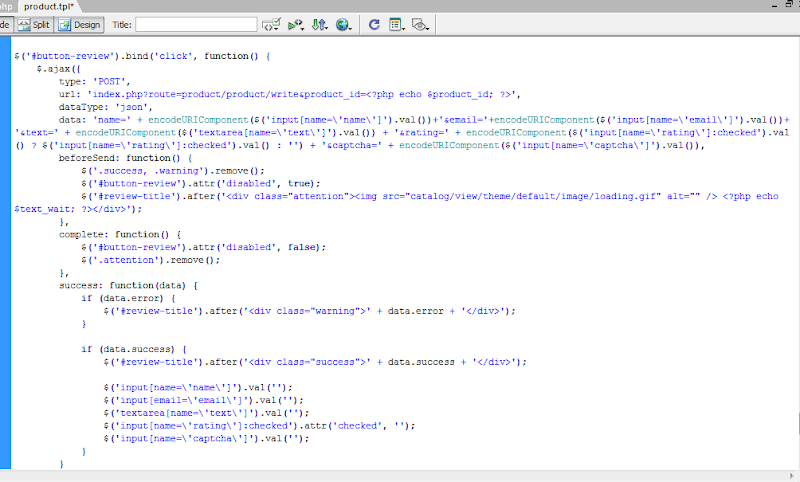
We hope you will get it because writing a post and long stories I feel bored just post things that we have done and shown you the logic we used in opencart to send mail to the specified mail.
We have not focused on the languages so sorry for that as well will update this post when we will get the time cheers.

Rupak Nepali is a web developer, manage Webocreation website and the author of six books:
Getting Started with OpenCart Module Development (Packt, 2013),
OpenCart Theme and Module Development (Packt, 2015),
OpenCart 4: Dev Guide for Themes & Extensions (2024),
OpenCart 4: User Manual (2025),
Cloudflare for the Enterprise Website (2026) and
The Technical Web Guide for Marketers (2026).
Rupak has built OpenCart stores and extensions since 2010, has published more than 600 tutorials on Webocreation, and shares free OpenCart extensions on GitHub.
Find Rupak on
GitHub | Amazon | LinkedIn | X | YouTube.