OpenCart Mobile App Developer Guide, Part 5: Configuration, Security, Extending, Testing, Releasing and Troubleshooting
Configure, secure, extend, test, release and troubleshoot the OpenCart mobile app: settings reference, security checklist and step-by-step recipes.
 Rupak NepaliPublished Nov 12, 2026
This is part 5 of 5 of the OpenCart Mobile App Developer Guide. New to the project? Start with Part 1: Overview, Architecture, Repository Layout and Languages.
In this post
- 13. Configuration reference
- 14. Security measures
- 15. Extending the app
- 16. Checking your changes
- 17. Building and releasing
- 18. Troubleshooting
- 19. Known limitations and future work
13. Configuration reference
13.1 App: mobile/src/config.ts
| Key | Example | Notes |
|---|---|---|
baseUrl | https://shop.example.com/ | The storefront URL with a trailing slash, not the API URL. Must be reachable from the phone. Use HTTPS in production. |
apiKey | 2f7e… | From the module settings page |
language | en-gb | Sent as &language= on every request. It must be a language installed in the store. |
pageSize | 20 | Products per page in lists |
For several environments, you can read these values from app.config.ts / extra or from EAS environment variables. At the moment they are plain constants.
13.2 App: mobile/app.json
| Key | Purpose |
|---|---|
name, slug, version | Store listing name and version. Bump version (and ios.buildNumber / android.versionCode when you add them) for each store release. |
ios.bundleIdentifier, android.package | Currently com.example.ocstore. Change these before your first store build; they can’t be changed after publishing. |
scheme | ocstore, for deep links (ocstore://…) |
ios.infoPlist.NSAppTransportSecurity.NSAllowsLocalNetworking | Allows plain HTTP to local network addresses (dev store). Public HTTP hosts are still blocked. A production store must use HTTPS. |
orientation, userInterfaceStyle | Portrait only, light mode |
plugins | expo-secure-store, expo-font, expo-asset config plugins |
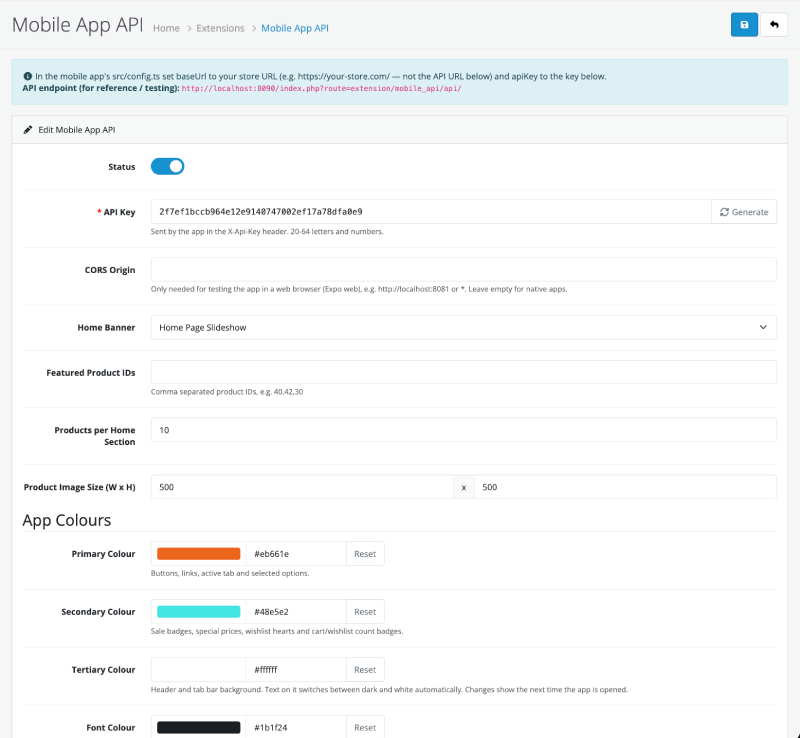
13.3 Store: module settings (Extensions → Extensions → Modules → Mobile App API)
| Setting | Key | Default | Effect |
|---|---|---|---|
| Status | module_mobile_api_status | Off | Off → every endpoint returns 503 and the startup does nothing |
| API Key | module_mobile_api_key | random, 40 characters | Must match config.apiKey; 20–64 letters and numbers |
| CORS Origin | module_mobile_api_cors | empty | Only for Expo web, e.g. http://localhost:8081 or * |
| Home Banner | module_mobile_api_banner_id | none | Banner group shown on Home |
| Featured Product IDs | module_mobile_api_featured | empty | Comma-separated, e.g. 40,42,30 |
| Products per Home Section | module_mobile_api_home_limit | 10 | n/a |
| Product Image Size | module_mobile_api_image_width / _height | 500 × 500 | Thumbnails in lists |
| Primary Colour | module_mobile_api_color_primary | #1f6feb | §9.7 |
| Secondary Colour | module_mobile_api_color_secondary | #e5484d | Sale badges, special prices, hearts, count badges |
| Tertiary Colour | module_mobile_api_color_tertiary | #ffffff | Header and tab bar |
| Font Colour | module_mobile_api_color_text | #1b1f24 | Main text |
| Button Colour | module_mobile_api_color_button | empty (= primary) | Main buttons |
| Button Text Colour | module_mobile_api_color_button_text | empty (= automatic) | Text on main buttons |
13.4 Store: core OpenCart settings the app reads or depends on
| Setting | Location | Effect in the app |
|---|---|---|
| Two-factor authentication | System → Settings → Option | Must be off. Logins return 403 while it’s on. |
| Login attempts | System → Settings → Option | Lock-out threshold (1 hour) for account.login |
| Guest checkout | System → Settings → Option | Shows the guest form at checkout |
| Login to see prices | System → Settings → Option | Hides prices for guests and disables guest checkout |
| Billing address required | System → Settings → Option | Adds the payment address step |
| Account / checkout terms page | System → Settings → Option | Adds “I agree” checkboxes |
| Telephone required, password length and rules | System → Settings → Option | Registration and profile validation |
| Display prices with tax | System → Settings → Option | Applied by formatPrice |
| Stock checkout | System → Settings → Option | Allows checkout with out-of-stock items |
| Reviews on, guest reviews | System → Settings → Option | Write-review button |
| Product count | System → Settings → Option | Category counts |
| Session lifetime | System → Settings → Server | How long the app stays logged in while inactive |
| Logo, store name, contact details | System → Settings → Store / Image | Home header and Account tab |
| Currencies, languages | System → Localisation | Currency picker; language must exist |
| Shipping, payment, order totals | Extensions | All supported automatically |
13.5 Local Docker: .env
DB_NAME, DB_USER, DB_PASSWORD, DB_ROOT_PASSWORD, ADMIN_USER, ADMIN_PASSWORD. These are development credentials only. Don’t reuse them anywhere real.
14. Security measures
14.1 What is in place
| Area | Measure | Where |
|---|---|---|
| API access | Every endpoint calls guard(). A missing or wrong X-Api-Key returns 401. The comparison uses hash_equals (constant time, so no timing leaks). | ApiController::guard() |
| Kill switch | Turning the module off stops every endpoint (503) and the startup. | guard(), startup |
| Customer-only data | Account, address and order endpoints call guardCustomer(). Orders and addresses are loaded through core models that filter by the logged-in customer_id, so one customer can’t read another’s order by changing order_id. | account.php, address.php, order.php |
| Session token | Sent only in a header (not in URLs, except for the payment page). Format checked (^[a-zA-Z0-9]{26,52}$). Stored in the iOS Keychain or Android Keystore through SecureStore. credentials: 'omit' stops cookie confusion. | startup, client.ts |
| No client-side prices | The client sends only product IDs, quantities, options and method codes. Prices, discounts, taxes and totals are always calculated on the server from the database. Shipping and payment codes must exist in the quotes the server stored in the session, so a forged code is rejected. | cart.php, checkout.php |
| Order integrity | Orders are built from the server-side cart and session, exactly like the website. Online orders stay at status 0 until the gateway confirms payment. checkout.complete only clears the cart when the order status is above 0. | saveOrder(), complete() |
| Brute-force protection | Uses OpenCart’s login-attempt table: too many failures within an hour → 429. | account.login |
| Account enumeration | Forgotten password always returns the same message. | account.forgotten |
| Account state | Disabled or unapproved accounts can’t log in. 2FA stores refuse app logins instead of bypassing 2FA. | account.login |
| Input handling | JSON bodies go through OpenCart’s request->clean() (HTML-escaped like form posts). All IDs are cast with (int). Validation uses core helpers (oc_validate_length, oc_validate_email) and core language strings. Database access goes through core models (escaped and parameterised by OpenCart). | parseJsonBody(), all controllers |
| Output | Content-Type: application/json, Cache-Control: no-store (no caching of personal data by proxies). Outgoing strings are decoded for the native client, where they are rendered as text, not HTML. | output() |
| HTML content | Store HTML (descriptions, information pages) is rendered in an isolated WebView. Links open in the system browser instead of inside the app. | HtmlView.tsx |
| Payment page cookie | HttpOnly, SameSite=Lax, Secure when served over HTTPS. The payment form is the gateway’s own code. Card data never passes through the app. | checkout.pay |
| Admin | Saving settings requires OpenCart’s modify permission. Key and colour formats are validated. Install and uninstall check extension/module permission. | admin controller |
| CORS | Off by default. Native apps don’t need it. Only enable it for web testing. | startup |
| Transport | iOS blocks plain HTTP except to local network addresses (dev store). Production must use HTTPS. | app.json |
14.2 Things to understand (not bugs, but limits of the design)
- The API key isn’t a secret. It ships inside the app and can be extracted from the bundle. It stops casual and accidental use and lets you rotate access (change the key, release an app update), but it doesn’t authenticate who is calling. The real protection is that every endpoint only does what a website visitor could already do, and prices are server-side.
- The session token is a bearer credential. Anyone who has it can act as that customer until the session expires. Keep HTTPS on and keep the session lifetime reasonable.
- The payment URL contains the session token. It’s needed because a WebView can’t send custom headers on its first load. The URL is only used inside the app’s WebView, but it could appear in server access logs. Make sure those logs are protected.
- The session id isn’t regenerated at login. This matches OpenCart’s own storefront behaviour. A possible hardening is to issue a new id on login and return it in
X-Session-Token;client.tsalready accepts changed tokens. - No captcha on registration and reviews (captchas are browser widgets). The login-attempt limit and the API key are the protection. If spam becomes a problem, add rate limiting at the web server or CDN (for example per IP on
route=extension/mobile_api/api/account.register). - The dev store is exposed on the LAN (
docker-compose.ymlbinds8090on all interfaces). Never use that setup on a shared or public network.
14.3 Production checklist
- ☐ Store served over HTTPS with a valid certificate;
baseUrlstarts withhttps:// - ☐ A new, random API key (not the dev key) in both the module and
config.ts - ☐ CORS Origin empty
- ☐ 2FA off for customers (or app logins are accepted as unavailable)
- ☐ Reasonable session lifetime
- ☐ Web server access logs protected (the payment URL includes the token)
- ☐
bundleIdentifier/packagechanged fromcom.example.ocstore - ☐ Optional: rate limiting on login, register and review routes at the web server or CDN
15. Extending the app
Most features touch the same five places, in this order:
1. PHP endpoint      opencart-extension/mobile_api/catalog/controller/api/<resource>.php
2. TS types          mobile/src/api/types.ts
3. TS endpoint       mobile/src/api/endpoints.ts
4. Screen / hook     mobile/src/screens/… (+ src/hooks/… if shared)
5. Navigation        mobile/src/navigation/types.ts + RootNavigator.tsx
15.1 Recipe: add a new screen that uses an existing endpoint
Example: a Brands screen. api.catalog.manufacturers() already exists, but no screen uses it yet.
a. Add the route and its parameters in src/navigation/types.ts:
export type RootStackParamList = {
  // …
  Brands: undefined;
};
b. Create the screen src/screens/BrandsScreen.tsx:
import React from 'react';
import { FlatList, Image, Pressable, StyleSheet, Text } from 'react-native';
import { useQuery } from '@tanstack/react-query';
import type { NativeStackScreenProps } from '@react-navigation/native-stack';
import { api } from '../api/endpoints';
import { EmptyState, ErrorState, Loading } from '../components/States';
import type { RootStackParamList } from '../navigation/types';
import { colors, font, radius, spacing } from '../theme';
import { errorMessage } from '../utils/errors';

type Props = NativeStackScreenProps<RootStackParamList, 'Brands'>;

export default function BrandsScreen({ navigation }: Props) {
  const query = useQuery({ queryKey: ['manufacturers'], queryFn: api.catalog.manufacturers, staleTime: 10 * 60 * 1000 });

  if (query.isLoading) return <Loading />;
  if (query.error || !query.data) return <ErrorState message={errorMessage(query.error)} onRetry={query.refetch} />;

  return (
    <FlatList
      data={query.data.manufacturers}
      keyExtractor={(m) => String(m.manufacturer_id)}
      numColumns={3}
      contentContainerStyle={{ padding: spacing.md }}
      ListEmptyComponent={<EmptyState icon="pricetag-outline" title="No brands yet" />}
      renderItem={({ item }) => (
        <Pressable
          style={styles.cell}
          onPress={() => navigation.navigate('ProductList', { title: item.name, query: { manufacturer_id: item.manufacturer_id } })}
        >
          {item.image ? <Image source={{ uri: item.image }} style={styles.logo} resizeMode="contain" /> : null}
          <Text style={styles.name} numberOfLines={1}>{item.name}</Text>
        </Pressable>
      )}
    />
  );
}

const styles = StyleSheet.create({
  cell: { flex: 1 / 3, alignItems: 'center', padding: spacing.sm, margin: spacing.xs, backgroundColor: colors.surface, borderRadius: radius.md },
  logo: { width: 72, height: 72 },
  name: { marginTop: spacing.xs, fontSize: font.small, color: colors.text },
});
Conventions this follows:
- Typed props.
Loading,ErrorStateandEmptyStatefor the three non-happy states.- Colours and sizes only from
theme. StyleSheet.createat the bottom of the file.- Navigation to an existing screen with typed parameters.
c. Register it in RootNavigator.tsx:
import BrandsScreen from '../screens/BrandsScreen';
// …
<Stack.Screen name="Brands" component={BrandsScreen} options={{ title: 'Brands' }} />
d. Link to it, for example from the Account screen with ListItem, or from Home with SectionHeader action="See all" onAction={() => navigation.navigate('Brands')}.
e. Check: npm run typecheck, then open the screen in Expo Go.
To add a tab instead, add the name to TabParamList, add an icon pair to tabIcons and add a <Tab.Screen> in Tabs(). Keep the tab count at five or fewer.
15.2 Recipe: add a new API endpoint
Example: catalog.manufacturer (one brand’s details).
a. PHP: add a method to catalog/controller/api/catalog.php and document it in the class docblock:
/**
 * GET extension/mobile_api/api/catalog.manufacturer&manufacturer_id=8
 *
 * @return void
 */
public function manufacturer(): void {
	if (!$this->guard()) {          // 1. always first
		return;
	}

	$this->load->model('catalog/manufacturer');   // 2. reuse core models

	$info = $this->model_catalog_manufacturer->getManufacturer((int)$this->query('manufacturer_id', 0));   // 3. cast input

	if (!$info) {
		$this->fail('Brand not found.', [], 404);   // 4. fail() with a proper status
		return;
	}

	$this->ok([                                    // 5. ok() with decoded, typed values
		'manufacturer_id' => (int)$info['manufacturer_id'],
		'name'            => $this->decode($info['name']),
		'image'           => $info['image'] ? $this->image($info['image'], 300, 300) : ''
	]);
}
Rules for every endpoint:
- Call
guard()orguardCustomer()first and return if it fails. - Read input only through
post()/query()and cast it ((int),(string)). - Use core models. Write SQL only if no model exists, and then always use
$this->db->escape()and(int)casts. - Never accept prices, totals or customer IDs from the client. Read the customer from
$this->customer. - Return through
ok()/fail()only. Neverecho. - Decode text with
decode()/t(). Cast numbers and booleans so the JSON types are stable. - Use
productCard()for any product list andimage()for images. - Respect
canSeePrice()whenever you output a price. - If the endpoint changes the cart, reset checkout methods (see
cart.php→resetCheckout()).
New file instead of a new method? Create catalog/controller/api/<name>.php with the namespace Opencart\Catalog\Controller\Extension\MobileApi\Api and class name <Name> extending \Opencart\System\Library\Extension\MobileApi\ApiController. The route is then extension/mobile_api/api/<name>.<method>. No registration is needed; OpenCart’s router finds it.
b. Types, in src/api/types.ts:
export interface ManufacturerDetail {
  manufacturer_id: number;
  name: string;
  image: string;
}
c. Endpoint function, in src/api/endpoints.ts, inside the catalog group:
manufacturer: (manufacturer_id: number) => request<ManufacturerDetail>('catalog.manufacturer', { query: { manufacturer_id } }),For a POST, pass { body: {...} }. request() switches to POST and JSON automatically.
d. Deploy the PHP: copy the file into store/extension/mobile_api/… for local testing, or rebuild the zip (§7.5).
e. Test it directly before building UI:
curl -s -H "X-Api-Key: <key>" "http://localhost:8090/index.php?route=extension/mobile_api/api/catalog.manufacturer&manufacturer_id=8" | python3 -m json.tool15.3 Recipe: add a section to the Home screen
Example: a “Brands” carousel on Home.
- Server: in
catalog.php→home(), build the list and add it to theok([...])array:$this->load->model('catalog/manufacturer'); $brands = []; foreach (array_slice($this->model_catalog_manufacturer->getManufacturers(), 0, $limit) as $m) { $brands[] = ['manufacturer_id' => (int)$m['manufacturer_id'], 'name' => $this->decode($m['name']), 'image' => $m['image'] ? $this->image($m['image'], 200, 200) : '']; } // … 'brands' => $brands,Old app versions ignore unknown fields, so adding fields is backwards compatible. Removing or renaming them isn’t (see §15.6). - Type: add
brands: Manufacturer[];toHomeDataintypes.ts. Make it optional (brands?: Manufacturer[]) if the app must also work with stores running an older extension. - UI: in
HomeScreen.tsx, destructurebrandsand render a section the same way as the existing ones: aSectionHeaderplus a horizontalFlatListorScrollView. Hide it when the list is empty. - Optional admin switch: add a setting such as
module_mobile_api_home_brands(see §15.4) and only includebrandswhen it’s on.
Each home section is rendered only if its array has items, so a store can switch a section off by leaving it empty (for example, no featured IDs).
15.4 Recipe: add a new admin setting
- Form field: add it to
admin/view/template/module/mobile_api.twig. Usename="module_mobile_api_<name>"andid="input-<name-with-dashes>", and add<div id="error-<name-with-dashes>" class="invalid-feedback"></div>if it can fail validation. - Labels: add
entry_<name>andhelp_<name>toadmin/language/en-gb/module/mobile_api.php. - Controller
index():$data['module_mobile_api_<name>'] = $this->config->get('module_mobile_api_<name>') ?: <default>; - Controller
save(): validate it and add$json['error']['<name>'] = …on failure. - Controller
install(): add the default to theeditSettingarray, so new installs get it. - Use it: read it with
$this->config->get('module_mobile_api_<name>')in a catalog endpoint. If the app needs it, add it tocommon.init(undersettingsor a new key), then toInitDataintypes.ts, and read it withuseStore().init.
Existing installs won’t have the new key until the admin saves the form once, so always give it a fallback when you read it.
15.5 Recipe: add a shared data hook
When several screens use the same data (like the cart):
// src/hooks/useAddresses.ts
import { useMutation, useQuery, useQueryClient } from '@tanstack/react-query';
import { api } from '../api/endpoints';

export const addressesKey = ['addresses'] as const;

export function useAddresses(enabled = true) {
  return useQuery({ queryKey: addressesKey, queryFn: api.address.list, enabled });
}

export function useDeleteAddress() {
  const queryClient = useQueryClient();
  return useMutation({
    mutationFn: api.address.remove,
    onSuccess: () => {
      queryClient.invalidateQueries({ queryKey: addressesKey });
      queryClient.invalidateQueries({ queryKey: ['checkout'] });   // checkout may show addresses
    },
  });
}
Export the key, so other code can invalidate it without retyping the array.
15.6 Compatibility rules (app versions vs extension versions)
Installed apps update slowly, but the server updates as soon as the store owner installs a new zip. So:
- Add, don’t change. Adding endpoints and response fields is safe. Renaming or removing fields breaks old apps.
- If you must change a shape, add a new field or endpoint, keep the old one for a while, and remove it later.
- New fields the app needs should be optional in
types.tswhen the app could talk to an older extension. - Bump the version in
install.jsonfor each extension release andversioninapp.jsonfor each app release. Note in the release notes which extension version each app version needs.
15.7 Adding a dependency
Use npx expo install <package>, not npm install. It picks the version that matches the current Expo SDK. If the package has native code not included in Expo Go, you need a development build (§6). Check with npx expo-doctor.
16. Checking your changes
The repository has no automated test suite yet. Before you hand off a change, run these checks:
| Check | Command | Catches |
|---|---|---|
| Types | cd mobile && npm run typecheck | API and navigation contract mismatches, typos |
| Bundle | cd mobile && npx expo export --platform ios --output-dir /tmp/oc-export | Import errors and syntax the type checker misses |
| Dependencies | cd mobile && npx expo-doctor | SDK version mismatches |
| PHP syntax | docker compose exec web php -l extension/mobile_api/catalog/controller/api/<file>.php | Parse errors |
| PHP runtime | docker compose logs -f web while using the app | Warnings, notices and fatal errors |
| Endpoint | curl with X-Api-Key (see §15.2) | Wrong output shape or status |
| Manual flow | Expo Go on a real phone | Behaviour, layout, keyboard and safe areas |
Manual regression list for changes that touch the cart, checkout or auth:
- Browse Home → category → product with options → add to cart.
- Change quantity, apply an invalid coupon (rejected) and a valid one.
- Guest checkout with Flat Rate + Cash on Delivery → order placed, cart empty.
- Register → log out → log in (a wrong password is rejected) → cart merge.
- Logged-in checkout with a saved address.
- Orders → order details → Buy again.
- Change currency → prices update.
- Wishlist as a guest → log in → items moved to the account.
- Admin: change a colour → reopen the app → colour applied.
Good next steps for automation: PHPUnit or a scripted HTTP test that runs the flow above against the Docker store, and Jest with React Native Testing Library for theme.ts, client.ts and key components.
17. Building and releasing
17.1 Extension
# bump "version" in opencart-extension/mobile_api/install.json
sh opencart-extension/build.sh          # → opencart-extension/mobile_api.ocmod.zip
On the store: Extensions → Installer → Upload, then Install. Updating an installed extension in OpenCart 4 means uninstalling and reinstalling it. The module uninstall removes the settings (including the API key), so note the key and colours first, or update the files on the server directly when only PHP files changed.
17.2 App (EAS)
npm install -g eas-cli
cd mobile
eas login
eas build:configure                     # creates eas.json
eas build --platform ios --profile production
eas build --platform android --profile production
eas submit --platform ios               # or android
Before the first store build:
- Set real
ios.bundleIdentifierandandroid.packageinapp.json. - Add an app icon and splash screen (
icon,splashinapp.json). - Point
config.tsat the production HTTPS store and set the production API key.
Over-the-air updates: eas update --branch production ships JavaScript changes without store review. Changes to native modules, app.json native settings, or the SDK version need a new build.
17.3 Upgrading the Expo SDK
cd mobile
npx expo install expo@^<next>           # e.g. ^59.0.0
npx expo install --fix                  # aligns react, react-native and all expo-* packages
npx expo-doctor
npm run typecheck
npx expo start -c
Read the SDK release notes for breaking changes. The last upgrade (SDK 52 → 58, React 18 → 19) needed small type fixes: list header and footer props must be undefined instead of null, and some callbacks needed explicit void returns. If npm reports ERESOLVE, delete node_modules and package-lock.json and reinstall.
18. Troubleshooting
| Symptom | Cause | Fix |
|---|---|---|
| Expo Go: “No usable data” after scanning | The project’s SDK isn’t supported by the installed Expo Go | Upgrade the SDK (§17.3) or update Expo Go |
| “Something went wrong” / “Cannot reach the store” on the phone | baseUrl uses localhost, a wrong IP, or the phone is on another network | Use the computer’s LAN IP, the same Wi-Fi, and check that port 8090 is published |
| “Unexpected response from the store (HTTP 200/404/500)” | Extension not installed or disabled, a PHP error, or baseUrl set to the API URL instead of the store URL | Check the module status; docker compose logs web; baseUrl must be the storefront root |
Invalid API key. (401) | Key mismatch | Copy the key from the module page into config.ts |
The mobile API is disabled. (503) | Status off | Turn on Status and save |
| Login: “Two-factor authentication is enabled…” | config_2fa on | Turn off 2FA in System → Settings → Option |
| Cart empties or user logged out every request | Session not restored: the startup is missing, or a proxy strips custom headers | Check System → Settings → Startups for mobile_api (reinstall the module if missing); allow X-Session-Token and X-Api-Key through the proxy or CDN |
| Images don’t load on the phone | Image URLs use localhost | Dev: config.php uses the request Host (§7.2). Production: set the store URL to the public HTTPS domain. |
| Admin colour change not visible | Colours apply at launch | Close and reopen the app (or shake → Reload) |
Cannot find module './utils/env' from the Expo CLI | A stale dev server after upgrading dependencies | Stop it and run npx expo start -c |
| Product can’t be added: “File required!” | The product has a required file-upload option | Not supported in the app (§19) |
| Online payment never returns to the app | The gateway’s success page uses an unusual URL | Check the URL the WebView reaches and extend the SUCCESS regex in PaymentScreen.tsx |
| Expo web: requests blocked by CORS | CORS Origin not set | Set it to http://localhost:8081 (or * for testing) |
19. Known limitations and future work
- File-upload product options aren’t supported. The product page tells the customer to order that product on the website. Future work: an upload endpoint using
expo-document-pickerand coretool/upload. - Captcha isn’t applied to API registration and reviews (§14.2).
- 2FA must be off for app logins.
- Single store only (
store_id0). - One language per build (
config.language). The API already returnslanguagesininit, so adding a language picker would mirror the currency picker. - Theme changes need an app restart (§9.2).
- Light mode only (
userInterfaceStyle: light). - No push notifications yet.
expo-notificationsplus an OpenCart event on order status change would add them. - No automated tests yet (§16).
- Rewards, store credit and gift vouchers are applied only as far as the core totals do automatically. There’s no UI to enter reward points or vouchers.
← Previous: Part 4: Design Patterns, Hooks and End-to-End Flows
The series
- Part 1: Overview, Architecture, Repository Layout and Languages
- Part 2: Tools and Libraries, Why Expo, and the Development Environment
- Part 3: The OpenCart Extension and the Mobile App
- Part 4: Design Patterns, Hooks and End-to-End Flows
- Part 5: Configuration, Security, Extending, Testing, Releasing and Troubleshooting (you are reading this part)

Author of four Opencart book.
The recent are Opencart 4 developer book and Opencart 4 user manual