Ecommerce Product Page Optimization: The Complete Guide to Increasing Conversions
 Rupak NepaliPublished Jul 6, 2026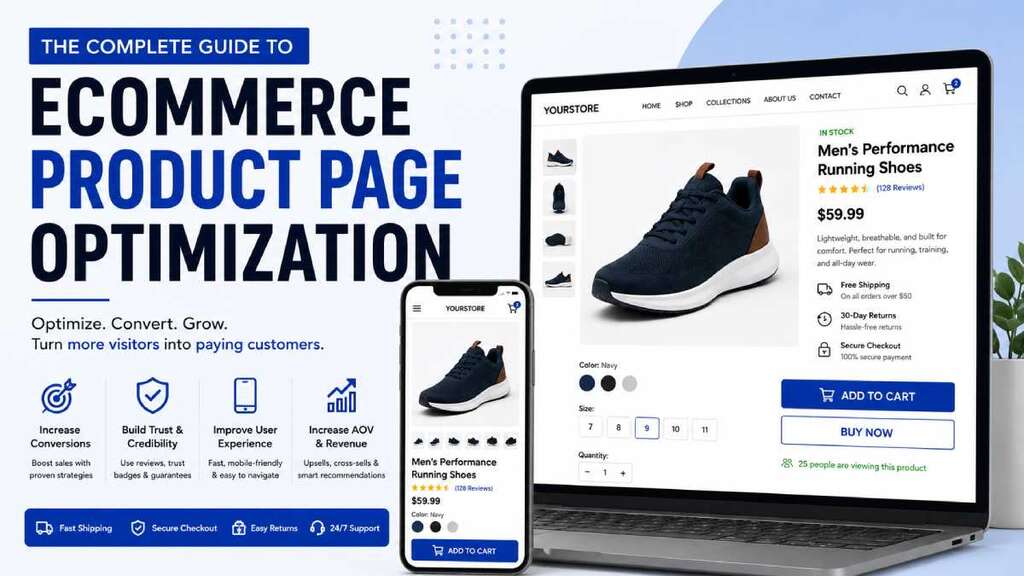
Your product page is where buying decisions happen.
You can spend thousands of dollars on SEO, Google Ads, email marketing, and social media campaigns, but if your product pages fail to convince visitors to purchase, your marketing budget is being wasted.
According to multiple ecommerce studies, product pages with clear messaging, strong visuals, trust signals, and optimized user experiences consistently outperform poorly designed pages. Even small improvements can significantly increase conversion rates and revenue.
In this guide, you’ll learn proven ecommerce product page optimization strategies that help turn more visitors into customers.
What Is Ecommerce Product Page Optimization?
Ecommerce product page optimization is the process of improving product pages to increase conversions, sales, and customer satisfaction.
The goal is to remove friction from the buying process while providing shoppers with the information and confidence they need to complete a purchase.
An optimized product page should:
- Clearly communicate product benefits
- Answer customer questions
- Build trust and credibility
- Reduce purchase anxiety
- Make checkout decisions easier
- Encourage immediate action
Why Product Page Optimization Matters
Many ecommerce stores focus heavily on driving traffic but overlook conversion optimization.
Consider this example:
- Monthly visitors: 50,000
- Current conversion rate: 2%
- Average order value: $75
Monthly revenue:
50,000 × 2% × $75 = $75,000
If you improve the conversion rate from 2% to 3%, revenue increases to:
50,000 × 3% × $75 = $112,500
That’s a 50% increase in revenue without spending more on traffic acquisition.
Essential Elements of a High-Converting Product Page
1. Create Clear and Compelling Product Titles
Your product title should instantly communicate what the product is and who it’s for.
Good product titles include:
- Product name
- Key feature
- Model or variation
- Important identifiers
Example:
Instead of:
“Wireless Headphones”
Use:
“Noise-Canceling Wireless Bluetooth Headphones with 40-Hour Battery Life”
This helps shoppers understand the value immediately.
Start with search intent and data
Before tweaking layouts, validate that your product pages actually match how people search and shop for the product. Modern product page SEO frameworks start with keyword research and intent mapping, then layer on on‑page optimization, image SEO, and schema markup. Use tools like Google Search Console and analytics to see which queries already drive impressions, then align titles, descriptions, and content with those queries rather than guessing.
2. Use High-Quality Product Images
Images are often the most influential element on a product page.
Best practices include:
- Multiple product images
- High-resolution photography
- Zoom functionality
- Lifestyle photos
- Different viewing angles
- Mobile-friendly image galleries
Consider including:
- Front view
- Side view
- Close-up details
- Product in use
- Packaging images
Customers want to visualize ownership before purchasing.
Elevate imagery and rich media
High‑quality visuals are one of the strongest levers on product page conversion. Studies and best‑practice guides recommend large, clear, zoomable product images placed above the fold, complemented by lifestyle imagery, 360‑degree views, interactive graphics, and videos where appropriate. From an SEO and performance perspective, you should use descriptive file names, alt text with relevant keywords, responsive image sizes, and compressed formats like JPG or WebP to balance quality and speed.
3. Add Product Videos
Videos help customers understand products more effectively than text alone.
Effective video content includes:
- Product demonstrations
- Unboxing videos
- How-to tutorials
- Feature walkthroughs
- Customer testimonials
Product videos can reduce uncertainty and improve purchase confidence.
4. Write Benefit-Focused Product Descriptions
Many ecommerce stores simply list features.
Successful stores explain benefits.
Feature:
“Made from stainless steel.”
Benefit:
“Durable stainless steel construction resists rust and lasts for years.”
Feature:
“Memory foam cushioning.”
Benefit:
“Provides all-day comfort and reduces foot fatigue.”
Focus on how the product improves the customer’s life.
Write unique, benefit‑driven product descriptions
Many ecommerce stores still copy manufacturer descriptions, which dilutes SEO and fails to sell the product. Guides from Ahrefs, Chargebee, and Salsify all emphasize writing unique, detailed descriptions that go beyond features to highlight concrete benefits, materials, dimensions, use cases, and who the product is for. Use bullets for key specs and benefits, keep copy readable, and avoid keyword stuffing—readability and persuasion should come first, with keywords woven in naturally.
5. Highlight Key Features Above the Fold
Most visitors scan before reading.
Display critical information immediately:
- Price
- Product images
- Product title
- Reviews
- Key benefits
- Availability
- Add-to-cart button
Customers should understand the product’s value within seconds.
6. Optimize Your Call-to-Action (CTA)
Your Add-to-Cart button should stand out visually.
Best practices:
- Use contrasting colors
- Make buttons large and clickable
- Use clear text
- Place near product information
- Keep visible on mobile devices
Examples:
- Add to Cart
- Buy Now
- Get Yours Today
- Order Now
Avoid vague button labels. Your primary call‑to‑action (typically “Add to cart” or “Buy now”) should be visually prominent, emotionally compelling, and friction‑free. Conversion optimization guides advise using strong action verbs, urgency when appropriate, a contrasting button color, and placement near key information like price, shipping, and stock status. Avoid cluttering the page with competing CTAs and pop‑ups; stick to a focused path that makes the next step obvious.
7. Display Customer Reviews and Ratings
Social proof significantly impacts purchasing decisions.
Include:
- Star ratings
- Written reviews
- User-generated photos
- Verified buyer badges
- Review summaries
Customer reviews provide reassurance and answer common buyer concerns.
8. Build Trust with Security and Credibility Signals
Trust is critical in ecommerce.
Display:
- SSL security indicators
- Secure payment icons
- Money-back guarantees
- Return policies
- Shipping information
- Customer service contact details
Visitors are more likely to purchase when they feel protected. Social proof is consistently cited as a major driver of product page conversions. Multiple sources recommend prominently displaying ratings, reviews, testimonials, and user‑generated content on product pages, not hiding them behind tabs. Trust can be reinforced with security badges, guarantees, transparent return and shipping policies, and even subtle urgency elements like “X people are viewing this now” or “500+ purchases this month” when used responsibly
9. Show Inventory and Availability
Creating urgency can motivate action.
Examples:
- Only 3 left in stock
- Limited availability
- Ships today
- Order within 2 hours for same-day shipping
Use urgency honestly and avoid misleading scarcity tactics.
10. Simplify Product Variations
Complex product options can create confusion.
For products with:
- Sizes
- Colors
- Materials
- Bundles
Ensure options are:
- Easy to understand
- Clearly labeled
- Mobile-friendly
- Visually appealing
Show updated images when customers select different variants.
11. Improve Mobile Experience
Mobile traffic often exceeds desktop traffic.
Optimize for mobile by:
- Using responsive layouts
- Compressing images
- Making buttons thumb-friendly
- Reducing page load times
- Simplifying navigation
A poor mobile experience can dramatically reduce conversions.
12. Speed Up Page Load Times
Every second matters.
Slow pages lead to:
- Higher bounce rates
- Lower conversions
- Poor user experience
- Reduced search rankings
Ways to improve speed:
- Compress images
- Use WebP formats
- Enable browser caching
- Minify CSS and JavaScript
- Use a content delivery network (CDN)
Fast pages create smoother shopping experiences.
13. Include Frequently Asked Questions (FAQs)
FAQs address objections before they become barriers.
Common questions:
- How long is shipping?
- What is the return policy?
- Is assembly required?
- What materials are used?
- Is there a warranty?
Well-written FAQs reduce customer support requests and improve conversions.
14. Use Cross-Sells and Upsells
Increase average order value by recommending related products.
Examples:
- Frequently bought together
- Complete the look
- Customers also purchased
- Recommended accessories
Keep recommendations relevant and useful.
15. Leverage User-Generated Content
Customers trust other customers.
Include:
- Customer photos
- Customer videos
- Social media mentions
- Product usage examples
Authentic content helps build credibility.
Product Page SEO Best Practices
Product pages should also be optimized for search engines.
Optimize Product URLs
Good URL:
/wireless-noise-canceling-headphones
Poor URL:
/product?id=12345
Optimize Meta Titles
Example:
Wireless Noise-Canceling Headphones | Free Shipping
Optimize Meta Descriptions
Include:
- Primary keyword
- Product benefits
- Call-to-action
Use Structured Data
Product schema can help search engines display:
- Ratings
- Prices
- Availability
- Reviews
This improves visibility in search results.
Common Product Page Optimization Mistakes
Avoid these common issues:
Weak Product Descriptions
Generic descriptions fail to persuade buyers.
Poor Product Photography
Low-quality images damage credibility.
Hidden Shipping Costs
Unexpected costs often lead to cart abandonment.
Lack of Reviews
Products without social proof often convert poorly.
Slow Loading Pages
Performance issues frustrate visitors.
Complicated Checkout Paths
Reduce unnecessary steps between product pages and checkout.
Key Metrics to Track
Monitor these metrics regularly:
- Product page conversion rate
- Add-to-cart rate
- Cart abandonment rate
- Revenue per visitor
- Average order value
- Bounce rate
- Time on page
- Mobile conversion rate
Data-driven optimization consistently delivers better results.
Final Thoughts
Product page optimization is one of the highest-impact activities for ecommerce growth.
Rather than focusing solely on acquiring more traffic, improving your existing product pages can generate significant revenue gains from visitors you already have.
Start by evaluating your product images, descriptions, reviews, trust signals, mobile experience, and call-to-action buttons. Then continuously test and refine based on user behavior and conversion data.
The most successful ecommerce brands treat product page optimization as an ongoing process—not a one-time project.
Every improvement that reduces friction and increases customer confidence can lead to more sales, higher revenue, and stronger long-term business growth.

Author of four Opencart book.
The recent are Opencart 4 developer book and Opencart 4 user manual