Search Everywhere: Crawlability and Indexability: robots.txt, Sitemaps, Canonicals and Redirects
Get every important page crawled and indexed: robots.txt, XML sitemaps, meta robots, canonical tags, status codes, redirects and JavaScript checks.
 Rupak NepaliPublished Nov 14, 2026

This post is Chapter 4 of Search Everywhere: The Practical Guide to SEO, AEO and GEO, the free online edition. Chapter and appendix references link to the matching post.
Technical SEO has a simple goal: make sure that every page you want found can be reached, read and indexed, and that every page you do not want found stays out of the way. Most technical problems come down to one of a handful of controls: robots.txt, XML sitemaps, meta robots tags, canonical tags, HTTP status codes and redirects.
This chapter explains each control, how it interacts with the others, and how to audit it. Throughout, we apply it to webocreation.com/.
robots.txt
The robots.txt file lives at the root of a host (https://example.com/robots.txt) and tells crawlers which paths they may fetch. It is a request, not a security barrier: well-behaved crawlers honour it, bad bots ignore it.
Syntax essentials
User-agent: *
Disallow: /wp-admin/
Allow: /wp-admin/admin-ajax.php

User-agent: Googlebot-Image
Disallow: /private-images/

Sitemap: https://example.com/sitemap_index.xml- User-agent names the crawler a group of rules applies to.
*means any crawler not matched by a more specific group. - A crawler follows only the most specific group that matches it. If you add a group for
GPTBot, GPTBot ignores the*group entirely. This trips people up constantly. - Disallow blocks paths that start with the given string. Allow creates exceptions. When rules conflict, Google uses the most specific (longest) matching rule.
*matches any sequence of characters inside a path, and$anchors the end of a URL.- Sitemap lines can appear anywhere and apply globally.
- Crawl-delay is not supported by Google. Bing and some other crawlers honour it.
What robots.txt does not do
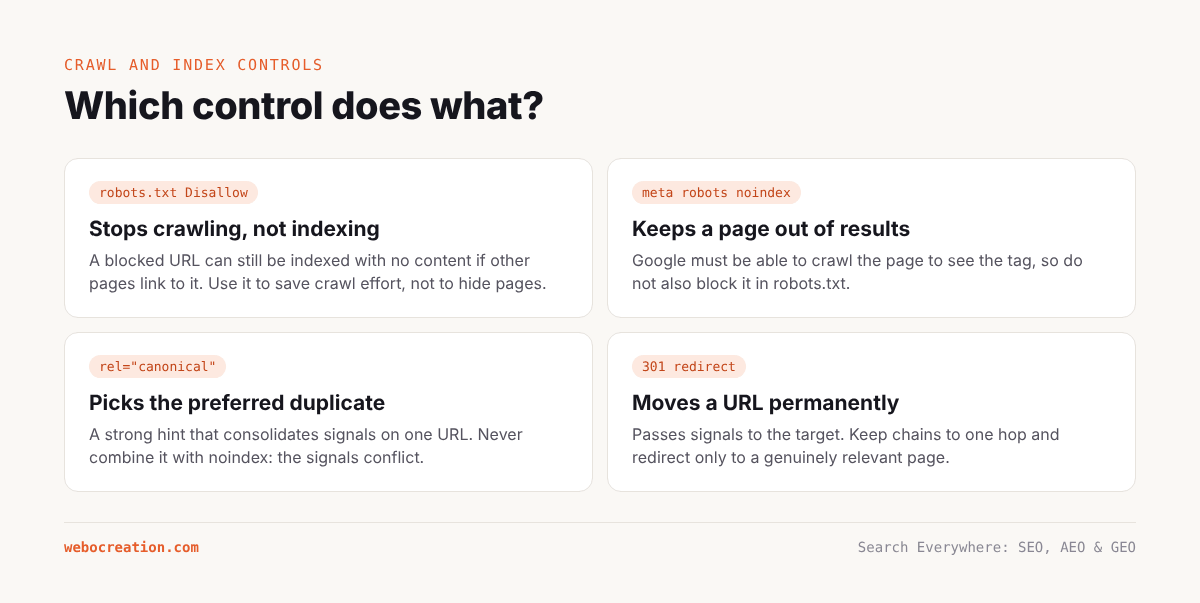
Blocking a URL in robots.txt stops crawling, not indexing. If other pages link to a blocked URL, Google can still index it with no content, showing “No information is available for this page.” To keep a page out of the index, allow crawling and use a noindex meta tag instead. Google has to crawl the page to see the noindex.
Case study: webocreation.com/’s robots.txt
Here is the file as it was served in November 2026:
User-agent: *
Disallow: /wp-admin/
Allow: /wp-admin/admin-ajax.php
Disallow: /wp-login.php
Disallow: /?s=
Disallow: /search/
Allow: /ads.txt$
Allow: /wp-admin/admin-ajax.php

User-agent: Twitterbot
Allow: /wp-content/

User-agent: ClaudeBot
Crawl-delay: 10

Sitemap: https://webocreation.com/sitemap_index.xml
What is good:
- Admin and login are blocked, with the standard exception for
admin-ajax.php. - Internal search results (
/?s=and/search/) are blocked. Search result pages are infinite, thin and duplicate, and Google explicitly recommends keeping them out of crawl. - The sitemap is declared.
What needs attention:
- The ClaudeBot group removes all other rules for ClaudeBot. Because ClaudeBot matches its own group, it ignores the
*group, so it is allowed to crawl/wp-admin/,/wp-login.phpand the search pages. This is almost certainly unintended. Any bot-specific group should repeat the disallow rules you still want. - The Twitterbot group has the same effect. Twitterbot can now crawl admin and search URLs. Harmless in practice, but untidy.
Allow: /wp-admin/admin-ajax.phpappears twice. No harm, but it signals the file was edited by hand without review.- There is no explicit policy for other AI crawlers (GPTBot, OAI-SearchBot, ChatGPT-User, PerplexityBot, Google-Extended, Applebot-Extended, CCBot, Bytespider and others). By default they fall under
*, which allows them. That may be exactly what the owner wants, given the site’s AEO/GEO positioning, but it should be a deliberate decision, documented in the file. - The site links to two sitemap entry points: robots.txt says
sitemap_index.xml(Yoast), the footer linkswp-sitemap.xml(WordPress core). In this case both return the Yoast index, so it works, but the footer link should point at the same URL as robots.txt.
A cleaned-up version, assuming the owner wants to be visible in AI search and is comfortable with training use, looks like this:
# Default rules for all crawlers
User-agent: *
Disallow: /wp-admin/
Allow: /wp-admin/admin-ajax.php
Disallow: /wp-login.php
Disallow: /?s=
Disallow: /search/
Disallow: /*?replytocom=

# AI search and assistant crawlers: allowed (same rules as default)
User-agent: OAI-SearchBot
User-agent: ChatGPT-User
User-agent: PerplexityBot
User-agent: Claude-SearchBot
User-agent: Claude-User
Disallow: /wp-admin/
Allow: /wp-admin/admin-ajax.php
Disallow: /wp-login.php
Disallow: /?s=
Disallow: /search/

# AI training crawlers: allowed, slowed where supported
User-agent: GPTBot
User-agent: ClaudeBot
User-agent: CCBot
Crawl-delay: 10
Disallow: /wp-admin/
Disallow: /wp-login.php
Disallow: /?s=
Disallow: /search/

Sitemap: https://webocreation.com/sitemap_index.xml
Several user agents can share one group by listing them one after another. Chapter 23 explains each crawler and the trade-offs of blocking or allowing them.
Tip. After any robots.txt change, check the robots.txt report in Search Console (Settings, then robots.txt) to confirm Google fetched the new version and found no errors. Then test a few important URLs with the URL Inspection tool.
XML sitemaps
An XML sitemap lists the URLs you want search engines to know about. It does not guarantee indexing, but it speeds up discovery and gives you a way to measure index coverage by sitemap in Search Console.
Rules for a good sitemap
- Only include canonical, indexable URLs that return 200. No redirects, no 404s, no noindexed pages, no parameter duplicates. A sitemap full of junk teaches search engines to ignore it.
- Use accurate
lastmoddates. Google useslastmodwhen it is consistently accurate. Do not set every URL to today’s date. - Split large sitemaps into files of up to 50,000 URLs or 50 MB uncompressed, tied together by a sitemap index.
- Split by type (posts, pages, products, categories) so that Search Console’s sitemap report shows index coverage by section.
- Reference the sitemap in robots.txt and submit it in Search Console and Bing Webmaster Tools.
Case study: what the sitemaps reveal
Yoast generates five sitemaps for webocreation.com/: posts, pages, categories, tags and authors. Reading them is one of the fastest ways to understand a site’s content, and here they tell an important story.
The post sitemap contains off-topic legacy content. Among the OpenCart tutorials are a Nepali-language serial from 2016, a set of Nepal health-sector study notes (malnutrition, diarrhoeal disease, national health plans), internship report fragments split across several posts, and guest posts about NFTs, metaverse development and Web3. None of these support the site’s identity as an OpenCart and web development authority.
The author sitemap lists 63 author archives. Only one of them, /author/rupaknpl/, belongs to the site’s main expert. The rest are guest contributors, several with company-style usernames. Each archive is a thin page listing one or two posts. Together they add dozens of low-value URLs and associate the site with authors who carry no expertise signals.
The tag sitemap is included. Tag archives on WordPress are often thin (a tag used on one or two posts generates its own page) and duplicate category archives. Unless tags are curated and few, most sites are better off setting tag archives to noindex and removing them from the sitemap.
lastmod values look plausible on the sampled entries, varying by URL rather than all being set to the same date, which is good. However, the blog listing showed the 15 most recent posts all dated the same day. That is fine if they were genuinely published together, but bulk date changes without real updates are something to avoid.
Recommendations:
- Audit the post sitemap URL by URL. Decide for each off-topic post whether to improve, move, noindex or remove and redirect (Chapter 5 gives a decision framework).
- In Yoast, disable author archives for guest authors (or noindex all author archives except the main author), and remove the author sitemap or limit it to real staff.
- Set tag archives to noindex in Yoast’s settings, which also removes them from the sitemap.
- Fix the footer link to point to
sitemap_index.xml.
Meta robots and X-Robots-Tag
The meta robots tag controls indexing and snippet behaviour at the page level:
<meta name="robots" content="noindex, follow">Common directives:
| Directive | Effect |
|---|---|
noindex |
Do not show this page in search results |
nofollow |
Do not follow links on this page (rarely needed) |
noarchive |
Do not show a cached copy |
nosnippet |
Do not show a text snippet or use content in AI Overviews/AI Mode |
max-snippet:N |
Limit snippet length to N characters (-1 means no limit) |
max-image-preview:large |
Allow large image previews |
data-nosnippet (HTML attribute) |
Exclude a specific section from snippets |
For non-HTML files such as PDFs, send the same directives in an HTTP header: X-Robots-Tag: noindex.
Case study. webocreation.com/’s post pages send
index, follow, max-image-preview:large, max-snippet:-1, max-video-preview:-1. This is the ideal setting for AEO: it allows Google to show long snippets and use the content in featured snippets and AI features. Sites that want to limit AI Overviews sometimes addnosnippetor restrictmax-snippet, but that also removes them from regular snippets and featured snippets.
Canonical tags
A canonical tag tells search engines which URL is the preferred version when the same or similar content is available at several URLs:
<link rel="canonical" href="https://webocreation.com/search-console-page-indexing-ecommerce/">Use canonicals for:
- URL parameters (
?utm_source=,?sort=price,?page=1). - HTTP vs HTTPS and www vs non-www (though redirects are better).
- Syndicated content published elsewhere, pointing back to the original.
- Product variants that share almost identical content.
Rules:
- Every indexable page should have a self-referencing canonical. This protects against parameter duplicates.
- Canonicals must point to a 200, indexable URL. Never canonicalise to a redirect, a 404 or a noindexed page.
- Do not combine noindex with a canonical to another URL. The signals conflict.
- Paginated pages (
/blog/page/2/) should canonicalise to themselves, not to page 1. Each page lists different content.
Search Console’s URL Inspection tool shows both the “User-declared canonical” and the “Google-selected canonical”. When they differ, Google disagrees with you, usually because the content is near-identical to another URL or because internal links point elsewhere.
HTTP status codes
Every URL returns a status code, and search engines treat each one differently.
| Code | Meaning | SEO effect |
|---|---|---|
| 200 | OK | Page can be indexed |
| 301 | Moved permanently | Passes signals to the target; old URL drops out over time |
| 302/307 | Temporary redirect | Google may keep the old URL indexed; treated like 301 if it persists |
| 304 | Not modified | Saves crawl resources when combined with caching headers |
| 404 | Not found | URL drops out of index; fine for genuinely removed content |
| 410 | Gone | Like 404, slightly faster removal |
| 429 | Too many requests | Crawler slows down |
| 500/502/503 | Server errors | Crawl rate drops; persistent errors cause deindexing |
A soft 404 is a page that returns 200 but looks like an error or empty page (for example, a category with no products, or “Sorry, no results”). Search Console flags these. Fix them by returning a real 404 or 410, or by adding meaningful content.
Redirects
Redirects move users and search engines from one URL to another. Use 301 for permanent moves. Keep redirect chains short (ideally one hop) and avoid loops. When you remove content, redirect it only to a genuinely relevant replacement; redirecting everything to the homepage is treated as a soft 404.
On WordPress, redirects can be managed with Yoast Premium’s redirect manager, the free Redirection plugin, at the server level (Nginx or Apache), or at the edge with Cloudflare’s Redirect Rules or Bulk Redirects. Server and edge redirects are faster and do not depend on WordPress loading.
JavaScript and rendering checks
Use these quick tests on any important template:
- View source vs inspect. Right-click and choose “View page source” to see the raw HTML. Compare it with the rendered DOM in DevTools. Anything missing from the source depends on JavaScript.
- URL Inspection, “View crawled page”. Shows the HTML Google rendered and a screenshot.
- Disable JavaScript in your browser (DevTools, Command menu, “Disable JavaScript”) and reload. What you see is roughly what a non-rendering AI crawler sees.
- Fetch with curl using an AI crawler’s user agent:
curl -A "Mozilla/5.0 (compatible; GPTBot/1.2; +https://openai.com/gptbot)" \
     -s https://webocreation.com/seo-and-marketing/ | grep -i "faq" -A5
If the answer text is not in the output, it is not available to crawlers that skip JavaScript.
A technical crawl audit workflow
Combine everything into a repeatable process:
- Crawl the site with Screaming Frog, Sitebulb or Semrush Site Audit. Configure it to respect robots.txt and to render JavaScript on a second pass for comparison.
- Export all URLs with status codes, indexability, canonicals and meta robots.
- Compare the crawl with the sitemaps. URLs in the sitemap but not found by crawling are orphan pages. URLs found by crawling but not in the sitemap might be missing, or might be junk that should not exist.
- Compare with Search Console’s Page indexing report. Look for large numbers of “Crawled – currently not indexed”, “Duplicate without user-selected canonical”, “Alternate page with proper canonical tag” and “Soft 404”.
- Compare with server logs (Chapter 20) to see what Googlebot and AI crawlers actually request.
- Prioritise fixes by the number of important URLs affected.
Illustrative example. A typical Page indexing summary for a WordPress blog of this size. Numbers are illustrative; replace them with your own Search Console export.
Status Pages Indexed 812 Crawled – currently not indexed 341 Discovered – currently not indexed 96 Alternate page with proper canonical tag 210 Page with redirect 154 Excluded by ‘noindex’ tag 88 Not found (404) 47 Duplicate without user-selected canonical 23 Soft 404 9 The large “Crawled – currently not indexed” bucket on a site like this usually contains tag archives, author archives, attachment pages, thin legacy posts and paginated archives. Cleaning those up is one of the highest-value technical tasks.
Key takeaways
- robots.txt controls crawling, not indexing. Use noindex to keep pages out of results.
- A crawler obeys only the most specific user-agent group. Bot-specific groups must repeat the rules you still want.
- Sitemaps should list only canonical, indexable, 200 URLs with honest lastmod dates.
- Reading your sitemaps is a fast content audit. On webocreation.com/ it reveals off-topic posts, 63 guest author archives and indexable tag archives.
- Check that important content exists in the raw HTML, not only after JavaScript runs.
Previous: Keyword, Question and Prompt Research for SEO, AEO and GEO
Next: Site Architecture, Internal Linking and Topical Authority
All chapters: Search Everywhere: The Practical Guide to SEO, AEO and GEO

Rupak Nepali is a web developer, manage Webocreation website and the author of six books:
Getting Started with OpenCart Module Development (Packt, 2013),
OpenCart Theme and Module Development (Packt, 2015),
OpenCart 4: Dev Guide for Themes & Extensions (2024),
OpenCart 4: User Manual (2025),
Cloudflare for the Enterprise Website (2026) and
The Technical Web Guide for Marketers (2026).
Rupak has built OpenCart stores and extensions since 2010, has published more than 600 tutorials on Webocreation, and shares free OpenCart extensions on GitHub.
Find Rupak on
GitHub | Amazon | LinkedIn | X | YouTube.