How to remove Vqmod conflicts successfully, solutions for Opencart

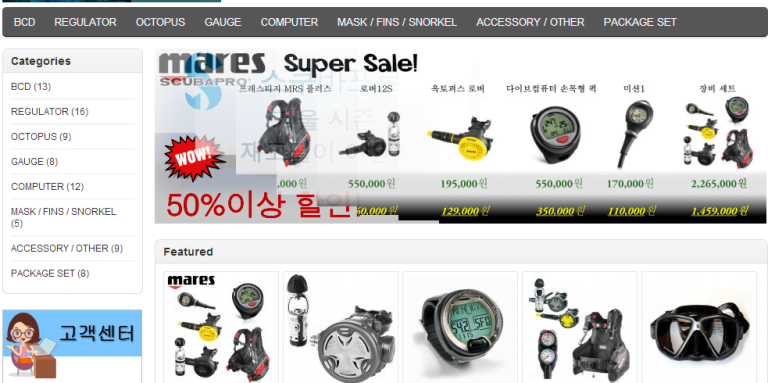
When we performed work at the scubattokki.com we have to remove Vqmod conflicts successfully for Opencart version 2. Some of the works we did are:

  • Remove the VqMOD conflict in opencart.
  • Checkout Steps decreased to two steps.
  • Registration pages change and address field changes
  • Korean Language translations
  • Many other small changes

How do we remove the VqMOD conflict?

They have used VqMOD like remove-add-to-cart-if-out-of-stock.xml, auto-reviews.xml,  disable_affiliate.xml,  ev_GridDefault.xml, featured-product-plus.xml, google_analytics_expert.xml, inmuto_hide_downloads.xml, inmuto_hide_wishlist.xml, remove-add-to-cart-if-out-of-stock.xml and many others like disabling captcha, etc

As they have used many VqMOD XML which changes the lines of codes and the remaining one does not find the code lines and occurs conflict likewise made the modifications on email format.

We checked what error is logged atVqMOD/logs and the files as per the day as we were working on Sunday so we checked at sun.log and find out what is the error and what search not found is logged. By this, we can know which XML is affected and we changed the code as per the requirement at a definite place to remove the conflict by this we were able to solve the conflict of VqMOD.

We have worked on the two-step quick checkout so that customers can easily check out by clicking only two clicks.

We have made many language changes as well as many CSS and registration page changes to hide the country, city, zone as he did not need them as all clients are from the locality.

About Scuba Bunny http://scubattokki.com/

Scuba Bunny
Scuba Bunny http://scubattokki.com/

At Scuba Bunny http://scubattokki.com/, they search the world for the best quality scuba equipment at the best prices. Why are our prices so low? We import all our products directly from our suppliers in the USA and Italy. With no middleman, we pass the savings on to you! All items at Scuba Bunny are guaranteed to be brand new, original brand name products. All products come with original serial numbers and full warranty certificates.

Let us know if you have any requirements.

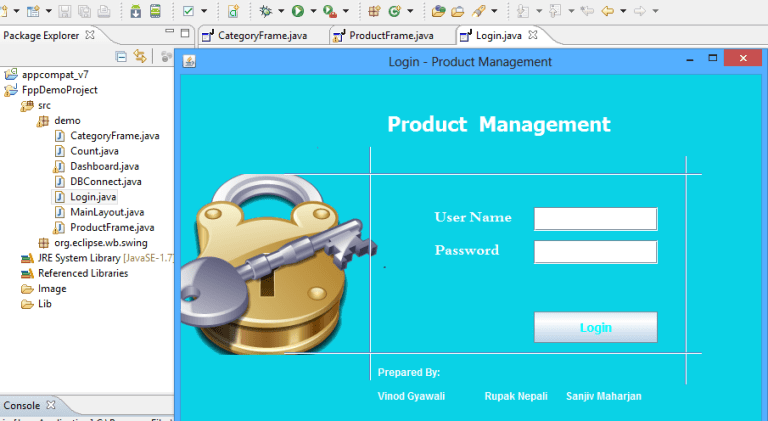
Simple Product Management System in Java

0

Hi,

Just started learning Java and have made simple product management system and hope it will be broadened to e-commerce system 🙂

I have uploaded the files at bitbucket.org and maintain the versions 🙂

Get details from the bitbucket https://bitbucket.org/rupaknpl/basic-java-ecommerce-class-project

Download the project

download button

I will soon write the description so that it will be helpful to understand the codes.

2000th title of Packt Publishing are launching an exciting campaign until 26th Mar 2014

0

2000th-Book-Home-Page-Banner

Let’s enjoy the campaign

Packt Publishing is launching an exciting campaign to coincide with the release of their 2000th title. During this offer, Packt is giving all its customers a chance to enjoy their books by giving them a free e-book copy for every purchase.

The campaign began on 18th March and will continue up until 26th Mar 2014.

You can find out who is using this offers by the social media hashtags #packt2k

Like for facebook, it is https://www.facebook.com/hashtag/packt2k, similar for the twitter and google plus.

If you want to excel in the OpenCart then you can get the following book

Getting Started With Opencart Module Development

Combined Checkout steps, shipping and payment addresses and methods on Opencart

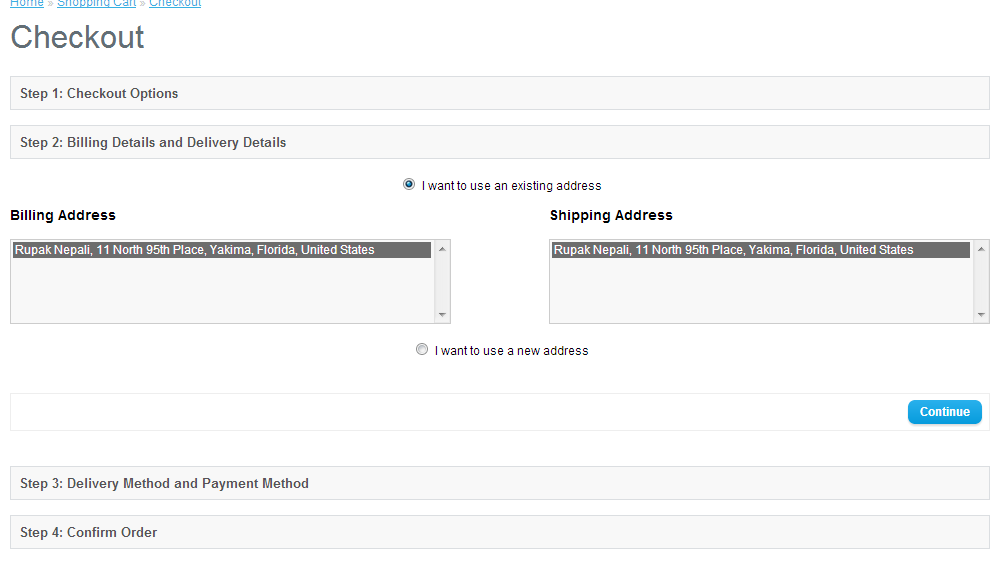
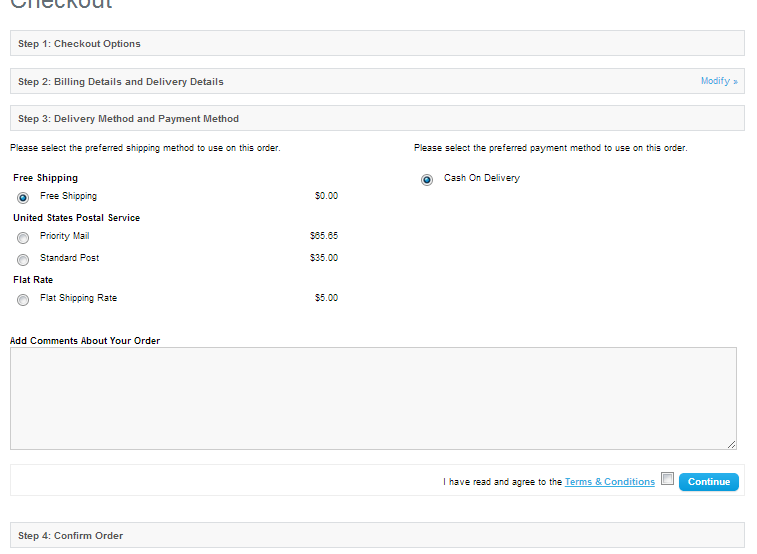
Today we completed two works to decrease the checkout steps where we have to combine the shipping and payment address at one as well as shipping and payment methods at another and transfer the shipping estimate to the shipping methods on the checkout step.

We made the shipping estimate on VqMOD and now the next work is to combine the checkout steps. Combine the shipping address and payment address at one step and shipping methods and payment methods on other steps.

checkout steps decreased
checkout_steps_decreased

When the customer has logged in and checkout then it will show Step 2: Billing Details and Delivery Details, if the customer likes to change the address then he has to insert the new address and choose from the select list. After clicking continue it will redirect to Step 3: Delivery Method and Payment Method, where he has to choose the delivery method and the payment method. Then on clicking the continue, it will redirect to the confirmed section.

checkout steps payment and shipping
checkout_steps_payment_and_shipping

If the products don’t have the shipping then no shipping address and shipping methods are shown.

Similarly, it works for the guest checkout.

Send me an email if you like similar work from the contact us form

Show Google Map at the contact us page and as module Opencart e-Commerce website

We are showing how to add Google Maps for opencart for free and show Google Maps on the contact us page and a module in the Opencart eCommerce website. This module works with VqMOD, if you like to manually insert the code read the post below which we will show how to do them.

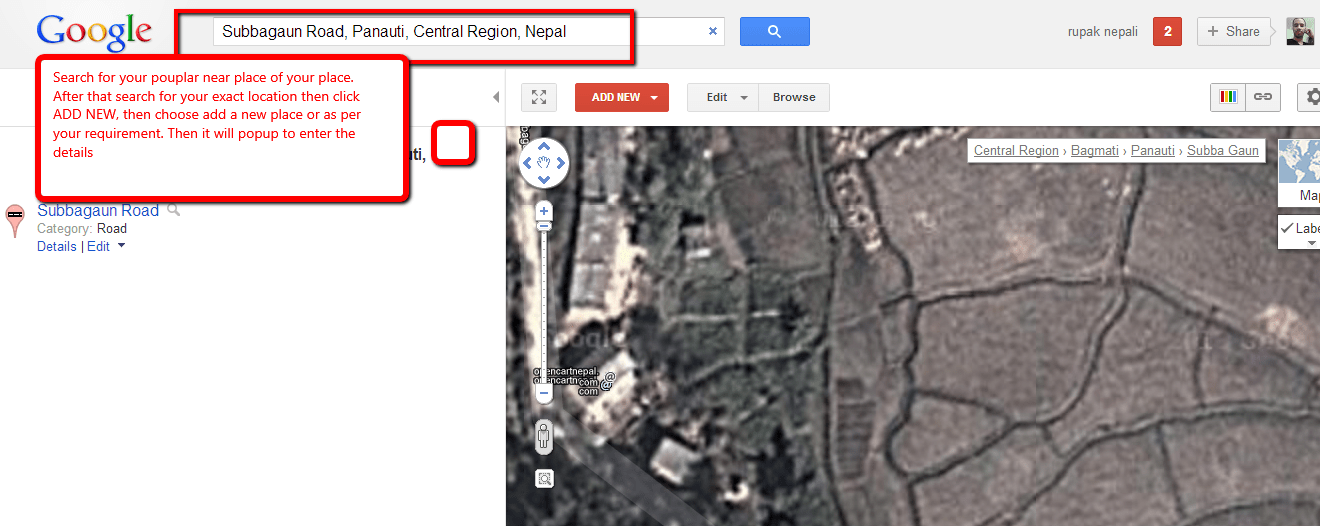
First, we like to show how to pin or add your shop locations on google maps. Go to http://www.google.com/mapmaker and search for the popular place near yours and zoom in to the map and see your exact location.

add your location to google map

Now click on the ADD NEW button and insert click to add the place and locate the red pin to your exact location and then insert the description as per required and SAVE. You can insert the phone, website, category, working hours, payment types, and so on.

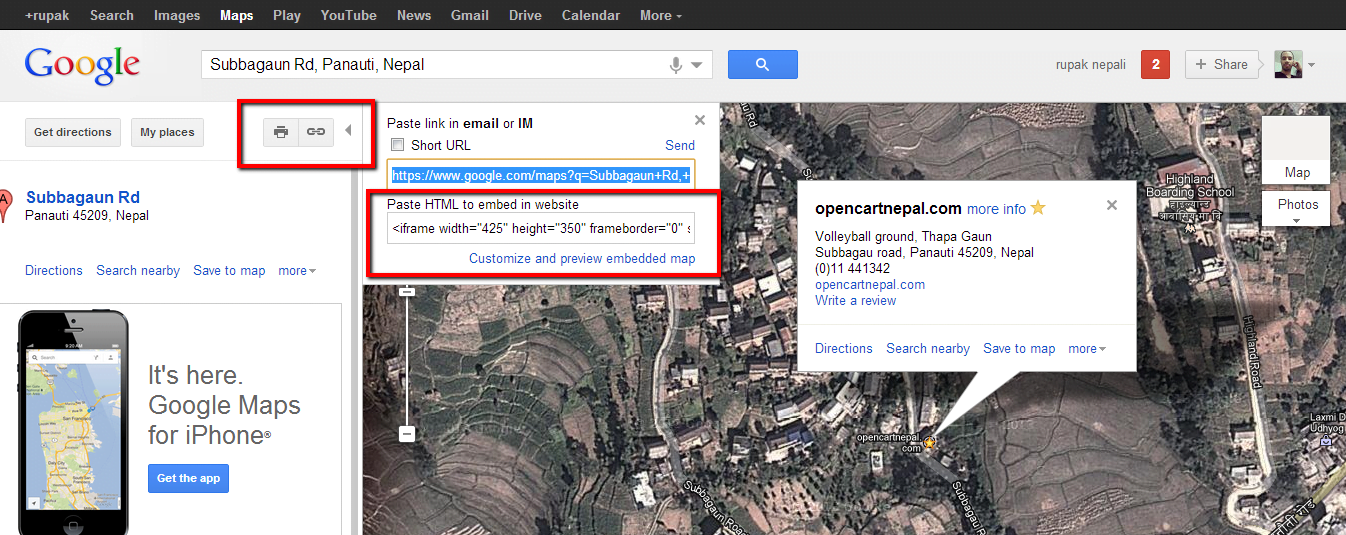
Now go to https://www.google.com/maps and search for your place and locate your place and pinned location. Google Maps will not instantly show your recently inserted location or shop. When you find your shop or location, then click on the red pin and it shows the details after that click on the link icon at the right (see the red box in the image below)

Google map at the opencart store
how to show the shop at the google map

Now find the HTML code and paste it into our contact google map module.

Now time to download the module and upload it to the respective directory.

Download Google Map Module Demo of Google Map

INSTALLATION OF FILES:

1 Unzip in the folder.
2 Upload the files inside the googlemap folder to your OpenCart root folder.
3 In admin, go to Extension>> Module >>Google Map and install the module and edit.

Now time to insert the iframe HTML code that we get from the Google Map from above. Please edit the iframe width to 100% and height as per your requirement.

For mine code looks like below

<iframe width=”100%” height=”350″ frameborder=”0″ scrolling=”no” marginheight=”0″ marginwidth=”0″ src=”https://www.google.com/maps/ms?msa=0&amp;msid=215707624648835363542.0004d48fa8b68dbc004b0&amp;ie=UTF8&amp;ll=27.597546,85.521119&amp;spn=0,0&amp;t=h&amp;iwloc=0004d48fa8bb305cc3dfb&amp;output=embed”></iframe><br /><small>View <a href=”https://www.google.com/maps/ms?msa=0&amp;msid=215707624648835363542.0004d48fa8b68dbc004b0&amp;ie=UTF8&amp;ll=27.597546,85.521119&amp;spn=0,0&amp;t=h&amp;iwloc=0004d48fa8bb305cc3dfb&amp;source=embed” style=”color:#0000FF;text-align:left”>opencartnepal.com</a> in a larger map</small>

Then add the module to where you like to show in the layout. One of the interesting things of this module is that it will show google map  in the contact us page just below the details of the contact.

Vqmod is needed to show the google map at the contact us page. If you don’t like to show it at the contact us page then you have to delete the googlemap.xml at the VqMOD and install the module pack. If you don’t have the v=VqMOD and like to show the google map at the contact us page then you can easily use the module set to show at the contact layout.

COPYRIGHT:

This module code is the intellectual property of mine as an Opensource code you are entitled to use it freely and modify it if you wish but please keep the credits intact.

Bulk transfer of Products, categories and manufacturer between stores on Opencart Ecommerce Store

Bulk transfer of products, categories, and manufacturers to stores on Opencart eCommerce store

If you have already inserted the products and want to add the store in the Opencart eCommerce store, after this transferring the products to the store is quite tedious. You have to go to each product and check for the store and click save, to remove this tediousness, we have created the bulk transfer of products which helps in transferring the products between the stores of Opencart eCommerce.

INSTALLATION OF FILES:

1 Unzip in the folder.
2 Upload the files inside the bulk_transfer folder to your OpenCart root folder.
3 In admin, go to Catalog >> Bulk Category Transfer or Catalog >> Bulk Product Transfer or Catalog >> Bulk Manufacturer Transfer
4 vQmod is needed for the backend to see the Catalog >> Bulk Category Transfer etc

If you don’t have the vQmod installed then you have to insert the following lines at admin/view/template/common/header.tpl

<li><a href=”index.php?route=catalog/portal_category&token=<?php echo $this->session->data[‘token’]; ?>”>Bulk Category Transfer</a></li>
<li><a href=”index.php?route=catalog/portal_instructor&token=<?php echo $this->session->data[‘token’]; ?>”>Bulk Manufacturer Transfer</a></li>
<li><a href=”index.php?route=catalog/portal_product&token=<?php echo $this->session->data[‘token’]; ?>”>Bulk Product Transfer</a></li>

Just below the

<li><a href=”<?php echo $information; ?>”><?php echo $text_information; ?></a></li>

and you will see the Catalog >> Bulk Category Transfer or Catalog >> Bulk Product Transfer or Catalog >> Bulk Manufacturer Transfer

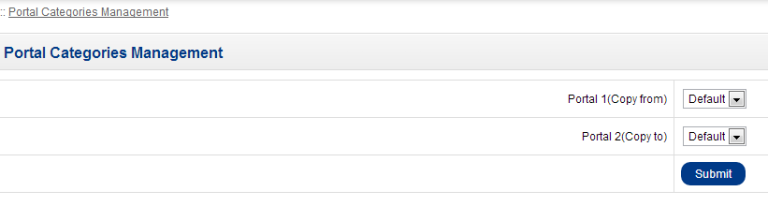
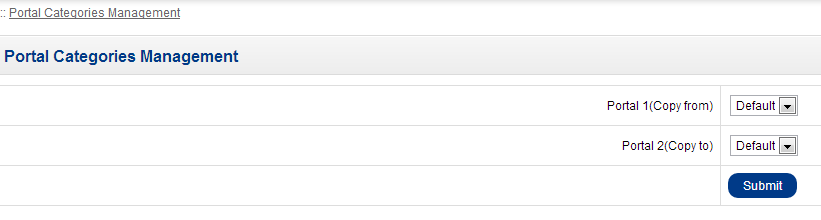
5. When you click the Catalog >> Bulk Category Transfer, you will see two list of stores

product, categories and manufacturer bulk transfer in Opencart

Portal 1 or store 1 is from where you are copying the categories and portal 2 or store 2 is to where you are copying the categories.

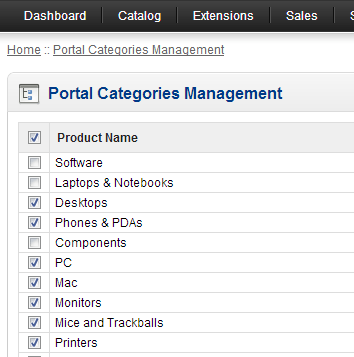
After choosing the portals or stores, you will be able to see the list of categories that are not already in portal 2.

For eg. if Desktop is already in portal 2 then it will not show in the list.

If you don’t want to transfer some of the category then unchecked the checkbox and click save. Unchecked will not be transferred.

Bulk transfer categories in Opencart

In the above figure the software, laptops and notebooks and components are not transferred to the portal 2 or store 2

By this same process, we can transfer products and manufacturers.

If you get the following message

Permission Denied!

You do not have permission to access this page, please refer to your system administrator.

====

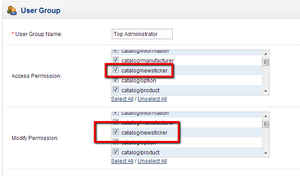
Go to the System >> Users >> User Groups and edit the Top Administrator and then check as in the figure:

permission opencart

permission for bulk transfer

It means we have to give permission to catalog/portal_category, catalog/portal_instructor, catalog/portal_product.

SEE MORE: Opencart Extension for free

Show the first four categories in the menu in OpenCart

Today we provide support to Opencart forum that someone appreciates my work as we have helped him with his e-commerce designs to show the first four menu items in Opencart.

We simply changed the code and posted it on the forum and his reply was:

You, my friend, are a legend! That is exactly what I was looking for. Thank you so much! its really appreciated. I just checked out your website, some useful information on there, bookmarked 

What was the problem and how I solved it?

Solution:

<?php if ($categories) { ?>
<div id="menu">
<ul>
<?php foreach ($categories as $key=>$category) { if($key<4){ ?>
<li><a href="<?php echo $category['href']; ?>"><?php echo $category['name']; ?></a>
<?php if ($category['children']) { ?>
<div>
<?php for ($i = 0; $i < count($category['children']);) { ?>
<ul>
<?php $j = $i + ceil(count($category['children']) / $category['column']); ?>
<?php for (; $i < $j; $i++) { ?>
<?php if (isset($category['children'][$i])) { ?>
<li><a href="<?php echo $category['children'][$i]['href']; ?>"><?php echo $category['children'][$i]['name']; ?></a></li>
<?php } ?>
<?php } ?>
</ul>
<?php } ?>
</div>
<?php } ?>
</li>
<?php } } ?>
</ul>
</div>
<?php } ?>

Changes done are bolded.

School of Computing and Technology, UML Component Modelling Assignment

2
University of West London
School of Computing and Technology

Student Assignment S1

Title UML Component Modelling Assignment
Module UML Component Modelling
Module Code CP70008E
Module Leader: DrNasser Matoorian
Set by: DrNasser Matoorian
Moderated by: Dr Samia Oussena
Assignment Assignment
Hand in arrangements The modelling element 3 of this assignment must be submitted via Blackboard.
Structure of assignment This assignment has three elements. The learning outcomes of the module are assessed by a successful completion of the elements.
Element Type Weighting Due Date
1 In-class Viva and Presentation (Business Process Model) 5 Week 8 – Nov 21, 2012
2 In-class Viva and Presentation (Use Case Models and Business Concepts) 15 Week 11 – December 12, 2012
3 Component Model 80 Week 14 – Friday Jan 18, 2013
Extensions will only be granted in exceptional circumstances. Extensions will be for 10 days or less. Documentary evidence will be required. Extensions must be agreed before the deadline.  Submissions up to one week late with no extension will be marked with a maximum mark of 50%.
Learning outcomes 1 Analyse and design component based architecture solutions
2 Evaluate and articulate the rationale for alternate component implementation technologies.
3 Display mastery of knowledge in current and future software development practice using component based approaches
4 To understand modern approaches to component implementation technologies.
Element 1
Title In-class Viva and Presentation (Business Process Model)
Task details A case study accompanies this section of the assignment. It describes the requirement for a system within a business context. You will need to make assumptions in the course of constructing your models. Ensure you submit a list of these assumptions with your assessment elements as appropriate. If you are at all unsure about the case study description you should ask questions within the seminars/workshops. The Tutors will be moderating the discussion boards. The diagrams must be completed using a CASE tool (starUMLis a suitable tool).You need to present the BPM elements of your work to your tutor and be able to answer questions.
Marking Guide Criteria Issues Mark Marking breakdown where appropriate
Business Process Model A Process Model with appropriate tasks. 5
Element 2
Title In-class Viva and Presentation (Use Case Models and Business Concepts)
Task details A case study accompanies this section of the assignment. It describes the requirement for a system within a business context. You will need to make assumptions in the course of constructing your models. Ensure you submit a list of these assumptions with your assessment elements as appropriate. If you are at all unsure about the case study description you should ask questions within the seminars/workshops. The Tutors will be moderating the discussion boards. The diagrams must be completed using a CASE tool (starUMLis a suitable tool).

You need to present the Use case diagram and the Business Concepts diagram of your work to your tutor and be able to answer questions.

Marking Guide Criteria Issues Mark Marking breakdown where appropriate
 
Use Case Model 


Business Concepts


Type Model

A Use Case diagram showing the system, the actors and the use cases for the system.

A class diagram showing all the key concepts in the case study and their relationships.

A class diagram showing Core Types and Business Components

5

5

5

Element 3
Title Component Model
Task details A case study accompanies this section of the assignment. It describes the requirement for a system within a business context. You will need to make assumptions in the course of constructing your models. Ensure you submit a list of these assumptions with your assessment elements as appropriate. If you are at all unsure about the case study description you should ask questions within the seminars/workshops. The Tutors will be moderating the discussion boards. The diagrams must be completed using a CASE tool (starUML is a suitable tool).
Marking Guide Criteria Issues Mark Marking breakdown where appropriate
Business Process Model A Process Model for each key life-cycle in the application. Swim lanes Indentified with appropriate tasks. 10
Use Case Model A Use Case diagram showing the system, the actors and the use cases for the system. Each Use Case should have a description including a scenario. Careful to show extensions and exceptions where appropriate. 20 Diagram and Explanation (10)

Use Case Descriptions (10)

Business Concepts A class diagram showing all the key concepts in the case study and their relationships. 15
Type Model A Type model class diagram showing appropriate core types and business component. 15
Component Specifications Business rules (invariants), identification of business and system interfaces. 10 Business Rules (5)

System Interfaces (5)

Component Architecture Component Diagram showing links between interfaces and a description of the communication between components via the interfaces. 10 Component Architecture (5)

Interaction Diagrams (5)

Grade descriptors
In addition to the assessment criteria above the following table may assist you in understanding how we arrive at your final mark. Indeed your final mark should agree with the following grade descriptors, but note that the assessment criteria are the main means of assessment.
Mark Descriptor
0-39% Limited conceptual understanding with possible structural deficiencies.  Restricted use of theory within module.  Inappropriate argument leading to unreliable and invalid conclusions/recommendations
40-49% Some confusion in purpose & aims of evaluation.  Some overall structure and conceptual understanding. Fair use of theory but arguments sometimes irrelevant, illogical or with unsupported assertions.
50-59% Demonstrates a limited but accurate level of understanding presented in a mostly descriptive manner. The answer contains relevant interpretation and critical understanding especially at the upper end of the marking range.
60-69% Demonstrates accurate knowledge and understanding of the subject presented in a coherent manner. The answer contains evidence of application and interpretation. At the upper end there is evidence of thoughtful and measured critical evaluation.
70-79% Demonstrates a clear, comprehensively researched understanding of relevant material with some element of critical evaluation. Shows initiative in approach and rigour in the handling of information. Demonstrates originality of thought together with interpretation and application to the relevant sector
80% or above The answer is analytical and critical. The assignment demonstrates scholarship through a depth of insight and understanding of relevant material, which is logically structured, accurate and well referenced. Originality of thought and application is evident.

Case Study

LH Medical Company (LHM)

LHM is a London based privately owned hospital which provides health care to its patients. The hospital uses in-house software to manage and service its patients which they refer to as clients.  It is an expanding venture and needs to accommodate for processing its information globally. The practice management system is web-enabled and multi-platform for connectivity via web services, in addition, it has connectivity to existing legacy systems. An enterprise document management system ensures patient documents are replicated globally and available per demand.

In addition to medical treatments, medicine, and drugs, consultation and vaccinations are offered to its patients (with a variable additional fee) the company offers medical instruments to other companies either to purchase or to lease.

LHM records the details of its clients with possibly their full medical history in their computer system.  When a new patient requests an appointment (walk-in or online) a treatment course begins and a practitioner is allocated to the patient. A full history and previous medical records are printed showing different categories of Treatments during different time intervals. Analyses are drawn in terms of any possible allergies and previous histories. Treatments may involve many surgeons and consultants depending on its complexity.

The contact practitioner is responsible for estimating the costs of treatments that is agreed by the client at the start of the treatment. The duration of the treatment may be set at any time duration and may also be changed during the treatment depending on the complexity of possible operations.  The final cost and completion date are recorded at the end of the treatment.

During a treatment process, notifications may be sent to patients and other practitioners.

Repeat prescriptions may automatically be produced by the system if appropriate and are available for collection at any surgery by the patient. At any time a practitioner may suspend or cancel the prescriptions.

The cost for a treatment is paid for by the client or an insurance policy provided by a number of insurers. Insurance policies may have additional surcharges and cost depending on treatment types and medicines. Long-term treatment courses may be edited or canceled by practitioners or clients. To re-start an existing treatment an additional fee is applied.

LHM may receive requests for specialise treatments from other hospitals or they may refer clients to other medical centres.

Each treatment course or service may include one or more of the following items:

  • Operations and vaccinations
  • Consultations and check-up
  • Medicine and different types of tablets
  • Clinical reports and attached documents and history
  • Prescriptions and repeat Prescriptions

Payments by clients may be in full or part payments to cover a range of medical and non-medical services offered by the company. Payments may include possible applied surcharges for late payments and or special discounts for long-term treatments.  Tax allocations may also vary from one treatment item to another.  Payments have to accommodate for price changes for medicines and medical services and track price changes for drugs purchased from pharmaceutical companies.

A treatment course comprising services from other hospitals carry additional changes set by the medical service providers. A full list of Treatment courses with corresponding payments may be requested by the site manager at any time. Clients’ outstanding balances may be retrieved at any time for current treatment and services indicating the payments for the treatment course.

Answer:

Show products on bestseller module manually into Opencart

If you are an admin you can do the following steps:

1. Make one fake customer.
2. Set the site into Maintenance Mode, be sure you keep on logging to the admin
3. Now activate the Cash on the Delivery method of payment.
4. Complete the buying process with many quantities with the use of the Cash on the delivery payment method

In this way, we can show the products into the best sellers.

If you are looking to show or add the bestseller module in pages then this video will help you:

Free Opencart theme, template for free by Shyn (An Opencart User)

Today I am very amazed why the following templates are free. I was just searching for the free template found out a bunch of themes that are free and have a great standard.

For free opencart 3 theme click here.

For OpenCart 2.3.0.2 I am creating my own free OpenCart theme for free, but it is still in development, you can check here.

Demo for the NepalEverest OpenCart free theme

You can pre-order it and I will provide you files once I published my first version. Enjoy.

These templates are provided by Shyn who is an Opencart user. You can see the following link to download directly from opencart extension section

https://www.opencart.com/index.php?route=marketplace/extension&filter_category_id=1&filter_license=0

https://www.opencart.com/index.php?route=marketplace/extension&filter_member=shyn

You can download the premium opencart theme for free. They are a really premium opencart theme. I really love them.

best opencart theme for free
the best opencart theme for free

The best theme I found among them is Miwa Pink OpenCart Theme but all others are also best.

Themes that Shyn providing for free are:

  1. Theia OpenCart Theme
  2. HYLA OpenCart Theme
  3. Palioxis OpenCart Theme
  4. EmptyWhite OpenCart Theme
  5. Neon Light OpenCart Theme
  6. Calm OpenCart Theme
  7. Techbee OpenCart Theme
  8. Miwa Pink OpenCart Theme
  9. Miwa OpenCart Theme
  10. T5 OpenCart Theme

I hope he/she will keep supporting the opencart community for free, really appreciate the good work or best theme for free.

Thanks a lot to Shyn