The solution to Homework 5.1 (Hands-On) M101JS: MongoDB for Node.js Developers

Homework: Homework 5.1 (Hands-On)

Finding the most frequent author of comments on your blog

In this assignment, you will use the aggregation framework to find the most frequent author of comments on your blog. We will be using the same basic dataset as last week, with posts and comments shortened considerably, and with many fewer documents in the collection in order to streamline the operations of the Hands-On web shell.

Use the aggregation framework in the web shell to calculate the author with the greatest number of comments.

Just to clarify, the data set for this week is not available for download.

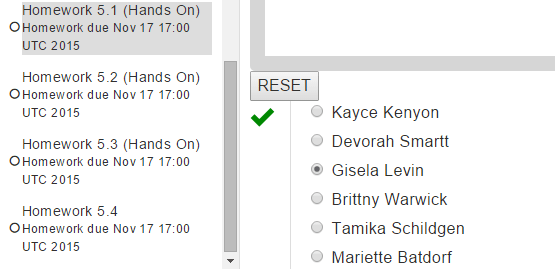
To help you verify your work before submitting, the author with the fewest comments is Cody Strouth and he commented 68 times.

Once you’ve found the correct answer with your query, please choose your answer below for the most prolific comment author.

Note: this data set is relatively large. Due to some quirks of the shell, the entire result set gets pulled into the browser on find(), so if you want to see the document schema, we recommend either using db.posts.findOne(), db.posts.find().limit(1), or that you plan on waiting for a bit after you hit enter. We also recommend that the last phase of your aggregation pipeline is {$limit: 1} (or some single-digit number)

Solution:

Run the following query and you will get the answers.

db.posts.aggregate([
    { $unwind: "$comments" },
    { $group: { _id: "$comments.author", count: { $sum: 1 } } },
    { $sort: { count: -1 } },
    { $limit: 1 }
])
hw5.1answer

The solution to HOMEWORK 4.3 M101JS: MongoDB for Node.js Developers

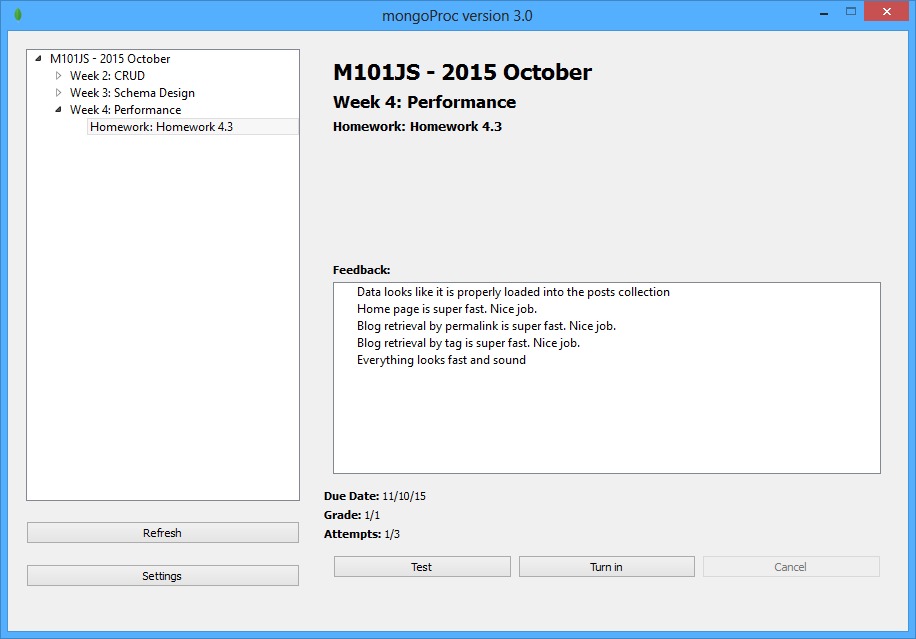
HOMEWORK: HOMEWORK 4.3 Solution to HOMEWORK 4.3 M101JS: MongoDB for Node.js Developers

NOTE there is a bug (TOOLS-939) affecting some versions of mongoimport and mongorestore that causes mongoimport -d blog -c posts < posts.json to fail. As a workaround, you can usemongoimport -d blog -c posts < posts.json --batchSize 1.If you have any difficulty using MongoProc, here are 2 video lectures showing how to set it up.

You will need to download one of the following versions of the MongoProc client, which will verify on your local machine (port 8082) that the signup and login pages of the blog work properly.

Download MongoProc

Making the Blog fast to get started, please download hw4-3.zip from the Download Handout link and unpack the file to your computer. This assignment requires Mongo 2.2 or above.

In this homework assignment, you will be adding some indexes to the post-collection to make the blog fast.

We have provided the full code for the blog application and you don’t need to make any changes, or even run the blog. But you can, for fun.

We are also providing a patriotic (if you are an American) data set for the blog. There are 1000 entries with lots of comments and tags. You must load this dataset to complete the problem.

# from the mongo shell
use blog
db.posts.drop()
# from the a mac or PC terminal window
mongoimport -d blog -c posts < posts.json

The blog has been enhanced so that it can also display the top 10 most recent posts by tag. There are hyperlinks from the post tags to the page that displays the 10 most recent blog entries for that tag. (run the blog and it will be obvious)

Your assignment is to make the following blog pages fast:

  • The blog home page
  • The page that displays blog posts by tag (http://localhost:8082/tag/whatever)
  • The page that displays a blog entry by permalink (http://localhost:8082/post/permalink)

By fast, we mean that indexes should be in place to satisfy these queries such that we only need to scan the number of documents we are going to return.

To figure out what queries you need to optimize, you can read the code in posts.js and see what queries it is doing to return the data needed for the relevant pages. Isolate those queries and use explain to explore.

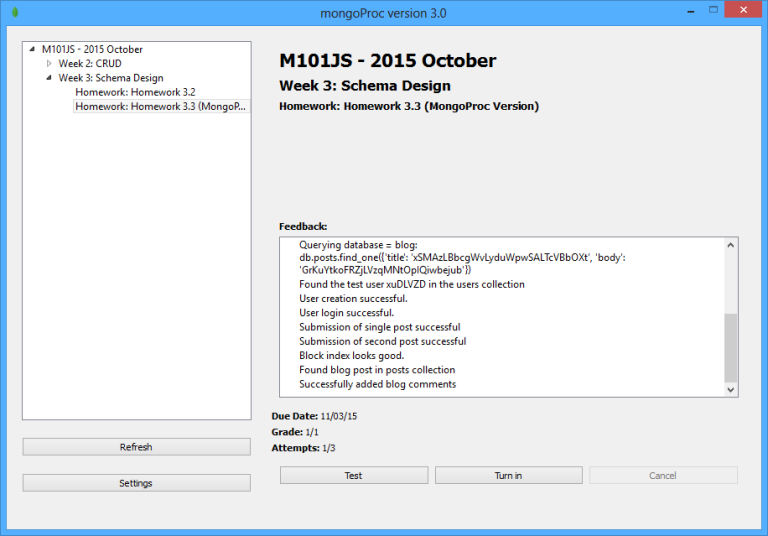
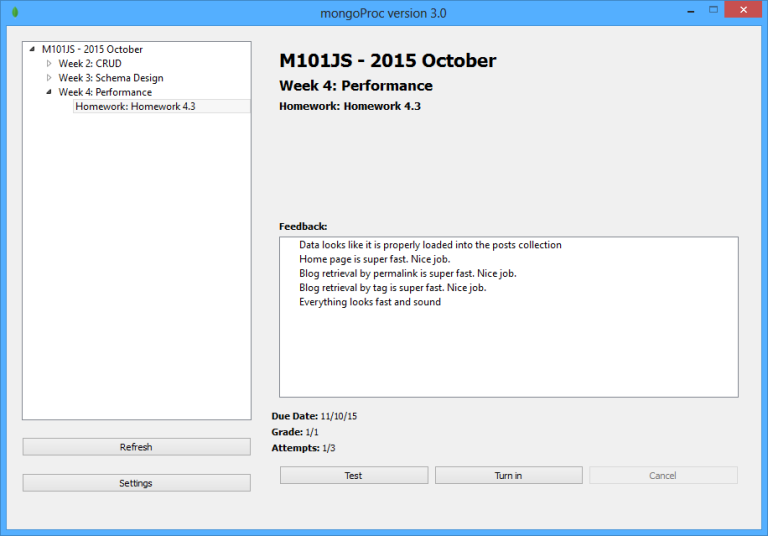
Once you have added the indexes to make those pages fast, just validate your work with MongoProc. Correct You have used 1 of 3 submissions.


Solutions:
Run the following queries one by one and submit it.

db.posts.ensureIndex({ date : -1})
db.posts.find({date : -1}).limit(10).explain()
db.posts.ensureIndex({ tags : 1, date : -1})
db.posts.find({tags : 'vietnam'}).sort({ date : -1}).explain()
db.posts.ensureIndex({ permalink : 1})
db.posts.find({permalink: "xnafqemtzzcyyzjdegkj"}).explain()
hw4.3answer

The solution to HOMEWORK 4.1 M101JS: MongoDB for Node.js Developers

The solution to HOMEWORK 4.1 M101JS: MongoDB FOR NODE.JS DEVELOPERS

Suppose you have a collection with the following indexes:

> db.products.getIndexes()
[
	{
		"v" : 1,
		"key" : {
			"_id" : 1
		},
		"ns" : "store.products",
		"name" : "_id_"
	},
	{
		"v" : 1,
		"key" : {
			"sku" : 1
		},
                "unique" : true,
		"ns" : "store.products",
		"name" : "sku_1"
	},
	{
		"v" : 1,
		"key" : {
			"price" : -1
		},
		"ns" : "store.products",
		"name" : "price_-1"
	},
	{
		"v" : 1,
		"key" : {
			"description" : 1
		},
		"ns" : "store.products",
		"name" : "description_1"
	},
	{
		"v" : 1,
		"key" : {
			"category" : 1,
			"brand" : 1
		},
		"ns" : "store.products",
		"name" : "category_1_brand_1"
	},
	{
		"v" : 1,
		"key" : {
			"reviews.author" : 1
		},
		"ns" : "store.products",
		"name" : "reviews.author_1"
	}

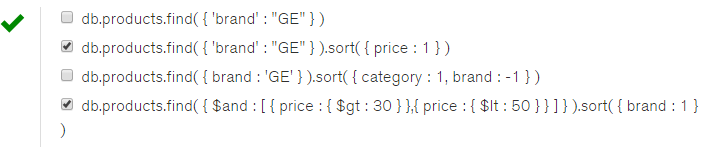
Which of the following queries can utilize at least one index to find all matching documents or to sort? Check all that apply.

hw4.1answer

Solutions:
db.products.find( { ‘brand’ : “GE” } ).sort( { price : 1 } )
db.products.find( { $and : [ { price : { $gt : 30 } },{ price : { $lt : 50 } } ] } ).sort( { brand : 1 } )  

I have submitted those two answers and found it to be correct.
Let me know if you have any problems.

Final: Question 6 Solution M101JS: MongoDB for Node.js Developers

Final: Question 6

Suppose you have a collection of students of the following form:

{
	"_id" : ObjectId("50c598f582094fb5f92efb96"),
	"first_name" : "John",
	"last_name" : "Doe",
	"date_of_admission" : ISODate("2010-02-21T05:00:00Z"),
	"residence_hall" : "Fairweather",
	"has_car" : true,
	"student_id" : "2348023902",
	"current_classes" : [
		"His343",
		"Math234",
		"Phy123",
		"Art232"
	]
}

Now suppose that basic inserts into the collection, which only include the last name, first name, and student_id, are too slow (we can’t do enough of them per second from our program). What could potentially improve the speed of inserts? Check all that apply.

Solution: I selected as in the image, please let me know if there are any correct answer.

final_exam_question_6

Final: Question 4 Solution M101JS: MongoDB for Node.js Developers

Final: Question 4

Enhancing the Blog to support viewers liking certain comments
In this problem, you will be enhancing the blog project to support users liking certain comments and the like counts showing up in the permalink page. Start by downloading Final4.zip and posts.json from the Download Handout link and loading up the blog dataset posts.json. The user interface has already been implemented for you. It’s not fancy. The /post URL shows the like counts next to each comment and displays a Like button that you can click on. Like button POSTS to the /like URL on the blog, makes the necessary changes to the database state (you are implementing this), and then redirect the browser back to the permalink page.

This full round trip and redisplay of the entire web page is not how you would implement liking in a modern web app, but it makes it easier for us to reason about, so we will go with it.

Your job is to search the code for the string “TODO: Final exam question – Increment the number of likes” and make any necessary changes. You can choose whatever schema you want, but you should note that the entry_template makes some assumptions about how the like value will be encoded and if you go with a different convention than it assumes, you will need to make some adjustments.

The validation script does not look at the database. It looks at the blog.

The validation script, final4-validate.js, will fetch your blog, go to the first post’s permalink page and attempt to increment the vote count. You run it as follows:

node final4-validate.js

Remember that the blog needs to be running as well as Mongo. The validation script takes some options if you want to run outside of the localhost.
After you have gotten it working, enter the validation string below.Solution: VQ3jedFjG5VmElLTYKqS   How do I achieve the result?

  • Open blog.js file and find following lines: // TODO: Final exam question – Increment the number of likes callback(Error(“incrementLikes NYI”), null);
  • Replace above lines with following lines var selector = {}; selector[‘comments.’ + comment_ordinal + ‘.num_likes’] = 1; posts.update({‘permalink’: permalink}, {‘$inc’: selector}, function(err, numModified) { if (err) return callback(err, null); callback(err, numModified); }); //callback(Error(“incrementLikes NYI”), null);
  • Now check it by running blog with “node app.js” and go to blog’s detail and click like button
  • Run validation by command line “node final4-validate.js” Trying to fetch blog homepage for url http://localhost:3000/ Trying to grab the number of likes for url http://localhost:3000/post/mxwnnnqaflufnqwlekfd Trying to increment the number of likes for post: /post/mxwnnnqaflufnqwlekfd Trying to grab the number of likes for url http://localhost:3000/post/mxwnnnqaflufnqwlekfd Successfully clicked like Blog validated successfully! Your validation code is: VQ3jedFjG5VmElLTYKqS
final_exam_question_4
  • Validation code that I found is VQ3jedFjG5VmElLTYKqS

Answer may vary for you so please verify for yourself.

Thanks

Final: Question 3 Solution M101JS: MongoDB for Node.js Developers

Final: Question 3

In this problem, you will update a document in the Enron dataset to illustrate your mastery of updating documents from the shell.

Please add the email address “mrpotatohead@mongodb.com” to the list of addresses in the “headers. To” array for the document with “headers.Message-ID” of “<8147308.1075851042335.JavaMail.evans@thyme>”

After you have completed that task, please download final3.zip from the Download Handout link and run final3-validate.js to get the validation code and put it in the box below without any extra spaces. The validation script assumes that it is connecting to a simple mongo instance on the standard port on the localhost.

Solution: vOnRg05kwcqyEFSve96R  

How to achieve it?

  • Extract the downloaded handout
  • In the first command prompt, go to the Final3 folder where you will see final3-validate.js and package.json files.
  • Now run “npm install”
  • Now open your mongo shell with mongod in second command prompt and again in third command prompt mongo
  • Run command “show databases” and see whether Enron is there or not if install from final question 2 nor run query “use enron”
  • Run the following query:
    db.messages.update({“headers.Message-ID”:”<8147308.1075851042335.JavaMail.evans@thyme>”}, {$addToSet: {“headers.To”: “mrpotatohead@mongodb.com”}}, {multi: 1})
  • Now run the command “node final3-validate.js”  in first command prompt
  • You will see something like below:

    Welcome to the Final Exam Q3 Checker. My job is to make sure you correctly updated the document
    Final Exam Q3 Validated successfully!
    Your validation code is: vOnRg05kwcqyEFSve96R
  • Thus my answer is “vOnRg05kwcqyEFSve96R”
  • It may differ to yours so please confirm before submitting.

Thanks

Final: Question 2 Solution M101JS: MongoDB for Node.js Developers

Final: Question 2

Please use the Enron dataset you imported for the previous problem. For this question, you will use the aggregation framework to figure out pairs of people that tend to communicate a lot. To do this, you will need to unwind the To list for each message.

This problem is a little tricky because a recipient may appear more than once in the To list for a message. You will need to fix that in a stage of the aggregation before doing your grouping and counting of (sender, recipient) pairs.

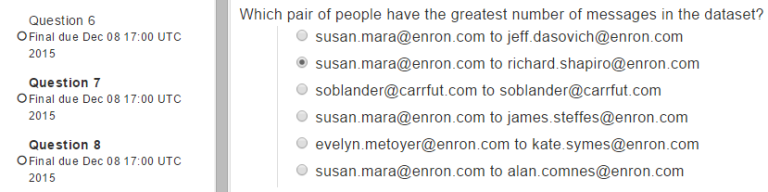
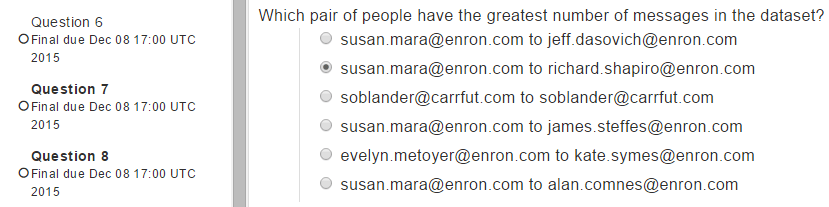
Which pair of people have the greatest number of messages in the dataset?

Solution:   Query to run as per the question is below as per my understanding:

db.messages.aggregate([
	{$project: {
		from: "$headers.From",
		to: "$headers.To"
	}},
	{$unwind: "$to"},
	{$project: {
		pair: {
			from: "$from",
			to: "$to"
		},
		count: {$add: [1]}
	}},
	{$group: {
		_id: "$pair",
		count: {$sum: 1}
	}},
	{$sort: {
		count: -1
	}},
	{$limit: 2},
	{$skip: 1}
])

Results that I found is below:

{ "_id" : { "from" : "susan.mara@enron.com", "to" : "richard.shapiro@enron.com" }, "count" : 974 }
final_exam_question_and-answer-2

Let me know if you guys find extra so that we can discuss it.

Thanks

The solution Homework 3.3 M101JS: MongoDB for Node.js Developers

The solution homework 3.3 M101JS: MongoDB for Node.js Developers

Making your blog accept comments

In this homework, you will add code to your blog so that it accepts comments. Download and unpack the files for this homework from the Download Handout link. You will be using the same code as you downloaded for homework 3.2, along with the changes you made.

We have removed parts of the code that uses the Node.js driver to query MongoDB from posts.js and marked the area where you need to work for HW 3.3 with “hw3.3 TODO”.

In a terminal:

Linux/Mac:

cd blog/ 
grep -rn "hw3.3 TODO" *

Windows:

cd blog/ 
find /n "hw3.3 TODO" *

You should not need to touch any other code. The database call that you are going to add will add a new comment to a given post.

This assignment has fairly little code, but it’s a little more subtle than the previous assignment because you are going to be manipulating an array within the Mongo document. For the sake of clarity, here is a document out of the posts collection from a working project that also has comments.

{
"_id" : ObjectId("513d396da0ee6e58987bae74"),
"author" : "andrew",
"body" : "Representatives from the planet Mars announced today that the planet would adopt MongoDB as a planetary standard. Head Martian Flipblip said that MongoDB was the perfect tool to store the diversity of life that exists on Mars.",
"comments" : [
{
"author" : "Larry Ellison",
"body" : "While I am deeply disappointed that Mars won't be standardizing on a relational database, I understand their desire to adopt a more modern technology for the red planet.",
"email" : "larry@oracle.com"
},
{
"author" : "Salvatore Sanfilippo",
"body" : "This make no sense to me. Redis would have worked fine."
}
],
"date" : ISODate("2013-03-11T01:54:53.692Z"),
"permalink" : "martians_to_use_mongodb",
"tags" : [
"martians",
"seti",
"nosql",
"worlddomination"
],
"title" : "Martians to use MongoDB"
}

As a reminder, to run your blog, go into the blog directory and type:

npm install
node app.js

Note that you add comments in this blog from the blog post detail page, which appears at

http://localhost:8082/post/post_slug

where post_slug is the permalink. For the sake of eliminating doubt, the permalink for the example blog post above is

http://localhost:8082/post/martians_to_use_mongodb

Ok, now it’s time to validate you got it all working.

From the top of this page, there was one additional program that should have been downloaded:mongoProc.

With it, you can test your code and look at the Feedback section. When it says “user creation successful” and “user login successful”, you can Turn in your assignment.

Solution:

Open blog/user.js and paste following codes or make changes near hw3.3

/* The PostsDAO must be constructed with a connected database object */
function PostsDAO(db) {
    "use strict";

    /* If this constructor is called without the "new" operator, "this" points
     * to the global object. Log a warning and call it correctly. */
    if (false === (this instanceof PostsDAO)) {
        console.log('Warning: PostsDAO constructor called without "new" operator');
        return new PostsDAO(db);
    }

    var posts = db.collection("posts");

    this.insertEntry = function (title, body, tags, author, callback) {
        "use strict";
        console.log("inserting blog entry" + title + body);

        // fix up the permalink to not include whitespace
        var permalink = title.replace( /\s/g, '_' );
        permalink = permalink.replace( /\W/g, '' );

        // Build a new post
        var post = {"title": title,
                "author": author,
                "body": body,
                "permalink":permalink,
                "tags": tags,
                "comments": [],
                "date": new Date()}

        // now insert the post
        // hw3.2 TODO

        //Solution:
        //callback(Error("insertEntry NYI"), null);
        posts.insert(post,function(err,result){
            if(!err){
                console.log("Post inserted " + result[0].permalink);
                return callback(null, result[0].permalink);
            }
            return callback(err, null);
        });
    }

    this.getPosts = function(num, callback) {
        "use strict";

        posts.find().sort('date', -1).limit(num).toArray(function(err, items) {
            "use strict";
            if (err) return callback(err, null);
            console.log("Found " + items.length + " posts");
            callback(err, items);
        });
    }

    this.getPostsByTag = function(tag, num, callback) {
        "use strict";

        posts.find({ tags : tag }).sort('date', -1).limit(num).toArray(function(err, items) {
            "use strict";

            if (err) return callback(err, null);

            console.log("Found " + items.length + " posts");

            callback(err, items);
        });
    }

    this.getPostByPermalink = function(permalink, callback) {
        "use strict";
        posts.findOne({'permalink': permalink}, function(err, post) {
            "use strict";

            if (err) return callback(err, null);

            callback(err, post);
        });
    }

    this.addComment = function(permalink, name, email, body, callback) {
        "use strict";

        var comment = {'author': name, 'body': body}

        if (email != "") {
            comment['email'] = email
        }

        // hw3.3 TODO
        //callback(Error("addComment NYI"), null);
        var query = { "permalink" : permalink };
        var operator = { '$push' : { 'comments' : comment } };
        posts.update(query, operator, function(err, updated){
            "use strict"
            if(err)
                return callback(err, null);
            //console.log("Comment: " + comment.body + " inserted in post: " + permalink );
            console.log("Comment: " + updated);
            return callback(null, updated);
        });
    }
}

module.exports.PostsDAO = PostsDAO;

The solution Homework 3.2 M101JS: MongoDB for Node.js Developers

Making your blog accept posts

In this homework, you will be enhancing the blog project to insert entries into the posts collection. After this, the blog will have basic functionality. It will allow you to add blog posts with a title, body, and tags and have it be added to the posts collection properly.

We have provided the code that creates users and allows you to log in (the assignment from last week). Download and unpack the files for this homework from the Download Handout link.

We have removed parts of the code that uses the Node.js driver to query MongoDB from posts.js and marked the area where you need to work for hw3.2 with “hw3.2 TODO”.

In a terminal:

Linux/Mac:

cd blog/ 
grep -rn "hw3.2 TODO" *

Windows:

cd blog/ 
find /n "hw3.2 TODO" *

You should not need to touch any other code. The database call that you are going to add will insert a new post into the posts collection. Here is an example of a valid blog post:

> db.posts.find().pretty()
{
"_id" : ObjectId("513d396da0ee6e58987bae74"),
"title" : "Martians to use MongoDB",
"author" : "andrew",
"body" : "Representatives from the planet Mars announced today that the planet would adopt MongoDB as a planetary standard. Head Martian Flipblip said that MongoDB was the perfect tool to store the diversity of life that exists on Mars.",
"permalink" : "martians_to_use_mongodb",
"tags" : [
"martians",
"seti",
"nosql",
"worlddomination"
],
"comments" : [ ],
"date" : ISODate("2013-03-11T01:54:53.692Z")
}

As a reminder, to run your blog, go into the blog directory and type:

npm install
node app.js

To play with the blog you can navigate to the following URLs:

http://localhost:8082/
http://localhost:8082/signup
http://localhost:8082/login
http://localhost:8082/newpost

Ok, now it’s time to validate you got it all working.

From the top of this page, there was one additional program that should have been downloaded:mongoProc.

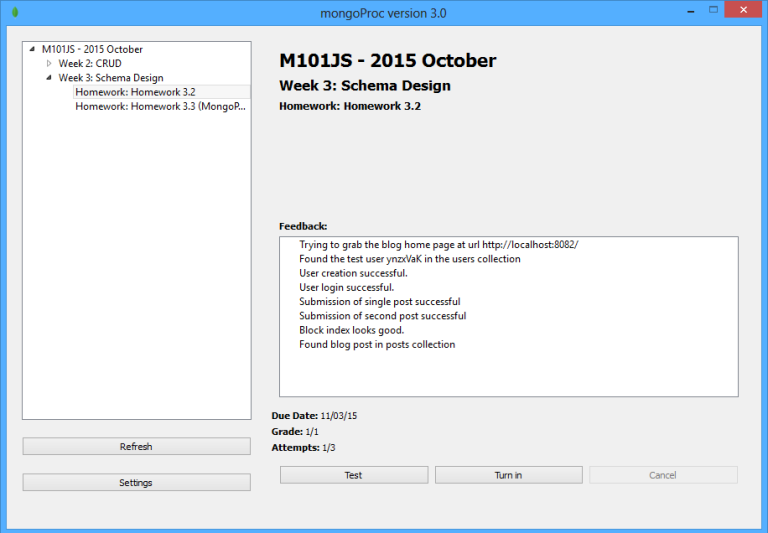
With it, you can test your code and look at the Feedback section. When it says “user creation successful” and “user login successful”, you can Turn in your assignment.


Solution:

Open blog/posts.js and paste following codes or make changes near hw3.2

/* The PostsDAO must be constructed with a connected database object */
function PostsDAO(db) {
    "use strict";

    /* If this constructor is called without the "new" operator, "this" points
     * to the global object. Log a warning and call it correctly. */
    if (false === (this instanceof PostsDAO)) {
        console.log('Warning: PostsDAO constructor called without "new" operator');
        return new PostsDAO(db);
    }

    var posts = db.collection("posts");

    this.insertEntry = function (title, body, tags, author, callback) {
        "use strict";
        console.log("inserting blog entry" + title + body);

        // fix up the permalink to not include whitespace
        var permalink = title.replace( /\s/g, '_' );
        permalink = permalink.replace( /\W/g, '' );

        // Build a new post
        var post = {"title": title,
                "author": author,
                "body": body,
                "permalink":permalink,
                "tags": tags,
                "comments": [],
                "date": new Date()}

        // now insert the post
        // hw3.2 TODO

        //Solution:
        //callback(Error("insertEntry NYI"), null);
        posts.insert(post,function(err,result){ if(!err){ console.log("Post inserted " + result[0].permalink); return callback(null, result[0].permalink); } return callback(err, null); });}

    this.getPosts = function(num, callback) {
        "use strict";

        posts.find().sort('date', -1).limit(num).toArray(function(err, items) {
            "use strict";
            if (err) return callback(err, null);
            console.log("Found " + items.length + " posts");
            callback(err, items);
        });
    }

    this.getPostsByTag = function(tag, num, callback) {
        "use strict";

        posts.find({ tags : tag }).sort('date', -1).limit(num).toArray(function(err, items) {
            "use strict";

            if (err) return callback(err, null);

            console.log("Found " + items.length + " posts");

            callback(err, items);
        });
    }

    this.getPostByPermalink = function(permalink, callback) {
        "use strict";
        posts.findOne({'permalink': permalink}, function(err, post) {
            "use strict";

            if (err) return callback(err, null);

            callback(err, post);
        });
    }

    this.addComment = function(permalink, name, email, body, callback) {
        "use strict";

        var comment = {'author': name, 'body': body}

        if (email != "") {
            comment['email'] = email
        }

        // hw3.3 TODO
        //callback(Error("addComment NYI"), null);
        var query = { "permalink" : permalink };
        var operator = { '$push' : { 'comments' : comment } };
        posts.update(query, operator, function(err, updated){
            "use strict"
            if(err)
                return callback(err, null);
            //console.log("Comment: " + comment.body + " inserted in post: " + permalink );
            console.log("Comment: " + updated);
            return callback(null, updated);
        });
    }
}

module.exports.PostsDAO = PostsDAO;
Top 30 Drupal 8 modules to use in 2019 SEO, Workflow, Securities and others

0

Following are the list of Drupal 8 modules that we find must-have modules for 2019, by which site will be SEO friendly, most of the securities are covered, easy to write codes, easy to debug, easy administration and many more. The list of required modules are:

  1. Paragraphs
    Better than Field collections module
    Site Builders — to make things cleaner so that you can give more editing power to your end-users
    https://www.drupal.org/project/paragraphs
  2. Bootstrap Paragraphs Types
    This Drupal module creates a suite of Paragraph bundles to allow content creators to harness the power of the Bootstrap framework for functionality and layout.
    https://bp.jimbir.ch
    https://www.drupal.org/project/bootstrap_paragraphs
  3. Display Suite
    Instead of Panels
    https://www.drupal.org/project/ds
  4. admin_toolbar
    Useful administration menu
    https://www.drupal.org/project/admin_toolbar
  5. Dropzonejs
    Functionality like “Media” in D7
    https://www.drupal.org/project/dropzonejs
  6. Embed
    Used in many fields
    https://www.drupal.org/project/embed
  7. Token
    Token module
    https://www.drupal.org/project/token
  8. Entity
    Entity
    https://www.drupal.org/project/entity
  9. entity_browser
    For Media Files
    https://drupal.org/project/entity_browser
  10. entity_reference_revisions
    Entity Reference Revisions
    https://www.drupal.org/project/entity_browser
  11. file_browser
    Media files popup
    https://www.drupal.org/project/file_browser
  12. file_entity
    File Entity
    https://www.drupal.org/project/file_entity
  13. Shortcode
    Shortcodes
    https://www.drupal.org/project/shortcode
  14. Ctools
    Chaos tools
    https://www.drupal.org/project/ctools
  15. inline_entity_form
    Inline Entity Form
    https://www.drupal.org/project/inline_entity_form
  16. entity_reference_revisions
    Inline Reference Revisions
    https://www.drupal.org/project/entity_reference_revisions
  17. entity_embed
    Entity Embed
    https://www.drupal.org/project/entity_embed
  18. Libraries
    Libraries
    https://www.drupal.org/project/libraries
  19. state_machine
    State Machine
    https://www.drupal.org/project/state_machine
  20. Webform
    WebForm
    https://www.drupal.org/project/webform
  21. tb_megamenu
    Mega Menu
    https://www.drupal.org/project/tb_megamenu
  22. Checklistapi
    simple interface for modules to create fillable, persistent checklists that track progress with completion times and users. https://www.drupal.org/project/checklistapi
  23. Better Exposed Filters
    Works with Views Filters
    Better Exposed Filters gives you greater control over the rendering of exposed filters. https://www.drupal.org/project/better_exposed_filtersSEO Modules:
  24. Pathauto
    Pathauto module automatically generates URL/path aliases for various kinds of content
    https://www.drupal.org/project/pathauto
  25. seo_checklist
    SEO Checklist module
    https://www.drupal.org/project/seo_checklist
  26. Robots txt
    Generates the robots.txt file dynamically and gives you the chance to edit it
    https://www.drupal.org/project/robotstxt
  27. Metatag
    Allows you to automatically provide structured metadata
    https://www.drupal.org/project/metatag
  28. Hreflang
    In Drupal 8, the core Content Translation module adds href lang tags only to translated entity pages.
    https://www.drupal.org/project/hreflang
  29. XML sitemap
    Creates a sitemap that conforms to the sitemaps.org specification
    https://www.drupal.org/project/xmlsitemap
  30. Security
    login_security
    limit the number of invalid login attempts before blocking accounts, or deny access by IP address, temporarily or permanently.
    https://www.drupal.org/project/login_security
  31. Security Kit
    SecKit provides Drupal with various security-hardening options. This lets you mitigate the risks of exploitation of different web application vulnerabilities.
    https://www.drupal.org/project/seckit
  32. Security Review
    Security Review module automates testing for many of the easy-to-make mistakes that render your site insecure. https://www.drupal.org/project/security_review
  33. Coder
    Coder checks your Drupal code against coding standards and other best practices.
    https://www.drupal.org/project/coder
  34. Captcha
    challenge-response test most often placed within web forms to determine whether the user is human.
    https://www.drupal.org/project/captcha
  35. Honeypot
    Honeypot uses both the honeypot and timestamp methods of deterring spam bots from completing forms on your Drupal site https://www.drupal.org/project/honeypot
  36. Encryption
    Needed for market and other modules
    https://www.drupal.org/project/encryption
  37. Workflow
    This module allows you to create arbitrary Workflows, and assign them to Entities.
    https://www.drupal.org/project/workflow

Let us know if you have your favorite modules if you have any. Check how you can set up PHP development environment with VSCode and let us know if you have other extensions.