The solution to Homework 6.5 M101JS: MongoDB for Node.js Developers

Homework: Homework 6.5

In this homework, you will build a small replica set on your own computer. We will check that it works with validate.js, which you should download from the Download Handout link.

Create three directories for the three mongod processes.

On UNIX or mac, this could be done as follows:

mkdir -p /data/rs1 /data/rs2 /data/rs3

Now start three mongo instances as follows. Note that are three commands. The browser is probably wrapping them visually.

mongod --replSet m101 --logpath "1.log" --dbpath /data/rs1 --port 27017 --smallfiles --oplogSize 64 --fork 
mongod --replSet m101 --logpath "2.log" --dbpath /data/rs2 --port 27018 --smallfiles --oplogSize 64 --fork
mongod --replSet m101 --logpath "3.log" --dbpath /data/rs3 --port 27019 --smallfiles --oplogSize 64 --fork

Windows users: Omit -p from mkdir. Also omit –fork and use start mongod with Windows compatible paths (i.e. backslashes “\”) for the –dbpath argument (e.g;C:\data\rs1).

Now connect to a mongo shell and make sure it comes up

mongo --port 27017

Now you will create the replica set. Type the following commands into the mongo shell:

config = { _id: "m101", members:[
          { _id : 0, host : "localhost:27017"},
          { _id : 1, host : "localhost:27018"},
          { _id : 2, host : "localhost:27019"} ]
         };
rs.initiate(config);

At this point, the replica set should be coming up. You can type

rs.status()

to see the state of replication.

Now install and run validate.js to confirm that it works.

npm install
node validate.js

Validate connects to your local replica set and checks that it has three nodes. Type the validation code below.

Solution: XdYfY6aqjqS3ik35qS6v   My validation code is above, but I hope it may differ for you so be careful before submitting.   How i achieve that validation code? These are my own steps so may differ for you:

  • Gone to C: drive data/ folder and created rs1/, rs2 and rs3 folders
  • Open command prompt and path to C:/data/rs1 and run following command: mongod –replSet m101 –logpath “1.log” –dbpath C:/data/rs1 –port 27017 –smallfiles –oplogSize 64
  • Then opened another command prompt and path to C:/data/rs2 and fun following command: mongod –replSet m101 –logpath “2.log” –dbpath C:/data/rs2 –port 27018 –smallfiles –oplogSize 64
  • Again opened another command prompt and path to C:/data/rs3 and run following command: mongod –replSet m101 –logpath “3.log” –dbpath C:/data/rs3 –port 27019 –smallfiles –oplogSize 64
  • Again open another command prompt and run following command: mongo –port 27017
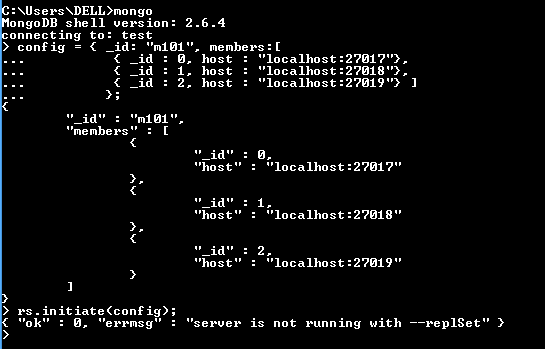
  • Then mongo database shell get opened on which run following command: config = { _id: “m101”, members:[ { _id : 0, host : “localhost:27017”}, { _id : 1, host : “localhost:27018”}, { _id : 2, host : “localhost:27019”} ] }; rs.initiate(config); You will see following message if other database ports are not opened:
    {“ok” : 0, “errmsg” : “server is not running with –replSet” }
    If all ports databases are running then you will get following success message
    {
    “info” : “Config now saved locally. Should come online in about a minute.”,
    “ok” : 1
    }
  • Now check status of the replicated databases with following command: > rs.status() { “set” : “m101”, “date” : ISODate(“2015-11-22T20:24:21Z”), “myState” : 1, “members” : [ { “_id” : 0, “name” : “localhost:27017”, “health” : 1, “state” : 1, “stateStr” : “PRIMARY”, “uptime” : 225, “optime” : Timestamp(1448223786, 1), “optimeDate” : ISODate(“2015-11-22T20:23:06Z”), “electionTime” : Timestamp(1448223795, 1), “electionDate” : ISODate(“2015-11-22T20:23:15Z”), “self” : true }, { “_id” : 1, “name” : “localhost:27018”, “health” : 1, “state” : 2, “stateStr” : “SECONDARY”, “uptime” : 74, “optime” : Timestamp(1448223786, 1), “optimeDate” : ISODate(“2015-11-22T20:23:06Z”), “lastHeartbeat” : ISODate(“2015-11-22T20:24:19Z”), “lastHeartbeatRecv” : ISODate(“2015-11-22T20:24:19Z”), “pingMs” : 0, “syncingTo” : “localhost:27017” }, { “_id” : 2, “name” : “localhost:27019”, “health” : 1, “state” : 2, “stateStr” : “SECONDARY”, “uptime” : 74, “optime” : Timestamp(1448223786, 1), “optimeDate” : ISODate(“2015-11-22T20:23:06Z”), “lastHeartbeat” : ISODate(“2015-11-22T20:24:19Z”), “lastHeartbeatRecv” : ISODate(“2015-11-22T20:24:20Z”), “pingMs” : 0, “syncingTo” : “localhost:27017” } ], “ok” : 1 } m101:PRIMARY> It shows all are OK
  • Now download the handout provided for the assignment, then unzip it.
  • Run another command prompt again and go to the path where you unzip your assignment and to hw6-5/ folder and run the following command: npm install node validate.js
  • You will see validation code as following in command line:

This way I have achieved my validation code, I hope it will be the same for you.
Please let me know if there is any way that I can run multiple command prompt instead of Opening multiple open.
Likewise, let me know if there is any simpler way.

The solution to Homework 6.4 M101JS: MongoDB for Node.js Developers

Homework: Homework 6.4

You have a sharded system with three shards and have sharded the collections “students” in the “school” database across those shards. The output of sh.status() when connected to Mongos looks like this:

mongos> sh.status()
--- Sharding Status --- 
  sharding version: {
	"_id" : 1,
	"minCompatibleVersion" : 5,
	"currentVersion" : 6,
	"clusterId" : ObjectId("5531512ac723271f602db407")
}
  shards:
	{  "_id" : "s0",  "host" : "s0/localhost:37017,localhost:37018,localhost:37019" }
	{  "_id" : "s1",  "host" : "s1/localhost:47017,localhost:47018,localhost:47019" }
	{  "_id" : "s2",  "host" : "s2/localhost:57017,localhost:57018,localhost:57019" }
  balancer:
	Currently enabled:  yes
	Currently running:  yes
		Balancer lock taken at Fri Apr 17 2015 14:32:02 GMT-0400 (EDT) by education-iMac-2.local:27017:1429295401:16807:Balancer:1622650073
	Collections with active migrations: 
		school.students started at Fri Apr 17 2015 14:32:03 GMT-0400 (EDT)
	Failed balancer rounds in last 5 attempts:  0
	Migration Results for the last 24 hours: 
		2 : Success
		1 : Failed with error 'migration already in progress', from s0 to s1
  databases:
	{  "_id" : "admin",  "partitioned" : false,  "primary" : "config" }
	{  "_id" : "school",  "partitioned" : true,  "primary" : "s0" }
		school.students
			shard key: { "student_id" : 1 }
			chunks:
				s0	1
				s1	3
				s2	1
			{ "student_id" : { "$minKey" : 1 } } -->> { "student_id" : 0 } on : s2 Timestamp(3, 0) 
			{ "student_id" : 0 } -->> { "student_id" : 2 } on : s0 Timestamp(3, 1) 
			{ "student_id" : 2 } -->> { "student_id" : 3497 } on : s1 Timestamp(3, 2) 
			{ "student_id" : 3497 } -->> { "student_id" : 7778 } on : s1 Timestamp(3, 3) 
			{ "student_id" : 7778 } -->> { "student_id" : { "$maxKey" : 1 } } on : s1 Timestamp(3, 4) 


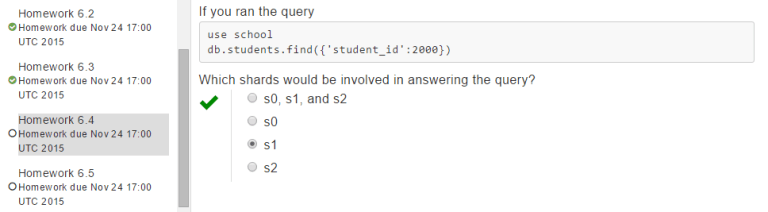
If you ran the query

use school
db.students.find({'student_id':2000})

Which shards would be involved in answering the query?  
Answer: s1

hw6.4answer

The solution to Homework 6.3 M101JS: MongoDB for Node.js Developers

Homework: Homework 6.3

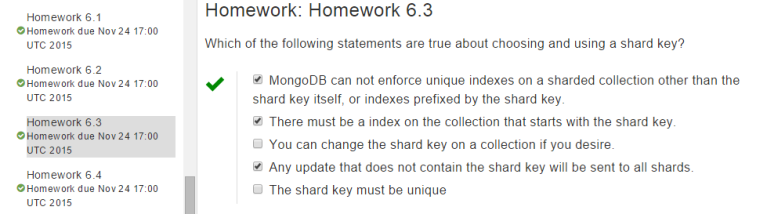
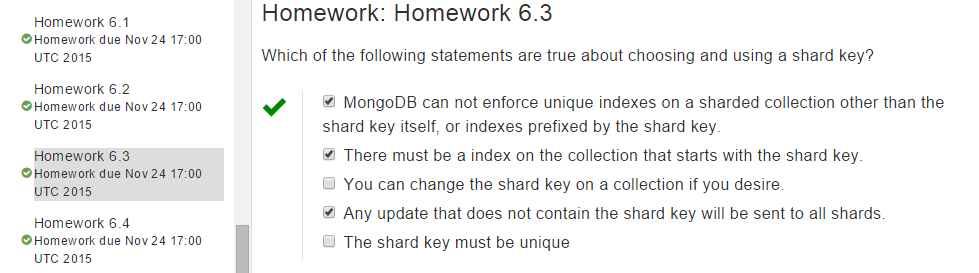
Which of the following statements are true about choosing and using a shard key? MongoDB can not enforce unique indexes on a sharded collection other than the shard key itself, or indexes prefixed by the shard key. There must be an index on the collection that starts with the shard key. You can change the shard key on a collection if you desire. Any update that does not contain the shard key will be sent to all shards. The shared key must be unique

hw6.3answer

The solution to Homework 6.2 M101JS: MongoDB for Node.js Developers

Homework: Homework 6.2

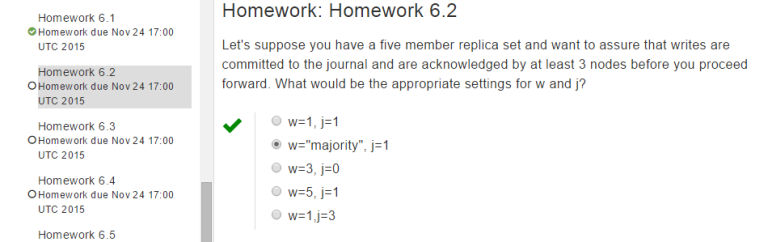
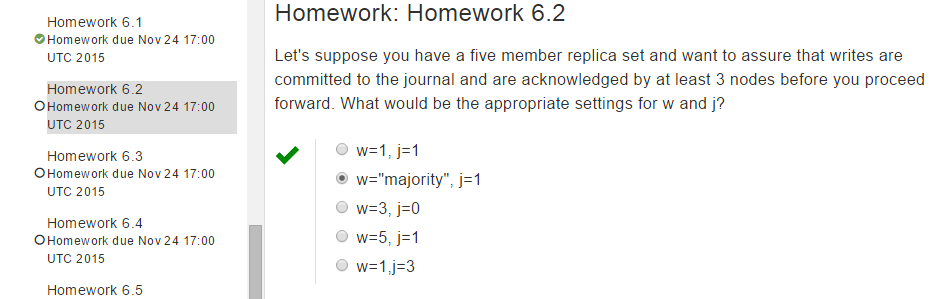
Let’s suppose you have a five-member replica set and want to assure that writes are committed to the journal and are acknowledged by at least 3 nodes before you proceed forward. What would be the appropriate settings for w and j?  

Solution: w=”majority”

hw6.2answer

The solution to Homework 6.1 M101JS: MongoDB for Node.js Developers

Homework: Homework 6.1

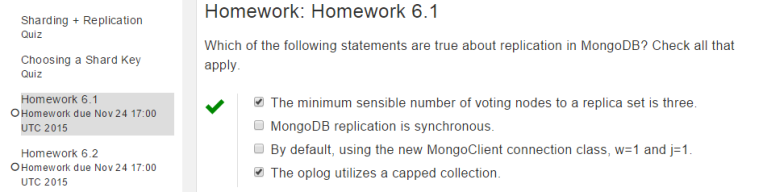
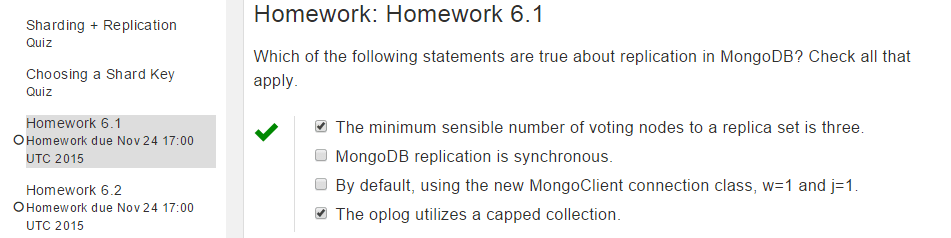
Which of the following statements are true about replication in MongoDB? Check all that apply.

hw6.1answer

The minimum sensible number of voting nodes to a replica set is three.
MongoDB replication is synchronous.
By default, using the new MongoClient connection class, w=1 and j=1.
The oplog utilizes a capped collection.

The solution to Homework 5.4 M101JS: MongoDB for Node.js Developers

The solution to Homework 5.4 M101JS: MongoDB for Node.js Developers Homework: Homework 5.4

Removing Rural Residents

In this problem, you will calculate the number of people who live in a zip code in the US where the city starts with a digit. We will take that to mean they don’t really live in a city. Once again, you will be using the zip code collection, which you will find in the ‘handouts’ link on this page. Import it into your MongoDB using the following command from the command line:

> mongoimport -d test -c zips --drop zips.json

If you imported it correctly, you can go to the test database in the mongo shell and confirm that

> db.zips.count()

yields 29,467 documents.

The project operator can extract the first digit from any field. For example, to extract the first digit from the city field, you could write this query:

db.zips.aggregate([
    {$project: 
     {
	first_char: {$substr : ["$city",0,1]},
     }	 
   }
])

Using the aggregation framework, calculate the sum total of people who are living in a zip code where the city starts with a digit. Choose the answer below.

You will need to probably change your projection to send more info through than just that first character. Also, you will need a filtering step to get rid of all documents where the city does not start with a digital (0-9).

Note: When you mongoimport the data, you will probably see a few duplicate key errors; this is to be expected, and will not prevent the mongoimport from working. There is also an issue with some versions of MongoDB 3.0 where it claims that 0 documents were mongoimported, when in fact there were 29,467 documents imported. You can verify this for yourself by going into the shell and counting the documents in the “test.zips” collection.

Solution:

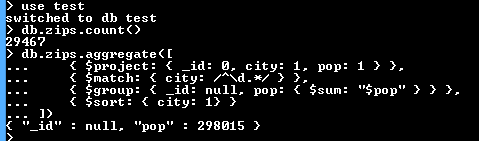
Run the following queries:

db.zips.aggregate([
    { $project: { _id: 0, city: 1, pop: 1 } },
    { $match: { city: /^\d.*/ } },
    { $group: { _id: null, pop: { $sum: "$pop" } } },
    { $sort: { city: 1} }
])
hw5.4answer2

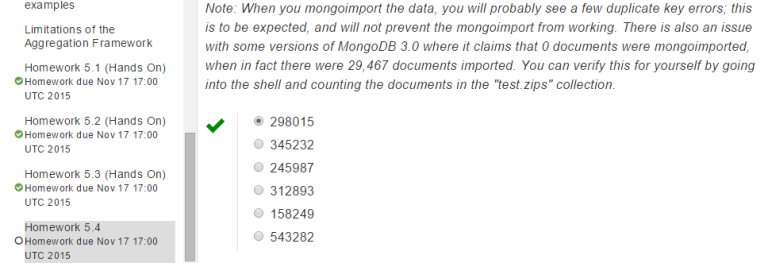
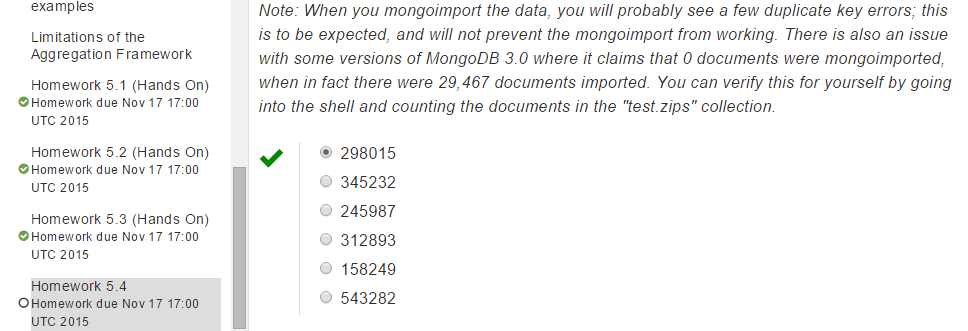
Seeing the above result I submit the 298015 and it is correct for me:

hw5.4answer

The solution to Homework 5.3 (Hands-On) M101JS: MongoDB for Node.js Developers

The solution to Homework 5.3 (Hands-On) M101JS: MongoDB for Node.js DevelopersWho’s the easiest grader on campus?
A set of grades are loaded into the grades collection. The documents look like this:

{
	"_id" : ObjectId("50b59cd75bed76f46522c392"),
	"student_id" : 10,
	"class_id" : 5,
	"scores" : [
		{
			"type" : "exam",
			"score" : 69.17634380939022
		},
		{
			"type" : "quiz",
			"score" : 61.20182926719762
		},
		{
			"type" : "homework",
			"score" : 73.3293624199466
		},
		{
			"type" : "homework",
			"score" : 15.206314042622903
		},
		{
			"type" : "homework",
			"score" : 36.75297723087603
		},
		{
			"type" : "homework",
			"score" : 64.42913107330241
		}
	]
}

There are documents for each student (student_id) across a variety of classes (class_id). Note that not all students in the same class have the same exact number of assessments. Some students have three homework assignments, etc.

Your task is to calculate the class with the best average student performance. This involves calculating an average for each student in each class of all non-quiz assessments and then averaging those numbers to get a class average. To be clear, each student’s average includes only exams and homework grades. Don’t include their quiz scores in the calculation.

What is the class_id which has the highest average student performance?

Hint/Strategy: You need to group twice to solve this problem. You must figure out the GPA that each student has achieved in a class and then average those numbers to get a class average. After that, you just need to sort. The class with the lowest average is the class with class_id=2. Those students achieved a class average of 37.6

If you prefer, you may download the handout and perform your analysis on your machine with

 mongoimport -d test -c grades --drop grades.json

Solution:

Run the following SQL and the first id that you will get be the solution.

db.grades.aggregate([
    { $unwind: "$scores" },
    { $match: { $or: [ {"scores.type": "homework"}, {"scores.type":"exam"} ] } },
    { $group: { _id: { 'student_id': "$student_id", 'class_id': "$class_id" }, avg: { $avg: "$scores.score" } } },
    { $group: { _id: "$_id.class_id", class_avg: { $avg: "$avg" } } },
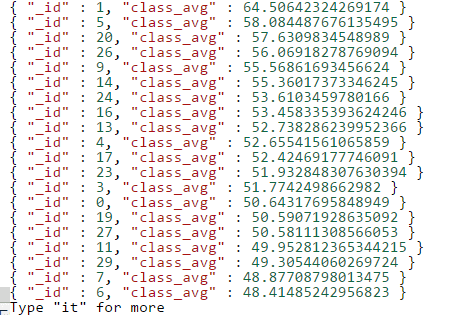
    { $sort: { 'class_avg': -1 } }
])

Following is the result that I got:

hw5.3answer2

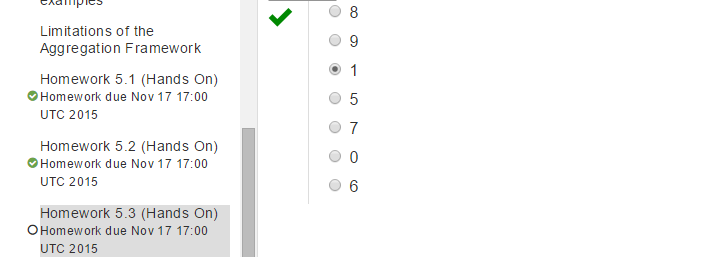
So the answer is:

hw5.3answer

The solution to Homework 5.2 (Hands-On) M101JS: MongoDB for Node.js Developers

The solution to Homework 5.2 (Hands-On) M101JS: MongoDB for Node.js Developers

Crunching the Zipcode dataset
Please calculate the average population of cities in California (abbreviation CA) and New York (NY) (taken together) with populations over 25,000. For this problem, assume that a city name that appears in more than one state represents two separate cities. Please round the answer to a whole number.
Hint: The answer for CT and NJ (using this data set) is 38177.

Please note:

  • Different states might have the same city name.
  • A city might have multiple zip codes.

For purposes of keeping the Hands-On shell quick, we have used a subset of the data you previously used in zips.json, not the full set. This is why there are only 200 documents (and 200 zip codes), and all of them are in New York, Connecticut, New Jersey, and California.

If you prefer, you may download the handout and perform your analysis on your machine with

> mongoimport -d test -c zips --drop small_zips.json

Solution:

Run the following query and find the answer:

db.zips.aggregate([
    { $match: {$or: [ {state: "CA"}, {state: "NY"} ] } },
    { $group: { _id: { city: "$city" }, pop: { $sum: "$pop" } } },
    { $match: { "pop": { $gt: 25000 } } },
    { $group: { _id: null, avg_pop_of_city: { $avg: "$pop" } } }
])

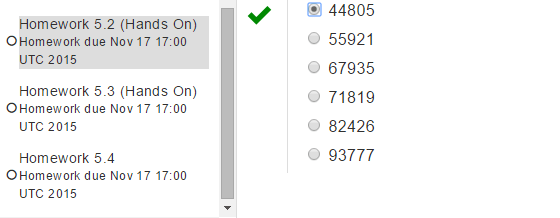
I got the following answer and submit and it is correct for me. let me know if you got any other results and an easy way to proceed through it.

hw5.2answer

The solution to Homework 5.1 (Hands-On) M101JS: MongoDB for Node.js Developers

Homework: Homework 5.1 (Hands-On)

Finding the most frequent author of comments on your blog

In this assignment, you will use the aggregation framework to find the most frequent author of comments on your blog. We will be using the same basic dataset as last week, with posts and comments shortened considerably, and with many fewer documents in the collection in order to streamline the operations of the Hands-On web shell.

Use the aggregation framework in the web shell to calculate the author with the greatest number of comments.

Just to clarify, the data set for this week is not available for download.

To help you verify your work before submitting, the author with the fewest comments is Cody Strouth and he commented 68 times.

Once you’ve found the correct answer with your query, please choose your answer below for the most prolific comment author.

Note: this data set is relatively large. Due to some quirks of the shell, the entire result set gets pulled into the browser on find(), so if you want to see the document schema, we recommend either using db.posts.findOne(), db.posts.find().limit(1), or that you plan on waiting for a bit after you hit enter. We also recommend that the last phase of your aggregation pipeline is {$limit: 1} (or some single-digit number)

Solution:

Run the following query and you will get the answers.

db.posts.aggregate([
    { $unwind: "$comments" },
    { $group: { _id: "$comments.author", count: { $sum: 1 } } },
    { $sort: { count: -1 } },
    { $limit: 1 }
])
hw5.1answer

The solution to HOMEWORK 4.3 M101JS: MongoDB for Node.js Developers

HOMEWORK: HOMEWORK 4.3 Solution to HOMEWORK 4.3 M101JS: MongoDB for Node.js Developers

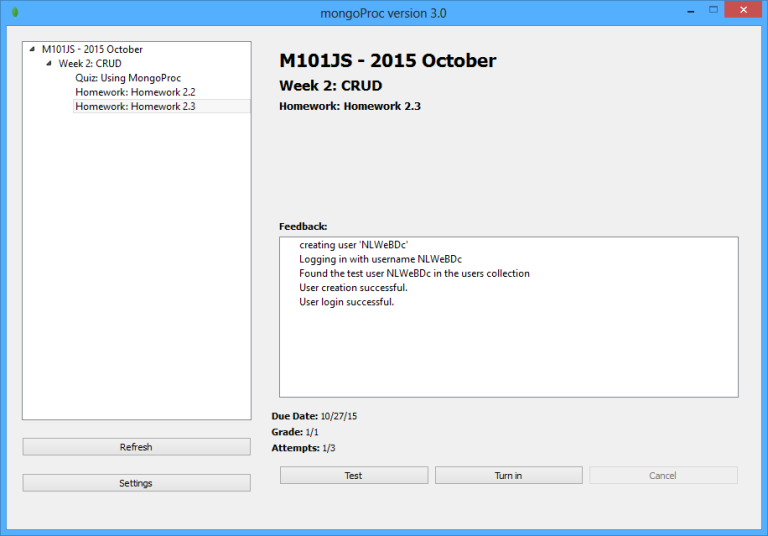
NOTE there is a bug (TOOLS-939) affecting some versions of mongoimport and mongorestore that causes mongoimport -d blog -c posts < posts.json to fail. As a workaround, you can usemongoimport -d blog -c posts < posts.json --batchSize 1.If you have any difficulty using MongoProc, here are 2 video lectures showing how to set it up.

You will need to download one of the following versions of the MongoProc client, which will verify on your local machine (port 8082) that the signup and login pages of the blog work properly.

Download MongoProc

Making the Blog fast to get started, please download hw4-3.zip from the Download Handout link and unpack the file to your computer. This assignment requires Mongo 2.2 or above.

In this homework assignment, you will be adding some indexes to the post-collection to make the blog fast.

We have provided the full code for the blog application and you don’t need to make any changes, or even run the blog. But you can, for fun.

We are also providing a patriotic (if you are an American) data set for the blog. There are 1000 entries with lots of comments and tags. You must load this dataset to complete the problem.

# from the mongo shell
use blog
db.posts.drop()
# from the a mac or PC terminal window
mongoimport -d blog -c posts < posts.json

The blog has been enhanced so that it can also display the top 10 most recent posts by tag. There are hyperlinks from the post tags to the page that displays the 10 most recent blog entries for that tag. (run the blog and it will be obvious)

Your assignment is to make the following blog pages fast:

  • The blog home page
  • The page that displays blog posts by tag (http://localhost:8082/tag/whatever)
  • The page that displays a blog entry by permalink (http://localhost:8082/post/permalink)

By fast, we mean that indexes should be in place to satisfy these queries such that we only need to scan the number of documents we are going to return.

To figure out what queries you need to optimize, you can read the code in posts.js and see what queries it is doing to return the data needed for the relevant pages. Isolate those queries and use explain to explore.

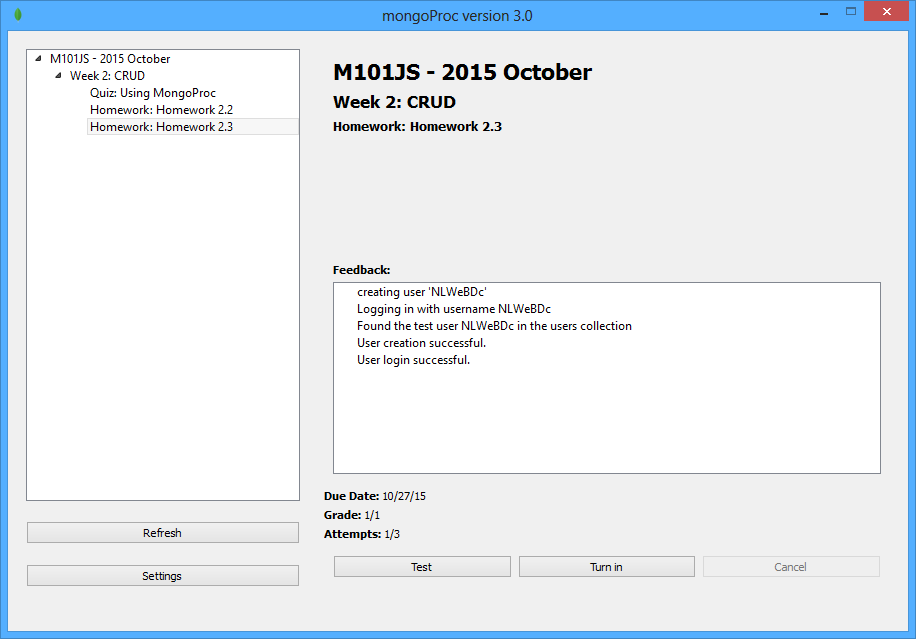
Once you have added the indexes to make those pages fast, just validate your work with MongoProc. Correct You have used 1 of 3 submissions.


Solutions:
Run the following queries one by one and submit it.

db.posts.ensureIndex({ date : -1})
db.posts.find({date : -1}).limit(10).explain()
db.posts.ensureIndex({ tags : 1, date : -1})
db.posts.find({tags : 'vietnam'}).sort({ date : -1}).explain()
db.posts.ensureIndex({ permalink : 1})
db.posts.find({permalink: "xnafqemtzzcyyzjdegkj"}).explain()
hw4.3answer