Drupal Console: [ERROR] Command “site:status”, is not a valid command name

0

Drupal Console: [ERROR] Command “site:status”, is not a valid command name.

First try/execute the drupal list command, where you will get a list of available command. If you don’t see the site:status then it means you have not installed the drupal, so Execute the drupal site:install command and again perform drupal list now hope you will see list of commands which you can perform site:status and other commands.

Front end Controller file to make hello world – OpenCart Module Development

OpenCart identifies existing modules automatically, simply by reading the catalog/controller/extension/module folder. Any modules existing in this folder will automatically be loaded as per the active modules for the pages on the front end.

Let’s start to create our hello world module by creating the file at admin/controller/extension/module and named it helloworld.php. Then follow the following steps:

Create a class named ControllerExtensionModuleHelloWorld

Every module name should start with ControllerExtensionModule in OpenCart frontend also.
Use camel case style, avoid using special characters, URL path will be “extension/module/modulename” in our HelloWorld case it will be “extension/module/helloworld”.

Code is written for Front end Controller file to make hello world – OpenCart Module Development

<?php
class ControllerExtensionModuleHelloWorld extends Controller {
    public function index($setting) {
        $data="";
        if (isset($setting['name'])) {
            $data['name'] = $setting['name'];
        }
        return $this->load->view('extension/module/helloworld', $data);
    }
}

In the above code for helloworld module which will show text at the front end,

  • Class name is ControllerExtensionModuleHelloWorld
  • This class extends the base Controller class
  • Have a public index function declaring $setting as arguments
  • This $setting holds all the values available for the module. For example when we do print_r for the $setting we find following: Array ( [name]=> This is hello world module text [status]=> 1 )

So we can assign to $data array to pass it to view section like:

if (isset($setting['name'])) {
      $data['name'] = $setting['name'];
}

Then return the loaded view as:

return $this->load->view('extension/module/helloworld', $data);

Now in the view section, catalog\view\theme\default\template\extension\module\helloworld.tpl, you can write the following code and show the output:

<div>
    <h2><?php echo $name; ?></h2>
</div>

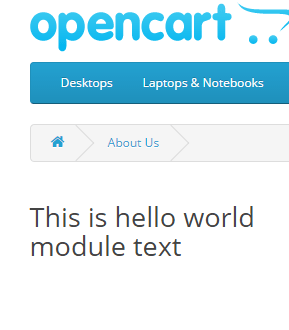
Like this way you can show hello world text at the front end:

controller-helloworld-module-opencart

Service ‘page_manager.variant_route_filter’ for consumer ‘router.no_access_checks’ does not implement

0

Service ‘page_manager.variant_route_filter’ for consumer ‘router.no_access_checks’ does not implement

The website encountered an unexpected error. Please try again later.

Symfony\Component\DependencyInjection\Exception\LogicException: Service ‘page_manager.variant_route_filter’ for consumer ‘router.no_access_checks’ does not implement Drupal\Core\Routing\FilterInterface. in Drupal\Core\DependencyInjection\Compiler\TaggedHandlersPass->processServiceCollectorPass() (line 164 of D:\xampp\htdocs\axway\corporate-8\web\core\lib\Drupal\Core\DependencyInjection\Compiler\TaggedHandlersPass.php).
Drupal\Core\DependencyInjection\Compiler\TaggedHandlersPass->processServiceCollectorPass(Array, ‘router.no_access_checks’, Object) (Line: 97)
Drupal\Core\DependencyInjection\Compiler\TaggedHandlersPass->process(Object) (Line: 141)
Symfony\Component\DependencyInjection\Compiler\Compiler->compile(Object) (Line: 757)
Symfony\Component\DependencyInjection\ContainerBuilder->compile() (Line: 1307)
Drupal\Core\DrupalKernel->compileContainer() (Line: 884)
Drupal\Core\DrupalKernel->initializeContainer() (Line: 466)
Drupal\Core\DrupalKernel->boot() (Line: 656)
Drupal\Core\DrupalKernel->handle(Object) (Line: 19)

We can solve the problem by applying the following patch:

cd modules/contrib/page_manager
wget https://www.drupal.org/files/issues/2918564-22.patch
patch -p 1 < 2918564-22.patch
diff --git a/page_manager.services.yml b/page_manager.services.yml
index 33bce44..f8fcf78 100644
--- a/page_manager.services.yml
+++ b/page_manager.services.yml
@@ -27,8 +27,10 @@ services:
     arguments: ['@entity_type.manager', '@path.current', '@request_stack']
     tags:
       # Run as late as possible to allow all other filters to run first.
-      - { name: non_lazy_route_filter, priority: -1024 }
+      # @todo Review this when https://www.drupal.org/node/2915772 is done.
+      - { name: route_filter, priority: -1024 }
       - { name: service_collector, tag: non_lazy_route_enhancer, call: addRouteEnhancer }
+      - { name: service_collector, tag: route_enhancer, call: addRouteEnhancer }
   page_manager.route_name_response_subscriber:
     class: Drupal\page_manager\EventSubscriber\RouteNameResponseSubscriber
     tags:
diff --git a/src/Routing/RouteEnhancerCollectorTrait.php b/src/Routing/RouteEnhancerCollectorTrait.php
index 0ca6c44..e91e4a3 100644
--- a/src/Routing/RouteEnhancerCollectorTrait.php
+++ b/src/Routing/RouteEnhancerCollectorTrait.php
@@ -7,24 +7,22 @@
 
 namespace Drupal\page_manager\Routing;
 
-use Symfony\Cmf\Component\Routing\Enhancer\RouteEnhancerInterface;
+use Drupal\Core\Routing\EnhancerInterface;
 
 /**
  * Provides a trait to make a service a collector of route enhancers.
- *
- * @todo Move to Symfony CMF in https://github.com/symfony-cmf/Routing/pull/155.
  */
 trait RouteEnhancerCollectorTrait {
 
   /**
-   * @var \Symfony\Cmf\Component\Routing\Enhancer\RouteEnhancerInterface[]
+   * @var \Drupal\Core\Routing\EnhancerInterface[]
    */
   protected $enhancers = array();
 
   /**
    * Cached sorted list of enhancers
    *
-   * @var \Symfony\Cmf\Component\Routing\Enhancer\RouteEnhancerInterface[]
+   * @var \Drupal\Core\Routing\EnhancerInterface[]
    */
   protected $sortedEnhancers = array();
 
@@ -35,12 +33,12 @@ trait RouteEnhancerCollectorTrait {
    * The order of the enhancers is determined by the priority, the higher the
    * value, the earlier the enhancer is run.
    *
-   * @param \Symfony\Cmf\Component\Routing\Enhancer\RouteEnhancerInterface $enhancer
+   * @param \Drupal\Core\Routing\EnhancerInterface $enhancer
    * @param int $priority
    *
    * @return $this
    */
-  public function addRouteEnhancer(RouteEnhancerInterface $enhancer, $priority = 0) {
+  public function addRouteEnhancer(EnhancerInterface $enhancer, $priority = 0) {
     if (empty($this->enhancers[$priority])) {
       $this->enhancers[$priority] = array();
     }
@@ -54,7 +52,7 @@ trait RouteEnhancerCollectorTrait {
   /**
    * Sorts the enhancers and flattens them.
    *
-   * @return \Symfony\Cmf\Component\Routing\Enhancer\RouteEnhancerInterface[]
+   * @return \Drupal\Core\Routing\EnhancerInterface[]
    *   The enhancers ordered by priority.
    */
   protected function getRouteEnhancers() {
@@ -70,7 +68,7 @@ trait RouteEnhancerCollectorTrait {
    *
    * The highest priority number is the highest priority (reverse sorting).
    *
-   * @return \Symfony\Cmf\Component\Routing\Enhancer\RouteEnhancerInterface[]
+   * @return \Drupal\Core\Routing\EnhancerInterface[]
    *   The sorted enhancers.
    */
   protected function sortRouteEnhancers() {
diff --git a/src/Routing/VariantRouteFilter.php b/src/Routing/VariantRouteFilter.php
index 0c271d8..b23bda8 100644
--- a/src/Routing/VariantRouteFilter.php
+++ b/src/Routing/VariantRouteFilter.php
@@ -1,17 +1,12 @@
 <?php
 
-/**
- * @file
- * Contains \Drupal\page_manager\Routing\VariantRouteFilter.
- */
-
 namespace Drupal\page_manager\Routing;
 
 use Drupal\Component\Plugin\Exception\ContextException;
 use Drupal\Component\Utility\NestedArray;
 use Drupal\Core\Entity\EntityTypeManagerInterface;
 use Drupal\Core\Path\CurrentPathStack;
-use Symfony\Cmf\Component\Routing\NestedMatcher\RouteFilterInterface;
+use Drupal\Core\Routing\FilterInterface;
 use Symfony\Cmf\Component\Routing\RouteObjectInterface;
 use Symfony\Component\HttpFoundation\Request;
 use Symfony\Component\HttpFoundation\RequestStack;
@@ -25,7 +20,7 @@ use Symfony\Component\Routing\RouteCollection;
  * needs to be filtered. Here is where we run variant selection, which requires
  * gathering contexts.
  */
-class VariantRouteFilter implements RouteFilterInterface {
+class VariantRouteFilter implements FilterInterface {
 
   use RouteEnhancerCollectorTrait;
 
@@ -141,9 +136,9 @@ class VariantRouteFilter implements RouteFilterInterface {
           return $name;
         }
 
-        // Restore the original request attributes, this must be done in the loop
-        // or the request attributes will not be calculated correctly for the
-        // next route.
+        // Restore the original request attributes, this must be done in
+        // the loop or the request attributes will not be calculated correctly
+        // for the next route.
         $request->attributes->replace($original_attributes);
         $this->requestStack->pop();
       }
diff --git a/tests/src/Unit/VariantRouteFilterTest.php b/tests/src/Unit/VariantRouteFilterTest.php
index 1664fbb..ea60e91 100644
--- a/tests/src/Unit/VariantRouteFilterTest.php
+++ b/tests/src/Unit/VariantRouteFilterTest.php
@@ -14,7 +14,7 @@ use Drupal\Core\Path\CurrentPathStack;
 use Drupal\page_manager\PageVariantInterface;
 use Drupal\page_manager\Routing\VariantRouteFilter;
 use Drupal\Tests\UnitTestCase;
-use Symfony\Cmf\Component\Routing\Enhancer\RouteEnhancerInterface;
+use Drupal\Core\Routing\EnhancerInterface;
 use Symfony\Component\HttpFoundation\Request;
 use Symfony\Component\HttpFoundation\RequestStack;
 use Symfony\Component\Routing\Route;
@@ -331,7 +331,7 @@ class VariantRouteFilterTest extends UnitTestCase {
     $this->currentPath->getPath($request)->willReturn('/path/with/1');
     $this->pageVariantStorage->load('a_variant')->willReturn($page_variant->reveal());
 
-    $route_enhancer = $this->prophesize(RouteEnhancerInterface::class);
+    $route_enhancer = $this->prophesize(EnhancerInterface::class);
     $this->routeFilter->addRouteEnhancer($route_enhancer->reveal());
     $result_enhance_attributes = $expected_enhance_attributes = [
       'foo' => 'bar',
@@ -375,7 +375,7 @@ class VariantRouteFilterTest extends UnitTestCase {
     $this->currentPath->getPath($request)->willReturn('/path/with/1');
     $this->pageVariantStorage->load('a_variant')->willReturn($page_variant->reveal());
 
-    $route_enhancer = $this->prophesize(RouteEnhancerInterface::class);
+    $route_enhancer = $this->prophesize(EnhancerInterface::class);
     $this->routeFilter->addRouteEnhancer($route_enhancer->reveal());
     $expected_enhance_attributes = [
       'foo' => 'bar',
@@ -436,7 +436,7 @@ class VariantRouteFilterTest extends UnitTestCase {
     $this->currentPath->getPath($request)->willReturn('/path/with/1');
 
     $expected_attributes = ['slug' => 1, '_route_object' => $route, '_route' => $route_name];
-    $route_enhancer = $this->prophesize(RouteEnhancerInterface::class);
+    $route_enhancer = $this->prophesize(EnhancerInterface::class);
     $route_enhancer->enhance($expected_attributes, $request)->willReturn(['slug' => 'slug 1']);
     $this->routeFilter->addRouteEnhancer($route_enhancer->reveal());
 

Drupal 8 Symfony Component Routing Exception RouteNotFoundException Route view.products_list.page_2 does not exist

0

The website encountered an unexpected error. Please try again later.</br></br><em class=”placeholder”>Symfony\Component\Routing\Exception\RouteNotFoundException</em>: Route &quot;view.products_list.page_2&quot; does not exist. in <em class=”placeholder”>Drupal\Core\Routing\RouteProvider-&gt;getRouteByName()</em> (line <em class=”placeholder”>190</em> of <em class=”placeholder”>core\lib\Drupal\Core\Routing\RouteProvider.php</em>).

Solution:
This is the exception thrown when a route does not exist but you are using it in your twig files or somewhere else. As in the above example find “view.products_list.page_2” in your code and remove it.

<a href="{{ path('view.products_list.page_2') }}">

Then don’t forget to clear the cache.

We hope it is helpful for someone. http://api.symfony.com/3.0/Symfony/Component/Routing/Exception/RouteNotFoundException.html

class RouteNotFoundException extends InvalidArgumentException implements ExceptionInterface
The exception is thrown when a route does not exist.

Admin Language file to make hello world – OpenCart Module Development

Create a language file helloworld.php at “admin\language\en-gb\extension\module\“, here en-Gb is the English language folder but if your store is multi-language then you have to create helloworld.php in another folder also like at “admin\language\OTHER_LANGUAGE_FOLDER\extension\module\“.

Now in helloworld.php, you will define variable that holds the text for that language. Starting defining a variable with $_[‘YOUR_VARIABLE_NAME’] and assign the text for that language.

$_['language_variable']     = 'Text for this language';

Now in the controller, you can do the following:

$this->load->language('extension/module/helloworld');
$data['view_variable'] = $this->language->get('language_variable');

In the view, you will show the text as:

<?php echo $view_variable; ?>

In this way, In the view, you will be able to access the text from the language that the controller file stored as a PHP variable.

For our HelloWorld module of OpenCart module development, the following are the needed text and I have assigned to those variables.

<?php
/**
 * Created by PhpStorm.
 * User: rnepali
 * Date: 10/2/2016
 * Time: 1:45 PM
 */

$_['heading_title']     = 'Hello World Module';

// Text
$_['text_extension']    = 'Extensions';
$_['text_success']      = 'Success: You have modified Hello World module!';
$_['text_edit']         = 'Edit Hello World Module';

// Entry
$_['entry_name'] = 'Enter the Hello World';
$_['entry_title']       = 'Heading Title';
$_['entry_status']      = 'Status';

// Error
$_['error_permission']  = 'Warning: You do not have permission to modify Hello World module!';
$_['error_name']        = 'Module Name must be between 3 and 64 characters!';

%type: !message in %function (line %line of %file) Drupal error

1

I keep on getting this error logging at watchdog table in the database while loading front end or home page: %type: !message in %function (line %line of %file) Drupal error I spend around 20 min, keep on clicking the “Clear All Caches” button at Performance section. I checked the code and found the following:

function watchdog_exception($type, Exception $exception, $message = NULL, $variables = array(), $severity = WATCHDOG_ERROR, $link = NULL) {

 // Use a default value if $message is not set.
 if (empty($message)) {
 // The exception message is run through check_plain() by _drupal_decode_exception().
 $message = '%type: !message in %function (line %line of %file).';
 }
 // $variables must be an array so that we can add the exception information.
 if (!is_array($variables)) {
 $variables = array();
 }

 require_once DRUPAL_ROOT . '/includes/errors.inc';
 $variables += _drupal_decode_exception($exception);
 watchdog($type, $message, $variables, $severity, $link);
}

If the message is not set then the given above log is set.

Instantly I cleared browser cache and here you go the page is loading well.

Maybe this is the only case for me, but keep on posting if I find any other solution.

The solution Homework 3.1 M101JS: MongoDB for Node.js Developers

Write a program in the language of your choice that will remove the lowest homework score for each student. Since there is a single document for each student containing an array of scores, you will need to update the scores array and remove the homework.

Remember, just remove a homework score. Don’t remove a quiz or an exam!

Hint/spoiler: With the new schema, this problem is a lot harder and that is sort of the point. One way is to find the lowest homework in code and then update the scores array with the low homework pruned.

To confirm you are on the right track, here are some queries to run after you process the data with the correct answer shown:

Let us count the number of students we have:

  1. use school
  2. DB.students.count()

The answer will be 200.

Let’s see what Tamika Schildgen’s record looks like:

  1. db.students.find( { _id : 137 } ).pretty( )

This should be the output:

{
	"_id" : 137,
	"name" : "Tamika Schildgen",
	"scores" : [
		{
			"type" : "exam",
			"score" : 4.433956226109692
		},
		{
			"type" : "quiz",
			"score" : 65.50313785402548
		},
		{
			"type" : "homework",
			"score" : 89.5950384993947
		}
	]
}

To verify that you have completed this task correctly, provide the identity (in the form of their _id) of the student with the highest average in the class with following query that uses the aggregation framework. The answer will appear in the _id field of the resulting document.

db.students.aggregate( { ‘$unwind’ : ‘$scores’ } , { ‘$group’ : { ‘_id’ : ‘$_id’ , ‘average’ : { $avg : ‘$scores.score’ } } } , { ‘$sort’ : { ‘average’ : -1 } } , { ‘$limit’ : 1 } )

Solution:

13

Enter 13 and submit.

Create a file app.js and insert the following code:

var MongoClient = require('mongodb').MongoClient;

MongoClient.connect('mongodb://localhost:27017/school', function(err, db){
  if(err) throw err;
  var query = {};

  db.collection('students').find(query).toArray(function(err, docs) {
    if(err) throw err;

    var min;
    var doc;
    var value;
    for (var i = 0; i < docs.length; i++){
        doc = docs[i];
        min = -1;
        for(var j = 0; j < doc.scores.length; j++){
           value = doc.scores[j];
           if(value.type === "homework"){
             if(min === -1 || value.score < doc.scores[min].score ){
               min = j;
             }
           }
        }
        console.log("Ant length :" + doc.scores.length + " min : " + min);
        // important: Array.splice need the number of elements to delete...  splice(index, )
        doc.scores.splice(min, 1);
        console.log("Pos length :" + doc.scores.length);
        db.collection('students').save(doc, function(err, saved) {
          if(err) throw err;
          console.log("Doc saved: " + saved);

        });
    }
    //console.dir("Result" + docs);
    console.dir("End");
    return db.close();
  });

});

Now run it with node app.js

Check your result with the following query:

db.students.find( { _id : 13 } ).pretty( )

Result:

{
        "_id" : 13,
        "name" : "Jessika Dagenais",
        "scores" : [
                {
                        "type" : "exam",
                        "score" : 90.47179954427436
                },
                {
                        "type" : "quiz",
                        "score" : 90.3001402468489
                },
                {
                        "type" : "homework",
                        "score" : 95.17753772405909
                }
        ]
}

You can see the lowest homework scores are removed from all documents.

Now again run

db.students.aggregate( { '$unwind' : '$scores' } , { '$group' : { '_id' : '$_id' , 'average' : { $avg : '$scores.score' } } } , { '$sort' : { 'average' : -1 }, { '$limit' : 1 } )

The result will be:

{ "_id" : 13, "average" : 91.98315917172745 }

I have submitted “13” and the answer is correct but if you have any great solution then please let me know as well as if any problem then let me know so that we can solve together.


Final: Question 1 M101JS: MongoDB for Node.js Developers

Final: Question 1

Please download the Enron email dataset enron.zip, unzip it and then restore it using mongorestore. It should restore to a collection called “messages” in a database called “enron”. Note that this is an abbreviated version of the full corpus. There should be 120,477 documents after restore.

Inspect a few of the documents to get a basic understanding of the structure. Enron was an American corporation that engaged in widespread accounting fraud and subsequently failed.

In this dataset, each document is an email message. Like all Email messages, there is one sender but there can be multiple recipients.

Construct a query to calculate the number of messages sent by Andrew Fastow, CFO, to Jeff Skilling, the president. Andrew Fastow’s email address was andrew.fastow@enron.com. Jeff Skilling’s email was jeff.skilling@enron.com.

For reference, the number of email messages from Andrew Fastow to John Lavorato (john.lavorato@enron.com) was 1.Solution: 3  

  • Download the  enron.zip and extract it
  • Now run “mongod”
  • Now import the extracted database mongorestore –drop –db enron dump/enron
  • Now run “mongo”
  • See if Enron database is imported with “show databases”
  • In the list, if you see enron then you are ready to go.
  • Now run “use enron”
  • Then “show collections”
  • You will see messages collection
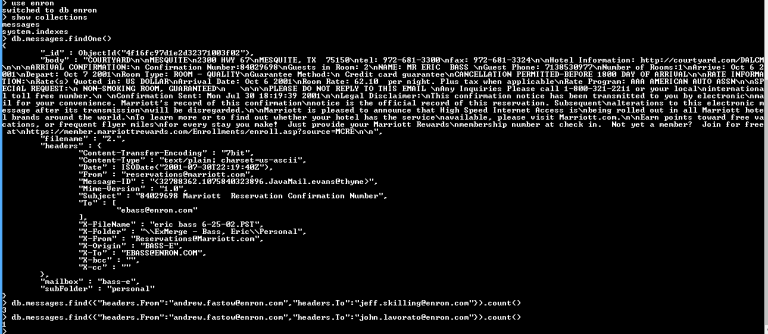
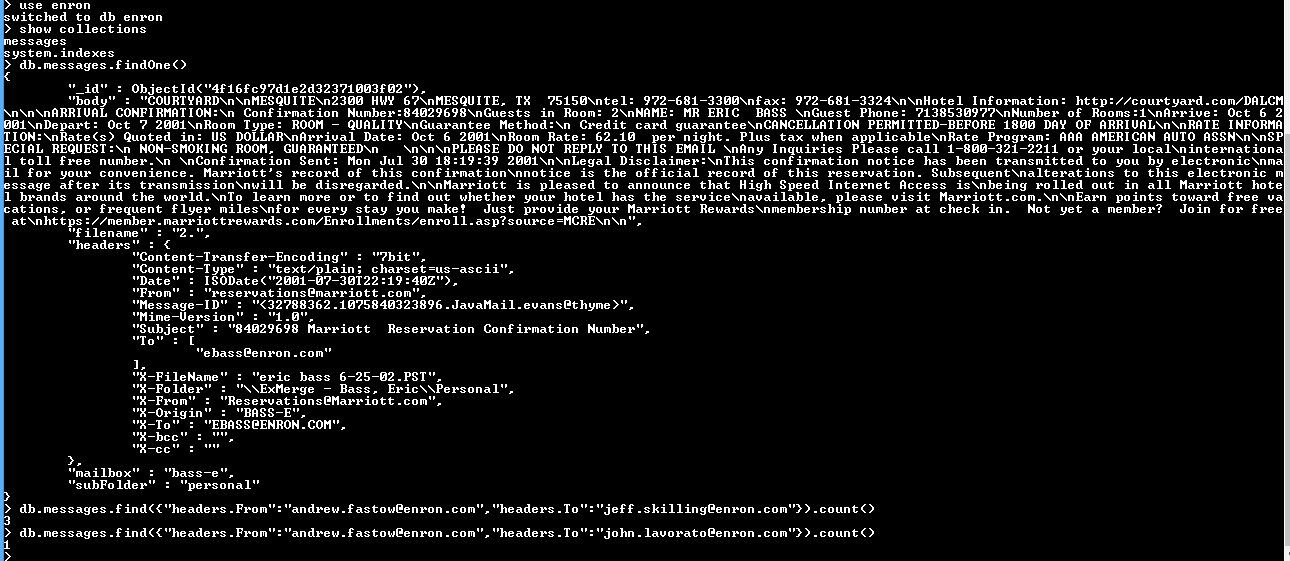
  • Check your data with “db.messages.findOne()” { “_id” : ObjectId(“4f16fc97d1e2d32371003f02”), “body” : “COURTYARD\n\nMESQUITE\n2300 HWY 67\nMESQUITE, TX 75150\ntel: 972-681-3300\nfax: 972-681-3324\n\nHotel Information: http://courtyard.com/DALCM \n\n\nARRIVAL CONFIRMATION:\n Confirmation Number:84029698\nGuests in Room: 2\nNAME: MR ERIC BASS \nGuest Phone: 7138530977\nNumber of Rooms:1\nArrive: Oct 6 2 001\nDepart: Oct 7 2001\nRoom Type: ROOM – QUALITY\nGuarantee Method:\n Credit card guarantee\nCANCELLATION PERMITTED-BEFORE 1800 DAY OF ARRIVAL\n\nRATE INFORMA TION:\nRate(s) Quoted in: US DOLLAR\nArrival Date: Oct 6 2001\nRoom Rate: 62.10 per night. Plus tax when applicable\nRate Program: AAA AMERICAN AUTO ASSN\n\nSP ECIAL REQUEST:\n NON-SMOKING ROOM, GUARANTEED\n \n\n\nPLEASE DO NOT REPLY TO THIS EMAIL \nAny Inquiries Please call 1-800-321-2211 or your local\ninternationa l toll free number.\n \nConfirmation Sent: Mon Jul 30 18:19:39 2001\n\nLegal Disclaimer:\nThis confirmation notice has been transmitted to you by electronic\nma il for your convenience. Marriott’s record of this confirmation\nnotice is the official record of this reservation. Subsequent\nalterations to this electronic m essage after its transmission\nwill be disregarded.\n\nMarriott is pleased to announce that High Speed Internet Access is\nbeing rolled out in all Marriott hote l brands around the world.\nTo learn more or to find out whether your hotel has the service\navailable, please visit Marriott.com.\n\nEarn points toward free va cations, or frequent flyer miles\nfor every stay you make! Just provide your Marriott Rewards\nmembership number at check in. Not yet a member? Join for free at\nhttps://member.marriottrewards.com/Enrollments/enroll.asp?source=MCRE\n\n”, “filename” : “2.”, “headers” : { “Content-Transfer-Encoding” : “7bit”, “Content-Type” : “text/plain; charset=us-ascii”, “Date” : ISODate(“2001-07-30T22:19:40Z”), “From” : “reservations@marriott.com”, “Message-ID” : “<32788362.1075840323896.JavaMail.evans@thyme>”, “Mime-Version” : “1.0”, “Subject” : “84029698 Marriott Reservation Confirmation Number”, “To” : [ “ebass@enron.com” ], “X-FileName” : “eric bass 6-25-02.PST”, “X-Folder” : “\\ExMerge – Bass, Eric\\Personal”, “X-From” : “Reservations@Marriott.com”, “X-Origin” : “BASS-E”, “X-To” : “EBASS@ENRON.COM”, “X-bcc” : “”, “X-cc” : “” }, “mailbox” : “bass-e”, “subFolder” : “personal” }
  • Now run following query to get the output
    • db.messages.find({“headers.From”:”andrew.fastow@enron.com”,”headers.To”:”jeff.skilling@enron.com”}).count()
  • Confirm you the result, I got “3” as an answer.
final_exam_question_1

The solution Homework 2.3 M101JS: MongoDB for Node.js Developers

You should see four files in the ‘blog’ directory: app.js, users.js, posts.js, and sessions.js. There is also a ‘views’ directory which contains the templates for the project and a ‘routes’ directory which contains our express routes.

If everything is working properly, you should be able to start the blog by typing:

npm install
node app.js

Note that this requires Node.js to be correctly installed on your computer.
After you run the blog, you should see the message:

Express server listening on port 8082

If you go to http://localhost:8082 you should see the front page of the blog. Here are some URLs that must work when you are done.

http://localhost:8082/signup
http://localhost:8082/login
http://localhost:8082/logout

When you login or sign-up, the blog will redirect to http://localhost:8082/welcome and that must work properly, welcoming the user by username.

We have removed parts of the code that uses the Node.js driver to query MongoDB from users.js and marked the area where you need to work with “TODO: hw2.3”. You should not need to touch any other code. The database calls that you are going to add will add a new user upon sign-up and validate a login by retrieving the right user document.

The blog stores its data in the blog database in two collections, users and sessions. Here are two example docs for a username search with password salty. You can insert these if you like, but you don’t need to.

> use blog
switched to db blog
> db.users.find()
{ "_id" : "sverch", "password" : "$2a$10$wl4bNB/5CqwWx4bB66PoQ.lmYvxUHigM1ehljyWQBupen3uCcldoW" }
> db.sessions.find()
{ "username" : "sverch", "_id" : "8d25917b27e4dc170d32491c6247aabba7598533" }
>

Once you have the the project working, the following steps should work:

go to http://localhost:8082/signup
create a user

It should redirect you to the welcome page and say: welcome username, where username is the user you signed up with. Now:

    Goto http://localhost:8082/logout
    Now login http://localhost:8082/login

Ok, now it’s time to validate you got it all working.

From the top of this page, there was one additional program that should have been downloaded:mongoProc.

With it, you can test your code and look at the Feedback section. When it says “user creation successful” and “user login successful”, you can Turn in your assignment.

Solution:

  • Open user.js
  • See changes below //TODO HW 2.3. Changes are done in two places.
var bcrypt = require('bcrypt-nodejs');
/* The UsersDAO must be constructed with a connected database object */
function UsersDAO(db) {
    "use strict";
    /* If this constructor is called without the "new" operator, "this" points
     * to the global object. Log a warning and call it correctly. */
    if (false === (this instanceof UsersDAO)) {
        console.log('Warning: UsersDAO constructor called without "new" operator');
        return new UsersDAO(db);
    }
    var users = db.collection("users");
    this.addUser = function(username, password, email, callback) {
        "use strict";
        // Generate password hash
        var salt = bcrypt.genSaltSync();
        var password_hash = bcrypt.hashSync(password, salt);
        // Create user document
        var user = {'_id': username, 'password': password_hash};
        // Add email if set
        if (email != "") {
            user['email'] = email;
        }
        // TODO: hw2.3
        users.insert(user, function (err, result) {
            "use strict";
            callback(err, result[0]);
        });
        //callback(Error("addUser Not Yet Implemented!"), null);
    }
    this.validateLogin = function(username, password, callback) {
        "use strict";
        // Callback to pass to MongoDB that validates a user document
        function validateUserDoc(err, user) {
            "use strict";

            if (err) return callback(err, null);

            if (user) {
                if (bcrypt.compareSync(password, user.password)) {
                    callback(null, user);
                }
                else {
                    var invalid_password_error = new Error("Invalid password");
                    // Set an extra field so we can distinguish this from a db error
                    invalid_password_error.invalid_password = true;
                    callback(invalid_password_error, null);
                }
            }
            else {
                var no_such_user_error = new Error("User: " + user + " does not exist");
                // Set an extra field so we can distinguish this from a db error
                no_such_user_error.no_such_user = true;
                callback(no_such_user_error, null);
            }
        }
        // TODO: hw2.3
        users.findOne({ '_id' : username}, function(err, user){
            if(err) throw err;
            validateUserDoc(err, user);
        });
       // callback(Error("validateLogin Not Yet Implemented!"), null);
    }
}
module.exports.UsersDAO = UsersDAO;
  • Save and run node js and perform signup and login in the browser if all are OK then open mongoProc and perform “Test” and if all seems OK then “Turn in”. While turning in I see the following screenshot.
m101js-homework_2.3

Let me know if get any problem so that we can solve each other help. As well as if you got any easy way to do it then please let me know.

The solution HW 2.2 M101JS: MongoDB for Node.js Developers

Write a program that finds the document with the highest recorded temperature for each state, and adds a “month_high” field for that document, setting its value to true. Use the weather dataset that you imported in HW 2.1.

From the top of this page, there was one additional program that should have been downloaded:mongoProc.

With it, you can test your code and look at the Feedback section. When it says “Correct amount of data documents.”, “Correct amount of month_high documents.” and “Correct month_high documents.”, you can Turn in your assignment.

Solution:

  • Create app.js
  • Paste the following code
var MongoClient = require('mongodb').MongoClient;
MongoClient.connect('mongodb://localhost:27017/weather', function(err, db) {
    if(err) throw err;
    db.collection('data').find().sort({"State" : 1, "Temperature" : -1}).toArray(function(err, docs) {
        if(err) throw err;
        var newstate = "";
        var query = {};
        docs.forEach(function (doc) {
            console.log("Doc : " + doc);
            if(newstate != doc.State) {
                // update row
                newstate = doc.Statdbe;
                query['_id'] = doc['_id'];
                var operator = { '$set' : { 'month_high' : true } };
                db.collection('data').update(query, operator, function(err, updated) {
                    if(err) throw err;
                    console.dir("Successfully updated " + updated + " document!");
                    return db.close();
                });
            }
        });
        db.close();
    });
});
  • Run with nodejs as node app.js
  • Check the result in mongo shell with query as db.data.find({“month_high”:true}); and result will be following:
{ "_id" : ObjectId("5627f4216f0eb671e142efbd"), "Day" : 23, "Time" : 1654, "State" : "Vermont", "Airport" : "BTV", "Temperature" : 57, "Humidity" : 78, "Wind Sp
eed" : 13, "Wind Direction" : 170, "Station Pressure" : 29.1, "Sea Level Pressure" : 982, "month_high" : true }
{ "_id" : ObjectId("5627f4216f0eb671e142f180"), "Day" : 11, "Time" : 1150, "State" : "California", "Airport" : "LAX", "Temperature" : 81, "Humidity" : 32, "Wind
 Speed" : 5, "Wind Direction" : 50, "Station Pressure" : 29.63, "Sea Level Pressure" : 151, "month_high" : true }
{ "_id" : ObjectId("5627f4216f0eb671e142f41d"), "Day" : 8, "Time" : 1453, "State" : "Florida", "Airport" : "ORL", "Temperature" : 83, "Humidity" : 55, "Wind Spe
ed" : 5, "Wind Direction" : 190, "Station Pressure" : 29.97, "Sea Level Pressure" : 195, "month_high" : true }
{ "_id" : ObjectId("5627f4226f0eb671e142f746"), "Day" : 11, "Time" : 1453, "State" : "New Mexico", "Airport" : "SAF", "Temperature" : 57, "Humidity" : 32, "Wind
 Speed" : 11, "Wind Direction" : 340, "Station Pressure" : 23.87, "Sea Level Pressure" : 174, "month_high" : true }
  • Then I run mongoProc and click “Test” button which shows data are fine then I click “Turn In” which shows the following screenshot.
m101js-homework_2.2

Let me know if get any problem so that we can solve each other help. As well as if you got any easy way to do it then please let me know.