Show discounts at featured module OpenCart 2.3 for free
 Rupak NepaliPublished Dec 13, 2018
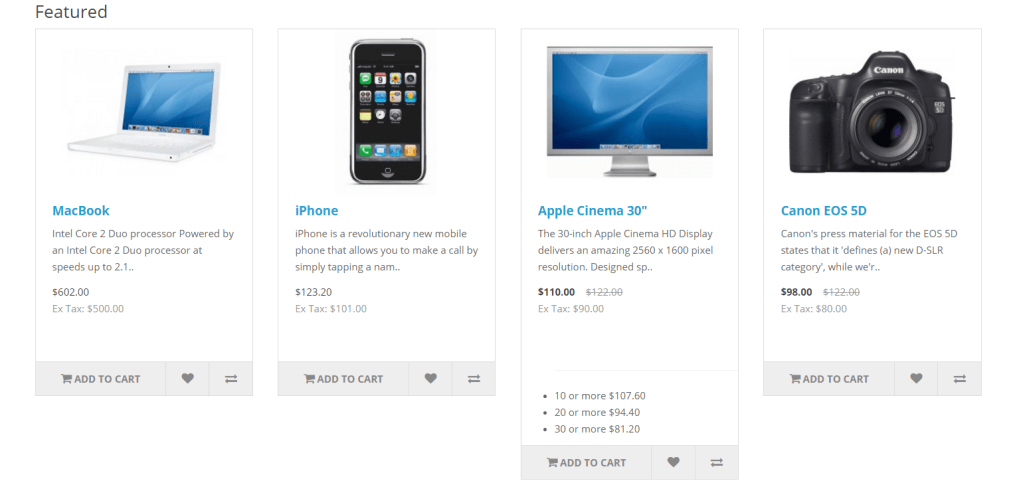
Opencart tip and trick to show discounts at featured products module in Opencart 2.3 for free, download and install and it will show discounts at the featured module.
Click to Download Ocmod file to show discounts at featured module
Go to catalog\language\en-gb\extension\module\featured.php Add following code:
$_['text_discount'] = ' or more ';
Go to catalog\controller\extension\module\featured.php Find the following lines of code:
$data['heading_title'] = $this->language->get('heading_title');
Add the following lines of code:
$data['text_discount'] = $this->language->get('text_discount');
Find the following lines of code:
foreach ($products as $product_id) {
   $product_info = $this->model_catalog_product->getProduct($product_id);
Add the following lines of code:
$discounts = $this->model_catalog_product->getProductDiscounts($product_id);

            $product_info['discounts'] = array();

            foreach ($discounts as $discount) {
                $product_info['discounts'][] = array(
                    'quantity' => $discount['quantity'],
                    'price'    => $this->currency->format($this->tax->calculate($discount['price'], $product_info['tax_class_id'], $this->config->get('config_tax')), $this->session->data['currency'])
                );
            }
Find the following lines of code:
$data['products'][] = array(
                    'product_id' => $product_info['product_id'],
Just below it, add the following lines of code:
'discounts'=>$product_info['discounts'],
Now go to catalog\view\theme\YOUR_ACTIVE_THEME\template\extension\module\featured.tpl
Find the following lines of code:
 <div class="button-group">
            <button type="button" onclick="cart.add('<?php echo $product['product_id']; ?>');">
Add above it or where ever you want to show but need to inside the product array:
<?php if ($product['discounts']) { ?>
        <ul>
            <hr>
            <?php foreach ($product['discounts'] as $discount) { ?>
            <li><?php echo $discount['quantity']; ?><?php echo $text_discount; ?><?php echo $discount['price']; ?></li>
            <?php } ?>
        </ul>
        <?php } ?>

Rupak Nepali is a web developer, manage Webocreation website and the author of six books:
Getting Started with OpenCart Module Development (Packt, 2013),
OpenCart Theme and Module Development (Packt, 2015),
OpenCart 4: Dev Guide for Themes & Extensions (2024),
OpenCart 4: User Manual (2025),
Cloudflare for the Enterprise Website (2026) and
The Technical Web Guide for Marketers (2026).
Rupak has built OpenCart stores and extensions since 2010, has published more than 600 tutorials on Webocreation, and shares free OpenCart extensions on GitHub.
Find Rupak on
GitHub | Amazon | LinkedIn | X | YouTube.

hi….before i said thank’s for your free extension
i try this extension “Show discounts at featured module OpenCart 2.3”
but not work, i use opencart 2.3.0.2
could you give me tutorial/document step by step, because i am beginner
thanks
Hello
Is this compatible with opencart 3.0.2.0 ?
I need to show discount percentage featured module block in home page