
Google base feed module for Opencart 4

Opencart free Google base feed module for the creation of an XML product data feed in the RSS 2.0 format to submit to Google Merchant Center.

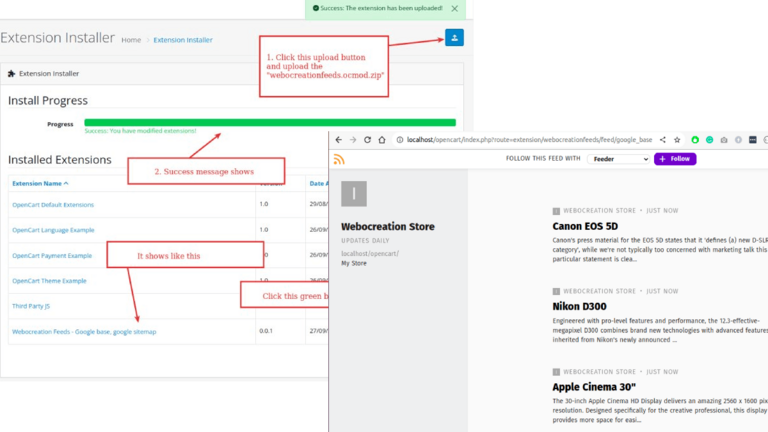
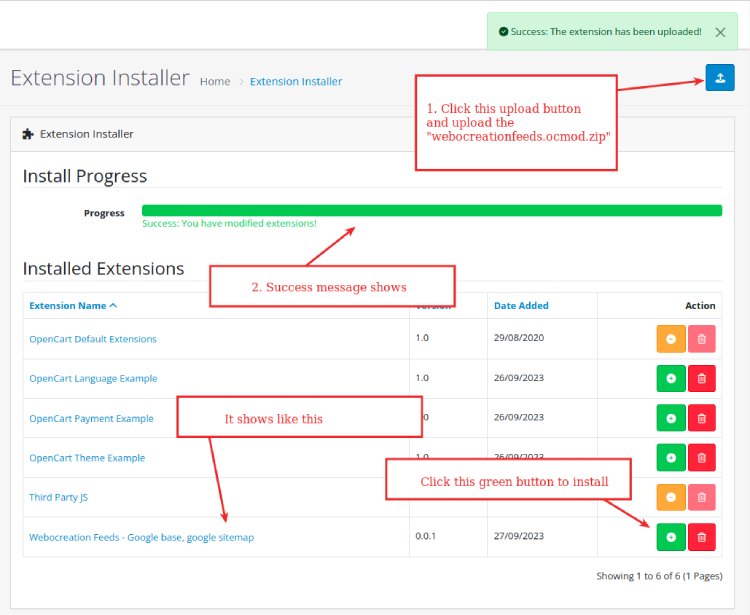
Click the above button to download the Google Base feed module, the file downloaded is webocreationfeeds.ocmod.zip. Now go to the Opencart admin >> Extensions >> Installer >> Then upload the file webocreationfeeds.ocmod.zip

Opencart extension installation

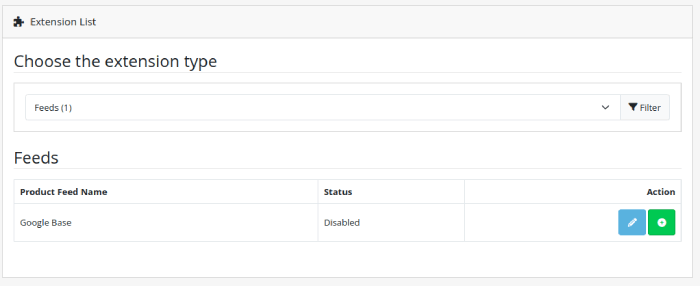
Once it is uploaded and installed. Go to Extensions >> Extensions and filter out to feed.

Google Base feed RSS module

Click the install button and then click the edit button.

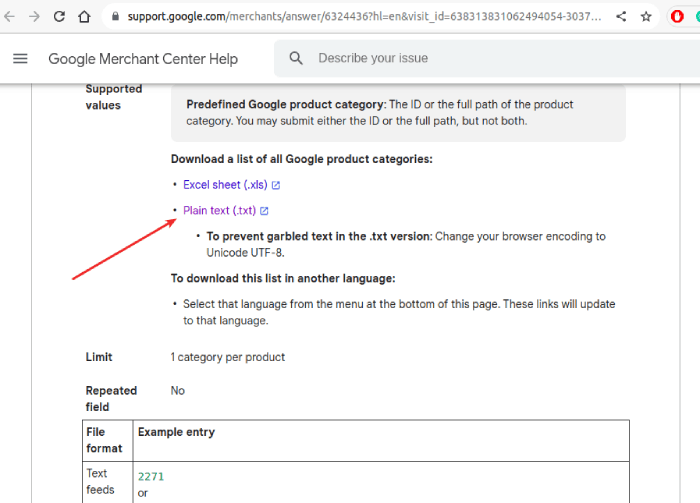
Now click here to download the Google product category text file. You can find it here: https://support.google.com/merchants/answer/6324436?hl=en&visit_id=638313777926954143-2283884251&rd=1

Google Product Category

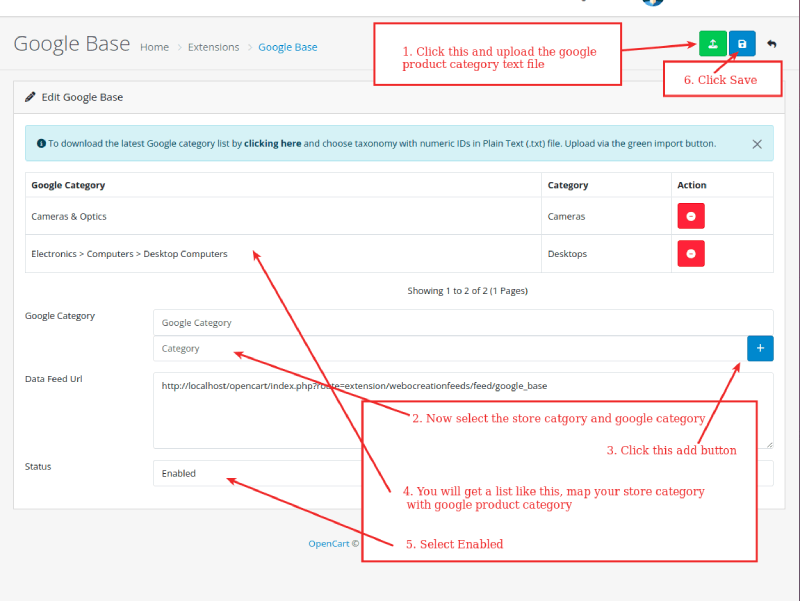
Once you download the text file, and then upload it to the Google Base settings page.

Google base settings

Once the Google category is uploaded, select the store category and Google category and map it out, then click the add button. You will get a list that is mapped to your store category with the Google product category. Then select Enabled and click Save.

Now go to the URL below

https://YOURURL/opencart/index.php?route=extension/webocreationfeeds/feed/google_base

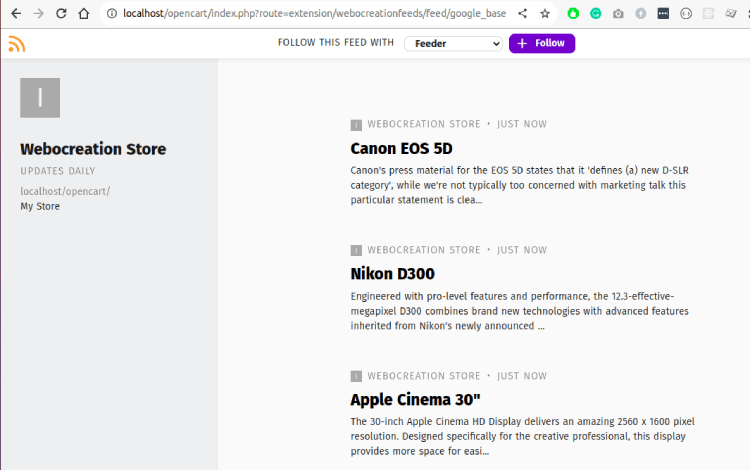
The output of the above with feed reader is like the below:

Google Base feed RSS output

Then, it will show XML something like below:

<?xml version="1.0" encoding="UTF-8" ?><rss version="2.0" xmlns:g="http://base.google.com/ns/1.0">  <channel>  <title>Webocreation Store</title>  <description>My Store</description>  <link>http://localhost/opencart/</link><item><title><![CDATA[Canon EOS 5D]]></title><link>http://localhost/opencart/index.php?route=product/product&amp;product_id=30</link><description><![CDATA[
	Canon's press material for the EOS 5D states that it 'defines (a) new D-SLR category', while we're not typically too concerned with marketing talk this particular statement is clearly pretty accurate. The EOS 5D is unlike any previous digital SLR in that it combines a full-frame (35 mm sized) high resolution sensor (12.8 megapixels) with a relatively compact body (slightly larger than the EOS 20D, although in your hand it feels noticeably 'chunkier'). The EOS 5D is aimed to slot in between the EOS 20D and the EOS-1D professional digital SLR's, an important difference when compared to the latter is that the EOS 5D doesn't have any environmental seals. While Canon don't specifically refer to the EOS 5D as a 'professional' digital SLR it will have obvious appeal to professionals who want a high quality digital SLR in a body lighter than the EOS-1D. It will also no doubt appeal to current EOS 20D owners (although lets hope they've not bought too many EF-S lenses...) äë
]]></description><g:condition>new</g:condition><g:id>30</g:id>  <g:image_link>http://localhost/opencart/image/cache/catalog/demo/canon_eos_5d_1-500x500.jpg</g:image_link>  <g:model_number>Product 3</g:model_number>  <g:identifier_exists>false</g:identifier_exists>  <g:price>98</g:price>  <g:google_product_category>141</g:google_product_category><g:product_type><![CDATA[Desktops]]></g:product_type><g:product_type><![CDATA[Cameras]]></g:product_type>  <g:quantity>7</g:quantity>  <g:weight>0.00kg</g:weight>  <g:availability><![CDATA[in stock]]></g:availability></item><item><title><![CDATA[Nikon D300]]></title><link>http://localhost/opencart/index.php?route=product/product&amp;product_id=31</link><description><![CDATA[
	
		Engineered with pro-level features and performance, the 12.3-effective-megapixel D300 combines brand new technologies with advanced features inherited from Nikon&#39;s newly announced D3 professional digital SLR camera to offer serious photographers remarkable performance combined with agility

]]></description><g:condition>new</g:condition><g:id>31</g:id>  <g:image_link>http://localhost/opencart/image/cache/catalog/demo/nikon_d300_1-500x500.jpg</g:image_link>  <g:model_number>Product 4</g:model_number>  <g:identifier_exists>false</g:identifier_exists>  <g:price>98</g:price>  <g:google_product_category>141</g:google_product_category><g:product_type><![CDATA[Cameras]]></g:product_type>  <g:quantity>1000</g:quantity>  <g:weight>0.00kg</g:weight>  <g:availability><![CDATA[in stock]]></g:availability></item><item><title><![CDATA[Apple Cinema 30&quot;]]></title><link>http://localhost/opencart/index.php?route=product/product&amp;product_id=42</link><description><![CDATA[
	The 30-inch Apple Cinema HD Display delivers an amazing 2560 x 1600 pixel resolution. Designed specifically for the creative professional, this display provides more space for easier access to all the tools and palettes needed to edit, format and composite your work. Combine this display with a Mac Pro, MacBook Pro, or PowerMac G5 and there's no limit to what you can achieve. 


]]></description><g:condition>new</g:condition><g:id>42</g:id>  <g:image_link>http://localhost/opencart/image/cache/catalog/demo/apple_cinema_30-500x500.jpg</g:image_link>  <g:model_number>Product 15</g:model_number>  <g:identifier_exists>false</g:identifier_exists>  <g:price>110</g:price>  <g:google_product_category>325</g:google_product_category><g:product_type><![CDATA[Desktops]]></g:product_type><g:product_type><![CDATA[Components &gt; Monitors]]></g:product_type>  <g:quantity>990</g:quantity>  <g:weight>12.50kg</g:weight>  <g:availability><![CDATA[in stock]]></g:availability></item><item><title><![CDATA[HP LP3065]]></title><link>http://localhost/opencart/index.php?route=product/product&amp;product_id=47</link><description><![CDATA[
	Stop your co-workers in their tracks with the stunning new 30-inch diagonal HP LP3065 Flat Panel Monitor. This flagship monitor features best-in-class performance and presentation features on a huge wide-aspect screen while letting you work as comfortably as possible - you might even forget you&#39;re at the office
]]></description><g:condition>new</g:condition><g:id>47</g:id>  <g:image_link>http://localhost/opencart/image/cache/catalog/demo/hp_1-500x500.jpg</g:image_link>  <g:model_number>Product 21</g:model_number>  <g:identifier_exists>false</g:identifier_exists>  <g:price>122</g:price>  <g:google_product_category>325</g:google_product_category><g:product_type><![CDATA[Laptops &amp; Notebooks]]></g:product_type><g:product_type><![CDATA[Desktops]]></g:product_type>  <g:quantity>1000</g:quantity>  <g:weight>1.00kg</g:weight>  <g:availability><![CDATA[in stock]]></g:availability></item><item><title><![CDATA[HTC Touch HD]]></title><link>http://localhost/opencart/index.php?route=product/product&amp;product_id=28</link><description><![CDATA[
	HTC Touch - in High Definition. Watch music videos and streaming content in awe-inspiring high definition clarity for a mobile experience you never thought possible. Seductively sleek, the HTC Touch HD provides the next generation of mobile functionality, all at a simple touch. Fully integrated with Windows Mobile Professional 6.1, ultrafast 3.5G, GPS, 5MP camera, plus lots more - all delivered on a breathtakingly crisp 3.8&quot; WVGA touchscreen - you can take control of your mobile world with the HTC Touch HD.

]]></description><g:condition>new</g:condition><g:id>28</g:id>  <g:image_link>http://localhost/opencart/image/cache/catalog/demo/htc_touch_hd_1-500x500.jpg</g:image_link>  <g:model_number>Product 1</g:model_number>  <g:identifier_exists>false</g:identifier_exists>  <g:price>122</g:price>  <g:google_product_category>325</g:google_product_category><g:product_type><![CDATA[Desktops]]></g:product_type><g:product_type><![CDATA[Phones &amp; PDAs]]></g:product_type>  <g:quantity>939</g:quantity>  <g:weight>146.40g</g:weight>  <g:availability><![CDATA[in stock]]></g:availability></item><item><title><![CDATA[iPhone]]></title><link>http://localhost/opencart/index.php?route=product/product&amp;product_id=40</link><description><![CDATA[
	iPhone is a revolutionary new mobile phone that allows you to make a call by simply tapping a name or number in your address book, a favorites list, or a call log. It also automatically syncs all your contacts from a PC, Mac, or Internet service. And it lets you select and listen to voicemail messages in whatever order you want just like email.
]]></description><g:condition>new</g:condition><g:id>40</g:id>  <g:image_link>http://localhost/opencart/image/cache/catalog/demo/iphone_1-500x500.jpg</g:image_link>  <g:model_number>product 11</g:model_number>  <g:identifier_exists>false</g:identifier_exists>  <g:price>123.2</g:price>  <g:google_product_category>325</g:google_product_category><g:product_type><![CDATA[Desktops]]></g:product_type><g:product_type><![CDATA[Phones &amp; PDAs]]></g:product_type>  <g:quantity>970</g:quantity>  <g:weight>10.00kg</g:weight>  <g:availability><![CDATA[in stock]]></g:availability></item><item><title><![CDATA[iPod Classic]]></title><link>http://localhost/opencart/index.php?route=product/product&amp;product_id=48</link><description><![CDATA[
			More room to move.
			With 80GB or 160GB of storage and up to 40 hours of battery life, the new iPod classic lets you enjoy up to 40,000 songs or up to 200 hours of video or any combination wherever you go.

]]></description><g:condition>new</g:condition><g:id>48</g:id>  <g:image_link>http://localhost/opencart/image/cache/catalog/demo/ipod_classic_1-500x500.jpg</g:image_link>  <g:model_number>product 20</g:model_number>  <g:identifier_exists>false</g:identifier_exists>  <g:price>122</g:price>  <g:google_product_category>325</g:google_product_category><g:product_type><![CDATA[Desktops]]></g:product_type><g:product_type><![CDATA[MP3 Players]]></g:product_type>  <g:quantity>995</g:quantity>  <g:weight>1.00kg</g:weight>  <g:availability><![CDATA[in stock]]></g:availability></item><item><title><![CDATA[MacBook]]></title><link>http://localhost/opencart/index.php?route=product/product&amp;product_id=43</link><description><![CDATA[
		MacBook makes it easy to hit the road thanks to its tough polycarbonate case, built-in wireless technologies, and innovative MagSafe Power Adapter that releases automatically if someone accidentally trips on the cord.
]]></description><g:condition>new</g:condition><g:id>43</g:id>  <g:image_link>http://localhost/opencart/image/cache/catalog/demo/macbook_1-500x500.jpg</g:image_link>  <g:model_number>Product 16</g:model_number>  <g:identifier_exists>false</g:identifier_exists>  <g:price>602</g:price>  <g:google_product_category>325</g:google_product_category><g:product_type><![CDATA[Laptops &amp; Notebooks]]></g:product_type><g:product_type><![CDATA[Desktops]]></g:product_type>  <g:quantity>929</g:quantity>  <g:weight>0.00kg</g:weight>  <g:availability><![CDATA[in stock]]></g:availability></item><item><title><![CDATA[MacBook Air]]></title><link>http://localhost/opencart/index.php?route=product/product&amp;product_id=44</link><description><![CDATA[
	MacBook Air is ultrathin, ultraportable, and ultra unlike anything else. But you don&rsquo;t lose inches and pounds overnight. It&rsquo;s the result of rethinking conventions. Of multiple wireless innovations. And of breakthrough design. With MacBook Air, mobile computing suddenly has a new standard.
]]></description><g:condition>new</g:condition><g:id>44</g:id>  <g:image_link>http://localhost/opencart/image/cache/catalog/demo/macbook_air_1-500x500.jpg</g:image_link>  <g:model_number>Product 17</g:model_number>  <g:identifier_exists>false</g:identifier_exists>  <g:price>1202</g:price>  <g:google_product_category>325</g:google_product_category><g:product_type><![CDATA[Laptops &amp; Notebooks]]></g:product_type><g:product_type><![CDATA[Desktops]]></g:product_type>  <g:quantity>1000</g:quantity>  <g:weight>0.00kg</g:weight>  <g:availability><![CDATA[in stock]]></g:availability></item><item><title><![CDATA[Palm Treo Pro]]></title><link>http://localhost/opencart/index.php?route=product/product&amp;product_id=29</link><description><![CDATA[
	Redefine your workday with the Palm Treo Pro smartphone. Perfectly balanced, you can respond to business and personal email, stay on top of appointments and contacts, and use Wi-Fi or GPS when you&rsquo;re out and about. Then watch a video on YouTube, catch up with news and sports on the web, or listen to a few songs. Balance your work and play the way you like it, with the Palm Treo Pro.
]]></description><g:condition>new</g:condition><g:id>29</g:id>  <g:image_link>http://localhost/opencart/image/cache/catalog/demo/palm_treo_pro_1-500x500.jpg</g:image_link>  <g:model_number>Product 2</g:model_number>  <g:identifier_exists>false</g:identifier_exists>  <g:price>337.99</g:price>  <g:google_product_category>325</g:google_product_category><g:product_type><![CDATA[Desktops]]></g:product_type><g:product_type><![CDATA[Phones &amp; PDAs]]></g:product_type>  <g:quantity>999</g:quantity>  <g:weight>133.00g</g:weight>  <g:availability><![CDATA[in stock]]></g:availability></item><item><title><![CDATA[Product 8]]></title><link>http://localhost/opencart/index.php?route=product/product&amp;product_id=35</link><description><![CDATA[
	Product 8
]]></description><g:condition>new</g:condition><g:id>35</g:id>  <g:image_link></g:image_link>  <g:model_number>Product 8</g:model_number>  <g:identifier_exists>false</g:identifier_exists>  <g:price>122</g:price>  <g:google_product_category>325</g:google_product_category><g:product_type><![CDATA[Desktops]]></g:product_type>  <g:quantity>1000</g:quantity>  <g:weight>5.00kg</g:weight>  <g:availability><![CDATA[in stock]]></g:availability></item><item><title><![CDATA[Samsung SyncMaster 941BW]]></title><link>http://localhost/opencart/index.php?route=product/product&amp;product_id=33</link><description><![CDATA[
	Imagine the advantages of going big without slowing down. The big 19&quot; 941BW monitor combines wide aspect ratio with fast pixel response time, for bigger images, more room to work and crisp motion. In addition, the exclusive MagicBright 2, MagicColor and MagicTune technologies help deliver the ideal image in every situation, while sleek, narrow bezels and adjustable stands deliver style just the way you want it. With the Samsung 941BW widescreen analog/digital LCD monitor, it&#39;s not hard to imagine.
]]></description><g:condition>new</g:condition><g:id>33</g:id>  <g:image_link>http://localhost/opencart/image/cache/catalog/demo/samsung_syncmaster_941bw-500x500.jpg</g:image_link>  <g:model_number>Product 6</g:model_number>  <g:identifier_exists>false</g:identifier_exists>  <g:price>242</g:price>  <g:google_product_category>325</g:google_product_category><g:product_type><![CDATA[Desktops]]></g:product_type><g:product_type><![CDATA[Components &gt; Monitors]]></g:product_type>  <g:quantity>1000</g:quantity>  <g:weight>5.00kg</g:weight>  <g:availability><![CDATA[in stock]]></g:availability></item><item><title><![CDATA[Sony VAIO]]></title><link>http://localhost/opencart/index.php?route=product/product&amp;product_id=46</link><description><![CDATA[
	Unprecedented power. The next generation of processing technology has arrived. Built into the newest VAIO notebooks lies Intel&#39;s latest, most powerful innovation yet: Intel&reg; Centrino&reg; 2 processor technology. Boasting incredible speed, expanded wireless connectivity, enhanced multimedia support and greater energy efficiency, all the high-performance essentials are seamlessly combined into a single chip.
]]></description><g:condition>new</g:condition><g:id>46</g:id>  <g:image_link>http://localhost/opencart/image/cache/catalog/demo/sony_vaio_1-500x500.jpg</g:image_link>  <g:model_number>Product 19</g:model_number>  <g:identifier_exists>false</g:identifier_exists>  <g:price>1202</g:price>  <g:google_product_category>325</g:google_product_category><g:product_type><![CDATA[Laptops &amp; Notebooks]]></g:product_type><g:product_type><![CDATA[Desktops]]></g:product_type>  <g:quantity>1000</g:quantity>  <g:weight>0.00kg</g:weight>  <g:availability><![CDATA[in stock]]></g:availability></item>  </channel></rss>

In this way, you can install and set up the Google base feed module for Opencart 4. Please let us know if you have any kind of projects, you can email us at webocreation.com@gmail.com. Hope you liked this free opencart module, please subscribe to our YouTube Channel and get more Opencart free extensions. You can also find us on Twitter and Facebook.

UX/UI design: how to optimize the user experience on your website

Creating a website with a pleasant user experience is essential for any business. With the right UI UX design services, you can ensure that your users have a positive experience when they visit your site and are more likely to return in the future. But how to optimize the user experience on your website? In this article, we’ll discuss some best practices for creating effective UX/UI design that helps ensure your website visitors have an enjoyable time. We’ll also look at examples of websites that have successfully applied these strategies and give you tips on how you can use them to create an attractive and intuitive interface.

Table of Contents

  1. Fundamentals of UX/UI design to improve user experience 
  2. How to increase user retention and conversion 

            2.1 How UX/UI design can increase conversion on your website

            2.2 How UX/UI design can improve your visitor retention

  1. Tools and techniques for effective UX/UI design
  2. UX/UI design that connects with your users

Fundamentals of UX/UI design to improve user experience 

When it comes to the fundamentals of UX/UI design, there are several key aspects that need to be taken into account to improve the user experience on your website.

  • First of all, it is essential to understand and know your target audience to adjust your website design to their needs and preferences. You should consider aspects such as the age, gender, interests, and education level of your audience to create an attractive and user-friendly design.
  • Another important aspect is the navigation of your website. The information must be organized in a clear and intuitive way to guide the user effectively. Usability is a key factor in the user experience, and the UX/UI design must be thought about this. Buttons and links should be easily identifiable and the design should not distract the user from their main objective on the page.
  • Additionally, the loading speed of your website is a critical aspect that can significantly affect the user experience. If your website takes too long to load, visitors may abandon it and look for an alternative. Therefore, it is important to ensure that your website is optimized to be fast and efficient.
  • Another aspect to consider is accessibility. The UX/UI design must be suitable for users with visual or hearing disabilities and ensure that all content is readable and available in different formats.
  • Lastly, the UX/UI design must also be visually appealing. Colors, fonts, and styles should be cohesive and aligned with the company brand. A carefully planned and consistent design can build trust and credibility in your website.

How to increase user retention and conversion

UX/UI design is essential to increase user retention and conversion on your website. While it is important to offer a pleasant experience to visitors, it is also crucial that the site’s functionalities are designed so that users can carry out their actions without difficulty.

An effective UX/UI design helps guide users toward desired actions and avoid confusion that can lead to frustration and ultimately abandonment. This may be the result of poorly thought-out design or poor organization of information.

On the other hand, a well-planned and executed UX/UI design can make it easier for users to find what they are looking for and complete the actions they want. This increases visitor satisfaction and therefore the likelihood that they will return in the future.

Additionally, UX/UI design also has an impact on user conversion. If the design is well-adjusted to users and their needs, conversion rates can increase significantly. This is because users become more comfortable with navigation and find what they are looking for more easily.

How UX/UI design can increase conversion on your website

UI UX design services are not only about creating a visually appealing website but also about offering a satisfying user experience that increases conversion on your website. By optimizing the design elements that influence user decisions, you can get more visitors to take desired actions on your site, such as registering, making a purchase, or filling out a form.

To achieve a UX/UI design that increases conversion, several key elements need to be taken into account. First, the design must be consistent and easy to use at all stages of the user interaction process. From the moment the user arrives on the website until they take the desired action, the design should guide them intuitively and without interruptions.

Additionally, it is important to make relevant information easily accessible and prominent in the design. This may include information about special offers, pricing, product reviews or customer testimonials. By ensuring that important information is in the right places and easy to find, you can increase user confidence and reduce the chances of them leaving your site in frustration.

Another important aspect of UX/UI design that can affect conversion is website loading speed. Users expect websites to load quickly, and if yours is slow or has loading issues, users will likely leave before they can take a desired action. Be sure to optimize images, videos, and other elements that may slow down the site’s loading, and use speed analysis tools to keep the site as fast as possible.

Finally, usability is vital for the conversion of your website. Users need to be able to easily navigate your site and find what they are looking for without confusion. If there are too many clicks or complicated steps to perform an action, users are more likely to abandon the process. Make sure your design is simple and easy to understand, without redundant or unnecessary elements.

How UX/UI design can improve your visitor retention

Do you want to keep your users engaged with your website and ensure they visit again? UX/UI design can be a fundamental tool to achieve this. User experience is crucial to keep the user coming back to your website. By using proper UX/UI design, you can improve your visitor retention and ensure that your site becomes a destination that users want to return to.

UX/UI design plays an important role in user retention. By offering an engaging and satisfying user experience, you can ensure that users are more willing to return to your site. A positive user experience translates into a better perception of your brand and greater loyalty from your users.

One of the ways you can improve user retention is by offering a consistent, user-friendly design at all stages of the process of interacting with your site. This means that from the user’s arrival to their departure, the design must guide them intuitively and without interruptions. Additionally, it is important to highlight relevant information in the design, such as special offers, prices, product reviews or customer testimonials.

It’s also important to make sure your website loads quickly. Users don’t want to wait to access the content they want, and if your site takes a while to load, they’re likely to leave before interacting with it. Be sure to optimize images, videos, and other elements that may slow down the site’s loading, and use speed analysis tools to keep the site as fast as possible.

Another aspect to consider is the simplicity of the design. Users need to be able to easily navigate your site and find what they are looking for without confusion. If there are too many clicks or complicated steps to perform an action, users are more likely to abandon the process. Make sure your design is simple and easy to understand, without redundant or unnecessary elements.

Tools and techniques for effective UX/UI design

Implementing an effective UX/UI design on your website may seem like a daunting task, but there are several tools and techniques that can help you achieve it.

  • First, creating wireframes is a useful technique for planning the structure and navigation of your website. You can use tools like Balsamiq or Axure to quickly create wireframes and visualize the different sections and elements of your site.
  • Another tool is the use of heat maps and user tracking tools like Hotjar or Crazy Egg. These tools allow you to understand how users interact with your website and discover elements that may be causing confusion or making it difficult for users to meet their goals.
  • On the other hand, it is important to pay attention to visual details in UX/UI design. Typography and colors can have a big impact on user perception and experience. Tools like Google Fonts or Adobe Color can help you select the most appropriate fonts and colors for your website.
  • Additionally, conducting usability tests with real users can provide valuable insights into how they can improve the user experience. Tools like UserTesting or TryMyUI can be useful for performing usability tests and getting feedback on your website.

In terms of techniques, the use of information architecture is essential to organize and present information in a clear and coherent manner. Creating a visual hierarchy and grouping related content can help users understand how different website elements are related.

Finally, it is important to keep in mind that UX/UI design is not a static task, but should be iterative and evolutionary. Constantly testing and analyzing user behavior can help you identify areas for improvement on your website and continually optimize the user experience.

UX/UI design that connects with your users

The success of a website depends largely on its UX/UI design since this is the element that connects directly with users. A well-thought-out and executed UX/UI design can positively influence visitor satisfaction, their experience, and their stay on the site.

To create an effective UX/UI design for your website, it is essential to know and understand your users. You should know what their needs, preferences, and behaviors are when browsing online. Only then can you create a design that is easy to use, attractive, and with the right information in the right place.

Wireframing is a technique used by many UX/UI designers to plan the structure and organization of information on a website. Thanks to them, the different sections, elements, and functions that will make up the site can be displayed graphically. This allows you to make informed decisions before starting the creation of the website.

Another tool used to achieve effective UX/UI design is the use of heat maps and user tracking tools. These tools allow you to visualize and analyze user behavior when browsing your website, which will help you improve problem areas. You can also see where users are clicking, what areas are not getting enough attention, and what content needs to be improved.

It’s important to pay attention to visual details in UX/UI design, such as typography and colors. These elements can influence users’ mood, their ability to understand information, and their overall perception of the website. Appropriate fonts and colors must be identified and used according to the type of content and the target audience of the website.

Conducting usability tests with real users is a crucial technique to achieve a UI UX design service that connects with your users. These tests can provide you with valuable insights into users’ needs and preferences, and how they interact with your website in their daily lives. Additionally, these tests allow you to make design improvements before launching the website.

Exploring the Future of Mobile App Development with Flutter: Trends and Predictions


Driven by fast technical developments and changing customer tastes, the scene of mobile app development is always changing. Total revenue of mobile apps is expected to grow at a CAGR of 9.27% from 2022-2026, with a value of 614.40 billion USD by 2026. 

Of the several tools at hand for developers, Flutter has become a game-changer. Originally launched by Google in 2017, Flutter is an open-source UI tool development kit (SDK) allowing developers to develop natively produced apps for desktop, web, and mobile from a single codebase. 

Top 7 Flutter App Development Trends

So, in this article, you’ll get to know about the Future of mobile app development with various trends and predictions.

1. The Rise of Cross-Platform Development 

Rising popularity of cross-platform app development solutions is one of the most important developments in mobile app development. Conventional native app development takes time and money since iOS and Android independent code bases are needed. 

Flutter lets developers create once-used codes for several platforms, therefore addressing this problem. Along with accelerating the development process, this lowers maintenance costs and efforts. Demand for cross-platform development tools such as Flutter is projected to explode as companies aim to rapidly and effectively reach a larger audience.

2. Enhanced Performance and User Experience

Because Flutter uses the Dart programming language and its Ahead-of-Time (AOT) compilation, its performance is sometimes likened to that of native apps. Dart generates to native machine code, so Flutter apps can attain almost native performance. 

Furthermore guaranteeing flawless and high-quality images is Flutter’s rendering engine, Skia. As consumers keep expecting flawless and responsive apps, Flutter’s acceptance is probably driven even more by this focus on performance and user experience.

3. Growing Ecosystem and Community Support

Any development framework’s power resides in its ecosystem and community support. With so many plugins, tools, and packages at hand for developers, Flutter has witnessed significant expansion in its community. 

Active and involved, the Flutter community routinely helps to expand and strengthen the framework. Apart from giving developers the tools they need to create strong applications, this dynamic ecosystem promotes a cooperative environment where creative ideas may blossom.

4. Integration with Emerging Technologies

The capacity to include newly developing technologies including artificial intelligence (AI), machine learning (ML), and the Internet of Things (IoT) into mobile apps will become increasingly important as they proliferate. Flutter is positioned to assist such integrations, making it an excellent choice for app development services

Its flexible design lets developers include artificial intelligence and machine learning models, therefore supporting predictive analytics, natural language processing, and customized user experiences. Moreover, Flutter’s fit with IoT devices opens the path for creative ideas in industrial automation, smart homes, and healthcare.

5. Increased Adoption in Enterprise Applications

Many times, enterprise apps call for scalability, strong security, and sophisticated capabilities. For companies trying to simplify their development operations, Flutter’s capacity to provide high-performance applications with a single codebase appeal.

Furthermore, very helpful for business situations where time-to-market is crucial is Flutter’s hot reload capability, which greatly speeds development and testing cycles. The adoption of Flutter in corporate applications is expected to increase as more companies understand its benefits.

6. Focus on Web and Desktop Development

Although Flutter first became well-known for creating mobile apps, its features now extend to online and desktop apps. Developers trying to provide coherent and consistent user experiences across several platforms would find great benefit from this adaptability. 

Developers may use the same codebase to create responsive web apps and desktop apps for Windows, macOS, and Linux by means of Flutter for Web and Flutter for Desktop. This unified development trend is probably going to keep on, thereby confirming Flutter’s role as a complete development tool.

7. Emphasis on Design and Customization

Extended UI design customizing and flexibility are made possible by Flutter’s widget-based architecture. Modern design trends can be followed by developers in creating aesthetically pleasing and highly interactive user interfaces. 

For both developers and designers, the opportunity to personalize every UI element without sacrificing performance is quite appealing. Flutter’s focus on design and customizing will be crucial in its ongoing success as user expectations for aesthetically beautiful and simple interfaces rise.

Predictions for the Future

Future developments of Flutter and their effects on mobile app development might be anticipated in numerous ways:

1. Widespread Adoption:  

Developers and Flutter app development company in USA will be driven to adopt Flutter by its simplicity, performance, and cross-platform capability.

2. Advanced Integrations: 

As artificial intelligence, machine learning, and IoT keep developing, Flutter will be more and more used to create applications that make use of these technologies, thereby producing more intelligent and linked apps.

3. Improved Tools and Plugins: 

The Flutter ecosystem will keep expanding with more tools and plugins created to increase output and simplify the development process.

4. Expanded Use Cases:  

Beyond conventional mobile apps, Flutter will be applied in web, desktop, and embedded devices, thereby proving its adaptability.

5. Continued Community Growth: 

The dynamic and involved Flutter community will keep driving innovation, therefore ensuring the framework stays at the vanguard of mobile app development and helping to shape it.

Conclusion

Already having a major influence on the mobile app development sector, flutter appears to be even more exciting going forward. Flutter is positioned to help define the direction of app development with its cross-platform capabilities, performance and user experience emphasis, strong community support, and possibility for complex integrations. According to stats, flutter is the most popular cross-platform mobile framework used by global developersFlutter app developers for hire can leverage these strengths to deliver exceptional applications across multiple platforms. As companies and developers keep looking for quick and efficient answers for producing high-quality apps, Flutter’s importance in the sector is likely to grow, ushering in a fresh era of innovation and expansion in mobile app development.

Tips for security in mobile applications

In this post, we will focus on the importance of adopting strong security measures in mobile applications and the challenges that corporate cybersecurity departments face in guaranteeing the security of mobile devices.

Mobile application security is one of the most important components of the security strategy of any company. If we were to ask any CISO or director of cybersecurity at any company what the main difference is in the current cybersecurity infrastructure compared to a few years ago, they would surely answer: the environment is missing. And you won’t be wrong.

In the past, software development consulting firms only had to protect the technological framework that was in the organization. Today, however, connections to an organization’s applications and data are established from different points and through different devices.

The increase in hybrid work, as well as the access of suppliers and clients to the company’s data or applications, means that the attack fronts have multiplied. The vast majority of these accesses are carried out through different terminals, mainly smartphones, so data protection on mobile phones, access control in applications, and the management of different types of digital identities are essential to improve the protection of company data and infrastructure.

Some relevant actions

Smartphones can be a gateway for cybercriminals to access a company’s systems, both on-premises and deployed in a cloud environment so managing mobile vulnerabilities is a key task to guarantee security and prevent possible attacks if it can put an end to a company’s security doubts

Along with cybersecurity awareness, establish security policies on mobile devices, implement multi-factor authentication in apps, perform security audits for mobile applications or incorporate a security framework for applications, as well as protection technologies for software development solutions, mobile apps such as Cloud & Cybersecurity, are just some of the actions that must be incorporated into the cybersecurity strategy. Let’s see some of the most important ones:

Use data encryption

Smartphones store a significant amount of relevant data for any organization. Using data encryption in applications will reduce security risks in mobile apps, as it allows the protection of sensitive information, such as passwords, financial data, or customer data.

By using apps with data encryption you add an extra layer of protection that makes it impossible to access unauthorized data, even if your phone is lost, in addition, this encryption includes multi-factor authentication, so the risk of unauthorized access will be significantly reduced.

Perform security tests

When we talk about mobile application security, conducting security tests regularly is an important aspect that is not always taken into account. These tests will allow threat mitigation in mobile applications and discover possible vulnerabilities before they are exploited by cybercriminals.

Among the most common techniques are ethical hacking and mobile penetration tests that simulate attacks against mobile infrastructure to discover weaknesses.

Develop with a focus on security

Having security in custom enterprise software development is another important element when implementing a cybersecurity strategy for mobile environments. Also called “Security by Design”, it implies having security at all times: from the moment the app begins to be developed until its implementation. It is a concept in which security is a priority instead of waiting for the app to be developed and having to discover and patch vulnerabilities when it is already operational. 

In short, it is increasingly important to implement a mobile application security policy because the possibility of an attack being successful is exponentially reduced. With this strategy, companies will be more protected, the cybersecurity strategy will be aligned with regulatory compliance in mobile apps, and the company’s image will be improved for users, clients, and partners.

Technological Innovation as a lever for Digital Transformation

New technologies are affecting all fields of knowledge in society thanks to their applications in very diverse fields. So much so that, from medicine to crop treatment, they can now be carried out with some improvements that go hand in hand with custom software development services.

This development towards a more digital world is what is called digital transformation, generating a space of shared knowledge that is updated in increasingly shorter periods. That is precisely what can be interpreted as innovation.

Technological innovation, therefore, can be considered as the introduction of methods, tools, and other types of technological products that generate substantial changes within the established status. In this context, it is easy to understand that, with effective technological advances, digital transformation must continue to advance in all entities.

Introduction to Technological Innovation

Since approximately 1970 and the first quarter of the 21st century, we have seen a technological escalation that is very difficult to predict. Although in some cases it is far below what was expected, the 2010s have taken technology to very high levels.

In less than 50 years we have gone from writing letters and waiting days or even weeks for a response to talking across distances of thousands of kilometers in real time. It is only a graphic example, but human beings have had to adapt to technological changes in record time. What a year ago was the latest, we now see it as an obsolete product.

Technology is growing by leaps and bounds and we must focus on technological innovation to embark on the path towards the 360º digital transformation of technology.

Types of Technological Innovation

In this way, technological innovation covers those elements and actions that are carried out to achieve the digital transformation of the business sector. We can distinguish three types of technological innovation taking into account the specific change that is committed:

  • Radical: are those that, in the business world, allow us to reach new markets. It may be because we have created a new product or service that opens the doors to other sectors.
  • Incremental: when we improve the technological processes that we already have implemented in our company.
  • Paradigm: when we create a new technological process that involves a substantial change in production. 

Characteristics of Technological Innovation

Without a doubt, any business that wants to introduce innovation and embark on the path toward digital transformation must have three fundamental characteristics: efficiency, competence, and quality.

Renew or die is the premise that must be applied in any business sector. Therefore, we must be able to create or renew our products, services, and even their production processes. All this to adapt to the growing needs of the consumer and end client.

However, technological advances should not only focus on ‘what we sell’ but also on the organizational structure of our company. Have professionals with qualities for innovation and also train our staff. Even having external companies that can guarantee the incorporation of new business models adapted to the technological revolution that we are experiencing.

In short, carry out a general transformation where digitalization is the highlight of our company. From the management of our personnel, through the structure of our processes to the changes by technology. But, above all, our goal must be to meet the increasingly changing needs of our clients.

Achieve a global approach that leads us to the digital transformation of every one of our departments. To do this we must apply the latest technological revolutions that are going strong. This is the case of Big Data, Artificial Intelligence, or the Internet of Things (IoT).

Phases of Technological Innovation

Betting on technological innovation must be one of the priorities of the business sector. It is a long road, but it is a line of the future that guarantees business continuity. There are several phases of technological innovation:

  1. Ideas → collection, evaluation, and release of ideas related to technological innovation.
  2. Concept → Analysis of the solution, implementation, and commercialization of those ideas.
  3. Solution → idea development and testing of finished product solutions.
  4. Market → launch in which the product’s characteristics that can cover new needs detected for the client are praised.

There must be a transversal incorporation of all software development services. That is, our R&D department can begin the development of a new product or service. It can be done satisfactorily after analyzing all the data collected through our CRM with which we can know the behavior of our client and their changes. Surely, this idea that arises from good data analytics will have a much greater chance of success.

In conclusion, technological innovation is the first step towards digital transformation. The long path towards digitalization involves other factors to ensure that our company is adapted and can face the technological revolution 100%.

Artificial intelligence in healthcare

It became clear that innovations were needed to make the sector more effective, and Artificial intelligence  (AI)could profoundly influence healthcare. As mentioned by Dr. TedrosAdhanom Ghebreyesus, Director-General of the World Health Organization, only after the spread of COVID-19 did it become clear that countries did not have the necessary capacity to collect and use health data, especially in an ongoing crisis. One of the first AI responses to the global pandemic was the collaboration of TytoCare and Israel’s Sheba Medical Center. They provided patients with special stethoscopes that listened to their hearts directly in their homes and transmitted images of the patient’s lungs to the special care system to save diagnosis time.

What is artificial intelligence in healthcare?

Hospital staff and doctors can get reliable, data-driven CDS (Clinical Decision Support) thanks to machine learning.En particular, AI technologies can effectively analyze medical records and images, as well as clinical trial data. As a result, healthcare organizations can improve both the speed and quality of diagnoses, saving more lives.

How AI is changing healthcare?

There are several benefits of AI in healthcare such as the automation of tasks, faster and more effective diagnoses, and safer surgeries. For example, wearable health technology that uses custom software product development such as AI analyzes data and informs the user and healthcare professional of potential health-related risks and issues. Fitbit, one of the most notable names in the industry, has developed an advanced Sense health watch to track parameters in real-time such as oxygen saturation, skin temperature, stress level, high heart rate or low respiratory rate, sleeping and waking up, snoring, complexion and even menstrual health. The customer obtains the valid data directly in the Fitbit application installed on a smartphone and can share the data with a healthcare professional for further consultation or diagnosis. Another successful example of applying AI in practical surgery is the robot developed by Borns Medical Robotics. You can perform minimally invasive surgeries remotely. The robot can be especially useful for performing surgeries in isolated areas, such as those affected by war. London medical technology company Digital Surgery, for its part, has introduced artificial intelligence that guides surgeons through each step of an operation, significantly reducing the possible fatal outcome. One of the cases of brilliant incorporation of AI into healthcare dates back to 2016. University of Iowa Hospital and Clinics Implemented AI custom development services in its surgical procedures. Predicts the likelihood of infection during surgery even before the doctor closes the wound. As a result, the hospital has reduced postoperative infections by 74% and saved $1.2 million. Insider information states that around 30% of healthcare expenses are related to administrative tasks. AI facilitates insurance pre-authorization as well as quick checking of unpaid bills, helps process patient records, and thus simplifies the workload of hospital staff.

Examples of AI in healthcare

Artificial intelligence for healthcare is about to revolutionize the sector and help healthcare professionals face the challenges ahead. Here we have selected the most outstanding real-life examples of AI in healthcare.

Machine learning y deep learning

In healthcare, machine learning techniques can be applied to many innovations. For example, according to Portal Mercury DataScience, machine learning(ML) is expected to significantly improve central nervous system clinical trials, given the difficulty of diagnosing the progression of CNS diseases. Machine learning is capable of making the most accurate predictions of future outcomes using rule-based logic and pattern recognition. This, in turn, reduces time and costs in executing clinical trials. Another successful example of ML and DL (deep learning) in healthcare is Subtle Medical. This company provides sharper medical images to radiologists. Their SubtleMR product blocks noise from images, focusing on areas such as the head, neck, breasts, and abdomen. As a result, radiologists acquire higher-quality images. Deep learning improves clinical practice, in particular, DL algorithms are widely used for the detection of diabetic retinopathy, for example, by building a Convolutional Neural Network. Aravind Eye Hospital will be able to estimate the severity of the patient’s blindness by simply observing the eye. Furthermore, as indicated in the study published in Health IT Analytics. DL-based CNNs (convolutional neural networks) identified the dermatological disease melanoma with more than 10% accuracy than experts.

Robots físicos

Robots have been around for a long time and perform a variety of actions, from lifting goods to delivering supplies. Chatbots de AI are perhaps the most popular. For example, since 2000, surgical robots that serve as “reinforcement” for doctors have been approved in the United States. For example, they can suture wounds more precisely or create invasive incisions. Among the most common surgical interventions involving physical robots (surely, important decisions are still made after doctors) include prostate, gynecological, as well as neck and head surgeries.

Diagnostic and treatment applications

Artificial Intelligence was first applied to diagnosis and treatment in the 70s with MYCIN-.Diagnosed Infections of bacterial origin transmitted by blood. However, he stayed at Stanford and did not reach clinical practice due to a lack of power. The situation has changed radically with custom business software development advances. Almost every week, leading AI companies launch AI applications in healthcare for diagnosis and other medical treatments to ensure results that are as accurate or more accurate than humans.

Virtual reality in healthcare

Virtual reality solutions allow patients and healthcare professionals to interact with simulated environments. This may involve pain treatment and rehabilitation, as well as surgical training. And if the global healthcare VR market estimate is approximately $2.07 billion in 2022, by 2026 it is projected to reach $9.25 billion, according to ReportLinker. 

VR can be applied to healthcare AI in several ways:

  • Medical education: Theoretical learning is supported by detailed 3D medical models. Most of the time, it will be applicable in learning anatomy.
  • Medical Training: By changing the simulated environment in a VR application, users virtually participate in a training scenario. The most common cases of VR medical training include simulating medical procedures, testing medical equipment, and simulating emergency cases.
  • Surgery: VR more quickly reduces functional skill deficiency. It is used in surgical training and pre-surgical planning.
  • Pain Management: VR diverts the patient’s attention, decreasing extreme discomfort and pain level and minimizing the use of pain medications, thereby reducing healthcare expenses. As highlighted in Net Health, VR allows patients to experience their preferred interactive environments, thereby helping them combat pain and discomfort. In most cases, the effectiveness of VR in pain management is vivid across acute pain, chronic pain, stress, mental health, and pain from medical procedures.

The future of healthcare with AI

We believe that artificial intelligence will play a huge role in the healthcare sector. The development of artificial intelligence solutions companies for healthcare and the integration of AI into hospital systems will lead to dramatic changes in the health outcomes of hospitalized patients.

However, the biggest challenge for artificial intelligence in healthcare is not whether the applications will be useful and powerful enough to deliver accurate results, but ensuring that they are adopted into everyday clinical practice. Regulations must approve AI applications, be taught to doctors, and be accepted by the population.

Although we can expect palpable use of artificial intelligence in clinical practice within five years, it is obvious that AI systems cannot completely replace human clinicians. On the contrary, they will only improve and facilitate healthcare.

Progressive Web Applications (PWA) for Your Business

Over the past few years, PWAs have been subject to a lot of evolution, many big IT companies like Twitter, Pinterest, and Ali Express, among many others, adopted the concept and created impressive products. But are PWAs the right product for your business? This article can help you decide.

PWAs are the evolution of web applications and responsive websites, trying to evolve the web browser experience to a native mobile experience, but are PWAs the right product for your business? First, let’s talk about the advantages, disadvantages, and limitations of a progressive web application.

Looking to create a Progressive Web App? Get in touch with our team at the web app development company!

Advantages

There are key advantages when comparing a PWA to a web app (a traditional mobile website).

  • Connectivity independence, allows the PWA to work offline most of the time (after the first visit).
  • App-like appearance, which helps to remove the search bar from the web browser when you download the PWA on your device.
  • Greater product visibility, because you can open your PWA in a web browser or find it on the Google Play Store and Microsoft Store available for download.
  • Push notifications. By using web notifications as native push notifications on Android.
  • Faster experience, due to its background processing feature, meaning progressive web apps integrate better with mobile hardware.

In conclusion, PWAs offer a significant improvement over traditional responsive websites.

Disadvantages

All the disadvantages are revealed when comparing PWAs with mobile apps (Native and hybrid):

  • Mobile applications have adequate access to the low-level hardware components of mobile devices such as accelerometer, NFC, and Bluetooth, PWAs are limited by the limitations of the web operating system.
  • Local memory limitations, because PWAs use cache memory for local storage.
  • Perceived security of sensitive information in local storage.
  • PWAs are slower than mobile apps. Therefore, the UX suffers, especially for video games and applications that require high processor usage.
  • User Interface for custom sophisticated graphical interfaces, because native mobile apps have better and more evolved visual frameworks.

Generally speaking, you should be careful when thinking about modifying your mobile app to a PWA.

Limitations

All limitations presented at this time are related to iOS. Even this operating system has enabled some functionalities for PWAs. However, we can see some restrictions compared to others (such as Android and Windows 10)

  • There are no push notifications.
  • You can’t access components like Face-Id, AR Kit, and Bluetooth.
  • Less cache memory usage (50 MB).
  • iOS purges the cache frequently, affecting offline functionality and local storage.
  • No visibility in the app store.

All limitations are intended to be removed in the near to medium-term future, although it is necessary to take them into account and review the notes for new iOS versions.

The Business Perspective

Now that the most relevant arguments are presented, it is necessary to determine the main characteristics of your desired (or existing) product, the stage of your business, and the costs (creation and maintenance).

Early Stage Startups

Typically, for IT-based MVPs, it is necessary to have products that are fast and focused on market goals, and not think about complex product developments. Entrepreneurs therefore seem forced to decide on a web application or a mobile application development. With a PWA, taking into account the limitations and disadvantages, which should not be an obstacle for the development of an MVP (generally), it is possible to create a product for both approaches (web and mobile).

In terms of cost and development time, the difference between developing an MVP web application and a PWA does not exceed 10% — 15%, and the maintenance efforts are very similar.

The visibility of a PWA product is an advantage. With just one development, you can have a website + mobile website + mobile app, and now add your PWA to Google Play (hopefully in the future also App Store). That way, you’ll have more potential users and test your solution in the market faster.

Startup Refinement and Scaling Stages

If you already have:

  • A web application was developed, the updated version is a PWA and migration is something to consider. It’s crucial to be careful with your development team about these migration efforts, especially if your product is older than two years.
  • A mobile application, be aware of the limitations and especially the disadvantages of a PWA. Generally, if your mobile app is a market-like product, a PWA would fit as a suitable replacement, because it gains visibility on the web and will not sacrifice the functionality of your mobile app. But, if your app runs on low-end hardware or any other advantages of the mobile apps presented above, keep maintaining your mobile app. Creating a separate PWA will help you get web viewing and users.

Ready to take your web application to the next level? Our web application development services are here to help you build a top-notch Progressive Web App. Get in touch with us now and let’s bring your vision to life!

Established Companies

Regularly, IT solutions provided by established companies are 360-degree offerings that include cloud, web, and mobile applications, and even desktop applications. Our suggestion for existing products is the same as for the scaling stages of startups, thinking mainly about optimizing maintenance costs. For new web-based products, we suggest using progressive web apps instead of web apps.

We suggest reviewing with your custom software development company all the aspects and considerations to take into account focused on the peculiarity of your business when thinking about developing a PWA or migrating your applications to a PWA. At Sparkout Tech we will be happy to advise you, so do not hesitate to contact us.

How to create an exceptional UI/UX design

Welcome to the complete guide to  UI UX design services, a field that is rapidly gaining importance in the digital world. We will explore the fundamental concepts, the differences between UI and UX, and the steps involved in the design process. You’ll also find resources to help you build a strong portfolio, job market information, and course and tutorial recommendations. So, let’s dive into the exciting world of UI/UX design and discover how it shapes our digital experiences.

Table of Contents

Introduction to UI/UX design

1. Importance of UI/UX design

2. UI vs UX: Understanding the Difference

Getting started with UI/UX design

1. How to start your UI/UX design journey

2. Why choose a career in UI/UX design?

3. Self-taught education versus formal education

The UI/UX design process

1. Steps and stages in UI/UX design

2. Principles and best practices

3. Guides and practical resources

4. Importance of designing for everyone

UI/UX design tools and software

1. Popular tools for UI/UX design

2. Free resources and tutorials

3. Excel in UI Design

Advanced UI/UX concepts

1. Creative UI/UX Design

2. Graphic design versus UX/UI design

3. UI/UX design challenges and solutions

Conclusion and future of UI/UX design

1. The evolution of UI/UX design

2. Predictions for the future

3. Resources

Introduction to UI/UX design

Welcome to the fascinating world of UI/UX design! If you’ve ever interacted with a digital product, whether it’s a mobile app, a website, or even the interface of a smartwatch, you’ve experienced the results of UI/UX design. Let’s dig deeper and discover the magic behind those interactions.

Why is UI/UX design so important?

Imagine walking into a store with items scattered everywhere, with no labels and no one to guide you. Frustrating, right? This is how users feel when they interact with a poorly designed digital product. UI/UX design is the unsung hero that ensures that users not only use a product but love using it.

  • User Retention: A well-designed interface can make the difference between a user returning to your app or website and uninstalling it or abandoning it forever.
  • Business growth: Satisfied users generate more referrals, positive reviews, and higher revenue. A pleasant user experience can significantly improve business metrics.
  • Reduced costs: Investing in good UI/UX design upfront can save money in the long run by reducing the need for costly redesigns or fixes.

Did you know? According to Forrester Research, every dollar invested in UX generates $100 in return. That’s a return on investment of an astonishing 9,900%!

UI vs UX: Understanding the Difference

Ah, the old debate: UI versus UX. While they often come together in a single moment, they are distinct, and each with its own set of responsibilities and outcomes.

UI (user interface): Think of UI as the visual design of a product. It’s everything you interact with directly: buttons, text, images, sliders, and even animations. It is the appearance of the product. A user interface designer decides how the application will look.

In the code above, the UI is defined by the color, padding, and other visual styles of the button.

UX (User Experience): UX, on the other hand, is the experience a user has while interacting with your product. It’s about the overall feel and user journey. A UX designer maps out the user journey, ensuring it is intuitive and fluid.

In this pseudocode, the UX focuses on ensuring that if a user forgets their password, they have the option to reset it, providing a seamless experience.

Simply put: If UI is the “what” (what the user interacts with) of a product, UX is the “how” (how they feel about their entire interaction).

Getting started with UI/UX design

Are you embarking on a journey towards UI UX design services Fantastic choice! The digital realm is expanding and with it, the demand for skilled UI/UX designers is skyrocketing. Whether you’re a newbie or a professional looking to get into this field, there’s a lot to be excited about. Let’s dive into how you can start your journey, the advantages of choosing this career, and the age-old debate: self-taught versus formal education.

How to start your UI/UX design journey

Taking the first step:

Getting started with UI/UX design can be overwhelming, but remember, every expert was once a beginner. Here’s a roadmap to guide you:

Research and curiosity: Start by understanding what UI/UX really means. Websites like Nielsen Norman Group offer a large number of articles that can give you basic knowledge.

Hands-on Practice: Start with simple projects. Redesign your favorite app or website. Use tools like Figma or Adobe XD for this. Here’s a basic example to get you started:

Feedback and iteration: Share your designs with friends, family, or online communities. Use your feedback to improve.

Why choose a career in UI/UX design?

The appeal of UI/UX:

  • High demand: With the digital transformation of companies, the demand for good UI/UX designers is increasing. Companies understand that a good user experience translates into customer retention.
  • Creativity and problem-solving: UI/UX design is the perfect combination of creativity and analytical thinking. Every project is a new challenge, ensuring you’ll never have a dull day.
  • Financial Rewards: According to Glassdoor, the average salary for a UI/UX designer is quite competitive, with opportunities for growth.

Self-taught education versus formal education

The path you choose:

  • Self-taught: The Internet is a gold mine. With platforms like Udemy, Coursera, and countless YouTube tutorials, you can learn at your own pace. The key is consistency, practice, and seeking feedback.
  • Formal education: Universities and design schools offer structured programs with experienced professors, peer interaction, and often placement opportunities. Schools like General Assembly have immersive courses that cover the breadth and depth of UI/UX.

Remember: whether you choose to be self-taught or opt for formal education, the design industry values ​​your portfolio and practical skills above all else. So, keep designing, iterating, and learning!

The UI/UX design process

Immersing yourself in the world of UI/UX design is like embarking on an exciting journey. Every step is crucial, from understanding the user’s needs to creating the final design that delights and resonates. Let’s unravel the intricate web of the UI/UX design process, exploring its stages, principles, and the importance of inclusivity in design.

Steps and stages in UI/UX design

Mapping the journey:

The UI/UX design process is a structured approach to creating meaningful digital experiences. Here’s a breakdown:

  • Research: This is the basis. Understand your users, their needs, pain points, and aspirations through methods such as surveys, interviews, and user profiles.
  • Ideation: Brainstorming solutions. Sketch rough ideas, create mood boards, and discuss possible design directions.
  • Wireframing: Write a skeletal structure of your design. Tools like Balsamiq or Axure can be helpful.
  • Prototyping: Bring your wireframes to life. Create clickable prototypes using tools like Figma or Adobe XD.
  • Testing: Validate your designs. Conduct usability tests, collect feedback, and iterate.
  • Implementation: Hand over your designs to developers. Ensure seamless collaboration using platforms like Zeplin.
  • Review and iterate: After launch, collect user feedback, analyze metrics, and refine your design.

Principles and best practices

The golden rules:

UI/UX design is not just about aesthetics; it’s about functionality, usability, and user satisfaction. Some guiding principles include:

  • Consistency: Maintain a consistent design language at all times.
  • Feedback: Always provide feedback to users, whether through animations, messages, or sounds.
  • Simplicity: often less is more. Keep interfaces clean and intuitive.
  • Accessibility: Make sure your designs are usable by everyone, including those with disabilities.

Guides and practical resources

Your Design Toolkit:

The Internet is a treasure trove of resources for both novice and experienced designers. Some gems include:

  • Books: “Don’t Make Me Think” by Steve Krug and “The Design of Everyday Things” by Don Norman are must-reads.
  • Online Courses: Platforms like Coursera, Udemy, and LinkedIn Learning offer a large number of UI/UX courses.
  • Communities: Join forums like Designer Hangout or Behance to connect, share, and learn.

Importance of designing for everyone

Inclusivity in design:

Designing for everyone means ensuring your designs are accessible and usable by everyone, regardless of age, gender, ability or background. Here’s why it’s crucial:

  • Broader Reach: Inclusive designs speak to a broader audience, increasing the reach and impact of your product.
  • Ethical responsibility: Everyone deserves a perfect digital experience. It is our duty as designers to provide that.
  • Innovation: Designing for diverse user needs can generate innovative solutions and differentiate your product.

UI/UX design tools and software

The digital design landscape is vast and having the right tools can make all the difference. Whether you’re just starting out or looking to refine your toolset, this section will guide you through some of the most popular and effective tools in the world of UI/UX design. Let’s dive in!

Popular tools for UI/UX design

The designer’s arsenal:

  • Sketch: A vector-based design tool exclusive to Mac, Sketch is known for its simplicity and efficiency. It is perfect for creating interfaces, websites, and icons.
  • Adobe XD: As part of the Adobe suite, Adobe XD offers design, prototyping, and collaboration all in one place. It is available for both Mac and Windows.
  • Figma: Figma, a cloud-based tool, enables real-time collaboration. It is platform-independent and is rapidly gaining popularity among designers.
  • InVision – InVision is a prototyping tool that allows designers to create interactive mockups for web and mobile projects.
  • Balsamiq: If you like wireframing, Balsamiq is a fantastic tool that replicates the experience of drawing on a whiteboard.
  • Axure: For those who require more detailed and dynamic prototypes, Axure offers advanced interactions and functionalities.

Free resources and tutorials

Learning never stops:

  • Coursera UI/UX Design Specialization – This course offers a comprehensive introduction to the world of UI/UX design.
  • Udemy – Platforms like Udemy have a large number of design courses, often at affordable or even free prices.
  • YouTube: Channels like The Future and DesignCourse offer valuable information and tutorials on UI/UX design.
  • Design blogs: Websites like Smashing Magazine and UX Design.cc are treasure troves of articles, case studies, and tutorials.

Excel in UI Design

Harnessing the power of spreadsheets:

  • Why Excel? While unconventional, Excel offers a grid system that can be leveraged for basic layout layouts. It is especially useful for those who do not have access to specialized design software.
  • Creating layouts: By adjusting the size of cells and using the merge feature, you can create button shapes, input fields, and more.
  • Color and style: Excel allows cell shading, border adjustments, and font style, allowing for a basic visual representation of your design.
  • Prototyping: With hyperlinks and macro functions, you can create interactive prototypes, linking different sheets to represent different pages or views.
  • Example: Imagine designing a simple login page. Column A can represent labels such as “Username” and “Password.” Adjacent columns can be combined to create input fields. A button can be styled using a thicker border and a contrasting fill color. By linking this button to another sheet, you can simulate the transition to a dashboard upon “login”.

Advanced UI/UX concepts

As the digital landscape continues to evolve, so does the realm of UI/UX design. Advanced concepts are emerging that push designers to think beyond traditional boundaries and embrace new challenges. In this section, we’ll delve into some of these advanced concepts, shedding light on the nuances of creative design, the distinction between graphic design and UI/UX, and the challenges designers face in today’s dynamic environment.

Creative UI/UX Design

Pushing the boundaries of design:

  • Microinteractions: These are subtle animations or design elements that guide users and enhance their experience. For example, a “Like” button that animates when clicked can delight users and make the interaction seem more tangible.
  • Dark Mode Design: With platforms like macOS and Android offering dark mode, designers are now tasked with creating interfaces that look stunning in both light and dark themes.
  • Voice User Interface (VUI): As voice assistants like Alexa and Siri become more prevalent, designing for voice interactions becomes crucial. This involves crafting responses, designing voice prompts, and ensuring a seamless listening experience.
  • Augmented Reality (AR) in UI/UX: AR offers a combination of the digital and physical worlds. Designing for AR means considering spatial layout, user environment, and interactive elements that feel natural in a 3D space.

Graphic design versus UI/UX design

Understand the nuances:

  • Purpose: While graphic design often focuses on conveying a message or evoking emotions through images, UI/UX design aims to enhance the user experience and facilitate user interactions with a product.
  • Tools: Graphic designers may rely heavily on tools like Adobe Illustrator or Photoshop, while UI/UX designers typically use software like Figma, Sketch, or Adobe XD for interface design and prototyping.
  • Final Product: A graphic designer’s final product can be a poster, logo, or brochure. On the contrary, the output of a UI/UX designer is a functional and interactive design, whether it is a website, an application, or a software interface.
  • Feedback loop: UI/UX design often involves continuous iterations based on user feedback and testing, ensuring the design meets user needs and provides a seamless experience.

UI/UX design challenges and solutions

Navigating the design labyrinth:

  • Challenge: Design Consistency: With multiple designers working on a product, maintaining a consistent design language can be a challenge. Solution: Using design systems or style guides can ensure consistency across different parts of an application or website.
  • Challenge: Adapting to different screen sizes: From smartphones to desktops, ensuring a design looks and works well on all devices is a major challenge. Solution: Responsive design and mobile-first approaches, combined with rigorous testing across multiple devices, can ensure a consistent user experience.
  • Challenge: Keeping up with trends: The world of design is constantly evolving and what’s hot today may be outdated tomorrow. Solution: Continuous learning, attending workshops, and updating design blogs and communities can help designers stay ahead of the curve.
  • Challenge: Balancing Aesthetics and Functionality: Striking the right balance between a visually appealing design and a functional one can be difficult. Solution: User testing and feedback can provide insights into what works and what doesn’t, allowing designers to make informed decisions.

Conclusion and future of UI/UX design

As we wrap up our exploration of UI/UX design, it’s essential to reflect on the journey so far and look forward. The digital landscape is constantly evolving, and with it, the realms of UI and UX design continue to expand, adapt, and innovate. Let’s delve into the evolution of this dynamic field and make some educated guesses about its future trajectory.

The evolution of UI/UX design

From pixels to experiences:

  • Humble Beginnings: Do you remember the early days of the Internet? Websites with clunky layouts, limited colors, and basic typography. The focus was primarily on functionality, without regard to aesthetics or user experience.
  • The Rise of Mobile: With the advent of smartphones, UI/UX design underwent a seismic shift. Designers had to rethink interfaces for smaller screens, leading to the birth of mobile-first design and responsive designs.
  • Focus on the user: As technology advanced, so did the understanding of the importance of the user. Companies began to realize that a pleasant user experience could be a competitive advantage. This marked the beginning of an era where design thinking and user focus became paramount.
  • Technology integration: Augmented reality (AR), virtual reality (VR), and voice user interfaces (like Siri or Alexa) have added new dimensions to UI UX design agency, pushing designers to think beyond the traditional screen-based interfaces.

Predictions for the future

Charting the unexplored:

  • AI and personalization: With advances in artificial intelligence, expect interfaces that adapt in real-time to user needs. Imagine a music app that changes its user interface based on your mood, detected by biometric sensors!
  • Beyond the screen: As AR and VR technologies mature, designers will create experiences that combine the digital and physical worlds. This will challenge designers to think in 3D, creating immersive experiences that are intuitive and engaging.
  • Voice and gestures: As voice assistants become more sophisticated and gesture recognition technologies advance, screenless or minimally displayed interfaces will become more common. Designing for these modalities will require a shift in thinking, focusing more on auditory and motion design.
  • Ethical design: With growing concerns about privacy and the impact of technology on well-being, there will be a greater emphasis on ethical design. Designers will need to ensure that products are not only easy to use but also respect the rights and mental health of users.

PHP for enterprise application development: optimizing efficiency & scalability

PHP is a flexible language for enterprise application development, in which efficiency and scalability are paramount. From its humble beginnings in web programming, PHP has now become the main tool for creating enterprise-level applications that can meet the diverse needs of today’s enterprises. 

PHP is used by 76.4% of all websites. PHP helps developers create combined, fast, and more secure e-commerce and CRM platforms to enable business growth and innovation. Let’s discuss how PHP for enterprise application development enhances efficiency and scalability.

How does PHP help in enterprise app development efficiency and scalability?

In the ever-busy business world where every second matters, developers are challenged to deliver reliable, scalable, and robust products and services. PHP and other cutting-edge technologies give companies the ability to design and release first-to-market apps. Enterprise app solutions are tailored to the individual organization and they are composed of multi-purpose components.

The PHP framework follows best practices to avoid complexity and duplication, making the code consistent, readable, and reusable. The framework’s modularity and usability allow for continuous optimization. Identity, routing, and dependency injections are pre-coded, and some essential functionalities may be used.

PHP Development

Among the many ways PHP can improve enterprise app development in terms of speed and scalability are the following:

It can build different types of enterprise apps

The most common kinds of business applications developed and deployed with PHP are as follows:

  • Enterprise resource planning (ERP) systems

ERP systems can be easily designed using PHP, regardless of the size of the company. PHP can guarantee consistency while also making all of its components more accessible to diverse departments.

  • Business intelligence (BI) software

PHP development solutions can improve your company’s data-driven decision-making with the help of business intelligence tools. Marketing, manufacturing, and human resources are just a few of the many data sources that may be accessed by PHP enterprise apps. 

In order to forecast patterns, spot trends, and generate precise predictions, business intelligence systems might use data mining techniques and sophisticated mathematical analytical algorithms.

  • Business process management (BPM) apps

The primary goals of business process management applications are the automation of routine tasks and the elimination of unnecessary ones. Streamline your company’s operations with BPM enterprise apps developed with PHP. 

Maximize productivity, remove errors, and build smooth processes. In addition to preventing operational delays, PHP guarantees business continuity for these apps. 

  • Customer relationship management (CRM)

Companies can improve their CRM strategies by utilizing PHP. To make sure no opportunity is missed, speed up query resolution, and personalize user interactions, PHP apps are a great choice. 

Companies may monitor client interactions, streamline onboarding, and increase customer loyalty. To better understand consumer habits and increase interaction, PHP apps can synthesize data discoveries. If used collectively, these apps have the potential to increase industry visibility and profitability.

  • The supply chain management (SCM) tools

Organizations can create their own custom tools for supply chain management with the aid of PHP. It ensures smooth delivery, instant sales, and profound control over inventory and resource management. 

The PHP-based PHP enterprise management software that is intended for supply chain management may increase communication between suppliers and customers and manage the supply chain more efficiently at all levels. When it comes to supply chain management, PHP has you covered in every way: such as warehousing, material ordering, logistics, order processing, procurement, and others.

  • Human resource management (HRM) apps

Finding appointments, performance management, and monitoring, among others, are seen by HRM apps as their functions in businesses. The larger companies can automate routine processes and look at reports, payrolls, and productivity. 

Human Resource Management software, developed in PHP, can assist in simplifying HR processes, easy planning of the workforce, and ease tedious administrative tasks. Training courses for employees that are suitable and an easier way of hiring or retaining people are also among the advantages.

It’s free, fast, and open-source

PHP constitutes an open-source and affordable solution for enterprises. In this way, budget-conscious startups and small firms can create scalable enterprise apps. 

This can be easily done when you hire dedicated PHP developers who can provide powerful solutions that boost your PHP apps. PHP’s many caching mechanisms speed up website and app development. These methods boost scalability and reaction time. 

Load balancing and asynchronous processing 

PHP’s load balancing, which uses many servers to handle user requests, is another feature. Apache, HAProxy, and Nginx assist PHP in distributing workloads and optimizing performance. 

It easily handles large traffic and ensures application availability. PHP uses ReactPHP and Swoole for asynchronous processing. Developers may optimize server resources and work faster. 

Optimizes database queries and operations 

PHP packages like Eloquent, Doctrine, and Propel optimize database queries. PHP monitors application performance in real-time and suggests improvements. 

New Relic, Blackfire, and Xdebug help with profiling, performance analysis, and debugging. PHP developers may optimize code, streamline user interactions, and detect performance issues with these tools. 

PHP has pre-built XML parser and database administration modules, reducing development costs. Businesses enjoy PHP projects because developers can write less code, test faster, and maintain well. PHP projects are secure, scalable, and desirable. 

Multiple PHP frameworks for different applications 

There are several scalable, user-friendly, and versatile PHP frameworks. Business ventures use many PHP frameworks depending on their demands. Laravel, Codeigniter, Slim, Symfony, and Zend are popular PHP frameworks worldwide. 

Slim is simple and powerful, but Zend is known for its modularity and updated codebases. Slim supports RESTful APIs, HTTP caching, URL routing, and cookie encryption. It’s simple and supports flash messaging. Database engine independence, quick setups, and reusable components distinguish Symfony from other frameworks. Integrating most libraries and vendor resources is simple. 

Laravel can handle complex backend demands, making it ideal for small and large enterprise apps. Most developers use PHP for bespoke app development due to its security, authentication options, template engine, MVC design, etc. 

Conclusion:

In today’s competitive market, using PHP for enterprise application development simplifies operations and sets the stage for long-term growth. Since its introduction to the software and app development scene, PHP has made great strides, and every enterprise application has its unique requirements. 

It is ideal for creating both basic and advanced projects, making it one of the most flexible programming frameworks. If you want to get the most out of the framework, you should be well-versed with object-oriented programming languages, databases, MVC architecture, the command line tool, and object-oriented relationship management systems. 

How Can You Accelerate Your eCommerce Development in 2024?

The race for seamless, hyper-personalized shopping experiences will accelerate in 2024. However, severe economic headwinds will continue to push a decrease in consumer spending across industries throughout the year’s first half. Consumer savings have been depleted, consumer debt has risen, and interest rates remain high, preventing consumers from easing their purse strings. 

How can retailers and brands get ready for the year ahead? Investing in artificial intelligence, seamless consumer experiences, and digital business transformation is critical for keeping a competitive edge in the e-commerce geography.

This post will discuss the top eight trends transforming the ecommerce development services landscape.

Generative AI 

Despite the rapid rise of generative AI technology via tools such as ChatGPT, many retailers are left wondering how to incorporate the technology into their e-commerce websites, whether or not customers will interact with it on search engines, and, frankly, what they need to change to avoid falling behind. Many e-commerce websites will begin implementing generative or conversational search features in 2024, following Google’s Search Generative Experience (SGE), which went online at the end of 2023.

According to a worldwide consumer survey, approximately 27% of consumers are enthused about the possibilities of generative AI to improve real-time offer comparison and overall search results. Google’s zero-click search launch will have enormous ramifications for ecommerce development next year, as connections to third-party affiliate websites will be phased out in favor of content from owned brand websites and sponsored shopping listings.

Customers Welcome Customised  Advertising

 Consumers agree that retail media networks should become more tailored. According to Luma Partners, retail media generated $30 billion in revenue quicker than search and social, and it continues to meet a market need for consumer packaged products and branded manufacturers. 

According to Reuters, by 2028, remuneration from retail media networks (RMNs) would account for 15.4 percent of the entire ad revenue, overtaking television as a promotion platform.

Secondhand Marketplaces Battle for Customer Attention

Second Hand markets, leasing platforms, and resale will grow faster with rising living costs and more sustainable purchasing habits. 

According to a survey of U.K. customers, more than four in ten (44 percent) buy more secondhand things than they did a year ago. In comparison, another 57 percent say their ecommerce development shopping habits have stayed the same. While third-party C2C platforms such as ThredUp, eBay, and Facebook Marketplace have long dominated the secondhand industry, new B2C and B2B marketplaces are emerging.

High-Quality Products

Unsurprisingly, consumers are more concerned with sustainability, but the high expense of living in many locations will need to be clarified for their eco-friendly intentions vs actions. The trend of “de-influencing,” in which social media influencers discourage consumers from overconsumption and counsel which products to avoid, has rekindled interest in high-quality products. 

Manufacturing long-lasting and durable products is the most significant business sustainability practice for consumers, surpassing waste reduction, lowering greenhouse gas emissions, and many other typical environmental projects.

Short-Term Financing and Invisible Payments

As the ecommerce development services experience gets more bespoke and smooth, businesses will accelerate using frictionless payment methods. In the previous three years, half of millennial and Gen X consumers have used short-term financing, including PayPal Credit, Afterpay, and Apple’s Pay Later service.

 The emergence of BNPL has also promoted the concept of invisible payments, transactions that take place without any apparent contact (or friction) between the client and the payment system. However, businesses must exercise caution when adding new BNPL options to their checkout. BNPL customers are also more likely to be financially stressed.

AI-Generated Images Impaccably Blends into Marketing

As generative AI technology progresses, allowing for plausible videos of world leaders playing video games and AI headshots of coworkers, internet advertising will increase AI-generated imagery, particularly when personalizing product pictures for diverse audience segments. 

Placing things in a lifestyle setting helps boost ecommerce development conversion rates, and generative AI can make the process more affordable and efficient. While consumers are concerned about the negative impact of artificial intelligence, such as job loss (42%) and misinformation (53%), 27 percent of those familiar with and have used generative AI tools are excited about its ability to generate personalized product recommendations for them.

Smart Supply Chains will Decrease  Product Waste

Global warfare and an increase in extreme weather occurrences related to climate change highlight the critical need for merchants to upgrade their supply chains by introducing digital twins, demand forecasting, preventative maintenance measures, and supplier tracking.

 These vigorous supply networks will prevent earnings loss due to unexpected catastrophes and provide retailers with a consistent baseline for measuring carbon emissions across the value chain.

Product Reviews Influence Drive Online Shopping

Authenticity remains crucial for internet customers, especially among younger generations. As corporations flood social media with paid advertising and influencer relationships, many consumers work harder to find unsponsored product evaluations and word-of-mouth advertising from loyal customers and influencers.

 As social media Gen Z’s preferred search channel becomes oversaturated with sponsored content and paid influencers, retailers integrating user-generated content into ecommerce development channels, including written and video product reexaminations, will be the leading shopping destination for more youthful consumers.

Wrapping It Up!

The future of ecommerce development for businesses will be those that capitalize on new technologies and spot emerging trends early on. Prioritizing business strategy, customer needs, and present capability goes a long way toward outperforming the competition. Identify value pools to estimate market size, define the goal experience for the most valuable user journeys, and undertake research to determine the feasibility and viability of change. The brands that recognize where the best possibilities are will shape the future.