Phygital: Blending the Physical and Digital for a Seamless Shopping Experience

Phygital

In the ever-evolving world of retail, the lines between physical and digital shopping experiences are becoming increasingly blurred. Enter the era of “phygital” retail—a term that encapsulates the seamless integration of physical and digital elements to create a unified, immersive, and customer-centric shopping experience. As consumers demand more convenience, personalization, and engagement, modern stores are embracing phygital strategies to stay relevant and competitive in today’s fast-paced market.

What is Phygital Retail?

Phygital retail is not just a buzzword; it’s a transformative approach that bridges the gap between online and offline shopping. It leverages technology to enhance the in-store experience while maintaining the tactile and sensory appeal of physical retail. From augmented reality (AR) fitting rooms to interactive kiosks and mobile app integrations, phygital retail is redefining how consumers interact with brands.

Why Phygital Matters in Modern Retail

  1. Enhanced Customer Experience: Today’s consumers expect more than just a transaction—they want an experience. Phygital retail allows brands to create memorable, interactive, and personalized experiences that resonate with shoppers. For example, a customer can use their smartphone to scan a product in-store, access detailed information, read reviews, and even see how it looks on them using AR.
  2. Seamless Omnichannel Integration: Phygital retail ensures that the customer journey is consistent across all touchpoints. Whether a shopper is browsing online, visiting a physical store, or engaging with a brand on social media, the experience is cohesive. This integration fosters brand loyalty and encourages repeat purchases.
  3. Data-Driven Personalization: By combining physical and digital data, retailers can gain deeper insights into customer behavior and preferences. This enables them to offer personalized recommendations, targeted promotions, and tailored shopping experiences that drive satisfaction and sales.
  4. Increased Operational Efficiency: Phygital solutions, such as self-checkout kiosks and inventory management systems, streamline operations and reduce costs. Retailers can optimize stock levels, minimize wait times, and improve overall efficiency, all while enhancing the customer experience.

Examples of Phygital Retail in Action

  1. Augmented Reality (AR) Fitting Rooms: Brands like Gucci and Zara have introduced AR fitting rooms that allow customers to virtually try on clothes without stepping into a physical changing room. This not only saves time but also adds an element of fun and interactivity to the shopping process.
  2. Interactive In-Store Displays: Retailers like Nike and Sephora use interactive screens and mirrors to provide product information, tutorials, and personalized recommendations. These displays engage customers and help them make informed purchasing decisions.
  3. Mobile App Integrations: Many retailers now offer mobile apps that enhance the in-store experience. For instance, Walmart’s app allows customers to scan items as they shop, check prices, and even pay directly from their phone, eliminating the need for traditional checkout lines.
  4. Click-and-Collect Services: Phygital retail also includes services like click-and-collect, where customers can order online and pick up their purchases in-store. This hybrid approach combines the convenience of online shopping with the immediacy of physical retail.

The Numbers Behind Phygital Retail

The adoption of phygital retail is not just a trend; it’s backed by compelling data and consumer behavior insights:

  • Consumer Demand for Omnichannel Experiences: According to a report by Salesforce, 73% of customers expect companies to understand their needs and expectations, and 62% of consumers say they are likely to switch brands if they don’t receive a personalized experience. Phygital retail meets these demands by offering seamless transitions between online and offline channels.

73% of customers expect companies to understand their needs and expectations

  • Rise of AR in Retail: A study by Threekit found that 71% of consumers would shop more often if they could use AR to visualize products. Additionally, Gartner predicts that by 2025, 80% of retailers will use AR to enhance the shopping experience, up from just 1% in 2020.

71% of consumers would shop more often if they could use AR to visualize products.

  • Mobile Shopping Integration: According to eMarketer, mobile commerce sales in the U.S. are expected to reach $510 billion by 2024, accounting for over 40% of total e-commerce sales. Retailers leveraging mobile apps for in-store experiences are tapping into this growing trend.

mobile commerce sales in the U.S. are expected to reach $510 billion by 2024

  • Click-and-Collect Growth: The global click-and-collect market is projected to grow at a CAGR of 14.6% from 2021 to 2028, reaching $703 billion by 2028, according to Grand View Research. This highlights the increasing preference for hybrid shopping models.

global click-and-collect market is projected to grow at a CAGR of 14.6% from 2021 to 2028

  • Data-Driven Personalization: A McKinsey report reveals that companies leveraging customer behavior insights to personalize experiences can achieve a 10-15% increase in revenue. Phygital retail’s ability to combine online and offline data makes it a powerful tool for personalization.

personalize experiences can achieve a 10-15% increase in revenue

The Future of Phygital Retail

As technology continues to advance, the possibilities for phygital retail are virtually limitless. Emerging technologies like artificial intelligence (AI), the Internet of Things (IoT), and virtual reality (VR) are poised to take phygital experiences to the next level. Imagine walking into a store where AI-powered assistants greet you by name, IoT-enabled shelves automatically restock themselves, and VR stations allow you to explore products in a fully immersive environment.

Moreover, sustainability is becoming a key focus in phygital retail. Brands are using digital tools to reduce waste, optimize supply chains, and promote eco-friendly practices. For example, digital receipts and virtual try-ons can significantly cut down on paper and product waste.

Conclusion

The modern store is no longer confined to physical walls or digital screens—it’s a dynamic, interconnected space where the physical and digital worlds coexist harmoniously. By embracing phygital retail, brands can create richer, more engaging experiences that meet the evolving needs of today’s consumers. As we move forward, the retailers who successfully integrate phygital strategies will be the ones who thrive in this new era of shopping.

So, whether you’re a consumer enjoying the convenience of a phygital experience or a retailer looking to innovate, one thing is clear: the future of retail is here, and it’s phygital. With compelling data and real-world examples proving its effectiveness, phygital retail is not just a trend—it’s the blueprint for the future of shopping.

Cybersecurity for Small Businesses – The Complete Guide

Cybersecurity should not be perceived as an issue that concerns only large companies, but every business, including small ones. Lacking adequate capital, and in many cases, less security protocols in place, small businesses are now considered to be at the forefront for hackers. 

However, protecting sensitive data and maintaining customer trust is not always very challenging. This blog offers a detailed analysis of cybersecurity tips and practices that are useful for small companies, highlighting the need for strong protection measures.

Understanding the Risk

One common mistake that small businesses make is to think that they are not vulnerable to cyber-attacks. This misconception stems from a belief that large organizations, given their size and volume of data, would be more valuable targets. But actually, the situation is quite the opposite. Cybercriminals are attracted to small businesses for a number of reasons:

  • Lack of Resources: Unlike giant companies that have dedicated IT teams and sufficient funds to allocate to cybersecurity, small companies are often restricted. This often translates into weaker security measures which in turn makes them easy targets for hackers and other cyber criminals.
  • Less Awareness: SME owners and their staff are generally less informed about current threats and protective measures in cyberspace. This lack of awareness increases the vulnerability of these users to phishing scams, malware, and other forms of cyber attacks.
  • Valuable Data: Even smaller businesses can process important information such as customers’ personal data, their payments, or business data belonging to a firm. If such data is breached, the consequences are dire, including legal repercussions and loss of customers’ trust. Moreover, a data breach will cost $4.45 million.
  • Supply chain vulnerabilities: SMEs are usually involved in the supply chain networks, where they act as subcontractors. Often, cybercriminals use the less protected systems of small businesses as a backdoor to infiltrate the more secure networks of partnering businesses.

Key Cybersecurity Strategies for Small Businesses

For small businesses to effectively protect themselves from cyber threats, it is essential to implement multi-faceted cybersecurity measures. Here is a brief description of each strategy:

#1) Employee Training and Awareness

A key requirement for comprehensive cybersecurity is ensuring that the employees are continually trained about cybersecurity risks. Seminars that involve updates on the latest cybersecurity tips and practices are important to be conducted often. 

These sessions should include how to recognize a phishing attack; reasons for the usage of strong and complex passwords; and ways that one can protect sensitive information. Creating awareness in business organizations can go a long way in enhancing the first line of defense against cyber threats.

#2) Regular Software Updates 

Maintaining updated software is important in preventing vulnerabilities through which cybercriminals would gain access to a system. Thus, it is necessary to automate software updates so that security patches can be applied as soon as they become available. This strategy minimizes potential security threats that attack outdated software and is one of the most basic yet effective security measures that every small business should adopt.

#3) Advanced Threat Protection

Small businesses should incorporate high-end threat protection solutions including firewalls, antivirus, and anti-malware. It is essential to work with a reliable cybersecurity solutions provider as this allows for signing up for professional cybersecurity tools that can help meet a company’s requirements. This not only increases the level of protection a business needs but also guarantees that they have access to the most advanced defensive tools.

#4) Secure Your Wi-Fi Networks 

Cyber attackers often use Wi-Fi networks as their point of entry into a given network. To secure these networks, you must encrypt the network, do not broadcast the network name or SSID, and use strong passwords that are difficult to guess. Moreover, businesses should also use different networks for business operations and for visitors to avoid unauthorized access to crucial business information.

#5) Data Backup and Recovery 

Regular and dependable data copies are imperative for every company to bounce back from data loss incidents such as ransomware attacks or hardware breakdowns. Backups should be made from time to time, and the stored copies should be both local and offsite. Another aspect of this strategy is testing these backups to ensure that you can easily retrieve your data by restoring them, in the event that you need them.

#6) Vulnerability Assessments

Periodic vulnerability scans can be used to detect security threats before they can be taken advantage of. Outsourcing these assessments to cybersecurity services companies may help small businesses acquire the necessary knowledge to assess and strengthen their protection. This proactive approach is also useful in strengthening security and designing future security plans based on experts’ suggestions.

Implementing Effective Cybersecurity Measures

Securing an organization against cyber threats must be done systematically. Below are some ways to improve your business’s cybersecurity:

#1) Data Encryption

It is important to ensure that sensitive information is encrypted to reduce its vulnerability to unauthorized access. Encryption technology helps small businesses to ensure that in the event of an attack, customer data and financial information, as well as other sensitive information, will remain protected. This method is used to ensure that confidentiality and integrity of data is maintained.

#2) Multi-factor Authentication (MFA)

MFA increases security by using more than one form of identification proof when authorizing a user. This usually involves the use of what the user knows such as the password, what the user has such as the security token, or what the user is such as biometric verification. MFA is very efficient in preventing unauthorized access, especially when an attacker gets hold of a person’s credentials.

#3) Develop a Response Plan 

Having a cybersecurity incident response plan is important to every business. This plan should show how possible cyber attacks can be managed, how the breach can be contained, how the stakeholders can be informed about the breach, and how any losses can be prevented. The plan must be periodically revised and adjusted to emerging threats in the cybersecurity field.

#4) Regular Security Audits

It is useful to conduct security audits to discover potential risks within a business’s network and applications. These audits should be performed on a periodic basis to check the effectiveness of all security measures implemented. It is advisable to engage with cybersecurity services in India for such audits to gain additional professional insight and identify underlying risks.

#5) Secure Configuration of Devices and Software 

It is important to ensure that all the devices and software if used are properly secured. The default settings are frequently optimized for convenience as opposed to security, which can lead to potential risks. Companies should adjust the configurations to maximize security; turn off the unrequired services and implement proper access controls.

#6) Employee Access Control 

Increase the security of the business information by having strict measures on who gains access to the information. This is the principle of “least privilege” where the employees should only have access to data that is relevant to their duties. It is crucial to review such access permissions periodically and modify them where necessary, especially because employees may change their positions or leave the company.

Conclusion

Security is an important component of any modern organization. It is especially relevant for small businesses since they are easy targets for hackers capable of inflicting significant damage. 
Small business owners can protect themselves effectively by comprehending the risks they face, collaborating with professional cybersecurity services companies, and implementing specific security solutions. Of course, cybersecurity is about protecting against threats, but it is also about helping your business to safely and securely embrace the digital world.

  AI Applied To UX/UI Design

Artificial intelligence is becoming a topic of increasing conversation. But how real is what we are hearing? Does it affect us as UX/UI designers? Are you going to supplant us in our work? The Slash design team has immersed itself in researching this, and Malena Guevgeozian, the UX/UI Designer, clears up our doubts and analyzes how AI is applied to UI UX design services

It is nothing new that AI is revolutionizing our lives. Like any new technology that emerges, it brings advantages and disadvantages. But exercise caution—not everything that shines is gold. 

AI applied to UX/UI design, is all that glitters gold?

The first thing to keep in mind is that although we have the feeling that today everyone is using AI, this is not entirely real. Just as when we do our research we avoid bias, we must also have an objective vision on this topic. Be clear that what applies to us does not have to apply to the rest. We’re not all early adopters. Perhaps in the design and technology environment in which we operate, many are taking their first steps with AI. However, globally, there are many others who have no idea what this is about. Some, like large companies, do have an idea but have such long and slow processes that they are at a great disadvantage in their implementation compared to startups and freelancers. We must also keep in mind that this is not something that was invented yesterday. We have been consuming products that have AI for a long time, although perhaps we are not so aware of it. Or how do you think Netflix and Spotify will be able to recommend series and music to you?

Let’s go to our specific case. AI applied to UX/UI design is still in its infancy, according to several experts. There is still a long way to go to become a reliable tool. Some designers say that the results achieved with AI are still not at the level of what has been achieved by humans. At the same time, they are a little distrustful of how objective the information obtained can be in the case of using AI for research. After all, how do we know the source of the information? How do we ensure that it is representative of the entire population and not just a certain group? I don’t want to go into paranoid mode and conspiracy theories, but who is behind the AI ​​training and the information it relies on to give us results?

How to apply AI to UX/UI design?

Beyond its possible disadvantages, we must also admit that applied AI and UX/UI design can help us a lot by automating some tasks. Especially those that are repetitive and that we designers love to avoid. For example, documentation. It could also help researchers with interview transcription, information summary, and benchmarking. Furthermore, it can be useful to us in specific phases of the projects. An example would be in the ideation phase, where the quantity and diversity of ideas are worth more than their quality. And as I mentioned before with the example of Netflix, it could be helpful to improve the user experience through personalization and even accessibility, for example with voice commands or gestures.

Artificial intelligence has led to the creation of several tools that also help in UI design. An example is Khroma to create color palettes based on your preferences automatically. Or Fontjoy to select fonts that work well with each other or Wizard that transforms your sketches into digital components.

This may be a bit alarming and makes us wonder if AI will replace the role of the designer. But do not spread panic! From my point of view, the main advantage of AI is undoubtedly the saving of time and the support for repetitive tasks that we would all like to delegate. But there are two human factors that artificial intelligence cannot replace, or at least for now: empathy and creativity. 

AI: empathy and creativity

When we get into the world of UX we hear thousands of times that you cannot design without having empathy with users. Empathy allows us to put ourselves in the other’s shoes. Understand their problems and needs without judging and be able to think of solutions. Many times not even the user himself is aware of what he needs or what his problem is. That is why when conducting interviews you must always know how to read between the lines and not always take everything the user says completely literally. For this, you need a human. 

Due to the very nature of artificial intelligence of returning results based on what it has learned, I don’t think it can be too creative either. Because? Well, because all the results will be based on already existing things. Furthermore, human error, although it can sometimes put us in trouble, has also led to great inventions throughout history. So why avoid it? I remember a university professor who always told us that we had to know the rules of design to be able to break them. And this seems to me to be an exclusively human capacity. AI will probably give us perfect results. But is a perfect result always the best solution?

AI and designers: the perfect match

Without a doubt, it is a tool that is changing things. As designers, we must learn to use and take advantage of all its advantages. But, from my point of view, that’s all it is: just another tool that cannot replace designers. If you don’t believe me, you can believe Jakob Nielsen, a great reference in the world of UI UX design agency who says that we should not assume that because it is artificial intelligence we will not need a designer, quite the opposite. We’re going to need it more. It is increasingly necessary to have more in-depth information about users and their problems before artificial intelligence can be applied. Furthermore, he thinks that with the help of AI, we can be more productive and efficient. And that increase in productivity could even lead to an increase in our salaries. Interesting, right?

Let us see AI as an ally, not a replacement. As a tool that helps us do our work better. Being able to automate repetitive processes to focus on the most essential aspects and develop increasingly better and more relevant products for our users. 

While researching this topic I heard this phrase: “You are not going to be replaced by AI, but you will be replaced by people who use it.” I think it will, so let’s start using it! But, as they say in Spiderman, “with great power comes great responsibility.” So go ahead! Explore this tool without fear. To take all the good that it brings us. But also to use it critically and responsibly. Questioning everything that generates doubts and distrust in us. We are aware that the products we design will always be for real users with real needs, and it is with them that we are committed as designers.

How much does it cost to develop a mobile App?

The investment cost should be critical for a business devoted to mobility to know how much it costs to create a mobile app. However, quoting for this type of investment has so many variables to consider that estimating a standard and/or adjusted pricing is quite challenging.

Hence, online budget request forms for apps are becoming more explicit day by day, and discussions prior to app development are more important than ever. On the other hand, based on client needs, a bespoke project may be necessary, as may more standardized innovations that are the result of already packaged goods that generate applications and compete in the mobile market.

Many people or companies think they have a brilliant idea but are not essentially clear regarding the goals and objectives that are to be met, along with the work involved in mobile development. This perception that everything seems \”easy\” has been tainted by free Apps, which from the outset impacted our communication and information consultation habits, such as WhatsApp, the use of all Google services, and social networking applications.

To be in a position to establish how much a developed App costs, it is necessary to define as much as possible the project including the platforms that it is going to be developed for if it is going to be native or hybrid development based on the needs of the client, data management, functionalities, content, and design. It is essential to understand which mobile application development services we will use to design our mobile app.

Estimate how much a mobile app would cost.

The answer we give to this question is usually always the same: a mobile application can range in price from $1,000 to $120,000 or more! It depends on the specifications of the app.

In other words, there is no single price to develop an application.

To give an explanation for such a wide range in pricing, we might compare an app with a car. We know that prices vary greatly depending on a number of factors, such as quality, model, options, or size. Just to give you an example, the cost of making an app on Android, for instance, is usually lower compared to an iOS app.

So, it would only seem logical that an SUV model with GPS tracking and voice control would be more expensive compared to a standard Dacia.

In the case of mobile applications, the principle is the same or almost. Instead of paying for the material, you invest in the time needed to develop the app. While some applications can be developed in 50 hours, others may require 500.

To gain benefit from the development of the app, it is very crucial to have a good team of mobile app development services, those who know how to make it and define the project in detail. Knowing which path you want to follow is of great importance before you start.

Any professional dealing with mobile applications, whether from a digital agency or an independent application developer, will seek this information before preparing a quote, that is, they will need to know what the client is looking for.

One more important thing is: that in case you want to know how much it costs to design an app, don’t be afraid to get a quote from a few app developers. You will be surprised to see how much the price can vary for the same mobile application.

What determines the cost of developing a mobile application?

 From the above, there are tons of factors that determine the development of a mobile app cost. They are the most significant.

1. Features

Some application functionality requires a certain amount of development time. Some may be easy to configure, thus saving the app developer time. However, if you want to know how much an app costs, bear in mind that other components will require more effort and, hence be more expensive. A contact form can be added to the app quickly, but a geographic tracking system will take more time and effort.

2. User Interface and App Design 

The UI/UX is critical to its success. Here, it is essential that the client and developer agree on the objectives to be achieved. Share your thoughts with the application developer so that they can focus their efforts on what you believe is most important.

3. Platforms

To find out how much it costs to create an app, it is also necessary to know which platforms it will be available on. Do you want to make an app for iOS or for Android? It’s a crucial subject because there are variations between Android and iOS when developing mobile apps.

Another issue to consider is whether you want a native, hybrid, or online application. Native apps will always be more expensive than online or hybrid apps.

But a native app must be the best option. Certain types of projects benefit more from hybrid and web technology. If you want to design an app for several platforms at once, the cost will be higher.

4. Extra costs

When calculating the cost of developing an app, don’t forget to add marketing charges and the cost of uploading the software to different app stores.

How much does it cost to have an app in the Play Store?

Registration as a developer is $25, and it is a one-time charge. For each app uploaded, it will cost another $25, a new one-time payment.

How much does it cost to publish an app on the Apple Store?

The cost of registration as a developer is $99, with an annual renewal. This license can upload applications to the App store charges for data storage should be part of the financial estimate plan. Last but not least, do not exclude maintenance data, like updates and bug patches.

How much does it cost to build an app based on the type of application and solution provider?

Before an app developer can give you an exact price for the cost of developing an app, you have to describe the functional requirements. The below parameters can give a general budget estimate for developing a new application.

Marketplace App

A Marketplace app costs from $12,000 to $20,000. The price of this mobile application depends on the number of users and roles, functionality- chat, payments, etc., and buyer interactions during the sale process.

E-Commerce Apps

E-commerce apps cost from $15,000 to $25,000. The number of referrals sold via the application, management software needed, discount systems, affiliate networks, and payment options determine the price.

Game app: The cost of developing a mobile application in this case is between $30,000 to $50,000. In some cases, design increases the price. The elements connected to the dynamics of the game have an impact, whether it is single-player or multiplayer.

Marketing Applications: The cost of marketing applications can range between $2,000 and $5,000. This application can, for instance, be used for the purpose of advertising events, and it’s only at certain times put into use.

The cost will also vary when you are choosing the right mobile application development solutions.

By technology and operating system.

How much does it cost to make an Android app? And create an app for iOS? Not the same, is the answer! The study also collects data on the cost per hour of work depending on the technology and operating system for which the application was developed.

To come to these conclusions, the opinions of freelance professionals and companies specializing in the operating system in question were taken into account.

The highest-paid professionals are those iOS developers. They charge an average of $44 per hour because it is a technology that oftentimes tends to deal with people who have higher purchasing power and demand more depth and quality in their application.

The cost of an Android app is lower if the developer works freelance–$27.50 per hour.

The cheapest developers are freelancers who use hybrid technology, costing a mean of $25 per hour.

You can achieve those goals by choosing the right mobile app development solutions. Just like it was said, our team will be glad to answer any questions you may have on that. After that, we will be happy to help you find the best app developer for your needs, and also offer you support and guidance in the process of development.

Impact of Edge Computing on IoT

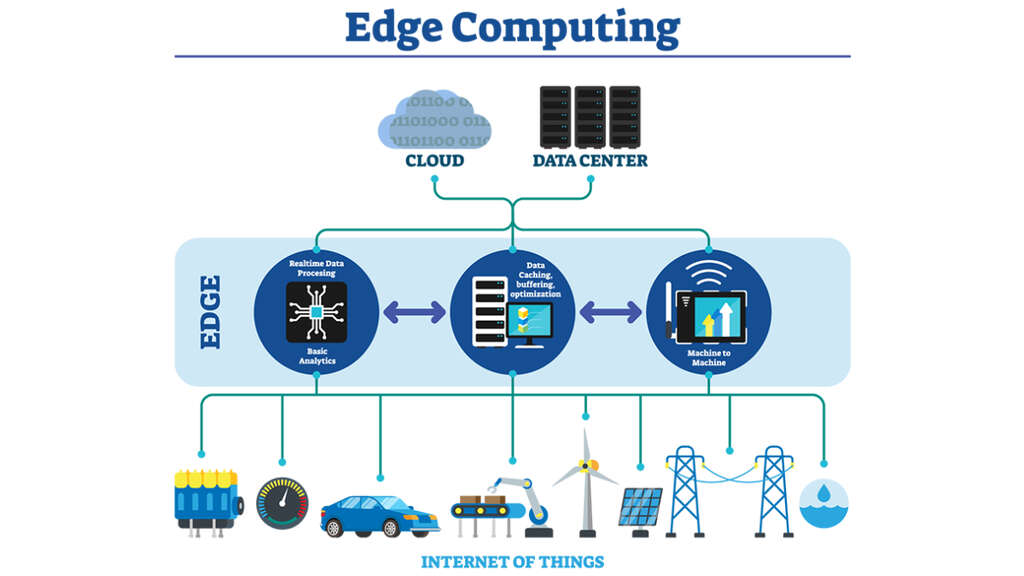
Edge Computing redefines the IoT, improving efficiency, security, and scalability through local data processing, addressing latency and bandwidth challenges.

The current software development solutions landscape is witnessing a significant transformation driven by two of the most disruptive trends: the Internet of Things (IoT) and Edge Computing. This synergy is redefining network architectures, data management, and business operations, setting the stage for a new era of efficiency, agility, and connectivity. As companies seek to unlock the potential of this combination, it is crucial to understand the impact of edge computing on the IoT and how it can be leveraged to drive innovation and competitive advantage in an increasingly digitized market.

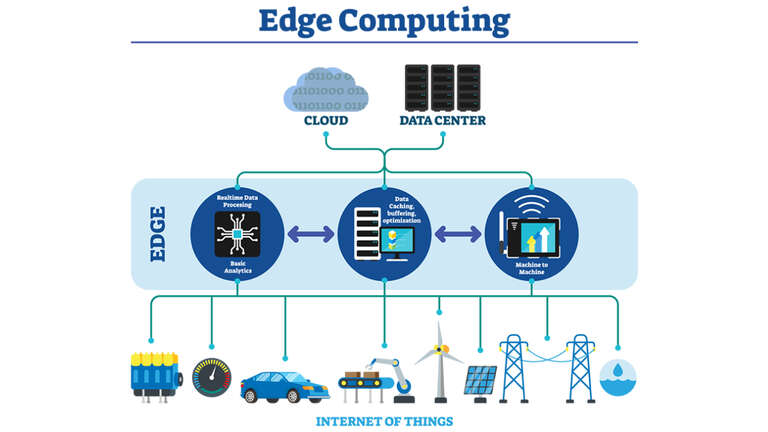
The IoT has seen exponential growth, connecting billions of devices around the world, from industrial sensors to consumer devices. This vast network of devices generates a huge amount of data that needs to be processed, analyzed, and, in many cases, acted upon in real time. This is where Edge Computing comes into play, offering a solution to process data close to the source, reducing latency, optimizing bandwidth, and improving data security.

Edge Computing

Transformation of Data Processing and Latency

Edge computing transforms the traditional data processing paradigm by bringing computing capacity closer to the edge of the network, that is, close to where the data is generated. This approach solves one of the most significant challenges of the IoT: latency. In critical applications, such as autonomous vehicles or real-time health monitoring systems, reduced latency is crucial for performance and safety. By processing data locally, Edge Computing enables near-instant decisions, eliminating delays that could compromise system functionality or user security.

Bandwidth and Cost Optimization

Another significant benefit of edge computing is its ability to optimize bandwidth usage, which is especially relevant given the growing number of IoT devices and the volume of data they generate. By processing and analyzing data locally, only the relevant information needs to be sent to the cloud or data center, significantly reducing network traffic and therefore the costs associated with data transmission. This optimization by software development consulting firms not only improves efficiency but can also result in significant savings for businesses, especially those operating large IoT deployments.

Improving Data Security and Privacy

Data security and privacy are primary concerns in the software development services sector such as the IoT ecosystem, given the sensitive nature of the data collected and the potential for security breaches. Edge computing offers an additional layer of security by allowing data to be processed locally, minimizing the amount of information that needs to be sent over the network. This approach not only reduces the attack surface but also allows for the implementation of more robust security protocols on the device or edge node, strengthening data protection.

Enabling New Applications and Services

The combination of IoT and Edge Computing is enabling a new wave of applications and services that were previously unviable due to latency and bandwidth limitations. From smart cities to industrial automation, edge processing is enabling smarter, more reactive solutions. For example, in the context of smart cities, edge computing can facilitate real-time analysis of traffic to optimize vehicle flows, or in manufacturing, it can enable real-time fault detection systems that minimize downtime. and maximize production.

Challenges and Considerations in Integrating Edge Computing into IoT

The integration of Edge Computing into IoT systems presents a number of technical challenges and strategic considerations. One of the main challenges is managing the vast amount of data generated by IoT devices. Unlike centralized models, where data is transmitted to the cloud for processing and analysis, Edge Computing proposes a decentralized approach. This means that data is processed locally on or near the device, reducing latency and bandwidth consumption but, in turn, posing challenges in terms of data storage, processing, and security at the edge. of the network.

Another significant challenge is the heterogeneity of IoT devices, which vary greatly in their computing, storage, and power capabilities. Designing Edge Computing solutions that are flexible and adaptable to a wide range of devices is essential for successful integration. This requires a modular approach and open standards that facilitate interoperability between different Edge Computing devices and platforms.

Security is a critical consideration in any IoT system, and edge computing introduces additional complexities in this area. Processing data locally expands the attack surface, requiring robust security measures at each edge node. This includes device authentication and authorization, encryption of data in place and in transit, and implementation of consistent security policies across the entire IoT architecture.

Advances Driven by Edge Computing in IoT

Despite these challenges, edge computing is enabling significant advances in the world of IoT, offering innovative solutions that address issues of latency, bandwidth, and energy efficiency. For example, in the manufacturing sector, Edge Computing enables real-time processing of sensor data on the production line, facilitating early detection of failures and optimization of manufacturing processes. This not only improves operational efficiency but also reduces maintenance costs and increases the life of the machinery.

In the field of smart cities, Edge Computing plays a crucial role in traffic management and public transportation systems. By processing traffic data in real-time close to its origin, it is possible to optimize traffic lights and transport routes, significantly improving urban mobility and reducing congestion. Additionally, the ability to process and analyze data locally makes it easier to implement privacy-friendly smart surveillance systems, as sensitive data can be processed and filtered at the edge without needing to be sent to the cloud.

The adoption of Edge Computing in the healthcare sector offers the potential to revolutionize healthcare, enabling remote patient monitoring and telehealth. IoT devices equipped with Edge Computing capabilities can monitor vital signs in real time, alerting healthcare professionals to any anomalies without delay. This improves the quality of care and allows for early intervention before health problems become critical.

Edge computing is ushering in a new era in IoT development, effectively addressing latency, bandwidth, and data processing challenges. Through its ability to process data locally, it offers significant improvements in terms of efficiency, security, and scalability. However, successfully integrating Edge Computing into IoT requires careful consideration of technical and strategic challenges, including data management, device interoperability, and security. As we move forward, the software development solutions community must collaborate on the development of open standards and modular solutions that facilitate the widespread adoption of Edge Computing, unlocking its full potential to transform the IoT and, by extension, our society and our environment.

The benefits of adding a UX Designer to your teams

Hiring a UX Designer can be a great contribution to our team, however, few of us really know how much it can impact our company.

It is necessary to review this position that unites the companies’ offers with the needs of users to optimize the use of their products in the most useful and pleasant way possible to know a little more, we interviewed Lalo Gonzalez, UI UX Design services Director of Laboratoria, with 10 years of experience working on digital products.

Summary

Don’t have time to read the webinar transcript? Here we summarize it in the most important points:

The UX Designer is in charge of designing user experiences with the product by understanding them through constant investigation of their problems and testing the solutions we offer.

Its role is important because it brings you closer to the success of creating better products, aimed at real needs, reducing investment in economic resources and unnecessary time. This will impact customer loyalty and increase the value of the company.

They handle various research methodologies, observation, data analysis, benchmarks, wireframes, prototypes, and knowledge of usability, accessibility, business, and technology. They use many tools, from simple tools like Post-Its to software like Sketch, Figma, and Framer.

The profile of the UX Designer you choose will depend on your existing team: if you are still just starting out, you will have to hire someone who can grow with you and handle many skills; If you already have people on the team who are working on these issues, aim to find a specialized UX Designer.

What is UX experience and what is the role of a UX designer?

Lalo: With the explosion of the internet, many digital products began to appear, many websites, and 7 or 8 years ago, many mobile applications, which were completely focused on the CEO, developer, and product manager, who we still interact with. In Latin America it is clear, that ticket sales platforms are products that have remained stagnant for 10 years. You walk in and you’re totally frustrated, if you could you wouldn’t come back. Finally, the user experience is very bad.

What is user experience?

Lalo: The experience that any user lives when interacting with any product. It doesn’t have to be digital: it happens when using the PC, accessing a website, using a chair. 

What are the activities carried out by the UX designer?

Lalo: UX design is a discipline where we work to design experiences so that products are more useful, accessible, and even more desirable for users. The tasks it performs are constant research on the user (interview, information, empathizing, going with them), but it is also a lot of data. One benefit that digital products bring us is that we can know what is happening in real-time to see how our products are working and be able to adapt them to improve the user experience. We are also constantly testing ideas. It constantly happens that in organizations there are many ideas in the air and the UX Designer can make them tangible in a prototype and test them to know if time and resources should be invested in them. She collaborates all the time with the team and is the person in charge of evangelizing everyone in creating user-centered products.

So why is the role of a UX Designer important?

Lalo: First of all, because it helps you get closer to who determines your success: the user. By creating products that solve their problems, you will become more successful because the user comes, they are going to get hooked, and they recommend you. In the long run, you will improve your income and that on a large scale is seen in the market capitalization of the companies. Many technology companies that are more valued (Google, Amazon) have a lot of design. The experience they have created has made their company worth more because users are more loyal.

What is the role of the UX Designer in an innovation/technology team and how does it interact with other profiles?

Lalo: The role is always the same: to be the voice of the user. These teams were born with the purpose of better understanding users: innovating to get closer, to create better products for them. But it is also their role to make others understand, facilitate the exchange of ideas, and work as a team to generate ideas to solve users’ problems. You must be in charge of maintaining this experience optimally throughout the users’ journeys through the product. It happens a lot that the designer’s role ends when she shows a design (usually on screens) and gives it to the developer. That’s where products end up that have a bad experience, they don’t improve, they don’t evolve, and they don’t have constant updates based on the data that the user gives us once we launch the product on the market.

I am a company. How do I know if I need a UX Designer on my team?

Lalo: If you feel that your product is distant from the user or you see metrics where they are falling or if their satisfaction is not good. You need someone to take care of them and understand what’s going on to know how to improve your product. Another additional thing is also to see the market and the competition, see how they are evolving, if they are better than you, what they have done. Many times it has to do with the fact that they put the user at the center of development. A theme of the UX Designer is that he not only knows the user because perhaps we end up with many unprofitable products, but he understands the needs of the business, its technological strengths, and its limitations. We balance the user’s problems and how we match that problem with the business objectives and the technical capabilities of the company.

Should people who work in the product area have this UX Designer profile?

Lalo: What is needed is someone who takes care of the user. Many times it starts with the same product manager taking care of it, but over time he ends up getting lost, working on other things, and losing sight of the user. We need someone on the team to take care of him, constantly test, and be close to him.

What can you expect from Laboratoria’s UX talent?

Lalo: The profile of a UI UX Design agency has a little of everything that I have mentioned, design, knowing the business, knowing how to balance business objectives, and also a technology base. They work with front-end developers, they learn a little about the basics of development. In addition, they are very empathetic people with a great desire to learn. I could cite the companies that have already hired, that is what they highlight, that they are the ones that bring this modern thinking of how to work: work lean, how to have good hypotheses, how to test them, and how to get to the market faster. Another component that always differentiates them is soft skills, their ability to organize, to speak in front of the public, to have empathy, to give feedback, to receive feedback.

What are the hard skills of a UX Designer?

Lalo: The hard skills, the knowledge of these methodologies that are used: research, interview, observation, data review, benchmark, creating wireframes, prototypes, knowledge of usability, accessibility, business, and technology.

Should a UX have a notion of programming and why?

Lalo: Anyone working in the digital world now should know the basics. Increasingly this is becoming more of a must have instead of a nice to have. In the specific case of UX Designers, since we work with developers, knowing how things work allows us to communicate better and have more empathy with the developer. It may be that something seems like putting enter and it works, but many times it takes 20 changes and changing the entire logic of the product. Knowing this makes the UXD propose things that are neither far-fetched nor complicated. It gives you a lot of autonomy in several areas (digital marketing, product), being able to enter a code from Google Analytics, Mixpanel, and Hotjar, all these tools allow you to monitor your product. It’s super easy, but because we don’t know two programming concepts we don’t do it. That autonomy serves everyone well. UX Designers, if they know programming, can look at a web product or a release that a developer has given, navigate through the code, make changes to see how it would appear, and then explain the changes. That autonomy is very valuable. In the future it will be a must-have, we take it as it is from the beginning that they should know and not lose throughout their work.

Could you exemplify how a UX profile can help solve a company and how this profile can accelerate these solutions?

Lalo: There is an analogy of a User Researcher, which is the branch that does research in UX Design, like a doctor. If you go to the doctor, the biggest waste of time for both of you is for the patient to come and tell you what he has and ask you to give him a pill and the doctor does it. What a good doctor should do is when you arrive, tell him what you feel and he will investigate. This is what a UX Designer does in analogy. He has a problem, he is going to investigate, talking to users, the business, and the developers. He will go looking for where the problem or pain is, and then solve it. Pains within companies can be: having products that no one uses, or products that misuse company resources. I have a developer who invests hours in a product to launch it and realizes that the user does not want it. The product returns and must be changed. Just by incorporating a UX Designer into your team, you reduce rework by 50%, through different techniques (prototyping, wireframing, testing), he will ensure that the conceptualization that reaches the developer is tested and has certainty that it is something that the user wants. There you reduce time. There are other studies that affirm that for every dollar invested in UX Design, the return on that investment is 100 dollars, because they generate greater engagement, greater efficiency in development, etc.

There are many companies that launch apps and perhaps they do not have a UX Designer who can help them research. Could this type of problem be somewhat related to the question? Why do they create an app that maybe they don’t know if it will work or that no one uses it anymore or that it is not friendly?

Lalo: The ideal is that before generating it, at least if you are an entrepreneur and you do not want or cannot yet hire a UX Designer, you should be one yourself. A UX Designer will help you because they already know these methodologies. It is also likely that he will tell you that you have created a product that has no future, that is of no use to anyone, but he will help you with that.

What are the main technological tools that UX Designers use to carry out their tasks?

Lalo: It depends on the phase you are in. To do research, normally on one, that is what is most used: interviews, observation, cameras, testing, optimal workshops, and whiteboards. In the most technological part, software like Balsamiq or Sketch. There are many softwares in the industry that are changing. The use of these tools depends on the designer’s specialization. Other basic tools are pencil and paper, the cheapest way to make mistakes, or post-its, a quick and easy way to release ideas and get rid of them, according to Tom Kelley.

What book do you recommend, that is on Amazon, about UX Design? What is the market value in Peru of a UX Designer? How can you learn to be a UX by doing?

Lalo: There are a lot of books: The Elements of User Experience, Sprint, Don’t Make Me Think, which talks about usability, Essays on Sperientia by Víctor Gonzales from Mexico, AboutFace, by Alan Cooper, the father of UXD. For more advanced users: The best interface is no interface, from a former UX Designer at Google.

How can they be good in practice and be clearer about the work of UX?

Lalo: Being good is first a matter of practice and then having feedback from other people. You cannot give yourself feedback alone, you have to go with a user, even if it is fictitious, to give you feedback on what you have done and then know how well you are doing. Then compare yourself with the industry, with the standards that already exist.

Does a UX Designer go beyond doing graphic design?

Lalo: Yes, obviously. It is also something that has been asked, the difference between a UX and a UI. Exactly what has happened lately is that many believe that design is just screens. They think that design is just making a pretty screen using Photoshop and vectors and that’s it. In recent years, many companies are finally making products that are aesthetically beautiful, but that are useless. A UX Designer does a little of everything. They may not be the best at using graphic design tools, but a UX is also dedicated to user testing, to the entire experience with the product, not just the screen. As the book “The Best Interface is no Interface” says, in many cases they are trying to solve problems only with screens, applications, and websites, when many times the problem within the user experience is a poorly done process, a person poorly trained, which has nothing to do with making an app. That ability, which we also encourage at Laboratoria, is that not everything is going to be resolved with this and that we must have the character to say that to those who work with us and tell them “This doesn’t help us.”

How do I prepare my startup/company to have a UX on the team?

Lalo: Initially we must have the desire to improve, to focus on the user. In terms of forming their team, they do need someone with that vision: a product manager, and a CEO. Just by having that idea, the UX Designer will fit in to be able to work on improving the product for the user.

Does a UX create artificial intelligence like chatbots?

Lalo: There is more and more talk about UX work in AI. A few months ago in Santiago de Chile, the people from 2 Brains wrote some articles about it. Finally, a chatbot is a conversation, just like a product. An application is a user interacting with it and should understand everything easily. There is even talk about how to test chatbots as a conversation. For example, you write to me and I will respond to you; There we can test how well the responses we have set work. The same goes for speakers, products that talk to you like Siri, Alexa, and Google Home, many tests are being done. How is it done? You put someone on the phone, who is the designer, who will make the responses that you have programmed for the assistant and that’s how you test. There are things as simple as that where you can try chatbots or assistants like that.

Can you summarize for us what a UX is and what we can expect from Laboratoria’s talent?

Lalo: In summary, UXD is the person or role that is responsible for designing user experiences with the product through their understanding. UX is the experience you have with any product and the job of the UX Designer is to design this experience. This has to be constantly close to the user, researching them and the data. You must constantly prove that:

The user’s problem is real.

The solution really solves that problem.

What is the difference between UX Designer and UX Interaction and how do they complement each other?

Lalo: Interaction Design is also a role within UX Design about how to help the user solve their problem in a more optimal way, with more optimized forms, with fewer steps within the product, without asking them things that you might know (name, email, place where you are). Interaction Design works to optimize this flow for users. The UI Designer/User Interface Designer/Visual Designer is in charge of the screens, ensuring that these and the interface with which the user interacts follow the visual design, usability, accessibility, and brand guidelines. The latter, for example, if I have a brand that is all blue and green, and I put something that is all yellow, my brand does not match the product I am making. A UX Designer speaks in much more specialized teams where there is a person for each of these roles. It goes hand in hand with the UI Designer so that these screens follow all those visual design principles so that the flow then works and is optimal. All this so that the product is finally useful for the user and meets their needs and is even desirable, something that they use and that they enjoy using.

What are the elements or characteristics that you should look for as an employer when hiring a UX Designer, considering that they have different profiles in JavaScript?

Lalo: Initially you should know what the organization wants when incorporating a UXD into the company. What Jared Spool is saying is that you should sit down and think about the level of experience you want from this person: whether it’s someone who starts with you and grows with you or you want someone who has done this for many years. Many times we say, for example, “I want a developer” but you don’t know what you want him to do, whether logic or front end. The profiles that Laboratoria creates know a little about everything, research, interaction, business, technology, and visual design. In larger teams, more specialized profiles are sought: someone who only does research and visual design. It has to do with what the team is looking for and how it is made up. It’s no use bringing someone who only makes interfaces if you don’t have anyone to take care of the user if you don’t have a developer because you’re going to bring someone who creates interfaces based on nothing.

What are the phases of UX?

Lalo: We rely a lot on the phases of user-centered design:

Research: understanding the user.

Synthesized: finding the meaning of what is analyzed, obtaining insight.

Ideation: understanding the problem to start thinking and generating solutions for it.

Prototyping.

Testing: test the prototype as the user.

We want no one to consider this process as linear, because it very rarely is. It is an iterative process that changes. Many times you arrive at an existing product and the first thing you have to do is test what already exists to understand the user. However, that step is listed as the last within that process. What we are looking for is that you handle the components of that process and the tools so well, so that you know what to use and when. The process is going to change and it will be one day, another day and it has to adapt to the problem you are facing.

Is this ideation co-created with the user?

Lalo: In many cases yes, it depends on how accessible it is to create with them. Many times it is used as an element of research, because you tell the user to create something to solve the problem and within their solution, you become aware of their insights and elements that they have in mind but that they have not expressed to you. It is co-created not only with users, but with developers, and business people. The role of the UX Designer is very much about facilitation and involving the different roles to work on improving the product. He is not the one who has the ideas and that’s it, but he facilitates these ideation activities so that everyone’s ideas come out and that in that diversity of ideas, a good solution can be found for the user’s problems.

Conclusion

There are many benefits of adding a UI UX Design services: knowing your user in depth, having greater efficiency as a development team, causing this to generate more income for an organization, among others. The UX Designer will allow us to position ourselves closer to the user, to in turn get closer to their problems and allow us to solve them optimally.

The Best UI/UX Design Agency: The Complete 2024 List

Well-crafted user experience (UX) and user interface (UI) design is recognized as absolutely crucial for success in the modern, rapidly evolving digital landscape of 2024.

To win potential business and top talent, every UI UX design agency has to be at the top of its game.

Whether you’re just now diving into the world of UX/UI design, a seasoned designer seeking the perfect place to unleash your creativity, or you work for an organization searching for an agency to enhance your digital experience, this article highlights the best agencies out there for your needs. 

Here’s our carefully curated list of the 12 best UI/UX design agencies to work with, and for, in 2024:

  1. Beyond
  2. Clay
  3. Code and Theory
  4. Sleepy
  5. Designit
  6. Fantasy
  7. Frog
  8. Therefore
  9. MetaLab
  10. Ramotion
  11. UX studio
  12. Work & Co

UI/UX design agency best-of list

1. Beyond 

Beyond is a renowned UX design agency that has established itself as a leader in the industry. With its headquarters in London, UK, and additional offices in New York, Texas, and California, Beyond boasts a global presence and a diverse team of talented designers, strategists, and technologists.

Beyond is not your typical UX design agency; they position itself as a “design and technology ideas company”.

Beyond specializes in creating exceptional digital experiences by combining design thinking with cutting-edge technology. A multidisciplinary approach means the agency can offer a wide range of services, including:

  • User Experience Design
  • User Interface Design
  • Product Design and Strategy
  • Digital transformation

Beyond has an impressive portfolio of clients from various industries. Collaborations with major brands and industry leaders include:

  • Google: Beyond partnered with Google on various projects, including creating Smart Home, building Grow, and working with YouTube to develop digital products for the Super Bowl and the Rio Carnival.
  • Brompton: Beyond worked with the legendary UK folding bike builders on a new central design theme and online buying experience, transforming its digital presence in just eight weeks.
  • Montblanc: Beyond teamed up with the luxury goods company to create a design system, including customizable watch faces and a suite of supporting apps for a new smartwatch.

Beyond has been recognized multiple times at The Webby Awards, an annual competition honoring excellence on the Internet, for exceptional design work.

2. Clay

Clay is a highly regarded UI UX design agency based in San Francisco, California. With a passion for developing exceptional digital products, Clay has garnered a strong reputation in the industry. 

Here are some of Clay’s key areas of expertise:

  • UI/UX Design
  • Digital Product Design
  • Enterprise Software Design
  • User Research and Testing

Clay has had the privilege of collaborating with several notable clients from diverse industries. Its client roster includes:

  • Facebook: Clay worked closely with Facebook, the leading social media platform, on various design projects. 
  • Coca-Cola: The agency partnered with Coca-Cola, a global beverage company, to create engaging digital experiences that align with the brand’s values and resonate with its target audience.
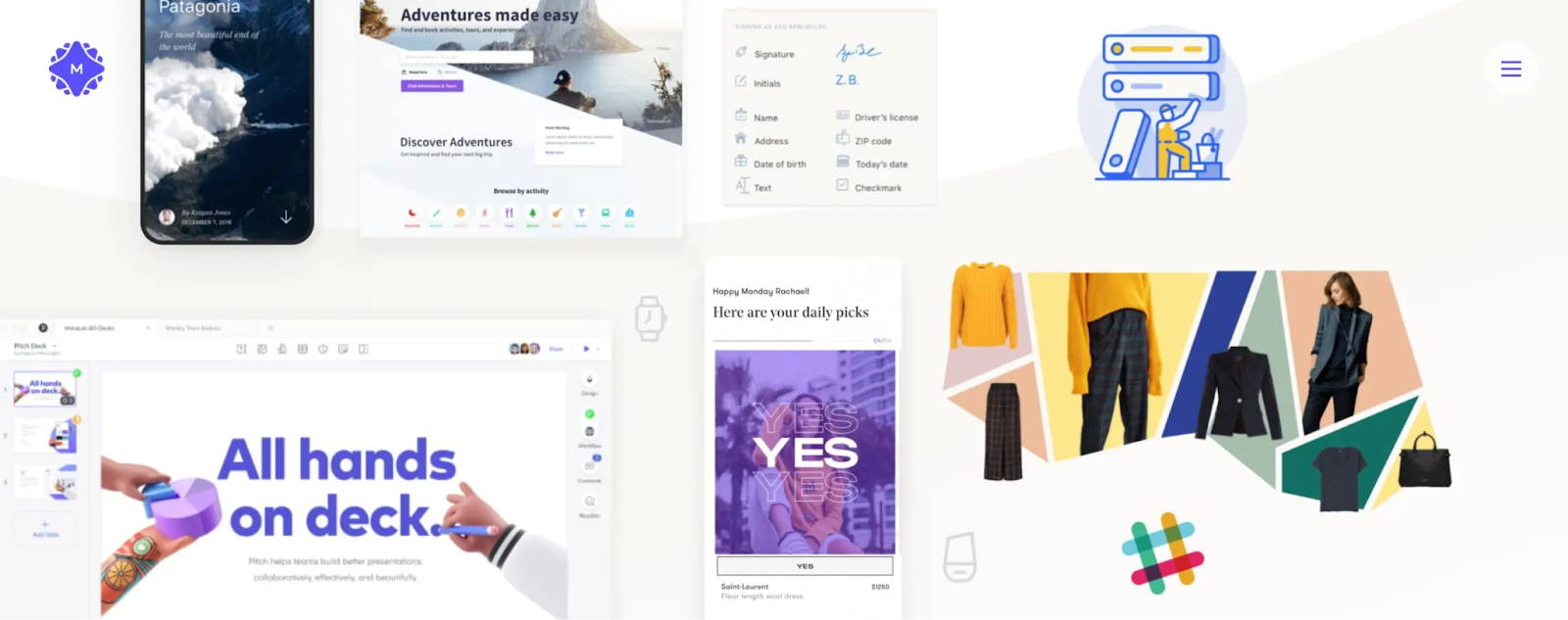
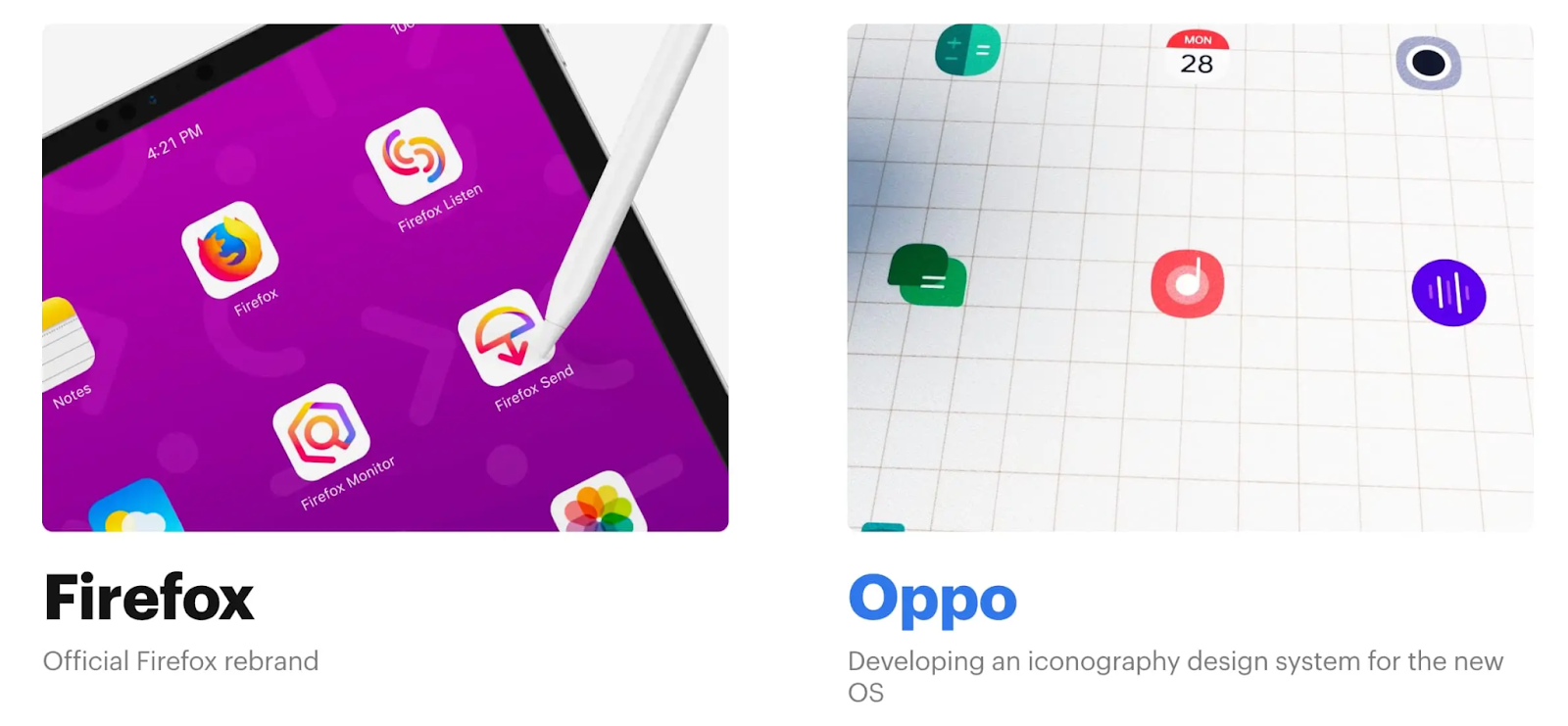
  • Oppo: Clay collaborated with Oppo, a prominent smartphone manufacturer,to design user-friendly and visually appealing interfaces for Oppo’s mobile devices.

Clay has received Awwwards recognition for their outstanding UI and UX design work, showcasing their expertise in creating visually appealing and user-friendly digital experiences.

3. Code and Theory

Code and Theory is a distinguished UX design agency that has established itself as a leader in the industry. With a wide range of UX and UI design services, a depth of expertise, and an impressive client portfolio, Code and Theory has earned a strong reputation for delivering exceptional user experiences. 

Here are Code and Theory’s key areas of expertise:

  • UX/UI Design
  • Content Strategy
  • Digital Campaigns
  • Technology Solutions

Code and Theory has had the privilege of working with an impressive roster of clients, spanning various industries. Here are some of their notable clients:

  • NBC Sports: Code and Theory collaborated with major broadcasting network NBC to overhaul seven old apps into a sleek one-stop-shop digital product, offering videos, editorial, social engagement, and statistics to its audience.
  • The Venetian: The agency worked with the Vegas casino and resort The Venetian for years to build a brand new website that expresses the luxury brand’s unique story in the digital space while offering customers a best-in-class booking flow.
  • American Express: Code and Theory formed a strategic partnership with the credit card company, totally redesigning the templates at the core of its conversion process.

Code and Theory was honored at the prestigious Cannes Lions Festival for its innovative and creative digital campaigns and design work.

Interested in working with them? Their careers page is regularly updated.

4. Sleep

Codal is a UX design agency known for its expertise in creating exceptional user experiences.

Codal provides comprehensive UX and UI design services to create intuitive and visually appealing digital experiences. Its services include:

  • User Research
  • Information Architecture
  • Wireframing and Prototyping
  • Visual Design
  • Responsive Design
  • Usability Testing

Codal has worked with a range of notable clients across different industries. Notable clients include:

  • Pepsi: Codal collaborated with Pepsi to enhance their digital experiences and improve customer engagement.
  • Intuit: They partnered with Intuit, the software company behind TurboTax and QuickBooks, to create intuitive and user-friendly interfaces for Intuit’s financial software products.
  • United Airlines: Codal worked with United Airlines to improve its website and mobile app experiences, enhancing the booking process and overall user journey.

Codal was recognized by Clutch, a leading B2B ratings and reviews platform, as one of the top UX design agencies, highlighting their expertise and client satisfaction.

5. Designit

Designit is a global UX design agency with over 16 studios worldwide. Founded by industry veteran Alan Cooper, Designit works with renowned companies such as Google and Starbucks. They specialize in interaction design and service design, and actively contribute to design education through courses and training programs.

Designit offers a comprehensive range of UX and UI design services to help organizations create seamless and engaging digital experiences. Some of their services include:

  • User Research
  • Service Design
  • Interaction Design
  • Visual Design
  • Prototyping and Testing

Designit has had the opportunity to collaborate with numerous notable clients across industries. Some of their notable clients include:

  • Google: Designit partnered with Google to improve educational outcomes around the globe, helping Google become the market leader for educational technology.
  • Starbucks: They partnered with Starbucks to design digital solutions, including mobile apps and in-store digital experiences, improving customer engagement and loyalty.
  • Novo Nordisk: Designit collaborated with Novo Nordisk, a pharmaceutical company, to develop digital health solutions that empower patients and healthcare professionals.

6. Fantasy

Fantasy is a global UI/UX design agency with offices in the U.S. and London. They are known for beautiful UI and website design and have worked with well-known brands such as Porsche, USA Today, and Mitsubishi, to create immersive and visually stunning user experiences. 

Fantasy offers a range of UX and UI design services that focus on creating captivating and intuitive digital experiences. Services include:

  • UX Design
  • UI Design
  • Micro-interactions
  • Animation
  • Prototyping and Testing

Fantasy has worked with a range of notable clients across different industries. Notable clients include:

  • Porsche: Fantasy collaborated with Porsche to create a visually striking and interactive website that reflects the luxury and performance of the brand.
  • USA Today: They partnered with USA Today to design a mobile app that delivers personalized news experiences and seamless content consumption for users.
  • Mitsubishi: Fantasy worked with Mitsubishi to design a digital showroom experience that showcases their vehicles and engages potential customers.

Fantasy has been featured in the Communication Arts Interactive Annual, a highly regarded design publication, for exceptional interactive design work.

7. Frog

Frog is one of the oldest industrial design firms, operating for over 50 years. They offer a wide range of services, including digital interfaces, hardware design, and branding. Frog operates from 10 offices worldwide and employs over 500 people.

Over the years, Frog has racked up an impressive portfolio of stellar clients. Including:

  • GE: Frog partnered with General Electric Company (GE)to reimagine and transform the user experience of GE’s digital products and services. They focused on enhancing the usability, efficiency, and overall satisfaction of GE’s industrial software and digital solutions.
  • AT&T: Frog collaborated with AT&T to design innovative user experiences for their telecommunications products and services. They worked on projects ranging from mobile apps to web interfaces, aiming to provide seamless and intuitive interactions for AT&T’s customers.
  • Disney: Frog worked with Disney on multiple projects, including the design of user experiences for Disney’s digital platforms and entertainment services. They focused on creating magical, immersive experiences that aligned with Disney’s brand identity.

Frog received the iF Design Award, one of the most prestigious design awards in the world. This award acknowledges Frog’s commitment to delivering cutting-edge and impactful UX design experiences.

8. Therefore

Ideo is a legendary innovation firm based in Palo Alto, California. Established in 1991, they are known for their industrial design expertise and influential role in popularizing design thinking. Ideo collaborates with diverse teams to provide innovative solutions for clients and has worked with major brands such as Apple.

Ideo collaborated with numerous high-profile clients across various industries. Here are some notable partners:

  • Apple: Ideo worked closely with Apple on various projects, contributing to the design and development of user-friendly and innovative products.
  • Coca-Cola: Ideo collaborated with Coca-Cola on projects related to product design, brand strategy, and user experience, helping create engaging and memorable experiences for consumers.
  • Ford: Ideo partnered with Ford to reimagine the future of mobility, exploring new concepts, and designing user-centered experiences for vehicles.

Ideo has received numerous awards and accolades for contributions to the field of UX design. These include multiple Red Dot Design Awards across various categories and several Industrial Designers Society of America Awards. Ideo has also consistently been recognized by Fast Company as one of the most innovative companies globally, highlighting their groundbreaking work in UX design and beyond.

9. MetaLab

MetaLab is a Canadian interface design firm that offers product design, custom software development, and UX/UI design services. Metalab has worked with a range of notable clients across various industries. These include:

  • Slack: MetaLab partnered with Slack from day one of the collaboration platform’s journey. MetaLab built Slack’s famously intuitive and user-friendly interfaces for enhanced productivity and teamwork from the ground up.
  • Google: MetaLab worked with Google on multiple projects, contributing to the design and development of user interfaces for various Google products and services.
  • Apple: MetaLab collaborated with Apple on design projects, including the development of interfaces and user experiences for Apple’s software applications and digital platforms.

MetaLab received recognition from the Canadian Web Awards, which acknowledge excellence in web design and development. These awards showcase MetaLab’s contributions to the Canadian design community.

10. Ramotion

Ramotion is a digital product agency based in San Francisco, CA, U.S. They specialize in web and mobile development, as well as UI/UX design. With an impressive client portfolio, Ramotion has established itself as a leading player in the industry. Some of these partners include:

  • Salesforce: Ramotion partnered with the leading customer relationship management platform to design and develop user-friendly interfaces and enhance the overall user experience of their products.
  • Netflix: Ramotion worked with Netflix to create intuitive and visually appealing interfaces that facilitate seamless content consumption for millions of users worldwide.
  • Mozilla: Ramotion collaborated with Mozilla, the organization behind the Firefox web browser, to design and improve their digital products’ user experience, including the browser and related applications.

11. UX studio

UX studio is an award-winning European UI UX design agency known for its global presence and expertise in user experience research and digital product design. With a focus on delivering tailored solutions and leveraging agile methodologies, they work closely with their partners to ensure efficiency and impactful results.

UX studio offers a range of services that revolve around user experience design. Core areas of expertise include:

  • UX Research: UX studio conducts thorough research to understand users’ needs, behaviors, and preferences. This includes user interviews, usability testing, and competitive analysis to gather valuable insights.
  • UX Design: They specialize in creating intuitive and engaging user interfaces for digital products. This involves wireframing, prototyping, and interaction design to ensure seamless user experiences.
  • Product Design: UX studio takes a holistic approach to product design, considering both the user interface and overall product strategy. They focus on delivering cohesive and impactful digital experiences.

UX studio has had the privilege of working with renowned companies and organizations such as Google, HBO, Netflix, and The United Nations World Food Programme.

12. Work & Co

Work & Co is an experience design agency that specializes in creating digital products and services. They have offices in New York, Portland, and São Paulo. Work & Co follows a unique approach of putting senior designers and engineers on every project, ensuring a high level of expertise and attention to detail. They aim to create seamless and intuitive user experiences across various platforms.

Work & Co’s services and areas of expertise include:

  • User Experience Design: Work & Co focuses on understanding user needs and designing interfaces that are easy to use, visually appealing, and aligned with the brand’s goals.
  • User Interface Design: They create visually engaging and responsive interfaces that enhance the user experience and effectively communicate the brand’s message.
  • Product Strategy: Work & Co helps clients define their product vision, identify market opportunities, and develop strategies to achieve their business goals.

Custom UI/UX Design with Android App Builders

When diving into mobile apps, especially those for the Android platform, the importance of UI (user interface) and UX (user experience) design cannot be overlooked. These two elements are the backbone of a successful app and determine how attractive it looks and how effectively it works and interacts with users.

In UI UX design services for Android apps, the focus is on the visual aspects: the layout, color schemes, typography, iconography, and all those elements that users interact with for the first time. A well-thought-out user interface design captures the user’s attention and makes a strong first impression. The Android design system offers a variety of components and guidelines, such as Material Design, that help designers create functional and visually appealing interfaces consistent with platform standards.

On the contrary, UX design delves into the psychological aspect of interacting with the application. It’s about the feeling of the experience. Is the app intuitive or confusing? Fluid or clumsy? UX design answers these questions by analyzing user behavior and preferences. It involves optimizing the navigation flow, ensuring that the application responds to user input in a logical and beneficial way, and ensuring that processes such as logging in, searching for information, or making purchases are streamlined and hassle-free. The synergy of both creates an environment where users enjoy a beautiful application and navigate it with ease and efficiency.

For Android, this means adhering to specific guidelines set by Google but also considering the wide variety of devices and screen sizes that run the Android operating system. The goal is to offer consistency and accessibility, ensuring that users can have a positive and consistent experience regardless of device.

Enter Android app builders, especially ones that require no code, like AppMaster. These platforms have dramatically changed the development game, democratizing the process and allowing people with little to no technical experience to create custom UI/UX designs. They feature a wide range of pre-built templates that adhere to Android UI/UX principles, feature a simplified drag-and-drop design approach, and allow for detailed customization to fit each unique business requirement. This makes the path to creating an easy-to-use, professional-looking Android app more accessible than ever.

No-codes have gained significant momentum in recent years and the Android ecosystem is no exception. The appeal of app creators-code lies in its promise to democratize the app development process. Traditional app development requires a deep understanding of programming languages ​​such as Java or Kotlin for Android and a firm grasp of complex development environments. These barriers can make app creation inaccessible to entrepreneurs, small businesses, and individuals with innovative ideas but limited technical expertise or resources.

Android’s significant market share makes it a priority platform for companies looking to interact with a broad user base through mobile applications. Android app creatorsNo-code have entered this space, allowing users to create applications through graphical user interfaces with editor drag-and-drop and pre-designed components. These tools offer a layer of coding abstraction, allowing users to focus on the design and functionality of their applications without the complexities of code.

The growing demand for mobile applications in various industries partly drives the growth of the platform’s no-code. As businesses look to provide value through digital solutions, rapid application deployment becomes crucial. Android app creatorsNo-codeThey accelerate the development process, allowing companies to launch functional applications in a fraction of the time it would take using traditional methods.

Platforms likeAppMasterThey simplify application development and ensure that the result is professional and enterprise-grade. These platforms allow for custom UI/UX design, which is often a differentiator in the crowded app market. With these advantages, the creatorsno-code. They are leveling the playing field, allowing smaller players to compete with larger organizations in terms of digital innovation.

Additionally, the rise of app creators-code has been driven by the proliferation of digital transformation initiatives. As organizations adapt to a more technology-centric mode of operation, they need fast and agile solutions that platforms no-code. They are uniquely positioned to provide. The cost savings associated with development no-code, both in terms of time and financial resources, increase their attractiveness, making them a strategic option for companies seeking to optimize their development efforts.

As the Android operating system continues to evolve and integrate new features, app creators no-code. They are also evolving, continually integrating new functionality that pushes the boundaries of what can be achieved without writing a line of code. As this trend continues, we can expect to see an even greater variety of sophisticated apps developed using creators. no-code, reflecting the potential of these platforms to transform the application development sphere.

Benefits of using No-Code platforms for custom UI/UX designs

In an era where user experience can make or break an app, platforms no-code present a compelling solution for businesses and individuals looking to create custom UI/UX designs without delving into the complexities of traditional coding. Here’s why these platforms, likeAppMaster, there are more and more reference tools for the development of Android applications:

  • Democratization of application development: platformsNo-codeThey break down barriers to entry, allowing people with little or no programming knowledge to participate in creating applications. This opens up a world of possibilities for entrepreneurs and creators who can now independently bring their ideas to life.
  • Fast time to market – with pre-designed templates and features drag-and-drop, the platforms no-codeThey significantly speed up the development process. This rapid deployment capability means companies can iterate quickly and capitalize on market opportunities in real time.
  • Cost reduction – Hiring a development team can be expensive, especially for startups and small businesses. The platformsNo-codeThey reduce or even eliminate the need for large equipment, resulting in significant cost savings.
  • Focus on design and user experience: Without worrying about backend complexities, creators can dedicate their energy and resources to perfecting the UI/UX of the app, ensuring the final product is intuitive, engaging, and retains users.
  • High customization: contrary to the myth that no code there is no flexibility, platforms like AppMaster. They offer a high degree of customization, allowing developers to tailor every aspect of the app’s design and functionality to meet specific needs.
  • Seamless integrations: the platformsNo-codeThey come equipped with several integration options, meaning apps can easily connect with third-party services, tools, and APIs to expand their capabilities and improve the user experience.
  • Collaborative development: These platforms typically have collaborative tools that allow teams to work together in real-time, streamlining the design process and improving communication between stakeholders.
  • Ease of update: Updating a traditional application can be cumbersome, but platforms do not code. They simplify the process. Changes can be made visually and propagated throughout the application with a few clicks, ensuring that the application stays up to date with the user’s needs and preferences.
  • Risk mitigation: since the development code requires less investment and can be achieved more quickly, the risk associated with application development is substantially reduced. If an app concept doesn’t work, less time and resources are wasted, and the feedback loop is much tighter, encouraging continuous improvement.
  • Long-term sustainability: platformsNo-codeasAppMasterThey keep applications up to date with the latest technologies and practices. They automatically handle updates and patches to the underlying code, ensuring the longevity and security of your application.

The platforms No-code They offer a unique combination of simplicity, speed, and sophistication, making them the perfect choice for those looking to create outstanding Android apps that not only work well but also provide an extraordinary user experience.

As development tools no-code continue to transform the technology industry, select the Android app builder no-code. Appropriate design is crucial to creating apps with a personalized, engaging user interface (UI) and intuitive user experience (UX). A platform a-code Feature-rich ensures your Android app is functional and offers an attractive, easy-to-use interface that aligns with your business needs. Here are some of the key features to look for in Android app builders with no code that adapts to custom UI/UX design:

Intuitive drag-and-drop interface

The core of application development code is the user interface of the app builder itself. A simple and responsive interface drag-and-drop simplifies the design process, making it accessible even to those with minimal technical knowledge. It should allow you to effortlessly place and configure widgets, such as buttons, text fields, and images, in real-time, providing immediate visual feedback.

Diverse Template Library

A library of customizable templates serves as a springboard for your design, allowing you to choose from a variety of pre-designed user interface elements that you can adapt to your brand identity and the needs of your users. Whether you’re building an eCommerce platform or a task management tool, starting with a template can save time and ensure consistency across multiple screens.

Flexible UI Customization

The platform should offer a high degree of customization, allowing you to modify everything from font sizes and color schemes to the layout of interface elements. This flexibility is essential to creating a unique, branded user interface that stands out in the crowded app market.

Animation and interactivity options

Interactive elements like animations, transitions, and micro-interactions can significantly improve UX. Look for a builder that supports these features, which are critical to maintaining user engagement and providing fluid, dynamic interactions.

Responsive design capabilities

With a wide range of Android devices on the market, it is paramount to ensure that your app looks and works well on different screen sizes and orientations. a creator no-code should enable responsive design, automatically adjusting the user interface to various devices and screen resolutions.

Integration with design tools

Many app builders now integrate with popular design tools like Adobe X, Deither, and Sketch. This allows designers to import their work directly into the app builder, streamlining the design process and ensuring design fidelity.

Advanced functionality support

While basic applications can be easy to create, truly valuable applications often require more sophisticated functionality. Best app builders no-code. They provide advanced features such as API support, databases, and other backend services, taking your Android app to a professional level.

User Feedback Implementations

Gathering and implementing user feedback is vital to perfecting UI/UX. a creator no-codeIdeally, it should allow you to quickly adapt and push updates to your app based on user interactions and feedback, keeping user experience at the forefront of development.

Test and preview modes

A good app builder no-codeIt should offer easy-to-use testing and preview tools that help you evaluate how your app performs on different Android devices before publishing it. This helps you detect and fix any UI/UX issues early in the development process.

Scalability and performance

The platform no-code you need to address the early stages of your app’s life and scale with your growing user base. Look for performance optimization features that ensure your application handles increased traffic and data smoothly.

The emergence of platforms such asAppMasterin the space-codeIt has meant a paradigm shift in the custom application design process. With features like visual BP Designers for mobile apps and the ability to generate, compile, and deploy code, these platforms offer unprecedented speed and efficiency for app development. These features allow users to create custom UI/UX for Android apps without being bogged down by the traditional complexities of software development.

How AppMaster powers custom Android UI/UX design

The appeal of custom UI/UX design in the world of Android app development is undeniable: a well-designed app looks attractive and provides a smooth and intuitive experience for users. In this effort to create the perfect application, AppMaster has emerged as a pioneering platform no-code which offers extensive capabilities to create custom Android apps, focusing on custom UI/UX design.

The approach ofAppMasterto train developers and non-developers in creating custom Android UI/UX designs is multifaceted and emphasizes ease of use, flexibility, and efficiency. The platform eradicates the complexities traditionally associated with the application development cycle by leveraging a comprehensive set of tools within an integrated development environment.

Intuitive drag-and-drop interface

In the heart of AppMaster, you will find an intuitive interface drag-and-drop that democratizes design and development. This visual editor establishes a foundation upon which users can build sophisticated user interface components, regardless of their technical prowess. The functionality of drag-and-drop ensures that elements can be placed precisely, fostering an environment where creativity is only limited by the imagination.

Mobile Business Process Designer

As a complement to the visual design of the user interface, AppMaster incorporates a mobile business process (BP) designer that provides users with the ability to define complex business logic uniquely for each user interface component. This ensures that behind every visually appealing element lies meticulous consideration of user interactions and operational efficiency.

Customizable templates and components

To accelerate development, AppMaster offers a variety of pre-designed templates that serve as a reliable starting point for custom designs. Developers can modify these templates to reflect brand identity and user needs. This flexibility is also seen in customizable components that can be adapted or expanded to push the limits of conventional application design.

Scalable architecture

AppMasterIt is not only concerned with the immediate results of the design, but also with the future scalability of Android applications. The backbone of every application created withAppMasterIt is prepared for high-load use cases, ensuring that as customer bases grow, the application can scale proportionally without problems.

Source code generation and implementation

Once the UI/UX design is satisfactory, AppMaster extends its functionality beyond the design phase. The platform generates source code for the designed application, compiles it, and prepares it for deployment. This code generation process is iterative and adapts to continuous changes and revisions without accumulating technical debt.

User experience testing

Ensuring a polished end-user experience requires rigorous testing and AppMastermakes it easy through its built-in testing tools. Designers and developers can evaluate how their UI/UX options hold up to real-world use, ensuring any adjustments can be made quickly within the interface. no code before final implementation.

Best Practices for Designing UI/UX with No-Code Android App Builders

The attractiveness of platforms no-code is undeniable when it comes to designing UI/UX for Android apps. They democratize app development, allowing people who lack coding experience to participate in creating functional and visually appealing apps. However, navigating these platforms requires a strategic approach to ensure the end product looks great and provides a user experience. Below are practical best practices to guide you through the design process using Android app builders’ no-code:

  1. Start with a clear understanding of your users: Before you dive into design, define your target audience. It’s sometimes overlooked in the rush to build, but it’s vital to understand who will be using your app and what they need from it. User personas and use case scenarios can help tailor the design to your audience’s preferences and behaviors, ensuring the app is intuitive and effective.
  2. Use Pre-Built Templates Wisely – Platforms No-code. They usually offer a variety of templates to start the design process. Use these templates not as end products but as a foundation to create a more personalized experience. Tailor them to your brand aesthetic and user journey to avoid a generic look.
  3. Aim for intuitive navigation: Your app navigation should be self-explanatory. It’s not just about beauty; functionality is key. Make sure menus, buttons, and links are located where users expect to find them.
  4. Adhere to Android Design Guidelines: Google’s Material Design Guidelines provide a framework for creating consistent UI/UX across all Android devices. Following these guidelines can help ensure that your application feels familiar to users and takes advantage of native components and behaviors.
  5. Prioritize responsiveness and compatibility: Android devices come in many screen sizes and resolutions. Make sure your design is responsive and looks good on multiple devices, whichever platforms no-code they should facilitate through responsive design features.
  6. Keep it simple: The best app designs are often the simplest. Clutter can overwhelm users, so look for a minimalist approach focused on key functionality. This doesn’t mean that your design should be boring, but rather that each element should have a purpose.
  7. Test rigorously on different devices: Consistent testing on different devices and use case scenarios can help identify UX issues that may not have been evident initially. Extensively use the platform’s preview and testing functions no-code to refine the design of your application.
  8. Incorporate feedback loops: Integrating mechanisms for user feedback within the application allows you to collect information directly from the source. Be prepared to iterate your design based on feedback to continually improve the UX.
  9. Optimize performance – Even the best-designed application can suffer if it is slow or unresponsive. The platformsNo-codeasAppMasterThey generally offer optimization tools to ensure that your application is not overloaded with unnecessary elements that can degrade performance.
  10. Stay up to date with trends and platform capabilities: Last but not least, UI/UX design is an ever-evolving field, and staying on top of the latest trends and platform updates is crucial. Regularly explore new features and updates offered by the platform no-code to improve the design capabilities of your application. A logical flow from one screen to the next will minimize frustration and abandonment.

By implementing these best practices, you will be on the right path to creating a user-centric Android app with attractive and efficient UI UX design services. Remember that with platforms likeAppMaster, you’re not alone on this journey – use their resources, support, and community to guide you through any challenges and further leverage the platform’s potential for your unique design needs.

Common Challenges and Solutions in No-Code UI/UX Design

Creating a custom user interface (UI) and user experience (UX) using platforms no-code is generally a simpler process than traditional coding. However, designers and developers may still encounter certain obstacles along the way. Let’s dive into some of the most common challenges faced during UI/UX design no-code and let’s explore practical solutions to these problems.

Limited customization options

A challenge often encountered is that the tools have no code. They may have customization limits. While they offer a wide selection of pre-designed elements, there may not be enough options for those looking to implement unique or highly specialized designs.

Solution: To solve this problem, you can explore platforms known for their highly customizable widgets and interactive elements.AppMaster, for example, allows users to define custom logic for each design component, ensuring that the UI/UX meets specific requirements.

Difficulty maintaining design consistency

Maintaining a consistent design across your entire app can be challenging, especially across different screens and features.

Solution: Use the platform’s theme management tools, if available, to ensure consistency in color schemes, typography, and other design elements. Periodically review the application’s UI/UX to identify inconsistencies and apply global styles wherever possible.

Integration of advanced features and functionalities

It is possible that the platformsNo-codes may not always support advanced features or custom functionality out of the box.

Solution: Search platforms with no code that offers extensibility through APIs or custom code blocks. This allows you to add complex functionality without leaving the environment no-code. Additionally, some platforms may have a marketplace of plugins or extensions that can add these features with minimal effort.

Performance overhead

Applications created with tools no-code. They can sometimes suffer from performance issues due to the additional overhead of the platform runtime.

Solution: Go Platform No-code that compiles applications to native code, which can significantly improve performance. Be sure to optimize the design by avoiding unnecessary elements and optimizing image size and resolution for mobile devices.

Inadequate testing environments

Testing UI/UX effectively is vital to the success of any application. Some platforms may not provide complete testing environments, which can lead to a poor end-user experience.

Solution: Choose platforms that offer built-in testing modules that allow you to simulate user interactions and perform usability testing. Also, use beta testers to get real-world feedback before finalizing the UI/UX.

Ensure accessibility

Providing an inclusive experience is essential, but solutions may no-code. Don’t always emphasize accessibility features.

Solution: Prioritize tools no-code that comply with Web Content Accessibility Guidelines (WCAG) and other accessibility standards. Include accessibility features like screen reader support, text scaling, and high contrast modes in your design process.

Keeping up with UI/UX trends

The UI/UX environment is continually evolving and what is trendy and easy to use today may not be trendy and easy to use tomorrow. The tools No-code can lag behind when it comes to offering the latest design trends.

Solution: Stay informed on the latest UI/UX trends and research platforms no-code that frequently update their feature set. Interact with the platform community to share ideas and knowledge on upcoming trends and how to implement them within the constraints of the environment no-code.

Industry Insights: Custom UI/UX Android App Success Stories

In the application development sector no-code, success stories abound where companies have translated ideas into fully functional and aesthetically pleasing Android apps without writing a single line of code. Here, we delve into some illustrative examples of companies that have harnessed the power of tools do-code as AppMaster to create custom UI/UX designs that delight users, solidify brand identity, and pave the way to market success.

Empowering Small Businesses: The Boutique Retail App Transformation

A notable case is that of a clothing retail boutique that sought to expand its presence from a physical store to an e-commerce platform optimized for Android users. With no prior programming knowledge, the retailer used app builders’ no-code and leveraged customizable design templates, aligning the look and feel of the app with the sophisticated brand aesthetic they maintained in-store. The result was an intuitive, cutting-edge app that allowed customers to browse collections, purchase items, and even interact with a virtual fitting room feature, thanks to the integration of artificial intelligence tools available through the platform’s ecosystem. no-code.

Revolutionizing hospitality: the journey of a hotel booking app

The success also illuminated the path for a regional hotel chain, which sought to simplify reservations and improve the guest experience. When choosing an Android app builder with no code Focused on UX/UI customization options, the hotel developed an app that offered a seamless booking process combined with virtual tours of rooms and facilities. This innovative approach to hospitality, combining convenience and immersive experiences, led to an increase in direct bookings and reduced reliance on third-party booking platforms.

On-Demand Healthcare: A Breakthrough in Telemedicine Application

Another inspiring example is the healthcare industry, where a telemedicine startup revolutionized the market with a no-code app builder. The startup focused on offering a user-friendly interface that older patients could easily navigate, a crucial need in healthcare technology, by tracing the patient path and using functions drag-and-drop. To create a clear and accessible user interface, the app provided an empathetic user experience that facilitated doctor-patient communication and appointment scheduling, securing the startup’s place as a leader in digital healthcare solutions.

Education Promotion: Personalized Learning Experiences

Within the education sector, one notable story involves a language learning platform that has no code to offer personalized and engaging experiences. The platform app featured a sophisticated algorithm that adapted to individual learning rates, requiring a dynamic UI/UX compatible with multiple Android devices. Thanks to the versatility of app creators’ no-code, the platform achieved a responsive and interactive design that responded to student input, making education accessible and technologically advanced.

Nonprofit Innovation: Community Service Made Accessible

A non-profit organization represents another success story and demonstrates that solutions-code. They serve more than just commercial interests. To increase community engagement, the organization developed an Android app that featured volunteer opportunities, donation platforms, and event calendars with real-time updates. The custom UI UX design agency allowed users to effortlessly engage with the cause, increasing engagement and awareness of the organization’s goals.

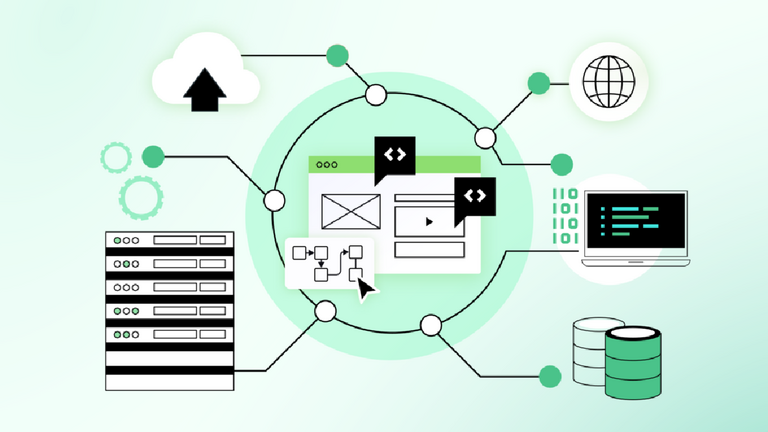
Angular Component Libraries to Use in 2024

Google is the company that developed and maintains the front-end framework Angular. It is renowned for its strong features, scalability, and flexibility. The vast library and tool ecosystem of Angular is a major factor in its success. Angular component libraries, in particular, are essential for speeding up development because they offer ready-made, modifiable user interface components.

Component libraries are a great way when you hire Angular developers. They will improve their Angular projects without going over budget. The top 6 free Angular component libraries that can speed up development and provide a polished user experience are examined in this post.

Angular: A Synopsis

A community of experienced developers and the Google Angular Team oversee the open-source, Typescript-based Angular web framework. With TypeScript, AngularJS has been completely rewritten, eliminating any reliance on Javascript. Thousands of users can be supported by sophisticated desktop and web apps made with Angular.

What is a Component Library?

A component library is an assemblage of pre-coded software components or pre-designed webpage components. Instead of having to write all the code from scratch, designers can just add the component to their application.

When done correctly, it becomes incredibly time-efficient and aids in the consistency of designers’ work. Customizable functionalities are also offered by a lot of UI component packages. As a result, developers are free to exercise their creativity and modify or create entirely new components.

The team’s ability to collaborate will also benefit from the component library with angular development services. Using a component library can simplify version control and maintain consistency across the entire application, especially for large projects involving multiple team members.

What Are Angular Component Libraries?

An Angular component library is a set of ready-to-use UI components packaged together for creating inventive, dynamic, and consistent web solutions. These libraries add to Angular’s core functionality. The same broad issues, such as providing a consistent user interface, presenting data, and permitting data entry, must be resolved by numerous programs. For specific domains, developers can provide generic solutions that can be modified for usage in various applications.

These libraries’ components are usually made to be extremely reusable and configurable, so you can easily modify buttons, forms, navigation menus, and other elements to fit your project requirements, app logic, and unique demands.

Top Angular Component Libraries

Angular is an extensive framework with a plethora of features and tools. Its numerous built-in libraries facilitate the job of developers. The Angular-CLI project has pre-installed core libraries like RxJS. It also contains a large number of frontend and API-specific libraries.

However, an excessive number of integrated libraries may prevent it from becoming unduly hefty. Working slowly and laboriously can result from having an excessive number of integrated web components that developers hardly ever use.

But if developers have to write new code for every tiny function, using Angular becomes difficult for them as well. Giving a user room for creativity and customization is also important. As a result, Angular developed Angular Material to give users access to external components. In addition, you have access to a plethora of UI component libraries, like Vaadin Components, NG Zorro, NG Lightening, and Onsen UI.

Companies can reduce development time and costs by using external Angular component libraries. The top libraries for Angular UI components are listed here for your use in Angular projects.

1. Angular Material

Angular Material is the official components library created by the Angular team; it was formerly known as Material2. It was created using TypeScript and complies with every rule and recommendation found in Google Material Design.

A vast array of components are available for designing layouts, toolbars and menus, navigation menus, pop-up windows, building blocks, and tables for presenting data. Moreover, the command line templates let you swiftly include new functionality. For development organizations who need to create bespoke tools and widgets, it is of great help.

2. NG-Bootstrap

2015 saw the creation of the well-known Angular Bootstrap component library, ng-bootstrap. Using Bootstrap 4 CSS, NG Bootstrap offers Angular widgets that are constructed from the ground up. Except for knowing how to use Angular and Bootstrap, these widgets are easily accessible and user-friendly. This Angular library is supported by a robust development team.

Access to Bootstrap components such as a date picker, popover, modal, carousel, and typeahead is provided. But because updates are often delayed, its use has been declining over time.

3. NGX-Bootstrap

Combining Angular functionalities with Bootstrap features is made possible by the NGX-Bootstrap module. All of the essential Bootstrap elements are included and adapted for Angular functionality. This library has a great deal of performative flexibility.

It functions well with desktop and mobile applications built with Angular. Development teams can utilize NGXbootstrap to create scalable Angular applications if they are familiar with Bootstrap and have access to thorough documentation. Angular developers may choose it over NGbootstrap due to its integrated animation support, sortable components, and frequent updates.

4. Onsen UI

An open-source set of UI elements for creating HTML5 hybrid mobile apps is called Onsen UI. It offers a wide range of Angular components that you may use to build online applications that run on several platforms.

It provides access to ready-to-use UI elements including toolbars, forms, side menus, and dialog for a more native appearance, and it supports both Android and iOS development. It is quite simple to set up and get the hang of.

5. Prime NG

The most potent library of Angular UI components is thought to be Prime NG. Prime NG provides native Angular CLI application templates that are extremely customizable along with a selection of themes. Every widget is freely downloadable from GitHub and is open source.

Numerous UI elements are available in Prime NG for buttons, file uploads, message notifications, and personalized graphing tools. It offers a file-uploading feature as well. It is ideal for creating mobile applications that respond to touch.

6. Vaadin Components

Vaadin is a collection of elegant Java Web App UI elements. The Web Components standards serve as the foundation for Vaadin’s components. They function flawlessly with any framework and provide browser-native performance.

To construct sophisticated web and mobile apps, Angular UI components are combined with the unique capabilities of polymer elements. Vaadin facilitates effective code sharing, making it a great tool for working with large teams.

Summing Up

The greatest Angular component library for 2024 is what we have given you. Every library on the list is the greatest of the best; it offers every functionality that might be needed to create stunning Angular apps.

Among the best Angular libraries are Vaadin, ngxBootstrap, and Angular Material. It is impossible to declare one person superior to another in every way. But there’s just one that’s ideal for you, based on how you use it and your project team. For all your development needs, including locating your UI components library, our team of knowledgeable Angular engineers is here to help.

How to develop an Opencart 4 custom theme? OpenCart 4 theme development tutorial

As part of the Opencart 4 theme development tutorial, We already showed you how to install Opencart 4 theme and to create Opencart 4 custom theme admin section, in today’s tutorial, we are showing you how to develop the frontend section of the Opencart 4 custom theme. You can download the custom Opencart 4 theme here.

The final files and folders structure of the Opencart 4 custom theme looks like below:

opencart 4 custom theme

When we developed the backend code, we have added the Startup code like below:

Opencart 4 custom theme Startup Theme

Taking that into consideration, you need to create the following file at extension >> webocreation4 >> catalog >> controller >> startup >> theme_standard.php, once you create the file, you can use the following lines of code.

<?php
namespace Opencart\Catalog\Controller\Extension\webocreation4\Startup;

class ThemeStandard extends \Opencart\System\Engine\Controller
{
    public function index(): void
    {
        if ($this->config->get('theme_theme_standard_status')) {
            $this->event->register('view/*/before', new \Opencart\System\Engine\Action('extension/webocreation4/startup/theme_standard|event'));
        }
    }

    public function event(string &$route, array &$args, mixed &$output): void
    {
        $override = [
            'common/header',
        ];

        if (in_array($route, $override)) {
            $route = 'extension/webocreation4/' . $route;
        }
    }
}

This overrides the header of the code, now, let’s create the header.twig at the extension folder, extension >> webocreation4 >> catalog >> view >> template >> common >> header.twig. Add the following lines of code:

<!DOCTYPE html>
<html dir="{{ direction }}" lang="{{ lang }}">
<head>
  <meta charset="UTF-8"/>
  <meta name="viewport" content="width=device-width, initial-scale=1">
  <meta http-equiv="X-UA-Compatible" content="IE=edge">
  <title>We are Here{{ title }}</title>
  <base href="{{ base }}"/>
  {% if description %}
    <meta name="description" content="{{ description }}"/>
  {% endif %}
  {% if keywords %}
    <meta name="keywords" content="{{ keywords }}"/>
  {% endif %}
  <script src="{{ jquery }}" type="text/javascript"></script>
  <link href="{{ bootstrap }}" type="text/css" rel="stylesheet" media="screen"/>
  <link href="{{ icons }}" type="text/css" rel="stylesheet"/>
  <link href="{{ stylesheet }}" type="text/css" rel="stylesheet"/>
  <link href="extension/webocreation4/catalog/view/stylesheet/stylesheet.css" type="text/css" rel="stylesheet"/>
  {% for style in styles %}
    <link href="{{ style.href }}" type="text/css" rel="{{ style.rel }}" media="{{ style.media }}"/>
  {% endfor %}
  {% for script in scripts %}
    <script src="{{ script }}" type="text/javascript"></script>
  {% endfor %}
  <script src="catalog/view/javascript/common.js" type="text/javascript"></script>
  {% for link in links %}
    <link href="{{ link.href }}" rel="{{ link.rel }}"/>
  {% endfor %}
  {% for analytic in analytics %}
    {{ analytic }}
  {% endfor %}
</head>
<body>
<nav id="top">
  <div id="alert" class="position-fixed top-0 end-0 p-3" style="z-index: 9999;"></div>
  <div class="container">
    <div class="nav float-start">
      <ul class="list-inline">
        <li class="list-inline-item">{{ currency }}</li>
        <li class="list-inline-item">{{ language }}</li>
      </ul>
    </div>
    <div class="nav float-end">
      <ul class="list-inline">
        <li class="list-inline-item"><a href="{{ contact }}"><i class="fas fa-phone"></i></a> <span class="d-none d-md-inline">{{ telephone }}</span></li>
        <li class="list-inline-item">
          <div class="dropdown">
            <a href="{{ account }}" class="dropdown-toggle" data-bs-toggle="dropdown"><i class="fas fa-user"></i> <span class="d-none d-md-inline">{{ text_account }}</span> <i class="fas fa-caret-down"></i></a>
            <ul class="dropdown-menu dropdown-menu-right">
              {% if not logged %}
                <li><a href="{{ register }}" class="dropdown-item">{{ text_register }}</a></li>
                <li><a href="{{ login }}" class="dropdown-item">{{ text_login }}</a></li>
              {% else %}
                <li><a href="{{ account }}" class="dropdown-item">{{ text_account }}</a></li>
                <li><a href="{{ order }}" class="dropdown-item">{{ text_order }}</a></li>
                <li><a href="{{ transaction }}" class="dropdown-item">{{ text_transaction }}</a></li>
                <li><a href="{{ download }}" class="dropdown-item">{{ text_download }}</a></li>
                <li><a href="{{ logout }}" class="dropdown-item">{{ text_logout }}</a></li>
              {% endif %}
            </ul>
          </div>
        </li>
        <li class="list-inline-item"><a href="{{ wishlist }}" id="wishlist-total" title="{{ text_wishlist }}"><i class="fas fa-heart"></i> <span class="d-none d-md-inline">{{ text_wishlist }}</span></a></li>
        <li class="list-inline-item"><a href="{{ shopping_cart }}" title="{{ text_shopping_cart }}"><i class="fas fa-shopping-cart"></i> <span class="d-none d-md-inline">{{ text_shopping_cart }}</span></a></li>
        <li class="list-inline-item"><a href="{{ checkout }}" title="{{ text_checkout }}"><i class="fas fa-share"></i> <span class="d-none d-md-inline">{{ text_checkout }}</span></a></li>
      </ul>
    </div>
  </div>
</nav>
<header>
  <div class="container">
    <div class="row">
      <div class="col-md-3 col-lg-4">
        <div id="logo">
          {% if logo %}
            <a href="{{ home }}"><img src="{{ logo }}" title="{{ name }}" alt="{{ name }}" class="img-fluid"/></a>
          {% else %}
            <h1><a href="{{ home }}">{{ name }}</a></h1>
          {% endif %}
        </div>
      </div>
      <div class="col-md-5">{{ search }}</div>
      <div id="header-cart" class="col-md-4 col-lg-3">{{ cart }}</div>
    </div>
  </div>
</header>
<main>
  {{ menu }}

The above code is similar to the default header code of the core Opencart code, one change is we add the custom stylesheet like below:

  <link href="extension/webocreation4/catalog/view/stylesheet/stylesheet.css" type="text/css" rel="stylesheet"/>

There are events to change the stylesheet but for now, we directly add the code like above. Now let’s create the stylesheet.css, extension >> webocreation4 >> catalog >> view >> stylesheet >>stylesheet.css. Paste the following code:

a {
  color: #f45511;
}
#menu {
  background-color: #f45511;
  background-image: linear-gradient(to bottom, #f45511, #f45511);
  background-repeat: repeat-x;
  border: 1px solid #f45511;
  border-color: #f45511;
  min-height: 40px;
  border-radius: 4px;
}

.btn-primary {
  color: #ffffff;
  text-shadow: none;
  background-image: linear-gradient(to bottom, #f45511, #f45511);
  background-repeat: repeat-x;
  border-color: #f45511;
}

With these codes, your custom Opencart 4 theme is ready, now you can add your CSS as per your requirement and make the website unique. Once it is active, it looks like the below, you can see the demo of the Opencart 4 custom theme

Opencart 4 custom themes

In this way, we complete a simple OpenCart 4 theme development tutorial, you can develop a new custom Opencart 4 theme and change the style, and show it on the front of Opencart 4. Hope you liked this article, please subscribe to our YouTube Channel for Opencart video tutorials. You can also find us on Webocreation Twitter and Webocreation Facebook. Please let us know if you have any questions or concerns.